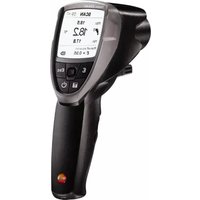
835-H1 - Thermometer Testo - Free user manual and instructions
Find the device manual for free 835-H1 Testo in PDF.


| Product type | Compact infrared thermometer with contact measurement and humidity option (model H1) |
| Dimensions (L x W x H) | 193 x 166 x 63 mm |
| Weight (with batteries) | 514 g (T1/T2), 527 g (H2) |
| Power supply | 3 AA batteries or USB interface (with easyClimate software) |
| Infrared measurement range | -30 °C to +600 °C (T1/H1), -10 °C to +1500 °C (T2) |
| Infrared accuracy | ±1,0 °C (0…+99,9 °C) or ±1 % of reading (≥100 °C) |
| Optics | 50:1 (distance/spot) |
| Aiming laser | 4 points, class 2, < 1 mW |
| Contact measurement range (type K thermocouple) | -50 °C to +600 °C (T1/H1), -50 °C to +1000 °C (T2) |
| Contact measurement accuracy | ±(0,5 °C + 0,5 % of reading) |
| Humidity measurement (model H1) | 0…100 % RH, accuracy ±2 % RH |
| Resolution | 0,1 °C/°F / 0,1 % RH |
| Measurement frequency | 0,5 s |
| Memory | Data logging with timestamp |
| Main functions | IR measurement, contact measurement, dew point calculation (H1), alarm, adjustable emissivity, continuous measurement |
| Display | Screen with adjustable backlight |
| PC interface | USB, easyClimate software (free download, license required) |
| Operating temperature | -20 °C to +50 °C |
| Battery life | 25 h (without laser or backlight) |
| Housing material | ABS/PC |
| Safety | Do not measure on or near live parts; do not use in explosive areas or for medical diagnosis |
| Cleaning | Housing: damp cloth (soapy water); lens: cotton swab with medical alcohol |
| Battery replacement | 3 AA batteries, accessible compartment |
| Warranty | 2 years (terms at www.testo.com/warranty) |
| Recycling | Return the device to Testo at end of life |
Frequently Asked Questions - 835-H1 Testo
User questions about 835-H1 Testo
0 question about this device. Answer the ones you know or ask your own.
Ask a new question about this device
Download the instructions for your Thermometer in PDF format for free! Find your manual 835-H1 - Testo and take your electronic device back in hand. On this page are published all the documents necessary for the use of your device. 835-H1 by Testo.
USER MANUAL 835-H1 Testo
natural_image
Close-up of a black plastic device with a blue internal component, showing mechanical parts and a metallic clip (no text or symbols visible)natural_image
Black plastic soap dispenser with blue internal component, partially attached to a black plastic clip (no text or symbols visible)text_image
24mm 65mm 40mm 86mm 60mm laser 119mm 100mm 2000mm 3000mm 5000mm laserPlease read this document through carefully and familiarise yourself with the operation of the product before using it. Keep this documentation to hand so that you can refer to it when necessary.
en
2. Safety information

Avoid electrical hazards:
▶ Do not conduct measurements on or near live parts!

Adhere to the product safety/warranty requirements:
▶ Always operate the instrument properly and according to its intended purpose and within the parameters specified. Do not use force.
▶ Do not store with solvents (e.g. acetone).
▶ Only open the instrument if this is expressly described in the documentation for the purpose of maintenance or repair work.

Ensure correct disposal:
- Dispose of defective rechargeable batteries and spent batteries at the collection points provided.
▶ Send the instrument directly to us at the end of its life cycle. We will ensure that it is disposed of in an environmentally friendly manner.
3. Intended use
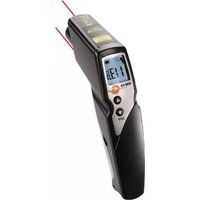
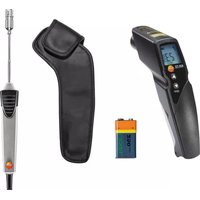
The testo 835 is a compact infrared thermometer for non-contact measurement of surface temperatures. When a probe is connected, a contact measurement can also be carried out. The H2 version also has an integrated humidity probe for measuring ambient humidity.
The product should not be used in the following areas:
• Potentially explosive areas
- For diagnostic measurements in the medical sector
4. Technical data
| Feature Values | |
| Infrared measurement | |
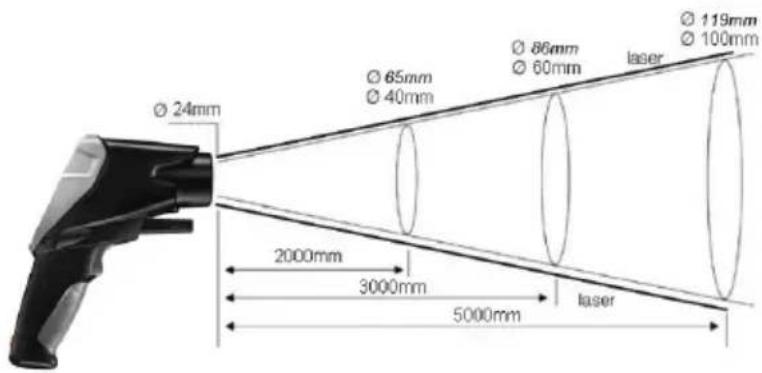
| Lens 50:1 + opening diameter of the sensor (24 mm /0.95") | |
| Laser type 4-point laser | |
| Output / wavelength < 1 mW / 8 to 14 μm | |
| Class / standard 2 / EN 60825-1:2007 | |
| Measuring range | T1 / H1: -30 to +600 °C / -22 to +1112 °FT2: -10 to +1500 °C / 14 to +2732 °F |
| Resolution 0.1°C/°F | |
| Accuracy (±1 digit) | T1 / H1: ±2.5 °C / ±4.5 °F (-30.0 to -20.1 °C / -22.0 to -4.1 °F)±1.5 °C / ±2.7 °F(-20.0 to -0.1 °C / -4.0 to 31.8 °F)±1.0 °C/ ±1.8 °F (0.0 to +99.9 °C / 32.0 to +211.9 °F)±1 % of the measuring value (remaining range)T2: ±2.0 °C / ±3.6 °F or ±1 % of the measuring value(the higher value applies) |
| Measuring rate 0.5 s | |
| Contact measurement | |
| Sensor type Thermocouple type K (connectable) | |
| Measuring range | T1 / H1: -50 to +600 °C / -58 to +1112 °FT2: -50 to +1000 °C/ -58 to +1832 °F |
| Resolution 0.1 °C/°F | |
| Accuracy (±1 digit) | ± (0.5 °C / 0.9 °F + 0.5 % of the measuring value) |
| Measuring rate 0.5 s | |
| Humidity measurement (only H1) | |
| Measuring range 0 to 100 %RH | |
| Resolution 0.1 %RH (humidity)0.1 °C/°F (temperature)0.1 °C td/°F td (dew point temperature) | |
| Accuracy (±1 digit) ± 2 %RH± 0.5 °C/ 0.9 °F | |
| Measuring rate 0.5 s | |
| General | |
| Operating temperature | ± 2 % (-20 to +50 °C / -4 to 122 °F) |
| Transportation/storage temperature -30 to +50 °C / -22.0 to 122 °F | |
| Voltage supply | 3 x battery type AA or via USB port (only in conjunction with EasyClimate software) |
| Battery life | 25 h (typical at 25 °C / 77 °F without laser and display illumination)10 h (typical at 25 °C / 77 °F without display illumination) |
| Housing ABS/PC | |
| Dimensions | 193 x 166 x 63 mm / 7.6 x 6.5 x 2.5" |
| Weight | T1 / T2: 514 g / 1.13 lbs (incl. batteries)H2: 527 g / 1.16 lbs (incl. batteries) |
| EC Directive | 2004/108/EC |
| Warranty | 2 years, warranty terms: see www.testo.com/warranty |
5. Product description
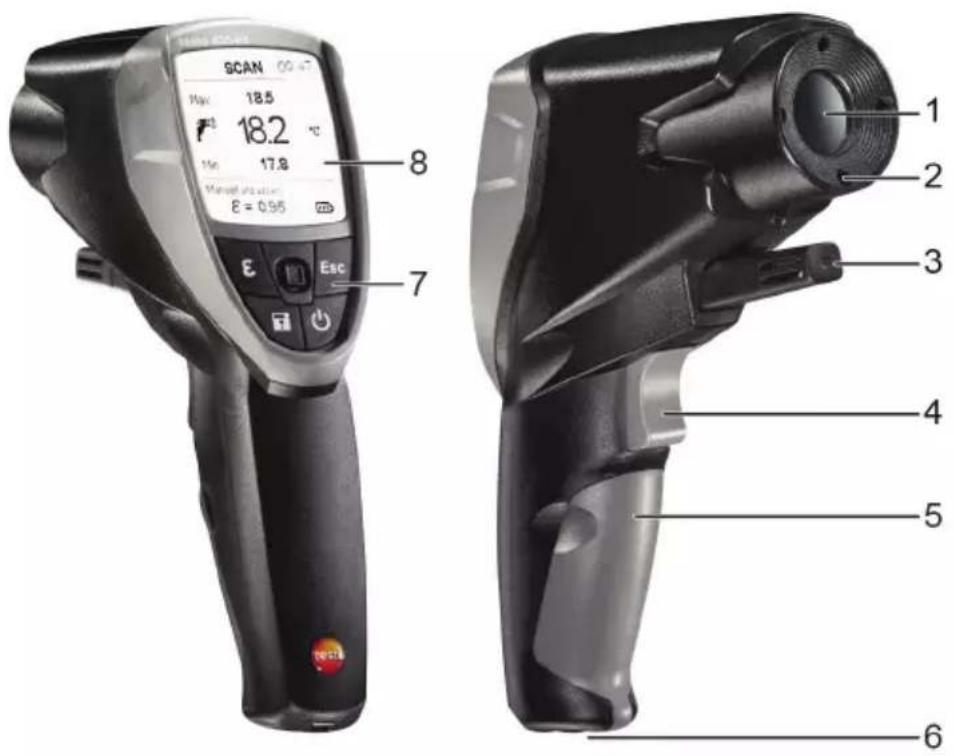
text_image
SCAN 18.5 18.2 °C 17.8 Managlure and action E = 0.95 Esc 7 8 1 2 3 4 5 61 Infrared lens
2 4-point laser for measurement spot marking
3 Humidity probe (only H1)
4 Trigger (measurement, switching on)
5 Battery compartment
6 USB port, probe connection socket
7 Control keys:
· [ ◊ : Switch instrument on/off
· [ ] : Save measuring values
· [ £ : Open Emissivity menu
· [Esc]: Back
- [☐]: 5-way joystick (press □, up ▲, down ▼, left ◀, right ▶): Open configuration menu, confirm entry, navigate
8 Display
6. Initial operation
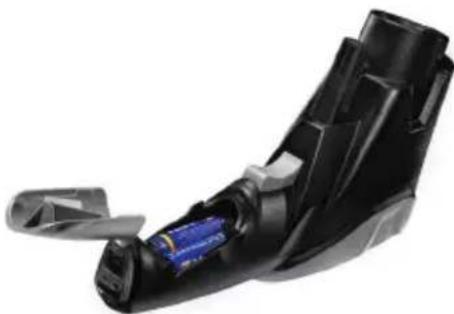
6.1 Inserting batteries
natural_image
Black plastic soap dispenser with internal blue battery module (no text or symbols visible)1 Open the battery compartment: open up the cover.
2 Insert batteries (3x type AA). Observe the polarity!
3 Close the battery compartment: close the cover again.
6.2 Setting the language
The measuring instrument has a language-specific user interface. English is set as the default user language.
1 Switch the instrument on with [⏻].
2 Open settings mode with [☐].
3 Use [☐] to select ⓑ (Language) and open with [☐].
4 Select the preferred language with [◀] and apply the setting with [□].
7. Operation
7.1 Connecting a probe
Connect the temperature probe at the probe socket. Observe the polarity!
7.2 On / Off.
▶ Switch the instrument on: [⏻] or press trigger.
! The display illumination switches off automatically if no key is pressed for 30 seconds. Pressing any key switches the illumination back on.
▶ Switch off the instrument: [⏻] .
The instrument switches off automatically if no key is pressed for 2 minutes.
7.3 Changing the display
Various combinations of three measurement parameters in each case can be shown on the display.
- The instrument is switched on.
▶ Select the desired measurement parameter display with [ ] :
· T_IR max, T_IR, T_IR min
· Only when a thermocouple is plugged in: T_TC , T_IR , T_(TC-IR)
- Only H1: %RH, T_IR , T_td
· Only H1: %RH, T_Amb , T_td
· Only H1: T_td max , T_td , T_td min
· Only H1: a_w max , a_w , a_w min
7.4 Measuring
! Observe information on IR measurement (chapter 12)/contact measurement (chapter 13).
- The instrument is switched on.
Performing a measurement
The measurement (IR and contact measurement) is started by pressing the trigger.
▶ Remove orange protective cap from the lens.
1 Continual measurement disabled: hold down the trigger.
- SCAN is displayed.
or
Continual measurement enabled: press trigger.
- CONT is displayed.
2 Lock in on measurement object (IR) or position thermocouple (contact measurement).
- When laser is enabled: the laser points mark the measuring range for IR measurement.
3 Continual measurement disabled: release the trigger to end the measurement. or
Continual measurement enabled: press the trigger again to end the measurement.
- HOLD is displayed.
- The measuring values are kept until the next measurement.
8. Settings
8.1 Performing settings
- The instrument is switched on.
1 Open settings mode with [☐].
- A box appears around the selected function.
2 Select the required function with [☐] and open with [☐].
3 Perform settings with [ ] and apply with [ ]:
Functions
Backlight: set the intensity of the display illumination.
⚠ Laser: switch the laser on/off for measurement spot marking.
Beeper: switch the beeper on/off.
Continual: switch continual IR measurement on/off.
Unit: set the temperature unit.
Emissivity: set the emission level (also see chapter 8.2). This function can also be opened directly from the measurement view with [E].
Memory: manage the memory (also see chapter 8.3).
Alarm: set alarm thresholds (also see chapter 8.4).
12 Calendar: set the date and time. When measurement data is saved, it is given a date and time stamp.
Language: set the user interface language (also see chapter 6.2).
Reset: reset to factory settings.
i Information: display instrument information.
8.2 Details: Emissivity
The emission level can be set in three different ways.
- The Emissivity function is opened.
Select material
▶ Select a material (with allocated typical emission level) from the list with [◀] and apply the selection with [□].
Customise manual
1 Use [◀] to select Customise manual and open the function with [▶].
2 Set the emission level with [ ] and apply this setting with [ ].
Customise automatic
A connected contact probe or a separate contact thermometer is required. The emission level is calculated via a comparison of the measured surface temperatures (contact measurement and IR measurement).
1 Use [◀] to select Customise automatic and open the function with [▶].
- If a contact probe (thermocouple type K, class 1) is connected, the surface temperature measured via the thermocouple ( T_TC ) is displayed. If no contact probe is connected, the temperature (measured with a different contact thermometer) must be entered with [☐].
2 Apply the measured or selected value with [☐].
3 Press the trigger to calculate the surface temperature via the IR sensor ( T_IR ).
- The measured value is displayed.
4 Apply the measured value with [☐].
- The calculated emission level ( ) is displayed.
5 Apply the calculated value with [☐].
8.3 Details: Memory
- The Memory function is opened.
Save - New Location
This function can also be opened directly from the measurement view with [☐].
A new location can be created.
1 Use [◀] to select Save and open the function with [□].
2 Use [◀] to select New Location and open the function with [□].
3 Use [☐] and [☐] to enter a memory location description.
4 Use [☐] to select← and confirm the entry with [☐].
Save - Save Measurement Data
This function can also be opened directly from the measurement view with [☐].
The current measurement data can be saved in an existing memory location.
1 Use [☐] to select Save and open the function with [☐].
2 Select an existing location with [◀] and apply this selection with [□].
3 Save the current measurement data with [□].
Overview
This function can only be opened via settings mode, not with [icon] from the measurement view.
Existing memory locations can be displayed and deleted.
▶ Use [☐] to select View and open the function with [☐].
- The existing locations and the volume of measurement data saved there are displayed.
▶ To delete a location and the saved measurement data: open the function with [☐], confirm with [☐] (☑) and carry out deletion with [☐].
Delete
This function can only be opened via settings mode, not with [icon] from the measurement view.
The entire memory (measuring locations and measurement data) can be deleted.
1 Use [◀] to select Delete and open the function with [□].
2 Confirm with [☐] (☑) and carry out deletion with [☐].
8.4 Details: Alarm
The alarm function can be switched on/off and alarm thresholds can be set for the measurement channels Infrared (measured), Thermocouple (measured), Dewpoint distance (only H1, calculated) and Surface moisture (only H1, calculated).
- The Alarm function is opened.
1 Select Measurement channel and enable by pressing the joystick.
2 Switch the alarm function on/off for the selected measurement channel: joystick up/down.
3 Move the joystick to the right and set limit value(s): joystick up/down.
4 Save entries by pressing the joystick.
9. Connecting to PC software
The measuring instrument can be connected to a PC via the USB port. With testo easyClimate software (download via www.testo.com/download-center, licence key to activate the software: see back of this instruction manual), instrument configurations can be carried out on the PC and measurement data saved on the instrument can be transferred to the PC.
- Connect measuring instruments to a PC via USB cable.
- The instrument switches to slave mode. All instrument control keys are disabled.
For further information, please refer to the instruction manual for testo EasyClimate software.
10. Service and maintenance
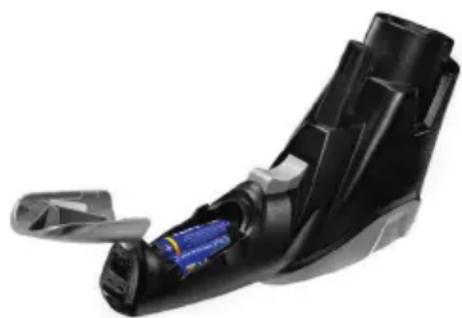
10.1 Changing the batteries
natural_image
Black plastic soap dispenser with internal battery and plastic clip (no text or symbols visible)1 Open the battery compartment: open up the cover.
2 Remove used batteries and insert new ones.
Observe the polarity!
3 Close the battery compartment: close the cover again.
10.2 Cleaning the instrument
Only use weak, commercially available neutral/ household cleaning agents (e.g. washing-up liquid) to clean the instrument. Do not use aggressive cleaning agents or solvent!
▶ Wipe down the housing with a damp cloth (with detergent).
▶ Clean the IR lens carefully with a cotton bud dipped in water or medical alcohol.
11. Questions and answers
Question Possible causes Possible solution
| lights up. Batteries dead. Change batteries. | |
| -- - lights up. Measuring values outside Keep to the permittedthe measuring range. measuring range. | |
| Instrument cannot be Low battery. Change batteries.switched on. | |
| Instrument switches itself off. Instrument switches off Switch the instrument on automatically 2 minutes after a key was last actuated. again. |
If we have not been able to answer your question, please contact your local dealer or Testo Customer Service. For contact details, please visit www.testo.com/service-contact.
12. Information on IR measurement
12.1 Measuring method
IR measurement is a visual measurement
▶ Keep lenses clean.
▶ Do not carry out measurement with foggy lenses.
- Keep the measuring range (the range between the instrument and the measurement object) free of obstacles. There must be no particles of dust or dirt, no humidity (rain, steam) and no gases.
IR measurement is a surface measurement
If there is dirt, dust, frost, etc. on the surface, only the outermost layer is measured, i.e. the dirt.
▶ For vacuum-packed food, do not measure at air pockets.
Where the values are critical, always measure separately with a contact thermometer. Particularly in the food sector: measure core temperature with a penetration/immersion thermometer.
Adjustment time
If the ambient temperature changes (change of location, e.g. measurement indoors/outdoors), the instrument must be allowed to equalise for 15 minutes for infrared measurement.
12.2 Emissivity
Materials have various emission levels, i.e. they emit various amounts of electromagnetic radiation. The emissivity of the instrument has a default setting of 0.95. This is ideal for the measurement of non-metals (paper, ceramic, gypsum, wood, paints and varnishes), plastics and foodstuffs.
Because of their low or non-uniform emission level, blank metals and metal oxides are only of limited use for IR measurement.
▶ Coatings that increase the emission level, e.g. paint or emission adhesive (art. no. 0554 0051) must be applied to the measurement object. If this is not possible: measure using a contact thermometer.
Emissivity table for important materials (typical values)
| Material (Temperature) | Material (Temperature) | ||
| Aluminium, bright-rolled (170°C/ 338°F) 0.04 | Heat sink, black anodised (50°C/ 122°F) 0.98 | ||
| Cotton (20°C/ 68°F) 0.77 | Copper, lightly tarnished (20°C/ 68°F) | 0.04 | |
| Concrete (25°C/ 77°F) 0.93 | Copper, oxidised (130°C/ 266°F) | 0.76 | |
| Ice, smooth (0°C/ 32°F) 0.97 | Plastics: PE, PP, PVC (20°C/ 68°F) | 0.94 | |
| Iron, polished (20°C/ 68°F) 0.24 | Brass, oxidised (200°C/ 392°F) | 0.61 | |
| Iron with cast skin (100°C/ 212°F) 0.80 | Paper (20°C/ 68°F) | 0.97 | |
| Iron with rolled skin (20°C/ 68°F) 0.77 | Porcelain (20°C/ 68°F) | 0.92 | |
| Plaster (20°C/ 68°F) | 0.90 | Black paint, matt (80°C/ 176°F) | 0.97 |
| Glass (90°C/ 194°F) | 0.94 | Steel, heat-treated surface (200°C/ 392°F) | 0.52 |
| Rubber, hard (23°C/ 73°F) | 0.94 | Steel, oxidised (200°C/ 392°F) | 0.79 |
| Rubber, soft grey (23°C/ 73°F) | 0.89 | Clay, fired (70°C/ 158°F) | 0.91 |
| Wood (70°C/ 158°F) | 0.94 | Transformer paint (70°C/ 158°F) | 0.94 |
| Cork (20°C/ 68°F) | 0.70 | Brick, mortar, plaster (20°C/ 68°F) | 0.93 |
- Information on contact measurement22
12.3 Measuring range, distance
Depending on the distance of the measuring instrument from the measurement object, a specific measuring range is recorded.
Measuring lens (ratio of distance : measuring range)
In italics = laser
Not in italics = measuring range
text_image
24mm 65mm 40mm 86mm 60mm laser 119mm 100mm 2000mm 3000mm 5000mm laser13. Information on contact measurement
▶ Observe the minimum penetration depth for immersion/penetration probes: 10x probe diameter
- Avoid using in aggressive acids or alkalis.