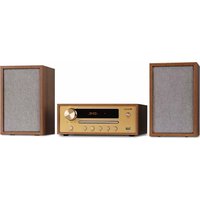
Berklee HiFi - Hi-fi system Auna - Free user manual and instructions
Find the device manual for free Berklee HiFi Auna in PDF.



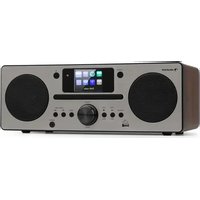
| Brand | Auna |
| Model | Berklee HiFi |
| Product type | Compact hi-fi system |
| Power supply | Input: 100-240 V~, 50/60 Hz; Output: 12 V DC, 2 A |
| CD player | Yes, compatible with audio CD and MP3 |
| USB port | Yes, plays MP3 files |
| FM radio | Yes, 87.5 – 108 MHz |
| Bluetooth | Yes, frequency 2400-2480 MHz, range max 10 m |
| Auxiliary input (Line-in) | Yes, 3.5 mm jack plug |
| Speaker outputs | 2 x passive speakers (OUT-L/OUT-R) |
| Remote control | Included |
| Display | LED |
| FM antenna | Integrated at the rear |
| Supplied accessories | Power adapter, remote control, 2 speakers |
| Laser class | 1 (Class 1 laser product) |
| Safety | Do not open the device, avoid heat sources and moisture |
| Maintenance and cleaning | Clean with a soft, dry cloth. Do not use abrasive products |
| Remote control batteries | Type not specified, one battery included (remove insulating film) |
| Recycling | Do not dispose of with household waste. Take to a collection point |
| Manual | Available in French, German, English, Spanish, Italian |
Frequently Asked Questions - Berklee HiFi Auna
User questions about Berklee HiFi Auna
0 question about this device. Answer the ones you know or ask your own.
Ask a new question about this device
Download the instructions for your Hi-fi system in PDF format for free! Find your manual Berklee HiFi - Auna and take your electronic device back in hand. On this page are published all the documents necessary for the use of your device. Berklee HiFi by Auna.
USER MANUAL Berklee HiFi Auna
INHALTSVERZEICHNIS
Technische Daten 4
Member of Berlin Brands Group
Handwerkerstr. 11
15366 Dahlwitz-Hoppegarten
Deutschland
natural_image
Symbol of a trash bin crossed with a diagonal line, representing no waste or discharge (no text or labels)Congratulations on the purchase of your device. Please read the following instructions carefully and follow them to prevent potential damage. We accept no liability for damage caused by disregarding the instructions or improper use. Please scan the QR code to access the latest operating instructions and for further information about the product.
CONTENTS
Technical Data 16
Safety Instructions 17
Device overview 19
Remote control 21
Connection 22
Mode selection 22
Troubleshooting 23
Disposal Considerations 24
Declaration of conformity 24
TECHNICAL DATA
| Article number 10040456, 10040457 | |
| Power supply | Input power: 100-240 V ~ 50/60 HzOutput power: DC 12 V / 2 A |
| FM frequency 87.5–108 MHz | |
| BT frequency 2400-2480 MHz | |
| BT transmission power (max.) | 4 dBm |
SAFETY INSTRUCTIONS
General Safety Instructions

CAUTION
Risk of injury! Do not listen to music at excessively high volumes as this may cause hearing damage.
- Children over 8 years as well as mentally, sensory and physically impaired persons may only use the device if they have been informed in detail about the functions and safety precautions by a supervisor responsible for them beforehand and understand the associated risks.
- Only place CDs in the CD compartment.
- Never open the unit cover and never attempt to carry out repairs to the unit yourself.
- Contact qualified personnel for repairs. The device does not contain any user serviceable parts.
- Improper handling may damage the unit and invalidate the warranty.
Power connection
- Use only the power supply unit included in the scope of delivery. The use of any other power supply may invalidate the warranty and/or cause irreparable damage to the unit.
- Unplug the device during thunderstorms.
- Make sure that the unit has been switched off before unplugging it from the mains.
- If you are using a power strip or the plug as a disconnecting device, make sure that they are always easily accessible and ready for use.
- Never throw batteries into an open fire and never try to open their outer casing.
- Batteries are hazardous to health if swallowed and should therefore be stored out of the reach of small children.
Ventilation
- Do not block or cover the air vents, holes or openings of the device with objects such as rugs, cloths and the like, otherwise the functionality and/or ventilation cannot be guaranteed for safe use.
- The bottom of the unit may become warm if the unit is used for a long period of time. This is normal.
Location
- Make sure that the unit is placed on a flat and stable surface.
- Place the unit no more than 1.4 metres from the nearest power socket. Make sure that the mains power cable and the speaker cables cannot become a trip hazard.
- Place the unit at least one metre away from other electrical equipment to avoid noise interference.
- Position the unit so that it is within range of external BT devices (for example, iPod/ iPhone/iPad/ Android devices/ computers, etc.). The maximum range (without obstacles) is 10 metres (33 feet).
- Make sure that the unit has enough space upwards so that the antenna can be properly aligned.
- Never place the appliance directly on antique or polished surfaces.
Notes on the laser

CAUTION
Risk of injury! Never touch or look into the optical lens in the CD compartment.
• This unit is a class 1 laser product
- Use of controls other than those specified in the instruction manual, or unauthorised modification of the unit, may result in harmful exposure to laser radiation.
DEVICE OVERVIEW
Front side
 | |
| 1 POWER: Press to switch the unit on / off | |
| 2 CD compartment: This is where the CD is inserted | |
| 3 USB slot: For music playback only | |
| 4 FUNC: Press to change the mode | |
| 5 | PREV: In USB/CD/BT mode: press briefly to skip to the previous track. In FM mode: Press briefly to skip to the previous station |
| 6 | NEXT: In USB/CD/BT mode: press briefly to skip to the next track. In FM mode: Press briefly to skip to the next station |
| 7 | PLAY/PAUSE: In USB/CD/BT mode: play/pause. In FM mode: Automatic station search |
| 8 | STOP: When you press the STOP button for the first time, the player stops playback. If you press the ▶ button, playback of the current music continues. If you press the STOP button twice, the player stops. If you press the ▶ button, playback starts again with the first track. |
| 9 OPEN/CLOSE: Open/close the CD compartment open/close | |
| 10 VOLUME: Turn the knob to adjust the volume | |
| 11 LED DISPLAY | |
Back side
| 12 OUT-R/OUT-L: Left/right speaker socket | |
| 13 DC 12V: Power input socket | |
| 14 | LINE IN: Audio input socket (for connecting another audio device or a mobile phone) |
| 15 ANT: FM antenna (permanently installed) | |
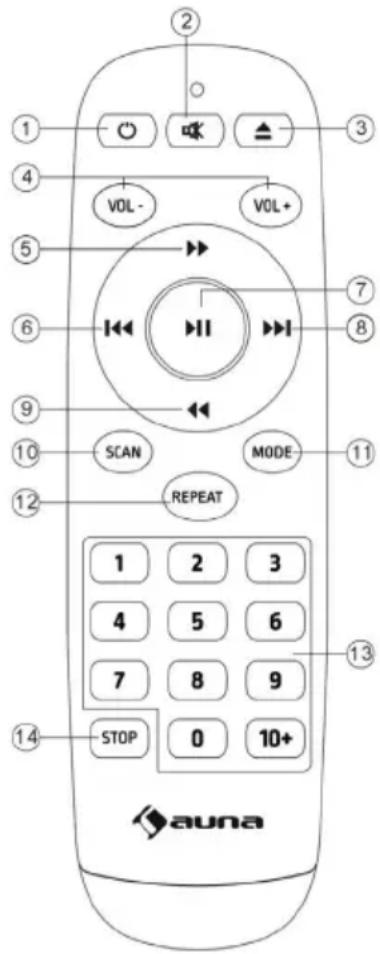 | 1 Power button: Switch the unit on and off |
| 2 Mute button | |
| 3 Press this button to open/close the disc tray | |
| 4 Volume key: Press this key to decrease/increase the volume | |
| 5 Fast forward: Press the ▶▶ button to fast-forward in CD mode | |
| 6 Skip back: Press the ◀◀ button in USB/CD/Bluetooth mode to skip to the previous track. In FM mode, press to skip to the previous station | |
| 7 Play/Pause: Press the ▶ll button to pause the music. Press the button again to resume playback. | |
| 8 Skip forward: In USB/CD/Bluetooth mode, press the ▶▶ button to skip to the next track. In FM mode, press to skip to the next station | |
| 9 Rewind: Press ◀◀ button to rewind in CD mode | |
| 10 SCAN: Press the button to search for FM stations | |
| 11 MODE: Press the button to select the mode. | |
| 12 REPEAT: When you press REPEAT for the first time during music playback, the current track is repeated. Press REPEAT twice to repeat the entire CD. Pressing REPEAT three times cancels the repeat function | |
| 13 Number buttons:For normal CDs: To call up tracks 1-9, press the corresponding button (1-9). To call up the 10th track, press key 10. To call up a track with a higher number, press key 10+ and then the second digit (1-9). Example: for track 15, press the 10+ key once and then the 5 key. For track 23, press the 10+ key twice and then the 3 key.For MP3 CDs: Enter the track number by entering the actual number. Example: for track 38, press the 3 button and then the 8 button. | |
| 14 STOP: When you press the STOP button for the first time, the player stops playback. If you press the ▶ll button, playback of the current music continues. If you press the STOP button twice, the player stops. If you press the ▶ll button, playback starts again with the first track. |
CONNECTION
- Connect the left and right speakers to the OUT-L/OUT-R jacks on the back of the unit.
- Connect the power supply unit to the power input socket on the back of the unit and the mains socket.
- Press the POWER button on the device to turn on the player.
MODE SELECTION
CD mode
- Press the MODE button to enter CD mode.
- Press the OPEN/CLOSE button on the unit or on the remote control to open the CD tray.
- Insert a CD into the CD compartment with the label facing up and press the OPEN/CLOSE button again to close the CD compartment.
- Use the controls on the unit or on the remote control to start playback of the inserted CD.
BT mode
- When you use your BT device with this player for the first time, you must pair it with the player first.
- Start BT on your external device (e.g. smartphone or tablet).
- Then select the "Berklee" player in the BT device list and connect to the player.
- When both units are successfully paired, a beep sounds. If the pairing device is disconnected, a beep also sounds.
FM radio mode
The radio antenna can be found on the back of the device. If you want to listen to the radio, pull out the antenna completely.
- Press the MODE button to enter FM mode.
- In FM mode, press the SCAN button on the remote control to automatically scan for stations. After the search is completed, the stations found are automatically saved.
- Press the button on the device or on the remote control to select the desired station.
LINE IN mode
When you switch to LINE IN mode, use a 3.5 mm audio cable (not included) to connect the player to other audio devices (such as a mobile phone or computer).
USB mode
Insert a USB stick with MP3 files, the unit plays the MP3 files automatically.
TROUBLESHOOTING
| Problem Possible cause and solution | |
| No sound Check the connection of the player to the mobile phone or other audio device. | |
| The CD will not play Check that the CD is inserted the right way round. | |
| The CD is dirty Clean the CD. | |
| The remote control does not work. | Remove all obstacles between the remote control and the player. |
| When the battery is dead, replace it with a new one. | |
| When delivered from the factory, insulating foil is inserted in the battery compartment. Pull this out before use. | |
| Button is not working. This may be caused by the mains voltage or some other disturbance. Switch the unit off and then on again after 10 seconds. | |
DISPOSAL CONSIDERATIONS

natural_image
Symbol of a trash bin crossed with a diagonal line, representing no waste or discharge (no text or labels)If there is a legal regulation in your country regarding the disposal of electrical and electronic equipment, this symbol on the product or on the packaging indicates that this product must not be disposed of with household waste. Instead, it must be taken to a collection point for the recycling of electrical and electronic equipment. By disposing of this product in accordance with the regulations, you protect the environment and the health of those around you from negative consequences. For information on recycling and disposal of this product, contact your local government or household waste disposal service.
This product contains batteries. If there is a legal regulation in your country regarding the disposal of batteries, the batteries must not be disposed of in household waste. Consult your local regulations for the disposal of batteries. By disposing of this product in accordance with the regulations, you are protecting the environment and the health of those around you from negative consequences.
DECLARATION OF CONFORMITY

Manufacturer:
Chal-Tec GmbH, Wallstrasse 16, 10179 Berlin, Germany.
Importer for Great Britain:
Berlin Brands Group UK Ltd PO Box 1145
Oxford, OX1 9UW
United Kingdom
Chal-Tec GmbH hereby declares that the radio equipment type Berklee complies with Directive 2014/53/EU. The complete text of the EU declaration of conformity is available at the following internet address: use.berlin/10040457
Cher client, chère cliente,
SOMMAIRE
Fiche technique 26
natural_image
Symbol of a trash bin crossed with a diagonal line, representing no waste or discharge (no text or labels)DÉCLARATION DE CONFORMITÉ

Fabricant :
Chal-Tec GmbH, Wallstraße 16, 10179 Berlin, Allemagne.
Berlin Brands Group UK Ltd
PO Box 1145
Oxford, OX1 9UW
United Kingdom
ÍNDICE
Datos técnicos 36
natural_image
Symbol of a trash bin crossed with a diagonal line, no text or labels presentBerlin Brands Group UK Ltd
PO Box 1145
Oxford, OX1 9UW
Reino Unido
INDICE
Dati tecnici 46
natural_image
Symbol of a trash bin crossed with a diagonal line, representing no waste or discharge (no text or labels)Berlin Brands Group UK Ltd
PO Box 1145
Oxford, OX1 9UW
United Kingdom
natural_image
Abstract white logo design on dark background, resembling stylized letter 'S' or wave form (no text or symbols)
- INHALTSVERZEICHNIS
- Member of Berlin Brands Group
- Handwerkerstr. 11
- Dahlwitz-Hoppegarten
- Deutschland
- CONTENTS
- SAFETY INSTRUCTIONS
- General Safety Instructions
- CAUTION
- Power connection
- Ventilation
- Location
- Notes on the laser
- DEVICE OVERVIEW
- Front side
- CONNECTION
- MODE SELECTION
- CD mode
- BT mode
- FM radio mode
- LINE IN mode
- USB mode
- DISPOSAL CONSIDERATIONS
- DECLARATION OF CONFORMITY
- Manufacturer:
- Importer for Great Britain:
- Cher client, chère cliente,
- SOMMAIRE
- DÉCLARATION DE CONFORMITÉ
- Fabricant :
- ÍNDICE
- INDICE
Brand : Auna
Model : Berklee HiFi
Category : Hi-fi system