MX 26 - Multimeter METRIX - Free user manual and instructions
Find the device manual for free MX 26 METRIX in PDF.



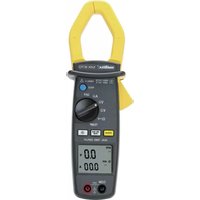
| Product type | Portable digital multimeter |
| Brand | Metrix |
| Model | MX 26 |
| Dimensions | 170 x 80 x 35 mm |
| Weight | 285 g (with battery) |
| Power supply | 1 x 9 V battery (6LF22); battery life ~500 h in VDC mode |
| Display | 5,000 counts + 34-segment bargraph; 50,000 counts in frequency |
| Measurement functions | AC voltage (VLOW Z), AC+DC, DC; DC and AC+DC current; resistance; continuity; capacitance; diode test; frequency |
| Special functions | Peak measurement (+/-), display hold (MEM), auto-hold, backlight, RS232 interface (optional) |
| Safety | CAT III 600 V max. relative to ground; varistor, PTC and 2 HPC fuses (0.63 A / 10 A) |
| Maintenance and cleaning | Damp cloth and soap; do not use solvents or abrasive products |
| Spare parts | Fuses (AT0084 10 A, AT0519 0.63 A), 9 V battery, test leads (AG0475AZ), protective holster (HX0010) |
| Repairability | Easy battery and fuse replacement; tool-free case opening; repair by qualified personnel |
| Operating environment | Indoor, altitude < 2000 m, temperature 0°C to 50°C; IP40 protection |
| Included accessories | 1 set of leads with tips, 1 battery, 1 manual, 1 elastomer protective holster |
| Options | RS232 software kit (SX-DMMK), current clamps, shunts, high-voltage probes, thermocouple, tachometer |
Frequently Asked Questions - MX 26 METRIX
User questions about MX 26 METRIX
0 question about this device. Answer the ones you know or ask your own.
Ask a new question about this device
Download the instructions for your Multimeter in PDF format for free! Find your manual MX 26 - METRIX and take your electronic device back in hand. On this page are published all the documents necessary for the use of your device. MX 26 by METRIX.
USER MANUAL MX 26 METRIX
User's manual page 15 Chapter
1. INSTRUCTIONS GENERALES....1
natural_image
Pure technical diagram of a cylindrical component with internal slots and an arrow pointing to it (no text or symbols)natural_image
Diagram of a cylindrical tank with internal compartments and an arrow pointing to one side (no text or symbols)6.2.1. Tensions continues
1.1. Precautions and safety measures 16
1.1.1. Preliminary 16
1.1.2. During use....16
1.1.3. Symbols 17
1.1.4. Instructions....17
1.2. Protection mechanisms .... 17
1.3. Safety mechanisms 18
1.4. Warranty 18
1.5. Maintenance and metrological verification....18
1.6. Unpacking - Repackaging....18
2. DESCRIPTION 19
2.1. Selector switch....19
2.2. Keypad....19
2.3. Display 19
2.4. Power supply....19
2.5. Input terminals 19
3. GETTING STARTED....20
3.1. Connecting the test leads 20
3.2. Switching on the instrument....20
3.3. Switching off the instrument....20
3.4. Special configuration....20
3.5. Multimeter maintenance 20
3.5.1. Fuse self-test 20
3.5.2. Battery self-test....21
3.5.3. Replacing the battery or fuses 21
3.5.4. Cleaning....21
3.5.5. Storage 21
4. FUNCTION DESCRIPTION....22
4.1. RANGE / AC+DC key 22
4.1.1. ADPDC / ADPAC+DC Position 22
4.1.2. 500 mADC / 500 mAAC+DC Position....22
4.1.3. 10 ADC / 10 AAC+DC Position....23
4.2. +/- Peak key 23
4.3. MEM / AUTO MEM key....23
4.4 key 23
5. SOFTWARE KIT (optional)....24
6. TECHNICAL SPECIFICATIONS....25
6.1. General 25
6.2. Characteristics....25
6.2.1. DC voltages 25
6.2.2. AC voltages (AC and AC+DC) 25
6.2.3. DC current....26
6.2.4. AC currents (AC+DC) 26
6.2.5. Resistance / Continuity test 26
6.2.6. Capacitance 27
6.2.7. Diode threshold voltage measurement....27
6.2.8. Frequencies 27
6.2.9. Safety 27
6.2.10. General information 28
6.2.11. Environment....28
6.2.12. EMC 28
6.3. Accessories 29
6.3.1. Supplied with the multimeter....29
6.3.2.Optional....29
1. GENERAL INSTRUCTIONS
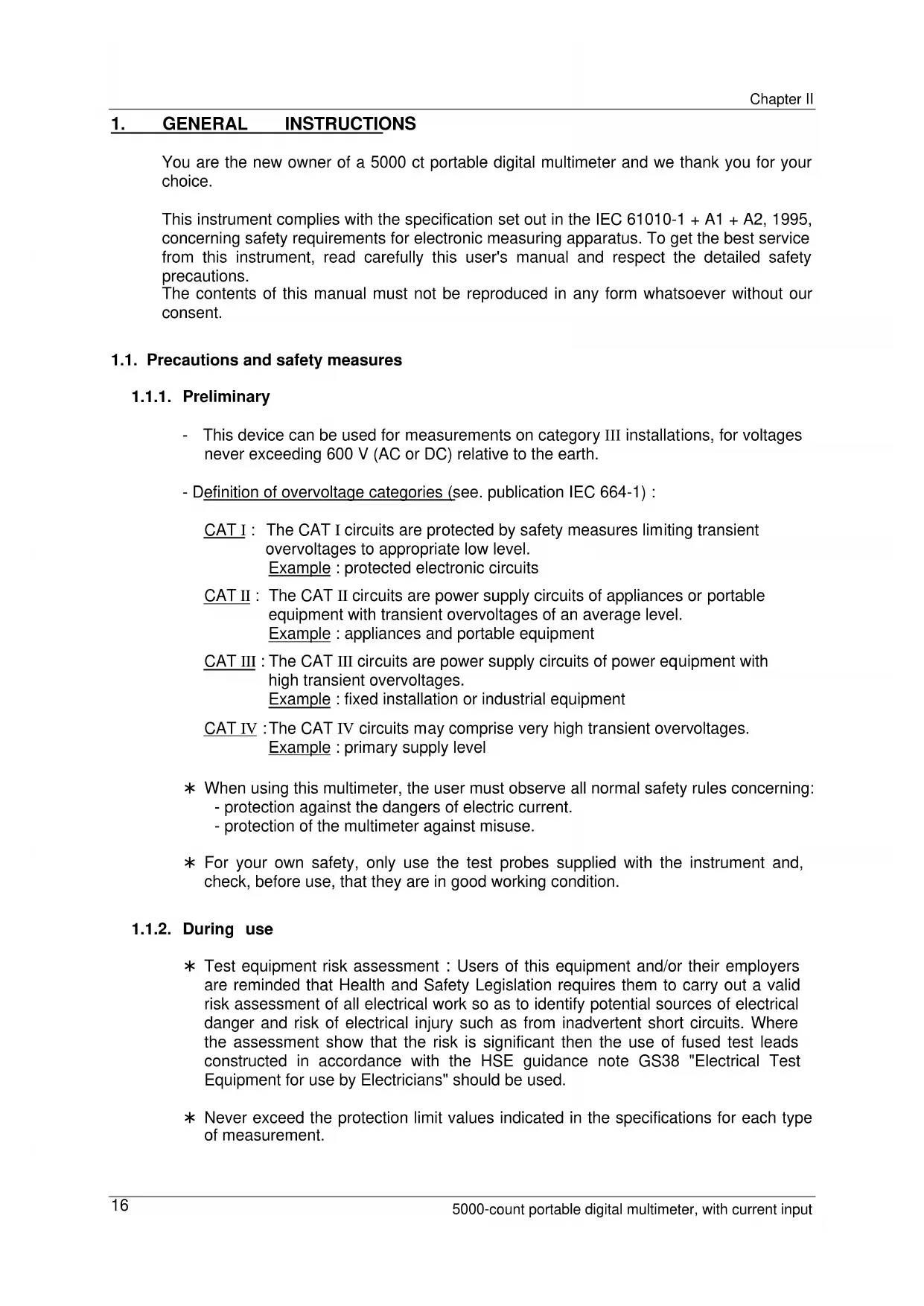
You are the new owner of a 5000 ct portable digital multimeter and we thank you for your choice.
This instrument complies with the specification set out in the IEC 61010-1 + A1 + A2, 1995, concerning safety requirements for electronic measuring apparatus. To get the best service from this instrument, read carefully this user's manual and respect the detailed safety precautions.
The contents of this manual must not be reproduced in any form whatsoever without our consent.
1.1. Precautions and safety measures
1.1.1. Preliminary
- This device can be used for measurements on category III installations, for voltages never exceeding 600 V (AC or DC) relative to the earth.
- Definition of overvoltage categories (see. publication IEC 664-1):
CAT I : The CAT I circuits are protected by safety measures limiting transient overvoltages to appropriate low level. Example : protected electronic circuits
CAT II : The CAT II circuits are power supply circuits of appliances or portable equipment with transient overvoltages of an average level. Example : appliances and portable equipment
CAT III : The CAT III circuits are power supply circuits of power equipment with high transient overvoltages. Example : fixed installation or industrial equipment
CAT IV : The CAT IV circuits may comprise very high transient overvoltages. Example : primary supply level
* When using this multimeter, the user must observe all normal safety rules concerning:
- protection against the dangers of electric current.
- protection of the multimeter against misuse.
* For your own safety, only use the test probes supplied with the instrument and, check, before use, that they are in good working condition.
1.1.2. During use
* Test equipment risk assessment : Users of this equipment and/or their employers are reminded that Health and Safety Legislation requires them to carry out a valid risk assessment of all electrical work so as to identify potential sources of electrical danger and risk of electrical injury such as from inadvertent short circuits. Where the assessment show that the risk is significant then the use of fused test leads constructed in accordance with the HSE guidance note GS38 "Electrical Test Equipment for use by Electricians" should be used.
* Never exceed the protection limit values indicated in the specifications for each type of measurement.
* When the multimeter is linked to measurement circuits, do not touch unused terminals.
* When the range of the value to be measured is unknown, check that the range initially set on the multimeter is the highest possible or, wherever possible, choose the autoranging mode.
* Before changing functions, disconnect the test leads from the circuit under test.
* In TV repair work, or when carrying out measurements on power switching circuits, remember that high amplitude voltage pulses at the test points can damage the multimeter. Use of a TV filter will attenuate any such pulses.
* Never perform resistance or continuity measurements on live circuits.
1.1.3. Symbols
Symbols used in this manual and on the instrument :

CAUTION : Refer to the instruction manual.
Incorrect use may result in damage to the device or its components.

DANGER : High voltage, risk of electric shock.

Earth
1.1.4. Instructions
* Before opening up the instrument, always disconnect from all sources of electric current and make sure you are not charged with static electricity, which may destroy internal components.
* Fuses must be replaced with fuses of the same rating and type.
* Any adjustment, maintenance or repair work carried out on the multimeter while it is live should be carried out only by appropriately qualified personnel, after having taken into account the instructions in this present manual.
A "qualified person" is someone who is familiar with the installation, construction and operation of the equipment and the hazards involved. He is trained and authorized to energize and de-energize circuits and equipment in accordance with established practices.
* When the instrument is opened up, remember that some internal capacitors can retain a dangerous potential even after the instrument is switched off.
* If any faults or abnormalities are observed, take the instrument out of service and ensure that it cannot be used until it has been checked out.
* It is recommended to remove the battery from the instrument if not used.
1.2. Protection mechanisms
This instrument is fitted with various protection mechanisms :
* Varistor protection for limiting transients of over 1100 V at the VΩ terminal, particularly 6 kV pulse streams as defined by the French standard IEEE 587.
* A PTC (positive temperature coefficient) resistor protects against permanent overvoltages of up to 600 V during resistance, capacitance, continuity and diode test measurements. This protection is reset automatically after overload.
* Two HBC fuses provide protection up to 600 V during measurements of intensity type.
* An IP protection rating of 40.
* Maximum protection between mA and 10 A input terminals : 500 V.
1.3. Safety mechanisms
* The battery unit cannot be accessed without first disconnecting the measuring leads.
* When measuring voltages above 24 V, the sign blinks ⚡ on the display.
* When measuring voltages above 10 A, the sign blinks △ on the display and an intermittent audible signal warns the user.
* If the maximum range is repeatedly exceeded, an intermittent audible signal warns the user in volt (DC and AC+DC) and current (DC and AC+DC) functions.
1.4. Warranty
This equipment is warranted against any defects of manufacture or materials according to the general conditions of sale.
During the warranty period (3 years), defective parts will be replaced, the manufacturer reserving the right to repair or replace the product. In the event of the equipment being returned to the distributor or to a local agency, carriage to the centre shall be payable by the customer. The warranty does not cover the following :
- Repairs necessitated by misuse of the equipment or use in association with incompatible equipment.
- Modification of the equipment or any related software without the explicit authorization of the manufacturer.
- Repairs necessitated by attempts to repair or maintain the product made by a person not approved by the manufacturer.
- Adaptation to a specific application not provided for in the specifications of the equipment or the user manual.
- Damage after a drop, a shock or flooding.
1.5. Maintenance and metrological verification
Return your instrument to your distributor for any work to be done within or outside the guarantee.
1.6. Unpacking - Repackaging
This equipment has been fully checked out mechanically and electrically before shipping. All precautions have been taken to ensure that the instrument arrives at its destination undamaged. However, it is advisable to carry out a rapid check for damage sustained in shipping. If there is any evidence of damage, make this known immediately to the shipper.

Should you need to return the multimeter, preferably use the original packaging and indicate the reasons as clearly as possible on an accompanying note.

Our products are patented in FRANCE and internationally and the logotypes are registered. We reserve the right to modify specifications and prices as required by technological improvements.
2. DESCRIPTION
This compact multimeter is a self-contained with an appropriate mechanical construction, enables hand-held version, with a protective elastomer case. This casing is sealed. It is designed for a high degree of user safety, maximum protection and unrivalled performance.
2.1. Selector switch
This multimeter is a standalone, hand-held professional measuring instrument, capable of measuring the following quantities (accessed by the twelve-position rotary selector switch):
* AC voltages with AC (or RMS) capacitive coupling (Input impedance : 500 kΩ)
* AC voltages with AC+DC (or TRMS) direct coupling
* DC voltages
* DC / AC+DC voltages, range 500 mV
* AC currents with AC+DC (or TRMS) direct coupling
* DC currents
* resistance values
* continuity (with beeper)
* capacitance
* diode threshold voltage
* frequencies
2.2. Keypad
A four-key keypad lets you :
* select the autoranging mode (RANGE / AC+DC key)
* store a value (MEM key)
* activate the positive or negative peaks (Pk +/- key)
* select a function derived from the main function, or switch on the multimeter again after it has been shut down automatically (RANGE / AC+DC key)
* activate back lighting of the display unit ( ☐ key)
* activate the RS232 link (Pk +/- and keys + switch to OFF).
2.3. Display
This multimeter display provides :
* 5 000-count measurements (50 000-count Hz-measurement),
* function indicator (V, A, AC+DC, F, Hz, ♩, Ω, ⬆AUTO, MEM, □ ∥ ∩ ) and multiplicator (n, μ, m, k, M),
* battery discharged indicator BAT : approximately 12 hours of operation,
* clearly legible figures (11 mm high),
* an analogue readout of the parameter being measured through a 34-segment bargraph,
* validation of the RS232 interface.
Display backlight when required in poor lighting conditions. Automatic switch-off.
2.4. Power supply
This multimeter is powered by a standard 9 V battery (6LF22) which provides approximately 500 hours of operation (on function VDC).
2.5. Input terminals
Measurements are performed using two measuring leads supplied with the instrument connected to input terminals 1, 2, 3 and 4, as indicated in section 3.1.
3. GETTING STARTED
3.1. Connecting the test leads
Connect the black lead to the COM socket (for all measurements). Depending on the position of the selector switch, connect the red lead as follows:
| Rotary selector switch position Input terminal | |
| VLOW Z, VAC+DC, VDC, ADPDC (ADPAC+DC), Hz, ΦΩ, , + - + | VΩ J + - + |
| 500 mADC (500 mAAC+DC) 500 mA | |
| 10 ADC (10 AAC+DC) 10 A |
RS232 lead :
Connect the RS232 optical interface (optional kit) to the top of the multimeter casing and the DB9F plug to PC (COM port).
3.2. Switching on the instrument
The selector switch is on the OFF position.
Turn the selector switch to the required function.
All segments of the display come on for a few seconds. The instrument is then ready for measurements.
3.3. Switching off the instrument
The instrument can be switched off manually by returning the selector switch to the OFF position, or automatically after approximately half an hour if no key is pressed or the switch is not operated.
| Note For user safety, automatic shutdown is disabled when a measured magnitude (voltage/current) present at the input exceeds dangerous level(△ indicator displayed). |
3.4. Special configuration
To adapt the configuration of the instrument to the measurement environment, the user can choose 50 Hz or 60 Hz rejection :
Switch on with the rotary switch while holding down the MEM key. The selection is reversed from the last configuration, is displayed for two seconds and remains backed up in non-volatile memory.
To initialise the RS232 communication, keep the Pk +/- and 🔔 keys simultaneously pressed, then set the rotary switch to the selected position.
3.5. Multimeter maintenance
3.5.1. Fuse self-test
This check can be carried out with the multimeter in use without opening up the casing.
- 0.63 A fuse (F1) : set the rotary switch to the ✝ position and short-circuit the 500 mA and VΩ sockets. The display should read approx. 0.001 V. If the digital display indicates an overflow « .OL ». The fuse is blown.
- 10 A fuse (F2) : set the rotary switch to the ⚠ position and short-circuit the COM and V Ω sockets. The display should read approx. 0.001 V. If the digital display indicates an overflow « .OL ». The fuse is blown.
3.5.2. Battery self-test
When the BAT indication appears on the display, the instrument still has approximately 12 hours of operation, but specifications can no longer be guaranteed.
Replace the battery.
3.5.3. Replacing the battery or fuses

Caution ! Disconnect test leads from any circuit under test, turn the meter off and remove test leads from the input terminals.
Use the following procedure:
1 - Disconnect test leads from any input terminals.
2 - Using an appropriate tool, slide off the case bottom of the instrument.
3 - Replace the battery or fuse (respect the value and the type).
4 - Replace the removable part.
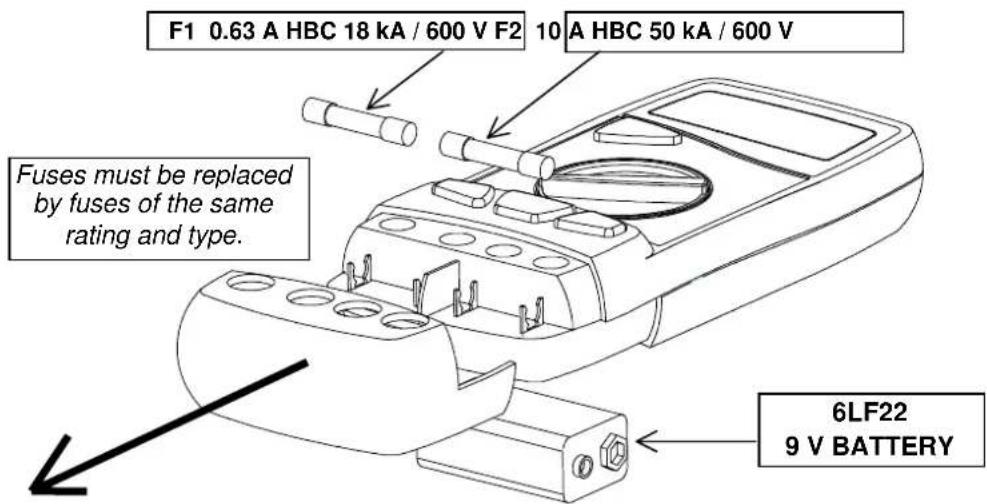
text_image
F1 0.63 A HBC 18 kA / 600 V F2 10 A HBC 50 kA / 600 V Fuses must be replaced by fuses of the same rating and type. 6LF22 9 V BATTERY
Fitting the fuses :
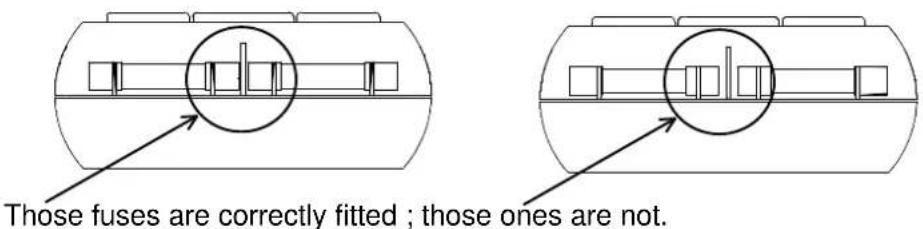
text_image
Those fuses are correctly fitted ; those ones are not.3.5.4. Cleaning
Clean the instrument using a damp cloth and soap. Never use abrasive or solvents.
3.5.5. Storage
To guarantee the measurement accuracy, after a long period storage in extreme environment conditions, wait enough time for the instrument to acclimatise to the working environment conditions (see environment specifications).
4. FUNCTION DESCRIPTION
4.1. RANGE / AC+DC key
The RANGE key is operative in following positions of the selector switch :
VLOW Z, VAC+DC, VDC, Ω, ± Hz.
This key makes it possible :
- In AUTO (Autoranging) mode to switch to MANUAL mode (short press).
- In MANUAL mode, to select the next range (short press) or return to AUTO mode (long press), the AUTO sign appears on the display.
This can be used to switch on the multimeter again after an automatic shutdown. It can also be used to access secondary functions associated with the selector switch positions : mode AC+DC.
The flowcharts below define these various functions.
4.1.1. ADPDC / ADPAC+DC Position
This function is adapted for accessories with mV output.
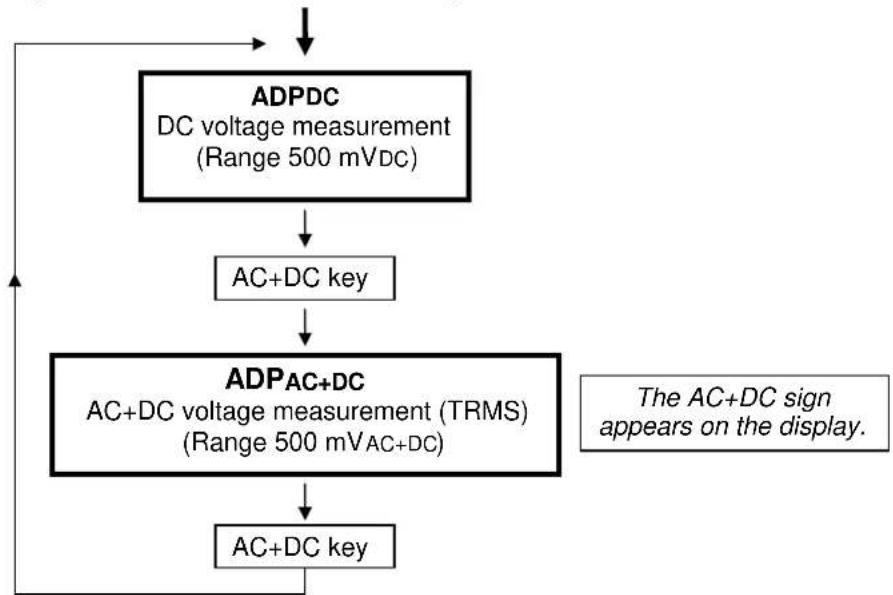
flowchart
graph TD
    A["ADPDC\nDC voltage measurement\n(Range 500 mVdc)"] --> B["AC+DC key"]
    B --> C["ADPAC+DC\nAC+DC voltage measurement (TRMS)\n(Range 500 mVAC+DC)"]
    C --> D["AC+DC key"]
    D --> E["The AC+DC sign appears on the display."]
4.1.2. 500 mADC / 500 mAAC+DC Position
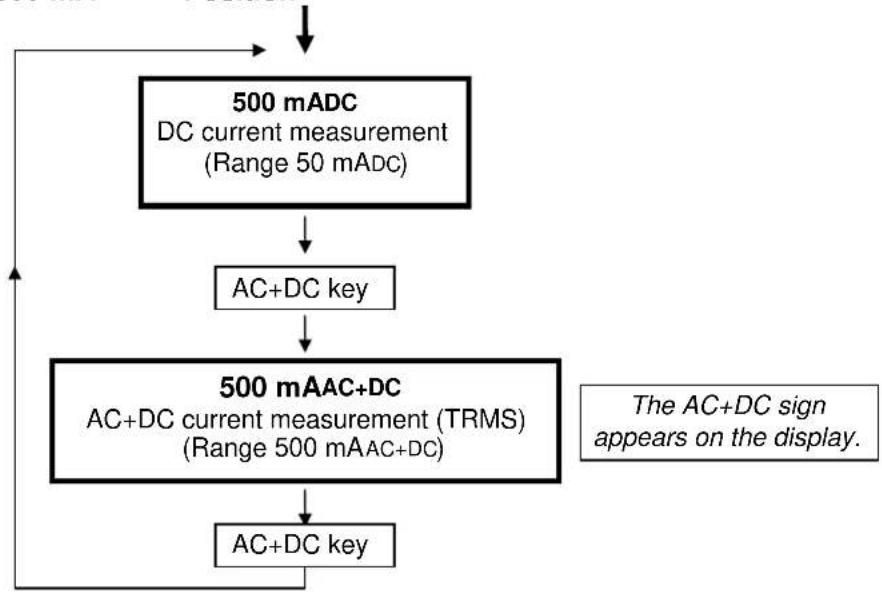
flowchart
graph TD
    A["500 mADC\nDC current measurement\n(Range 50 mADC)"] --> B["AC+DC key"]
    B --> C["500 mAAC+DC\nAC+DC current measurement (TRMS)\n(Range 500 mAAC+DC)"]
    C --> D["AC+DC key"]
    D --> A
    note right of C The AC+DC sign appears on the display.
4.1.3. 10 A/c / 10 AAC+DC Position
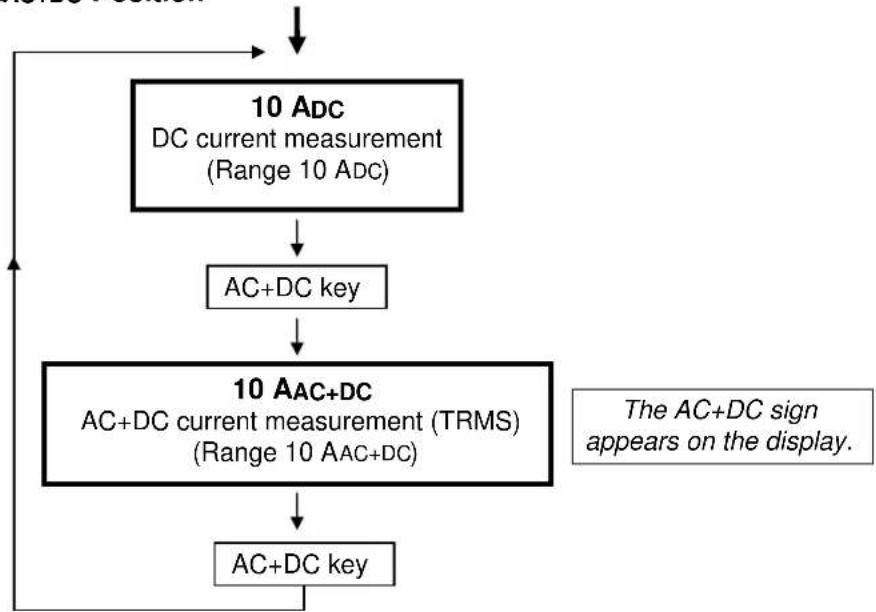
flowchart
graph TD
    A["10 ADC\nDC current measurement\n(Range 10 ADC)"] --> B["AC+DC key"]
    B --> C["10 AAC+DC\nAC+DC current measurement (TRMS)\n(Range 10 AAC+DC)"]
    C --> D["AC+DC key"]
    D --> A
    note right of C The AC+DC sign appears on the display.
4.2. +/- Peak key
The fast positive or negative peak measurement functions (> 1 msec.) can be accessed by repeatedly pressing this key in the VDC, ADPDC, mADC and 10 ADC functions.
This key also desactivates the auto power-off, if it is pressed when switching on ("P-OFF" is displayed).
Automatic shutdown of the instrument is disabled in order to avoid interrupting the peak measurements (Pk +/-).
4.3. MEM / AUTO MEM key
Short press (MEM) : Fixes the display on the current value. A second short press returns the multimeter to normal mode. The “MEM” sign appears on the display.
The MEM mode is available on all measurements.
Long press (AUTO MEM) : Accesses or quits the "autostore" mode.
The "MEM" sign blinking on the display.
Affected ranges : VLOWZ, VAC+DC, VDC, ADPDC, ADPAC+DC
Autostore
Set the probes on the point to be measured. An audio signal indicates whether the measurement is stable. When you remove the probes, a second audible signal indicates that this stable value displayed has been stored.

The bargraph remains active during the "autostore" and display "MEM "mode.
Pressing this key when switching on the instrument enables the selection of a rejection of 50 or 60 Hz. The selection is reversed from the last configuration. It is displayed for 2 secs. and remains backed up in non-volatile memory.
4.4.

key
Activates/desactivates back lighting of the display unit. It automatically goes off after ≈ 60 seconds.
5. SOFTWARE KIT (optional)
Connection of the kit and installation of the SX-DMM software :
With the software kit option, the multimeter can interface directly with a computer or PC:
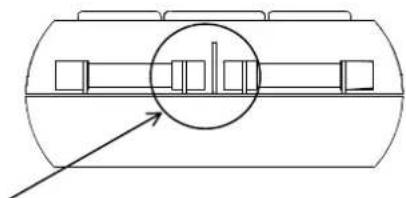
- Connect the optical plug at the top of the shockproof sheath. A mechanical fail-safe device is provided on the left-hand side to prevent connection the wrong way round.
- Plug the connector into one of the PC's "COM" ports.
- Keep the "Pk +/-" and " 🔍 " multimeter keys pressed down and then move the switch from the "OFF" position to the position required.
The digital display briefly indicates "RS232".
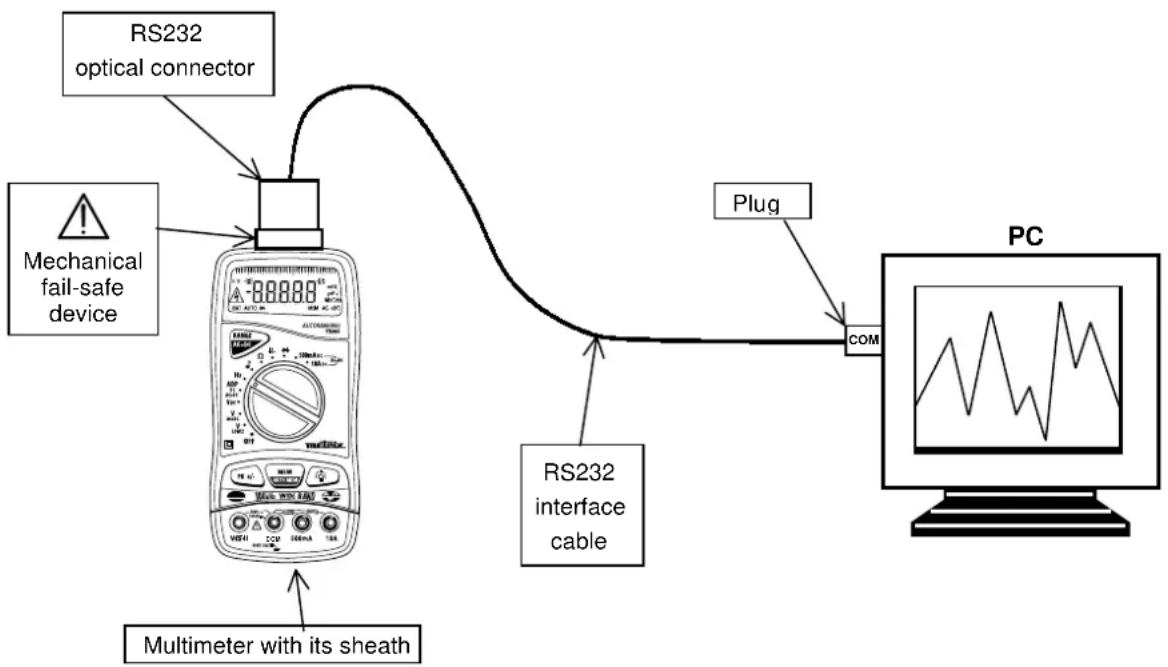
flowchart
graph TD
    A["RS232 optical connector"] --> B["Mechanical fail-safe device"]
    B --> C["RS232 interface cable"]
    C --> D["PC"]
    D --> E["Plug"]
    E --> F["COM"]
    G["Multimeter with its sheath"] --> B
- Install the SX-DMM software on the PC using the 2 floppy disks.
- Start up the software to perform data acquisition and to take advantage of the various display possibilities such as cursors, curves, tables, etc.
6. TECHNICAL SPECIFICATIONS
6.1. General
Only the values assigned tolerances or given limits are guaranteed values. Values without tolerances are given for information only, without guarantee (standard NFC 42670). The measurement errors must be considered in an environment of reference temperature (refer to § 6.2.11).

It is essential that all measuring instruments are regularly calibrated.
6.2. Characteristics
Accuracy is ± [% reading (R) + number of digits (D)].
{Accuracy: "n %R + n D" means "n % of the reading + n digits"}
6.2.1. DC voltages
| Selector switch position | Ranges | Accuracy | Input impedance | Protection (*) | Resolution |
| ADPDC | 500 mVDC | 0,3 % R + 2 D | 10 MΩ | ± PEAC V | 0.1 mVDC |
| VDC | 5 VDC | 11 MΩ | 1 mVDC | ||
| 50 VDC | 775 Vrms 10 mV | DC | |||
| 500 VDC | 10 MΩ | 100 mVDC | |||
| 1000 VDC | 1 VDC |
(*) Acceptance permanent max. voltage
Number of points : 5 000
Range selection : automatic or manual for the 5 V, 50 V,
500 V, 1000 V ranges
Common mode rejection : at 50 and 60 Hz, better than 120 dB
Serial mode rejection : at 50 and 60 Hz, better than 60 dB
Intermittent signal sounds and « OL » on the display in case of range overpassing.
For measurements performed on alternative signals, the selected range must tally with the max. value of the signal peak.
Additional error in Pk +/- mode for a pulse width of ≥ 1 ms : 1 % R ± 50 D
6.2.2. AC voltages (AC and AC+DC)
| Switch position | Range | Input impedance | Protection (*) | Accuracy | Resolution | ||||
| 40Hz to 1 kHz | 1 to 4 kHz | 4 to 20 kHz | 20 to 50 kHz | 50 to 100 kHz | |||||
| VLOW Z | 5 VAC50 VAC500 VAC750 VAC | 500 kΩ | ± 1100 Vpk775 Vrms | 1 % L + 3 D | 1 % L + 3 D | 2 % L + 3 D | 3 % L + 3 D | 5 % L + 3 D | 1 mVAC10 mVAC100 mVAC1 mVAC |
| - | - | - | - | ||||||
| ADPAC+DC | 500 mVAC+DC | 10 MΩ//100 pF | ± 1100 Vpk775 Vrms | 1.5 % L + 3 D | - | - | - | - | 0.1 mVAC+DC |
| VAC+DC | 5 VAC+DC50 VAC+DC500 VAC+DC750 VAC+DC | 11 MΩ | ± 1100 Vpk775 Vrms | 1 % L + 3 D | 1 % L + 3 D | 2 % L + 3 D | 3 % L + 3 D | 5 % L + 3 D | 1 mVAC+DC10 mVAC+DC100 mVAC+DC1 VAC+DC |
| 10 MΩ | - | - | - | - | |||||
(*) Acceptance permanent max. voltage
Specifications applicable from 10 % to 100 % of the range for a sinusoidal signal in band 40 Hz to 20 kHz and from 20 % to 100 % of the range in band 20 kHz to 100 kHz.
Number of points : 5 000
Range selection :
automatic or manual for the 5 V, 50 V, 500 V, 750 V ranges
Common mode rejection : at 50 and 60 Hz, better than 60 dB
Additional error according to crest factor :
0.5% for a crest factor of 2 to 3
1 % for a crest factor of 3 to 6
Intermittent signal sounds and « OL » on the display in case of range overpassing.
6.2.3. DC current
| Selector switch position | Ranges Accuracy | Max volt. drop Protection | Fuses (*) | Resolution | |
| 500 mADC | 500 mADC | 0.3 % R + 2 D < 600 mV 600 V | RMS | F1 + F2 1 | 00 μA DC |
| 10 ADC (**) | 10 ADC | 1 % R + 2 D < 700 mV 600 V | RMS | F2 10 mA | DC |
(*) Refer to fuse specifications section 3.5.3.
(**) Over 7 ADC : the measurement must not exceed 1 minute.
Number of points : 5 000
« OL » on the display (range 500 mADC only) and intermittent signal sounds in case of range overpassing.
For measurements performed on alternative signals, the selected range must tally with the max. value of the signal peak.
Additional error in Pk +/- mode for a pulse width of ≥ 1 ms : 1 % R ± 50 D
6.2.4. AC currents (AC+DC)
| Selector switch position | Ranges Accuracy Max. | volt.drop | Protection | Fuses (*) | Resolution | Max. crest | ||
| 500 mAAC+DC | 500 mAAC+DC | 40 Hz to 10 kHz : 1.5 % R + 2 D | 10 kHz to 30 kHz : 5 % R + 2 D | < 600 mV | 600 VRMS | F1 + F2 | 100 μAAC+DC | 1 A |
| 10 AAC+DC (**) | 10 AAC+DC | 40 Hz to 2 kHz : 2.5 % R + 2 D | 2 kHz to 10 kHz : 5 % R + 2 D | < 700 mV | 600 VRMS | F2 | 10 mAAC+DC | |
(*) Refer to fuse specifications section 3.5.3.
(**) Over 7 ADC : the measurement must not exceed 1 minute.
500 mAAC+DC range:
Specifications applicable from 10 % to 100 % of the range for a sinusoidal signal in band 40 Hz to 30 kHz.
10 AAC+DC range:
Specifications applicable from 10 % to 100 % of the range for a sinusoidal signal in band 40 Hz to 2 kHz and 20 % to 100 % of the range in band 2 kHz to 10 kHz.
Number of points : 5 000
Additional error according to crest factor : 0.5 % for a crest factor of 2 to 3
1 % for a crest factor of 3 to 6
« OL » on the display (range 500 mAAC+DC only) and intermittent signal sounds in case of range overpassing.

blinks and an intermittent signal sounds (10 ADC and 10 ADC+DC ranges) in case of measurements over 10 ADC and 10 ADC+DC.
6.2.5. Resistance / Continuity test
| Selector switch | Ranges | Accuracy Measur | current | Protection (*) | Resolution |
| 500 Ω | 0.3 % R + 3 D | 1 mA | 600 VRMS | 0.1 Ω | |
| Ω | 500 Ω | 0.3 % R + 3 D | 1 mA | 0.1 Ω | |
| 5 kΩ | 100 μA | 1 Ω | |||
| 50 kΩ | 10 μA | 10 Ω | |||
| 500 kΩ | 1 μA | 100 Ω | |||
| 5 MΩ | 0.5 % R + 3 D | 100 nA | 1 kΩ | ||
| 50 MΩ | 1 % R + 5 D | 50 nA | 10 kΩ |
(*) Overload protection can be reset automatically.
Number of points : 5 000
Range selection : auto or manual (fixed in continuity mode)
Maximum open circuit voltage : 7 V
Detection threshold in continuity mode : 10 Ω to 15 Ω
Response time in continuity mode : 1 ms
For measurements in 5 MΩ and 50 MΩ ranges, the use of shielded and very short connection is highly recommended.
6.2.6. Capacitance

Note Discharge all capacitors before taking measurements.
| Selector switch position | Ranges | Accuracy Meas | urement current | Max measurement time | Protection (*) | Resolution |
| + | 50 nF 1 | 00 nA < 1 s 10 | pF | RMS | ||
| 500 nF 1 | μA < 1 s 100 | pF | ||||
| 5 μF 10 | μA < 1 s 1 nF | |||||
| 50 μF 1 | % R + 2 D 100 | μA < 1 s | 600 V | 10 nF | ||
| 500 μF | 1 mA | < 2 s 100 nF | ||||
| 5000 μF | 1 mA | ≈ 3 s/mF | 1 μF | |||
| 50 mF | 2 % R + 2 D | 1 mA | ≈ 3 s/mF | 10 μF |
(*) Overload protection can be reset automatically.
Number of points : 5 000
Range selection : automatic or manual
Maximum open circuit voltage : 7 V
For measurements in 50 nF range, the use of shielded and very short connection is highly recommended.
6.2.7. Diode threshold voltage measurement
Measurable voltages : 0 to 1.999 V
Measurement current : 1 mA _+/- 20 %
Resolution : 1 mV
Protection : 600 VRMS, can be reset automatically
6.2.8. Frequencies
| Selector switch position | Ranges | Accuracy | Input impedance | Protection | Resolution |
| Hz | 0.62 to 5 Hz | 03 % R + 1 D | 10 MΩ (VAC+DC) | ± 1100 VPEAK 775 Vrms | 0.0001 Hz |
| 5 to 50 Hz | 0.001 Hz | ||||
| 50 to 500 Hz 0.03% R + 1 D | 0.01 Hz | ||||
| 500 Hz to 5 kHz | 0.1 Hz | ||||
| 5 to 50 kHz | 1 Hz | ||||
| 50 to 500 kHz | 0.05 % R + 1 D | 10 Hz |
Number of points : 50 000
Range selection : The measurement is realised by the capacitive coupling. The frequency meter is automatically positioned on 5 V range.
Voltage range manual selection possible, if necessary.
| Sensitivity | ||
| Range | 5 V to 500 V | 750 V |
| 0.62 Hz to 5 kHz (*) | 2 % of range | 100 V |
| 5 kHz to 50 kHz | 5 % of range | 250 V |
| 50 kHz to 500 kHz | 10 % of range | - |
(*) square signals

In this switch position, only the voltage frequency can be measured.
6.2.9. Safety
IEC 61010-1 + A1 + A2, 1995
Insulation : class 2
Pollution degree : 2
Indoor use, altitude < 2000 m
Installation category of input : CAT III, 600 V max. to earth
6.2.10. General information
Mechanical
Dimensions 170 x 80 x 35 mm
Weight (inc. battery) 285 g
Casing and circuit self-extinguishing materials
Packaging
Dimensions 230 x 155 x 65 mm
Weight
385
g
Power supply
Power requirements single 9 V alkaline battery (6LF22)
Low battery indication BAT is displayed when the battery
voltage drops below operating voltage
Battery life 500 hours approx. in V
DC mode
Display
Liquid crystal display comprising
- a 50 000-count display + sign (digits 11 mm high)
- a 34-bar analogue bargraph display
- appropriate units for each type of measurement
- triggered mode indicators (storage, ranging, ...)
- battery discharged indicator
Measurement rate
Digital display 2 measurements/s
Bargraph
20
measure
6.2.11. Environment
Reference temperature 23°C ± 5°C
Limit range of operation 0°C to 50°C
Not specified rated range of use
Storage temperature range
Temperature coefficient
Relative humidity
-10°C to 0°C and 50°C to 55°C
-20°C to 70°C
max. 0.1 x (accuracy) / °C
0 to 80 % from 0 to 35°C
(70 % max. for ranges from 5 and 50 MΩ)
0 to 70 % from 35°C to 50°C
Water-tightness
Max. influence in electro-magnetic fields at
3 V/m acc. to EN 61000-4-3, 1997
IP 40
± 300 D in VDC and VAC ranges
± 200 D in IDC and IAC ranges
± 200 D in Ohm range
6.2.12. EMC
This apparatus was designed in accordance with the EMC standards in force and its compatibility has been tested accordance with the following standards :

•Emission EN 50081-1, 1992
• Immunity EN 50082-1, 1998
The product conforms to the prescriptions of the European directive low voltage directive 73/23/EEC and the EMC directive 89/336/EEC, amended by 93/68/EEC.
6.3. Accessories
6.3.1. Supplied with the multimeter
One set of test leads with safety probes AG0475AZ
One 6LF22 9 V battery AL0042
One user's manual 906129650
Protective elastomer case with RS232 window HX0010
6.3.2. Optional
Communication kit SX-DMMK Acquisition Software (part. nr. SX-DMM) RS232 lead (DB9F) (part. nr. HX2002)
Software
Calibration software SX-MX26CAL
Connection
RS232 lead (DB9F) HK2002
Probes
EHT 3 kVAC/DC HT0203 EHT 30 kVDC HT0212
Type K thermocouple, 1 mV/°C, general purpose and surface type, -25°C to +350°C HK0210N
Optical tachometer, 100 rpm to 60 000 rpm HA1237
Current clamps
Range 200 AAC, 1 AAC/1 mVAC, max cable ∅ 20 mm, connection : sockets AM0014N Range 200 AAC, 1 AAC/10 mVAC, max cable ∅ 20 mm, connection : sockets AM0016N Range 600 ADC, 600 AAC, max cable ∅ 30 mm, connection : sockets AM0600N Range 1000 ADC, 600 AAC, max cable ∅ 43 mm, connection : sockets AM1000N
Shunts
30 ADC / 300 mV, ± 0.5% 50 ADC / 50 mV, ± 0.5% 300 ADC / 30 mV, ± 0.5% HA0170 HA0512 HA0300
Fuses
Fuse 6.3 x 32 mm, 10 A, 50 kA / 600 V AT0084 Fuse 6.3 x 32 mm, 0.63 A, 18 kA / 600 V AT0519
Miscellaneous
Carrying bag AE0190 Carrying case (Nr. 30) HX0009 Set of test leads with safety probes (bent bananas) AG0475A
natural_image
Diagram of a cylindrical container with internal compartments and an arrow pointing to one compartment (no text or symbols)natural_image
Diagram of a cylindrical tank with internal compartments and an arrow pointing to one side (no text or symbols)natural_image
Diagram of a cylindrical tank with internal compartments and an arrow pointing to one side (no text or symbols)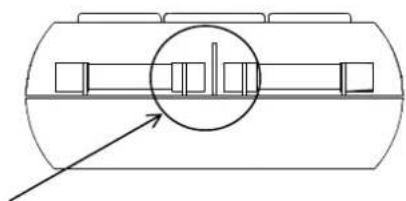
natural_image
Diagram of a cylindrical tank with internal compartments and an arrow pointing to one side (no text or labels)natural_image
Diagram of a cylindrical container with internal compartments and a highlighted circular feature (no text or symbols)