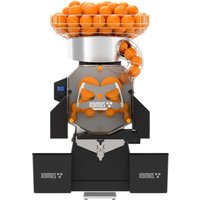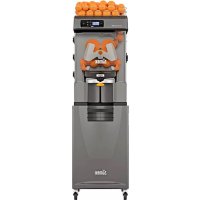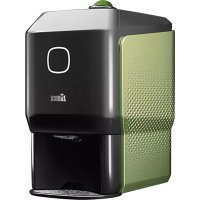
Soul Series 2 - Juicer Zumex - Free user manual and instructions
Find the device manual for free Soul Series 2 Zumex in PDF.


| Product type | Professional juicer |
| Brand | Zumex |
| Model | Soul Series 2 |
| Compatible fruit sizes | 64-81 mm (oranges, thin-skinned lemons) |
| Capacity | 3-6 oranges or 7-8 limes |
| Noise level | <60 dB |
| Protection rating | IPX0 |
| Connectivity | Wi-Fi (Zumex Connect) |
| Indicator light | Front button: white (ready), orange (operating), flashing (alert) |
| Dispenser capacity | 3-4 oranges |
| Pressing system | Automatic Push&Juice |
| Waste bin | With full level detection and easy emptying |
| Exterior material | Stainless steel and plastic |
| Cleaning of removable parts | Dishwasher safe |
| Recommended maintenance | Use of Zumex Citric Active cleaner |
| Safety | Top cover, front door, automatic stop in case of blockage |
| Options | Kit S (45-65 mm) and Kit XS (42-52 mm) optional |
| Intended use | Commercial (restaurants, hotels, cafeterias, etc.) |
| Equipotential terminal | Located at the rear for grounding auxiliary devices |
| Patents | ES2567101A1, WO2016059186A1, ES2527974B1, WO2013182712A2 |
Frequently Asked Questions - Soul Series 2 Zumex
User questions about Soul Series 2 Zumex
0 question about this device. Answer the ones you know or ask your own.
Ask a new question about this device
Download the instructions for your Juicer in PDF format for free! Find your manual Soul Series 2 - Zumex and take your electronic device back in hand. On this page are published all the documents necessary for the use of your device. Soul Series 2 by Zumex.
USER MANUAL Soul Series 2 Zumex
natural_image
Exterior view of a modern ZLenox water dispenser device (no visible text or symbols on body)User's Manual

zumex

bar
| Category | Value | |---|---| | Category 1 | 100 | | Category 2 | 100 | | Category 3 | 100 | | Category 4 | 100 | | Category 5 | 100 | | Category 6 | 100 | | Category 7 | 100 | | Category 8 | 100 | | Category 9 | 100 | | Category 10 | 100 | | Category 11 | 100 | | Category 12 | 100 | | Category 13 | 100 | | Category 14 | 100 | | Category 15 | 100 | | Category 16 | 100 | | Category 17 | 100 | | Category 18 | 100 | | Category 19 | 100 | | Category 20 | 100 | | Category 21 | 100 | | Category 22 | 100 | | Category 23 | 100 | | Category 24 | 100 | | Category 25 | 100 | | Category 26 | 100 | | Category 27 | 100 | | Category 28 | 100 | | Category 29 | 100 | | Category 30 | 100 | | Category 31 | 100 | | Category 32 | 100 | | Category 33 | 100 | | Category 34 | 100 | | Category 35 | 100 | | Category 36 | 100 | | Category 37 | 100 | | Category 38 | 100 | | Category 39 | 100 | | Category 40 | 100 | | Category 41 | 100 | | Category 42 | 100 | | Category 43 | 100 | | Category 44 | 100 | | Category 45 | 100 | | Category 46 | 100 | | Category 47 | 100 | | Category 48 | 100 | | Category 49 | 100 | | Category 50 | 100 | | Category 51 | 100 | | Category 52 | 100 | | Category 53 | 100 | | Category 54 | 100 | | Category 55 | 100 | | Category 56 | 100 | | Category 57 | 100 | | Category 58 | 100 | | Category 59 | 100 | | Category 60 | 100 | | Category 61 | 100 | | Category 62 | 100 | | Category 63 | 100 | | Category 64 | 100 | | Category 65 | 100 | | Category 66 | 100 | | Category 67 | 100 | | Category 68 | 100 | | Category 69 | 100 | | Category 70 | 100 | | Category 71 | 100 | | Category 72 | 100 | | Category 73 | 100 | | Category 74 | 100 | | Category 75 | 100 | | Category 76 | 100 | | Category 77 | 100 | | Category 78 | 100 | | Category 79 | 100 | | Category 80 | 100 | | Category 81 | 100 | | Category 82 | 100 | | Category 83 | 100 | | Category 84 | 100 | | Category 85 | 100 | | Category 86 | 100 | | Category 87 | 100 | | Category 88 | 100 | | Category 89 | 100 | | Category 90 | 100 | | Category 91 | 100 | | Category 92 | 100 | | Category 93 | 100 | | Category 94 | 100 | | Category 95 | 100 | | Category 96 | 100 | | Category 97 | 100 | | Category 98 | 100 | | Category 99 | 100 | | Total (Total) |Index
User's manual → 04
|
Thought you knew the world of juice?
Get ready to change your perception forever.
natural_image
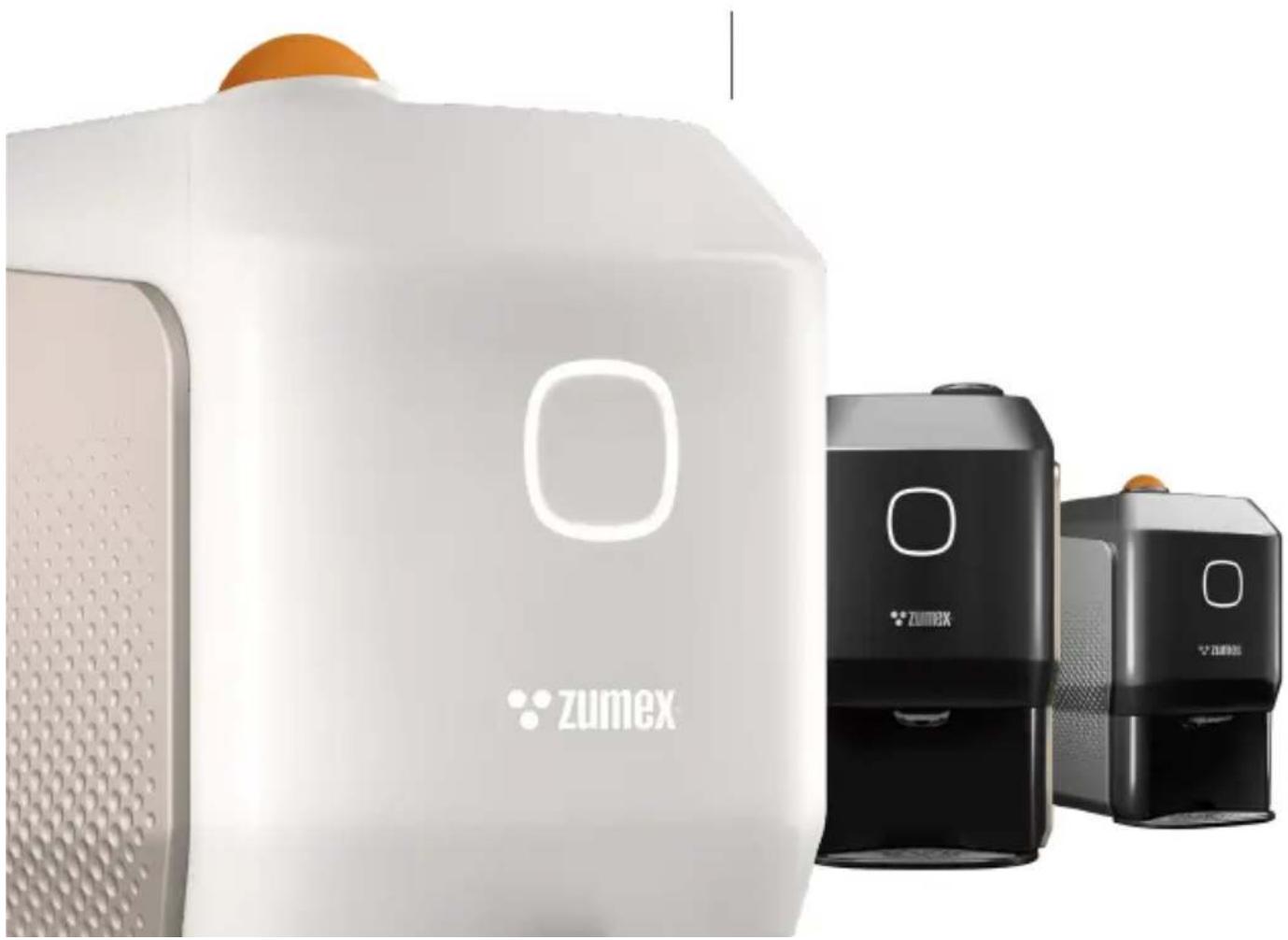
Exterior view of two Zumex brand devices with orange spherical tops and perforated surfaces (no signage or text beyond branding)You have the first ever Smart Juicer, Soul Series 2, in your hands. The first automatic juicer, capable of offering the purest juice to your customers and the best performance for your business.
The future starts today: innovation and the most authentic style fit in the smallest space.
Small. Smart. Stylish
TECHNICAL CHARACTERISTICS↓
JUICES CITRUS FRUIT
○ ORANGES
○ MANDARINS
○ LEMONS*
◇ LIMES
*We recommend that you juice lemon varieties with a rounded shape and thin skin. For example: Eureka, Lisbon, Meyer.

SIZES
64-81 mm
Other optional kits:
Kit S → 45-65 mm
Kit XS → 42-52 mm

AUTONOMY FOR THE USER
3-6 oranges | 7-8 limes
natural_image
Close-up of a black refrigerator with white logo and 'ZU' text, no readable document contentEN
60
DIMENSIONS
300×480×537 mm
11.8" x 18.9" x 21.1"
SPEED
1 JUICE IN →

| 18
PIECES OF FRUIT

| WEIGHT | 32 kg | 71 lb |
| VOLTAGE | 100-240 VAC | 50/60 Hz |
| POWER | 100 W | 0.134 hp |
| MAXIMUM CONSUMPTION | 0.4-3.4 A (100-130 VAC) | 0.3-1.5 A (220-240 VAC) |
| SOUND PRESSURE LEVEL | Below 60 Db | |
| ANTI-MOISTURE PROTECTION | IPX0 |
*Remember to contact your usual distributor for any technical query
Patent: ES2567101A1.WO2016059186A1 ES2527974B1.WO2013182712A2 Pat. Pending: P201930926 DMC: 007055652
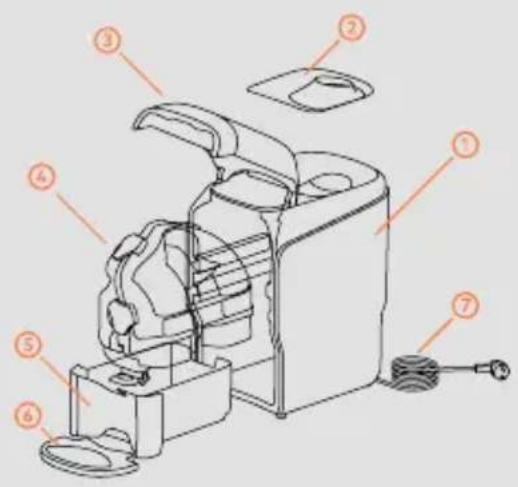
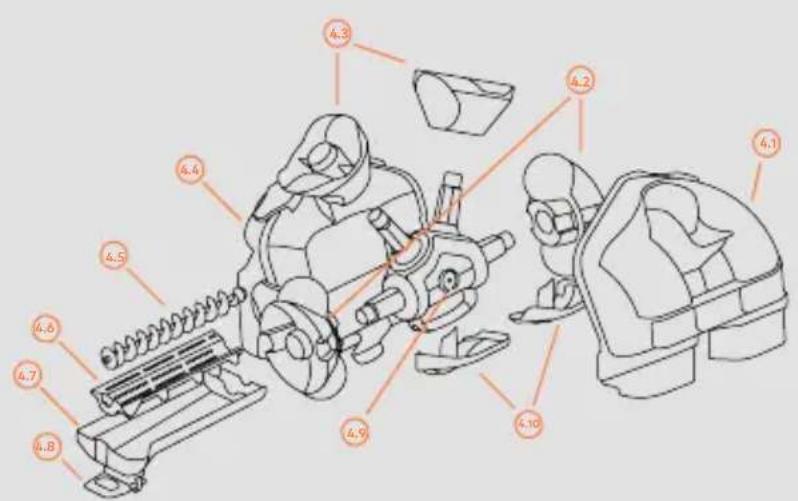
FIG. 1 → Soul Series 2
1 SOUL SERIES 2
2 FEEDER LID
3 FRONT DOOR
4 CASE OUT
5 WASTE COLLECTION TRAY
6 CUPHOLDER TRAY
7 MAINS CABLE
FIG. 2 → Case Out Unit (4)
4.1 FEEDER CASE
4.2 LOWER PRESSING UNITS
4.3 UPPER PRESSING UNITS
4.4 CUTTING CASE
4.5 PULP EXTRACTOR SCREW CONVEYOR
4.6 PULP EXTRACTOR FILTER
4.7 JUICE CONTAINER
4.8 TAP
4.9 SHAFTS UNIT
4.10 PEEL EJECTORS
BEFORE YOU START, FOR YOUR SAFETY, TAKE INTO ACCOUNT
The specific details about your Zumex Soul Series 2 juicer (voltage, frequency and other data of interest), can be found on the Identification Label that you will find inside the machine.
If you have any technical queries, you must get in touch with your regular Dealer / Official Technical Support Service, always stating the Serial Number on the machine Identification Label.
Zumex adopts the necessary measures to ensure that the machines placed on the market are selectively collected and managed in an environmentally respectful manner. Please contact your authorised Zumex dealer to correctly dispose of these machines.
The instructions may be updated without prior notice. You can consult them at any time on our website www.zumex.com, in the section on the selected model. If you have any suggestions or comments that you believe may improve our machines or service network, please get in touch with Zumex directly at the address below:

zumex
ZUMEX GROUP, S.A.
Polígono Ind. Moncada III C/Molí 2.
Do not manipulate the machine in such a way that it works without safety elements.
This appliances are intended to be used for commercial applications, for example in kitchens of restaurants, canteens, hospitals and in commercial enterprises such as bakeries, etc., but not for continuous mass production of food.
The appliance is not intended to be cleaned with a water jet or a steam cleaner.
This appliance can be used by children over the age of 8 or older, or by people with impaired physical, sensorial or mental capacities or who lack experience or knowledge, if they are supervised or have received adequate training with respect to the safe operation of the appliance and they understand the risks entailed.
Children should be supervised to make sure they do not play with the appliance.
The cleaning and maintenance to be performed by the user must not be carried out by children without supervision.
This machine contains an equipotential terminal on the rear to connect the Earth Tap of other appliances to the Earth Tap of your installation through this terminal. If you use it, slacken the nuts and washers, couple the Earth Tap cable
of the auxiliary appliance and firmly tighten the nuts and washers again. This equipotentiality point is indicated with the following symbol:

Do not use other different fruit to that specified in the manual.
When you clean, perform maintenance or replace parts, make sure that you have always unplugged the power cable from the socket and it is visible.
Use the cutting elements with great care, to avoid possible cuts.
The parts that are in contact with food must be cleaned according to the instructions that you can read in the cleaning chapter.
If the power cable is damaged, it must be replaced with a cable or special unit to be supplied by the manufacturer or by the after-sales service.

A place for the juice of the future
Have you already thought about where you will place your Soul Series 2?
You can put it wherever you like thanks to its size and 360° design.
It will turn any space into a designer juice corner.
EN 12
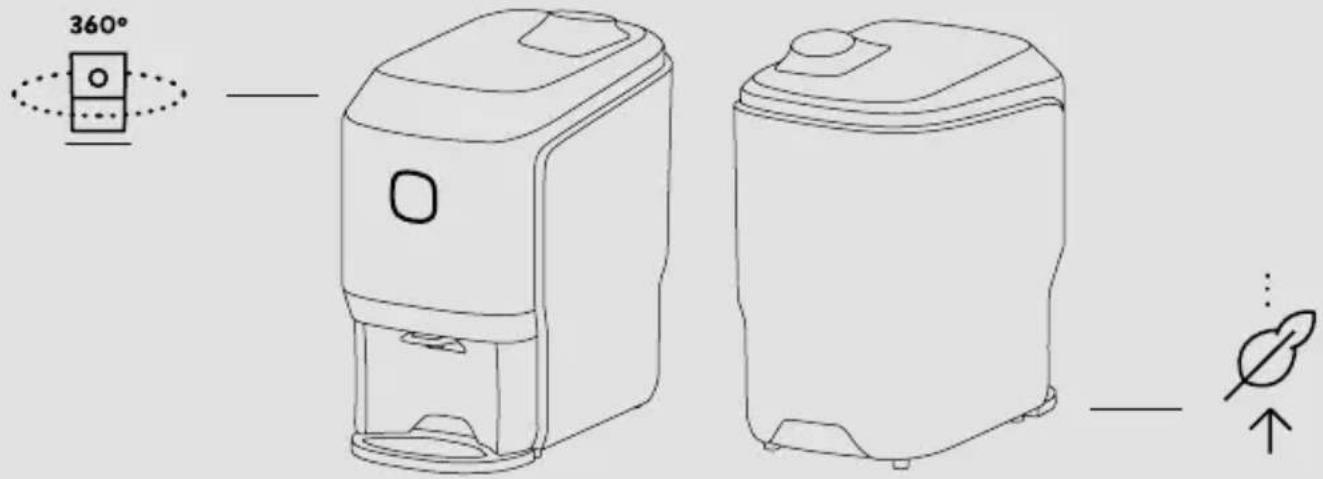
First of all, check that the mains voltage coincides with that shown on the Identification Label of the machine, which you will find both in this manual and on the machine itself.
Make sure there are no obstacles which may get in the way during the unpackaging process.
Then take the Soul Series 2 out of the packaging and place it on the flat surface you have ready.
The following components may be supplied loose. If this is the case, put them in position: Cupholder base, Cupholder, Mains cable.
You are just one step away from starting to juice with Soul Series 2.
SOME ADVICE BEFORE BEGINNING
Initial cleaning
We recommend that you clean the juicing system before first use. See the section "Cleaning".
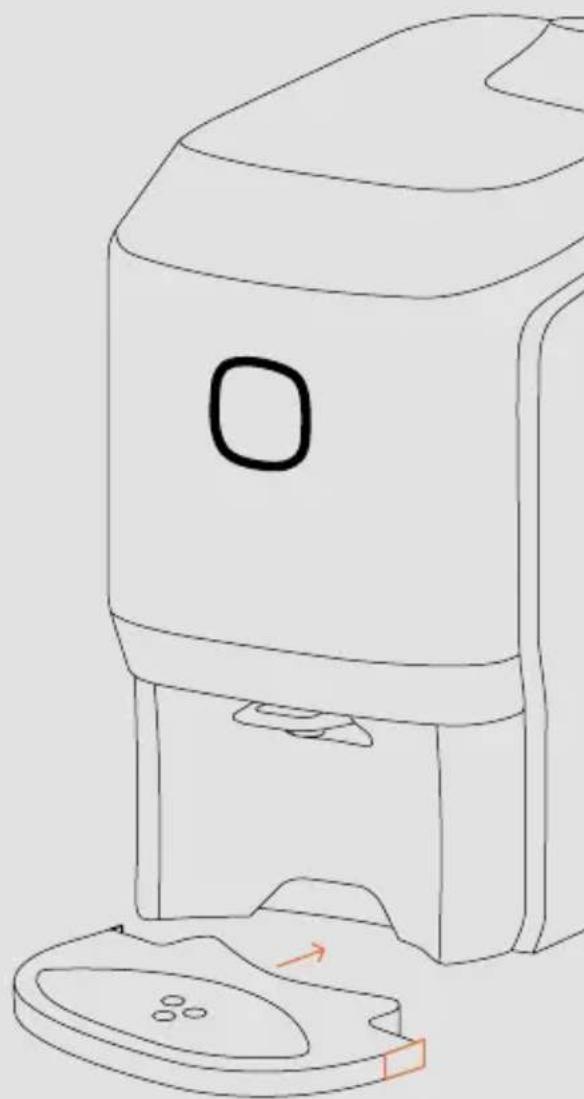
Attaching the cupholder
To fix the cupholder to the machine, press the outer clips of the tray, then side the piece up to the limit on it and release the clips.
natural_image
Line drawing of a portable air purifier with lid and base plate (no text or symbols)Start up
→ Check the electrical data of your machine with the electricity supply. Once the machine is correctly installed, proceed to plug it into the mains voltage.
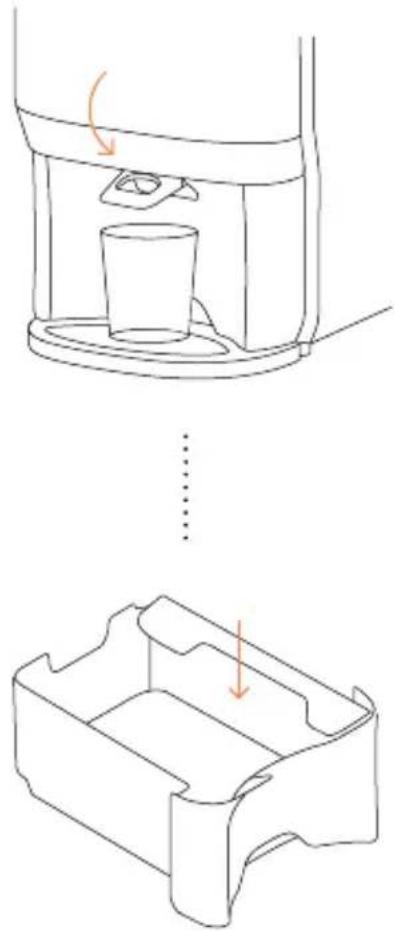
→ After plugging in the machine, press the button for 1" to switch on the juicer, until a steady white light comes on. This means that the machine is ready to juice.
→ Check that the Top lid, Waste collection tray and the Front door are properly fitted. A flashing white light will appear if they are not. Remember to open the Tap (to the down position) and use a glass at the juice outlet.
Juicing unit
Check that all the Case Out parts have been mounted correctly.
Loading the feeder
The machine can fit 3/4 oranges in the feeder, depending on their size.
Waste collection zone
Ensure that the Waste collection tray is correctly fitted in its position and that the peel deflector is in the lowest position.
natural_image
Line drawing of a device with a cup inside, showing top and side views (no text or symbols)
You are now a Smart Juicer: Connect your machine

natural_image
Simple line diagram showing a Wi-Fi symbol above a tablet screen (no text or symbols present)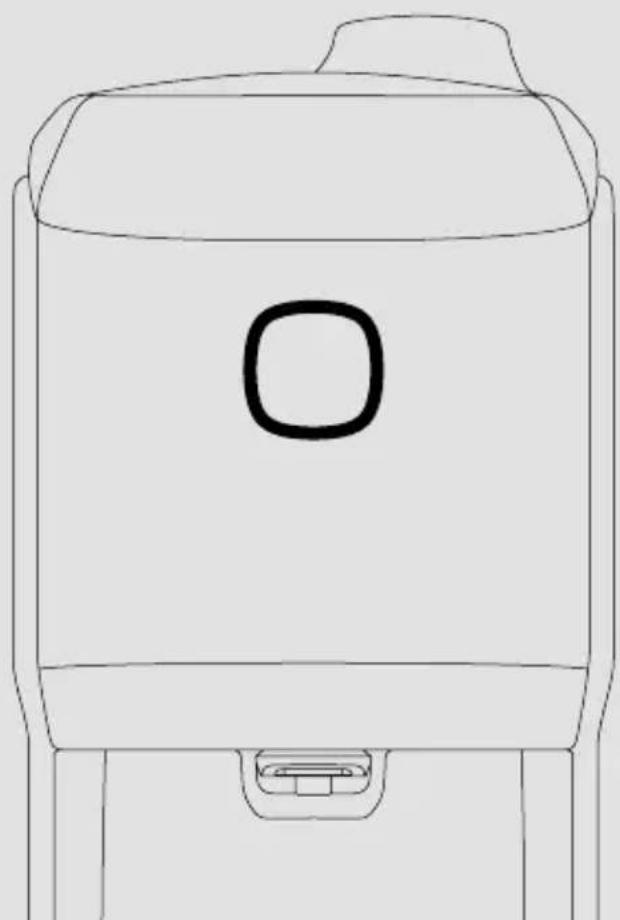
natural_image
Line drawing of a simple container with a handle and spout (no text or symbols)When you turn on the machine, it will emit this WiFi network: Zumex Connect to which you can connect with your mobile device, tablet or PC, using the PIN: 0000
② Enter the URL into your browser: http://8.8.8.8
3 A screen with the option Settings > WiFi will appear. Enter your network parameters here.
Your machine is now connected to the internet!
4 From the same menu, you can set the language or access PIN, as well as other options.
On the website zumexconnect.com, access the Registration area and enter your machine's serial number and the Zumex Connect number*. Once registration is complete, you will receive your access details to the reports in an email.

You can also access them by scanning the QR code.
*If you do not have this number, contact service@zumex.com, indicating the serial number of your machine.
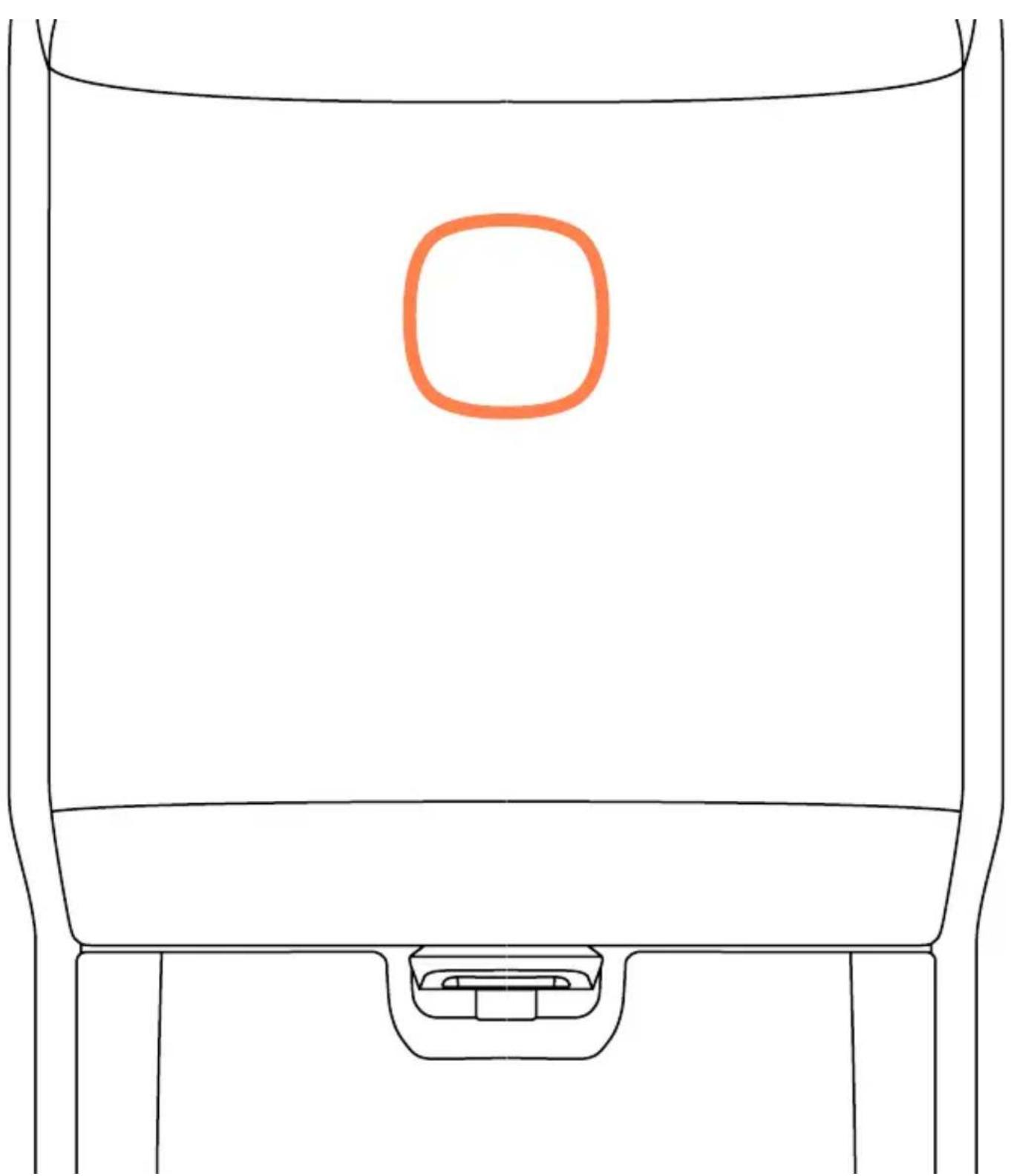
Juicing is easier than ever FOLLOW YOUR INTUITION: PUSH&JUICE!
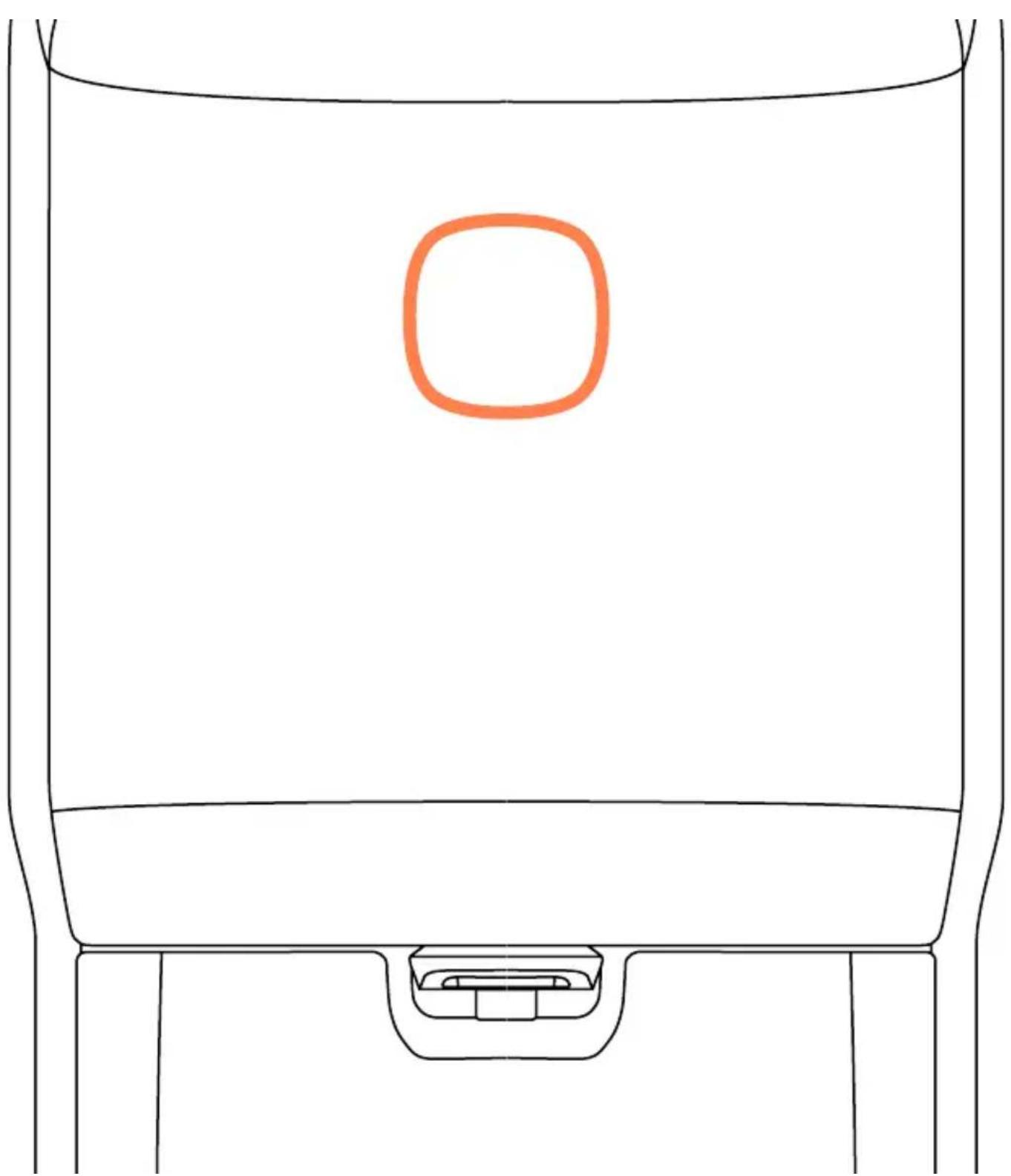
Just touch the front button to juice. The button will change colour automatically from white to orange.
Pure Juice in record time.
natural_image
Simple line drawing of a car front view with a highlighted orange square on the backrest (no text or symbols)Understand the language of Soul
Observe the light of the button and the sound coming from the machine
White
The machine is ready to juice.
Flashing White
Waste collection tray incorrectly positioned.
Front door open.
Top lid incorrectly positioned.
Orange
The machine is juicing correctly.
Flashing Orange
Empty the waste collection tray.
Juicing system blocked.
PulpOut System blocked.
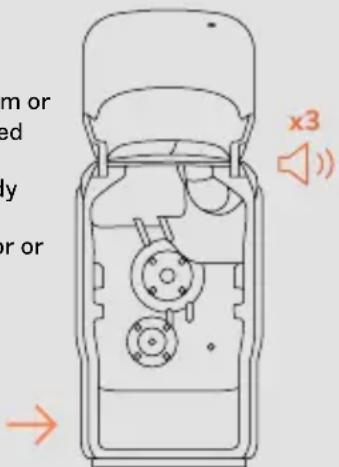
x3

The machine will notify you with three bleeps when the waste collection tray is full and needs to be emptied.
Switch your Soul off
You can switch your machine off as follows:
→ By pushing the front button for 2".
→ By unplugging the mains cable directly.
→ If the machine does not detect any oranges, it will stop, approximately 20" after the last orange has gone through.
Important
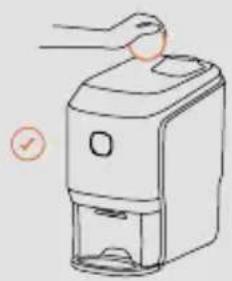
Please, never attempt to access the juicing zone from the feeder with your hand, to avoid accidents.
Never operate the machine from the side or from the back. Always load the feeder from the front of the machine.
natural_image
Line drawing of a hand using a handheld device to clean or store items (no text or symbols)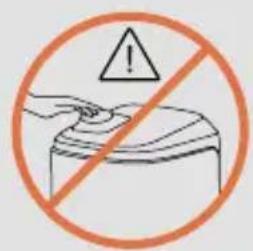
Easy to clean, like everything in Soul
1
Disconnect the machine from the mains and remove any obstacles from around the machine.
2
Raise the Front door up with your hand as far as it will go.
To close it, gently move it down with your hand until you hear a slight click. Important! For safety reasons, the machine will not start up unless the door is fully closed.
3
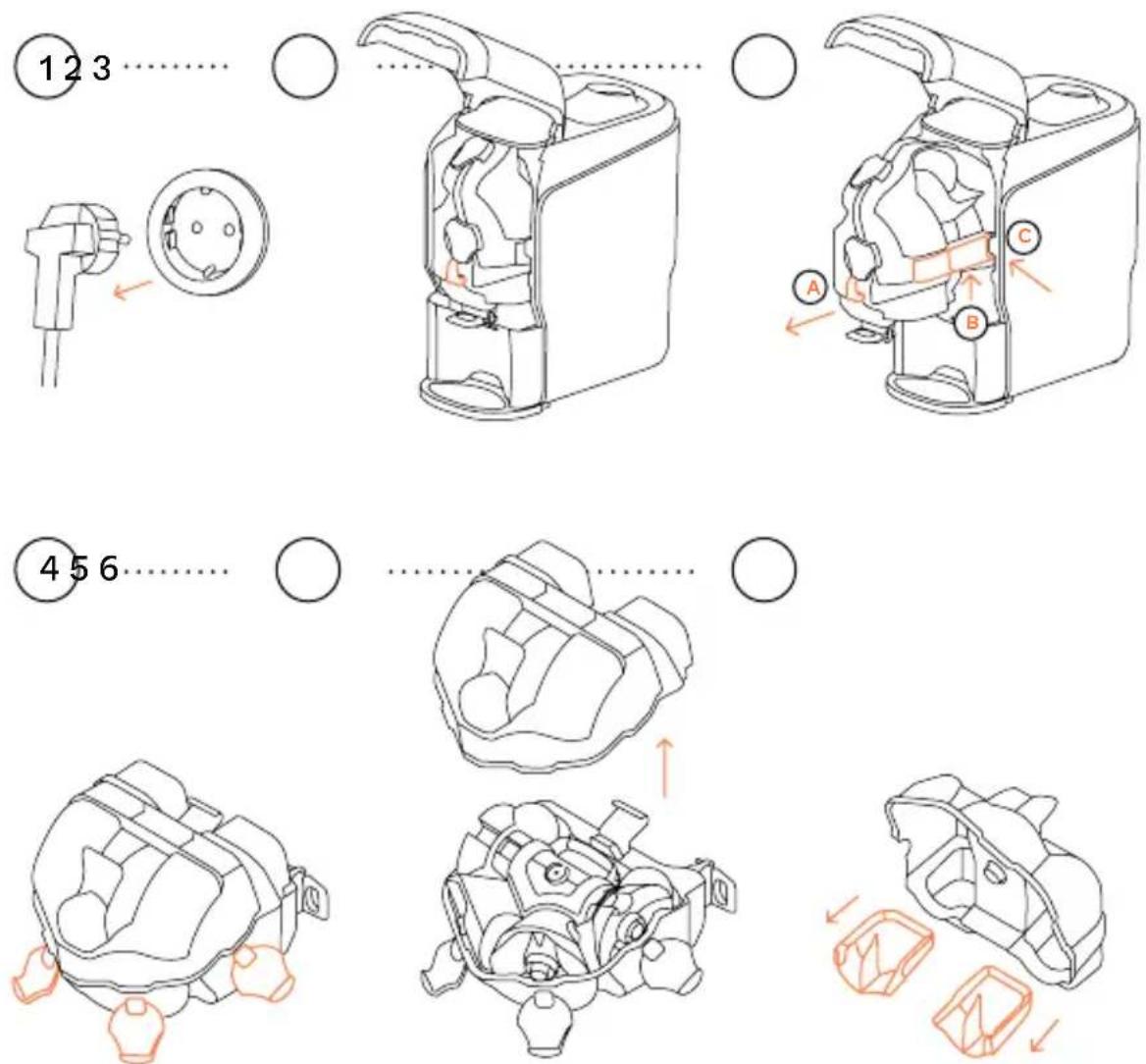
The Case Out is removed in two steps:
- Hold of the Front handle (A) and pull it carefully outwards, sliding it along the guides until the Case Out reaches the end of the guides in the front area.
- Hold the Side handles (B) of the Case Out in your hands, gently lifting it over the front stops, and pull it out, sliding it along the guides (C). Carry the unit in the same position to prevent dripping. To put it back in the machine, take hold of it by the handles with both hands, take the two guides at the left and right of the machine interior as your reference, and insert the unit inwards as far as it will go.
4
Carefully support the Case Out on a flat surface to disassemble it, resting it on its left face and leaving the latches on that side. Open the four latches to disassemble the Feeder Case.
5
Pull the Case upwards.
6
Remove the two peel ejectors, left and right, from the Feeder Case for subsequent cleaning.
Easy to clean, like everything in Soul
7
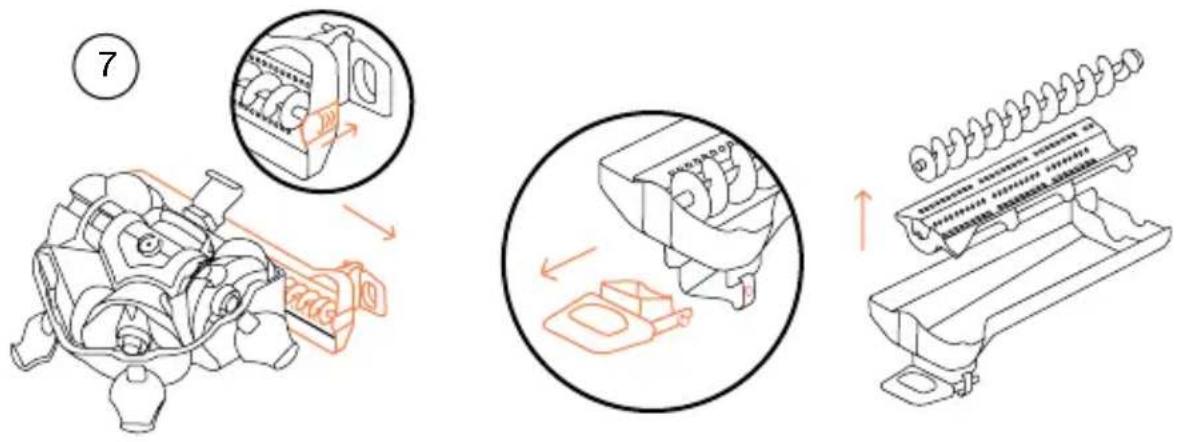
Once the feeder case lid is removed, take out the sweeper unit located in the cutting housing by moving the tab at the far right of the tray and sliding the whole unit outwards to take it off the guides of the cutting housing. You will find the screw conveyor and the filter inside this sweeper unit tray. Take them out. Zumex recommends thorough cleaning of the tap with the brush supplied. Press the back tab to unclip the Tap and take it out. To put it back in, position it in front of the tap support holes and fit it into them.
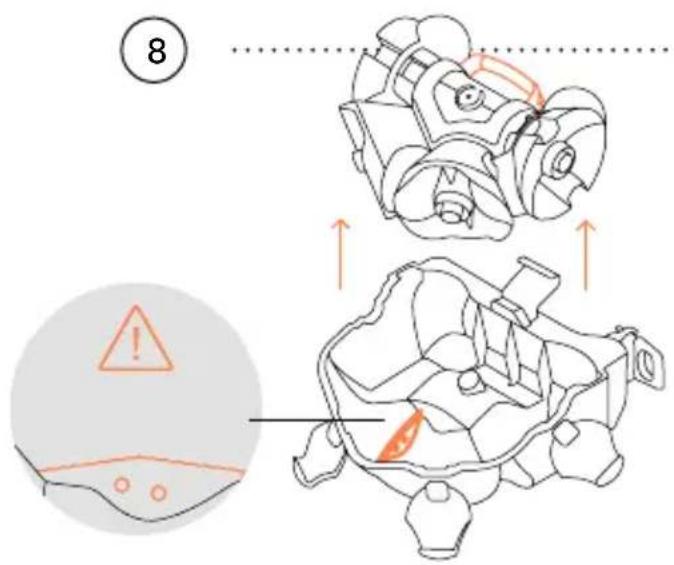
8
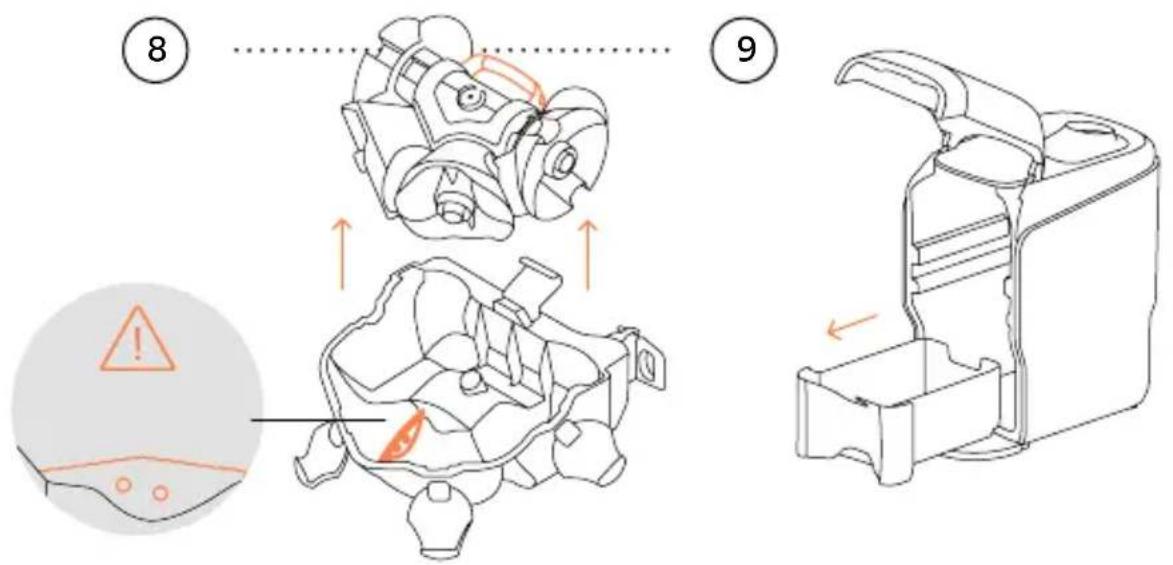
Take the whole pressing units and shafts unit out by pulling the handle on its central support upwards.
Warning! Take care with the cutting zone! Take care with the blade when removing the shafts and pressing units unit.
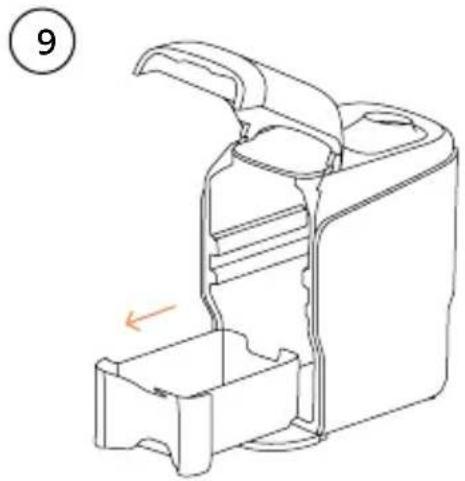
Remove the Waste collection tray to empty the peel.
9
natural_image
Line drawing of a mechanical device with an arrow indicating a component (no text or symbols present)Easy to clean, like everything in Soul
10

Cleaning is very easy. Rinse the parts with water, helping yourself to remove pulp remains with a soft brush or with a sponge.
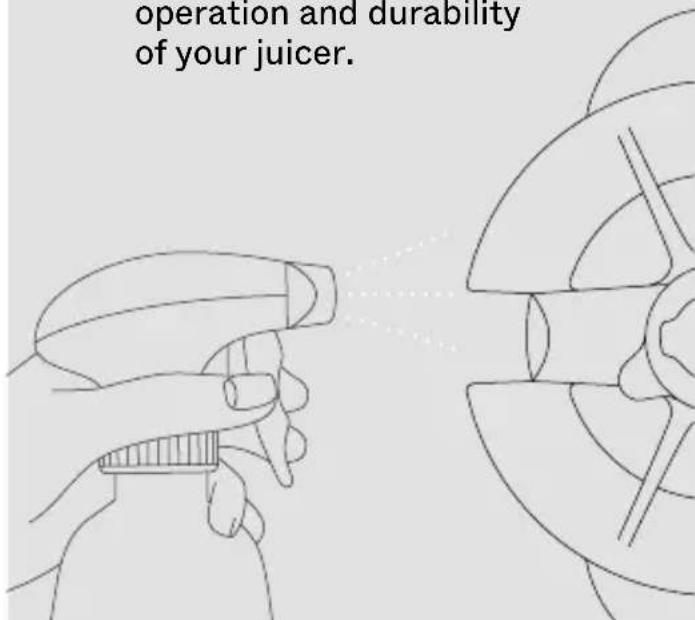
Zumex recommends using the Zumex Citric Active cleaner to improve machine cleaning results, especially for removing waxes. The machine needs to be sanitised with a disinfectant after every cleaning.
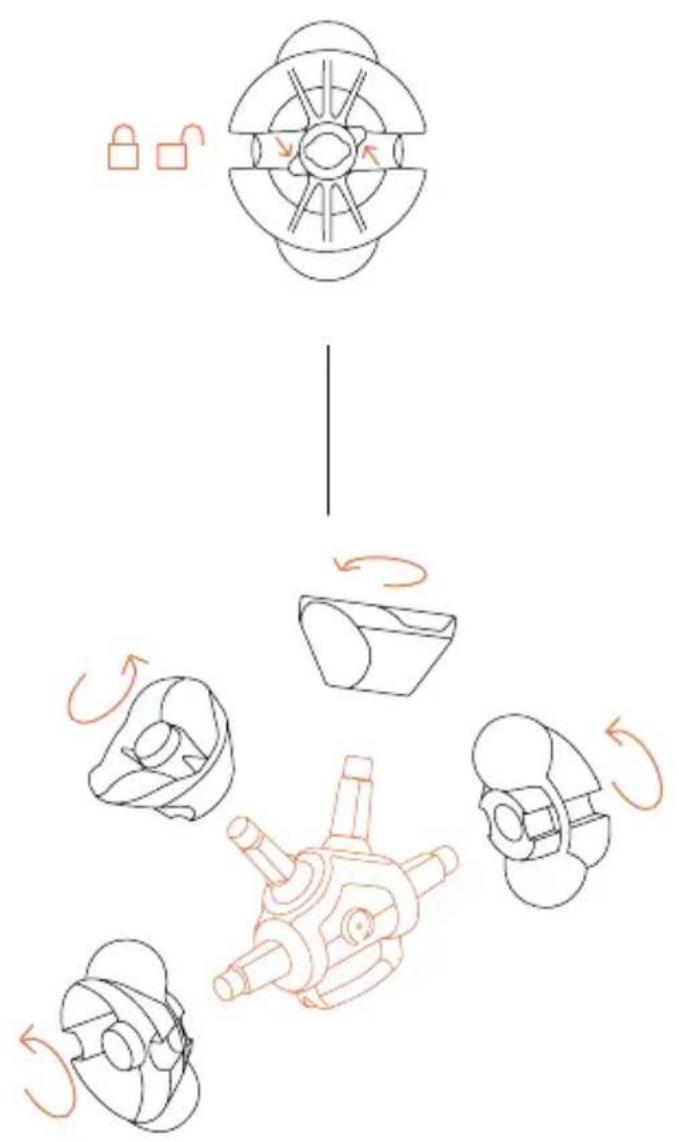
You may remove the Pressing units for deeper cleaning. Turn the Pressing unit latches a quarter of a turn to remove the Lower pressing units and the Upper pressing units.
You can also wash all the parts in the dishwasher. You should use the soap, salt and rinse aid correctly so that the parts do not lose their shine. Important! The Shafts unit (4.9) with its central support is an indivisible unit. You should not disassemble it.
To mount the pressing units, slide the corresponding pressing unit along the guide until fully in position. Make sure that both pressing units fit together perfectly. Turn the Pressing unit latches a quarter of a turn and make sure that the latches support the pressing units correctly.
You can clean the inside of the machine with a soapy dishcloth. Then rinse and dry. Avoid using a rough cloth which may damage the inner surface of the machine. You can use a wet rag or soapy dishcloth with mild soap to clean the outside of the machine.
11
10
flowchart
graph TD
    A["Top Component"] --> B["Left Rotation Arrow"]
    B --> C["Right Rotation Arrow"]
    C --> D["Bottom Component"]
    D --> E["Left Rotation Arrow"]
    E --> F["Right Rotation Arrow"]
    F --> G["Bottom Component"]
    G --> H["Left Rotation Arrow"]
Zumex Tips
We recommend daily cleaning in depth and that you follow these hygiene and disinfection instructions step by step to ensure the proper operation and durability of your juicer.
Don't let anything stop you Frequently asked questions.
1→ My Zumex Soul does not turn on
Check that it is plugged into the mains. Check that there is voltage in the socket by plugging any other appliance into the socket and seeing if it works. If the electricity socket is working, check that you have connected the plug into the socket correctly, and into the machine. If the button still does not come on nor flash, touch the button for 1".
3 → There is no light on the button
Access the Juicing unit to check that nothing is causing a blockage inside.
2 → My machine does not juice
Check that the machine is connected and touch the button.
4 → No juice coming out?
Check that the tap is open. If the juice is still not coming out, clean the tap by disassembling it as indicated in the cleaning section and making sure it remains open. You can test it by pouring a glass of water into the system through the feeder zone. Check that the filter inside is not stopped up, and clean it.
5 → You hear noise but the oranges are not going in?
Stop the machine and disassemble it. Assemble it again by following the steps and checking that all the parts fit into each other perfectly.
6 → Why is there a white light on the front button?
This light means that the machine is ready to juice. No fault.
7 → Why is there a flashing white light?
This light appears when the machine is not juicing and/or:
8 → Why is there an orange light on the front button?
This light means that the machine is juicing correctly. No fault.
→ The front door is not closed properly.
→ The waste collection tray is incorrectly positioned
→ The top lid is incorrectly positioned
For the machine to be operational again, open and close the door, or unplug the machine.
9 → Why is there a flashing orange light and an alert sound?
The machine will notify you with a flashing orange light and three beeps when the Waste collection tray is full of peel.
Once it has detected that the tray is full, the machine will stop the juicing unit.
After the notification, the button will go back to a white light. If you try to continue juicing and press the button again, the machine will not start up and will notify you by means of a longer steady beep.
Empty the Waste collection tray to resume normal operation.
If a blockage in the juicing system or the pulp sweeper zone is detected during juicing, the machine will notify of the blockage by a steady beep and flashing orange light, which will continue until the door or tray is opened.
natural_image
Exterior view of two Zumex brand devices with orange circular buttons and dotted patterns (no readable text or symbols beyond branding)Small. Smart. Stylish
CARACTERÍSTICAS TÉCNICAS↓
CÍTRICOS
○ NARANJAS
○ MANDARINAS
LIMONES*
◇ LIMAS
natural_image
Close-up of a black and gold product container with white branding (no readable text or symbols)
ES 32
DIMENSIONES
300 × 480 × 537 mm.
11,8" x 18,9" x 21,1"
VELOCIDAD
1 ZUMO → 10" | 18 FRUTAS → 1'
PESO 32 kg 71 lb
VOLTAJE 100-240 VAC 50/60 Hz
POTENCIA 100 W 0,134 hp
CONSUMO 0,4-3,4 A (100-130 VAC) 0,3-1,5 A (220-240 VAC)
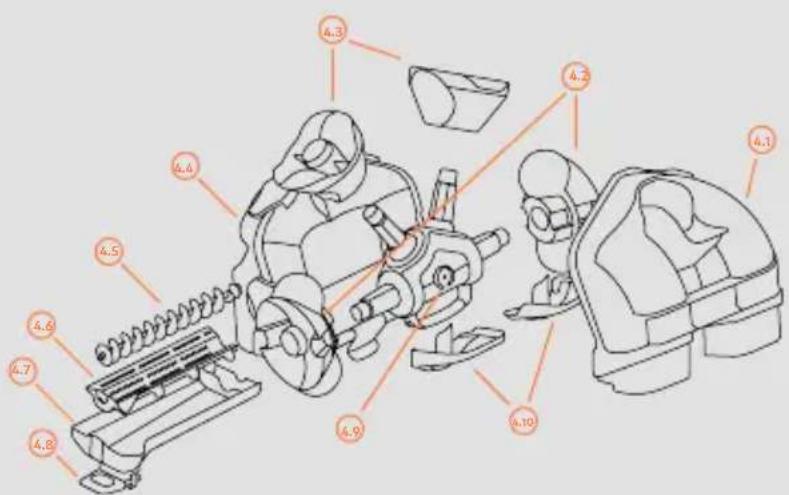
FIG. 1 → Soul Series 2
natural_image
Line drawing of a portable water dispenser with lid and base plate (no text or symbols)Puesta en marcha
natural_image
Simple line drawing of a container with a glass inside, showing a rotating arrow (no text or symbols)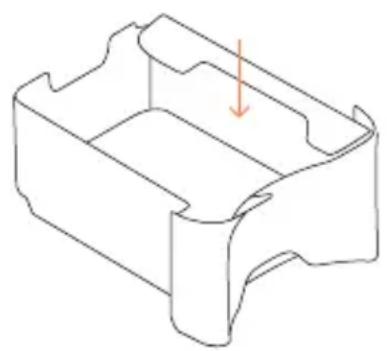
natural_image
Isometric line drawing of a mechanical part with a downward arrow indicating a feature (no text or symbols)
Ya eres un Smart Juicer: conecta tu máquina

natural_image
Simple line diagram showing a Wi-Fi symbol above a tablet screen (no text or symbols present)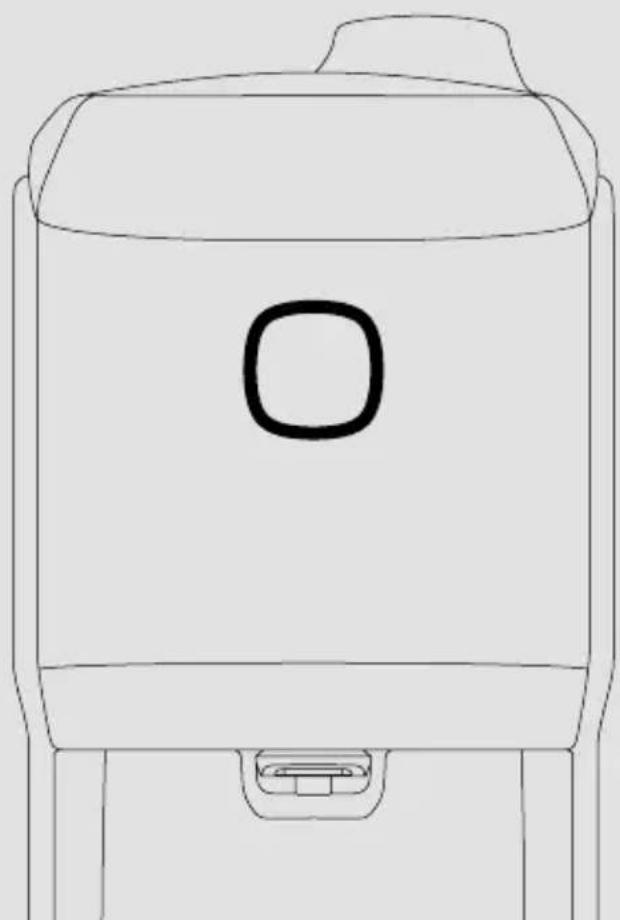
natural_image
Line drawing of a simple container with a handle and spout (no text or symbols)natural_image
Simple line drawing of a car front view with a highlighted orange square on the backrest (no text or symbols)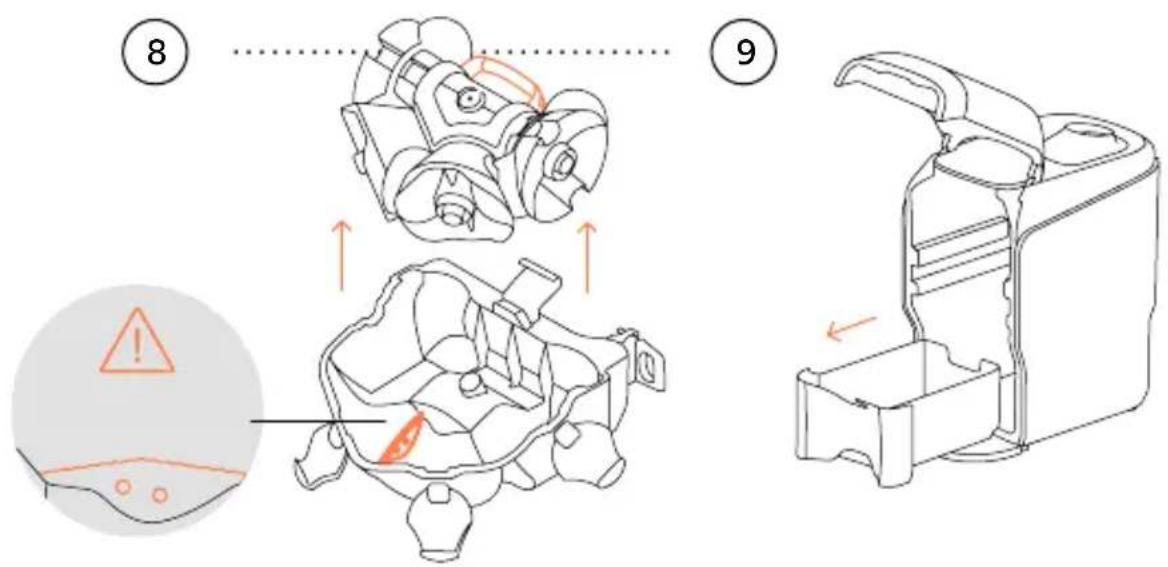
natural_image
Line drawing of a hand holding a spray bottle with a pointed tip (no text or symbols)
natural_image
Pure mechanical diagram showing symmetrical components without any text, numbers, or symbolsnatural_image
Exterior view of two Zumex brand devices with orange spherical tops and textured surfaces (no signage or text beyond branding)Small. Smart. Stylish
CARACTÉRISTIQUES TECHNIQUES↓
PRESSE-AGRUMES
○ ORANGES
○ MANDARINES
CITRONS*
◇ LIMES
natural_image
Close-up of a black and gold product container with white branding (no readable text or symbols)
FR 58
DIMENSIONS
300 × 480 × 537 mm
11.8" x 18.9" x 21.1"
VITESSE
1JUS EN → 10" | 18 FRUITS → 1'
POIDS 32 kg 71 lb
TENSION 100-240 VAC 50/60 Hz
PUISSANCE 100 W 0.134 hp
CONSOMMATION 0.4-3.4 A (100-130 VAC) 0.3-1.5 A (220-240 VAC) MAXIMALE
Pat. Pending: P201930926
DMC:007055652
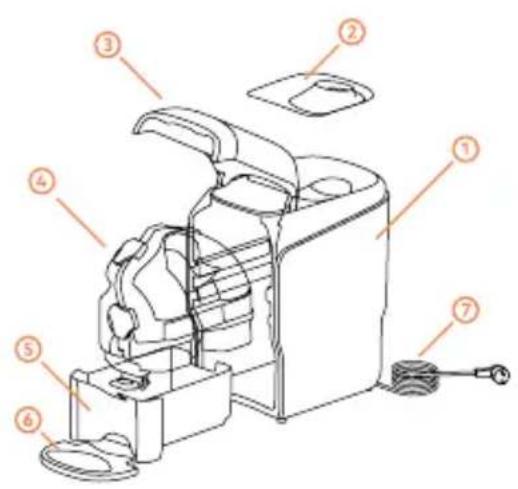
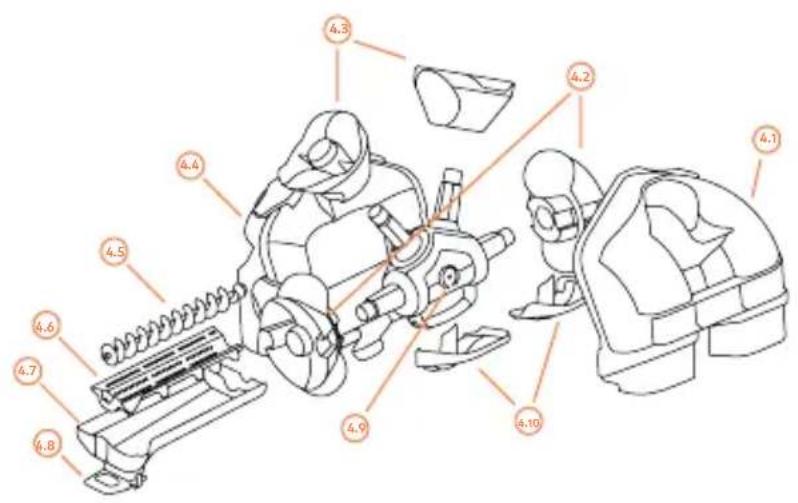
FIG. 1 → Soul Series 2
| 1 SOUL SERIES 2 |
| 2 COUVERCLE DISTRIBUTEUR |
| 3 PORTE AVANT |
| 4 CASE OUT |
| 5 BAC À DÉCHETS |
| 6 PLATEAU PORTE-VERRES |
| 7 CÂBLE D'ALIMENTATION |
FIG. 2 → Ensemble Case Out (4)
| 4.1 CASE DISTRIBUTEUR |
| 4.2 TAMBOURS MÂLE |
| 4.3 TAMBOURS FEMELLE |
| 4.4 CASE COUPE |
| 4.5 VIS EXTRACTEUR DE PULPE |
| 4.6 FILTRE EXTRACTEUR DE PULPE |
| 4.7 BAC |
| 4.8 ROBINET PRESSE-AGRUMES |
| 4.9 ENSEMBLE AXES |
| 4.10 EXTRACTEURS D'ÉCORCE |
POUR VOTRE SÉCURITÉ, AVANT DE COMMENCER, VEUILLEZ OBSERVER LES INSTRUCTIONS SUIVANTES
natural_image
Line drawing of a portable air purifier with a handle and control panel (no text or symbols)Mise en marche
natural_image
Technical line drawing showing a device with a cup and lid, and its internal structure with arrows indicating motion (no text or symbols)
natural_image
Simple line diagram showing a Wi-Fi symbol above a tablet screen (no text or symbols present)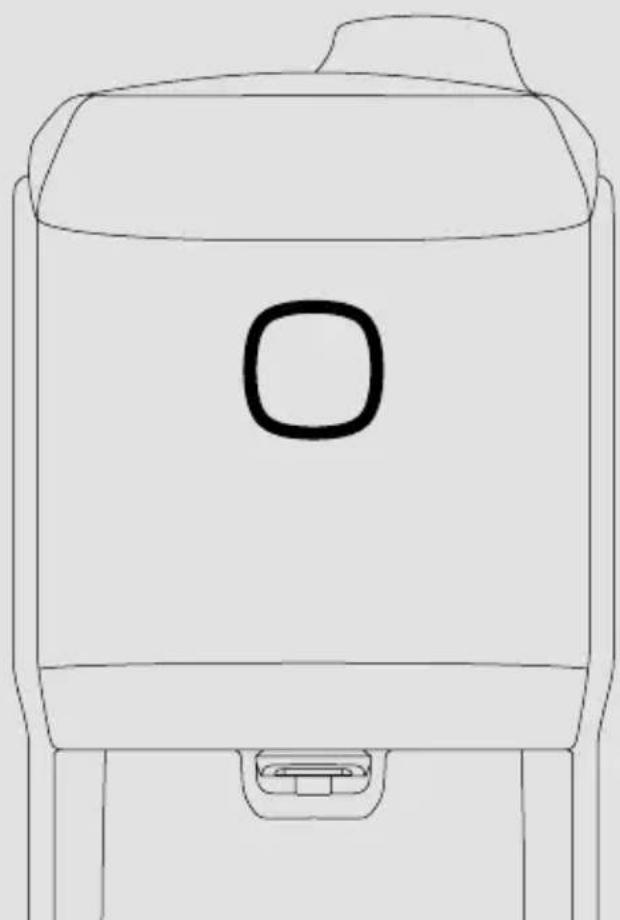
natural_image
Line drawing of a simple container with a handle and spout (no text or symbols)natural_image
Simple line drawing of a car front view with a highlighted orange square on the backrest (no text or symbols)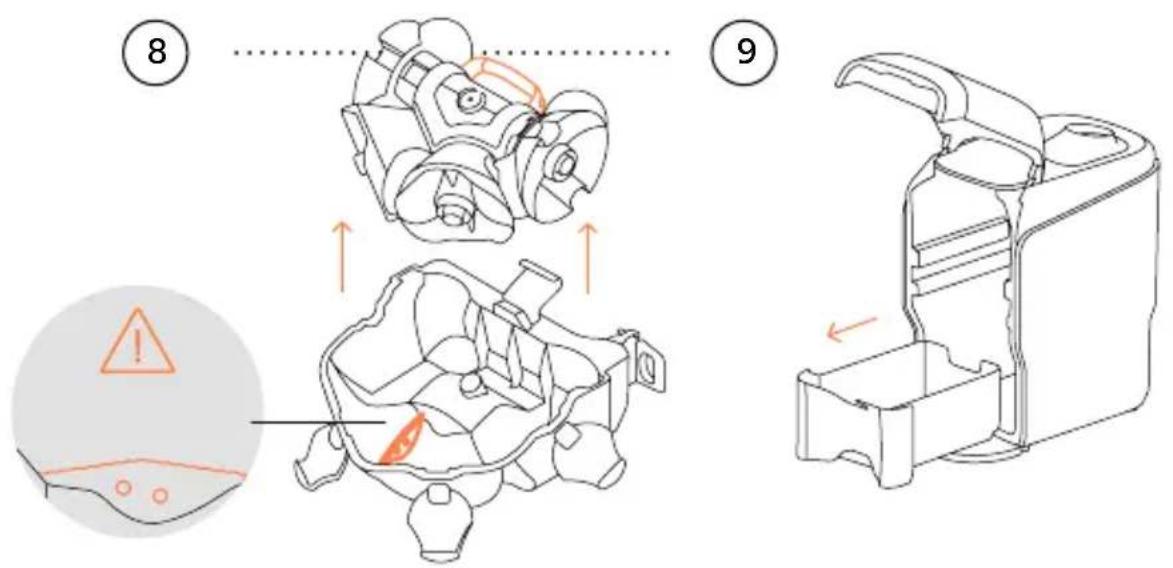
natural_image
Line drawing of a hand holding a spray bottle with a pointed tip (no text or symbols)
natural_image
Pure mechanical component diagram without any text, numbers, or symbolsnatural_image
Exterior view of two Zumex brand devices with orange spherical tops and textured surfaces (no signage or text beyond branding)Small. Smart. Stylish
natural_image
Close-up of a black and gold product container with white branding (no readable text or symbols)DE 84
ABMESSUNGEN
300 × 480 × 537 mm
11.8" x 18.9" x 21.1"
GESCHWINDIGKEIT
1 SAFT IN → 10" | 18 FRÜCHTE → 1'
GEWICHT 32 kg 71 lb
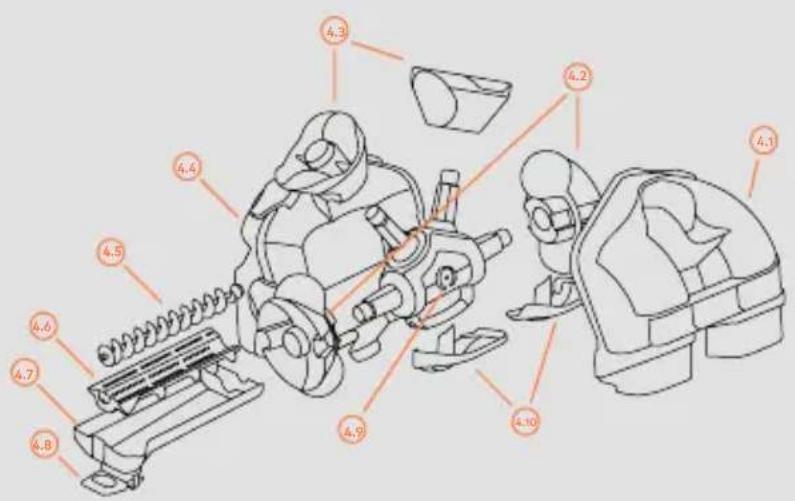
Abb. 1 → Soul Series 2
1 ZUMEX SOUL SERIES 2
2 ABDECKUNG ZUFÜHRUNG
3 FRONTTÜR
4 CASE OUT
5 ABFALLBEHÄLTER
6 ABSTELLPLATTE FÜR SAFTGLAS
7 NETZANSCHLUSSKABEL
Abb. 2 → Case Out-Einheit (4)
4.1 CASE-ZUFÜHRUNG
4.2 OBERE TROMMELELEMENTE
4.3 UNTERE TROMMELELEMENTE
4.4 CASE SCHNEIDEGEHÄUSE
4.5 SPINDEL FRUCHTFLEISCH-ENT-FERNER
4.6 FILTER FRUCHTFLEISCH-ENTFERNER
4.7 SAFTBEHÄLTER
4.8 ABLASSHAHN
4.9 ACHSENEINHEIT
4.10 EXTRAKTIONSKEILE
natural_image
Line drawing of a portable device with a handle and spout, no text or symbols presentInbetriebnahme
natural_image
Technical line drawing of a mechanical device with two views: top shows a cylindrical component, bottom shows a rectangular housing with a downward arrow indicating motion (no text or symbols)
natural_image
Simple line diagram showing a Wi-Fi symbol above a tablet screen (no text or symbols present)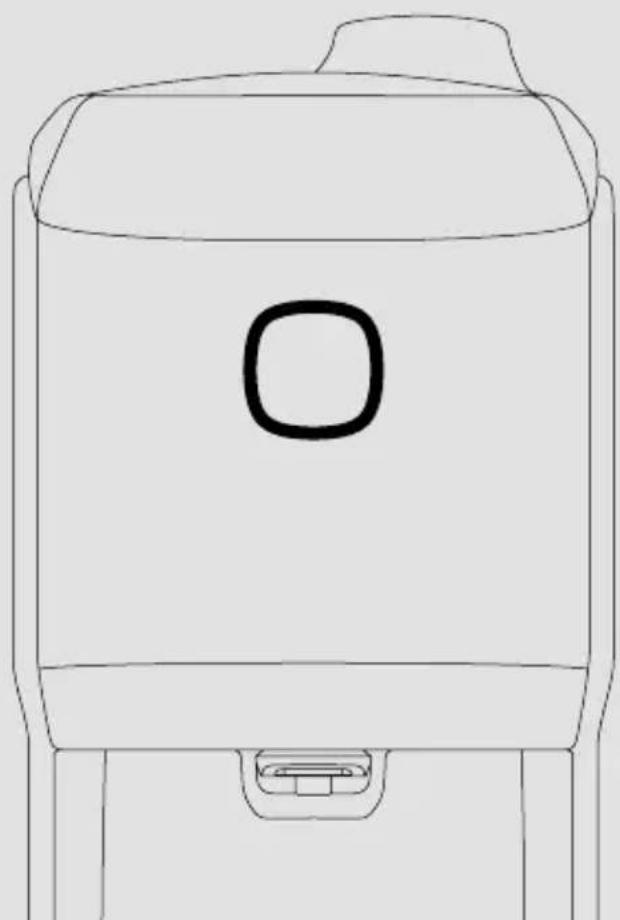
natural_image
Line drawing of a simple container with a handle and spout (no text or symbols)natural_image
Simple line drawing of a car front view with a highlighted orange square on the backrest (no text or symbols)natural_image
Line drawing of a hand using a handheld device to clean or install a surface (no text or symbols)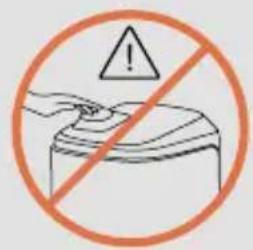
natural_image
Line drawing of a hand holding a spray bottle with a pointed tip (no text or symbols)
natural_image
Diagram of a device interior with gears and a speaker icon (no text or symbols)natural_image
Exterior view of two Zumex brand devices with orange circular tops and perforated surfaces (no signage or text in focus)Small. Smart. Stylish
SPECIFICHE TECNICHE↓
SPREME GLI AGRUMI
○ ARANCE
○ MANDARINI
LIMONI*
◇ LIME
3-6 arances | 7-8 limes

natural_image
Close-up of a black and gold product container with white branding (no readable text or symbols)
IT 110
DIMENSIONI
300 × 480 × 537 mm
11.8" x 18.9" x 21.1"
VELOCITÀ
1 SPREMUTA IN → 10" | 18 FRUITS → 1'
PESO 32 kg 71 lb
TENSIONE 100-240 VAC 50/60 Hz
POTENZA 100 W 0.134 hp
CONSUMO
MASSIMO
LIVELLO DI
PRESSIONE SONORA
PROTEZIONE
ANTIUMIDITÀ
0.4-3.4 A (100-130 VAC) 0.3-1.5 A (220-240 VAC)
Inférieur à 60 Db
IPXO
Pat. Pending: P201930926
DMC: 007055652
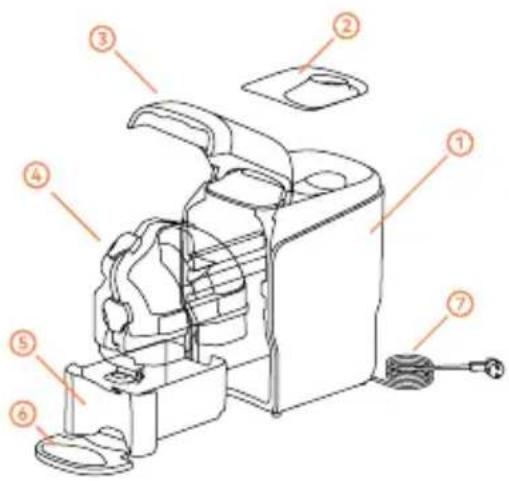
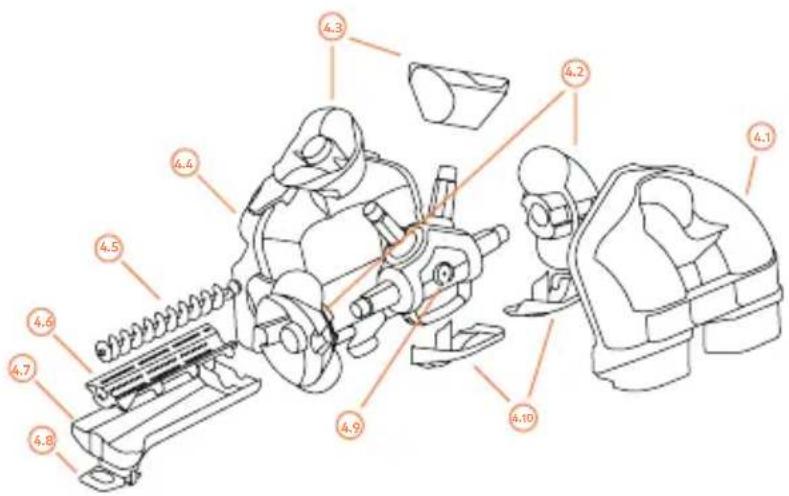
FIG. 1 → Soul Series 2
1 SOUL SERIES 2
2 COPERCHIO ALIMENTAZIONE
3 SPORTELLO ANTERIORE
4 CASE OUT
5 VASCHETTA RIFIUTI
6 VASCHETTA POGGIABICCHIERE
7 CAVO DI RETE
FIG. 2 → Kit Case Out (4)
4.1 CASE ALIMENTAZIONE
4.2 TAMBURO MASCHIO
4.3 TAMBURO FEMMINA
4.4 CASE TAGLIO
4.5 MANDRINO DI ESTRAZIONE POLPA
4.6 FILTRO DI ESTRAZIONE POLPA
4.7 VASCHETTA SUCCO
4.8 RUBINETTO
4.9 GRUPPO ASSI
4.10 ESTRATTORI DI BUCCE
natural_image
Line drawing of a portable air purifier with a handle and base plate (no text or symbols)Avvio
natural_image
Technical line drawing of a device with internal components and directional arrows indicating motion (no text or symbols)
natural_image
Simple line diagram showing a Wi-Fi symbol above a tablet screen (no text or symbols present)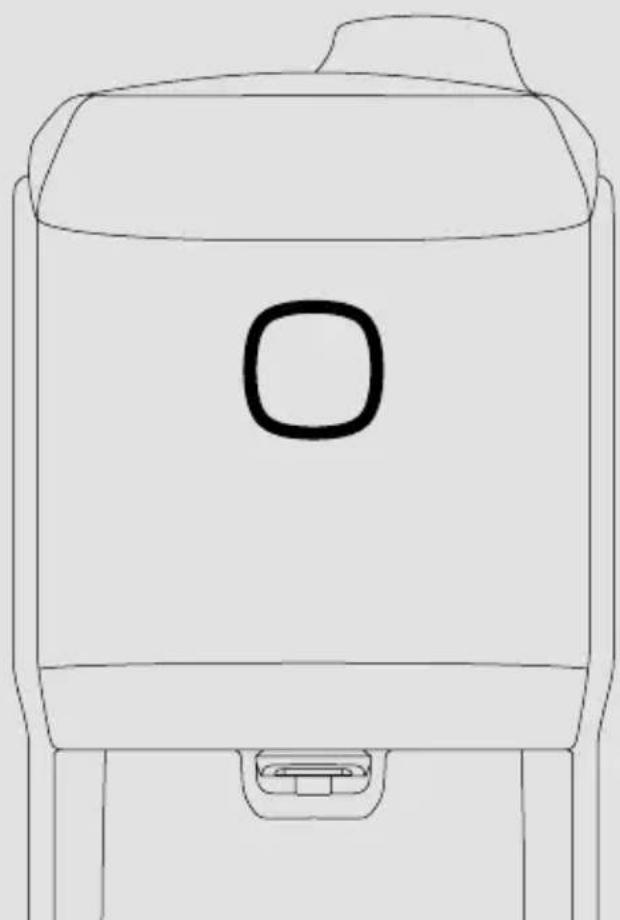
natural_image
Line drawing of a simple container with a square lid and handle (no text or symbols)Pure Juice in tempi record.
natural_image
Simple line drawing of a car front view with a highlighted orange square on the backrest (no text or symbols)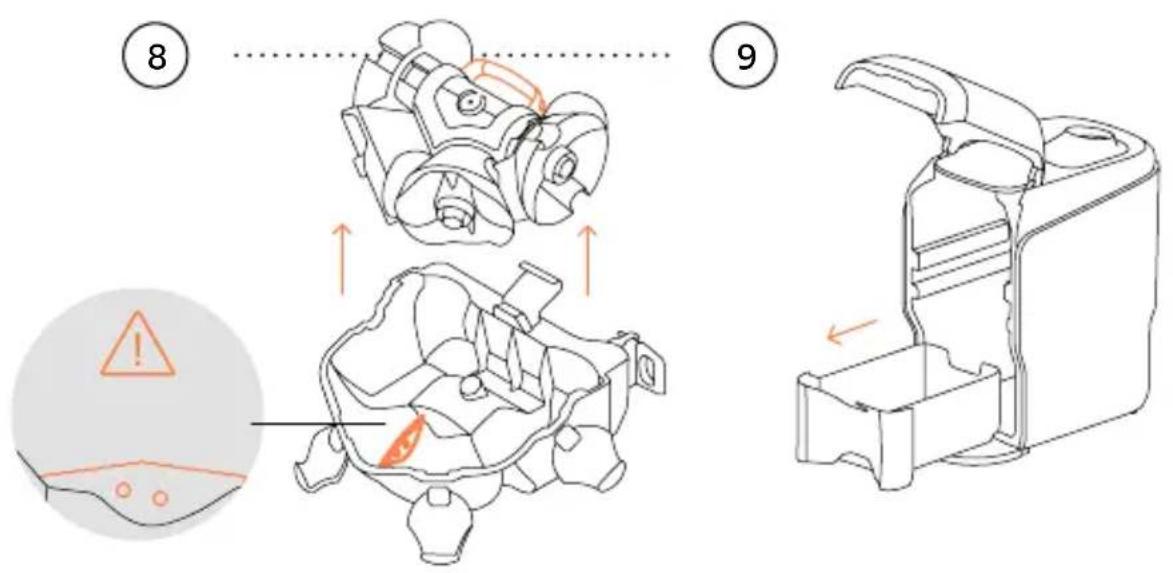
natural_image
Line drawing of a hand holding a spray bottle with a pointed tip (no text or symbols)