SHRM10000 - Smart Home ABUS - Free user manual and instructions
Find the device manual for free SHRM10000 ABUS in PDF.


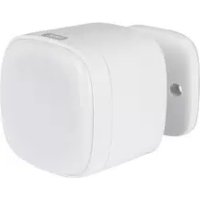
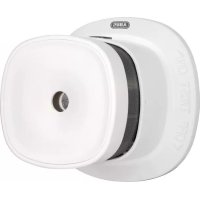
| Product type | Z-Wave smoke detector |
| Brand | ABUS |
| Model | SHRM10000 |
| Category | Smart home |
| Dimensions (L x W x H) | 60 x 60 x 49.2 mm |
| Power supply | Replaceable 3 V CR123A (CR17335) lithium battery |
| Standby consumption | <10 μA |
| Alarm consumption | <90 mA |
| Detection technology | Photoelectric reflection (optical) |
| Sound pressure | 85 dB(A) at 3 m |
| Coverage area | Max. 40 m² per room |
| Operating temperature | 0 °C to 40 °C |
| Atmospheric humidity | <95 % (non-condensing) |
| Radio frequency | 868.42 MHz |
| Protocol | Z-Wave (ad hoc network) |
| Transmission power | <4.5 dBm |
| Mounting location | Ceiling (indoor only) |
| Mute function | 10 minutes (via Test/Mute button) |
| Self-test | Periodic with error message |
| Low battery indicator | Flashing red LED + beep every 53 s |
| Factory reset | Hold Network button for 10 s (battery removed) |
| Service life | 10 years after commissioning |
| Maintenance | Clean air slots by vacuuming/blowing; inspection every 12 ± 3 months |
| Spare parts | Replaceable CR123A (CR17335) battery; supplied battery not guaranteed |
Frequently Asked Questions - SHRM10000 ABUS
User questions about SHRM10000 ABUS
0 question about this device. Answer the ones you know or ask your own.
Ask a new question about this device
Download the instructions for your Smart Home in PDF format for free! Find your manual SHRM10000 - ABUS and take your electronic device back in hand. On this page are published all the documents necessary for the use of your device. SHRM10000 by ABUS.
USER MANUAL SHRM10000 ABUS
Security Tech Germany
natural_image
Line drawing of a kitchen sink with mesh pattern and label 'M KIT PAINT' (no other text or symbols)natural_image
Pure geometric lines forming an L-shape with a central circle (no text or symbols)Deckenunterzüge
natural_image
Technical line drawing of a structural frame with two circular components labeled 'RM' (no text or symbols beyond labels)natural_image
Illustration of a hand holding a tool with a circular component and an upward arrow, no text or symbols present.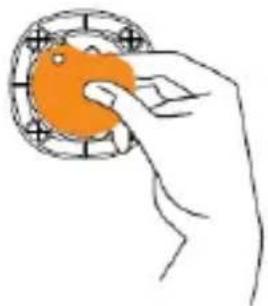
natural_image
Hand holding an orange circular object with grid pattern (no text or symbols)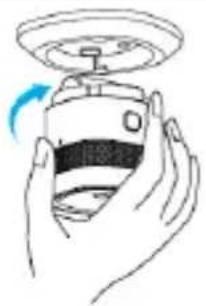
natural_image
Illustration of a hand holding a device with a blue circular arrow indicating rotation (no text or symbols)
natural_image
Hand pressing a button on a small electronic device (no text or symbols visible)
natural_image
Hand pressing a button on a small electronic device (no text or symbols visible)Pflege und Wartung
natural_image
Illustration of a hand using a tool to adjust a component, showing a magnified view (no text or symbols present)Gewährleistung
Security Tech Germany
natural_image
Line drawing of a kitchen sink with mesh pattern and label 'M KIT PAINT' (no other text or symbols)Scope of delivery....7
Device Details 8
Technical data 9
Functional principle and features....10
Behaviour in case of alarm 11
Selecting location 11
Installation and start-up....15
Displays and functions 18
Care and maintenance....21
Warranty....24
Disposal....25
Declaration of conformity 26
Declaration of performance....26
Introduction
Notes to accompany user manual
Dear Customer,
We are delighted that you have chosen our product and thank you for your trust.
You have made a good choice.
This smoke alarm device (hereinafter referred as “detector” or “device” was developed and manufactured with great care in order to help draw your attention to any fire risk in good time. Please read this user manual thoroughly and observe all the instructions provided, as this will enable best use of the device.
This manual serves as the fitting and maintenance instructions.
Intended use
Only use the device for the purpose for which it was built and designed.
Any other use is considered unintended!
This device may only be used for the following purpose:
- Detecting and raising the alarm of household fires or for similar applications in the living areas
In addition the intended use of a Z-Wave smoke detector is to be paired with a Z-Wave hub.
Limitation of liability
Your rights are limited to the repair or replacement of this product in its as-delivered condition. ABUS Security-Center does not assume liability for any special, incidental or consequential damages, including but not limited to Loss of revenue, loss of profit, restrictions in use of the software, loss or recovery of data, costs for replacement facilities, down times, damage to property and claims by third parties, including those arising from contractual or legal claims for recovery or those arising under damage legislation, notwithstanding other restricted or legally implicit warranty provisions or in cases where the limited warranty is not valid, the scope of liability of ABUS Security- Center is limited to the purchase price of the product. The contents of these instructions may be altered without prior notice..
© ABUS Security-Center GmbH & Co. KG, 03/2018
Safety information
Explanation of symbols
The following symbols are used in this manual and on the device:
| Symbol | Signal word | Meaning | |
 | Caution | Indicates a risk of injury or health hazards. | |
 | Caution | Indicates a risk of injury or health hazards caused by electrical voltage. | |
 | Important | Indicates possible damage to the device/accessories. | |
 | Note | Indicates important information. | |
Packaging
- Keep packaging material and small parts away from children. There is a risk of suffocation.
- Remove all packaging material before using the device.
Information on the battery
The device is powered by one 3V CR123A Lithium replaceable battery
- High direct heat may damage the batteries. For this reason, you should not place the device on heat sources (such as radiators) or in direct sunlight.
- The battery cannot be recharged.
- Battery should only be removed in order to be changed, otherwise the device cannot warn you of a serious incident.
- To ensure a long lifespan and safe operation, we recommend using the following high-quality battery: "EVE CR17335 3V (CR123A)"
- After replacing the battery, you must always check that the device is functioning correctly.
Functioning of the device
To ensure that the device functions correctly, please note the following points:
- Do not cover the device.
- Do not paint over the device or cover it with wallpaper.
- Do not, on any account, open or repair the device. Failure to observe this instruction will invalidate the warranty.
- Do not use the device if it has been dropped or damaged in any other way.
Scope of delivery
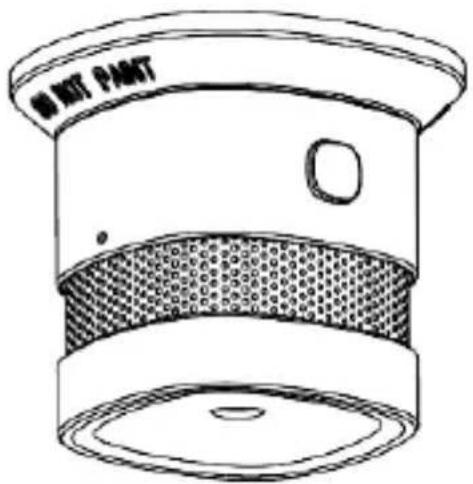
• ABUS smoke alarm device including battery
- User manual
- Installation material
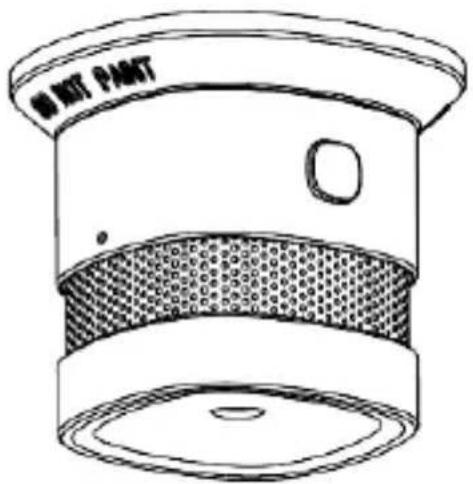
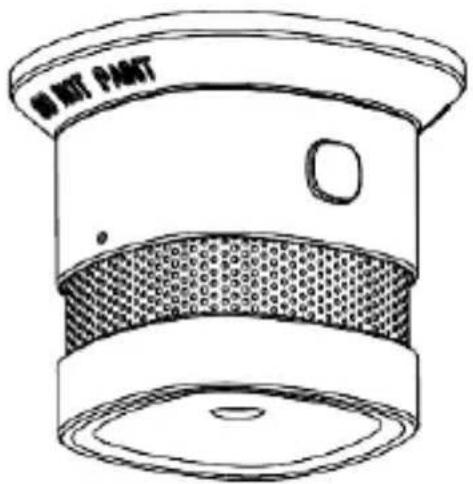
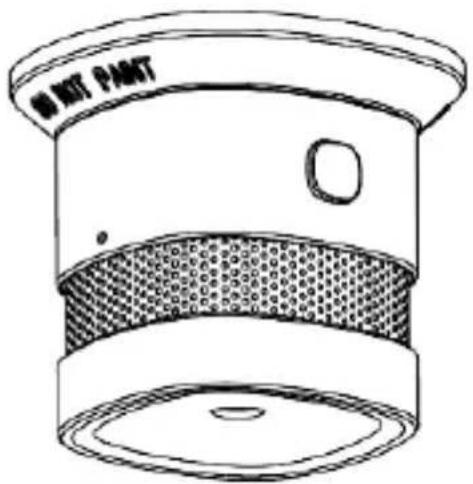
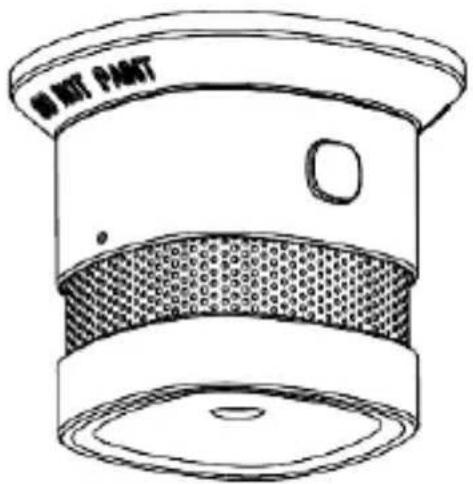
Device Details
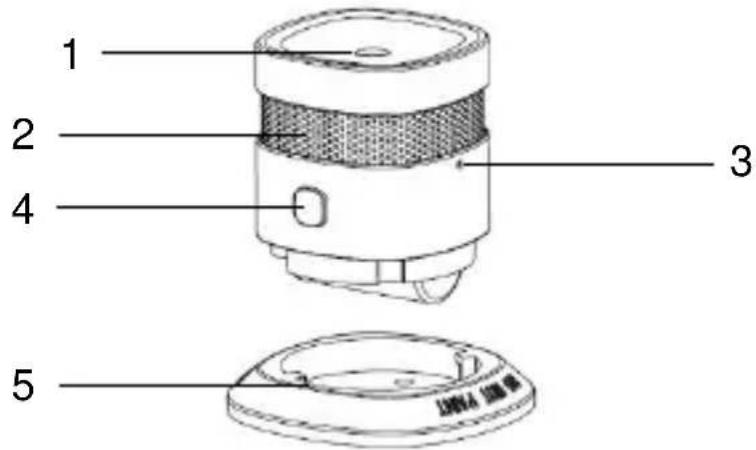
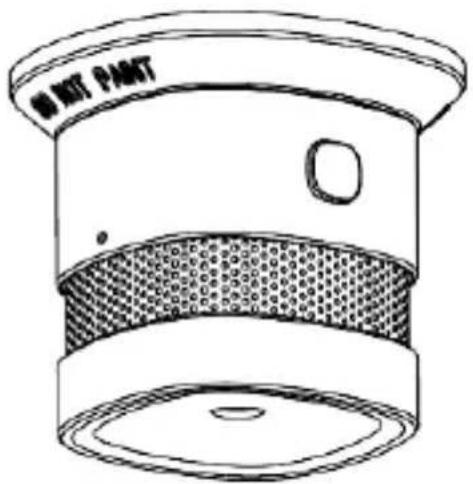
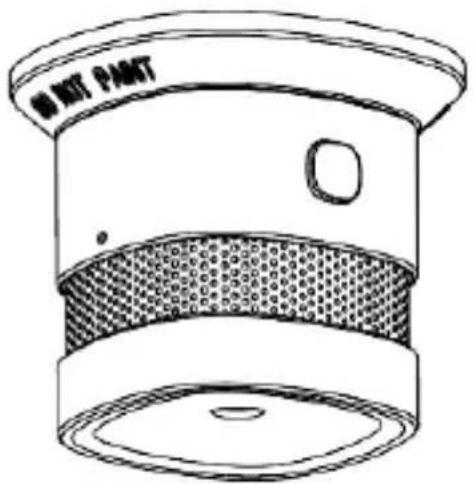
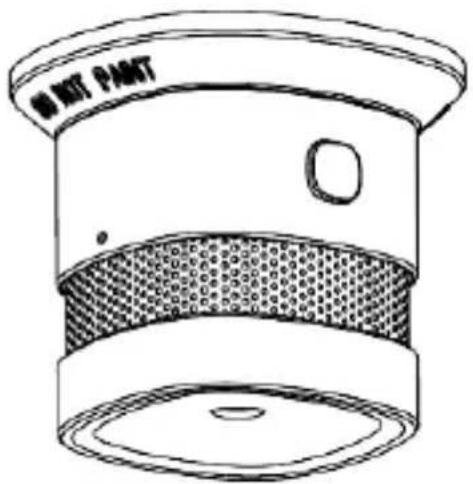
| Item | Name | Comment |
| 1 | Sound outlet opening | |
| 2 | Smoke inlet opening | |
| 3 | Network button | For learning / unlearning with a Z-Wave hub and Factory reset |
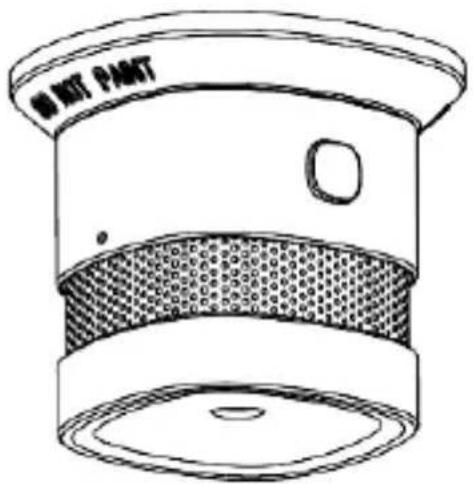
| 4 | Test/hush button, Control Light (LED) | The control light is located under the Test/hush button and shines through it. |
| 5 | Detector base | with mounting holes |
Technical data
| Power supply | DC3V CR123A (CR17335) lithium battery (replaceable) |
| Smoke detection | Photoelectric reflection |
| Power consumption | <10 μA (standby) || <90 mA (alarm) |
| Operating temperature | 0 to 40°C |
| Humidity | < 95% (non-condensing) |
| Sound pressure | >85 dB (A)@3 m |
| Alarm muting | < 10 minutes |
| Detection range | Max. 40 m2 within a room |
| Installation location | Ceiling (only in interior spaces) |
| Radio frequency | 868.42 MHz |
| Networking | Z-Wave Ad-Hoc Networking |
| Dimension | 60x60x49.2mm |
Functional principle and features
- The smoke alarm device does not detect heat, gas, steam, fire or flames.
- People with impaired hearing may not be able to hear the alarm. Alarms with additional optical signalling are available for such cases.
- Particularly high electromagnetic radiation could impair the function of the detector. For this reason, do not install the detector near magnets or devices which produce electromagnetic radiation.
- The smoke alarm device operates in accordance with the optical principle (photoelectric reflection) and features a measurement chamber in which infiltrating smoke particles are measured.
- If the alarm threshold is exceeded, a loud acoustic alarm sounds.
- The alarm is switched off as soon as the measurement chamber is free of smoke again.
Behaviour in case of alarm
(1) Alert all co-residents
(2) Offer assistance to children, disabled and elderly people and invalids.
(3) Close all windows and doors behind you.
(4) Leave the building immediately.
(5) Do not use elevators.
(6) Alert the fire service: Tel. 112.
Selecting location
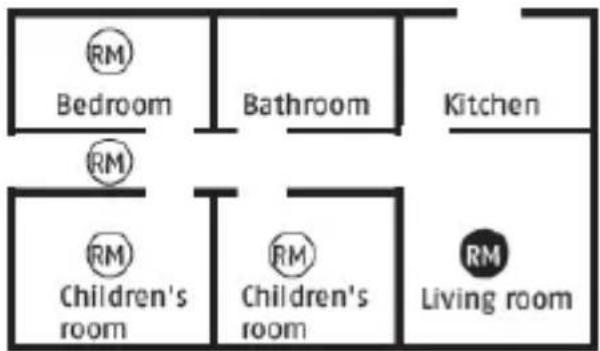
flowchart
graph TD
    A["Room"] --> B["Bedroom"]
    A --> C["Bathroom"]
    A --> D["Kitchen"]
    A --> E["Room"]
    E --> F["Children's room"]
    E --> G["Room"]
    E --> H["Living room"]
    style A fill:#f9f,stroke:#333
    style B fill:#ccf,stroke:#333
    style C fill:#ccf,stroke:#333
    style D fill:#ccf,stroke:#333
    style E fill:#cfc,stroke:#333
    style F fill:#fcc,stroke:#333
    style G fill:#fcc,stroke:#333
    style H fill:#fcc,stroke:#333
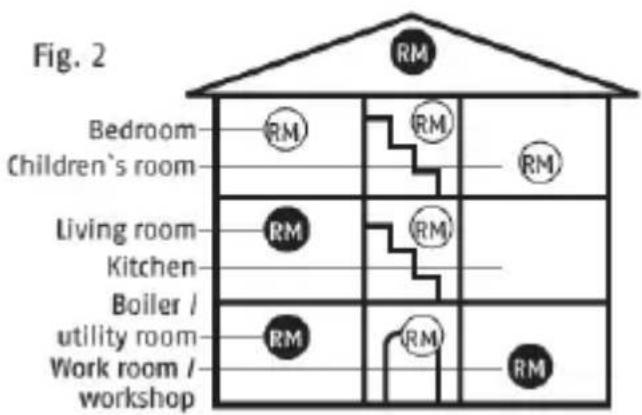
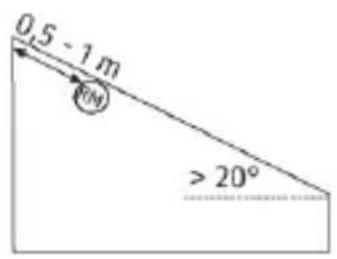
Smoke alarm devices are to be used as the bare minimum RM equipment in all bedrooms, children's rooms and hallways which act as escape routes, and are to be installed in each case in the middle of the room, on the ceiling only (do not install on a wall) (Fig. 2). Select the highest installation location with a minimum distance of 50 cm to surrounding walls, furniture and lamps. In the case of sloping ceilings with an angle of over 20^ , detectors should be installed 0.5 - 1 m away from the highest point. Configuration is optimal RM when devices are located in all other rooms as well as staircases. In washrooms (bathrooms, lavatories etc.), a smoke alarm device is generally not necessary because the risk of fire is low.
Please note the graphics in this manual and the detailed information available in the EN14676 standard “Smoke alarm devices for use in residential buildings, apartments and rooms with similar purposes – Installation, use and maintenance”.
Special installation cases
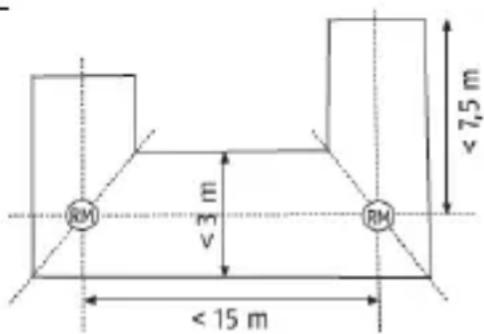
Installation in a hallway with a width of < 3 m
• Maximum distance from the front walls: 7.5 m
• Maximum distance between detectors: 15 m
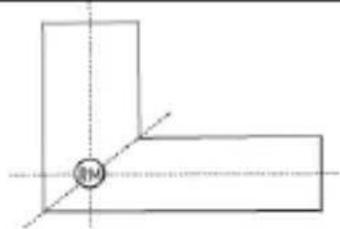
- Installation on the mitre line between intersecting crossings, T-junctions and corner areas
Installation in an L-shaped room
- Total area of < 60m^2 : installation on the mitre line
- Total area of > 60m²: each side is treated as a separate room
natural_image
Pure geometric lines forming an L-shape with a central circle labeled 'M' (no text or symbols beyond the label)Ceiling beams
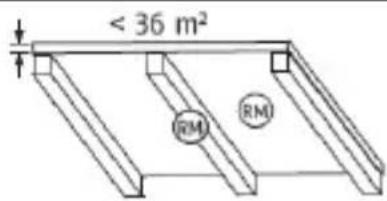
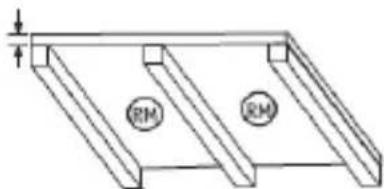
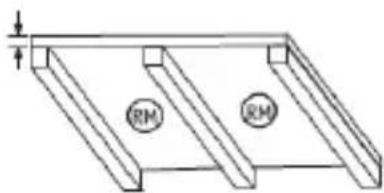
- In the case of ceiling beams measuring > 0.2 m and a total area of < 36 m², detectors should be installed in the centre of the room either on a beam or ceiling panel.
- In the case of ceiling beams measuring > 0.2 m and a total area of > 36 m², detectors should be installed in the centre of each ceiling panel and not on the beams.
natural_image
Technical line drawing of a structural frame with two circular components labeled 'RM' (no text or symbols beyond labels)Mezzanines and landings
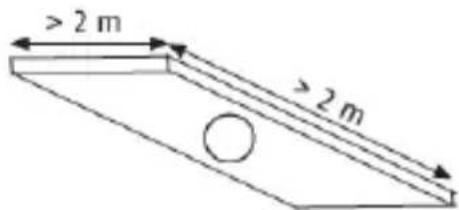
- In the case of mezzanines and landings with a length and width of >2 m and a total area of >16 m², an additional smoke alarm should be installed in the centre of the surface area.
Sloped ceilings
- There are no special requirements for ceilings sloped at an angle of < 20^ .
- In the case of ceilings sloped at an angle of >20^ , detectors should be installed 0.5–1 m away from the highest point.
Partially sloped ceilings
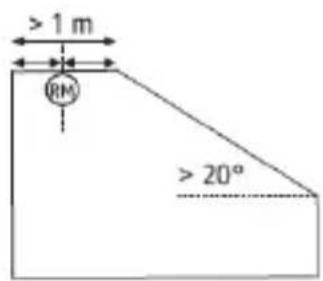
- The instructions for fully sloped ceilings apply for partially sloped ceilings with a horizontal ceiling surface measuring < 1 m in width.
- In the case of partially sloped ceilings with a horizontal ceiling surface measuring > 1 m, detectors should be installed in the centre of the horizontal surface.
Where smoke alarm devices should not be installed
- Outside (use only in closed rooms)
- In rooms in which the alarm could be triggered by disturbance variables (steam, condensation, “normal” smoke, vapour, dust, dirt or grease)
- Next to an air duct or similar ventilation opening (draughts)
- In areas in which the temperature can fall below 0^ C or rise to over 40^ C
- On unstable surfaces with designs that render them unsuitable for installation
Installation and start-up
Take the following steps in the specified order to install the detector on the ceiling.
- Loosen the device from the mounting bracket by turning it anticlockwise.
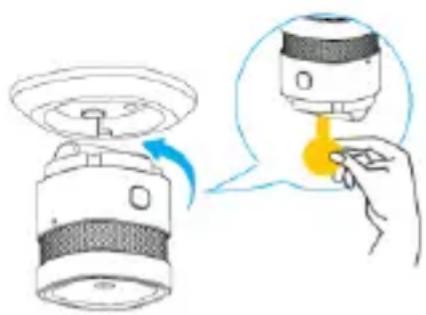
- Remove the battery insulating strip to electrify the device.
Learning / unlearning with Gateway
| Click “+” in the APP to start the learning process with the Gateway. Select the device from the list. | 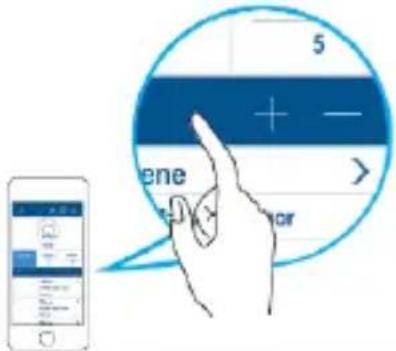 |
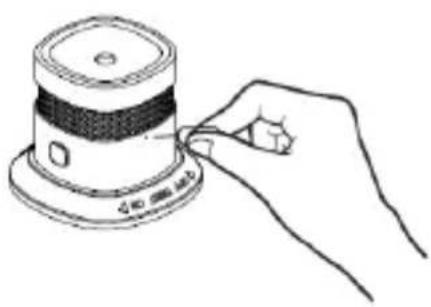
| According to the APP prompt: press the Network button 3 times within 1.5 seconds. Green LED Flash + App Prompt confirms that pairing is successful. (within max. 30 seconds) | 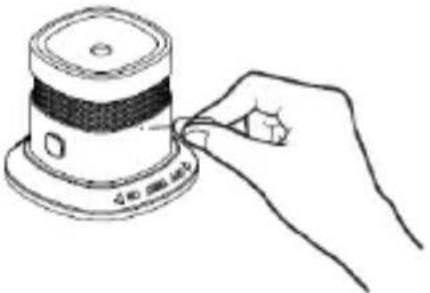 |
| To unlearn the device from the Gateway, click the delete equipment button “-”, press the Network button 3 times within 1.5 seconds. The green light flashes slowly 6 times to confirm device is unlearned. | 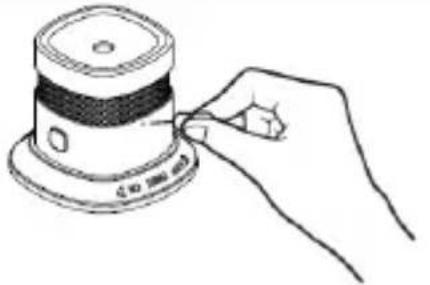 |
Installation
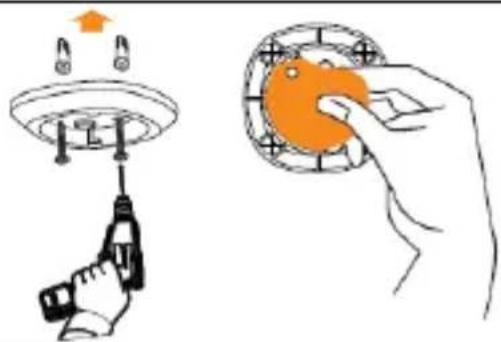
When marking out the drill holes, make sure there are no electrical wires or cables, pipes or other important components behind the mounting location.
-
Fix the bracket onto the ceiling by using screws. (recommended)
-
Alternative: remove the double sided adhesive and stick the bracket onto the ceiling
-
Mount the device on the mounting bracket by turning it clockwise to lock it into place.
natural_image
Illustration showing a hand holding an orange object next to a mechanical component (no text or symbols present)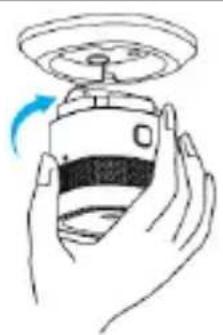
natural_image
Illustration of a hand holding a device with a circular top and a blue arrow indicating rotation (no text or symbols)
Failure to follow the instructions for the selection of a location and installation may result in risk of injury, e.g. from smoke alarm devices falling down.
Displays and functions
Normal state
In the normal state, the red control LED under the housing cover flashes once every 53 seconds and signals that the detector is ready for operation.
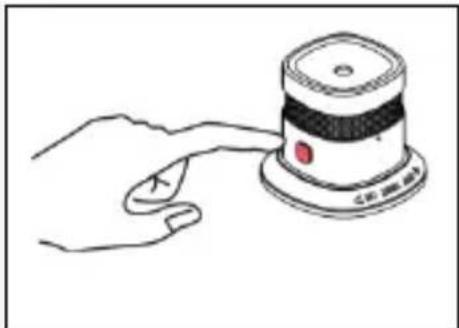
Testing the device electronics
Regularly check the functionality of the smoke alarm device by pressing the Test button. The warning tone signals and the red "ALARM" LED flashes quickly
This does not indicate that smoke is present in the air in the room; it is a confirmation that the smoke alarm device is functioning properly.
natural_image
Hand pressing a button on a device (no text or symbols visible)
Test the functionality of the detector after installation without fail. A regular test is also recommended.
Keep the device at arm's length to protect your hearing.
To carry out a test, press the Test button shortly.
Weak batteries
If the detector's battery charge falls below a certain value, the detector signals this with a Red LED Flash and an acoustic warning tone (every 53 seconds). If this warning signal sounds, the detector batteries must be immediately replaced with new batteries.
From the time of the first battery warning signal, the detector is still operable and completely functional for at least 7 more days.
Self-test with automatic error message
The smoke alarm device periodically runs a self-test.
If the trigger sensitivity of the detector falls below the required minimum threshold (e.g. as a result of excess contamination of the smoke measurement chamber), the detector beeps twice and the red LED flashes every 53 seconds.
If the error message does not clear after the detector has been cleaned, the detector must be replaced immediately (see “Care and maintenance” chapter).
Alarm state: Smoke
If smoke is detected, a loud, pulsing alarm tone sounds and the red LED flashes at the same time at short intervals. In this case, proceed as described in the “Behaviour in case of alarm” chapter.
Alarm muting function (hush mode)
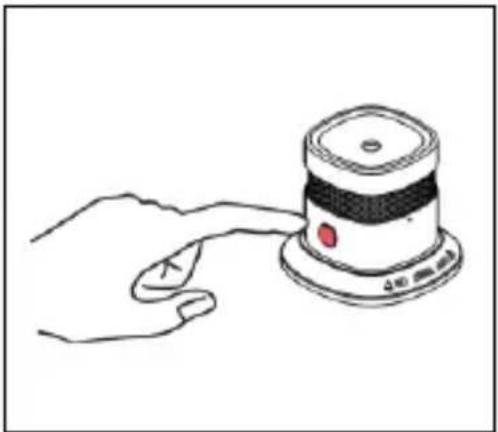
If the detector is in the alarm state, the acoustic alarm can be deactivated for 10 minutes by pressing the Test button.
If the muting function is active, the red LED flashes every 10 seconds.
If smoke is still detected in the smoke measurement chamber after the 10-minute muting period, the acoustic alarm will sound again.
natural_image
Line drawing of a hand pressing a small electronic device with a red button (no text or symbols)Care and maintenance
What should you do in the event of a false alarm?
Possible reasons for a false alarm are: Welding and cutting work, soldering and other high-temperature work, sawing and grinding, dust from construction work or cleaning, extreme electromagnetic effects, and temperature fluctuations which lead to condensation of the humidity in the detector.

- If work which could cause false alarms is being carried out near the detector, the detector should be covered or removed temporarily. After this work is completed, however, it is essential to restore and test the original functionality.
Cleaning
According to German application standard DIN 14676, the functionality of every installed smoke alarm device must be regularly tested and ensured with maintenance and repair work.
This consists of an inspection at least once every 12 ± 3 months including maintenance and function checks of the warning signals.
The measures and results must be documented accordingly.
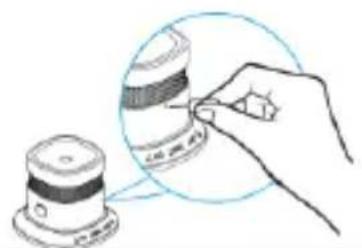
- Dusty detectors must be cleaned. You can clean dust from the air vents of the detector using a vacuum cleaner or compressed air.
- If necessary, you can remove the dust with a brush.
- You can clean the surface using a cloth slightly dampened in soapy water.
- Do not allow water to enter the inside of the device. Do not clean the device in a dishwasher.
- Do not use sharp, pointed, abrasive or corrosive cleaning materials, chemicals or hard brushes.
Maintenance
- The electronic components of every smoke alarm device are subject to ageing processes. In addition, the insect protection grid and smoke measurement chamber will inevitably become soiled over time.
- In order to guarantee the full functionality of the smoke alarm devices, they must be exchanged 10 years after installation at the latest.
Changing the battery
- Turn the device anticlockwise and remove it from the mounting bracket and remove the old battery
- Insert a new battery, ensure that the polarity is correct.
- Test the smoke alarm device. To do so, press and release the test button. The alarm will sound loud short beeps indicating that the smoke detector works normally.
- Turn the detector clockwise onto the mounting bracket
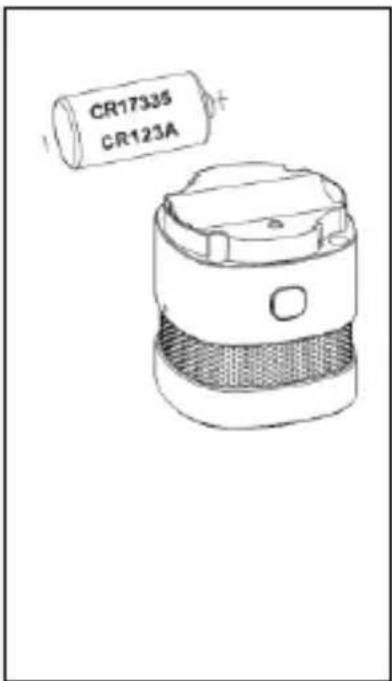
Restore factory settings
Remove the battery from the Smoke detector device, press the Network button and keep it pressed for 10 seconds. Device will restore factory settings.
natural_image
Hand inserting a component into a sensor or sensor device (no text or symbols visible)Warranty
- ABUS products are designed and manufactured with the greatest care and tested according to the applicable regulations.
- The warranty only covers defects caused by material or manufacturing errors at the time of sale. If there are demonstrable material or manufacturing errors, the smoke alarm device will be repaired or replaced at the warrantor's discretion.
- In such cases, the warranty ends when the original warranty period of 2 years expires. All further claims are expressly rejected.
- The warranty does not cover the batteries supplied.
- ABUS will not be held liable for defects and damage caused by external influences (e.g. transport, use of force, operating errors), inappropriate use, normal wear and tear or failure to observe the instructions in this manual.
- In the event of a warranty claim, the original receipt with the date of purchase and a short written description of the problem must be supplied along with the smoke alarm device in question.
- If you discover a defect on your smoke alarm device which existed at the time of purchase, contact your dealer directly within the first two years.
Disposal
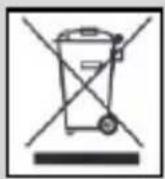
Dispose of the device in accordance with EC Directive 2012/19/EU – WEEE (Waste Electrical and Electronic Equipment). If you have any questions, please contact the municipal authority responsible for disposal. You can get information on collection points for waste equipment from your local authority, from local waste disposal companies or your dealer, for example.
Declaration of conformity
ABUS Security-Center GmbH & Co. KG, Linker Kreuthweg 5, 86444 Affing, Germany, hereby declares that the SHRM10000 device is in compliance with the essential requirements and the relevant provisions of in the following directives:
RED Directive (2014/53/EU)
EMC Directive (2014/30/EU)
RoHS Directive (2011/65/EU).
The declaration of conformity can be obtained from the following address:
ABUS Security-Center GmbH & Co. KG, Linker Kreuthweg 5, 86444 Affing, GERMANY
Declaration of performance
This smoke alarm device is tested and certified as a building product in accordance with regulation EU 305/2011. Production is monitored by regular and independent inspections for continued compliance with legal and standard specifications.
Declaration of performance SHRM10000#2018 can be found here: www.abus.com/ger/Service/Leistungserklaerungen
SHRM10000
Security Tech Germany
natural_image
Line drawing of a kitchen sink with mesh pattern and label 'M KIT PAINT' (no other text or symbols)natural_image
Pure geometric lines forming an L-shape with a central circle (no text or symbols)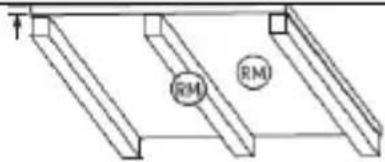
natural_image
Pure technical line drawing of a rectangular frame with two side slats and two circular features labeled 'RM' (no text or symbols beyond labels)natural_image
Illustration of a device being introduced into a sensor, showing the sensor and sensor components (no text or symbols)natural_image
Hand holding a tool with a screwdriver, emitting a light from a ceiling fixture (no text or symbols visible)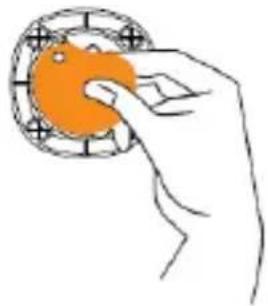
natural_image
Hand holding an orange circular object with a ring, no text or symbols visible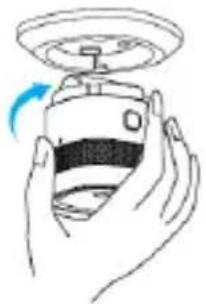
natural_image
Hand holding a device with a circular head and a blue arrow indicating rotation (no text or symbols)
natural_image
Hand pressing a button on a small electronic device (no text or symbols visible)
natural_image
Line drawing of a hand pressing a small electronic device on a base (no text or symbols)natural_image
Hand holding a camera lens with a magnified inset showing the lens detail (no text or symbols)caution
Directive CEM 2014/30/UE,
Directive RoHS 2011/65/UE.
Security Tech Germany
natural_image
Line drawing of a kitchen sink with mesh pattern and label 'M KIT PAINT' (no other text or symbols)natural_image
Pure geometric lines forming an L-shape with a central circle (no text or symbols)dwarsbalken
natural_image
Pure technical line drawing of a rectangular frame with two side slats and two circular markers labeled 'RM' (no text or symbols beyond labels)natural_image
Illustration of a hand holding a tool with a circular component and an upward arrow above it (no text or symbols)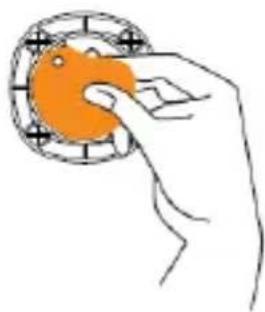
natural_image
Hand holding an orange circular object with a pointer, no text or symbols visible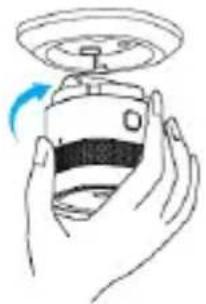
natural_image
Line drawing of a hand holding a device with a circular head and a blue arrow indicating rotation (no text or symbols)
natural_image
Hand pressing a button on a small device (no text or symbols visible)
natural_image
Line drawing of a hand pressing a small electronic device on a surface (no text or symbols)natural_image
Illustration of a hand using a tool to adjust a component on a base (no text or symbols visible)borgstelling
Security Tech Germany
natural_image
Line drawing of a kitchen sink with mesh pattern and label 'M KIT PAINT' (no other text or symbols)natural_image
Pure geometric lines forming an L-shape with a central circle (no text or symbols)travi
natural_image
Pure technical line drawing of a rectangular frame with two side slats and two circular features labeled 'RM' (no text or symbols beyond labels)Gallerie e Piattaforme
natural_image
Illustration of a device being processed with a yellow droplet, showing a hand interacting with the component (no text or symbols present)Teach-in / Teach-out al gateway
natural_image
Illustration showing a hand holding an orange object next to a mechanical device (no text or symbols present)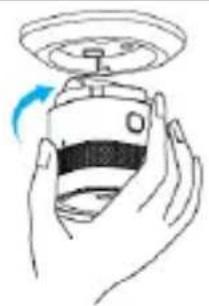
natural_image
Illustration of a hand holding a device with a circular head and a blue arrow indicating rotation (no text or symbols)
natural_image
Hand holding a small electronic device with a button labeled 'C#' (no text or symbols on the device itself)
natural_image
Hand holding a small electronic device with a red button, no visible text or symbolsCura e manutenzione
natural_image
Illustration of a hand using a tool to adjust a component on a base (no text or symbols visible)fideiussione
Security Tech Germany
natural_image
Line drawing of a kitchen sink with mesh pattern and label 'M KIT PAINT' (no other text or symbols)natural_image
Pure geometric lines forming an L-shape with a central circle labeled 'M' (no text or symbols beyond the label)Loftsbjælker
natural_image
Illustration of a device being processed with a yellow droplet, showing a hand interacting with the component (no text or symbols present)natural_image
Illustration showing a hand using a tool to clean an orange circular object, with no text or symbols present.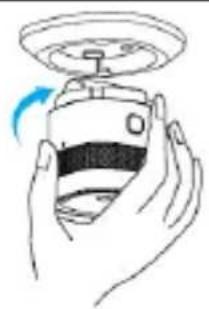
natural_image
Illustration of a hand holding a small electronic device with a circular top and a blue arrow indicating rotation (no text or symbols)
natural_image
Hand pressing a button on a device (no text or symbols visible)
natural_image
Line drawing of a hand pressing a small electronic device on a surface (no text or symbols)natural_image
Hand holding a small object with patterned bands, next to a cylindrical container (no text or symbols visible)Garanti
Security Tech Germany
natural_image
Line drawing of a kitchen sink with mesh pattern and label 'M KIT PAINT' (no other text or symbols)natural_image
Pure geometric lines forming an L-shape with a central circle (no text or symbols)viguetas
natural_image
Illustration of a device being processed with a yellow droplet, showing a hand interacting with the component (no text or symbols present)Teach-in / Teach-out en el gateway
natural_image
Line drawing of a hand holding a small electronic device with a knob (no text or symbols)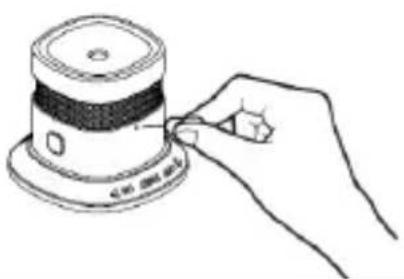
natural_image
Line drawing of a hand inserting a small component into a circular base (no text or symbols)ensamblaje
natural_image
Illustration of a hand holding a tool with a suspended lamp and two illuminated components above (no text or symbols)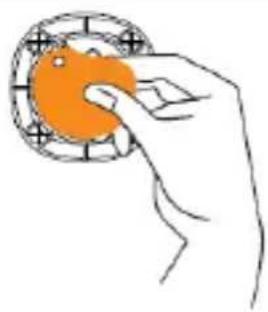
natural_image
Hand holding an orange circular object with grid pattern (no text or symbols)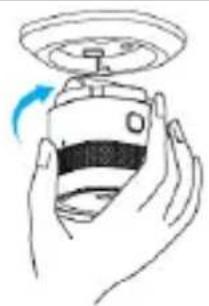
natural_image
Illustration of a hand holding a device with a circular head and a blue arrow indicating rotation (no text or symbols)
natural_image
Hand holding a small electronic device with a button labeled 'C: 100 MHz' (no other text or symbols visible)
natural_image
Hand pressing a button on a small electronic device (no text or symbols visible)natural_image
Illustration of a hand using a tool to adjust a component on a base (no text or symbols visible)garantizar
Directiva CEM 2014/30/UE,
Directiva RoHS 2011/65/EU.
Security Tech Germany
natural_image
Line drawing of a kitchen sink with mesh pattern and label 'M KIT PAINT' (no other text or symbols)natural_image
Pure geometric lines forming an L-shape with a circle labeled 'M' at the center (no text or symbols beyond basic geometry)Takbjälkar
natural_image
Pure technical line drawing of a structural frame with two circular components labeled 'RM' (no text or symbols beyond labels)natural_image
Diagram showing a device being introduced into a sensor or sensor device, with no visible text or symbols.Programmering / avprogrammering med Gateway
natural_image
Line drawing of a hand holding a small electronic device with a button (no text or symbols)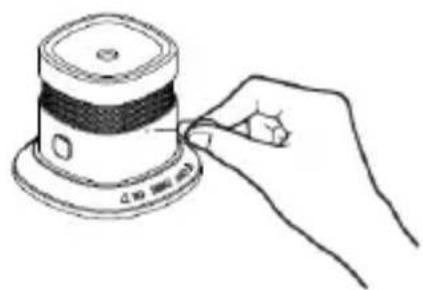
natural_image
Line drawing of a hand holding a cylindrical device with a black-and-white striped top (no text or symbols)Montering
natural_image
Line drawing of a hand pressing a button on a device (no text or symbols visible)
Testa ovillkorligen detektorns funktion efter monteringen. Därutöver rekommenderas regelbunden kontroll.
natural_image
Hand holding a small electronic device with a red button, no visible text or symbolsnatural_image
Illustration of a hand using a tool to adjust a component on a base (no text or symbols visible)Garanti
Security Tech Germany
natural_image
Line drawing of a kitchen sink with mesh pattern and label 'M KIT PAINT' (no other text or symbols)natural_image
Pure geometric lines forming an L-shape with a central circle (no text or symbols)legary
natural_image
Technical line drawing of a structural frame with two circular components labeled 'RM' (no text or symbols beyond labels)Galerie i platformy
natural_image
Illustration of a device being introduced into a sensor or sensor device, showing the sensor and sensor components (no text or symbols present)natural_image
Illustration of a hand holding a tool with a circular component and an upward arrow above it (no text or symbols)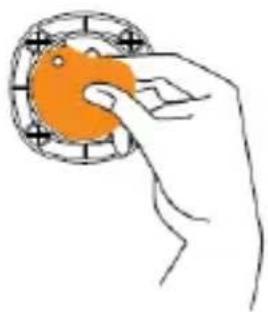
natural_image
Hand holding an orange circular object with a grid pattern (no text or symbols)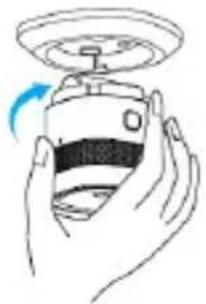
natural_image
Line drawing of a hand holding a device with a circular head and a blue arrow indicating rotation (no text or symbols)
natural_image
Hand pressing a button on a small device (no text or symbols visible)
natural_image
Line drawing of a hand pressing a small electronic device on a surface (no text or symbols)natural_image
Illustration of a hand using a tool to adjust a component, showing a circular inset view (no text or symbols)poręczenie