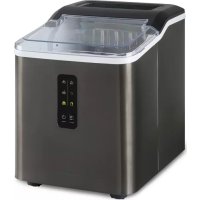
Albaron Supreme - Ice machine Klarstein - Free user manual and instructions
Find the device manual for free Albaron Supreme Klarstein in PDF.


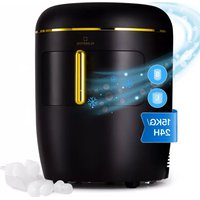
| Product Type | Ice Machine |
| Brand | Klarstein |
| Model | Albaron Supreme |
| Dimensions (W x D x H) | 228 x 307 x 297 mm |
| Net Weight | 7.6 kg |
| Power Supply | 230-240 V ~ 50 Hz, 120 W |
| Daily Production | 12 kg |
| Ice Storage Capacity | 600 g |
| Water Tank Capacity | 1.5 L |
| Refrigerant | R600a (isobutane) |
| Main Functions | Automatic ice making, choice between large and small ice cubes, cleaning function, automatic stop when the basket is full or water is low, delayed restart of 3 minutes |
| Control Panel | Indicator lights (power, add water, ice full, making, cleaning, ice cube size) and POWER and SELECT buttons |
| Cleaning and Maintenance | Regular cleaning of the interior, basket, tank and evaporator with a water-vinegar solution. Drain the tank if unused for a long time. Daily water change recommended. |
| Safety | Automatic stop when basket is full or water is low, restart after 3 minutes, do not immerse in water, do not use external timer, keep away from heat sources |
| Spare Parts and Repairability | Contact customer service for component replacement (solenoid valve, sensors, motor). Only use accessories recommended by the manufacturer. |
| General Information | Household use only. Flat surface. Minimum 150 mm clearance at the back for ventilation. Do not tilt more than 45°. Mineral water recommended, distilled water not recommended. |
Frequently Asked Questions - Albaron Supreme Klarstein
User questions about Albaron Supreme Klarstein
0 question about this device. Answer the ones you know or ask your own.
Ask a new question about this device
Download the instructions for your Ice machine in PDF format for free! Find your manual Albaron Supreme - Klarstein and take your electronic device back in hand. On this page are published all the documents necessary for the use of your device. Albaron Supreme by Klarstein.
USER MANUAL Albaron Supreme Klarstein
area
| Category | Value | | -------- | ----- | | 1 | 100 | | 2 | 100 | | 3 | 100 | | 4 | 100 | | 5 | 100 | | 6 | 100 | | 7 | 100 | | 8 | 100 | | 9 | 100 | | 10 | 100 | | 11 | 100 | | 12 | 100 | | 13 | 100 | | 14 | 100 | | 15 | 100 | | 16 | 100 | | 17 | 100 | | 18 | 100 | | 19 | 100 | | 20 | 100 | | 21 | 100 | | 22 | 100 | | 23 | 100 | | 24 | 100 | | 25 | 100 | | 26 | 100 | | 27 | 100 | | 28 | 100 | | 29 | 100 | | 30 | 100 | | 31 | 100 | | 32 | 100 | | 33 | 100 | | 34 | 100 | | 35 | 100 | | 36 | 100 | | 37 | 100 | | 38 | 100 | | 39 | 100 | | 40 | 100 | | 41 | 100 | | 42 | 100 | | 43 | 100 | | 44 | 100 | | 45 | 100 | | 46 | 100 | | 47 | 100 | | 48 | 100 | | 49 | 100 | | 50 | 100 | | 51 | 100 | | 52 | 100 | | 53 | 100 | | 54 | 100 | | 55 | 100 | | 56 | 100 | | 57 | 100 | | 58 | 100 | | 59 | 100 | | 60 | 100 | | 61 | 100 | | 62 | 100 | | 63 | 100 | | 64 | 100 | | 65 | 100 | | 66 | 100 | | 67 | 100 | | 68 | 100 | | 69 | 100 | | 70 | 100 | | 71 | 100 | | 72 | 100 | | 73 | 100 | | 74 | 100 | | 75 | 100 | | 76 | 100 | | 77 | 100 | | 78 | 100 | | 79 | 100 | | 80 | 100 | | Note: The actual values are not provided in the code. I have used the label 'Value' as a placeholder for the value detection. You would need to run the code to get the actual values from the code list. Please note that the actual values would be the result of this example. You would need to run the code to get the actual values from the code list. You would need to run the code to get the actual values from the code list. You would need to run the code to get the actual values from the code list. You would need to run the code to get the actual values from the code list. You would need to run the code to get the actual values from the code list. You would need to run the code to get the actual values from the code list. You would need to run the code to get the actual values from you would need to run the code. You would need to run the code to get the actual values from you would need to run the code.INHALT
Technische Daten 4
Member of Berlin Brands Group
Handwerkerstr. 11
15366 Dahlwitz-Hoppegarten
Deutschland
natural_image
Symbol of a trash bin crossed with a diagonal line, no text or labels presentBerlin Brands Group UK Limited
PO Box 42
272 Kensington High Street
London, W8 6ND
United Kingdom
Dear Customer,,
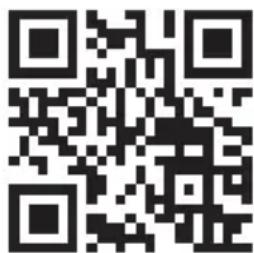
Congratulations on purchasing this device. Please read the following instructions carefully and follow them to prevent possible damages. We assume no liability for damage caused by disregard of the instructions and improper use. Scan the QR code to get access to the latest user manual and more product information.
CONTENTS
Technical DAta 16
Safety Instructions 17
Product Description 19
Control Panel Functions 20
Operating Instructions 21
Cleaning and Care 22
Troubleshooting 23
Disposal Considerations 24
Manufacturer & Importer (UK) 24
TECHNICAL DATA
| Item number 10041360 | |
| Power supply 230-240 V ~ 50 Hz | |
| Power consumption 120 W | |
| Daily ice output 12 kg | |
| Ice storage capacity 600 g | |
| Water tank capacity 1.5 L | |
| Refrigerant R600a | |
| Dimensions 228X 307 X 297mm | |
| Weight 7.6 kg | |
SAFETY INSTRUCTIONS
- Place the device on a level surface.
- Use the device indoors only.
- Unplug the device from the power outlet when not in use.
- Never immerse the power cord and plug in water or other liquids.
- Only use accessories that are expressly recommended by the manufacturer for this device.
- Do not place the device directly under an electrical outlet.
- Do not let the power cord hang from the work surface so that children cannot pull on it.
- Do not overfill the unit, otherwise short circuits and electric shocks may occur.
- Make sure that the lid is always closed during operation.
- Do not pull the plug out of the outlet by the cord, but hold it by hand when unplugging.
- Use this device only for its intended purpose. We accept no liability for damage caused by disregarding the instructions and improper use. Only use the device in the household.
- Do not connect the device to a timer or remote-controlled socket.
- Do not immerse the device in water.
- If the power cord or plug is damaged, it must be replaced by the manufacturer, an authorized service centre, or a similarly qualified person.
- Follow local regulations for disposal of equipment containing flammable gas.
- Do not store highly flammable or explosive substances in the device.
- Fill the device only with potable water.
- Children from the age of 8, mentally, sensory and physically impaired persons may only use the device if they have been familiarized in detail with the functions and safety precautions by a supervisor responsible for them beforehand and understand the associated risks.
This appliance contains the coolant isobutane (R600a), a natural gas which is environmentally friendly. Although it is flammable, it does not damage the ozone layer and does not increase the greenhouse effect. The use of this coolant has, however, led to a slight increase in the noise level of the appliance. In addition to the noise of the compressor, you might be able to hear the coolant flowing around the system. This is unavoidable, and does not have any adverse effect on the performance of the appliance. Care must be taken during the transportation and setting up of the appliance that no parts of the cooling system are damaged. Leaking coolant can damage the eyes.
WARNING
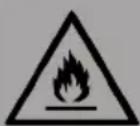
Fire hazard due to improper disposal! Please observe the local regulations for the disposal of appliances containing flammable refrigerants and gases.
- Keep ventilation openings in the unit housing free of obstacles.
- Do not damage the refrigerant circuit.
- Do not use any mechanical devices or other means to accelerate the defrosting process or the ice recovery process.
- Do not use other types of electrical appliances inside the ice cube machine.
Special Notes
- When positioning the unit, make sure that the power cord is not pinched or damaged.
- Make sure that there are no multiple sockets or power supplies on the back of the unit.
To avoid contamination of food, please follow the instructions below:
- Regularly clean surfaces that may come into contact with food. Clean the water drain regularly.
- If the appliance contains a water tank, clean it if it has not been used for 48 hours. Rinse the tank if no water has been removed for 5 days.
WARNING
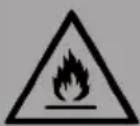
When using, servicing and disposing of the unit, pay attention to the left symbol on the rear of the unit or on the compressor. This symbol warns of possible fires. There are flammable substances in the refrigerant lines and in the compressor. Keep the appliance away from sources of fire during use, maintenance and disposal.
- During transportation, do not tilt the machine more than 45 degrees, do not reverse the machine. This may damage the compressor and the sealing system.
- Remove all packing materials, check the machine carefully and make sure that the machine, power cord and plug are normal.
- The machine should be on a level surface. To ensure sufficient ventilation, the distance of the back of ice maker to the wall should be at least 150 mm, it should be away from the oven, radiator or other heat source.
- Before using the machine for the first time, place the machine and leave the transparent cover open for at least two hours.
- Make sure that the home voltage is consistent with the voltage indicated by the machine.
• Distilled water is not allowed. Mineral water is recommended. - When the indoor temperature is lower than 15 □, small ice is recommended. When the indoor temperature is higher than 30 □, large ice is recommended.
PRODUCT DESCRIPTION
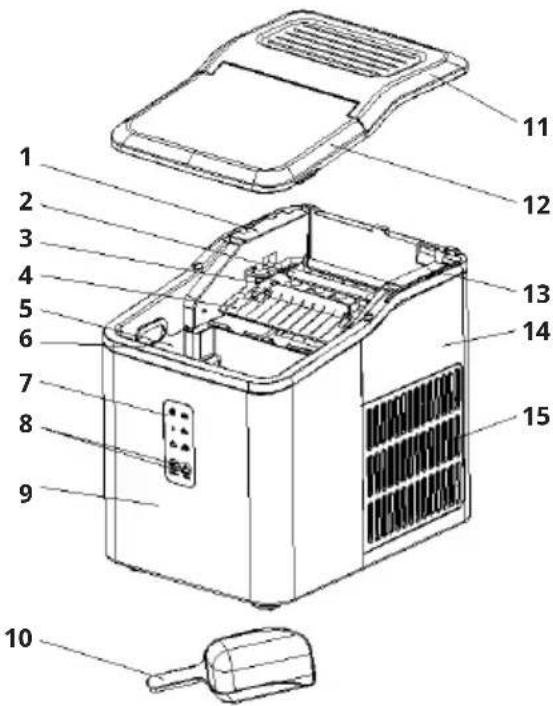
1 Micro switch bracket
2 Evaporator
3 Water box
4 Ice shovel board
5 Ice collecting tray
6 Water tank
7 Control panel
8 Buttons
9 Front housing
10 Ice shovel
11 Top cover
12 Transparent lid
13 Motor mount
14 Back housing
15 Air vent
CONTROL PANEL FUNCTIONS
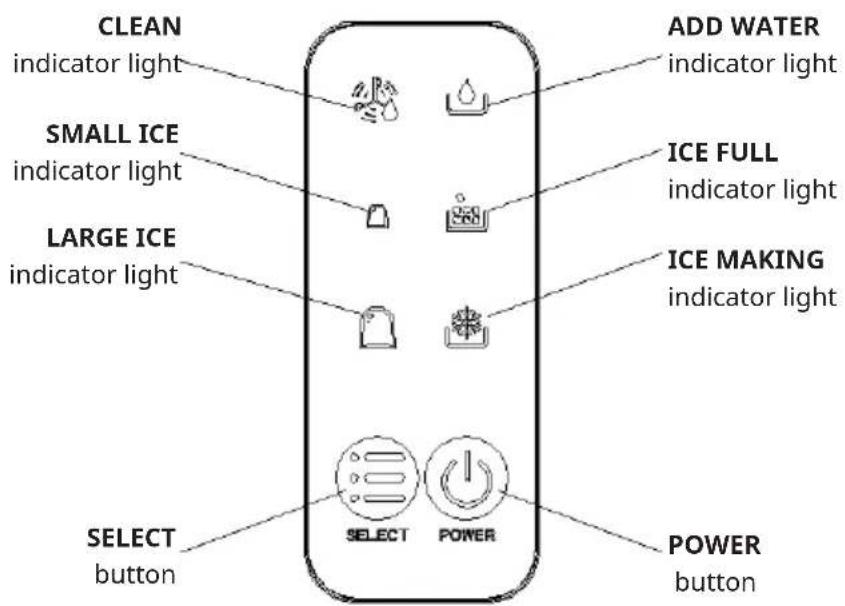
POWER
Plug in the power and the machine is in standby mode. Press the POWER button. The "POWER" indicator light is always being on, then the machine enters the operating state and the default to mode is large ice. The "LARGE ICE" indicator light is always on, the ice block will be made automatically. After the ice making is completed, the deicing will be carried out, and then the ice shoveling function will be entered, and so on.
SELECT
Plug in the power, turn on power switch and press the SELECT button to select large ice, small ice and cleaning mode. Select any function, the corresponding function indicator light flashes for 5 seconds, and then automatically confirms and switches to the function, and the corresponding function indicator is always on. In standby mode, the SELECT button is invalid for this operation. When the indoor temperature is lower than 15 ☐, small ice is recommended. When the indoor temperature is higher than 30 ☐, large ice is recommended.
CLEANING FUNCTION
Plug in the power, press on the POWER button turns on the machine, then press the SELECT button to switch to the cleaning function, and the product cleaning function starts. The POWER indicator light and CLEANING indicator light are always on. Do not disconnect the power supply during the cleaning. After the cleaning, the product automatically enters the standby mode.
When the "ADD WATER" indicator light flashes, it means that there is water shortage in the water tank. You need to add water and press the POWER button to restart the machine.
Ice full alarm
When the ice reaches the maximum capacity of the ice storage container, the "ICE FULL" indicator light flashes, and the machine stops. At this time, the ice needs to be poured out. When the ice position is lower than the full sensor position, the machine will restart automatically.
ADD WATER
ICE FULL
OPERATING INSTRUCTIONS
Step 1
Open the lid and take out the ice collecting tray and add water to the reservoir.
Note: There is a maximum scale MAX in the reservoir. The water should not exceed the MAX position. If the water exceeds the maximum scale MAX, you need to open the bottom drain plug, release the excess water, and cover with a transparent cover.
Step 2
Plug in the power and press the power button to start the machine.
- The three cycles used for the first time, the ice produced is small and irregular.
- When the ice collecting tray is full, please take out the ice immediately, do not let the ice overflow the ice collecting tray.
CLEANING AND CARE
- Clean the inner liner, ice collecting tray, water box, ice shovel and evaporator frequently. When cleaning, unplug the unit and remove the ice cubes. Use a diluted solution of water and vinegar to clean the inside and the outside surface of the ice maker. Do not spray ice maker with chemicals or diluted agents such as acids, gasoline or oil. Rinse thoroughly before starting.
- Keep ventilation openings in the appliance enclosure, or in the built-in structure, clear of obstruction. Do not use mechanical devices or other means to accelerate the defrosting process, other than those recommended by the manufacturer.
- Reuse the machine after being idled for a period of time. It may not have enough water to pump for air blockage. In this case, the water shortage indicator “ADD WATER” will light up, just repress POWER button to restart the ice maker.
- To ensure the cleanness of ice, please change water for water reservoir at least once one day. If do not use for a long time, please drain the water out and clean it up.
- If the compressor takes a strike action for shortage water, fully water or interruption of power supply, it will delay for 3 minutes to start up after restarted.
- Always use fresh water before starting ice production either at initial installation or after a long shut-off period.
TROUBLESHOOTING
- Please note, if a power failure occurs due to disconnection of the power cord, or the power button has been pushed off during an ice making cycle, small ice chips may formed and lodge in the automatic shovel causing it to jam. If this occurs, the ice chips may be removed by disconnecting the power cord and gently pushing the shovel to the rear of the cabinet and removing the ice chips, then restarting.
- Please check if the water reservoir is flat when the ice shovel can not remove the ice to ice basket. If not, please push the ice shovel gently by finger, then press POWER button to restart.
| PROBLEM POSSIBLE CAUSE SUGGESTED SOLUTIONS | ||
| The compressor works abnormally with a buzzing noise. | The voltage is lower than recommended. | Stop the ice maker and do not restart until the voltage is normal. |
| Water shortage indicator light is on. | 1. There is no water.2. The pump is full of air. | 1. Add to some water until it reaches MAX position.2. Press POWER button to restart. |
| Indicator lights on control panel are not on. | 1. No power.2. Blown fuse. | Replace fuse. / Turn power on. |
| The ice made is too large and with pieces sticking together. | Ice of previous cycles left in the water tray | Take out the ice under the standby state. |
| The ice making process was correct, but no ice came out. | 1. The compressor has no refrigerant2. Compressor damaged3. Fan motor damaged | Call the service hotline. |
| All indicators twinkle simultaneously. | 1. Water tray is blocked by ice cube.2. The motor is stuck, or the motor falls off, or the motor is damaged.3. Micro switch is damaged. | 1. Unplug the power to take out the ice which blocking the tray, then plug the power and press the POWER button, the machine will restart 3minutes later.2. Call the service hotline. |
| The machine has been working, but the water has been warming. | Solenoid broke down Replace the solenoid valve. | |
| When the ice is full, the machine does not display the ICE FULL Icon | 1. Ice full sensor damaged2. Sunlight interference | 1. Replace the ice full sensor.2. Making ice indoor.3. Call the service hotline. |
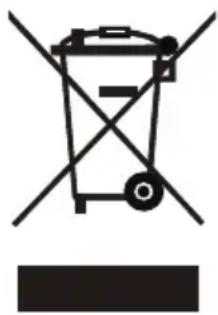
DISPOSAL CONSIDERATIONS
natural_image
Symbol of a trash bin with crossed lines indicating no waste, and a solid rectangle below (no text or labels)If there is a legal regulation for the disposal of electrical and electronic devices in your country, this symbol on the product or on the packaging indicates that this product must not be disposed of with household waste. Instead, it must be taken to a collection point for the recycling of electrical and electronic equipment. By disposing of it in accordance with the rules, you are protecting the environment and the health of your fellow human beings from negative consequences. For information about the recycling and disposal of this product, please contact your local authority or your household waste disposal service.
MANUFACTURER & IMPORTER (UK)
Manufacturer:
Chal-Tec GmbH, Wallstrasse 16, 10179 Berlin, Germany.
Importer for Great Britain:
Berlin Brands Group UK Limited
PO Box 42
272 Kensington High Street
London, W8 6ND
United Kingdom
Cher client, chère cliente,
SOMMAIRE
Fiche technique 26
natural_image
Symbol of a trash bin with crossed lines indicating no waste or discharge, and a solid black rectangle below (no text or labels)Berlin Brands Group UK Limited
PO Box 42
272 Kensington High Street
London, W8 6ND
United Kingdom
Gentile cliente,
INDICE
Dati tecnici 36
natural_image
Symbol of a trash bin with crossed x- and y-axes, no text or labels presentPRODUTTORE E IMPORTATORE (UK)
Produttore:
Chal-Tec GmbH, Wallstraße 16, 10179 Berlino, Germania.
Berlin Brands Group UK Limited
PO Box 42
272 Kensington High Street
London, W8 6ND
United Kingdom
Estimado cliente:
CONTENIDO
Datos técnicos 46
natural_image
Symbol of a trash bin with crossed lines indicating no waste or discharge, and a solid black rectangle below (no text or labels)Berlin Brands Group UK Limited
PO Box 42
272 Kensington High Street
London, W8 6ND
United Kingdom

area
| Category | Value | | -------- | ----- | | 1 | 100 | | 2 | 100 | | 3 | 100 | | 4 | 100 | | 5 | 100 | | 6 | 100 | | 7 | 100 | | 8 | 100 | | 9 | 100 | | 10 | 100 | | 11 | 100 | | 12 | 100 | | 13 | 100 | | 14 | 100 | | 15 | 100 | | 16 | 100 | | 17 | 100 | | 18 | 100 | | 19 | 100 | | 20 | 100 | | 21 | 100 | | 22 | 100 | | 23 | 100 | | 24 | 100 | | 25 | 100 | | 26 | 100 | | 27 | 100 | | 28 | 100 | | 29 | 100 | | 30 | 100 | | 31 | 100 | | 32 | 100 | | 33 | 100 | | 34 | 100 | | 35 | 100 | | 36 | 100 | | 37 | 100 | | 38 | 100 | | 39 | 100 | | 40 | 100 | | 41 | 100 | | 42 | 100 | | 43 | 100 | | 44 | 100 | | 45 | 100 | | 46 | 100 | | 47 | 100 | | 48 | 100 | | 49 | 100 | | 50 | 100 | | 51 | 100 | | 52 | 100 | | 53 | 100 | | 54 | 100 | | 55 | 100 | | 56 | 100 | | 57 | 100 | | 58 | 100 | | 59 | 100 | | 60 | 100 | | 61 | 100 | | 62 | 100 | | 63 | 100 | | 64 | 100 | | 65 | 100 | | 66 | 100 | | 67 | 100 | | 68 | 100 | | 69 | 100 | | 70 | 100 | | 71 | 100 | | 72 | 100 | | 73 | 100 | | 74 | 100 | | 75 | 100 | | 76 | 100 | | 77 | 100 | | 78 | 100 | | 79 | 100 | | 80 | 100 | | Note: The actual values are not provided in the code. I have used the label 'Value' as a placeholder for the value detection. You would need to run the code to get the actual values from the code list. Please note that the actual values would be the result of this example. You would need to run the code to get the actual values from the code list. You would need to run the code to get the actual values from the code list. You would need to run the code to get the actual values from the code list. You would need to run the code to get the actual values from the code list. You would need to run the code to get the actual values from the code list. You would need to run the code to get the actual values from the code list. You would need to run the code to get the actual values from you would need to run the code. You would need to run the code to get the actual values from you would need to run the code.
KLARSTEIN
- INHALT
- Member of Berlin Brands Group
- Dahlwitz-Hoppegarten
- Dear Customer,,
- CONTENTS
- SAFETY INSTRUCTIONS
- WARNING
- Special Notes
- PRODUCT DESCRIPTION
- CONTROL PANEL FUNCTIONS
- POWER
- SELECT
- CLEANING FUNCTION
- Ice full alarm
- OPERATING INSTRUCTIONS
- Step 1
- Step 2
- CLEANING AND CARE
- TROUBLESHOOTING
- DISPOSAL CONSIDERATIONS
- MANUFACTURER & IMPORTER (UK)
- Manufacturer:
- Importer for Great Britain:
- SOMMAIRE
- Gentile cliente,
- INDICE
- PRODUTTORE E IMPORTATORE (UK)
- Produttore:
- Estimado cliente:
- CONTENIDO
- KLARSTEIN
Brand : Klarstein
Model : Albaron Supreme
Category : Ice machine