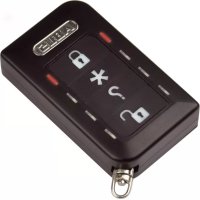
FUBE50015 - Alarm system ABUS - Free user manual and instructions
Find the device manual for free FUBE50015 ABUS in PDF.



| Product type | Wireless remote control for alarm system |
| Brand | ABUS |
| Model | FUBE50015 |
| Frequency | 868.6625 MHz |
| Transmission power | 10 mW (amplifier output) |
| Display | 8 status LEDs (red/green) |
| Free field range | approx. 200 m |
| Indoor range | Variable depending on environmental conditions |
| Power supply | CR2450 3 V lithium battery |
| Low battery threshold | <2.4 V |
| Operating temperature | -10 °C to +40 °C |
| Humidity | 75 % max. (non-condensing) |
| Dimensions (W x H x D) | 36.2 x 62 x 17 mm |
| Weight | 35 g |
| Security grade | 2 (EN50131-1:2009) |
| Environmental class | II (EN50131-1:2009) |
| Main functions | Activation/deactivation of alarm system, status indication, panic function, control of 868 MHz transceivers |
| Coding technology | Rolling code (compatible with Secvest FUAA50xxx and FU800x) |
| Maintenance | Replace CR2450 battery; avoid contact with water |
| Cleaning | Wipe with a dry, lint-free cloth |
| Safety | Anti-copy rolling code, not waterproof |
| Spare parts and repairability | Replaceable CR2450 battery; no spare parts available |
| General information | Compliant with EN50131-1,3,5-3,6; RED, EMC, RoHS, WEEE, ErP, BT, general safety directives |
| Software version | V3.1 (displayed by LEDs) |
Frequently Asked Questions - FUBE50015 ABUS
User questions about FUBE50015 ABUS
0 question about this device. Answer the ones you know or ask your own.
Ask a new question about this device
Download the instructions for your Alarm system in PDF format for free! Find your manual FUBE50015 - ABUS and take your electronic device back in hand. On this page are published all the documents necessary for the use of your device. FUBE50015 by ABUS.
USER MANUAL FUBE50015 ABUS
Security Tech Germany
natural_image
Symbol of a trash bin crossed with a diagonal line, representing waste or disposal (no text or labels)text_image
Technical diagram of a mechanical device with labeled parts 1, 2, and 3, showing internal components and directional arrows.Security Tech Germany
text_image
ABUS

PEACE OF MIND AND SECURITY – THANKS TO THE ROLLING CODE
This remote control works using secure rolling code technology to provide optimum protection against code scanning and code grabbing in order to prevent unauthorised access.
We are constantly developing our product range in order to provide our customers with optimal, safe products incorporating state-of-the-art technology. We have used this new software to implement a rolling code procedure and optimise processes
The rolling code procedure is compatible with all Secvest FUAA50xxx.
The rolling code procedure can also be switched off. The remote control then functions like an FU8100 or FUBE50010-13. This remote control is therefore then compatible with Secvest FU8000 and also with FUAA50xxx.
Details on switching can be found in this manual starting on page 61.
Preface
Dear customer,
Thank you for purchasing this wireless remote control. In choosing our product, you now have a piece of equipment that is built according to state-of-the-art technology.
This document refers to the V3.1 software version of the wireless remote control.
This user guide contains important installation and operation information. Store this user guide in a safe place for future reference. This user guide belongs to this product – bear this in mind if you pass on this product to others.
Conformity
Hereby, ABUS Security-Center GmbH & Co. KG declares that the radio equipment type FUBE50015 is in compliance with Directive 2014/53/EU.
The full text of the EU declaration of conformity is available at the following internet address: www.abus.com search: FUBE50015/Downloads.
The declaration of conformity can be obtained from the following address: ABUS Security-Center GmbH & Co. KG, Linker Kreuthweg 5, 86444 Affing, GERMANY
Intended use

Read the notes and advice in this user guide carefully. If you do not follow these instructions, your guarantee claim becomes invalid. No liability can be accepted for resulting damages. No part of the product may be changed or modified in any way. The remote control is not waterproof. Please avoid direct contact with water. Everything possible has been done to ensure that the content of this user guide is correct. However, neither the author nor ABUS Security-Center GmbH & Co. KG can be held liable for loss or damages caused by incorrect or improper use or failure to observe the safety instructions and warnings. We reserve the right to make changes to these instructions without prior notice.
Refer to the end of the user guide for more notes and information on operating the wireless remote control. [beginning on page 61]
Information on the battery
The device is supplied with direct current from a 3V lithium battery. To guarantee a long service life and avoid fire and injury, please note the following:
- Do not dispose of the battery in domestic waste.
- The battery must not be directly exposed to heat or sunlight, and must not be stored in a place with a very high temperature.
- The battery must not be burned.
- The battery must not come into contact with water.
- The battery must not be dismantled, pierced or otherwise damaged.
- The battery contacts must not be short-circuited.
- The battery must be kept away from small children.
- The battery cannot be recharged.
Packaging
Keep packaging material and small parts away from children. There is a risk of suffocation.
Disposal
Disposal as per directive WEEE 2012/19/EU
natural_image
Symbol of a trash bin crossed with a diagonal line, representing no waste or discharge (no text or labels)The product contains valuable raw materials. At the end of its service life, dispose of the product according to the applicable legal requirements. Within the EU, the product and its accessories must be collected and disposed of separately. Devices displaying this symbol may not be disposed of as domestic waste. Please contact your dealer or dispose of the products at the local collection point for electronic waste.
Features
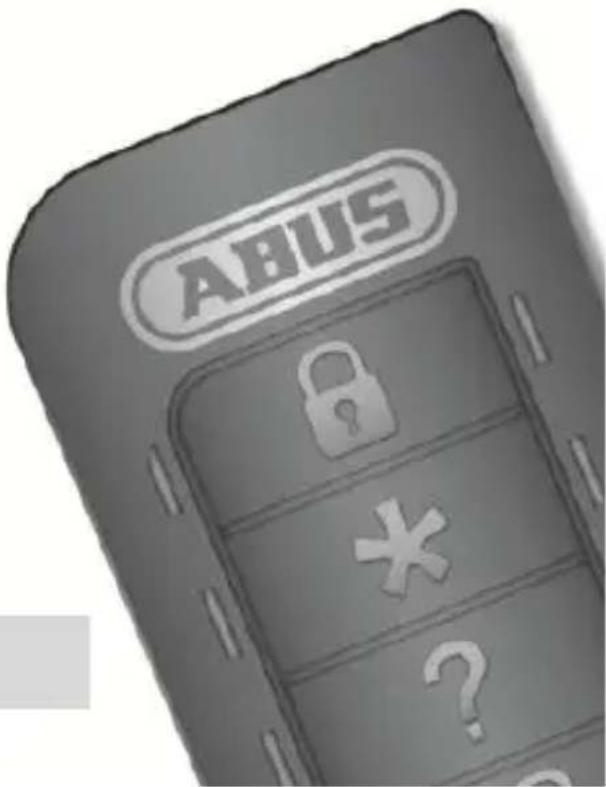
The wireless remote control is used for arming and disarming Secvest alarm systems FUAA50xxx and FU800x. It indicates the current status of the alarm system. An output can also be activated as an option. The wireless remote control has a panic feature. This can also be used for controlling 868 MHz transceivers in the Secvest product range.
Technical data
Wireless frequency: 868.6625 MHz
Transmission power: max. 10 mW (amplifier output)
Display: 8 status LEDs
Range (outdoors): approx. 200 m
Range (indoors): Depending on ambient conditions
Power supply: Lithium battery type / CR 2450 Li-Mn 3V
Battery error message: <2.4 V ("Low battery" threshold)
Operating temperature: -10°C to +40°C
Humidity: max. 75% (non-condensing)
Dimension (WxHxD): 36.2 x 62 x 17 mm
Weight: 35 g
Security level: 2 (EN50131-1+A1:2009, Section 6)
Environmental class: II (EN50131-1+A1:2009, Section 7)
Standards, compliance: EN50131-1, 3, 5-3, 6
EU directives: RED: 2014/53/EU, EMV: 2014/30/EU,
RoHS: 2011/65/EU, WEEE: 2012/19/EU, ErP: 2009/125/EC, Low
Voltage: 2014/35/EU, General Safety: 2001/95/EC
Operation
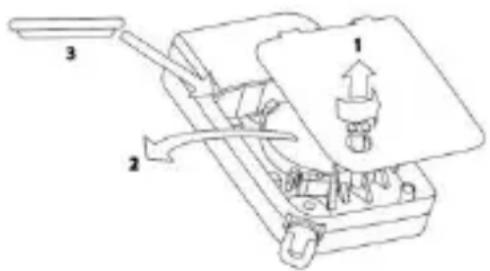
Inserting or changing the battery
text_image
Technical diagram of a mechanical device with labeled parts 1, 2, and 3, showing internal components and directional arrows.Before the wireless remote control can be used, the battery has to be inserted. When inserting the battery, all the LED pairs light up red and green one after another which show that all the LEDs are working properly.
Reading the software version
The software version of the remote control is then shown by the two LEDs at the top. The main version is shown by the flashing red LED and the sub version is shown by the flashing green LED.
Learning in
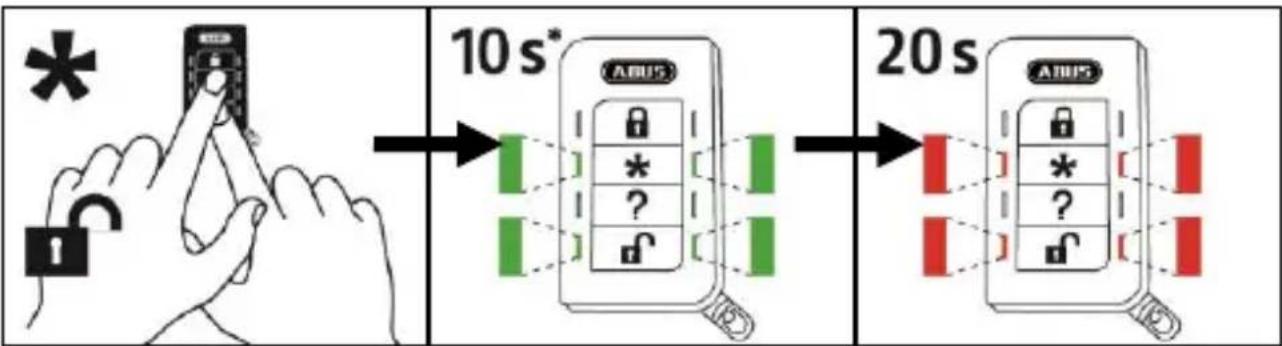
Follow the steps described in the user guide for the compatible component. The “*” button can be used for “arming internally” or for switching an output. Find out more details from the user guide for the compatible component.
Customer service and support
End consumer
Please consult your dealer or installer if you have any questions.
Dealer/installer
Consult our website for product information.
© ABUS Security-Center GmbH & Co. KG, May 2017

Security Tech Germany
FUBE50015 NOTICE D'UTILISATION
[UK] User Guide 11
natural_image
Symbol of a trash bin crossed with a diagonal line, representing waste sorting or restriction (no text present)text_image
Technical diagram of a mechanical device with labeled parts 1, 2, and 3, showing internal components and directional arrows.Security Tech Germany
FUBE50015 GEBRUIKERSHANDLEIDING
[UK] User Guide 11
natural_image
Symbol of a trash bin crossed out by two diagonal lines, no text or labels presenttext_image
Technical diagram of a mechanical device with labeled parts 1, 2, and 3, showing internal components and directional arrows.Security Tech Germany
FUBE50015 BETJENINGSVEJLEDNING
[UK] User Guide 11
natural_image
Symbol of a trash bin crossed with a diagonal line, representing waste or discharge (no text or labels)text_image
Technical diagram of a mechanical device with labeled parts 1, 2, and 3, showing internal components and directional arrows.Security Tech Germany
FUBE50015 MANUAL DE INSTRUCCIONES
[UK] User Guide 11
natural_image
Symbol of a trash bin crossed with a diagonal line, representing waste or discharge (no text or labels)Directivas UE: RED: 2014/53/UE, CEM: 2014/30/UE, RoHS: 2011/65/UE,
text_image
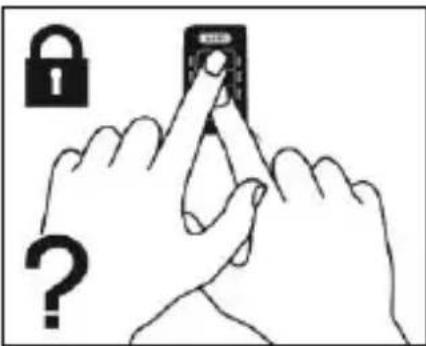
Technical diagram of a mechanical device with labeled parts 1, 2, and 3, showing internal components and directional arrows.[FR] Code tournant (RC)
[NL] Rollingcode (RC)
[DK] Rolling Code (RC)
[ES] Rolling Code (RC)
text_image
Illustration showing hands interacting with a lock and a question mark, suggesting password or security warning.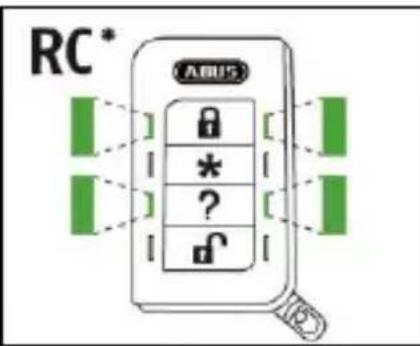
text_image
RC* ARUS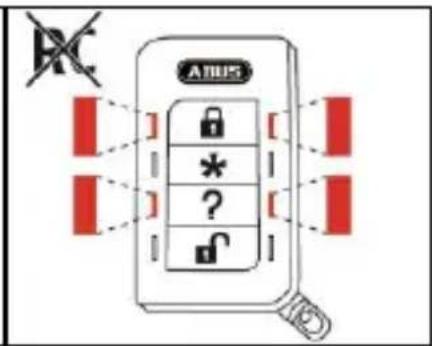
text_image
ATUS * ?flowchart
graph LR
    A["Hand Hand Icon"] --> B["Lock Icon"]
    B --> C["USB Lock with Red Signal"]
    C --> D["USB Lock with Green Signal"]
    D --> E["USB Lock with Green Signal"]

[UK] When arming the system, you are not allowed to be in the controlled area. When using alarm panels which are installed regarding VdS3438 this device is not allowed for arming or disarming the panel.
[UK] Arming internally
[FR] Activer en interne
[NL] Intern activeren
flowchart
graph LR
    A["Hand with asterisk"] --> B["Switch press"]
    B --> C{Lock State Detection}
    C -->|Green Light| D["Access to ABUS"]
    C -->|Green Light| E["Access to ABUS"]
    D --> F["Smart Lock System"]
    E --> G["Smart Lock System"]
    F --> H["Access to ABUS"]
    G --> H
flowchart
graph LR
    A["Hand typing on padlock"] --> B["Pre-detect check"]
    B --> C["AMUS Interface with lock status: 0, 1, 2, 3, 4, 5, 6, 7, 8"]
    C --> D["After adjusting lock status: 1, 2, 3, 4, 5, 6"]
    D --> E["After adjusting lock status: 1, 2, 3, 4, 5, 6"]
flowchart
graph LR
    A["Hand typing on padlock"] --> B["Pre-detection check"]
    B --> C["USB lock-up with lock icons"]
    C --> D["After installation of USB lock-up with warning indicators"]
    D --> E["After installation of USB lock-up with no warning indicators"]
[UK] Status query [→System is armed]
flowchart
graph LR
    A["Hand with question mark"] --> B["Switch: ARUS"]
    B --> C["Lock/Unip: 0, 1, 2, 3, 4"]
    C --> D["Reset: Green indicator, green warning light"]
    D --> E["Smart Phone with lock/Unip: 1, 2, 3, 4"]
    E --> F["Reset: Red indicator, red warning light"]
[UK] Status query [→System is armed internally]
flowchart
graph LR
    A["Hand with question mark"] --> B["Switch to padlock"]
    B --> C{Switch is selected?}
    C -->|Yes| D["Load padlock with lock (* ? ? ?"]
    C -->|No| E["Load padlock with lock (* ? ? ?"]
    D --> F["Switch is selected with green indicator box"]
    E --> G["Switch is selected with green indicator box"]
    F --> H["Load padlock with lock (* ? ? ? ?"]
    G --> I["Load padlock with lock (* ? ? ?"]
[UK] Status query [→System is disarmed]
flowchart
graph LR
    A["Hand with question mark"] --> B["Switch with lock/unlock icon"]
    B --> C["Lock/Unlock icon with lock symbol"]
    C --> D["Password verification: green dot indicates unknown symbol"]
    D --> E["Smartphone with lock symbol and unknown symbol"]
    E --> F["Password verification: green dot indicates unknown symbol"]
[FR] Temps de transmission
[NL] Ontvangsttijd
[DK] Modtagelsestid
[ES] Tiempo de recepción
flowchart
graph LR
    A["Hand with lock icon"] --> B["10s* USB status check"]
    B --> C["20s USB status check"]
    style A fill:#f9f,stroke:#333
    style B fill:#ccf,stroke:#333
    style C fill:#cfc,stroke:#333
flowchart
graph LR
    A["*"] --> B["Hand with finger pointing to a device"]
    B --> C["USB lock with lock icon"]
    C --> D["Switch with switch symbol"]
[DE] Leere Batterie
[UK] Empty battery
[FR] Batterie vide
[NL] Lege batterij
[DK] Afladet batteri
[ES] Pila sin carga
![ABUS FUBE50015 - [DE] Leere Batterie - 1](/content/2026/04/627383/images/c6e99a0bda15263a8fe7dc0cd1e55de0fa33c921e01f0849ab9d8ab2a392be2e.jpg)