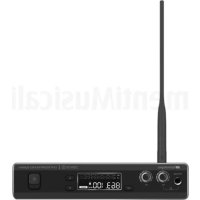
DEM 30 - Earplug DB Technologies - Free user manual and instructions
Find the device manual for free DEM 30 DB Technologies in PDF.



User questions about DEM 30 DB Technologies
0 question about this device. Answer the ones you know or ask your own.
Ask a new question about this device
Download the instructions for your Earplug in PDF format for free! Find your manual DEM 30 - DB Technologies and take your electronic device back in hand. On this page are published all the documents necessary for the use of your device. DEM 30 by DB Technologies.
USER MANUAL DEM 30 DB Technologies
natural_image
Black wireless device with antenna and external microphone (no visible text or symbols)USER MANUAL - Section 1
The warnings in this manual must be observed together with the "USER MANNUAL- Section 2".
This equipment is in conformity with RED directive 2014/53/EU in reference to the following harmonized standards:
| Health & Safety | EN 62479 / EN 60950-1+A11+A1+A12+A2 |
| EMC | EN 301 489-1 v2.2.0, EN 301 489-9 v2.1.1, |
| Spectrum | EN 300 422-1 v2.1.2 |
EMI CLASSIFICATION
According to the standards EN 55032 and EN 55035 this equipment is designed and suitable to operate in class B electromagnetic environments.
SIMPLIFIED EU DECLARATION OF CONFORMITY
Hereby, AEB Industriale declares that the radio equipment DEM 30
DEM 30 IEM
Cod. 420120320 REV. 1.0
IMPORTANT SAFETY INSTRUCTIONS:
- Read these instructions
- Keep these instructions.
- Heed all warnings.
- Follow all instructions.
- Do not use this apparatus near water.
-
Clean only with dry cloth.
-
Do not block any ventilation openings. Install in accordance with the manufacturer's instructions.
-
Do not install near any heat sources such as radiators, heat registers, stoves, or other apparatus (including amplifiers) that produce heat.
-
Do not defeat the safety purpose of the polarized or grounding-type plug. A polarized plug has two blades with one wider than the other. A grounding type plug has two blades and a third grounding prong. The wide blade or the third prong are provided for your safety. If the provided plug does not fit into your outlet, consult an electrician for replacement of the obsolete outlet.
-
Protect the power cord from being walked on or pinched particularly at plugs, convenience receptacles, and the point where they exit from the apparatus.
-
Only use attachments /accessories specified by the manufacturer.

- Use only with the cart, stand tripod, bracket, or table specified by the manufacturer, or sold with the apparatus. When a cart is used, use caution, when moving the cart/apparatus combination to avoid injury from tip-over.
- Unplug this apparatus during lightning storms or when unused for long periods of time.
- Refer all servicing to qualified service personnel. Servicing is required when the apparatus has been damaged in any way, such as power-supply cord or plug is damaged, liquid has been spilled or objects have fallen into the apparatus has been exposed to rain or moisture, does not operate normally, or has been dropped.
ADDITIONAL SAFETY INSTRUCTIONS:
- No naked flame sources, such as lighted candles, should be placed on the apparatus
- Do not use the apparatus in tropical climates
DEM 30 IEM Cod. 420120320 REV. 1.0
ITALIANO
ENGLISH
DEUTSCH
FRANÇAIS
ESPAÑOL
DEM 30 IEM
Cod. 420120320 REV. 1.0
INDICE
natural_image
Diagram showing a wireless device with antenna and connector, alongside its close-up view of a mechanical component (no text or symbols present)2. TRASMETTITORE
PRODUCT OVERVIEW.... 14
USER REFERENCE.... 14
CONTENTS 15
INSTALLING THE ANTENNA 15
2. TRANSMITTER 16
-
RECEIVER.... 17
-
FUNCTIONS AND DISPLAY 18
-
FIRST TROUBLESHOOTING 19
6. SPECIFICATIONS 20
DEM30T TRANSMITTER 20
DEM30R RECEIVER.... 20
EARPHONES DEM30E 20
1. GENERAL INFORMATION
WELCOME!
Thanks for purchasing a product designed and developed in Italy by dBTechnologies! This frequency modulation wireless in-ear monitor system is the result of a long experience in the radio transmission field applied to the audio field. It uses optimised solutions for an easy configuration and robustness of use.
PRODUCT OVERVIEW
DEM 30 is a user-friendly and high-quality wireless in-ear monitor system. The frequency range is: 823-832 MHz + 863-865 MHz. 96 channels in total are available to the user.
USER REFERENCE
To make the most of your DEM30 system, we recommend that you:
- read the quick start user manual included in the package and this user manual thoroughly and keep this manual during the whole life of the product.
- Register your product at http://www.dbtechnologies.com under "SUPPORT".
- keep proof of purchase and WARRANTY (User manual "section 2").
CONTENTS
The package contains:
• DEM 30T transmitter
• Antenna with BNC connector
• DEM 30R receiver
- Power supply
• Earphones DEM 30E with interchangeable buds
• Pair of LR6 AA batteries
- Adapter kit for 2x19" rack
• Paper documents
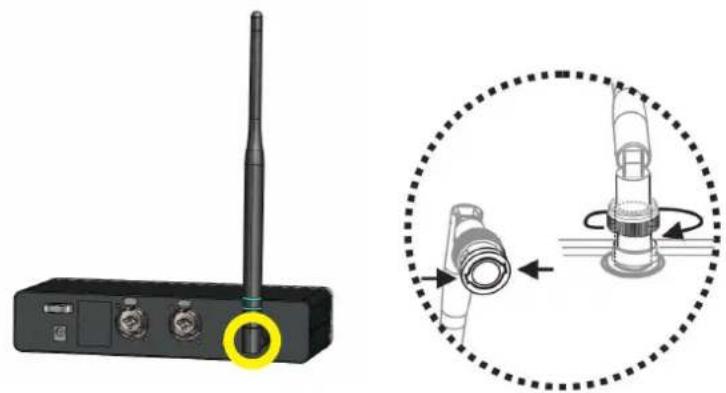
INSTALLING THE ANTENNA
Before using the system, insert the antenna by screwing in the BNC connector on the DEM 30T transmitter, as shown.
natural_image
Diagram showing a wireless device with antenna and connector, alongside its close-up view of a mechanical component (no text or symbols present)DEM 30 IEM Code 420120320 REV. 1.0
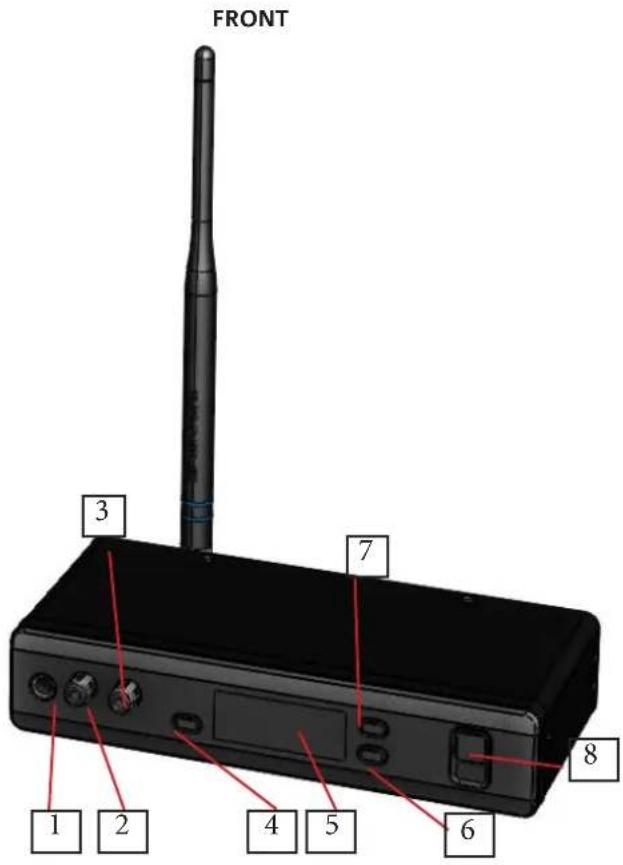
2. TRANSMITTER
The receiver has the following controls on the front:
- Headphone connector
- Headphone level selector
- Input level selector
- "SET" button
- Control display
- "Down" button
- "Up" button
- ON/OFF button
text_image
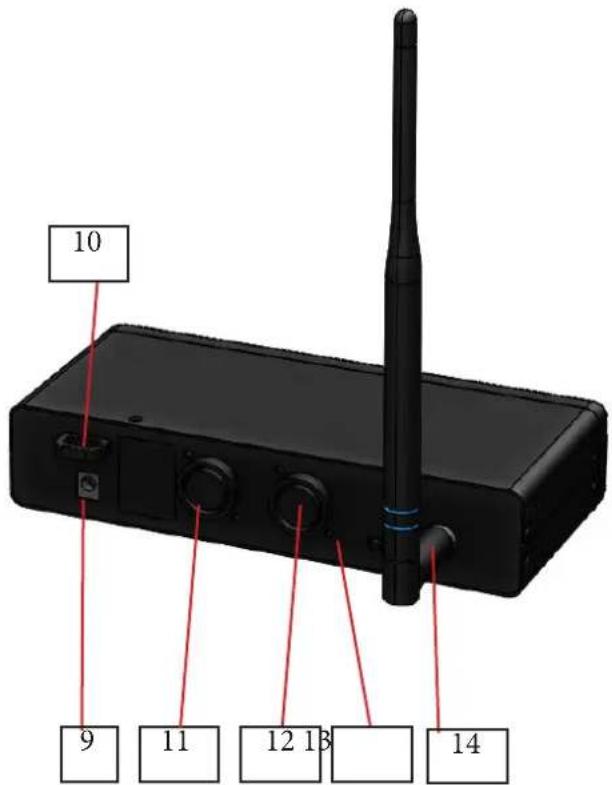
FRONT 3 7 8 1 2 4 5 6The following are on the back:
- Power connector
- Power cable fastening system
- AF1 (Combo input)
- AF2 (Combo input)
- PAD SELECTOR (0, -12 dB)
- Antenna (BNC connector)
REAR
text_image
10 9 11 12 13 14DEM 30 IEM
Code 420120320 REV. 1.0
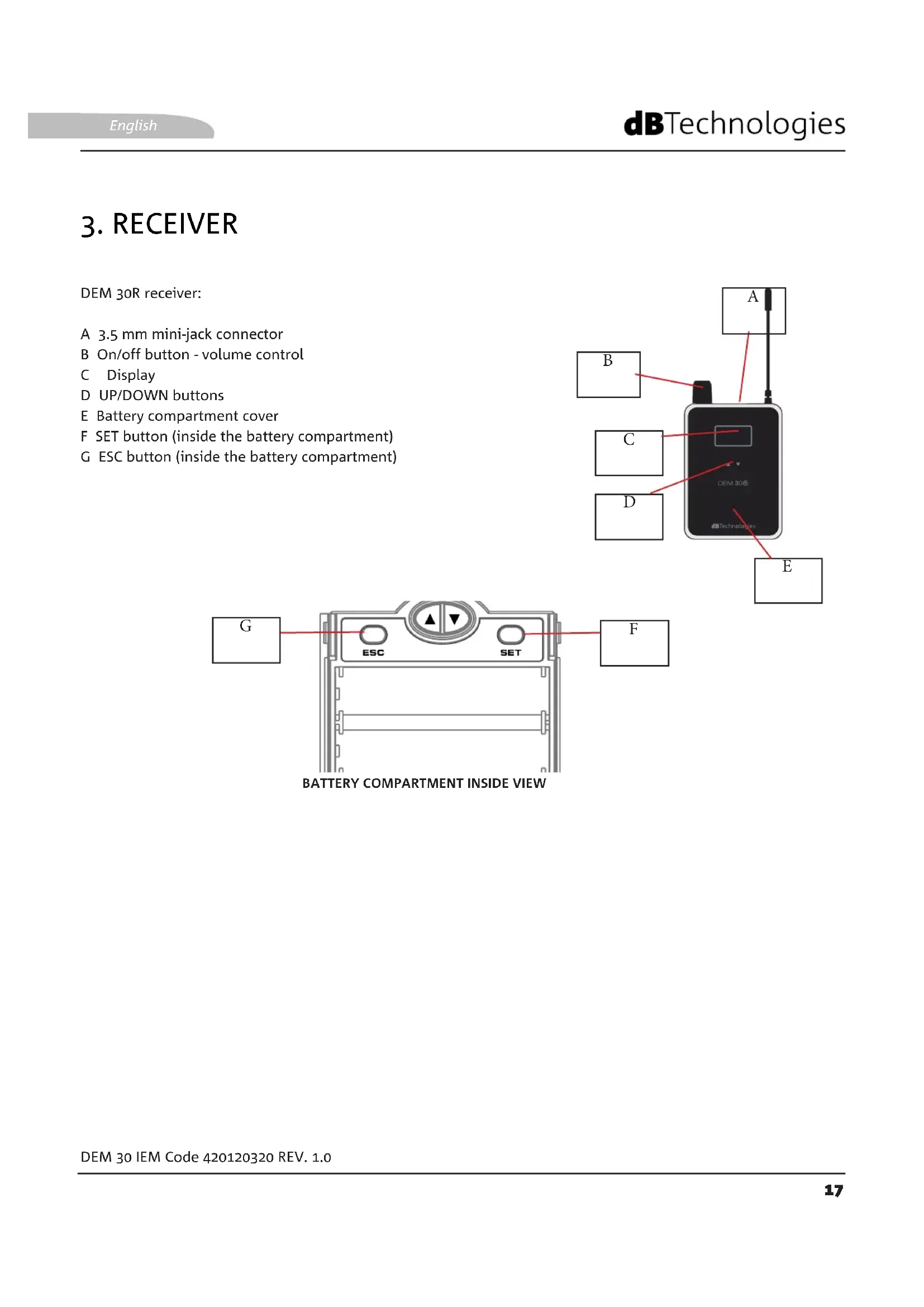
3. RECEIVER
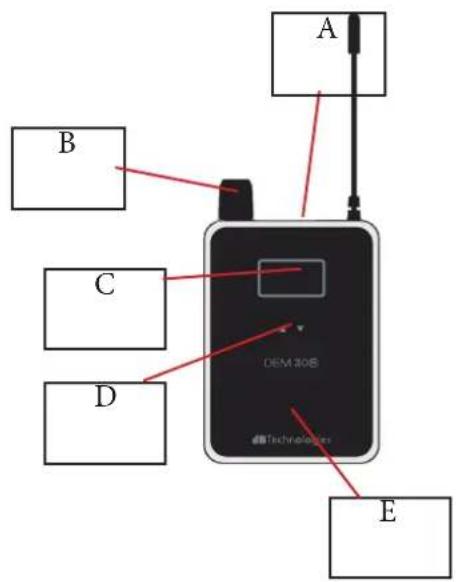
DEM 30R receiver:
A 3.5 mm mini-jack connector
B On/off button - volume control
C Display
D UP/DOWN buttons
E Battery compartment cover
F SET button (inside the battery compartment)
G ESC button (inside the battery compartment)
text_image
A B C D DEM 30B e b Technolomics E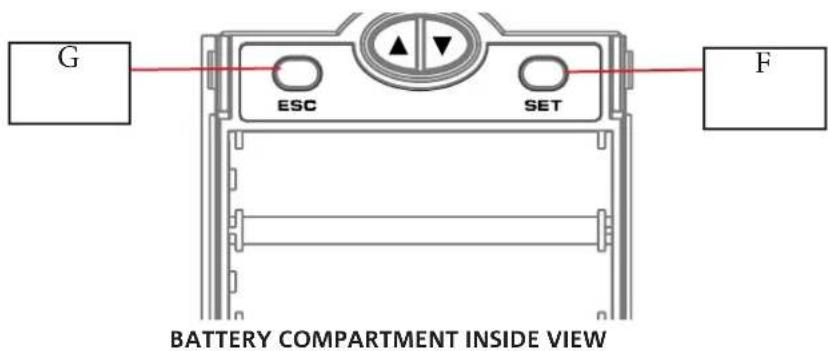
text_image
G ESC SET F BATTERY COMPARTMENT INSIDE VIEW4. FUNCTIONS AND DISPLAY
A quick view of the parameters shown in the transmitter and receiver displays is shown below:

text_image
TRANSMITTER U AF 1 -40 -30 -20 -10 0 PEAK AF 2 -40 -30 -20 -10 0 PEAK GROUP CHANNEL STEREO 888.888 MHZ MONO W V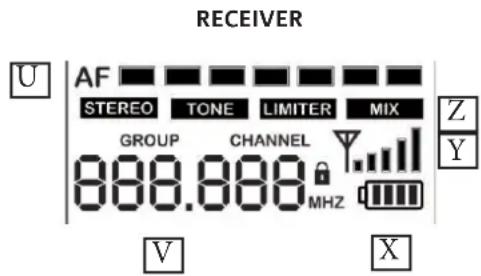
text_image
RECEIVER U | AF STEREO TONE LIMITER MIX GROUP CHANNEL 888.888 MHZ V X Z YU - AF levels (stereo/mono)
V - GROUP - CHANNEL indicator
W - STEREO/MONO mode
X - BATTERY CHARGE LEVEL
Y - SIGNAL RECEPTION LEVEL
Z - FUNCTION SELECTION
The sequence for selecting and increasing the values for the transmitter is as follows:
- Hold SET depressed for a few seconds to select the parameters that can be edited.
- The first parameter, according to a preset sequence, starts flashing.
- Use the relevant arrows to increase/decrease the value of the parameter concerned.
The sequence for selecting and increasing the values for the receiver is as follows:
- Hold SET depressed for a few seconds to select the parameters that can be edited.
- The first parameter, according to a preset sequence, starts flashing.
- Use the relevant UP/DOWN arrows of the receiver to increase/decrease (or select ON/OFF, depending on the parameter) the value concerned.
- It is possible to either quit the sequence by pressing ESC or continue to edit parameters.
DEM 30 IEM
Code 420120320 REV. 1.0
- FIRST TROUBLESHOOTING
| PROBLEM POSSIBLE SOLUTION | |
| The receiver does not turn on • Make | sure power is present upstream of the system, verify the proper connection of the wiring, and repeat the activation procedure. |
| The transmitter does not turn on • Check that the batteries are properly inserted and charged; replace them if necessary. Repeat the activation procedure. | |
| The mixer does not receive the audio signal | • Check the wiring and the input level on the receiver. Repeat the sync procedure if necessary. |
6. SPECIFICATIONS
DEM30T TRANSMITTER
| Available bands: 823-832 MHz / 863-865 MHz | |
| Channels: 96 (8 groups of 12 channels each) | |
| Frequency response: 60 Hz - 15 kHz (± 3 dB) | |
| Front panel: Headphone volume, input level, SET, up, down | |
| Rear panel: PAD switch | |
| Dimensions (mm) [inches]: | 212 x 44 x 96 [8.34" x 1.73" x 3.77"] |
| Weight: (g) [oz] | 560 [19.7] |
DEM30R RECEIVER
| Frequency response: 50 Hz - 15 kHz (±3 dB) | |
| Input: | stereo 3.5 mm mini-jack type |
| Controls: | Volume, up, down, ESC, set |
| Power supply: | 2 AA batteries LR6 1.5 V |
| Dimensions (mm) [inches]: | 64 x 90 x 23 [2.51" x 0.91" x 3.54"] |
| Weight (g) [oz]: | 95 [0.09] |
EARPHONES DEM30E
| Impedance: | 16 Ω (± 15%) [@ 1 kHz, 1 mW] |
| Sensitivity: | 92.5 (± 3) dB [@ 1 kHz, 1 mW] |
| Earphones: interchangeable, 3 pairs | |
| Cable length: ≈ 1,300 mm |
www.dbtechnologies.com
info@dbtechnologies-aeb.com
A.E.B. Industriale Srl
Via Brodolini, 8
natural_image
Diagram showing a wireless device with antenna and connector, alongside its close-up view of a mechanical component (no text or symbols present)text_image
G ESC SET F INNENANSICHT DES BATTERIEFACHS4. FUNKTIONEN UND DISPLAY
natural_image
Diagram showing a wireless device with antenna and connector, alongside its close-up view of a mechanical component (no text or symbols present)DEM 30 IEM Code 420120320 RÉV. 1.0
2. ÉMETTEUR
natural_image
Diagram showing a wireless device with antenna and connector, alongside its close-up view of a mechanical component (no text or symbols present)DEM 30 IEM Cód. 420120320 REV. 1.0