IAN 69549 - Watch AURIOL - Free user manual and instructions
Find the device manual for free IAN 69549 AURIOL in PDF.



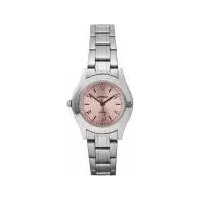
| Product type | Analog watch |
| Brand | Auriol |
| Model | IAN 69549 |
| References | Z31970A, Z31970B, Z31970C, Z31970D, Z31970E, Z31970F |
| Power supply | Button cell battery |
| Display | Hour, minute, and second hands |
| Additional functions | Date and day of week display (depending on model), rotating bezel for timing (Z31970B), removable segments (Z31970A, B, C) |
| Water resistance | 3 bar (Z31970C, Z31970F) or 5 bar (other models) according to DIN 8310 standard |
| Case material | Stainless steel |
| Glass | Mineral |
| Case diameter | Approx. 40 mm |
| Case thickness | Approx. 10 mm |
| Weight | Approx. 80 g |
| Day languages | Bilingual (e.g., English-German) on some models (Z31970C, Z31970E) |
| Warranty | 3 years |
| Care and cleaning | Clean with a soft dry cloth. Do not open yourself. |
| Battery replacement | Entrust to a watchmaker or specialized shop |
| Water resistance check | Recommended once a year |
| Disposal | Recycle according to local regulations. Do not dispose of with household waste. |
| Wear parts | Battery, glass (not covered by warranty) |
| Repairability | By an authorized watchmaker. Unauthorized opening voids warranty. |
Frequently Asked Questions - IAN 69549 AURIOL
User questions about IAN 69549 AURIOL
0 question about this device. Answer the ones you know or ask your own.
Ask a new question about this device
Download the instructions for your Watch in PDF format for free! Find your manual IAN 69549 - AURIOL and take your electronic device back in hand. On this page are published all the documents necessary for the use of your device. IAN 69549 by AURIOL.
USER MANUAL IAN 69549 AURIOL
WRISTWATCH
GB IE
WRISTWATCH
Operation and Safety Notes
FI
RANNEKELLO
GB / IE Operation and Safety Notes Page 9
| FI Käyttö- ja turvallisuusohjeet Sivu 17 | |||
| SE Bruksanvisning och säkerhetsanvisningar Sidan 25 | |||
| DK Brugs- og sikkerhedsanvisninger Side 32 | |||
| FR / BE Instructions d’utilisation et consignes de sécurité | Page | 40 | |
| NL/BE | Bedienings- en veiligheidsinstructies | Pagina | 59 |
| DE/AT/CH | Bedienungs- und Sicherheitshinweise | Seite | 60 |

A
Z31970A, Z31970D


| F |  | 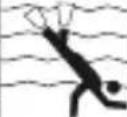 | ||
| 3 BAR WATER RESISTANT | √ | × | × | × |
| 5 BAR WATER RESISTANT | √ | √ | × | × |
| 10 BAR WATER RESISTANT | √ | √ | √ | × |


Wristwatch
● Preparations for use
- Changing the battery
Note: Have batteries changed in a specialist shop.
- Display
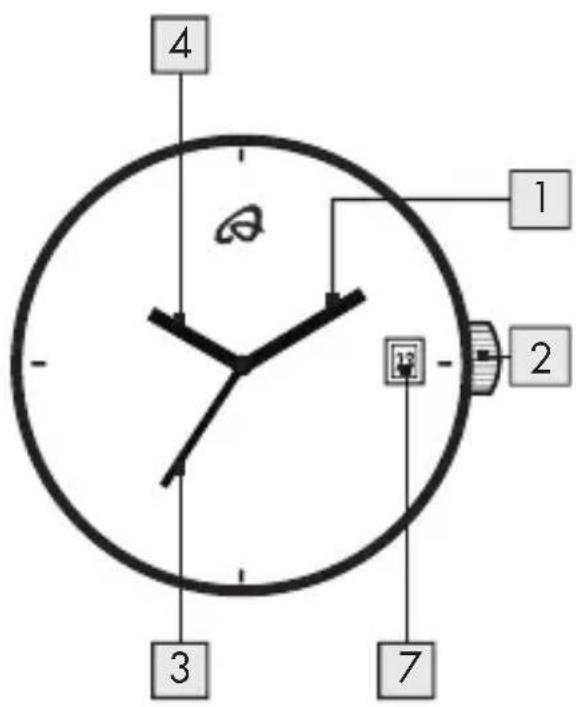
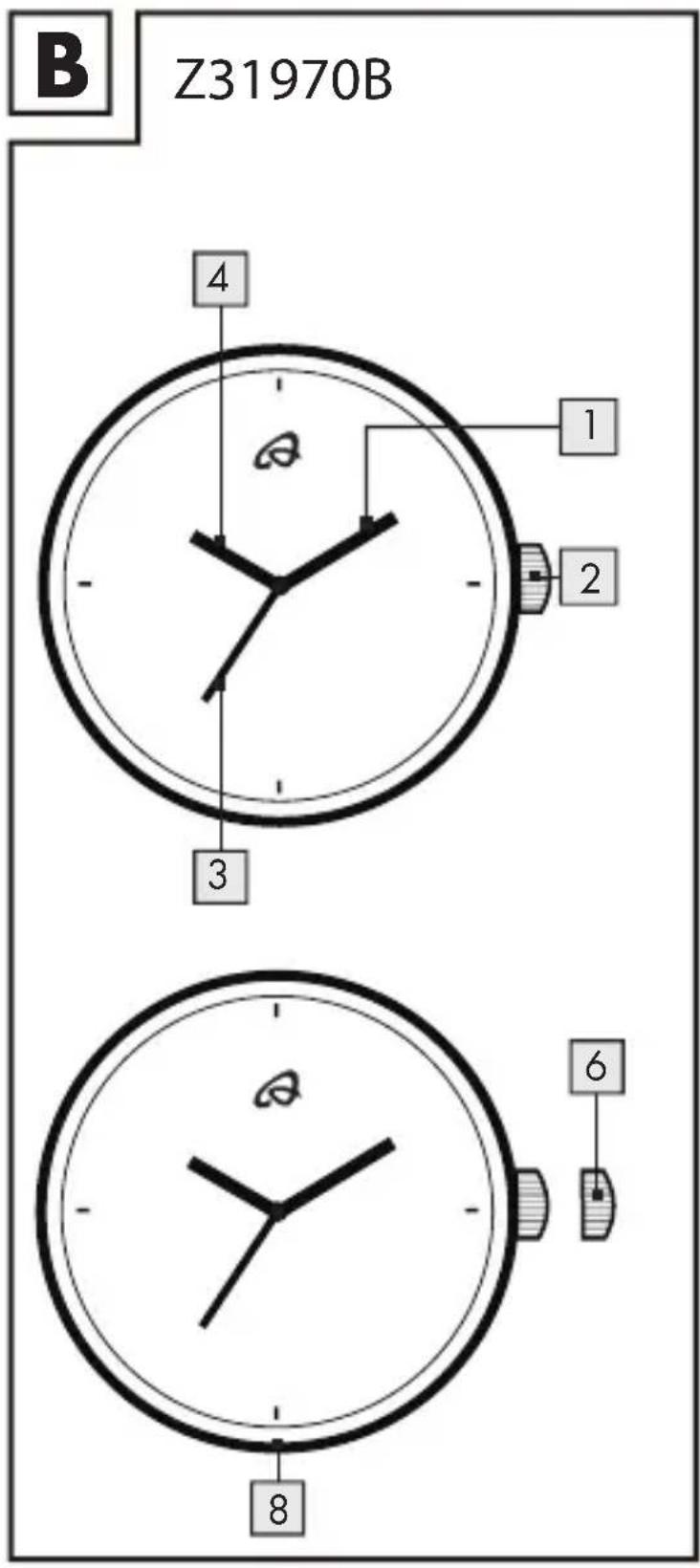
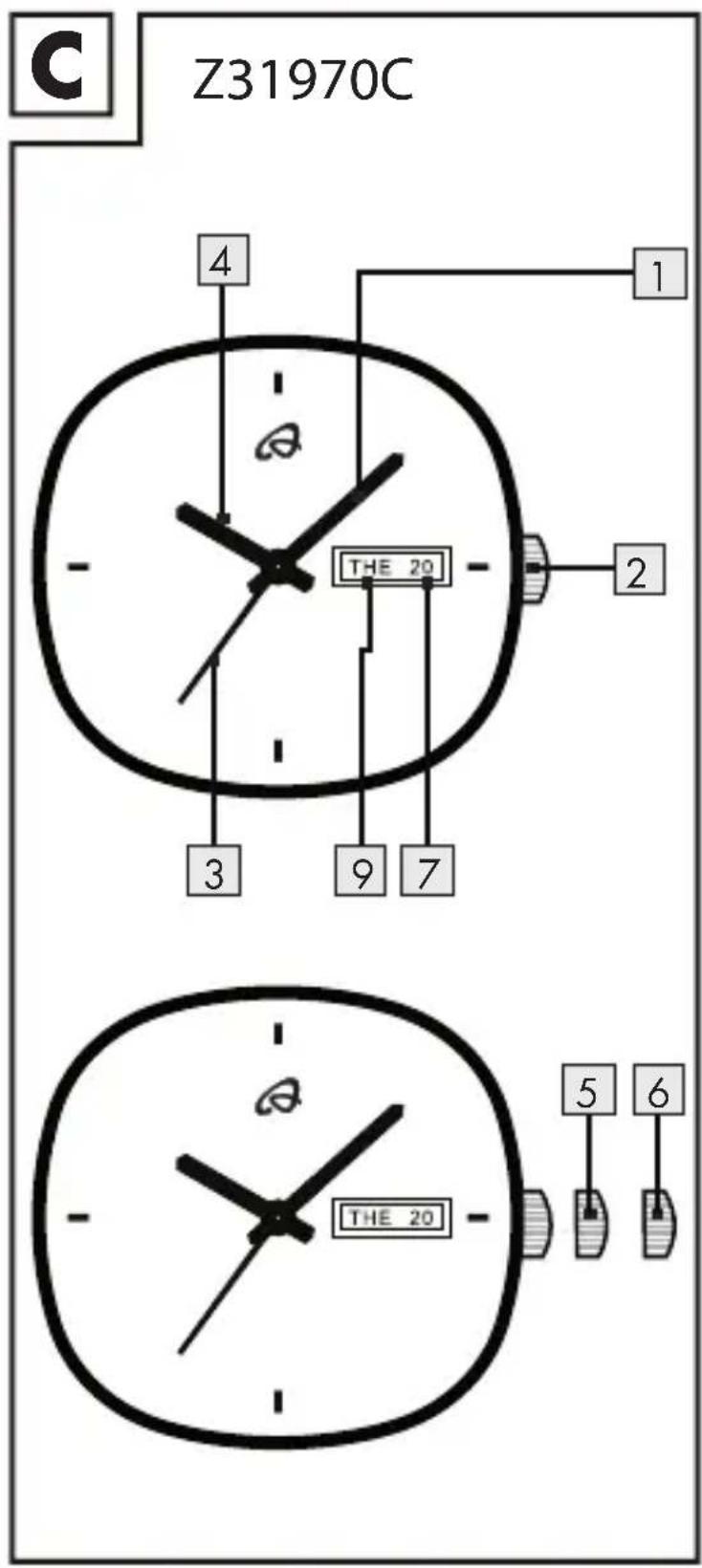
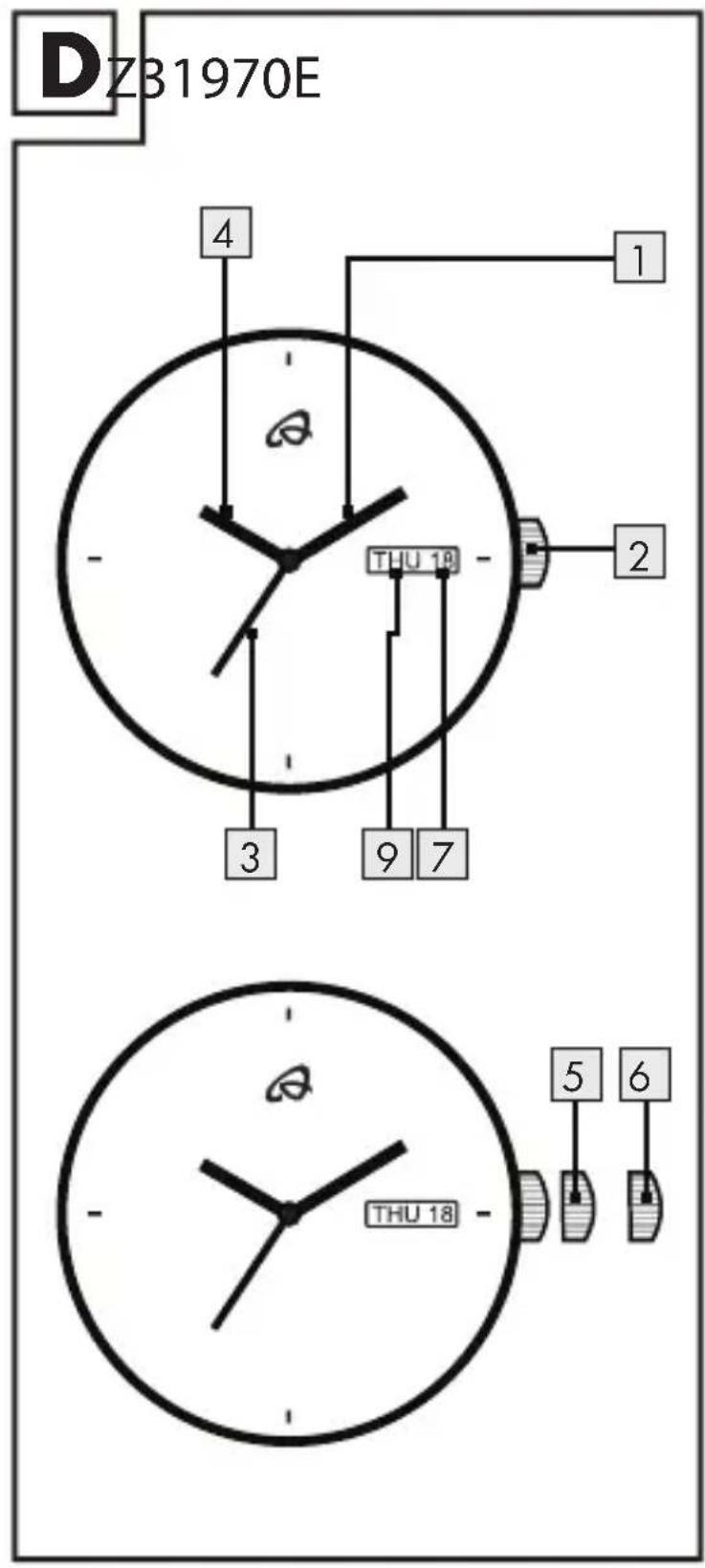
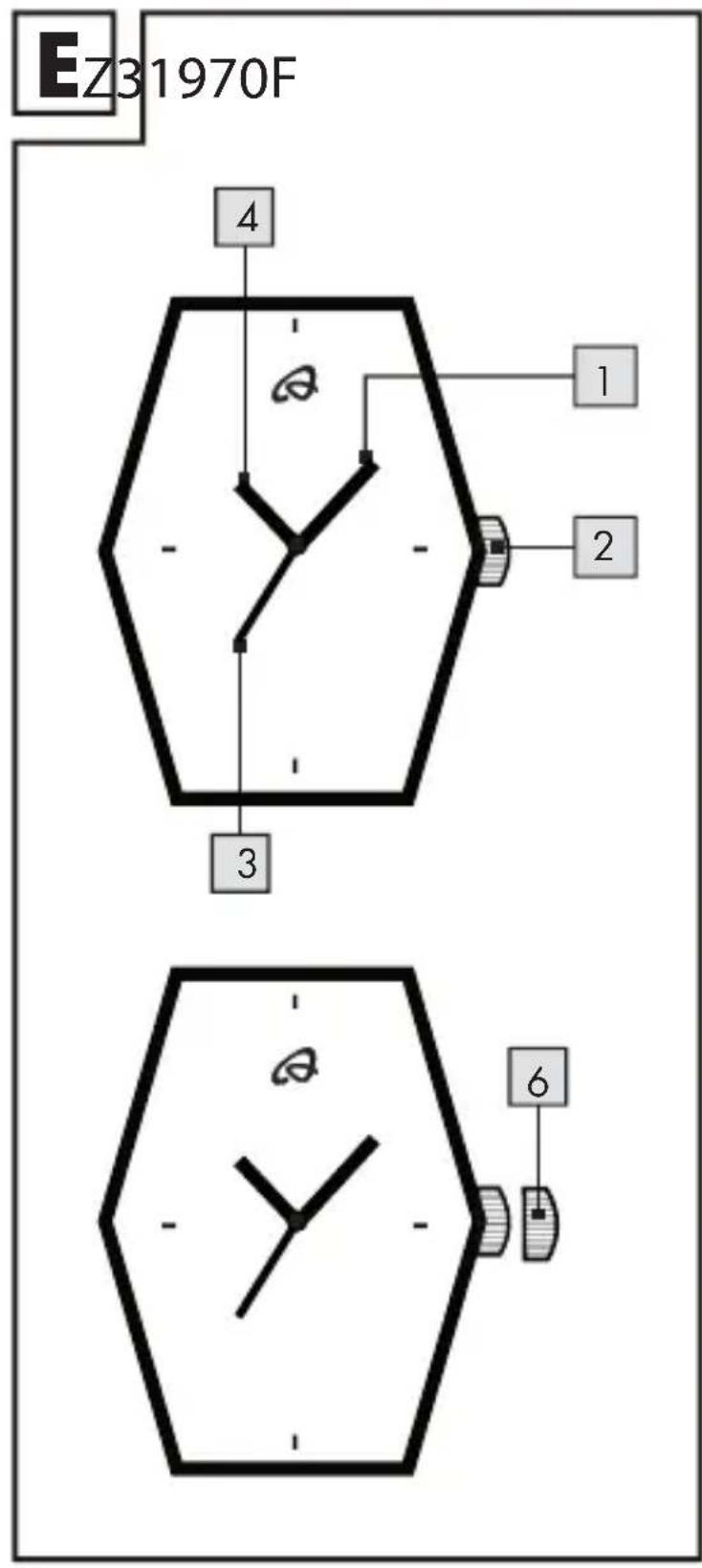
1 Minute hand
2 Crown
3 Second hand
4 Hour hand
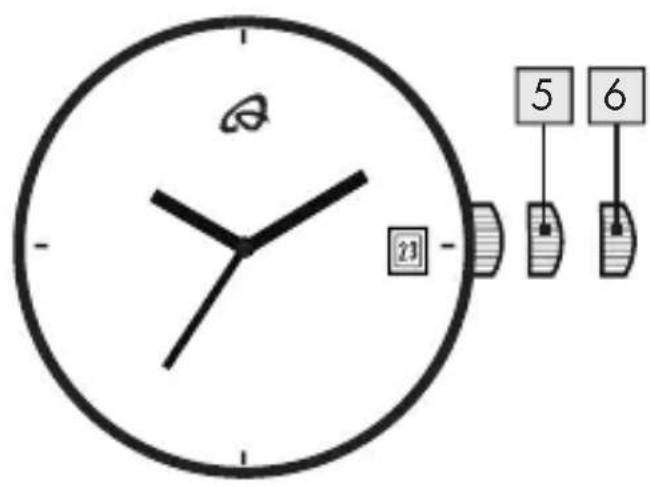
5 1st position
6 2nd position
7 Date display
8 Bezel (rotating outer ring)
9 Day of the week display
- Setting the time and date
- To set the time, pull the crown 2 out to the 2nd position 6.
- Turn the crown 2 to set the hour and minute hands 1, 4.
9 GB/IE


- When the crown 2 is pushed back to the normal position the second hand 3 begins to run.
- To set the date, pull the crown 2 out to 1st position 5. Turn the crown 2 until the required date is set on the date display 7. (Z31970A, Z31970C, Z31970D, Z31970E)
● Language setting for week day display (Z31970C, Z31970E)

Pull out the crown to the 2nd position 6 and turn the hour and minute hands clockwise to set the desired day of the week 9. (Example: Bilingual day display: English - German)
- After the desired day appears in the calendar frame (the hands indicate 3:45 AM at this time), turn the hands counterclockwise. Day display - "SUN"
- Turn the hands counterclockwise until they indicate the time zone between
10 GB/IE

9:00 PM and 11:15 PM.
Day display - "SAM"
-
Then, turn the hands clockwise again up to 3:45 AM and language of the day changes over to the other. Day display - "SON"
-
By repeating these procedures 1-3, the language of the day changes over to the other successively.
Example: "SUN"→"SON"→"MON"
→ "MON" → "TUE" → "DIE"
- Watertightness


This watch has the following water resistance classification in accordance with DIN 8310:
Figure F shows the permissible areas of use. Please note that the watertightness is not a permanent feature. It should be checked annually and particularly
11 GB/IE

before subjecting it to special conditions, as the function of the inbuilt sealing elements diminishes with daily use.
- Timing (Z31970B)
The bezel 8 is used to indicate a period of time (e.g. jogging time). The amount of time elapsed can be read easily from the bezel.
■ Turn the bezel 8 in anti-clockwise direction to mark the start of timing.
- Removing Segments (Z31970A, Z31970B, Z31970C)
Note: The segments that can be removed are marked with an arrow. They are connected together with pins. The pins can be pushed out in the direction of the arrow.
12 GB/IE
- Cleaning and maintenance
■ Clean the product on the outside only with a soft, dry cloth.
- Disposal

The packaging is made entirely of recyclable materials, which you may dispose of at local recycling facilities.

Contact your local refuse disposal authority for more details of how to dispose of your worn-out product.

To help protect the environment, please dispose of the product properly when it has reached the end of its useful life and not in the household waste. Information on collection points and their opening hours can be obtained from your local authority.
13 GB/IE

Faulty or used batteries must be recycled in accordance with Directive 2006/66/EC. Please return the batteries and / or the device to the available collection points.
Environmental damage through incorrect disposal of the batteries!
Batteries must not be disposed off with domestic waste. They may contain toxic heavy metals and are subject to hazardous waste treatment rules and regulations. The chemical symbols of the heavy metals are as follows: Cd = cadmium, Hg = mercury, Pb = lead. That is why you should dispose of used batteries at a local collection point.
WARRANTY
The device has been manufactured to strict quality guidelines and meticulously examined before delivery. In the event of product defects you have legal rights against the retailer of this product. Your legal rights are not limited in any way by our warranty detailed below.
14 GB/IE


The warranty for this device is 3 years from the date of purchase. Should this device show any fault in materials or manufacture within three years from the date of purchase, we will repair or replace it - at our choice - free of charge to you.
The warranty period begins on the date of purchase. Please keep the original sales receipt in a safe location. This document is required as your proof of purchase. This warranty becomes void if the device has been damaged or improperly used or maintained.
The warranty applies to faults in material or manufacture. This warranty does not cover product parts subject to normal wear, thus possibly considered consumables (e.g. batteries) or for damage to fragile parts, e.g. switches, rechargeable batteries or glass parts.
The warranty further excludes a reduction in water tightness. The state of water tightness is not a permanent property and should therefore be regularly maintained.
15 GB/IE


Please note, opening and repairs performed by unauthorized individuals will void any warranty.
CE


16 GB/IE

Rannekello
- Käyttöönotto
Ta bort segment (Z31970A, Z31970B, Z31970C)
