Centaur Charger - Battery charger VICTRON ENERGY - Free user manual and instructions
Find the device manual for free Centaur Charger VICTRON ENERGY in PDF.



| Product type | Automatic high-frequency battery charger (switching) |
| Brand | Victron Energy |
| Model | Centaur Charger (several variants: 12/20, 12/30, 12/40, 12/50, 12/60, 12/80, 12/100, 24/16, 24/30, 24/40, 24/60) |
| Dimensions (H × W × D) | From 355 × 215 × 110 mm (models 12/20, 12/30, 24/16) to 505 × 255 × 130 mm (models 12/80, 12/100) |
| Weight | From 3.8 kg to 12 kg depending on model |
| Power supply | 90 – 265 Vac, 45 – 65 Hz; power factor unity (PFC correction) |
| Number of outputs | 3 independent outputs (each output can supply 100% of nominal current) |
| Nominal charge current | From 16 A to 100 A depending on model (e.g. 12/20: 20 A, 24/60: 60 A) |
| Compatible battery types | Open lead-acid, sealed (AGM) and gel (GEL) batteries; selection via DIP switch |
| Charge curve | IUoU (3 stages: absorption, float, maintenance) |
| Protections | Output short-circuit, overheating, forced ventilation controlled by temperature and current |
| Operating temperature | -20 °C to +60 °C; power derating above 40 °C |
| Maximum humidity | 95% (non-condensing) |
| Protection rating | IP 20 |
| Housing material | Aluminum, blue RAL 5012 |
| Minimum battery cable cross-section | From 10 mm² to 35 mm² depending on model and distance (up to 6 m) |
| Battery connection | M6 or M8 bolts depending on model |
| Mains connection | 4 mm² screw terminal (L, N, earth) |
| Maintenance and cleaning | Disconnect power before any intervention. Clean the exterior with a dry cloth. Check connections and fuses periodically. No user-serviceable parts. |
| Safety | Safety class I (mandatory grounding). Use conductors rated for min. 75 °C. Do not use in explosive atmosphere. Disconnect mains and battery before intervention. Residual current device recommended. |
| Spare parts and repairability | No user-serviceable parts. Have any repairs carried out by qualified personnel. |
| Compliance standards | Safety: EN 60335-2-29, UL 1236; Emission: EN 55014, EN 61000-3-2, EN 61000-3-3; Immunity: EN 55014-2 |
Frequently Asked Questions - Centaur Charger VICTRON ENERGY
User questions about Centaur Charger VICTRON ENERGY
0 question about this device. Answer the ones you know or ask your own.
Ask a new question about this device
Download the instructions for your Battery charger in PDF format for free! Find your manual Centaur Charger - VICTRON ENERGY and take your electronic device back in hand. On this page are published all the documents necessary for the use of your device. Centaur Charger by VICTRON ENERGY.
USER MANUAL Centaur Charger VICTRON ENERGY
1. Safety and regulatory information
General
- Review related documentation of this product to familiarize yourself with safety markings and instructions before you operate the equipment.
- This product has been designed and tested in accordance with international standards. Only use the equipment for the intended purpose of application.
- WARNING: RISK OF ELECTRIC SHOCK. The product is used in conjunction with a permanent energy source (battery). Even if the equipment is switched off, dangerous electrical voltages may appear at the in- and/or output terminals. Always disconnect AC power and battery before maintaining or servicing the product.
A Ground Fault Circuit Interrueter (GFCI) must be installed in the AC supply circuit. - WARNING: This appliance is not intended for use by young children or infirm persons unless they have been adequately supervised by a responsible person to ensure that they can use the appliance safely. Young children should be supervised to ensure that they do not play with the appliance.
- There are no user-serviceable parts inside. Do not remove the front plate or operate the product without the front plate fitted. Refer all servicing to qualified personnel.
- Never use the product in locations where there is danger of gas- or dust explosions. Consult your supplier to ensure that the product is intended for use in conjunction with the battery. Always apply the battery manufacturer's safety instructions.
- Caution: never carry heavy loads without assistance.
- Explosive gases can be generated during charging of a lead-acid battery. Prevent open flame and sparks. Take care of sufficient ventilation during charging.
- Never try to recharge non-rechargeable batteries.
- A double-pole switch with a minimum contact distance of 3mm must be incorporated in the fixed mains input wiring of the installation.
Installation
- The installation of this product must be performed by qualified personnel.
- Always refer to the installation section in the operator's manual before applying power to the equipment.
- This is a Safety Class I product (provided with a protective earthing terminal). An uninterruptible safety earth ground must be provided at the AC in/output terminals. An additional grounding point is located at the outside of the product. Whenever it is likely that the grounding protection has been impaired, the product must be made inoperative and secured against any unintended operation; refer to qualified service personnel.
- Make sure that fuses and circuit breakers are provided in the connecting wires. Never replace a safety component by a different type. Consult the manual for determining the correct component.
- Make sure that all cables and wiring in the installation are anchored in such a way that the conductors are relieved from strain and twisting.
- Before applying power, verify that the available power source matches the configuration settings of the product as described in the manual.
- Ensure that the environmental conditions are suitable for operation of the equipment. Never operate the product in a wet or in a dusty environment.
- Always allow enough free space around the product for ventilation and make sure that ventilation vents are not blocked.
- Be sure that the demanded power does not exceed the capacity of the product.
- This device is a continuous duty automatic charger for rechargeable open, sealed and gel lead acid batteries
- For supply connection use wires suitable for at least 75°C (167°F) .
- CAUTION: Replace defective cords or wires immediately.
Transport and storage
- When storing or transporting the product make certain that mains power and battery leads are disconnected.
- No liability can be accepted for any transport damage when equipment is shipped in non-original packaging.
- Store the product in a dry location; storage temperature must be between -20°C and 60°C .
- Refer to the battery manufacturer manual concerning transport, storage, charging, recharging and disposal of the battery.
2. Description
Technology
The Centaur Charger is a fully high-frequency switched battery charger. The input is electronically power factor corrected by the first power stage.
The next stage gives provision for galvanic isolation and a perfect DC voltage at the output terminals.
The internal electronic parts are protected against moisture and dirt by means of a special coating, which assures a long lifetime of your battery charger.
Three high-capacity batteries can be charged simultaneously with this charger.
Operation
The battery charger charges the battery with 3-stage (Bulk-Absorption-Float) charging characteristic. It can remain connected to the battery continuously, without increased gas formation, caused by overcharging, taking place.
The charger can be used for different types of batteries but the default settings are for Gel batteries.
For use with other types of batteries please select Lead acid or AGM by opening front bottom cover and select DIP switch in bottom left hand corner. See Figure 1.
The full charging current of this Charger is divided in three main outputs but any one output can supply 100% of power if that is the only battery connected.
TROUBLESHOOTING
Problem
Charger does not function
Possible cause
The mains is not ok.
Solution
Measure mains
defective your dealer
Input or output fuses are
Return product to
The battery does not get fully charged connection
A bad battery connection
Check battery
The battery select switch is in the wrong setting
Select correct battery type (see Fig1)
Battery capacity to large Make sure charger capacity matches battery
The battery is being overcharged
The battery select switch is in the wrong setting
Select correct battery type (see Fig1)
defective
A single cell in battery is
Replace battery
supplier
Too small battery
Consult your battery
3. Installation
WARNING: Qualified personnel only
Instructions
- Mount wall bracket (for top holding) of the battery charger, make sure it is level.
- Install three screws.
- Open cover by removing four screws, on front bottom cover.
- Put charger on mounting bracket and mark the Bottom of the two (M6-D-holes) mounting holes.
- Install M6 screws.
- Install AC cord to input terminal strip marked E, N, L, be sure to use the correct size wire (per ABYC regulations) to use for the input current marked on the label of charger.
- Cut DC inlet plugs to cable size, then connect battery cables to DC lugs marked +DC & -DC. The -DC is used commonly for all three batteries. If there are less than three batteries, pick any +DC; all are capable of full current load. Select appropriate size wire (per ABYC regulations).
- Select battery type by pushing the appropriate DIP switch at bottom left corner of board. Note: This unit is selected for GEL; if you change battery type DESELECT GEL, (See Figure 1).
- Replace top cover and reinstall four screws on cover.
- Apply power and verify Green LED is on (bottom left of PC board, look through bottom left air vents).
Location
The Centaur Charger must be installed in a dry, well-ventilated area.
Too high an ambient temperature has the consequence of lower output, shorter life or a complete shutdown of the Centaur
Charger.
The Centaur Charger is suitable for floor and wall mounting. However, for optimum cooling, a vertical position is recommended. The cables between the Centaur Charger and the battery must be kept as short as possible to minimize cable losses. Input/output connections refer to Figure 1.
Required tools and cables
M6 Socket driver.
Crosshead screwdriver no. 2 Phillips.
- Battery cables: minimum cable cross-section
| Model | Length 0 - 6m | |
| 12/20 | 24/16 | 10mm² AWG 7 |
| 12/30 | 24/30 | 16mm² AWG 5 |
| 12/40 | 24/40 | |
| 12/50 | 24/60 | 25mm² AWG 3 |
| 12/60 | ||
| 12/80 | 35mm² AWG 2 | |
| 12/100 | ||
Cables longer then 6m are not recommended.
Cable eyes with M6/8 holes should be used.
For supply connection use wires suitable for at least 75°C (167°F)
CAUTION: Replace defective cords or wires immediately.
Connection sequence
- Disconnect mains.
- Disconnect battery cables from the battery.
- Open front cover.
- Connect battery cables to the charger. Note that there's only one 'minus'- Use a fuse according to the size of the battery charger.
- Connect battery cables to the battery.
- Connect the AC-in by means of a 3-core cable of 2.5 - 4mm2 flexible core to the AC-in terminal block. Note that a real PE-connection is strictly necessary.
- Close the front panel.
| Charge voltage at appr. 10% of the nominal current | ||||
| Absorption | Float | |||
| Lead-acid Battery type | 12V (6 cells) | 24V (12 cells) | 12V (6 cells) | 24V (12 cells) |
| GEL | 14.2 | 28.4 | 13.5 | 27.0 |
| AGM | 14.35 | 28.7 | 13.3 | 26.6 |
| LA | 14.5 | 29.0 | 13.5 | 27.0 |
| Other | 14.85 | 29.7 | 13.7 | 27.4 |
Important note regarding charge voltage settings
The charge voltages as mentioned above for the different types of battery are indicative only. Please contact your battery supplier for advice.
Especially flooded lead acid batteries ("LA" in the table) may require a different charge voltage, depending on chemical/mechanical construction.
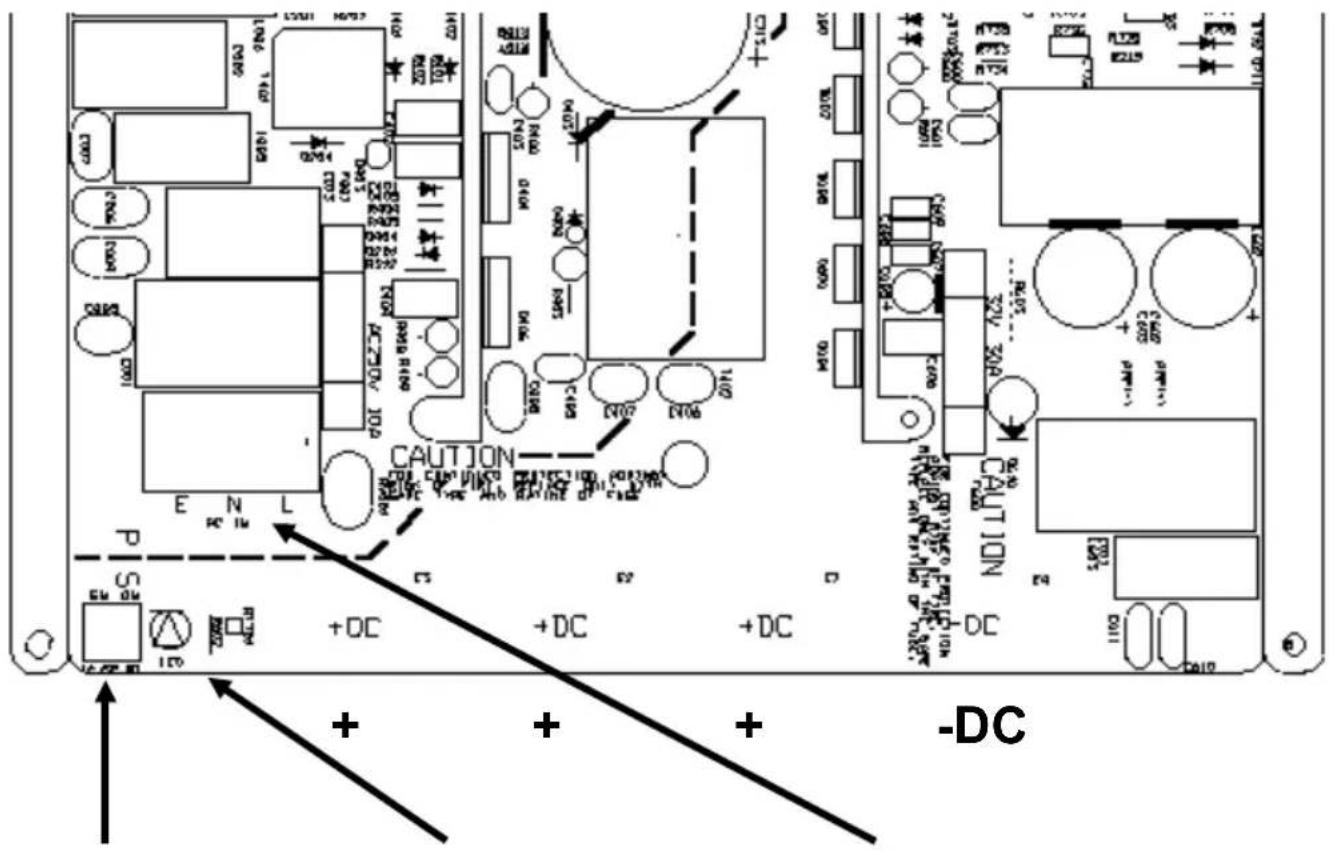
FIGURE 1 INPUT/ OUTPUT CONNECTIONS
Battery Select
LED 'ON' Indicator
AC INPUT
| LA | II | ||
| II | II |
| AGM | II | ||
| II | II |
| GEL | II | ||
| II | II |
| Other | II | II | |
| II |
| Input Voltage vs. Input Current | ||||
| Model | Input Voltage (Vac) | Input Current (Aac) | Input Voltage (Vac) | Input Current (Aac) |
| 12/20 | 120 | 3.35 | 240 | 1.75 |
| 12/30 | 120 | 4.35 | 240 | 2.30 |
| 12/40 | 120 | 6.40 | 240 | 3.20 |
| 12/50 | 120 | 8.00 | 240 | 4.00 |
| 12/60 | 120 | 9.55 | 240 | 4.75 |
| 12/80 | 120 | 12.0 | 240 | 6.00 |
| 12/100 | 120 | 15.0 | 240 | 8.00 |
| 24/16 | 120 | 5.55 | 240 | 2.50 |
| 24/30 | 120 | 9.00 | 240 | 4.55 |
| 24/40 | 120 | 10.0 | 240 | 6.00 |
| 24/60 | 120 | 15.0 | 240 | 9.00 |
Note:
For other input voltages U in the input current can be calculated as follows:
Input current = (current at 120Vac) x (120 / Uin)
Example:
Input current at 120Vac: 3,35 Amps
Required: input current at Uin = 110Vac
Answer: input current = 3,35 × (120 / 110) = 3,65A
4. Specifications
| Centaur Charger | 12/20 | 12/30 | 12/40 | 12/50 | 12/60 | 12/80 | 12/100 |
| 24/16 | 24/30 | 24/40 | 24/60 | ||||
| Common characteristics | Input voltage: 90 - 265V | Input frequency: 45 - 65Hz | Power factor: 1 | ||||
| Charge voltage ‘absorption' (V DC) | 14,3 / 28,5 (1) | ||||||
| Charge voltage ‘float' (V DC) | 13,5 / 27,0 (1) | ||||||
| Output banks | 3 | ||||||
| Charge current (A) (2) | 20 | 30/16 | 40 | 50 | 60/30 | 80/40 | 100/60 |
| Total output ammeter | Yes | ||||||
| Charge characteristic | IUoU (Three stage charging) | ||||||
| Recommended battery capacity (Ah) | 80-200 | 120-300 | 160-400 | 200-500 | 240-600 | 320-800 | 400-1000 |
| 45-150 | 120-300 | 160-400 | 240-600 | ||||
| Temperature sensor | Internal, - 2mV / °C (- 1mV / °F) per cell | ||||||
| Forced cooling | Yes, temperature and current controlled fan | ||||||
| Protection | Output short circuit, over temperature | ||||||
| Operating | - 20 to 60°C (0 - 140°F) | ||||||
| Ignition protected Yes | |||||||
| Humidity (non-condensing) | max 95% | ||||||
| ENCLOSURE | |||||||
| Material & Colour aluminium (blue RAL 5012) | |||||||
| Battery-connection | M6 studs | M6 studs | M8 studs | M8 studs | M8 studs | M8 studs | M8 studs |
| AC-connection | screw-clamp 4mm² (AWG 6) | ||||||
| Protection category IP 20 | |||||||
| Weight kg (lbs) | 3,8 (8.4) | 3,8 (8.4) | 5 (11) | 5 (11) | 5 (11) | 12 (26) | 12 (26) |
| Dimensions hwxwd in mm (hxwxd in inches) | 355x215x110 (14.0x8.5x4.3) | 355x215x110 (14.0x8.5x4.3) | 426x239x135 (16.8x9.4x5.3) | 426x239x135 (16.8x9.4x5.3) | 426x239x135 (16.8x9.4x5.3) | 505x255x130 (19.9x10.0x5.2) | 505x255x130 (19.9x10.0x5.2) |
| STANDARDS | |||||||
| Safety | EN 60335-2-29, UL 1236 | ||||||
| Emission | EN 55014, EN 61000-3-2, EN 61000-3-3 | ||||||
| Immunity | EN 55014-2 | ||||||
1) Standard setting.
Optimum charge/float voltages for Flooded Lead-acid, Gel-Cell or AGM batteries selectable by DIP switch.
2) Up to 40°C (100°F) ambient.
Output will reduce to approximately 80% of nominal at 50°C (120°F) and 60% of nominal at 60°C (140°F)
Installation et raccordements
| AGM (absorbed glass mat) | II | ||
| II | II |
- SAFETY AND REGULATORY INFORMATION
- GENERAL
- INSTALLATION
- TRANSPORT AND STORAGE
- DESCRIPTION
- TECHNOLOGY
- OPERATION
- TROUBLESHOOTING
- PROBLEM
- POSSIBLE CAUSE
- SOLUTION
- WARNING: QUALIFIED PERSONNEL ONLY
- INSTRUCTIONS
- LOCATION
- REQUIRED TOOLS AND CABLES
- CONNECTION SEQUENCE
- IMPORTANT NOTE REGARDING CHARGE VOLTAGE SETTINGS
- NOTE
- SPECIFICATIONS
- INSTALLATION ET RACCORDEMENTS
Brand : VICTRON ENERGY
Model : Centaur Charger
Category : Battery charger