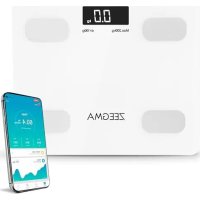
Gewit - Scale Zeegma - Free user manual and instructions
Find the device manual for free Gewit Zeegma in PDF.



| Product Type | Bluetooth connected impedance meter scale |
| Brand | Zeegma |
| Model | Gewit |
| Power Supply | 2 AAA batteries (not included) |
| Maximum Capacity | 200 kg |
| Accuracy | 0.1 kg (estimated) |
| Measurement Units | kg (adjustable via app) |
| Main Functions | Weight, BMI, body fat percentage, water, muscle, bone mass, BMR, body age, visceral fat, proteins, weight control |
| Connectivity | Bluetooth 4.0+ (estimated), AIfit app (Android and iOS) |
| Display | LCD screen |
| Material | Tempered glass and plastic (estimated) |
| Dimensions | Approximately 30 x 30 x 2.5 cm (estimated) |
| Device Weight | Approximately 1.5 kg (estimated) |
| Usage | Domestic, for adults and children over 10 years old |
| Care and Cleaning | Wipe with a soft, dry cloth. Do not use chemicals. Do not immerse in water. |
| Safety | Do not use by persons with a pacemaker or other electronic implants. Not recommended for pregnant women for body analysis. |
| Recycling | Complies with WEEE directive (2012/19/EU). Do not dispose of with household waste. |
| Warranty | 2 years (standard estimated) |
| Customer Service | support@zeegma.com |
Frequently Asked Questions - Gewit Zeegma
User questions about Gewit Zeegma
0 question about this device. Answer the ones you know or ask your own.
Ask a new question about this device
Download the instructions for your Scale in PDF format for free! Find your manual Gewit - Zeegma and take your electronic device back in hand. On this page are published all the documents necessary for the use of your device. Gewit by Zeegma.
USER MANUAL Gewit Zeegma
EN: The product complies with requirements of EU directives.
Pursuant to the Directive 2012/19/EU, this product is subject to selective collection. The product must not be disposed of along with domestic waste as it may pose a threat to the environment and human health. The worn-out product must be handed over to the electrics and electronics recycling center.
Thank you for placing trust in us and choosing Zeegma.
We provide you with a product perfect for everyday use thanks to the use of high-quality materials and modern solutions.
We are sure that the product will satisfy your requirements as it has been designed with utmost care. Before you use the product, please read this manual carefully.
Should you have any remarks or questions concerning the product,
please contact us:
support@zeegma.com
IMPORTANT
Please read this manual before you start using the device to see its functions and use them in accordance with intended use.
- Do not repair or modify the device. Only an authorized service technician is allowed to perform these operations.
- Do not switch the device on if you have noticed any damage.
- Do not use the device when it starts acting up, has been dropped or wetted, overheats extensively, is discolored or deformed, emits abnormal sounds and odors and when other atypical circumstances occur. This being the case, contact the manufacturer's service point immediately.
- If you do not use the device for a long time, remove the battery.
- The device is adapted to home use only. Do not use it outdoors.
- The device is not a toy. Do not let children play with it.
- The device is intended for adults and children aged above 10.
- The device must operate at a room temperature. Do not switch the device on if the temperature is low. Before you switch it on, leave the device at a room temperature for at least 30 minutes.
- The device is not waterproof, do not immerse it in water and do not keep in a humid place.
- Position the device on a flat and horizontal surface, and avoid slopes. Do not place it on carpets or other soft surfaces.
- Use the device away from source of heat, high temperatures, hot surfaces, direct sunlight, sources of ignition, naked flame, oils and sharp edges.
-
Do not use the device in inflammable, explosive or toxic atmosphere.
-
Do not use the device for other purposes than designed.
- Do not use a scale if you have a pacemaker or other electronic implants because the method of measurement may disturb their operation.
- Pregnant women should not use the body analysis feature.
- Scale results should not be treated as a health diagnosis but just suggestions for the healthy lifestyle.
SCALE OUTLINE

Electrodes
REPLACEMENT OF BATTERIES
The scale uses two AAA batteries.
- Turn the scale around.
- Pull out the battery cover.
- Remove old batteries and insert new ones. Pay special attention to battery terminals.
- Slip the cover back in.
EN
CAUTION
Never mix two batteries of various manufacturers or new batteries with old ones. Do not use storage batteries. The batteries must be replaced when:
The display shows the low battery message: The scale does not start operating.

- The image in the display is unclear.
HOW TO USE
-
Position the scale on a hard and fl at surface.
-
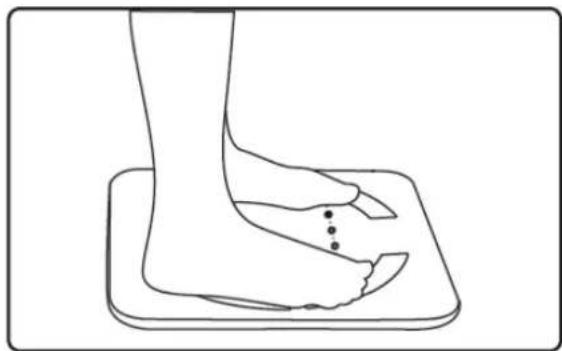
Step on the scale barefoot.

-
Wait until you can see the measurement results.
-
After a while a measurement of other values will occur and the display will show four "o" symbols.

- The measurement results will show up in the following order: body weight (kg), BMI, fat in percents (FAT), total body water (TBW), muscle in percents (MUS), bone weight (BONE), BMR (KCAL) and again body weight. The results will be displayed twice.
NOTE
-
The device displays the full range of data only after the first pairing with the mobile application.
-
Due to the puberty, the full range of data is available only to persons over 18 years of age.

EN
APPLICATION

The scale can be connected with the application via Bluetooth. The Android and iOS application is available on our website and in Google Play (Android: AIfit) as well as App Store (iOS: AIfit Health).
The AIFit downloads measurement results from the scale, allows analyzing a large number of parameters and has a history of measurements.
NOTE
The scale can be paired with many devices but may send results to one device only. When two users use the scale, two applications cannot be activated. To have a result, the second user must switch the application off.
Operation guidelines
- Run Bluetooth in the mobile/tablet. The scale may remain inactive.
- Run the application. Register (e-mail address, password) or log in if you have already opened the account.
- The application automatically searches the scale, connects to it and assigns to your account. Every time you activate it, the application connects automatically when the scale is nearby.
Interface
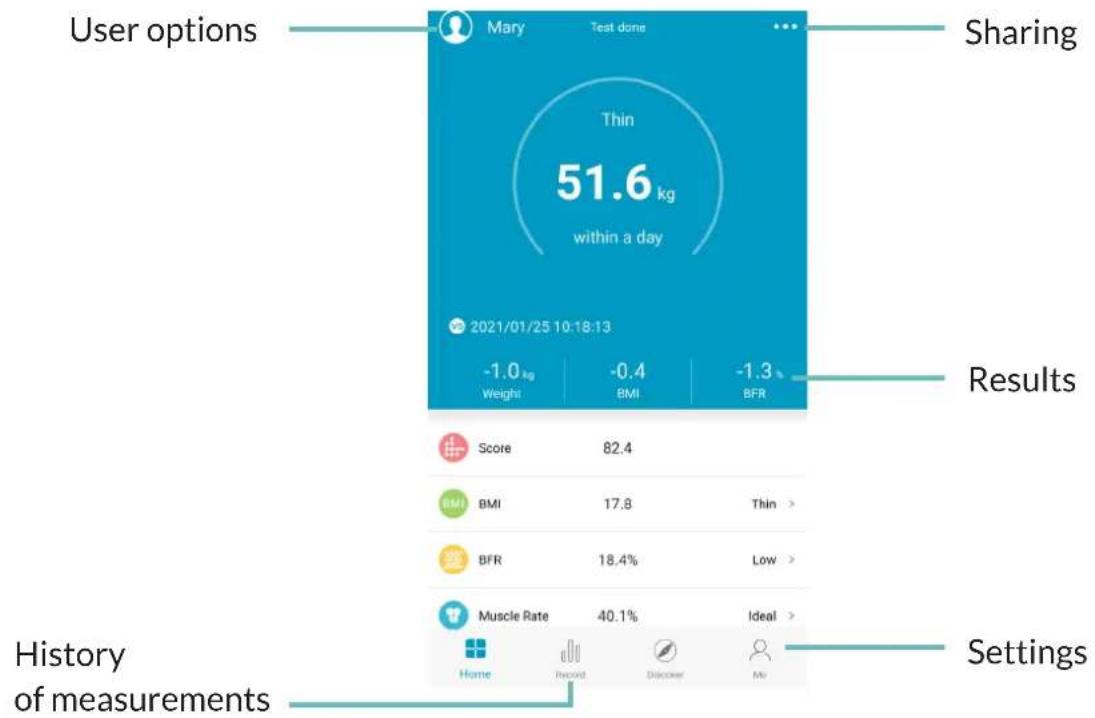
- User options
In user options you can add profiles and edit them. Every profile has its own history of measurements.
- History of measurements
In history of measurements you can read all previous measurements saved in the profile. At the same time you can read averages from each parameter.
- Settings
Application settings let you adapt the application to own needs: units, reminders, scale connections, etc.
- Measurement results
The following results are displayed along with the analysis and information on proper range of values:
Weight
BMI
- Fat in percents
- Muscle mass in percent
Water in percents
- Bone weight
BMR
- Visceral fatty tissue degree
Protein in percents
Body age
- Standard weight
Weight control
- Fat mass
Weight without fat
- Muscle mass
Protein mass
- Obesity degree
The definitions of all values presented above can be found in the application.
EN
TROUBLESHOOTING
| Problem Cause Solution | ||
| The scale does not activate | ·No battery. ·Battery inserted wrongly ·Low battery ·Weight below 5 kg. | ·Install battery. ·Remove battery and insert again, pay attention to battery terminals. ·Replace battery. ·Minimum measured value is 5 kg. |
| Serious measurement error | ·Scale is not positioned on fl at surface. ·Check selected measurement unit. ·When measuring for the first time, the scale could have not calibrated automatically. | ·Scale must be positioned on a fl at and hard surface. Avoid carpets and other soft surfaces. ·Set a proper unit. ·When using for the first time and every time when your scale changes its position, activate scale by touching it and wait about 10 seconds until it deactivates on its own. Scale should show “0.0” at this time. |
| The display shows Low battery. | ·Replace battery. |
EN
| The display shows Err Max | maximum permissible value has been exceeded. | Maximum permissible value is 200 kg. |
| The display shows Err1 Scale has difficulties in measuring through electrodes. | Measure yourself when you are barefoot - remove footwear and socks. Moisten your feet slightly. Remove any thickened areas of the epidermis on your foot. Make sure you have entered correct values in the application profile (age, height, sex). | |
| The application does not connect to the scale. | There is a Bluetooth connection problem between the scale and mobile phone. | Make sure your Bluetooth is active. Make sure your scale has a battery installed and works. Switch all other Bluetooth devices nearby off. Remember that one device can be connected to the scale only. Close the application and Bluetooth in other devices which use the scale. |
The pictures are for reference only. The real design of the products may differ from the pictures presented.
EINLEITUNG
Hikoli He 3miuyTe 6aTapeiOK pi3nX Bnpo6nKIB Ta nocaJKeHnx 3 HOBIM. 3a6oPoHaETbcra BnKOpncTaHHaKymyIaTopib. BaTapeiKn Notpi6Ho 3amIHOBaTI, KOJI:
- Ha dincnnei noBntbCra nobIDomIeHHnpo Hn3bKn 3apd 6aTapeNoK:

- Bara He BMnKaTbca.
3.Диспелій nokaye HeBnpa3He 3o6paKeHHa.
CПОСIEL BИКОРИCTAHнЯ
-
NoklaDiTb Bary Ha TBepri nnocki nobepxhi.
-
CtaHbTe Ha Bary 6ocmH HOramn.
-
3auekaIte, nOKn NOBnTbcra pe3yJbTaT BmipOBaHHa
-
3a DejKn Yac TaKoK NoUHeTbC npOuec o6paxyHky iHux BeiUnH, a Ha DnCnIeI NOBnTbcra O".

- Pe3yIbTaTn BmIpIOBaHb 6ydyTb NOBJIaTncy y HAcTyHOMy NoprAnky: Bara TiJa (Kr), iNdeKc Macn TiJa (BMI), npoceHThe cniBBiDHOweHHa JnpiB (FAT), pBeH BoIN B npoceHTax (TBW), npoceHThe cniBBiDHOweHHa M'zIB (MUS), Bara KicToK (BONE) Ta 3HObY Bara TiJa BMR (KCAL). Pe3yIbTaTn 6ydyTb nOKa3aHI dBiHi.
UA
YBAGA
- Pnncptpi Bio6paKae nobHy kiIbKicTb pe3yIbTaTIB BNKIOHNO nICn nepwo npyBaHH npncTpoo 3 Mo6iIbHM DoaTkom.
3 orlaHn npoc 3piocti, nobHa KJIbKicTb pe3yJbTaTIB DOCTynBaBKNIOUHO Oco6am BIKY 18 Ta 6Ibwe pOKIB.

ДОДАТOK

Bara moke 6yTu 3'eHaHa 3 BeiHKoO KjIbKicTb npnCTpoB, HATOMictb npncIaTN pe3yJbTaTN MOKe TlkbH Ha OdnH. KaIO BaroIO KopNCTyOTbcra Dba KopNCTyBaHi, OndouacHO He moke 6yTu 3anyuSeHO DBOx DoaTkIB. Uo6 OTpIMaTN pe3yJbTaTN, dpyrN KOPICTyBaH McNTmE BmMKHyT NdoTAOK.
Ihctpykizj KOpncTyBaHHa
- YbIMKHiTb Bluetooth Ha TelefoHi/IIaHWeTi. Bara MoKe 3aIIuTaTnCBAUMKHeHOJ.
- 3aynctitbdoataok.3apeectpytecra (adpeca eI.noTn,napoIb) a6o ybiidtB, kso BN yke 3apeectpybaIncpaHise.
3.ДодаТOK abTomatTuHOb 3HaIe Bary, 3'EDHaTbCz 3 HeO Ta NOB'JxKe II 3 BaIIM npoФiIeM. Пр КoxHOMy 3aIyCky,ЯKIo Bara 6yde IOBn3v,doTaTOK 6yde 3'EDHyBaTncr 3 HeO ABToMaTtuHO.
INTepeic

- ПараMeТри КорисТуВачa
B napametpax KopncTyBaHa MOKHa DoaBaTu Ta peaayBaTu npophiJI. Koxen npophiJb Mae cBOIO icToPi opeyIbTaTIB.
- Ictopia pe3yIbTaTIB
B ictopi pe3yIbTaTIB MOxHa nepeIaHyTu yci nonepeNHi pe3yIbTaTn, 3aIncahi y npoifii. TaKoX MoxHa nepeIaHyTu cepeHc apuΦMeTuHHe NO KoxHOMy 3 pe3yIbTaTIB.
- HanaTsyBaHHa
HaIaHTyBaHnI OdaTky Do3BOJIoTb npNCTOCyBaTH Do DaTOK Do CBOIX noTp6: OdnHnCi, HaraDyBaHH, 3'EDHaHH 3 BaTOO Ta IH.
- Pe3yIbTaTn BmipIOBaHb
BnbojTbcHacTyHpi pe3yIbTaTN, pa3OM 3 aHaJIi3OM Ta iHΦOpMaciEIO npo diiChn diana3OH 3HaueHb:
-
Bara
-
INdeKc Macn TiJa BMI
-
PpoeHTHe CnIBBiHOJHHeHH JxipB
-
PpoeHTHe CnIBBiHOwEHHa M'3iB
Pibehb BOIDB INPOUeHTax
-
Bara Kictok
-
KaIopiHa noTppe6a (BMR)
Pibenb BicepaJIbHOI JnpoBOITKaHnHn
Pibehb 6ilkb y npoentax
Bik Tila
- CtaHДapTHa Bara
KoHTpoJIb Baru
-
Bara xiny
-
Bara 6e3 knpy
-
Bara M'ЯзIB
-
Bara 6iikib
Pibehb OxnipiHn
PO3B'3yBAHHI PPOBJEM
Brand : Zeegma
Model : Gewit
Category : Scale