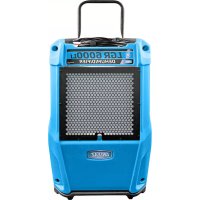
Revolution LGR - Air purifier Dri Eaz - Free user manual and instructions
Find the device manual for free Revolution LGR Dri Eaz in PDF.



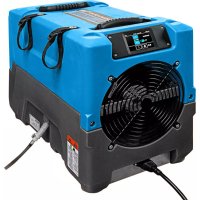
| Product type | Air dehumidifier (air purifier) |
| Brand | Dri Eaz |
| Model | Revolution LGR (Model F413) |
| Dimensions (L × H × D) | 31.8 × 44.7 × 54.6 cm (12.5 × 17.6 × 21.5 in) |
| Weight | 29.5 kg (65 lb) |
| Power supply | 115 V / 60 Hz, 6.2 A (at 80°F/60% RH) |
| Electrical protection | Ground fault circuit interrupter (GFCI) required |
| Airflow | 121 to 180 CFM (3.43 to 5.1 CMM) |
| Water removal capacity | 80 pints/day (38 L/day) at 80°F/60% RH; 134 pints/day (63 L/day) at 90°F/90% RH |
| Operating temperature range | 1 to 38°C (33 to 100°F) |
| Dehumidification method | Refrigerant (compressor) |
| Control panel | i-Series controller with digital display and Hygrostat mode |
| Condensate pump | Integrated, with 12 m (40 ft) quick-connect drain hose |
| Air filter | 4-PRO high-efficiency filter (ref. 102312) |
| Included parts | Drain hose, 7.6 m (25 ft) detachable power cord, set of 24 filters |
| Options | Duct attachment kit (ref. 106996) |
| Routine maintenance | Clean filter, coils, check valve, and pump tray |
| Safety | ETL listed to UL 474 and CSA; auto shutoff on error |
| Warranty | Online registration required (warranty.LegendBrandsRestoration.com) |
| Storage and transport | Always in horizontal position; let stand 30 min after vertical transport |
| Country of manufacture | United States (Legend Brands, Inc.) |
Frequently Asked Questions - Revolution LGR Dri Eaz
User questions about Revolution LGR Dri Eaz
0 question about this device. Answer the ones you know or ask your own.
Ask a new question about this device
Download the instructions for your Air purifier in PDF format for free! Find your manual Revolution LGR - Dri Eaz and take your electronic device back in hand. On this page are published all the documents necessary for the use of your device. Revolution LGR by Dri Eaz.
USER MANUAL Revolution LGR Dri Eaz
Owner's Manual Revolution LGR Dehumidifier
F413
LEGEND BRANDS, INC.
15180 Josh Wilson Road, Burlington, WA 98233
Phone: 800-932-3030 Fax: 360-757-7950 Revo.LegendBrandsRestoration.com
The Dri-Eaz ^® Revolution LGR Dehumidifier reduces humidity in enclosed environments by removing water vapor from the air. The Revolution is ideal for water damage restoration, structural drying, construction, and many other applications requiring temporary, high-performance dehumidification.
Patents: LBpatents.com
READ AND UNDERSTAND BEFORE OPERATING

WARNING

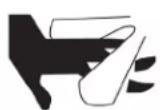

SAFETY INSTRUCTIONS
WARNING! Do not alter or modify your unit in any way. Use only replacement parts authorized by Legend Brands, Inc. Modifications or use of unapproved parts could create a hazard and will void your warranty. Contact your authorized distributor for assistance.
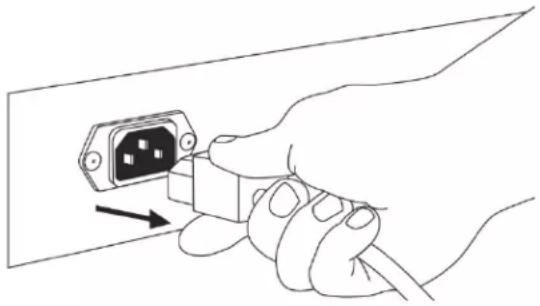
CORRECT PLUG REMOVAL
Grasp IEC plug and pull straight out
IMPORTANT: Damage to IEC receptacle or dehumidifier resulting from improper removal of the power cord is not covered by warranty. The IEC power cord is a wear item and is not covered by warranty.
natural_image
Illustration of a hand inserting an electrical plug into a socket (no text or symbols)WARNING! Electric shock hazard, rotating fan, hot surface hazards. Unplug unit before opening cover for cleaning or servicing. Unit must be grounded.
- Inspect the power cord before use. If cord is damaged, do not use. Always grasp the plug (not the cord) to unplug.
- Insert three-prong plug on power cord into a matching electrically grounded outlet. Do not use adapter. Never cut off third prong. Do not use an extension cord.
- The unit must be operated on a 115V/60Hz circuit protected by a Ground Fault Circuit Interrupter (GFCI) device.
- Keep motor and wiring dry.
- Do not attempt to repair the unit. For Authorized Service Centers, contact Dri-Eaz.
NOTICE: Do not use in environments where corrosive chemicals are present, such as chlorine.
BEFORE YOU BEGIN
Warranty registration
Visit warranty.LegendBrandsRestoration.com to register your purchase. Registration allows us to better assist you with using, maintaining or servicing your equipment and to contact you in case we have important safety information concerning your Dri-Eaz product. If you determine service is required, have your equipment model, serial number and original proof of purchase available and call your distributor for assistance with obtaining a return material authorization (RMA).
INTRODUCTION
The Revolution Dehumidifier reduces humidity in enclosed structural environments by removing water vapor from the air. With proper use, the Revolution can help to dry out damp structural materials, insulation, and contents, and maintain a healthy level of humidity. Using the Revolution may also prevent secondary damage caused by high humidity.
How the Revolution works
The Revolution refrigerant dehumidifier uses a fan to draw moist air in and condenses it into water that collects in a tray and is automatically pumped out through a drain hose. The unit can be set to operate continuously or the user may select Humidistat Mode. In Humidistat Mode, the Revolution will turn on and off automatically to maintain the inlet humidity level the user has selected.
CONTROLS AND OPERATING INSTRUCTIONS
Set unit upright
NOTICE: Always store, transport, and use the unit in a horizontal position. If the unit is ever placed in a vertical position, return it to the horizontal position and let it stand for at least 30 minutes before turning it on.
Positioning a Dehumidifier
For best results, operate your dehumidifiers in an enclosed area. Close all doors and windows that open to the outside to maximize water removal efficiency. Place your dehumidifier away from obstructions, and keep it away from anything that could block airflow into and out of the unit.
Set up drain hose
This unit automatically pumps out water on a regular basis. This dehumidifier is equipped with a quick-connect fitting for attachment to the provided 40 ft. (12 m) drain hose located in the tray on top of the unit. Unwrap the entire hose and place the open end in a sink, drain, bucket or outdoors – anywhere that water can drain out safely. If you use a bucket or other container for water collection, check it regularly to prevent overflows.
NOTICE: Uncoil and straighten the entire drain hose. Do not leave any part of the hose coiled and do not place the end of the hose higher than 20 ft. (6 m) above the bottom of the unit. Also check for kinks or other obstructions that might restrict the flow of water. Obstructions may cause a water backup and result in overflows.
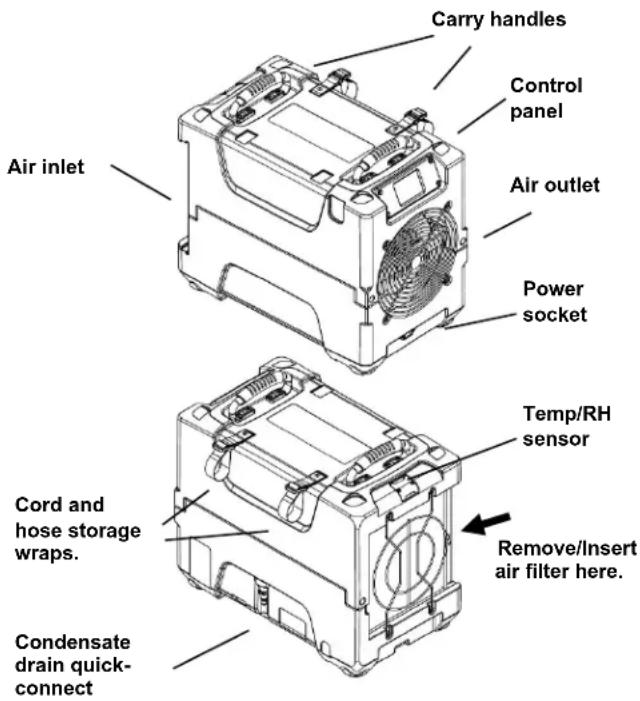
Fig. A: Parts Identification
text_image
Carry handles Control panel Air inlet Air outlet Power socket Temp/RH sensor Cord and hose storage wraps. Remove/Insert air filter here. Condensate drain quick-connectPlug in electrical cord
The Revolution should be plugged into a GFCI-protected 115 volt outlet rated for at least 15 amps. Always plug the cord firmly into the unit first, and then plug the other end into a suitable outlet.
HOW TO USE THE CONTROL PANEL
The i-Series Controller provides comprehensive dehumidifier controls and detailed real-time data about the drying environment as well as job hours, self-diagnosis messages, maintenance reminders and operating status.
For detailed information and additional instructions, please visit the i-Series Controller page at Controller.LegendBrandsRestoration.com
Home Screen Views
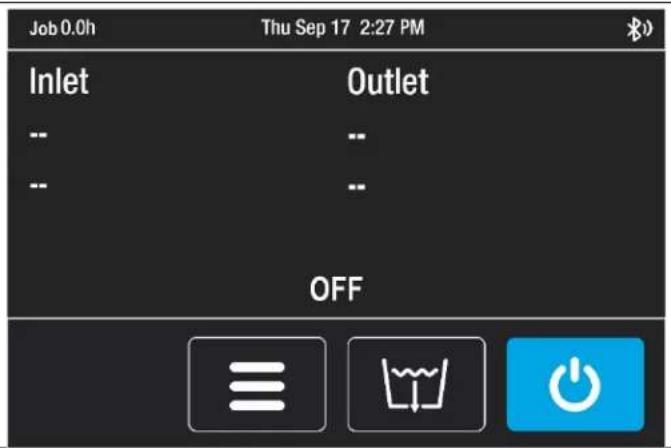
Unit OFF
Unit must be plugged in.
Top display bar:
Job hours, current time

Press MENU to access settings and configuration controls

Press PURGE to pump out condensate tank

Press ON/OFF to turn unit on.
text_image
Job 0.0h Thu Sep 17 2:27 PM Inlet Outlet -- -- -- -- OFFUnit ON
Press ON/OFF key to switch unit on.
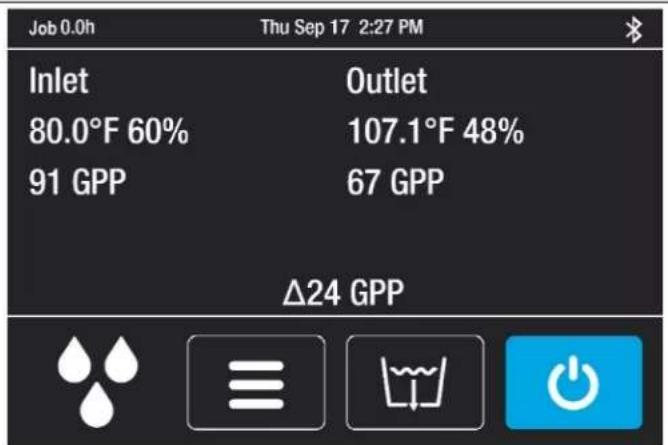
Top display bar:
Job hours, current time
Information display:
Inlet/Outlet temp, %RH and GPP
Current GPP removal
Bottom menu bar:

Quick-Reference Inlet GPP.
1: < 60 GPP; 2: 60–90 GPP; 3: > 90 GPP

Press MENU to access settings and configuration controls
Press ON/OFF to turn unit off.
text_image
Job 0.0h Thu Sep 17 2:27 PM Inlet Outlet 80.0°F 60% 107.1°F 48% 91 GPP 67 GPP Δ24 GPPIf the control system detects a problem, it will display an "Alert" symbol in the upper right corner of the screen. Press ON/OFF to view the message and OK to clear the message. NOTE: In the case of an error, the unit will not operate until the problem is resolved. Refer to the explanations and solutions shown below. If these solutions do not fix the problem, contact your local authorized service center for further assistance.
| CONTROL PANELMESSAGE | EXPLANATION AND SOLUTION |
| ER4 ErrorDefrost Thermistor Connect-or-ER4 ErrorOutlet Thermistor Connect | Temp sensor is open, missing, or shorted. Check that temp sensors are in-stalled correctly on control panel. If error persists, contact service. |
| ER5 ErrorInlet RH1 Temp/RH Sensor | Inlet Temp/RH sensor is open, missing, or shorted. Check that inlet temp/RH sensor is installed correctly on control panel and inlet shroud. If error persists, contact service. |
| ER5 ErrorInlet RH1 Temp/RH Sensor | Inlet Temp/RH sensor is open, missing, or shorted. Check that inlet temp/RH sensor is installed correctly on control panel and inlet shroud. If error persists, contact service. |
| ER6 ErrorCurrent Sensor Failure | Current sensor failure. If error persists, contact service. |
| ER9 ErrorPump Blocked | Check for obstructions in drain hose. Check the pump. |
| W1Low BATTERY | Replace coin cell battery (3V, CR2032) on control panel. |
| W2BLE ErrorW3Flash ResetW4WDT Reset | Cycle power to dehumidifier. If warning persists, contact service. |
AT THE END OF THE JOB
To reduce the possibility of drips when moving the unit, follow these additional steps to ensure that all water is removed from the unit.
NOTICE: To ensure all water is removed from the dehumidifier, the unit will complete the defrost cycle even if the unit is turned off. If the unit is unplugged during the defrost cycle, excessive water may accumulate in the unit and may drip out when you move the unit.
NOTICE: To ensure the condensate tank empties completely while purging, make sure the unit is placed up-right on a horizontal surface.
-
Do not turn unit off or move it until it has returned to normal operating mode.
-
Gently rock the machine to ensure any water remaining on interior surfaces falls into the sump area.
- Press the PURGE key. When the purge cycle is complete, turn the unit off.
- Remove the external drain hose, drain it carefully, coil it, and secure it with one of the straps provided.
- Remove the power cord, coil it neatly, and secure it with one of the straps provided.
TRANSPORTATION AND STORAGE
NOTICE: Always remove power cord before moving, transporting, or storing the unit.
NOTICE: Handle the unit carefully. Do not drop, throw, or place the unit where it could fall. Rough treatment can
damage this equipment and may create a hazardous condition or void warranty.
- Do not expose the control panel to moisture, snow or rain.
- Protect from freezing.
- Store and transport securely to avoid any damaging impact to internal parts.
- Secure during transport to prevent sliding and possible injury to vehicle occupants.
MAINTENANCE SCHEDULE
WARNING! ELECTRIC SHOCK HAZARD. Unplug unit before cleaning or servicing.
WARNING: Risk of dust and contaminants exposure. Use of respirator mask and gloves is recommended. If unit has been exposed to potentially dangerous contaminants, clean thoroughly and sanitize before reuse.
NOTICE: The unit is fitted with sensitive electronic sensors. Protect the sensors and their lead wires from damage and do not expose them to water or cleaning solution.
The following tools and supplies are needed to complete the maintenance procedures described in this manual:
Philips screwdriver
10 mm wrench
6 mm hex bit
14 in. nut driver
Cleaning cloths
HEPA vacuum cleaner with soft brush nozzle and crevice nozzle.
Recommended
Cordless drill, small knife, small-jaw pliers, coil cleaning solution, rotomolded housing cleaning solution.
Before each use
Inspect the electrical cord for damage. Look for fraying, cuts, etc. If you find any damage, replace the cord with an authorized Legend Brands part.
Inspect filter. Replace if accumulation of dust and debris is visible.
NOTICE: Replace used filters only with a new Dri-Eaz 4-PRO filter part no. #102312 (F583) (24-pack). Other filter types do not provide adequate filtration or airflow. Each filter is individually wrapped to protect filtration effectiveness. Remove the wrapper before installing the filter into the dehumidifier.
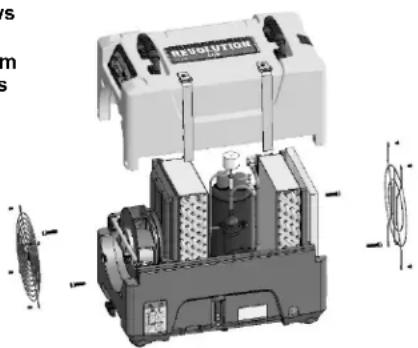
Fig. B: Disassembly for Cleaning
Remove the 4 screws from housing and 2 top screws each from inlet and outlet grills and lift off cover.
text_image
RESOLUTION m sMonthly
Inspect coils. Clean when dust accumulation is visible. In normal use, dust can accumulate and can restrict airflow, reducing performance and causing the unit to overheat. Use a vacuum cleaner with a brush tool and a soft cloth to remove any debris. Take care not to damage any interior components.
To maintain appearance, wipe interior and exterior surfaces with a damp cloth. For deep cleaning and a lasting, protective shine, use an automotive interior cleaner.
As Needed
Clean pump check valve and basin. Remove grills and cover as shown in Fig. B. Remove screws from pump base and lift out pump. Wipe out pump basin with a damp cloth. Inspect the pump base for build-up of debris and clean if needed. Unthread barbed fitting with check valve and rinse fitting and check valve with clean water. Reinstall check valve into barbed fitting and install the barbed fitting into pump. Do not overtighten. Reinstall pump on base. Reinstall cover and grills.
Clean coils. With the cover removed, inspect both coils. If excessive dust and debris is present, vacuum thoroughly and/or clean with coil cleaner.
TROUBLESHOOTING
| FAULT CAUSE SOLUTION | ||
| Water drips out when moving unit | Unit was unplugged before purging was complete. | Purge unit before moving. See “At the End of the Job.” |
| Unit does not operate | Unit not switched on.No power to machine. | Switch unit on.Plug in unit; check power cord connection at wall outlet and at base of unit. |
| Unit operating, but room not dry | Not enough time to dry.Poor air movement in room.Excessive moist air infiltration. | Make sure “Humidistat” is OFF. Allow more time for drying.Increase air movement with air movers.Seal off area to reduce infiltration. |
| Unit collects too little water | Room air is dry.Room temperature is too low.Filter is clogged.Coils are clogged. | Make sure “Humidistat” is OFF.Confirm humidity level with hygrometer.Increase room temperature.Check filter. Replace as necessary.Check coils. Clean as necessary. |
| If the problem you are experiencing is not listed here, call your local distributor or contact our Service Department toll-free at 800-932-3030 for further assistance. | ||
SPECIFICATIONS
| Name | Revolution LGR Dehumidifier Model F413 |
| Dimensions (W × H × D) | 12.5 × 17.6 × 21.5 in.31.8 × 44.7 × 54.6 cm |
| Weight (w/ cord & hose) | 65 lbs. | 29.5 kg |
| Amps | 6.2 amps at 80°F/60% RH |
| Power | 115V / 60Hz |
| Air movement | 121–180 CFM | 3.43–5.1 CMM |
| Water removal | 80 pts/day | 38 L/dayat 80°F/60% RH (AHAM)134 pts/day | 63 L/dayat 90°F/90% RH |
| Operating temperature range | 33–100°F |1–38°C |
| Safety | ETL listed to CSA standards |
| Specifications are subject to change without notice. Some values may be approximate. | |
WARNING: This product may expose you to chemicals, including lead and phthalates, known to the State of California to cause cancer, birth defects, or other reproductive harm. For more information, go to P65Warnings.ca.gov
PARTS INCLUDED
40 ft. (12 m) of drain hose with quick-connect fitting.
25 ft. (7.6 m) detachable power cord.
4-PRO Air filter reorder no. #102312 (F583) (24 pk)
OPTIONAL
Duct Attachment Kit #106996 (F530)
ADDITIONAL PRODUCT INFORMATION and current documentation is available at
Revo.LegendBrandsRestoration.com.
FOR PARTS AND SERVICE CALL YOUR LOCAL DIS- TRIBUTOR or Dri-Eaz at 800-932-3030.
LegendBrandsRestoration.com
Visit warranty.LegendBrandsRestoration.com and register your purchase to ensure you receive any important product releases.
15180 Josh Wilson Road, Burlington, WA 98233
Teléfono: 800-932-3030 Fax: 360-757-7950 Revo.LegendBrandsRestoration.com
natural_image
Illustration of a hand inserting an AC input into a socket (no text or symbols)15180 Josh Wilson Road, Burlington, WA 98233
Téléphone : 800-932-3030 Fax : 360-757-7950 Revo.LegendBrandsRestoration.com