SL80 - Battery charger VOLTCRAFT - Free user manual and instructions
Find the device manual for free SL80 VOLTCRAFT in PDF.



| Product Type | Sound level meter (decibel meter) class 2, compliant with IEC 61672-1 |
| Brand | VOLTCRAFT |
| Model | SL80 |
| Dimensions (L x H x D) | 48.5 x 204 x 27 mm |
| Weight | Approx. 136 g (without batteries) |
| Power supply | 3 AAA 1.5 V batteries |
| Measurement range | 30 to 130 dB |
| Resolution | 0.1 dB |
| Accuracy | ±1.5 dB (at 1 kHz) |
| Frequency range | 31.5 Hz to 8 kHz |
| Frequency weighting | A and C |
| Response time | FAST (125 ms) / SLOW (1 s) |
| Microphone | 1.27 cm (1/2 in) polarized capacitive microphone |
| Protection rating | IP54 (splash resistant) |
| Auto power off | After approx. 15 minutes of inactivity (can be disabled) |
| Main functions | MAX/MIN/AVG display, hold function (HOLD), dBA/dBC selection, fast/slow response time |
| Operating conditions | 0 to +40 °C, <80% RH (non-condensing), altitude ≤2000 m |
| Storage conditions | -10 to +60 °C, <80% RH (non-condensing) |
| Maintenance and cleaning | Clean with a dry, lint-free cloth; do not use harsh chemicals |
| Safety | Do not immerse, avoid shocks, replace batteries observing polarity |
| Package contents | Sound level meter, windscreen, 3 AAA batteries, carrying pouch, user manual |
Frequently Asked Questions - SL80 VOLTCRAFT
User questions about SL80 VOLTCRAFT
0 question about this device. Answer the ones you know or ask your own.
Ask a new question about this device
Download the instructions for your Battery charger in PDF format for free! Find your manual SL80 - VOLTCRAFT and take your electronic device back in hand. On this page are published all the documents necessary for the use of your device. SL80 by VOLTCRAFT.
USER MANUAL SL80 VOLTCRAFT
GB Operating Instructions
SL-80 Sound Level Meter
Item no: 2620273
F Mode d'emploi
Sonomètre SL-80
text_image
QR code image containing encoded data, no visible human-readable text1 Introduction.... 16
2 Intended use.... 16
3 Delivery contents 16
4 Operating Instructions for download.... 17
5 Description of symbols.... 17
6 Safety instructions .... 17
6.1 General.... 17
6.2 Handling.... 18
6.3 Operating environment.... 18
6.4 Operation.... 18
6.5 Batteries.... 18
7 Overview.... 19
7.1 Product.... 19
7.2 Display symbols 19
8 Replacing batteries.... 20
9 Operation....20
9.1 Power ON / OFF 20
9.2 Auto shut-off.... 20
9.3 MAX / MIN / AVG display 21
9.4 Display hold.... 21
9.5 Decibel weightings (dBA / dBC) 21
9.6 FAST / SLOW response time.... 22
10 Sound measuring tips.... 22
11 Cleaning and care.... 23
12 Disposal.... 23
12.1 Product.... 23
12.2 (Rechargeable) batteries.... 24
13 Technical data 25
1 Introduction
Dear customer,
Thank you for purchasing this product.
If there are any technical questions, please contact:
www.conrad.com/contact
2 Intended use
The product is a handheld sound level (decibel) meter.
The product complies with the requirements of EN 61672-1 for a Class 2 sound level meter.
Important:
The product has an IP54 ingress protection rating. It is resistant against light splashes of water. Do not submerge.
If you use the product for purposes other than those described, the product may be damaged.
Improper use can result in short circuits, fires, or other hazards.
The product complies with the statutory national and European requirements.
For safety and approval purposes, you must not rebuild and/or modify the product.
Read the operating instructions carefully and store them in a safe place. Make this product available to third parties only together with the operating instructions.
All company names and product names are trademarks of their respective owners. All rights reserved.
3 Delivery contents
Sound level meter
Wind noise suppressor
3x AAA 1.5 V batteries
Carry bag
Operating instructions
4 Operating Instructions for download
text_image
QR code image containing encoded data, no visible human-readable textUse the link www.conrad.com/downloads (alternatively scan the QR code) to download the complete operating instructions (or new/current versions if available). Follow the instructions on the web page.
5 Description of symbols

The symbol warns of hazards that can lead to personal injury.
6 Safety instructions

Read the operating instructions carefully and especially observe the safety information. If you do not follow the safety instructions and information on proper handling, we assume no liability for any resulting personal injury or damage to property. Such cases will invalidate the warranty/guarantee.
6.1 General
The product is not a toy. Keep it out of the reach of children and pets.
Do not leave packaging material lying around carelessly. This may become dangerous playing material for children.
If you have questions which remain unanswered by this information product, contact our technical support service or other technical personnel.
- Maintenance, modifications and repairs must only be completed by a technician or an authorised repair centre.
6.2 Handling
- Handle the product carefully. Jolts, impacts or a fall even from a low height can damage the product.
6.3 Operating environment
- Do not place the product under any mechanical stress.
- Protect the appliance from extreme temperatures, strong jolts, flammable gases, steam and solvents.
■ Protect the product from direct sunlight.
6.4 Operation
- Consult an expert when in doubt about the operation, safety or connection of the product.
If it is no longer possible to operate the product safely, take it out of operation and protect it from any accidental use. DO NOT attempt to repair the product yourself. Safe operation can no longer be guaranteed if the product:
– is visibly damaged,
– is no longer working properly,
– has been stored for extended periods in poor ambient conditions or
– has been subjected to any serious transport-related stresses.
6.5 Batteries
■ Correct polarity must be observed while inserting batteries.
The batteries should be removed from the device if it is not used for a long period of time to avoid damage through leaking. Leaking or damaged batteries might cause acid burns when in contact with skin, therefore use suitable protective gloves to handle corrupted batteries.
Batteries must be kept out of reach of children. Do not leave batteries lying around, as there is risk, that children or pets swallow them.
All batteries should be replaced at the same time. Mixing old and new batteries in the device can lead to battery leakage and device damage.
- Batteries must not be dismantled, short-circuited or thrown into fire. Never recharge non-rechargeable batteries. There is a risk of explosion!
7 Overview
7.1 Product
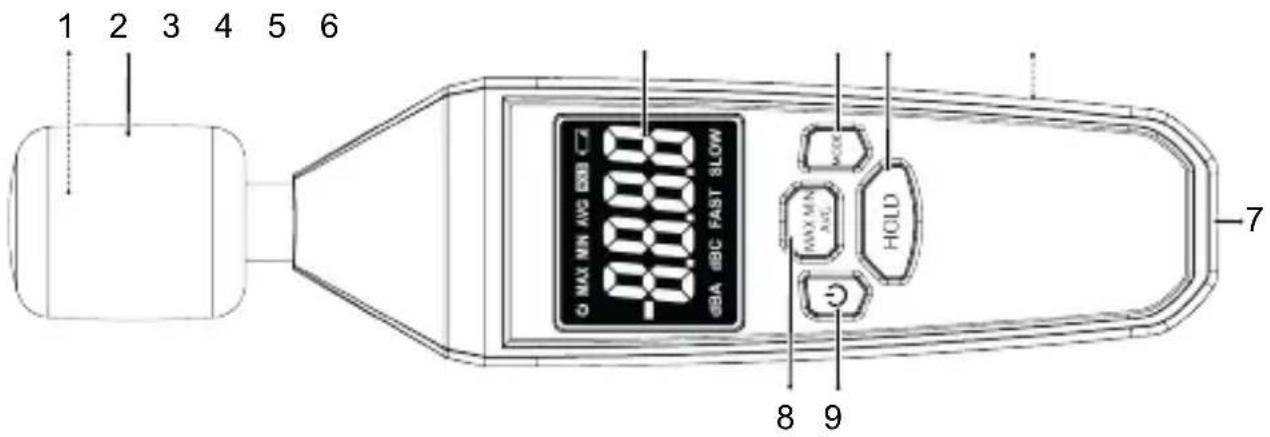
text_image
1 2 3 4 5 6 G MAX MIN AVG 00000 00000 HOLD 8 9 71 Microphone tip (underneath) 2 Wind noise suppressor
3 Display 4
5 HOLD: button
7 Tripod mount 8
9 : ON/OFF button
MODE: button
6 Battery compartment (rear)
MAX MIN AVG: button
7.2 Display symbols
| Symbol Description | |
 | Display hold active. |
| [WKBX] | Auto shut-off active. |
| [X802] | Low battery indicator. |
| MAX | Maximum value is held. |
| MIN | Minimum value is held. |
| AVG | Average value is displayed. |
| dBA | A-Weighted decibel scale (human hearing). |
| dBC | C-Weighted decibel scale (flatter frequency response). |
| FAST | Fast time evaluation. |
| SLOW | Slow time evaluation. |
| oL | Measurement range exceeded. |
8 Replacing batteries
Note:
Replace the batteries when the low battery indicator shows.
- Use a cross-head screwdriver to remove the compartment cover screw.
- Replace the batteries and match the polarity markings shown inside the compartment.
- Replace the battery compartment cover taking care not to over-tighten the screw.
9 Operation
9.1 Power ON / OFF
■ Press and hold the button to switch the power ON/OFF.
9.2 Auto shut-off
Notes:
- Auto shut-off is active by default, it is indicated by the " symbol.
- This energy saving feature will shut power off after approximately 15 minutes of no activity.
To disable auto shut-off:
Preconditions:
√ The power is switched ON.
- Short press the HOLD button and then short press the button.
→ The symbol will disappear when disabled.
- Auto shut-off will reactivate after the power is switched OFF.
9.3 MAX / MIN / AVG display
In this mode the display shows the "MIN" (minimum), "MAX" (maximum), or "AVG" (average) value measured.
Press the "MAX MIN" button repeatedly to toggle though modes: MAX → MIN → AVG → OFF.
The display will show "MAX", "MIN", or "AVG" to indicate which mode is active.
9.4 Display hold
Important:
- The display hold function freezes the display.
- The display hold should be switched OFF before taking measurements.
■ Press the HOLD button to switch display hold ON/OFF.
The hold icon will appear when display hold is ON.
9.5 Decibel weightings (dBA / dBC)
Notes:
- "dBA" is the A-weighted decibel scale that approximates human hearing by reducing the emphasis on very low and very high audio frequencies.
- "dBC" is the C-weighted decibel scale that measures sound levels with a flatter frequency response across the audible spectrum compared to the A-weighted scale.
- Press the MODE button to switch between weighted scales.
The display will show "dBA" or "dBC" to indicate which mode is active.
9.6 FAST / SLOW response time
Notes:
- Fast time evaluation "FAST" uses a 125 ms time constant. It responds quickly to fluctuations in sound levels and is good for capturing short, transient sounds (e.g., hammering, dogs barking, drums etc.).
- Slow time evaluation "SLOW" uses a 1 sec time constant. It responds more slowly, and is good for measuring steady, continuous sounds (e.g., machinery noise, fans, AC systems, crowd noise etc.).
The default setting is "FAST".
- Press and hold the MODE button to toggle between "FAST" and "SLOW" response times.
The display will show "FAST" or "SLOW" to indicate which mode is active.
- You cannot change response times when " H's active.
10 Sound measuring tips
■ Make sure there are no objects between the microphone and the sound source.
- To not influence the sound waves, extend the microphone away from the body using an outstretched arm or mount it to a stand.
If possible, move approx. 2 m away from the sound source.
- Minimize device vibration or movement.
Wind noise affect results, use the included foam suppressor if the wind speed >10 m/s.
11 Cleaning and care
Important:
- Do not use aggressive cleaning agents, rubbing alcohol or other chemical solutions. They damage the housing and can cause the product to malfunction.
-
Do not immerse the product in water.
-
Clean the product with a dry, fibre-free cloth.
12 Disposal
12.1 Product
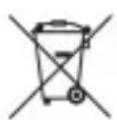
This symbol must appear on any electrical and electronic equipment placed on the EU market. This symbol indicates that this device should not be disposed of as unsorted municipal waste at the end of its service life.
Owners of WEEE (Waste from Electrical and Electronic Equipment) shall dispose of it separately from unsorted municipal waste. Spent batteries and accumulators, which are not enclosed by the WEEE, as well as lamps that can be removed from the WEEE in a non-destructive manner, must be removed by end users from the WEEE in a non-destructive manner before it is handed over to a collection point.
Distributors of electrical and electronic equipment are legally obliged to provide free take-back of waste. Conrad provides the following return options free of charge (more details on our website):
in our Conrad offices
■ at the Conrad collection points
at the collection points of public waste management authorities or the collection points set up by manufacturers or distributors within the meaning of the ElektroG
End users are responsible for deleting personal data from the WEEE to be disposed of.
It should be noted that different obligations about the return or recycling of WEEE may apply in countries outside of Germany.
12.2 (Rechargeable) batteries
Remove batteries/rechargeable batteries, if any, and dispose of them separately from the product. According to the Battery Directive, end users are legally obliged to return all spent batteries/rechargeable batteries; they must not be disposed of in the normal household waste.
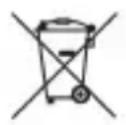
Batteries/rechargeable batteries containing hazardous substances are labelled with this symbol to indicate that disposal in household waste is forbidden. The abbreviations for heavy metals in batteries are:
Cd = Cadmium, Hg = Mercury, Pb = Lead (name on (rechargeable) batteries, e.g. below the trash icon on the left).
Used (rechargeable) batteries can be returned to collection points in your municipality, our stores or wherever (rechargeable) batteries are sold. You thus fulfil your statutory obligations and contribute to environmental protection.
Batteries/rechargeable batteries that are disposed of should be protected against short circuit and their exposed terminals should be covered completely with insulating tape before disposal. Even empty batteries/rechargeable batteries can contain residual energy that may cause them to swell, burst, catch fire or explode in the event of a short circuit.
13 Technical data
Power supply...... 3x AAA 1.5 V batteries
Auto shut-off.... 15 mins
Observed standards ...... IEC 61672-1 Class 2
Ingress protection..... IP54
Measuring range.... 30 to 130 dB
Resolution.... 0.1 dB
Frequency weighting ...... A and C
Accuracy.... ±1.5 dB (1 kHz)
Frequency range 31.5 Hz to 8 kHz
Response time..... FAST (125 ms), SLOW (1 s)
Microphone.... 1.27 cm (1/2") polarized capacitive microphone
Operating altitude ....≤2000 m
Operating conditions.... 0 °C to +40 °C, <80 % RH (non-condensing)
Storage conditions.... -10 °C to +60 °C, <80 % RH (non-condensing)
Dimensions (W x H x D) ...... 48.5 x 204 x 27 mm
Weight ..... approx. 136 g (without batteries)
F Sommaire
France technique@conrad-
(email): france.fr
text_image
QR code image containing encoded data, no visible human-readable texttext_image
QR code image containing encoded data, no visible human-readable textCopyright by Conrad Electronic SE
*2620273_V1_1123_dh_mh_de 9007200276803979-1 l2/O1 en

This is a publication by Conrad Electronic SE, Klaus-Conrad-Str. 1, D-92240 Hirschau (www.conrad.com).
All rights including translation reserved. Reproduction by any method (e.g. photocopying, microfilming or the capture in electronic data processing systems) requires prior written approval from the editor. Reprinting, also in part, is prohibited. This publication reflects the technical status at the time of printing.
Copyright by Conrad Electronic SE
*2620273_V1_1123_dh_mh_en 9007200276803979-2 l2/O1 en

Copyright by Conrad Electronic SE
*2620273_V1_1123_dh_mh_fr 9007200276803979-3 I2/O1 en

Copyright by Conrad Electronic SE
*2620273_V1_1123_dh_mh_nl 9007200276803979-4 I2/O1 en