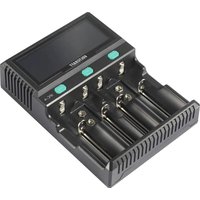
IPC-4 - Battery charger VOLTCRAFT - Free user manual and instructions
Find the device manual for free IPC-4 VOLTCRAFT in PDF.


| Product type | Smart 4-bay battery charger |
| Brand | Voltcraft |
| Model | IPC-4 |
| Dimensions (L x W x H) | 162 x 120 x 45 mm |
| Weight | Approx. 382 g |
| Mains power supply | 100-240 V AC, 50-60 Hz |
| DC power supply | 12 V DC / 3 A |
| Compatible battery types | NiMH, NiCd, Li-ion, LiFePO4 (1.2 V / 3.2 V / 3.6-3.7-3.85 V / 9 V) |
| Compatible battery sizes | AA, AAA, AAAA, C, SC, D, 9V, 10340, 10440, 14500, 14650, 16340, 17335, 17500, 17670, 18350, 18500, 18650 and others |
| Number of bays | 4 (independent, separately programmable) |
| Available programs | Charge (all bays); Discharge, Refresh, Test (bay 4 only) |
| Charge current | 0.2 A / 0.5 A / 0.8 A / 1 A / 1.5 A / 2 A (depending on bay) |
| Discharge current | 0.2 A / 0.4 A (bay 4 only) |
| Charge voltage | Automatic according to type: Li-ion 4.2V/4.35V; LiFePO4 3.65V; NiMH 1.48V; NiMH 9V 10V |
| Trickle charge | Yes (100 mA ± 30 mA for NiMH) |
| Display | Backlit LCD: voltage, current, capacity, internal resistance, charge status, program |
| Safety | Reverse polarity protection, faulty battery detection, thermal shutdown |
| Maintenance | Clean with a dry, lint-free cloth. Do not use solvents or immerse. |
| Repairability | Repair by a specialist only. Do not open or modify. |
| Operating temperature | 0 to 40 °C |
| Operating humidity | 20 to 80% RH (non-condensing) |
| Power consumption | 36 W |
| Case material | ABS |
| Package contents | Charger, user manual, power cord |
| Order reference | 2859417 |
Frequently Asked Questions - IPC-4 VOLTCRAFT
User questions about IPC-4 VOLTCRAFT
0 question about this device. Answer the ones you know or ask your own.
Ask a new question about this device
Download the instructions for your Battery charger in PDF format for free! Find your manual IPC-4 - VOLTCRAFT and take your electronic device back in hand. On this page are published all the documents necessary for the use of your device. IPC-4 by VOLTCRAFT.
USER MANUAL IPC-4 VOLTCRAFT
18700/20700/21700/22650/22700/26500/26650/32650
GB Operating instructions
Li-ion, NiCd, NiMH, LiFePO4 round cell charger
Item no. 2859417
CE
1 Intended use
The product is intended for charging, discharging, testing and refreshing the battery types specified in the manual.
The product is intended for indoor use only. Do not use it outdoors. Contact with moisture must be avoided under all circumstances.
Using the product for purposes other than those described above can damage the product. Improper product use can cause a short circuit, fire, electric shock, or other hazards.
This product complies with statutory, national and European regulations. For safety and approval purposes, you must not rebuild and/or modify the product.
Read the instructions carefully and store them in a safe place. Always provide these operating instructions when giving the product to a third party.
All company names and product names contained herein are trademarks of their respective owners. All rights reserved.
2 Delivery content
IPC-4 charger
Power cord
Operating instructions
3 Latest product information
Download the latest product information at www.conrad.com/downloads or scan the QR code shown. Follow the instructions on the website.
4 Explanation of symbols

This symbol warns of hazards that can lead to injury.

This symbol warns of a dangerous voltage which can lead to injuries due to electric shock.
5 Safety instructions

Read the operating instructions carefully and especially observe the safety information. If you do not follow the safety instructions and information on proper handling, we assume no liability for any resulting personal injury or damage to property. Such cases will invalidate the warranty/guarantee.
5.1 General
This product is not a toy. Keep it out of the reach of children and pets.
Do not leave packaging material lying around carelessly. It may become a dangerous plaything for children.
Should you have any questions or concerns after reading this document, please contact our technical support or a professional technician.
Maintenance, modifications and repairs must be carried out by a technician or a specialist repair centre.
5.2 Handling
Please handle the product carefully. Impact, shocks or a fall even from a low height can damage the product.
5.3 Operating environment
Do not expose the product to any mechanical stress.
Protect the product from extreme temperatures, strong jolts, flammable gases, vapours and solvents.
Protect the product from high humidity and moisture.
Protect the product from direct sunlight.
Never switch the device on immediately after taking it from a cold into a warm environment. This may cause condensation to form, which can destroy the product. Allow the product to reach room temperature before using it.
Avoid using the product near strong magnetic or electromagnetic fields, transmitter aerials or HF generators. Otherwise, the product may not function properly.
5.4 Operation
Consult an expert when in doubt about the operation, safety or connection of the device.
Always disconnect the device from the mains supply when not in use.
Warning! Explosive gases. Protect the device from flames and sparks and ensure sufficient ventilation during charging.
If it is no longer possible to operate the product safely, take it out of operation and protect it from any accidental use. DO NOT attempt to repair the product yourself. Safe operation can no longer be guaranteed if the product:
– is visibly damaged,
– is no longer working properly,
– has been stored for extended periods in poor ambient conditions or
– has been subjected to any serious transport-related stress.
5.5 Rechargeable batteries
Pay attention to correct polarity when inserting the rechargeable batteries.
If you do not plan to use the product for an extended period, remove the rechargeable batteries to prevent damage from leaking. Leaking or damaged rechargeable batteries may cause acid burns if they come into contact with your skin. Therefore, use suitable protective gloves when handling damaged rechargeable batteries.
Rechargeable batteries must be kept out of reach of children. Do not leave batteries/rechargeable batteries lying around, as there is a risk that children or pets may swallow them.
Remove the batteries from the charger after completing the programme (charge, discharge, refresh, test).
Make sure you remove the batteries from the device before storing it.
Leaking batteries can cause damage to the device.
Rechargeable batteries must not be dismantled, short-circuited or thrown into fire. Never attempt to recharge non-rechargeable batteries. This may cause an explosion!
5.6 Power cord

Never attempt to modify the electrical components of the charger. Risk of fatal electric shock!
Always ensure that the mains plug is properly connected.
Never attempt to modify the device.
The mains socket must be located near the device and be easily accessible.
Never plug in or unplug the mains plug when your hands are wet.
Never disconnect the mains plug from the socket by pulling on the cable. Always pull it out of the mains socket using the intended grips.
Unplug the mains plug from the mains socket if you do not use the device for a long time.
Unplug the device from the power outlet during a thunderstorm for safety reasons.
Make sure that the power cord is not squeezed, bent, damaged by sharp edges or exposed to mechanical stress.
Avoid excessive thermal stress on the power cord from extreme heat or cold.
Do not modify the power cord. Otherwise, the power cord may be damaged. A damaged power cord can cause a fatal electric shock.
Do not touch the power cord if it is damaged.
- First, power down the respective mains socket (e.g. via the respective circuit breaker), and then carefully pull the mains plug out of the mains socket.
- Never use the product if the power cord is damaged.
Make sure that the cable is not pinched, kinked or damaged by sharp edges.
Always lay cables so that nobody can trip over or become entangled in them. Failure to do so could result in injury.
6 Product overview
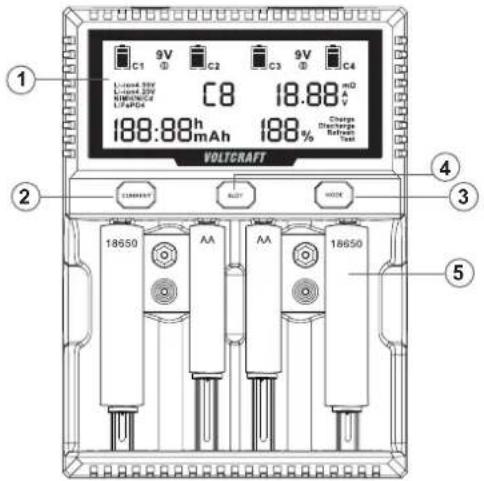
1 LCD display
2 Charging current
3 Programme selection
4 Charging slot selection
5 Battery compartment
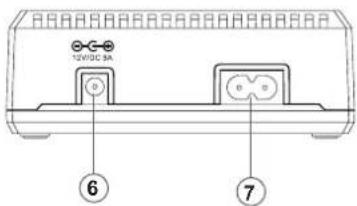
6 DC input
7 AC input
7 Installation
The charger comes with a suitable power cord (see section 2 "Scope of supply").
You can also operate the charger via a power adaptor (12 V, 3 A). If the device is connected to the mains and the power adaptor simultaneously, the device automatically selects the mains connection.
8 Usage
Plug the supplied power cord or the power adapter cable into the dedicated socket on the back of the charger. All indicators light up briefly and then switch to the operating mode. If no batteries are connected, four empty battery icons will appear. When batteries are connected, the respective icon shows the programme mode for the slot.
When switched on, the device runs the default programme "Charge".
Once the device is switched on, put the batteries in the desired battery compartments by pulling the contact tabs or plugging the 9 V blocks into the corresponding pins.
8.1 Display
1 Battery icon
2 9 V battery compartment
3 Battery type
4 Battery compartment
5 Battery charging current, voltage and internal resistance
This element of the display switches automatically between voltage [V], internal resistance [milliohms] and current [A]
6 Battery capacity and time
The display automatically switches between runtime and charge [mAh] during and at the end of a programme run.
Important:
If a rechargeable battery is defective or inserted the wrong way round or if a battery is inserted instead of a rechargeable battery in the respective compartment, "Err" for "Error" is displayed. In this case, no programmes can be selected and the battery should be inserted with the correct polarity or disposed of properly.
7 Charge status in %
8 Selected programme (only for slot 4)
The device has a backlit display, indicators for charging time, voltage, charging current, capacity/previously charged/discharged mAh, internal resistance, battery type, charging slot, programme, charge status in % and charging time, as illustrated above.
8.2 Selecting the slot
With the device switched on and the battery connected, select the corresponding slot and set the programme (slot 4 only) and the charging/discharging current for this slot. You can run a separate programme for slot 4, whereas you can only run the "Charge" programme for slots 1-3.
8.3 Programme
The charger has four programmes:
- "Charge" (charging)
Charges the battery to its end-of-charge voltage (automatically, except for Li-ion and LiFePO4 batteries, see 8.5)
- "Discharge" (discharging), only for slot 4
Discharges the battery to its final discharge voltage. This allows the capacity to be tested, for example.
- "Refresh" (refreshing), slot 4 only
This programme carries out several charging and discharging cycles in succession and increases the performance of batteries that have become weak.
- "Test" (battery check, capacity, internal resistance), slot 4 only
This programme carries out a charge-discharge and recharge cycle.
Use the "Mode" button to select the desired programme for slot 4. If the device powers off due to a power failure, it will automatically restart with the "Charge" programme when the power supply is restored.
The "Charge" programme has a "Trickle Mode" (trickle charge, 100 mA, ±30 mA, only for NiMH batteries) to keep batteries fully charged until they are removed from the charger.
The display changes during each programme run and at the end the charge achieved in mAh, the current voltage in V and the internal resistance in milliohms are displayed.
8.4 Charging/discharging current
After selecting the desired slot, use the "Current" button to select the charging/discharging current. Refer to the technical data for available current values.
Recommended charging current:
| Recommended charging current Battery capacity range | |
| 0.2 A lower than 800 mAh | |
| 0.5 A – 0.8 A 800 mAh – 2000 mAh | |
| 1.0 A – 1.5 A 2000 mAh – 3500 mAh | |
| 2.0 A more than 3500 mAh | |
8.5 Important information about Li-ion and LiFePO4 rechargeable batteries
You must set LiFePO4 rechargeable batteries manually, or they will be charged in Li-ion mode. LiFePO4 rechargeable batteries have a lower voltage when fully charged than Li-ion rechargeable batteries, which means they can be damaged and even explode due to excessive cut-off voltage.

Where not automatically recognised, you must also set the appropriate type (4.20 V or 4.35 V) for Li-ion rechargeable batteries to ensure the correct end-of-charge voltage.
Press and hold the "Mode" button (1-2 sec.) until the correct battery type is displayed.
9 Troubleshooting
| Problem Cause Remedy | ||
| Battery is not recognised, battery icon remains empty | Resistance between the connections is too high | Defective battery, dispose of properly and insert a new one |
| “Err” display | Battery inserted incorrectly, wrong polarity | Insert with correct polarity. If the battery has the correct polarity and the display still appears, the battery is faulty and should be disposed of correctly. |
| There is a non-rechargeable battery in the shaft. | Please remove the battery from the charger immediately. | |
| Battery gets very hot (>40 °C) | Check end-of-charge voltage and charging current (see section 8.4). Values are too high, risk of battery explosion/ignition! Defective battery Ambient temperatures are too high during charging | Immediately remove the battery, leave it in a safe place (e.g. between two ceramic plates or on a stone slab) and let it cool down. Ensure sufficient ventilation of the room |
| Charger will not start or gets very hot (>50 °C) | Defective internal power supply | Discontinue use of the charger |
10 Cleaning and care
Important:
- Do not use aggressive cleaning agents, rubbing alcohol or other chemical solutions. They can damage the housing and can cause the product to malfunction.
-
Do not submerge the product in water.
-
Disconnect the product from the power supply.
- Clean the product with a dry, lint-free cloth.
11 Disposal
11.1 Product

This symbol must appear on any electrical and electronic equipment placed on the EU market. This symbol indicates that this device should not be disposed of as unsorted municipal waste at the end of its service life.
Owners of WEEE (Waste from Electrical and Electronic Equipment) shall dispose of it separately from unsorted municipal waste. Spent batteries and accumulators, which are not enclosed by the WEEE, as well as lamps that can be removed from the WEEE in a non-destructive manner, must be removed by end users from the WEEE in a non-destructive manner before it is handed over to a collection point.
Distributors of electrical and electronic equipment are legally obliged to provide free take-back of waste. Conrad provides the following return options free of charge (more details on our website):
in our Conrad offices
at the Conrad collection points
at the collection points of public waste management authorities or the collection points set up by manufacturers or distributors within the meaning of the ElektroG
End users are responsible for deleting personal data from the WEEE to be disposed of.
It should be noted that different obligations about the return or recycling of WEEE may apply in countries outside of Germany.
11.2 Rechargeable batteries
Remove rechargeable batteries, if any, and dispose of them separately from the product. According to the Battery Directive, end users are legally obliged to return all spent rechargeable batteries; they must not be disposed of in the normal household waste.

Rechargeable batteries containing hazardous substances are labelled with this symbol to indicate that disposal in household waste is forbidden. The abbreviations for heavy metals in batteries are: Cd = Cadmium, Hg = Mercury, Pb = Lead (name on rechargeable batteries, e.g. below the trash icon on the left).
Used rechargeable batteries can be returned to collection points in your municipality, our stores or wherever rechargeable batteries are sold. You thus fulfil your statutory obligations and contribute to environmental protection.
Batteries/rechargeable batteries that are disposed of should be protected against short circuit and their exposed terminals should be covered completely with insulating tape before disposal. Even empty rechargeable batteries can contain residual energy that may cause them to swell, burst, catch fire or explode in the event of a short circuit.
12 Technical data
12.1 Power supply
Input voltage/current 1....AC 100\~240V 50-60Hz
Input voltage/current 2.....DC 12 V/3 A
Output voltage/current 1....DC 3.65 V / DC 4.2 V / 4.35 V 2 A * 2 (slot 1 & slot 4), 1.5 A * 3, 0.2 A / 0.5 A / 0.8 A / 1 A * 4
Output voltage/current 2....1.48 V 0.2 A / 0.5 A / 0.8 A / 1 A * 4
Output voltage/current 3....DC 9 V 60 mA / 120 mA * 2
Discharge current....0.2A/0.4 A * 1 (slot 4 only)
Trickle charging 100 mA ± 30 mA (NiMH rechargeable batteries only)
Material.....ABS
Power consumption 36 W
Maximum charge voltage ....LiFePO43.65V±0.05V
Li-ion 4.2V ±0.05V
Li-ion 4.35V ±0.05V
NiMH 1.48V ±0.05V
NiMH9V 10V ±0.5V
Compatible rechargeable batteries..... 1.2V Ni-MH/CD: A, AA, AAA, AAAA,C,SC,D
9V Ni-MH 6F22
3.2V LiFePO4, 3.6/3.7/3.85VLi-ion:10340/10440/14500/
14650/16340/17335/17500/17670/18350/18500/18650/
18700/20700/21700/22650/22700/26500/26650/32650
12.2 Ambient conditions
Operating temperature and
operating humidity 0 – 40 °C / 20\~80% rf (non-condensing)
Storage temperature
storage humidity....-20 - 70 °C / 20\~85% rf (non-condensing)
12.3 Miscellaneous
Dimensions....162 x 120 x 45 mm
Weight .....approx. 382 g
VOLTCRAFT
F Mode d'emploi
Important:
18700/20700/21700/22650/22700/26500/26650/32650
12.2 Conditions ambiantes
7 Installatie
18700/20700/21700/22650/22700/26500/26650/32650
- Intended use
- Delivery content
- Latest product information
- Explanation of symbols
- Safety instructions
- General
- Handling
- Operating environment
- Operation
- Rechargeable batteries
- Power cord
- Product overview
- Installation
- Usage
- Display
- Important:
- Selecting the slot
- Programme
- Charging/discharging current
- Important information about Li-ion and LiFePO4 rechargeable batteries
- Cleaning and care
- Disposal
- Product
- Rechargeable batteries
- Technical data
- Power supply
- Ambient conditions
- Miscellaneous
- VOLTCRAFT
- Conditions ambiantes
- Installatie
Brand : VOLTCRAFT
Model : IPC-4
Category : Battery charger