SD1000 - Karaoke system KETRON - Free user manual and instructions
Find the device manual for free SD1000 KETRON in PDF.


User questions about SD1000 KETRON
0 question about this device. Answer the ones you know or ask your own.
Ask a new question about this device
Download the instructions for your Karaoke system in PDF format for free! Find your manual SD1000 - KETRON and take your electronic device back in hand. On this page are published all the documents necessary for the use of your device. SD1000 by KETRON.
USER MANUAL SD1000 KETRON
Internal Storage: Flash Memory.
USB (Midi Connection).
Sound Card: 512 Voices, 47 Drum Sets, 248 Audio Drum Loops.
Polyphony 128 note.
Multitimbral 32 parts (2x16).
DSP: 11 Effects, 2 × EFX Insert, 20 presets.
Midi: In, Thru.
Main Out: Left/Right Stereo.
Headphone.
Volume Control.
Optional: Bag.
External Power supply 9 V.
Dimensions:Width 147,Depth 109,Height 39
Weight: 0.5Kg
Warning: to reduce the risk of fire or electric shock, do not expose this instrument to rain or moisture.
IMPORTANT SAFETY AND INSTALLATION INSTRUCTIONS
WARNING - When using electrical products, some basic precautions must be followed, including the following:
- Before using this instrument, carefully read the User's Manual.
- When the instrument is used by children, the presence of an adult is required.
- Do not use the instrument near water, for example near a wash-basin, a swimmingpool, a wet surface, etc.
The instrument must be used only on supports recommended by the manufacturer. - Do not use the instrument where there is any risk of it getting splashed with water or of water dripping on it, such as near wash basins, swimming pools or on wet surfaces etc. Do not put containers with water on top of the instrument.
The instrument is to be used in a position where adequate ventilation is provided. - Use the instrument far away from heat sources such as radiators, heaters, etc.
- Use only the supplied power adaptor for connecting the instrument to the mains. The identification and power adaptor data are reported on the bottom of the instrument.
- Disconnect the power cable if the instrument is not used for longer periods of time.
If you need to disconnect the instrument from the power supply, use the ON/OFF switch at front of the instrument. - The instrument must be positioned so that the ON/OFF switch is easily accessible.
- Bring the instrument to an service centre in the following cases:
a. Damages on the power adaptor or plug.
b. Objects or liquids fallen into its inside.
c. The instrument has been exposed to rain.
d. Abnormal running or an evident decrease of the instrument's performance.
e. The instrument has fallen down or the enclosure has been damaged.
- Never try to repair the instrument yourself. All operations must be performed by specialised engineers.
KEEP THESE INSTRUCTIONS IN A SAFE PLACE
HOW TO AVOID RADIO/ TV INTERFERENCE
This instrument operates at radio frequencies, and if not correctly installed according to the instructions supplied, it may cause interference with radio and television reception.
Though this instrument has been designed according to the applicable standards and notwithstanding the reasonable protections against interference it has been equipped with, there is no guarantee that such events will not occur. In order to check if the interference is actually caused by this instrument, switch it off and see if the interference disappears.
Then switch it on again and check if the interference appears again. Once you have made sure that the interference is originated by this instrument, take one of the following measures:
- Modify the instrument's position with respect to the receiver.
- Increase the distance between the instrument and the receiver.
- Connect the instrument's plug to a different outlet to make sure that the instrument and the receiver are connected to two different circuits.
- If necessary, contact a specialised technician.
POWER SUPPLY
- Before connecting this instrument to any other equipment (amplifier, mixer, other MIDI instruments, etc.) make sure that all units are switched off.
- Read the instructions about Radio and TV interference.
HOW TO CLEAN THIS INSTRUMENT
- Use only a soft and dry cloth to clean the external surface of your instrument. Never use petrol, thinners or solvents generally speaking.
OTHER PRECAUTIONS
If you wish to use your instrument abroad and if you have any doubts about the power supply, contact a qualified engineer previously.
The instrument should never be subject to strong vibrations.
AC POWER ADAPTOR
To connect this instrument to the wall socket you will need the supplied KETRON AC Power adaptors. Use of other AC adaptors could result in damage to the instrument's power circuit. So be sure to ask for the right kind.
INFORMATION FOR USERS
"Observe European Directives 2002/95, 2002/96 and 2003/108 with regard to the reduced use of harmful substances on electrical and electronic instruments and also observe waste disposal regulations."
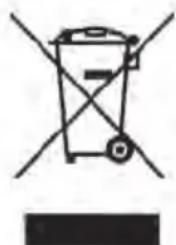
The symbol with the bin crossed out on the instrument points out that it must be separated from other waste at the end of its useful life span and not just thrown away in the bin.
The user must therefore hand the instrument over to differentiated waste disposal centres authorised to process electronic and electro-technical waste at the end of its useful life span, or give it back to the retailer when purchasing a new similar type of device on a basis of 1-to-1 ratio.
The differentiated disposal of the equipment for the possible future recycling of its constructional
parts contributes in safeguarding the environment and human health.
The user is subject to administrative fines in the case of the abusive disposal of the product.
INTRODUCTION
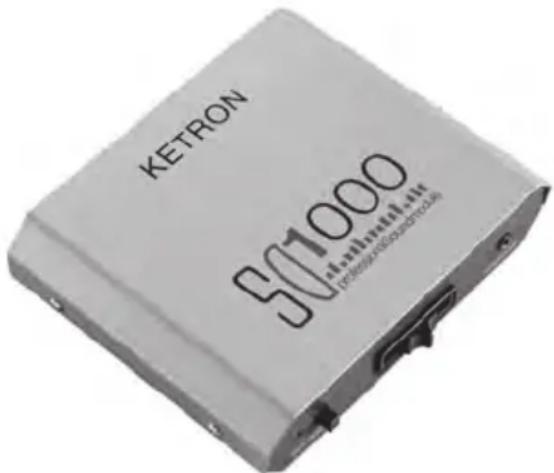
Thank you for purchasing the new KETRON SD1000 Professional Sound Module. The SD 1000 instrument represents an interesting integration to the sector of sound modules in terms of compactness and musical performance. Not only does it avail of all the sound acoustics necessary for the perfect reproduction of musical files in General Midi standard and Kar format, but it also has other additional sound banks with an incredible variety of orchestral Voices: Grand Piano Stereo over 88 notes, Acoustic and electric guitars, Brass and saxophones of unique quality, sampled organs, Accordions, Bass, Strings, acoustic and electronic Drum Sets and so on. The SD1000 unit is also equipped with a considerable number of audio Drum and Percussion Loops split-up into a very wide variety of musical styles, which definitely make SD1000 stand out from all other similar models on the market. The applications of SD1000 are best exploited in combination with a MIDI player (such as KETRON MIDJAY for example) or with sequencers on computer (Logic®, Cubase®, Cakewalk® and others), but it can also be connected to Master keyboards or multi-purpose keyboards (Arranger, Synth, Digital pianos, etc.).
Before you use your SD1000 instrument, make sure you read all the instructions carefully in order to fully exploit its potentials and to ensure its long life.
Keep this manual in a safe place for future reference.
CONTENTS OF THE PACKAGE
The original package of your SD1000 instrument includes the following material:
a) SD1000 unit
b) Instruction manual
c) DC Feeder - 9 Volts
Optional accessory: Midi to USB cable. This is required to use SD1000 with a Laptop, due indeed to the fact that portable computers do not have their own Midi interface (unless they are equipped with additional boards such as Firewire, USB, etc.).
This cable is used for the communication of the midi data from your portable computer with the Midi In of SD1000 via the USB connection.
TURNING ON
To turn the SD1000 unit on, simply connect the feeder supplied with the instrument to the mains. The LED on the front panel lights up to point out that the instrument is working.
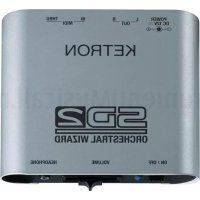
1 On / Off: Main ON/OFF switch of the SD1000 instrument. When the LED lights up, it points out that the instrument is working. The LED will flash if there is any Midi In activity.
2 Volume: Slider that controls the general volume of SD1000. This volume also affects the Headphone output.
3 Headphone: Connection for stereo headphones with low impedance.
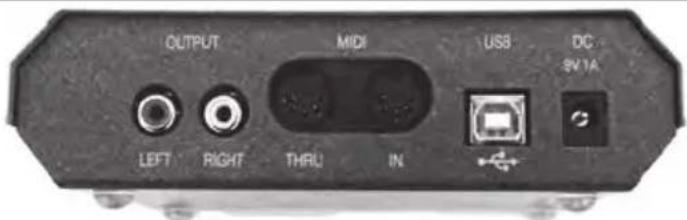
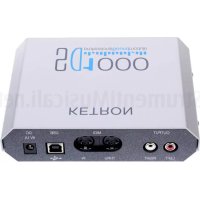
4 Midi In / Thru: Midi In and Thru connection of SD1000. Connect the Midi In of SD1000 to the Midi out of the computer, of the Midi player or of the Master keyboard. The Thru connection is used to send a copy of the Midi In to another device (i.e.:Expander). Midi Thru not available when USB midi is active. Advice: Do not use midi port while midi Usb is active.
5 Out L / R: Left and Right audio outputs to be connected to the mixer or audio amplifier.
6 Power Dc In: Connection for the DC 9 V feeder of SD1000.
7 USB: USB port for computer connection.
ADVICE ON USING THE INSTRUMENT
In this section we show you how we think you should use SD1000 to fully exploit its performance in musical applications.
HOME STUDIO (with computer, sequencer or external players)
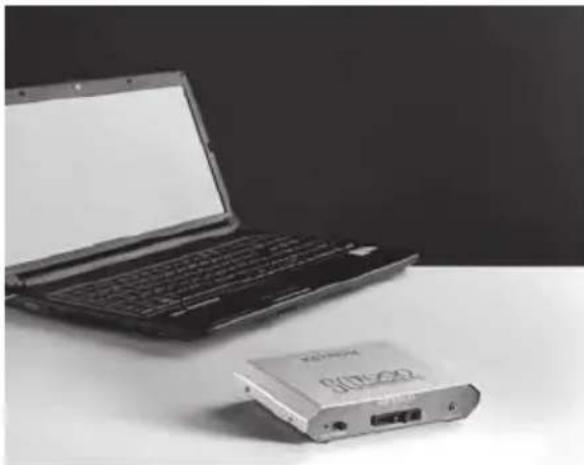
In this context, SD1000 is able to express its performance to the best. It can be connected to your computer (Pc or Mac) via the Midi cable (if you already have a board with Midi interface) or via the Midi to USB cable supplied as an optional accessory by KETRON. Using musical sequencer programs such as Cubase®, Logic®, Cakewalk® or similar you will be able to successfully integrate SD1000 in your musical elaborations (Midi files, Jingles, Audio Mix etc.) exploiting its amazing sound versatility in the best way possible.
Your SD1000 not only offers the sounds that are by now part of the GM standard references but you will also find other Sound Banks with many characteristic sounds in the traditional families (Piano, Strings, Sax, Brass, etc.).
The main feature that definitely distinguishes SD1000 from other sound modules is the presence of the numerous audio Loops (Drum Loops that you can download free of charge from our Internet site: www.ketron.it). Just imagine if you add these Loops to your musical creations... these can enrich, if not indeed replace, the rhythm of your songs and they could make the difference with everything that you have elaborated
up to now in the sphere of Midi files! Just a quick example: Think of a Midi file of Caribbean music, where you often hear not very convincing parts of Latin percussions.
Apply some of the Patterns available in the data base of the additional Loops (or rather replacement loops) of the existent Drum track (Copy & Paste). In just a few steps you will be able to replace the Midi rhythmic structure with audio Loops and the result will be amazing.
Once your musical file is complete and you have saved it in the format that your prefer, you
can naturally play it back with any type of sequencer or Midi player (i.e.: MIDJAY or similar) by connecting it to your SD1000. The use of laptops has become more and more popular in the world of musical entertainment to play back Midi files.
The advantage of having a musical board integrated in the computer is however often penalised by the fact that such boards only avail of a few sounds and of rather modest quality.
In this case again, we think that the use of SD1000 instead of built-in boards offers a considerable opportunity.
MIDI KEYBOARD (Master keyboard, Arranger, Accordion, etc.)
SD1000 can be used as a supplementary module to enrich the sound palette of your keyboard. Another ideal solution is that of coupling SD1000 with Master keyboards without sounds or with current mini remote keyboards (multimedia keyboards) that are used increasingly in the live set-up. We are sure that such a powerful and compact sound module will certainly become part of your musical set-up.
OPERATING NOTES
As you will have already noticed, the SD1000 unit has external connections (described previously) and one general volume control for the rear outputs and for the headphones.
Obviously everything else that may modify the Sound, the Volume, the Reverb, the Effects etc. must be performed via MIDI messages.
For those who are already familiar with this type of Editing procedure, simply observe the table of MIDI implementations of SD1000 to be able to manage the Sounds of the instrument in all its potentials.
For those who are still learning, we have prepared a set of files on our Internet site www.ketron. it (that you can download free of charge) with the configuration of the Map of sounds that can be used to work with the most commonly used sequencer programs and musical notes, such as Cubase®, Logic®, Cakewalk®.
HOW TO USE AUDIO DRUM LOOPS
You can download the Drum Loops for SD1000 from our Internet site www.ketron.it
The files appear with a set of Folders, which are catalogued per type of music (Salsa, Cha, Merengue, Jazz, etc.). These are actually Midi files that contain information on how to play the rhythm Patterns of the various Loops contained in the sound generation of SD1000.
To better understand the sound possibilities that these loops offer, we suggest that you listen to the
Demo.mid files within the reference folders of the various musical rhythms.
We remind you that these patterns contain all the information necessary (program change, volume, etc.) to be played immediately without any other settings.
IMPORTANT INFORMATIONSON SOUND LIST
On SD 1000 Sound List (on the bottom of this guide) you'll find some remarks associated with the Voices name which explain how the voices are structured:
(M): MULTI VOICE These sounds are obtained with two or more voices played simultaneously. An extensive use of multi voices will cause an important polyphony reduction. Also some sounds may have a different voice response on stereo panorama due to the different tones associated on left or right pan address.
(ST): STEREO These sounds are true stereo voices obtained with a double tone slot for each note played. An extensive use of stereo sound will reduce the global polyphony.
(LDM): LIVE DRUM MODELING On these acoustic drum sets some percussions plays randomly with different samples and/or sound nuances on the same instrument (such as Snare, Rim shot, Claps, Snap), thus enhancing the natural feel of a live drummer's performance.
(FXV): EFX INSERT VOICE The latest 8 Voices of SD1000 Sound List (on the bottom of this guide) are obtained applying an EFX insert module (such HQ Distortion, Overdrive, Phaser, Chorus and others). A smart use of the EFX Inserts will permit you to raise the sound quality of your musical works.
OTHER FEATURES
DSP: For those of you who have already worked with multi-timbre sound modules, you will already know that the DSP's (effects and sound post-treatment) are integral part of these systems, which are used via the various controllers and/or Sys Exclusive. Here is SD1000 Routing:
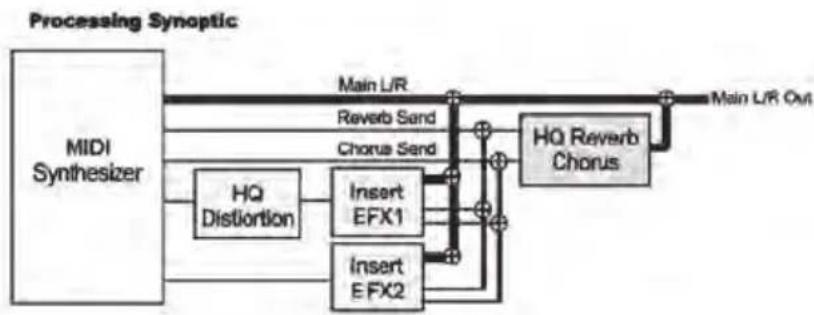
However, you will be interested to know that together with the typical sections of Reverb and Chorus, you will also find other DSP effects, such as:
Rotary: with Rate and Depth controls.
Wha Wha: Amount. This controls the intensity of the Wha effect on the track.
HQ Distortion: Type, Drive, Gain (Available only on Insert #1 EFX).
2 x Insert EFX: Chorus, Flanger, Phaser, Tremolo, 4 Band Parametric EQ, Compressor and Delay efx. Advice: You could use (at most) 2 different Insert an all available tracks.
The Master Control section also envisages the following controls:
Tune: This controls the general tune of the module (Data Value).
Arabic Scale: This controls the intervals for the Arabic scale (Data Value).
Global Transposer: Global transposition of the instrument (Data Value).
CÓMÖ UTILIZAR LOS AUDIO DRUM LOOPS
TECLADO MIDI (Master keyboard, Arranger, Acordeão, etc.)
Rotary: com controlos de Rate e Depth.
VOICE BANK B (Control Change 0, Value = 1)
| P. Ch. Name | Remark | P. Ch. Name | Remark | P. Ch. Name | Rema |
| 1 Jingle | 48 Slow Arcos St | 95 Lower 8' - 4' | |||
| 2 Dark Grand St | 49 Bowed Strings St | 96 Jazzy | |||
| 3 House St | 50 Dark Strings St | 97 Pop Strat | |||
| 4 Suitcase | 51 Dah | 98 Telecast | |||
| 5 Mark | 52 Classic Choir | 99 Strato | |||
| 6 Funk Dx | 53 Men_Doo | 100 Texas | |||
| 7 Fm Tine | 54 Girl_Doo St | 101 Western | |||
| 8 DX Piano | 55 Laah | 102 Fingerpick | |||
| 9 ToyPad | 56 Voices | 103 5th Stops | |||
| 10 Orch. Bell | 57 Swing Tpt | 104 Wha guitar | |||
| 11 Mallet | 58 Cornet | 105 Hawaiian | |||
| 12 Short Vibe | 59 Euphonium | 106 Mandolin | |||
| 13 Karimba | 60 Miles Tpt | 107 Django | |||
| 14 Etnowood | 61 Flughorn | 108 ClassicFx | |||
| 15 Metallophone | 62 Stereo Brass St | 109 Pedalsteel | |||
| 16 Windchimes | 63 GrowBras | 110 Rock&Roll | |||
| 17 Rotor Fast | 64 Octabrass | 111 Reed 8' | |||
| 18 Jazz Organ | 65 Soprano | 112 Fisa 8' | |||
| 19 Drawbar | 66 Circus Sax | 113 Gategroup St | |||
| 20 Positive | 67 Lounge Tenor | 114 Amazing St | |||
| 21 French Musette | 68 Growl Sax | 115 Housesynth St | |||
| 22 Francaise | 69 Melo Trumpet | 116 Resonance | |||
| 23 Cassotto | 70 Horn Swell | 117 Key Lead St | |||
| 24 Tango | 71 Trumpets St | 118 Juno Synth St | |||
| 25 Classic | 72 Soft Trombones St | 119 Obx Poly St | |||
| 26 Folk | 73 Latin Flute St | 120 JX Brass | |||
| 27 Funk Strat | 74 Pop Flute | 121 Alarm&Sirene | |||
| 28 60' Stopped | 75 Andes | 122 Jet | |||
| 29 Muted velo | 76 Voice Flute | 123 Ppif&Jew_Harp | |||
| 30 Vintage | 77 Analogs St | 124 Rain | |||
| 31 12 Strings | 78 Flanger | 125 Vocals | |||
| 32 Solidbody | 79 Brightpad | 126 Thunder | |||
| 33 WarmBass | 80 Wiring St | 127 Train | |||
| 34 Folk Bass | 81 Wow St | 128 Sweep | |||
| 35 MuteBass | 82 Polysynth St | ||||
| 36 Deep Bass | 83 Trance St | ||||
| 37 Precision | 84 Wave | ||||
| 38 Reso Bass | 85 Rave Bass | ||||
| 39 Saw Bass | 86 Modular Bass St | ||||
| 40 House Bass | 87 Percussive Bass St | ||||
| 41 Philarmonic | 88 Wild Bass St | ||||
| 42 Quartet | 89 2nd Perc | ||||
| 43 GlockString | 90 3th Perc | ||||
| 44 OctaStrings1 | 91 Power Fast | ||||
| 45 OctaStrings2 | 92 Tonebar | ||||
| 46 Marcato | 93 Dark B3 | ||||
| 47 String&Fall St | 94 Jimmy Org. |
VOICE BANK C (Control Change 0, Value = 10)
| P. Ch. Name | Remark | P. Ch. Name | Remark | P. Ch. Name | Remark |
| 1 Piano&Strings St, M | 48 | Symphony St, M | 95 | Stream | |
| 2 Grand&Pad St, M | 49 | Full Ensemble St, M | 96 | Digi Pro | |
| 3 Octapiano St | 50 | Digistring | 97 | UsPad | |
| 4 Electropad M | 51 | Disco Strings St, M | 98 | Bottled Air | |
| 5 Msk | 52 | Country Violin | 99 | Bellvox | |
| 6 StagePno | 53 | Tuuh | 100 | DigiPad St | |
| 7 Rodes | 54 | Ooh Girls | 101 | Syntax St | |
| 8 Elopiano | 55 | Aah Girls St | 102 | Bright Analog St, M | |
| 9 FM Layer | 56 | Choir | 103 | Aura Pad M | |
| 10 Chinese Bell | 57 | Tbones&Cornet St, M | 104 | Acoustic Dream St, M | |
| 11 Stereochrom | 58 | Slide Trombone | 105 | Tres | |
| 12 Bright Vibes | 59 | Dixie Tpt | 106 | Banjo 5 String | |
| 13 Toy Box | 60 | Open Horn St | 107 | Futozao | |
| 14 Mbira | 61 | Brass Fall Off | 108 | Hackbrett | |
| 15 XMas Bell | 62 | Horn Pad St, M | 109 | Paraguayan Harp | |
| 16 FM Marimba | 63 | Multi Brass St, M | 110 | Short Mandolin | |
| 17 Pop Organ | 64 | Brass Cool St, M | 111 | Harp Glissando | |
| 18 Gospel | 65 | Altosax | 112 | Bouzuki | |
| 19 Power Slow | 66 | Jazz Alto | 113 | Tinkles | |
| 20 Principale | 67 | Alto Straight | 114 | Triangle | |
| 21 Dry Organ | 68 | Rock Sax | 115 | Tambora | |
| 22 Alpen | 69 | Superhorn St, M | 116 | Claves | |
| 23 Bellow | 70 | Tpt Slide Up St | 117 | Ac.Tom | |
| 24 Steirisch | 71 | Dry Trumpet | 118 | Bruhtom | |
| 25 DynaFolk | 72 | Trumpet Section M | 119 | Snare | |
| 26 CountryFx | 73 | Open Trombones St, M | 120 | Crash | |
| 27 Humbuck | 74 | Irish Flute | 121 | Scratch1 | |
| 28 StratoFx | 75 | Staccato Flute | 122 | Scratch2 | |
| 29 Ac. Stereo St | 76 | Asian Flute | 123 | Scratch3 | |
| 30 Acid | 77 | Fife | 124 | Scratch4 | |
| 31 Plucked | 78 | Ethnic Flute | 125 | Scratch5 | |
| 32 Flamenco | 79 | Staccato Whistle | 126 | FxSlap | |
| 33 Acoustic Bass | 80 | Pipe | 127 | Laser | |
| 34 Bass&Guit1 | 81 | Solo Dance St | 128 | Wind | |
| 35 Oberbas1 | 82 | Juicy | |||
| 36 RetroBass | 83 | Drama | |||
| 37 Fusion | 84 | Odissey | |||
| 38 Oberbas2 | 85 | Minimug M | |||
| 39 Pedalbass | 86 | Attack St, M | |||
| 40 Bass&Guit 2 | 87 | Phantom M | |||
| 41 Slow Violin | 88 | Soloist St, M | |||
| 42 Electric Violin | 89 | Warmness | |||
| 43 Chamber | 90 | Explorer | |||
| 44 Tzivago | 91 | Choral M | |||
| 45 Staccato St, M | 92 | Cyber St, M | |||
| 46 String Fall St | 93 | Magic M | |||
| 47 Harp&Orchestra St, M | 94 | Glockpad |
P. Ch. Name Remark
| 1 | Layered Piano M | 48 | Vocal_Praise M | 95 | Etnovox | St, M |
| 2 | Latin Piano St, M | 49 | Cinema Strings | 96 | Whisper | M |
| 3 | Fm Thin | 50 | Score M | 97 | Evopad | St, M |
| 4 | Rdx Operator M | 51 | AahMix St | 98 | Plucking | St, M |
| 5 | Twin Electro M | 52 | Humming | 99 | Mallet Area St, M | |
| 6 | Stage Mix M | 53 | Lah Choir St, M | 100 | 80's Pad | St, M |
| 7 | Huge FM M | 54 | Lah Mello Choir M | 101 | Fluty Pad | St, M |
| 8 | Digitine St, M | 55 | Church Choir M | 102 | Nylon Theme | St, M |
| 9 | Glasshouse St, M | 56 | Night Vocals | 103 | BottledChoir | |
| 10 | Fantasyland St, M | 57 | Mmh | 104 | Brass Hits | St, M |
| 11 | Italian Positive | 58 | Boom&Uap | 105 | Southern Harp | M |
| 12 | Principale&Octave M | 59 | Horn Crescendo M | 106 | Ungarian Zither M | |
| 13 | Full Organ M | 60 | Emperor Brass St, M | 107 | Alpen Choir | M |
| 14 | ChorusB3 | 61 | Dry Tenor | 108 | Mallet World | M |
| 15 | Hot Organ | 62 | Sax Club | 109 | Country&WesternM | |
| 16 | 16-8-5 | 63 | Swing Tenor | 110 | StereoFolk | St, M |
| 17 | Pipe Octave | 64 | Baritone | 111 | Alpen Musette | |
| 18 | Tonewheel M | 65 | Glenn Sax M | 112 | Jazz Accordion | |
| 19 | Movie Organ M | 66 | Boogie Sax M | 113 | Bright Musette | M |
| 20 | Fast Drawbars M | 67 | Octasax M | 114 | 335 Jazz | |
| 21 | Carousel Org M | 68 | Countie Sax M | 115 | Smooth_Bass | |
| 22 | Diatonic M | 69 | Sax Section M | 116 | Funky Muted | |
| 23 | Blues Harp | 70 | Saxes M | 117 | Country Gtr | |
| 24 | Conservatory M | 71 | Billy Sax M | 118 | Nylon Slide | |
| 25 | Classic Bright | 72 | Pop Sax M | 119 | Power Guit | |
| 26 | Thin Folk | 73 | Lute | 120 | Clean Chorus FX | |
| 27 | Jazz Octave M | 74 | Mandola | 121 | Tremolo Mark FX | |
| 28 | Muted Wha | 75 | Latin Harp | 122 | Phase Electro FX | |
| 29 | Rock Strat | 76 | Portuguese | 123 | Organ OverdriveFX | |
| 30 | Str Power | 77 | Fingered&Slide | 124 | Metal FX | |
| 31 | Valve Lead M | 78 | Fingered Gtr | 125 | Distorted FX | |
| 32 | Smooth ElectroM | 79 | Finger Slap | 126 | Crunch FX | |
| 33 | Strat&Folk M | 80 | Planet | 127 | Jazz Combo | St, M, FX |
| 34 | Open Country St, M | 81 | Rock Synth M | 128 | Echolead | St, FX |
| 35 | Golden Steel M | 82 | Chuck St, M | |||
| 36 | Cntry Detune | 83 | Smooth Lead St, M | |||
| 37 | Acoust. Picking M | 84 | Synth Plug St, M | Remark: | ||
| 38 | Twin Folk M | 85 | Subbass | ST = Stereo Voice | ||
| 39 | Gipsy | 86 | Synvoice | M = Multi Voice | ||
| 40 | Brazilian | 87 | Deep Jazz | FX = Fx Insert Voice | ||
| 41 | Rockabilly | 88 | Memory Synth | |||
| 42 | Funk Bass | 89 | Evolution | |||
| 43 | Maxipick | 90 | Sideral St, M | |||
| 44 | Ooh Mix St | 91 | North Wire St, M | |||
| 45 | Duh Group M | 92 | Blowing St, M | |||
| 46 | Dah Quartet M | 93 | Aural St, M | |||
| 47 | Lah Trio M | 94 | Velvet St, M | |||
SOUND FAMILY MAP
PIANO CHROMATIC ORGAN
Bank Prg.Ch Sound
01 Grand Piano
03 Electric
12 Dark Grand
04 Honky-tonk
10 5 Msk
05El.Piano1
06 El.Piano2
16 Funk Dx
15 Mark
08Clavi
02 Rock Piano
10 3 Octapiano
1 1 Jingle
10 1 Piano&Strings
13 House
1 4 Suitcase
17 Fm Tine
18DX Piano
10 4 Electropad
07 Harpsichord
10 2 Grand&Pad
11 1 Layered Piano
11 2 Latin Piano
10 6 StagePno
10 7 Rodes
10 8 Elopiano
11 3 Fm Thin
11 4 Rdx Operator
11 5 Twin Electro
11 6 Stage Mix
11 7 Huge FM
10 9 Fm_Layer
11 8 Digitine
11 121 Tremolo Mark
11 122 Phase Electro
Bank Prg.Ch Sound
0 12 Vibraphone
013Marimba
0 14 Xylophone
09 Celesta
0 10 Glockenspiel
011MusicBox
0 15 TubularBells
1 13 Karimba
19 ToyPad
0 113 Tinkle bell
1 10 Orch. Bell
1 11 Mallet
1 12 Short Vibe
1 14 Etnowood
1 15 Metallophone
1 16 Windchimes
10 10 Chinese Bell
10 11 Stereochrom
10 12 Bright Vibes
10 13 Toy Box
10 14 Mbira
10 15 XMas Bell
10 16 FM Marimba
11 9 Glasshouse
11 10 Fantasyland
Bank Prg.Ch Sound
10 19 Power Slow
0 18 Percussive
0 19 Rock Organ
021 Theatre
1 20 Positive
191 Power Fast
196Jazzy
1 19 Drawbar
1 17 Rotor Fast
0 20 Church
192 Tonebar
1 93 Dark B3
1 94 Jimmy Org.
1 18 Jazz Organ
10 17 Pop Organ
10 18 Gospel
017 Rotary
10 20 Principale
10 21 Dry Organ
11 11 Italian Positive
11 12 Principale&Octave
11 13 Full Organ
11 14 ChorusB3
11 15 Hot Organ
11 16 16-8-5
11 17 Pipe Octave
11 18 Tonewheel
11 19 Movie Organ
11 20 Fast Drawbars
11 21 Carousel Org
1 95 Lower 8^ -4
1 89 2nd Perc
1 90 3th Perc
11 87 Deep Jazz
11 123 Organ Overdrive
ACCORDION GUITAR
Bank Prg.Ch Sound
022 Musette
0 23 Harmonica
024 Bandoneon
1 21 French Musette
1 22 Francaise
1 23 Cassotto
1 24 Tango
10 22 Alpen
10 23 Bellow
10 24 Steirisch
11 22 Diatonic
11 23 Blues Harp
11 24 Conservatory
11 111 Alpen Musette
11 112 Jazz Accordion
11 113 Bright Musette
1 111 Reed 8'
1 112 Fisa 8
Bank Prg.Ch Sound
0 25 Nylon
0 26 Steel
027 Jazz
028Clean
030Overdrive
1 27 Funk Strat
1 26 Folk
1 99 Strato
1 30 Vintage
1 32 Solidbody
1 25 Classic
10 29 Ac. Stereo
1 105 Hawaiian
1 107Django
031 Distorted
11 26 Thin Folk
11 30 Str Power
1 110 Rock&Roll
1 102 Fingerpick
0 29 Muted
1 28 60' Stopped
1 29 Muted velo
1 31 12Strings
197 Pop Strat
1 98 Telecast
1 100 Texas
1 101 Western
1 103 5th Stops
1 104 Wha guitar
1 108 ClassicFx
1 109 Pedalsteel
10 25 DynaFolk
10 26 CountryFx
10 27 Humbuck
10 28 StratoFx
10 30 Acid
10 31 Plucked
10 32 Flamenco
11 25 Classic Bright
11 27 Jazz Octave
11 28 Muted Wha
11 29 Rock Strat
11 31 Valve Lead
11 32 Smooth Electro
11 33 Strat&Folk
11 34 Open Country
11 35 Golden Steel
Bank Prg.Ch Sound
11 36 Cntry Detune
11 37 Acoust. Picking
11 38 Twin Folk
11 39 Gipsy
11 40 Brazilian
11 41 Rockabilly
11 114 335 Jazz
11 116 Funky Muted
11 117 Country Gtr
11 118 Nylon Slide
11 119 Power Guit
11 120 Clean Chorus
0 32 Harmonics
11 110 StereoFolk
11 124 Metal
11 125 Distorted
11 126 Crunch
11 127 Jazz Combo
11 77 Fingered&Slide
11 78 Fingered Gtr
11 76 Portuguese
STRINGS / CHOI R BRASS
| Bank Prg.Ch Sound | Bank Prg.Ch Sound | Bank Prg.Ch Sound | |||
| 0 | 49 Strings Ens. | 11 | 47 Lah Trio | 0 | 62 Brass Sect. |
| 1 | 49 Bowed Strings | 10 | 43 Chamber | 0 | 57 Trumpet |
| 0 | 41 Violin | 10 | 44 Tzivago | 0 | 58 Trombone |
| 0 | 42 Viola | 10 | 45 Staccato | 0 | 60 Muted Tpt |
| 0 | 47 Harp | 10 | 46 String Fall | 0 | 63 SynBrass1 |
| 1 | 47 String&Fall | 10 | 47 Harp&Orchestra | 1 | 62 Stereo Brass |
| 0 | 53 Choir Aah | 10 | 48 Symphony | 1 | 57 Swing Tpt |
| 0 | 54 Voice Ooh | 10 | 49 Full Ensemble | 10 | 60 Open Horn |
| 0 | 55 Synth Voice | 10 | 50 Digistring | 1 | 60 Miles Tpt |
| 1 | 53 Men_Doo | 10 | 51 disco Strings | 10 | 59 Dixie Tpt |
| 1 | 55 Laah | 10 | 52 Country Violin | 1 | 61 Flughorn |
| 1 | 51 Dah | 11 | 49 Cinema Strings | 1 | 70 Horn Swell |
| 0 | 46 Pizzicato | 11 | 48 Vocal_Praise | 1 | 71 Trumpets |
| 0 | 43 Cello | 11 | 107 Alpen Choir | 1 | 72 Soft Trombones |
| 0 | 50 SlowStrings | 11 | 58 Boom&Uap | 0 | 64 SynBrass2 |
| 10 | 41 Slow Violin | 11 | 86 Synvoice | 1 | 63 GrowBras |
| 0 | 44 Contrabass | 0 | 56 Hits | 1 | 59 Euphonium |
| 0 | 51 SynStrings1 | 10 | 61 Brass Fall Off | ||
| 1 | 54 Girl_Doo | 10 | 70 Tpt Slide Up | ||
| 1 | 52 Classic Choir | 10 | 63 Multi Brass | ||
| 1 | 56 Voices | 0 | 59 Tuba | ||
| 10 | 53 Tuuh | 0 | 61 French Horn | ||
| 10 | 54 Ooh Girls | 1 | 58 Cornet | ||
| 10 | 55 Aah Girls | 1 | 64 Octabrass | ||
| 0 | 52 SynStrings2 | 1 | 69 Melo Trumpet | ||
| 0 | 45 Tremolo | 10 | 57 Tbones&Cornet | ||
| 0 | 48 Timpani | 10 | 58 Slide Trombone | ||
| 1 | 41 Philarmonic | 10 | 62 Horn Pad | ||
| 1 | 42 Quartet | 10 | 64 Brass Cool | ||
| 1 | 43 GlockString | 10 | 69 Superhorn | ||
| 10 | 56 Choir | 10 | 71 Dry Trumpet | ||
| 11 | 51 AahMix | 10 | 72 Trumpet Section | ||
| 11 | 52 Humming | 10 | 73 Open Trombones | ||
| 11 | 53 Lah Choir | 11 | 59 Horn Crescendo | ||
| 11 | 54 Lah Mello Choir | 11 | 60 Emperor Brass | ||
| 11 | 55 Church Choir | 11 | 104 Brass Hits | ||
SAX / FLUTE PAD
Bank Prg.Ch Sound
167 Lounge Tenor
066 Contralto
068 Bariton Sax
065 Altosoft
10 66 Jazz Alto
072 Clarinet
074Flute
076PanFlute
176VoiceFlute
079 Whistle
173 Latin Flute
174 Pop Flute
067 Tenor Sax
069Oboe
10 65 Altosax
1 65 Soprano
1 66 Circus Sax
1 68 Growl Sax
175 Andes
1074 Irish Flute
073 Piccolo
075 Recorder
077Bottle
078Shakushi
070 Engl.Horn
071Bassoon
10 67 Alto Straight
10 68 Rock Sax
11 61 Dry Tenor
11 62 Sax Club
080Ocarina
| 3xh | 33h | Chorus/Flanging feedback, 0 to 7Fh | |
| 3xh | 34h | Chorus/Flanging/Short-Delay high pass filter on input: 0 = no filter to 1.2 kHz | |
| 3xh | 35h | HDAMP: high frequency filter on delay feedback, , 0 to 7Fh = 0 to 100 % | |
| 3xh | 36h | Modulation rate: 0 = ~0,023 Hz, ...64 = ~0,89Hz, till 127 = ~5,8 Hz (~1Hz to ~20Hz for Tremolo) | |
| 3xh | 37h | Modulation depth, 0 to 7Fh | |
| 3xh | 38h | Tremolo modulation shape: 0 = triangle, till 127 = square | |
| 3xh | 39h | Rotary speed: 0=slow, 1=fast (only for Rotary preset # 23) | |
| Insert MFX Delay Controls | |||
| 3xh | 58h | Delay Preset, 0..4 (off, mono1, mono2, stereo1, stereo2) | |
| 3xh | 59h | Delay ON/OFF, 0 = OFF, else ON | |
| 3xh | 5Ah | Delay Mode, 0=mono, 1=stereo | |
| 3xh | 5Bh | Delay PreLP, 0 to 7Fh | |
| 3xh | 5Ch | Delay Level, 0 to 7Fh | |
| 3xh | 5Dh | Delay Time, 0 to 7Fh = 0 to 1365ms | |
| 3xh | 5Eh | Delay Feedback, 0 to 7Fh | |
| 3xh | 5Fh | HDAMP: high frequency filter on delay feedback, , 0 to 7Fh = 0 to 100 % | |
Some presets have been predefined for each of the 5 Insert Effects blocks: Compressor, , Distortion, Mod-FX (Chorus etc) and Delay. Presets are selected through MIDI NRPN messages.
1.2 Compressor/Limiter Presets
Preset is selected by using MIDI NRPN 3x40h, with value = preset number, from 0 to 8
| Nb | Name | Preset Default values | ||||
| Attack | Release | Threshold | Ratio | Boost | ||
| 0 | NO COMPRESSION | 64 | 0 | 127 | 0 | 0 |
| COMPRESSOR | ||||||
| 1 | COMPR 1: -18dB 2:1 | 64 | 0 | 73 | 64 | 24 |
| 2 | COMPR 2: -15dB 3:1 | 64 | 0 | 82 | 84 | 32 |
| 3 | COMPR 3: -18dB 5:1 | 64 | 0 | 73 | 100 | 48 |
| 4 | COMPR 4: -21dB 7:1 | 64 | 0 | 64 | 110 | 48 |
| 5 | COMPR 5: -24dB 12:1 | 64 | 0 | 55 | 117 | 64 |
| LIMITER | ||||||
| 6 | LIMITER 1: -6dB | 64 | 0 | 109 | 127 | 0 |
| 7 | LIMITER 2: -12dB | 64 | 0 | 91 | 127 | 0 |
| 8 | LIMITER 3: -18dB | 64 | 0 | 73 | 127 | 0 |
Notes:
Preset value for Compressor Knee value is always 0 (Hard Knee).
1.3 Distortion Presets
Preset is selected by using MIDI NRPN 3x60h, with value = preset number, from 0 to 13
| Nb | Name | Preset Default values | ||||||
| Drive | Type | Hi-Cut Filter Frequency | Post Gain | Pre Gain | RC LP Filter | Low Lev Cut | ||
| OFF | ||||||||
| 0 | OFF | 0 | 0 | 127 | 127 | 127 | 127 | 0 |
| TUBE DISTORTION | ||||||||
| 1 | TUBE DIST Low 1 | 3 | 1 | 100 | 60 | 64 | 127 | 1 |
| 2 | TUBE DIST Low 2 | 4 | 2 | 80 | 50 | 64 | 127 | 2 |
| 3 | TUBE DIST Medium 1 | 5 | 1 | 70 | 40 | 64 | 127 | 2 |
| 4 | TUBE DIST Medium 2 | 5 | 2 | 70 | 40 | 64 | 127 | 3 |
| 5 | TUBE DIST High 1 | 6 | 1 | 60 | 40 | 64 | 127 | 3 |
| 6 | TUBE DIST High 2 | 6 | 2 | 60 | 40 | 64 | 127 | 3 |
| SPECIAL DISTORTION | ||||||||
| 7 | SMOOTH OD | 6 | 6 | 50 | 30 | 64 | 80 | 3 |
| 8 | DISTORTION | 7 | 1 | 40 | 30 | 64 | 127 | 3 |
| 9 | CRUNCH | 5 | 5 | 60 | 40 | 64 | 80 | 3 |
| 10 | FUZZ | 6 | 7 | 80 | 40 | 64 | 127 | 3 |
| 11 | GRUNGE | 5 | 4 | 110 | 40 | 64 | 127 | 2 |
| 12 | METAL | 8 | 3 | 40 | 40 | 64 | 127 | 4 |
| 13 | MESS | 10 | 0 | 80 | 30 | 64 | 127 | 4 |
Notes:
Preset value for Hi-Cut Filter Q is always 0.
1.4 Parametric Equalizer Presets
Presets are selected by using MIDI 3x70h, with value = preset number, from 0 to 13
| Nb | Name | Preset Default Values | |||||||||
| Gain Low | Gain Low Mid | Gain High Mid | Gain High | Freq Low | Freq Low Mid | Freq High Mid | Freq High | Quality Low Mid | Quality High Mid | ||
| 0 | Flat | 64 | 64 | 64 | 64 | 40 | 24 | 64 | 127 | 0 | 64 |
| 1 | JC Clean | 80 | 30 | 90 | 64 | 40 | 20 | 50 | 60 | 0 | 80 |
| 2 | Acoustic | 90 | 20 | 110 | 64 | 40 | 26 | 113 | 50 | 30 | 100 |
| 3 | Black Panel | 80 | 40 | 90 | 64 | 40 | 28 | 30 | 40 | 0 | 40 |
| 4 | Brit Combo | 60 | 80 | 80 | 64 | 100 | 64 | 7 | 127 | 0 | 30 |
| 5 | Tweed | 64 | 30 | 80 | 64 | 50 | 42 | 28 | 60 | 100 | 20 |
| 6 | Stack Classic | 64 | 20 | 85 | 64 | 80 | 40 | 30 | 40 | 20 | 40 |
| 7 | Metal | 64 | 50 | 100 | 64 | 80 | 50 | 35 | 127 | 0 | 70 |
| 8 | R-Fier | 64 | 20 | 70 | 64 | 80 | 30 | 30 | 80 | 30 | 50 |
| 9 | Dyna Amp | 64 | 20 | 75 | 64 | 40 | 32 | 25 | 127 | 64 | 50 |
| 10 | Crunch | 64 | 75 | 30 | 64 | 40 | 10 | 8 | 127 | 20 | 70 |
| 11 | VO Drive | 64 | 64 | 90 | 64 | 40 | 20 | 30 | 127 | 64 | 60 |
| 12 | BG Lead | 64 | 64 | 70 | 64 | 40 | 20 | 64 | 127 | 64 | 64 |
| 13 | MS HiGain | 64 | 80 | 50 | 64 | 40 | 10 | 6 | 127 | 80 | 70 |
1.5 Chorus/Flanger/Phaser/Tremolo/Rotary Presets
Preset is selected by using MIDI NRPN 3x30h, with value = preset number, from 0 to 23
| Nb | Name | Preset Default Values | |||||
| Volume | Delay | Feedback | Hdamp | Chorus Rate | Chorus Depth | ||
| 0 | OFF | 0 | / | / | / | / | / |
| 1 | Chorus Light 1 | 56 | 20 | 0 | 0 | 40 | 30 |
| 2 | Chorus Light 2 | 56 | 40 | 0 | 0 | 30 | 30 |
| 3 | Chorus Medium 1 | 64 | 26 | 0 | 0 | 45 | 40 |
| 4 | Chorus Medium 2 | 64 | 60 | 0 | 0 | 35 | 50 |
| 5 | Chorus Deep 1 | 64 | 64 | 0 | 0 | 40 | 70 |
| 6 | Chorus Deep 2 | 64 | 80 | 0 | 0 | 45 | 90 |
| 7 | Chorus Fast 1 | 64 | 30 | 0 | 0 | 70 | 10 |
| 8 | Chorus Fast 2 | 64 | 60 | 0 | 0 | 60 | 20 |
| 9 | Resonant Chorus | 64 | 30 | 80 | 0 | 40 | 20 |
| 10 | Long Time Chorus | 64 | 100 | 0 | 0 | 20 | 20 |
| 11 | Flange Light | 64 | 8 | 32 | 0 | 30 | 30 |
| 12 | Flange Medium | 72 | 13 | 72 | 0 | 40 | 80 |
| 13 | Flange Slow Deep | 72 | 2 | 50 | 0 | 20 | 90 |
| 14 | Flange Deep | 72 | 6 | 100 | 0 | 50 | 100 |
| 15 | Phaser Light | 64 | 0 | 80 | 0 | 50 | 50 |
| 16 | Phaser Medium | 64 | 0 | 90 | 0 | 60 | 80 |
| 17 | Phaser Slow Deep | 64 | 0 | 100 | 0 | 20 | 110 |
| 18 | Phaser Fast | 64 | 0 | 40 | 0 | 120 | 60 |
| 19 | Tremolo Slow | 64 | 0 | 0 | 0 | 20 | 60 |
| 20 | Tremolo Medium 1 | 64 | 0 | 0 | 20 | 40 | 70 |
| 21 | Tremolo Medium 2 | 64 | 0 | 0 | 40 | 60 | 90 |
| 22 | Tremolo Fast | 64 | 0 | 0 | 60 | 100 | 110 |
| 23 | Rotary Slow | 90 | 30 | 0 | 0 | 50 | 20 |
Note:
Preset value for Pre-High-pass-Filter is always 0 (off).
2.0 HQ Distortion
| HQ Distortion Top Level Controls | |||
| 3Dh | 00h | Distortion ON/OFF: = 0 OFF, else ON | |
| 3Dh | 01h | Noise Reduction: 0..4 | |
| 3Dh | 02h | Booster: 0..3 | |
| 3Dh | 03h | Type (Preset): 0..7 = OFF, Warm-Drive, Overdrive, Cry, Distortion, Metal, Max-Saturation, Fuzz (using Preset parameter below) | |
| 3Dh | 04h | Drive: 0..127 | |
| 3Dh | 05h | Tone: 0..127 (using PEQ parameters below) | |
| 3Dh | 06h | Level (Post-Gain): 0..127 | |
| HQ Distortion Preset Parameter Controls (see note below) | |||
| 3Dh | 10h | Input High Pass Cutoff): 0..127 | |
| 3Dh | 11h | Input High Pass Mode: 0..2 | |
| 3Dh | 12h | Bias Level): 0..127 | |
| 3Dh | 13h | Input Low Pass Cutoff): 0..127 | |
| 3Dh | 14h | Input Low Pass Mode: 0..7 | |
| 3Dh | 15h | Type (internal): 0-22 | |
| 3Dh | 16h | Pre-Gain: 0..127 (should be set normally to 127, Distortion drive amount should be set by “Drive” parameter, NRPN 3D04h) | |
| 3Dh | 17h | PEQ Freq low): 0..127 | |
| 3Dh | 18h | PEQ Gain low): 0..64..127 = -12..0..+12dB | |
| 3Dh | 1Ah | PEQ Freq high): 0..127 | |
| 3Dh | 1Bh | PEQ Gain high): 0..64..127 = -12..0..+12dB | |
| HQ Distortion Routing Controls | |||
| 3Dh | 7Fh | Routing switch of Distortion block: 0 = default, else input on MIC2IN (DAAD4R) | 0 |
Note: details about the HQ Distortion Preset Parameters Controls please see dedicated Distortion Library module documentation.
3. MIDI Implementation
2 ports of 16 channels are provided for a total of 32 channels. MIDI Message "F5 nn" is used to switch between the two ports (nn=1 or 2).
| MIDI Message | HEX Code | Description |
| NOTE ON | 9nH kk vv | Midi channel n(0-15) note ON # kk(1-127), velocity vv(1-127). vv=0 means NOTE OFF |
| NOTE OFF | 8nH kk vv | Midi channel n(0-15) note OFF # kk(1-127), vv is don't care. |
| PITCH BEND | EnH bl bh | Pitch bend as specified by bh|bl (14 bits) Maximum swing is +/- 1 tone (power-up). Can be changed using « pitch bend sensitivity ». Center position is 00H 40H. |
| PROGRAM CHANGE | CnH pp | Program (patch) change. Specific action on channel 10 (n=9): select drumset. Refer to sounds / drumset list. Drumsets can be assigned to other channels (see SYSEX MIDI channel to part assign and part to rhythm allocation) |
| CHANNEL AFTERTOUCH | DnH vv | vv pressure value. Effect set using Sys. Ex. 40H 2pH 20H-26H |
| CTRL 00 | BnH 00H cc | Bank select: Refer to sounds list. No action on drumset |
| CTRL 01 | BnH 01H cc | Modulation wheel. Rate and maximum depth can be set using SYSEX |
| CTRL 05 | BnH 05H cc | Portamento time. |
| CTRL 06 | BnH 06H cc | Data entry: provides data to RPN and NRPN |
| CTRL 07 | BnH 07H cc | Volume (default=100) |
| CTRL 10 | BnH 0AH cc | Pan (default=64 center) |
| CTRL 11 | BnH 0BH cc | Expression (default=127) |
| CTRL 64 | BnH 40H cc | Sustain (damper) pedal |
| CTRL 65 | BnH 41H cc | Portamento ON/OFF |
| CTRL 66 | BnH 42H cc | Sostenuto pedal |
| CTRL 67 | BnH 43H cc | Soft pedal |
| CTRL 71 | BnH 47H cc | TVF Resonance modify (same as nrpn 0121h) |
| CTRL 72 | BnH 48H cc | Env release time modify (same as nrpn 0166h) |
| CTRL 73 | BnH 49H cc | Env attack time modify (same as nrpn 0163h) |
| CTRL 74 | BnH 4AH cc | TVF cutoff freq modify (same as nrpn 0120h) |
| CTRL 75 | BnH 4BH cc | Env decay time modify (same as nrpn 0164h) |
| CTRL 76 | BnH 4CH cc | Vibrato rate modify (same as nrpn 0108h) |
| CTRL 77 | BnH 4DH cc | Vibrato depth modify (same as nrpn 0109h) |
| CTRL 78 | BnH 4EH cc | Vibrato delay modify (same as nrpn 010Ah) |
| CTRL 84 | BnH 54H vv | Portamento control |
| CTRL 91 | BnH 5BH vv | Reverb send level vv=00H to 7FH |
| CTRL 93 | BnH 5DH vv | Chorus send level vv=00H to 7FH |
| CTRL 98 | BnH 62H vv | NRPN low |
| CTRL 99 | BnH 63H vv | NRPN high |
| CTRL 100 | BnH 64H vv | RPN low |
| CTRL 101 | BnH 65H vv | RPN high |
| CTRL 120 | BnH 78H 00H | All sound off (abrupt stop of sound on channel n) |
| CTRL 121 | BnH 79H 00H | Reset all controllers |
| CTRL 123 | BnH 7BH 00H | All notes off |
| CTRL 126 | BnH 7EH 00H | Mono on |
| CTRL 127 | BnH 7FH 00H | Poly on (default power-up) |
| CTRL CC1 | BnH ccH vvH | Assignable Controller 1. cc=Controller number (0-5Fh), vv=Control value (0-7Fh). Control number (ccH) can be set on CC1 CONTROLLER NUMBER (Sys. Ex 40 1x 1F). The resulting effect is determined by CC1 controller function (Sys.Ex. 40 2p 40-4A) |
| CTRL CC2 | BnH ccH vvH | Assignable Controller 2. cc=Controller number (00h-5Fh), vv=control value (0-7Fh). Control number can be set on CC2 CONTROLLER NUMBER (Sys.Ex. 40 1x 20). The resulting effect is determined by CC2 controller function (Sys.Ex.40 2p 50-5A). |
| RPN 0000H | BnH 65H 00H 64H 00H 06H vv | Pitch bend sensitivity in semitones (default=2) |
| RPN 0001H | BnH 65H 00H 64H 01H 06H vv | Fine tuning in cents (vv=00 -100, vv=40H 0, vv=7FH +100 |
| RPN 0002H | BnH 65H 00H 64H 02H 06H vv | Coarse tuning in half-tones (vv=00 -64, vv=40H 0, vv=7FH +64 |
| NRPN 0108H | BnH 63H 01H 62H 08H 06H vv | Vibrate rate modify (vv=40H -> no modif) |
| NRPN 0109H | BnH 63H 01H 62H 09H 06H vv | Vibrate depth modify (vv=40H -> no modif) |
| NRPN 010AH | BnN 63H 01H 62H 0AH 06H vv | Vibrate delay modify (vv=40H -> no modif) |
| NRPN 0120H | Bnh 63H 01H 62H 20H 06H vv | TVF cutoff freq modify(vv=40H -> no modif) |
| NRPN 0121H | BnH 63H 01H 62H 21H 06H vv | TVF resonance modify (vv=40H -> no modif) |
| NRPN 0163H | Bnh 63H 01H 62H 63H 06H vv | Env. attack time modify(vv=40H -> no modif) |
| NRPN 0164H | BnH 63H 01H 62H 64H 06H vv | Env. decay time modify(vv=40H -> no modif) |
| NRPN 0166H | BnH 63H 01H 62H 66H 06H vv | Env. release time modif(vv=40H -> no modif) |
| Standard Sysex | F0H 7EH 7FH 09H 01H F7H | General MIDI reset (note 4) |
| Standard Sysex F0H | 7FH 7FH 04H 01H 00H II F7H | Master volume (II=0 to 127, default 127) (note 4). Not reset by GS reset |
| SYSEX F0H 26H 7BH 0CH 00H 00H vv F7H | Master tune (default vv=40H) -100.vv=0 to +100. vv=7FH. | |
| SYSEX F0H 41H 00H 42H 12H 40H 00H 04H vv xx F7H | Master volume (default vv=7FH) (note 4) Not reset by GS reset. | |
| SYSEX F0H 26H 7BH 07H 00H vv F7H | Master Transposer (default vv=40H, no transpose) (note 4) | |
| SYSEX F0H 26H 7BH 39H 00H vv F7H | Master pan (default vv=40H, center) (note 4) | |
| SYSEX F0H 26H 7BH 30H 00H vv F7H | MIDI Port vv=0H (Channels 00H - 0FH), 01H (Channels 10H -1FH) | |
| SYSEX F0H 26H 7BH 71H 1FH vv 00H F7H | Vv= Round Robin. 0=OFF, 1=On | |
| SYSEX F0H 26H 7BH 1AH 1pH vv efx F7H | Load EXF Channel, p=Channel (00H-0FH), vv=(00H-13H) 00H:Chorus1 01H:Chorus2 02H:Phaser1 03H:Phaser2 04H:Flanger1 05H:Flanger2 06H:Tremolo1 07H:Tremolo2 08H:Delay1 09H:Delay2 0AH:Echo Pan 0BH:Rotor Slow 0CH:Rotor Fast 0DH:Organ Overdrive* 0EH:Valve Distortion* 0FH:Power Distortion* 10H:Metal Distortion* 11H:Tweed Amp.Simulator 12H:British Amp. 13H:Jazz Amp.Simulator Simulator vv=7FH (off) efx=3AH(EFX1),3BH(EFX2) *=available only on EFX1 | |
| SYSEX F0H 41H 00H 42H 12H 40H 00H 7FH 00H xx F7H | GS reset (note 4) | |
| SYSEX F0H 26H 7BH 0EH 00H 00H F7H | GM reset (note 4) | |
| SYSEX F0H 26H 7BH 00H 00H vv F7H | Reverb type (vv=0 to 7), default = 03H 10H:Room1 11H:Room2 12H:Room3 13H:Hall1 14H:Hall2 15H:Plate 16H:Delay 17H:Pan delay (note 5) | |
| SYSEX F0H 26H 7BH 02H 00H vv F7H | Reverb master level, default = 32 (note 5) | |
| SYSEX F0H 26H 7BH 01H 00H vv F7H | Chorus type (vv=0 to 7), default = 02H 10H:Chorus1 11H:Chorus2 12H:Chorus3 13H:Chorus4 14H:Feedback 15H:Flanger 16H:Short delay 17H:FB delay (note 5) | |
| SYSEX | F0H 26H 7BH 03H 00H vv F7H | Chorus master level, default = 26 (note 5) |
| SYSEX F0H 26H 7 | BH 0FH 00H 0pH vv F7H | Part to rhythm allocation, p is part (0 to 15), vv is 00 (sound part) or 01 (rhythm part). This SYSEX allows a part to play sound or drumset. There is no limitation of the number of parts playing drumset. |
| SYSEX F0H 41H 0 | OH 42H 12H 40H 1pH 40H v1 v2 ... v12 xx F7H | Scale tuning, p is part (0 to 15), v1 to v12 are 12 semi-tones tuning values (C, C#, D, ... A#, B), in the range -64 (00H) 0 (40H) +63(7FH) cents.This SYSEX allows non chromatic tuning of the musical scale on a given part.Default v1, v2, ... ,v12 = 40H, 40H,...,40H (chromatic tuning).Scale tuning has no effect if the part is assigned to a rhythm channel or if the sound played is not of chromatic type. (note 3) |
| SYSEX F0H 41H 0 | OH 42H 12H 40H 1pH 1FH vv xx F7H | CC1 Controller number (00-5FH) (default = 10H) (note 3) |
| SYSEX F0H 41H 0 | OH 42H 12H 40H 1pH 20H vv xx F7H | CC2 Controller number (00-5FH) (default = 11H) (note 3) |
| SYSEX F0H 41H 0 | OH 42H 12H 40H 2pH 00H vv xx F7H | Mod pitch control (-24,+24 semitone) (default = 40H) (note 3) |
| SYSEX F0H 41H 0 | OH 42H 12H 40H 2pH 01H vv xx F7H | Mod tvf cutoff control (default = 40H) (note 3) |
| SYSEX F0H 41H 0 | OH 42H 12H 40H 2pH 02H vv xx F7H | Mod Amplitude control (-100%-+100%) (default=40H) (note 3) |
| SYSEX F0H 41H 0 | OH 42H 12H 40H 2pH 03H vv xx F7H | Mod Ifo1 rate control (default = 40H). n is don't care. Rate is common on all channels |
| SYSEX F0H 41H 0 | OH 42H 12H 40H 2pH 04H vv xx F7H | Mod Ifo1 pitch depth (0-600 cents) (default=0AH) (note 3) |
| SYSEX F0H 41H 0 | OH 42H 12H 40H 2pH 05H vv xx F7H | Mod Ifo1 tvf depth (default = 0H) (note 3) |
| SYSEX F0H 41H 0 | OH 42H 12H 40H 2pH 06H vv xx F7H | Mod Ifo1 tva depth (0-100%) (default = 0H) (note 3) |
| SYSEX F0H 41H 0 | OH 42H 12H 40H 2pH 10H vv xx F7H | Bend pitch control (-24,+24 semitone) (default = 42H) (note 3) |
| SYSEX F0H 41H 0 | OH 42H 12H 40H 2pH 11H vv xx F7H | Bend tvf cutoff control (default = 40H) (note 3) |
| SYSEX F0H 41H 0 | OH 42H 12H 40H 2pH 12H vv xx F7H | Bend Amplitude control (-100%-+100%) (default=40H) (note 3) |
| SYSEX F0H 41H 0 | OH 42H 12H 40H 2pH 14H vv xx F7H | Bend Ifo1 pitch depth (0-600 cents) (default=00H) (note 3) |
| SYSEX | FOH 41H 00H 42H 12H 40H 2pH 15H vv xx F7H | Bend Ifo1 tvf depth (default = 0H) (note 3) |
| SYSEX F0H 41H 0 | OH 42H 12H 40H 2pH 16H vv xx F7H | Bend lfo1 tva depth (0-100%) (default = 0H) (note 3) |
| SYSEX F0H 41H 0 | OH 42H 12H 40H 2pH 20H vv xx F7H | CAF pitch control (-24,+24 semitone) (default = 40H) (note 3) |
| SYSEX F0H 41H 0 | OH 42H 12H 40H 2pH 21H vv xx F7H | CAF tvf cutoff control (default = 40H) (note 3) |
| SYSEX F0H 41H 0 | OH 42H 12H 40H 2pH 22H vv xx F7H | CAF Amplitude control (-100%-+100%) (default=40H) (note 3) |
| SYSEX F0H 41H 0 | OH 42H 12H 40H 2pH 24H vv xx F7H | CAF lfo1 pitch depth (0-600 cents) (default=00H) (note 3) |
| SYSEX F0H 41H 0 | OH 42H 12H 40H 2pH 25H vv xx F7H | CAF lfo1 tvf depth (default = 0H) (note 3) |
| SYSEX F0H 41H 0 | OH 42H 12H 40H 2pH 26H vv xx F7H | CAF lfo1 tva depth (0-100%) (default = 0H) (note 3) |
| SYSEX F0H 41H 0 | OH 42H 12H 40H 2pH 40H vv xx F7H | CC1 pitch control (-24,+24 semitone) (default = 40H) (note 3) |
| -SYSEX F0H 41H | OH 42H 12H 40H 2pH 41H vv xx F7H | CC1 tvf cutoff control (default = 40H) (note 3) |
| SYSEX F0H 41H 0 | OH 42H 12H 40H 2pH 42H vv xx F7H | CC1 Amplitude control (-100%-+100%) (default=40H) (note 3) |
| SYSEX F0H 41H 0 | OH 42H 12H 40H 2pH 44H vv xx F7H | CC1 lfo1 pitch depth (0-600 cents) (default=00H) (note 3) |
| SYSEX F0H 41H 0 | OH 42H 12H 40H 2pH 45H vv xx F7H | CC1 lfo1 tvf depth (default = 0H) (note 3) |
| SYSEX F0H 41H 0 | OH 42H 12H 40H 2pH 46H vv xx F7H | CC1 lfo1 tva depth (0-100%) (default = 0H) (note 3) |
| SYSEX F0H 41H 0 | OH 42H 12H 40H 2pH 50H vv xx F7H | CC2 pitch control (-24,+24 semitone) (default = 40H) (note 3) |
| SYSEX F0H 41H 0 | OH 42H 12H 40H 2pH 51H vv xx F7H | CC2 tvf cutoff control (default = 40H) (note 3) |
| SYSEX F0H 41H 0 | OH 42H 12H 40H 2pH 52H vv xx F7H | CC2 Amplitude control (-100%-+100%) (default=40H) (note 3) |
| SYSEX F0H 41H 0 | OH 42H 12H 40H 2pH 54H vv xx F7H | CC2 lfo1 pitch depth (0-600 cents) (default=00H) (note 3) |
| SYSEX | F0H 41H 00H 42H 12H 40H 2pH 55H vv xx F7H | CC2 lfo1 tvf depth (default = 0H) (note 3) |
| SYSEX F0H 41H 0 | OH 42H 12H 40H 2pH 56H vv xx F7H | CC2 lfo1 tva depth (0-100%) (default = 0H) (note 3) |
Notes :
-
NRPN sending method: CTRL#99=high byte, CTRL#98=low byte, CTRL#6=vv. Example: NRPN 0108h = 40h -> CTRL#99=1, CTRL#98=8, CTRL#6=64.
-
x or xx means « don't care »
- Cross system exclusive :
Address can be 040h xxh xxh or 050h xxh xxh
If addresse = 040h xxh xxh : system exclusive applies to midi port 1 (midi channels 0-Fh) if received on midi port1, applies to midi port 2 (midi channels 10-1Fh) if received on midi port 2. If addresse = 050h xxh xxh, cross system exclusive : applies to port 2 if received on port1, applies to port 1 if received on port2
- Non cross system exclusive applying only on receiving port :
System exclusive applies to midi port 1 (midi channels 0-Fh) if received on midi port1.
System exclusive applied to midi port 2 (midi channels 10-1Fh) if received on midi port2.
- Non cross system exclusive applying on both ports :
System exclusive will be applied to all midi channels (0-1Fh). Can be received on port 1 or port 2.
indifferently.
This is the case for all system exclusive concerning reverb and chorus because reverb and chorus are the same for both ports 1 and 2.
KETRON s.r.l. - Via G. Taliercio, 7 - 60131 - Ancona - Italy
ph.: +39 071 285 771 - Fax +39 071 2857748
e-mail: ketron@ketron.it - web:www.ketron.it