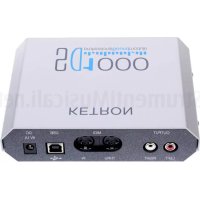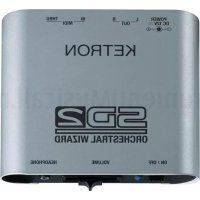
SD2 - Karaoke system KETRON - Free user manual and instructions
Find the device manual for free SD2 KETRON in PDF.


| Product Type | Karaoke system / Sound module |
| Brand | KETRON |
| Model | SD2 |
| Power Supply | DC 12 V power adapter (included) |
| MIDI Connections | In / Thru (5-pin DIN) |
| Audio Outputs | L / R (6.35 mm jack) |
| Headphone Output | Stereo socket (3.5 mm jack) |
| Volume Control | Master slider (also affects headphones) |
| Sound Bank | General MIDI + additional orchestral banks |
| Piano | Stereo grand piano sampled over 88 notes (default sound) |
| Drawbars | Digital section: 16', 8', 5'1/3, 4', 2'2/3, 2', 1'3/5, 1' + percussion 4' and 2'2/3 |
| Audio Loops | Many drum loops available for free download at ketron.it |
| DSP Effects | Reverb, Chorus, Delay, Rotor (for drawbars), Wah, Bass Boost |
| Additional Functions | Tuning, Arabic scale, global transposition |
| Compatibility | Computer (PC/Mac), sequencers, master keyboards, MIDI players (e.g., MIDJAY) |
| Pack Contents | SD2, user manual, power adapter |
| Optional Accessory | MIDI to USB cable |
| Safety | Grounding mandatory; do not expose to water or humidity |
| Maintenance | Clean with a soft, dry cloth; do not use solvents |
| Operating Conditions | Well-ventilated, away from heat sources |
Frequently Asked Questions - SD2 KETRON
User questions about SD2 KETRON
0 question about this device. Answer the ones you know or ask your own.
Ask a new question about this device
Download the instructions for your Karaoke system in PDF format for free! Find your manual SD2 - KETRON and take your electronic device back in hand. On this page are published all the documents necessary for the use of your device. SD2 by KETRON.
USER MANUAL SD2 KETRON
Sound Generation: Stereo Grand Piano.384 GM Voices. 128 Special Orchestral Presets. Over 1000 Percussive sounds. GM Standard. Digital Drawbars.
Drum 1: 32 New Drum sets.
Drum 2: 150 Live Drums, featuring Acoustic, Latin, Jazz, Pop and Dance Loops.
Effects: Multi effect DSP. Reverb, Chorus, Delay, Distortion, Rotor Slow/Fast.
MIDI: In, Thru. 32 Midi Channels. GM standard.
Outputs: Left & Right Outputs. Stereo headphone.
Volume:
Volume
Slider
Dimensions: L x W x H = (12 x 13 x 4 cms.) (4.8 x 5.2x 1.6 inches).
Weight: 0.6Kg (1.32 lbs)
Power: External 12 Volts Power supply
Options:
USB to Midi cable.
Specifications and appearances are subject to change without notice.
Distortion (Type, Resonance, Tone)
Distortion (Type, Resonance, Tone)
Warning: to reduce the risk of fire or electric shock, do not expose this instrument to rain or moisture.
- Earthing instructions -
This product must be connected to an earthed outlet. In case of malfunctioning, the earthing will reduce the risk of electric shock. The instrument comes with an earthed power cable and plug to be used with an earthed outlet.
DANGER - Improper earthing connections may cause electric shocks. In case of doubts, have your electric installation checked by a qualified electrician. Do not modify the power cable coming with the instrument.
IMPORTANT SAFETY AND INSTALLATION INSTRUCTIONS
WARNING - When using electrical products, some basic precautions must be followed, including the following:
Before using this instrument, carefully read the User's Manual.
- When the instrument is used by children, the presence of an adult is required.
- Do not use the instrument near water, for example near a wash-basin, a swimming-pool, a wet surface, etc.
The instrument must be used only on supports recommended by the manufacturer.
- Do not use the instrument where there is any risk of it getting splashed with water or of water dripping on it, such as near wash basins, swimming pools or on wet surfaces etc. Do not put containers with water on top of the instrument.
The instrument is to be used in a position where adequate ventilation is provided.
Use the instrument far away from heat sources such as radiators, heaters, etc.
- Use only the supplied power cable for connecting the instrument to the mains.
The identification and power supply data are reported on the bottom of the instrument.
- Disconnect the power cable if the instrument is not used for longer periods of time.
If you need to disconnect the instrument from the power supply, use the ON/OFF switch at the back of the instrument.
The instrument must be positioned so that the ON/OFF switch is easily accessible.
- Bring the instrument to an service centre in the following cases:
a. Damages on the power cable or plug.
b. Objects or liquids fallen into its inside.
c. The instrument has been exposed to rain.
d. Abnormal running or an evident decrease of the instrument's performance.
e. The instrument has fallen down or the enclosure has been damaged.
- Never try to repair the instrument yourself. All operations must be performed by specialised engineers.
KEEP THESE INSTRUMENTS IN A SAFE PLACE
HOW TO AVOID RADIO/TV INTERFERENCE
This instrument operates at radio frequencies, and if not correctly installed according to the instructions supplied, it may cause interference with radio and television reception.
Though this instrument has been designed according to the applicable standards and notwithstanding the reasonable protections against interference it has been equipped with, there is no guarantee that such events will not occur. In order to check if the interference is actually caused by this instrument, switch it off and see if the interference disappears.
Then switch it on again and check if the interference appears again. Once you have made sure that the interference is originated by this instrument, take one of the following measures:
- Modify the instrument's position with respect to the receiver.
- Increase the distance between the instrument and the receiver.
- Connect the instrument's plug to a different outlet to make sure that the instrument and the receiver are connected to two different circuits.
- If necessary, contact a specialised technician.
POWER SUPPLY
- Before connecting this instrument to any other equipment (amplifier, mixer, other MIDI instruments, etc.) make sure that all units are switched off.
- Read the instructions about Radio and TV interference.
HOW TO CLEAN THIS INSTRUMENT
- Use only a soft and dry cloth to clean the external surface of your instrument. Never use petrol, thinners or solvents generally speaking.
OTHER PRECAUTIONS
If you wish to use your instrument abroad and if you have any doubts about the power supply, contact a qualified engineer previously.
The instrument should never be subject to strong vibrations.
AC POWER ADAPTORS
To connect these instruments to the wall socket you will need the supplied KETRON AC Power adaptors.
Use of other AC adaptors could result in damage to the instrument's power circuit. So be sure to ask for the right kind.
INFORMATION FOR USERS
"Observe European Directives 2002/95, 2002/96 and 2003/108 with regard to the reduced use of harmful substances on electrical and electronic instruments and also observe waste disposal regulations."
The symbol with the bin crossed out on the instrument points out that it must be separated from other waste at the end of its useful life span and not just thrown away in the bin.
The user must therefore hand the instrument over to differentiated waste disposal centres authorised to process electronic and electro-technical waste at the end of its useful life span, or give it back to the retailer when purchasing a new similar type of device on a basis of 1-to-1 ratio. The differentiated disposal of the equipment for the possible future recycling of its constructional parts contributes in safeguarding the environment and human health.
The user is subject to administrative fines in the case of the abusive disposal of the product.
INTRODUCTION
Thank you for purchasing the new KETRON SD 2 Orchestral Wizard. The SD 2 instrument represents an interesting integration to the sector of sound modules in terms of compactness and musical performance. Not only does it avail of all the sound acoustics necessary for the perfect reproduction of musical files in General Midi standard and Kar format, but it also has other additional sound banks with an incredible variety of orchestral
Voices: Grand Piano Stereo over 88 notes, Acoustic and electric guitars, Brass and saxophones of unique quality, sampled organs and Digital Drawbars section, Accordions, Bass, Strings, acoustic and electronic Drum Sets and so on. The SD 2 unit is also equipped with a considerable number of audio Drum and Percussion Loops split-up into a very wide variety of musical styles, which definitely make SD 2 stand out from all other similar models on the market.
The applications of SD 2 are best exploited in combination with a MIDI player (such as KETRON MIDJAY for example) or with sequencers on computer (Logic®, Cubase®, Cakewalk® and others), but it can also be connected to Master keyboards or multi-purpose keyboards (Arranger, Synth, Digital pianos etc.).
Before you use your SD 2 instrument, make sure you read all the instructions carefully in order to fully exploit its potentials and to ensure its long life. Keep this manual in a safe place for future reference.
CONTENTS OF THE PACKAGE
The original package of your SD 2 instrument includes the following material:
a) SD 2 unit
b) Instruction manual
c) DC Feeder - 12 Volts
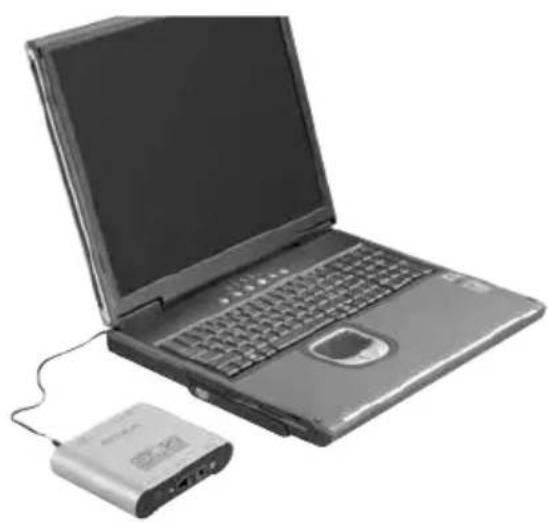
Optional accessory: Midi to USB cable. This is required to use SD 2 with a Laptop, due indeed to the fact that portable computers do not have their own Midi interface (unless they are equipped with additional boards such as Firewire, USB etc.).
This cable is used for the communication of the midi data from your portable computer with the Midi In of SD 2 via the USB connection.
TURNING ON
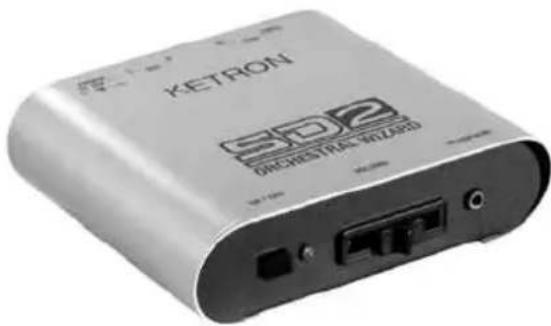
To turn the SD 2 unit on, simply connect the feeder supplied with the instrument to the mains. The LED on the front panel lights up to point out that the instrument is working.
1 On / Off: Main ON/OFF switch of the SD 2 instrument. When the LED lights up, it points out that the instrument is working. The LED will flash if there is any Midi In activity.
2 Volume: Slider that controls the general volume of SD 2. This volume also affects the Headphone output.
3 Headphone: Connection for stereo headphones with low impedance.
CONNECTIONS
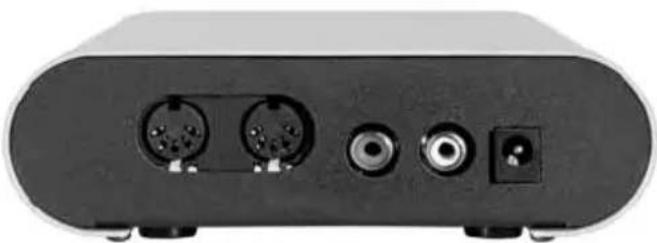
4 Midi In / Thru: Midi In and Thru connection of SD 2. Connect the Midi In of SD 2 to the Midi out of the computer, of the Midi player or of the Master keyboard. The Thru connection is used to send a copy of the Midi In to another device (i.e.:Expander).
5 Out L/R: Left and Right audio outputs to be connected to the mixer or audio amplifier.
6 Power Dc In: Connection for the DC 12 V feeder of SD 2.
ADVICE ON USING THE INSTRUMENT
In this section we show you how we think you should use SD 2 to fully exploit its performance in musical applications.
HOME STUDIO (with computer, sequencer or external players)
In this context, SD 2 is able to express its performance to the best.
It can be connected to your computer (Pc or Mac) via the Midi cable (if you already have a board with Midi interface) or via the Midi to USB cable supplied as an optional accessory by KETRON. Using musical sequencer programs such as Cubase®, Logic®, Cakewalk® or similar you will be able to successfully integrate SD 2 in your musical elaborations (Midi files, Jingles, Audio Mix etc.) exploiting its amazing sound versatility in the best way possible.
Your SD 2 not only offers the sounds that are by now part of the GM standard references but you will also find other Sound Banks with many characteristic sounds in the traditional families (Piano, Strings, Sax, Brass etc.).
The main feature that definitely distinguishes SD 2 from other sound modules is the presence of the numerous audio Loops (Drum Loops that you can download free of charge from our Internet site: www.ketron.it.).
Just imagine if you add these Loops to your musical creations ...they can enrich, if not indeed replace, the rhythm of your songs and they could make the difference with everything
that you have elaborated up to now in the sphere of Midi files! Just a quick example: Think of a Midi file of Caribbean music, where you often hear not very convincing parts of Latin percussions.
Apply some of the Patterns available in the data base of the additional Loops (or rather replacement loops) of the existent Drum track (Copy & Paste). In just a few steps you will be
able to replace the Midi rhythmic structure with audio Loops and the result will be amazing. Once your musical file is complete and you have saved it in the format that your prefer, you can naturally play it back with any type of sequencer or Midi player (i.e.: MIDJAY or similar) by connecting it to your SD 2. The use of laptops has become more and more popular in the world of musical entertainment to play back Midi files.
The advantage of having a musical board integrated in the computer is however often penalised by the fact that such boards only avail of a few sounds and of rather modest quality. In this case again, we think that the use of SD 2 instead of built-in boards offers a considerable opportunity.
MIDI KEYBOARD (Master keyboard, Arranger, Accordion etc.)
SD 2 can be used as a supplementary module to enrich the sound palette of your keyboard. Another ideal solution is that of coupling SD 2 with Master keyboards without sounds or with current mini remote keyboards (multimedia keyboards) that are used increasingly in the live set-up. We are sure that such a powerful and compact sound module will certainly become part of your musical set-up.
OPERATING NOTES
As you will have already noticed, the SD 2 unit has external connections (described previously) and one general volume control for the rear outputs and for the headphones.
Obviously everything else that may modify the Sound, the Volume, the Reverb, the Effects etc. must be performed via MIDI messages.
For those who are already familiar with this type of Editing procedure, simply observe the table of MIDI implementations of SD 2 to be able to manage the Sounds of the instrument in all its potentials.
For those who are still learning, we have prepared a set of files on our Internet site www.ketron.it (that you can download free of charge) with the configuration of the Map of sounds that can be used to work with the most commonly used sequencer programs and musical notes, such as Cubase®, Logic®, Cakewalk®.
HOW TO USE THE DRUM LOOPS
You can download the Drum Loops for SD 2 from our Internet site www.ketron.it. The files appear with a set of Folders, which are catalogued per type of music (Salsa, Cha, Merengue, Jazz etc.). These are actually Midi files that contain information on how to play the rhythm Patterns of the various Loops contained in the sound generation of SD 2. To better understand the sound possibilities that these loops offer, we suggest that you listen to the Demo.mid files within the reference folders of the various musical rhythms. We remind you that these patterns contain all the information necessary (program change, volume etc.) to be played immediately without any other settings.
DRAWBARS SECTION
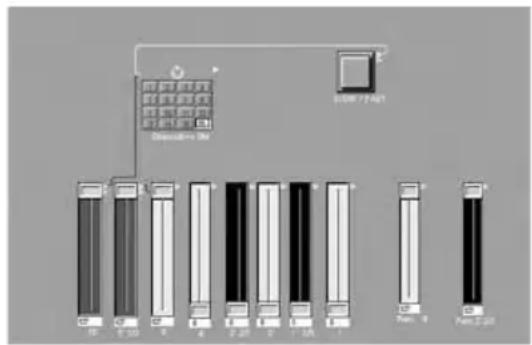
The sound generation of SD 2 also avails of a section of digital Drawbars, inspired by the sounds of electro-magnetic organs: 16',8' , 5'1/3 , 4' , 2'2/3 , 2' , 1'3/5 , 1' . Percussion 4' and 2'2/3 The Drawbars can play on any midi channel (and also on a number of midi channels simultaneously). Using the environment created especially for the Logic® (which you can
download free of charge from our Internet site www.ketron.it) you can play all the digital Drawbars, thanks to the virtual sliders reproduced in this environment.
Here's how the editor created on Logic® appears: If, on the other hand, you do not use this environment, you can pull-up the various Drawbars by sending the relative controllers to the SD 2 unit, which are described in the section entitled Midi Implementation.
Example:
Drawbar 16' is obtained by sending the following controller string to the SD 2 unit:
Bank 67, Program Change 0, Controller 20 (with value 0/127 relative to the volume of the actual drawbar).
In the section of the Midi Implementation functions, you will also find all the information necessary to be able to modify the Drawbars and their relative applicable effects (Rotary, Chorus, Reverb etc.).
STEREO GRAND PIANO
The SD 2 unit has a professional Grand Piano Stereo sound over 88 notes (pre-arranged as the default sound when you turn the instrument on in Progr. Change 01).
The availability of a Grand Piano sound of such quality proves extremely useful when the instrument is connected to a Master Keyboard.
OTHER FEATURES
For those of you who have already worked with multi-timbre sound modules, you will already know that the DSP's (effects and sound post-treatment) are integral part of these systems, which are used via the various controllers and/or Sys Exclusive.
However, you will be interested to know that together with the typical sections of Reverb, Chorus and Delay, you will also find other DSP effects, such as:
Rotor (for digital Drawbars with Rate, Acceleration, Depth and Type controls)
Wha Wha (Amount. This controls the intensity of the Wha effect on the track)
Bass Boost (Gain, Frequency. Bass boosting device)
Distortion (Type, Resonance, Tone)
The Master Control section also envisages the following controls:
Tune: This controls the general tune of the module (Data Value)
Arabic Scale: This controls the intervals for the Arabic scale (Data Value)
Global Transposer: Global transposition of the instrument ( Data Value )
Distortion (Type, Resonance, Tone)
Distortion (Type, Resonance, Tone).
TECLADO MIDI (Master keyboard, Arranger, Acordeão etc.)
Distortion (Type, Resonance)
NOTE ON 9nH kk vv n(0-OFH) midi channel, kk(01H-7FH)=NOTE ON vv=velocity(01H-7FH) (vv=0 means NOTE OFF)
NOTE OFF 8nH kk vv n(0-OFH) midi channel, kk(01H-7FH)=NOTE OFF 9nH kk 00H vv=don't care if command 8nH
PITCH BEND EnH bl bh Pitch Bend as specified by bl(low) bh(high),bl=(00H-7FH),bh=(00H-7FH) 14 bit
resolution.
Maximum swing is + / - 1 tone (default).
(Can be changed using RPN 0000H)
Center position is bl = 00H bh = 40H
Refer to voices or drumset list.
CHANNEL AFTERTOUCH DnH vv v v=pressure value(00H-7FH). see System excl. list for Aftertouch effect setting
CONTROL 00H BnH 00H cc Bank select. See voices list for details.
CONTROL 01H BnH 01H cc Modulation wheel. Rate, Assignment can be set using System excl.
CONTROL 05H BnH 05H cc Portamento time
CONTROL 06H BnH 06H cc Data Entry. Provides data to RPN NRPN
CONTROL 07H BnH 07H cc Volume
CONTROL OAH BnH OAH cc Pan. (Default 40H)
CONTROL OBH BnH OBH cc Expression. (Default 7FH)
CONTROL 14H BnH 14H cc Draw Bar 16^ ,cc=amount
CONTROL 15H BnH 15H cc Draw Bar 8^ ,cc=amount
CONTROL 16H BnH 16H cc Draw Bar 5^1 / 3 ,cc=amount
CONTROL 17H BnH 17H cc Draw Bar 4^ ,cc=amount
CONTROL 18H BnH 18H cc Draw Bar 2^2 / 3 ,cc=amount
CONTROL 19H BnH 19H cc Draw Bar 2^ ,cc=amount
CONTROL 1AH BnH 1AH cc Draw Bar 1^3 / 5 ,cc=amount
CONTROL 1BH BnH 1BH cc Draw Bar 1^ ,cc=amount
CONTROL 1CH BnH 1CH cc Draw Bar Perc 4^ ,cc=amount
CONTROL 1DH BnH 1DH cc Draw Bar Perc 2^2 / 3 ,cc=amount (see on bottom
of document)
CONTROL 1EH BnH 1EH cc Rotor cc=00H off, cc=40H slow, cc=7FH fast 00H = rotor OFF (return to default chorus)
40H = rotor slow
7FH = rotor fast
CONTROL 40H BnH 40H cc Sustain. (Dumper pedal) On=7FH, Off=00H
CONTROL 41H BnH 41H cc Portamento. On/Off On=7FH, Off=00H
CONTROL 42H BnH 42H cc Sostenuto pedal On=7FH, Off=00H
CONTROL 43H BnH 43H cc Soft pedal On=7FH, Off=00H
CONTROL 54H BnH 54H cc Wha-Wha On/Off On=7FH Off=00h
CONTROL 55H BnH 55H cc Wha-Wha Amount cc=00H-7FH
CONTROL 5BH BnH 5BH cc Auxiliary channel1 Reverb send vv=00H-7FH
CONTROL 5DH BnH 5DH cc Auxiliary channel2 Effects send vv=00H-7FH (chorus, delay, distorsor)
CONTROL 77H BnH 77H 00H Reset all NRPN (see note 1).
CONTROL 78H BnH 78H 00H All sound off. (Abrupt stop of sound on channel n)
| CONTROL 79H | BnH 79H 00H | Reset all controllers | |
| CONTROL 7BH | BnH 7BH 00H | All Notes Off | |
| CONTROL 7EH | BnH 7EH 00H | Mono on | |
| CONTROL 7FH | BnH 7FH 00H | Poly On (default) | |
| RPN 0000H | BnH 65H 00H | 64H 00H 06H vv | Pitch Bend sensitivity in semitones (default vv=02H) |
| RPN 0001H | BnH 65H 00H | 64H 01H 06H vv | Fine tuning in cents. vv=00H (-100) vv=40h (0) vv=7FH (+100) |
| RPN 0002H | BnH 65H 00H | 64H 02H 06H vv | Coarse tuning in half-tones vv=00H (-64) vv=40H (0) vv=7FH (+64) |
| NRPN 0108H | BnH 63H 01H | 62H 08H 06H vv | Lfo1 Rate modify (vv=40H no modify) |
| NRPN 0109H | BnH 63H 01H | 62H 09H 06H vv | Dco Depth modify (vv=40H no modify) |
| NRPN 010AH | BnH 63H 01H | 62H 0AH 06H vv | Lfo1 Delay modify (vv=40H no modify) |
| NRPN 0110H | BnH 63H 01H | 62H 10H 06H vv | Lfo2 Rate modify (vv=40H no modify) |
| NRPN 0111H | BnH 63H 01H | 62H 11H 06H vv | Lfo2 Delay modify (vv=40H no modify) |
| NRPN 0112H | BnH 63H 01H | 62H 12H 06H vv | Dcf Depth modify (vv=40H no modify) |
| NRPN 0113H | BnH 63H 01H | 62H 13H 06H vv | Dca Depth modify (vv=40H no modify) |
| NRPN 0120H | BnH 63H 01H | 62H 20H 06H vv | TVF cutoff freq. modify (vv=40H no modify) |
| NRPN 0121H | BnH 63H 01H | 62H 21H 06H vv | TVF Resonance modify (vv=40H no modify) |
| NRPN 0130H | BnH 63H 01H | 62H 30H 06H vv | FM Amplitude1 (vv=40H no modify) |
| NRPN 0131H | BnH 63H 01H | 62H 31H 06H vv | FM Amplitude2 (vv=40H no modify) |
| NRPN 0132H | BnH 63H 01H | 62H 32H 06H vv | FM Amplitude3 (vv=40H no modify) |
| NRPN 0133H | BnH 63H 01H | 62H 33H 06H vv | FM Amplitude4 (vv=40H no modify) |
| NRPN 0163H | BnH 63H 01H | 62H 63H 06H vv | Env. attack time modify (vv=40H no modify) |
| NRPN 0164H | BnH 63H 01H | 62H 64H 06H vv | Env. decay time modify (vv=40H no modify) |
| NRPN 0166H | BnH 63H 01H | 62H 66H 06H vv | Env. release time modify (vv=40H no modify) |
| NRPN 016BH | BnH 63H 01H | 62H 6BH 06H vv | Env. sustain time modify (vv=40H no modify) |
| NRPN 18rrH | BnH 63H 18H | 62H rr 06H vv | Pitch Course of drum instr. in semitones rr=note vv=40H no modify |
| NRPN 19rrH | BnH 63H 19H | 62H rr 06H vv | Pitch Fine of drum instr. in semitones rr=note vv=00h no modify vv=7FH +1/2 tone |
| NRPN 1ArrH | BnH 63H 1AH | 62H rr 06H vv | Level of drum instr. note rr. vv=00h to 7FH |
| NRPN 1CrrH | BnH 63H 1CH | 62H rr 06H vv | Pan of drum instr. note rr. vv=00h to 7FH |
| NRPN 1DrrH | BnH 63H 1DH | 62H rr 06H vv | Reverb send level of drum instr. note rr. vv=00h to 7FH |
| NRPN 1ErrH | BnH 63H 1EH | 62H rr 06H vv | Chorus send level of drum instr. note rr. vv=00h to 7FH |
note 1:
Reset NRPN. reset following NRPN: 0108H,0109H,010AH,0110H,0111H,0112H,0113H,0120H,0121H,0130H,0131H,0132H 0133H,0163H,0154H,0166H,016BH. If midi channel i a drumset channel following NRPN are also reset: 18rrH,19rrH,1ArrH,1CrrH,1Drrh,1ErrH.
BASS BOOST
FOH 26H 7BH 7DH 00H Boost_gain Freq F7H Boost_gain = 0-6
Freq = 0-7
PARAMETERS GENERAL FORM
FOH 26H 7BH Code Data_1..Data_n F7H
REVERB1 TYPE
FOH 26H 7BH 00H 00H Rev_type F7H
Rev_type = 00H Reverb_1 02H Reverb_3 04H Reverb_5 06H Reverb_7
Delay_type=00H Delay_1 02H Delay_3 04H Delay_5 06H Delay_7
01H Delay_2 03H Delay_4 05H Delay_6 07H Delay_8
DISTORSOR TYPE
FOH 26H 7BH 11H 00H Dist_type F7H
Dist_type = 00H Distorsor_1 01H Distorsor_3 01H Distorsor_5 01H Distorsor_7 7FH OFF
01H Distorsor_2 01H Distorsor_4 01H Distorsor_6 01H Distorsor_8
TYPE EFFECTS CHANNEL ASSIGN
FOH 26H 7BH 0BH 0OH Chan Type F7H
Chan: 00H -1FH Type: 0 = no effects 3 = Chorus
1 = Leslie 4 = Delay
2 = Distorsor
CHORUS PARAMETERS
FOH 26H 7BH Cho_par 00H Value F7H
Cho_par: 3BH Chorus Volume Value 0 - 7FH 76H Chorus Rate Value 0 - 7FH
74H Delay 0-7FH 77H Depth 0-7FH
75H Feedback 0-7FH
DELAY PARAMETERS
FOH 26H 7BH Delay_par 00h Value F7H
Delay_par: 2BHDelay Feed Value0-7FH 2CHDelay FilterValue0-68H
DELAY TIME
FOH 26H 7BH 29h 00H Time_Center(0-7FH) Time_Left(0-7FH) Time_right(0-7FH) F7H
DELAY VOLUME
FOH 26H 7BH 2Ah 00H Vol_Center(0-7FH) Vol_Left(0-7FH) Vol_right(0-7FH) F7H
DISTORSOR PARAMETERS
FOH 26H 7BH Dist_par 00H Value F7H Dist_par: 22H Distorsor Volume Value 00H - 7FH
25H " Tone 10H-66H
26H "Resonance 18H-7FH
GLOBAL TRANSPOSER
FOH 26H 7BH 07H 00H Value F7H Value = 28H - 58H;40H = no transp.
SCALE TUNING (ARABIC)
FOH 26H 7BH 0AH Chan Data1...Data12 F7H
Data: 00H-7FH; 40h = no detune Chan: 00H-1FH 7FH all channels (not drum sections)
MASTER TUNE
FOH 26H 7BH 0CH 00h Data1,Data2 F7H
Data1 00H-0CH high nibble Es. Data1=06h Es. Data1=00h Es. Data1=0Ch
Data2 00H-OFH low nibble Data2=04h (nominal) Data2=00h (-100%) ata2=08h +100%)
GLOBAL GM RESET
FOH 26H 7BH 0EH 00h Value F7H Value = 00H gm controls reset
Value = 01H gm controls reset + all note off
GM DRUM PART
FOH 26H 7BH OFH 00H GMPart Value F7 Value = 00H voice
Value = 01H drum
GMPart = 00H-1FH
GM MIDI RX CHANNEL ASSIGN
FOH 26H 7BH 12H 00H GMPart Chan F7H Chan = 00H-20H, 20H=OFF
GMPart
00H-1FH
VELOCITY SLOPE
FOH 26H 7BH 3EH 00H Part Value F7H Part: 00H-1FH Value: 00H-7fH
VELOCITY OFFSET
FOH 26H 7BH 3FH 00H Part Value F7H Part:00H-1FH Value:00H-7fH
FILTER VELOCITY SLOPE
FOH 26H 7BH 40H 00H Part Value F7H Part:00H-1FH
Value: 00H-7fH
FILTER VELOCITY OFFSET
FOH 26H 7BH 41H 00H Part Value F7H Part:00H-1FH
Value: 00H-7fH
MODULATION, BEND, AFTERTOUCH, VOICES CONTROLS
FOH 26H 7BH CNTRL 00H Part Value F7H Part : 01H-20H
Value: 00H-7fH
CNTRL: 42H mod. pitch ctrl
43H mod. tvf cutoff 4AH bend tvf cutoff
5AH AfterTouch tvf cutoff 62h Voices amplitude
44H mod. Ifo amplitude 4BH bend amplitude
5BH AfterTouch amplitude 63h Voicse Ifo pitch
45H mod. lfo rate 4CH bend lfo pitch
5CH After Touch Ifo pitch 64h Voices Ifo tvf dpth
46H mod. Ifo pitch depth 4DH bend Ifo tvf
5DH AfterTouch Ifo tvf depth
47H mod. Ifo tvf depth 4EH bend Ifo tva
5EH AfterTouch Ifo tva depth
48H mod. Ifo tva depth 59H AfterTouch pitch ctrl
60h Voices pitch ctrl
61h Voices tvf cutoff
GENERAL MIDI VOLUME
FOH 26H 7BH 38H 00H Value F7H Value 00-7FH default: 7FH
GENERAL MIDI PAN
FOH 26H 7BH 39H 00H Value F7H Value 00-7FH default: 40H
MIDI PORT
FOH 26H 7BH 30H 00H Value F7H Value: 00H == Channels 00H - OFH
01H == Channels 10H -1FH
DRAWBARS SELECTION
Controller 0 Value 67 Bank MSB Program Change 0
Drawbar Controller: 20 = 16' Value: 0-127
24 = 2 2/3 Value: 0-127
28 = percussion 4' Value: 0-127
21 = 8' Value: 0-127 25 = 2' Value: 0-127
29 = percussion 2' 2/3 Value:0-127
22 = 5 1/3' Value: 0-127 26 = 1' 3/5 Value: 0-127
23 = 4' Value: 0-127 27 = 1' Value: 0-127
I.E (in order to send a drawbars data 16^ - 8^ - 4^ )
Controller 0 value 67
Controller 20 value 127 (16')
Controller 23 value 127 (4')
Program change 0
Controller 21 value 127 (8')
KETRON s.r.l. • 60131 Ancona ITALY • Via Giuseppe Taliercio, 7
Ph. +39 (0)71 285771 • Fax +39 (0)71 2857748 • www.ketron.it