31881 - Video camera Berger & Schröter - Free user manual and instructions
Find the device manual for free 31881 Berger & Schröter in PDF.



| Brand | Berger & Schröter |
| Model | 31881 |
| Product type | Trail camera / motion detection |
| Power supply | 4 AA 1.5V batteries (not included) |
| Memory card type | Micro SD up to 32 GB, class 6 or higher |
| Maximum photo resolution | 16 MP (4608 x 3456 P) |
| Maximum video resolution | 1920 x 1080 P |
| Infrared distance | Adjustable: Near, Medium, Far |
| Sensor detection angle | Not specified (front motion sensor) |
| Adjustable video length | From 3 seconds to 10 minutes |
| Interval between triggers | From 5 seconds to 60 minutes |
| Operating mode | Photo, Video, Photo+Video, Interval, Timelapse |
| Screen | Yes (size not specified) |
| IR LED flash | Yes (black and white in night mode) |
| Connectivity | USB, DC adapter, 1/4" tripod |
| Password protection | Yes (4 digits) |
| Wall mount included | Yes, with screws and wall plugs |
| Warranty | 24 months |
Frequently Asked Questions - 31881 Berger & Schröter
User questions about 31881 Berger & Schröter
0 question about this device. Answer the ones you know or ask your own.
Ask a new question about this device
Download the instructions for your Video camera in PDF format for free! Find your manual 31881 - Berger & Schröter and take your electronic device back in hand. On this page are published all the documents necessary for the use of your device. 31881 by Berger & Schröter.
USER MANUAL 31881 Berger & Schröter
Das Datumsformat: tt/mm/jjjj, jjjj/mm/tt, mm/tt/jjjj.
User's Manual Mini Camera 16 MP Item No. 31881
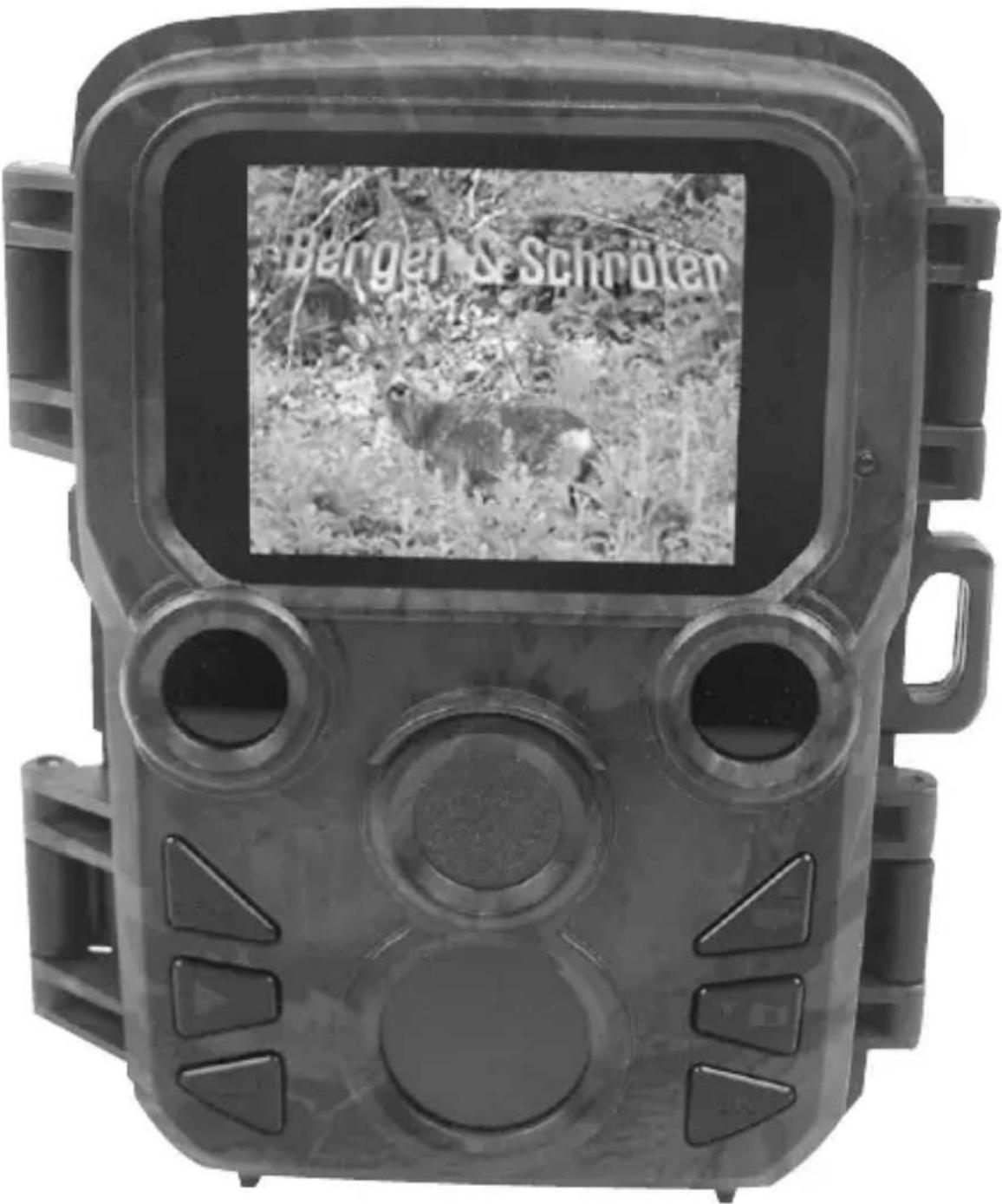
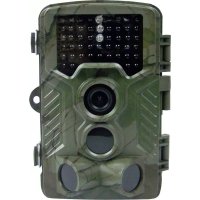
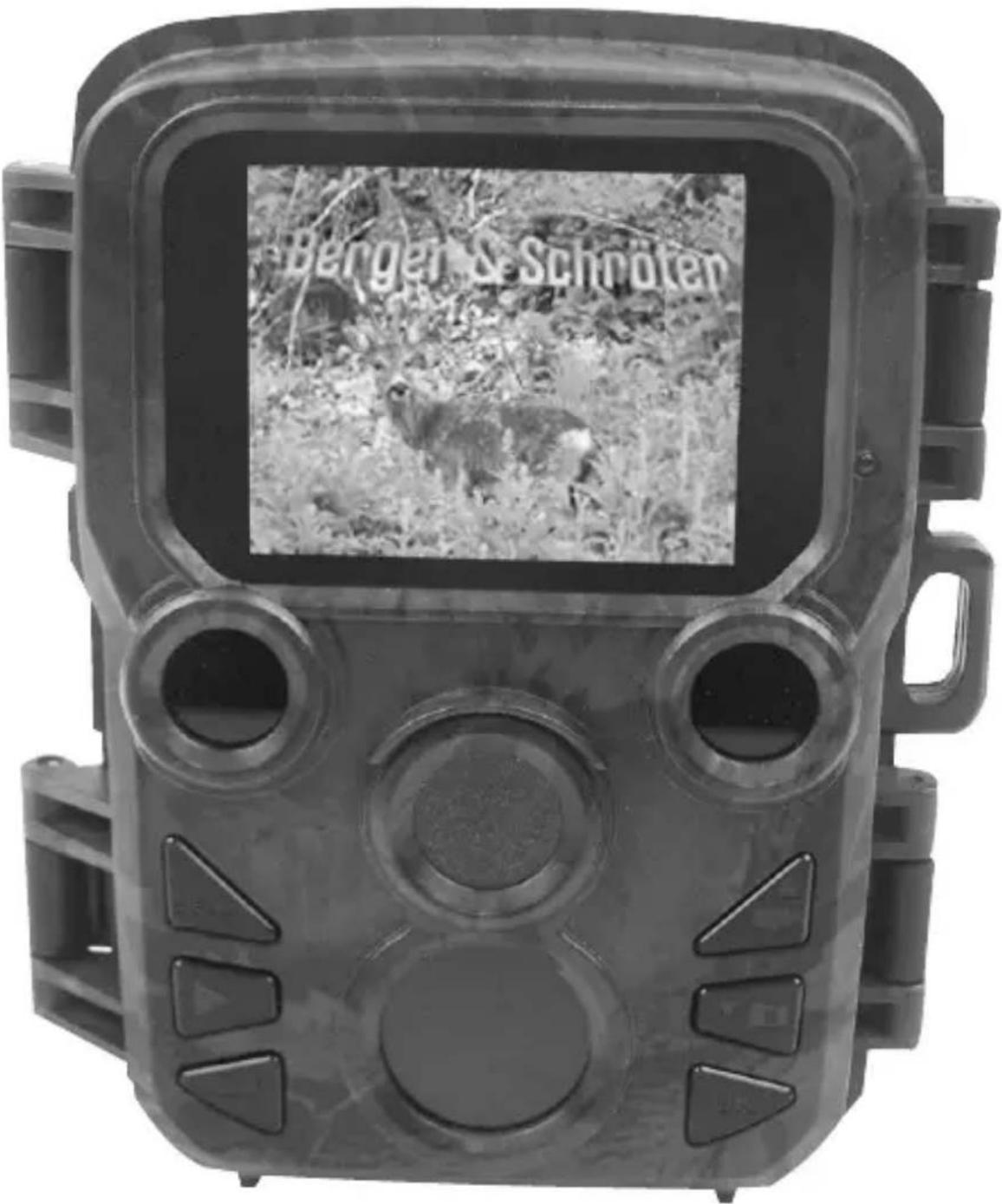
Parts Of The Camera
- Display screen
- IR LED flash
- Lens
- Up/Video Button
- Down/Capture Button
- Front motion sensor
- OK/Shot button
- Menu Button
- Right button
- Playback button
- DC adapter port
- Tripod Slot
- Microphone
- Battery compartment
- ON-TEST-OFF button
- USB jack
- Micro SD card slot
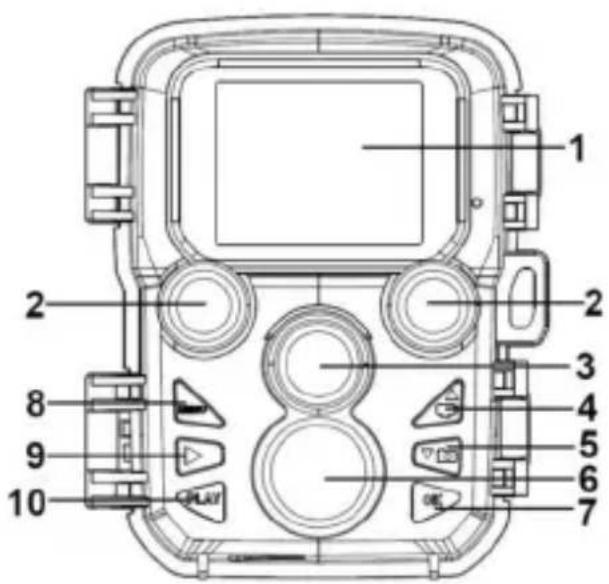
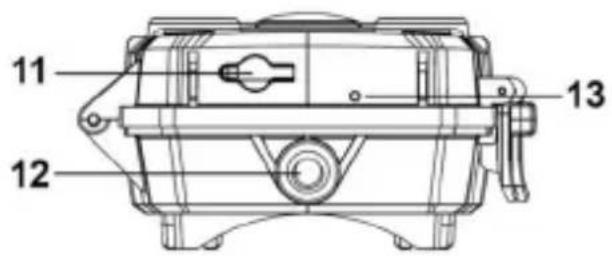
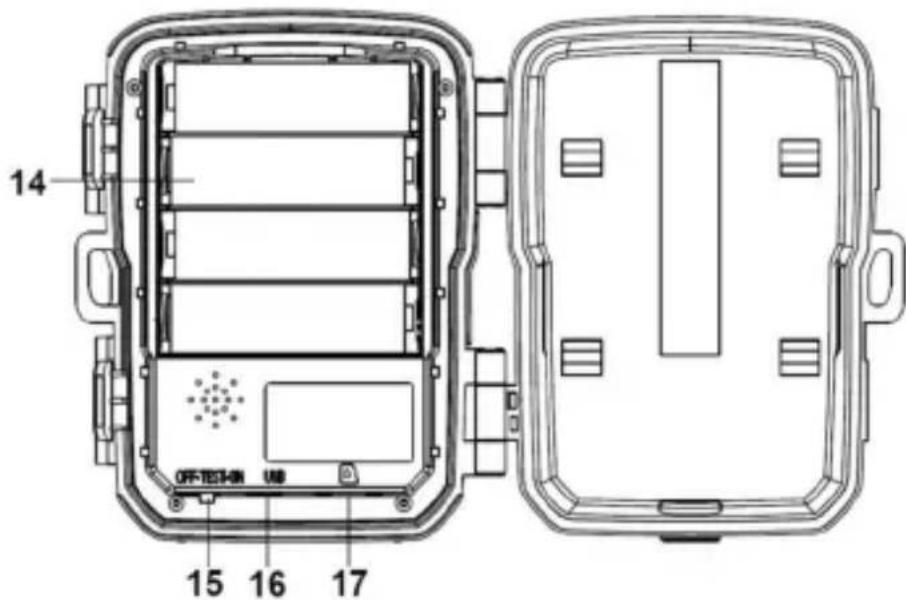
Power Supply
Please install batteries before using the camera.
- Unlock the camera and you will find the compartment. Install 4 pieces of 1.5V AA batteries. Please make sure the electrode is correct.
- If the camera is in low power, please connect the camera to a power adapter (not provide) for power supply.
Inserting The Memory Card
Please prepare a Micro SD card and insert it into the camera for saving files. Before recording, please format the memory card first.
- Support Micro SD card,up to 32GB. Suggest to use class 6 or above high speed card.
- To avoid malfunction, the memory card should be far away from water, strong vibration,dust, hot source and direct sunlight.
- Do not insert the memory card forcibly. Please refer to the marking on the camera.
- For the first time use, please wait for the memory card temperature reach the ambient temperature. The camera will be short-circuit influenced by environment temperature and humidity. Please notice protection for the camera when using it outdoor.
- If the capacity of memory card is full, the camera will stop recording automatically.
- Press the edge of the card gently to pop-up the TF card.
Basic Operation
Turn On And Off The Camera
Switch the Mode Button to "Test/On" to turn on the camera.
Switch the Mode Button to "Off" to turn off the camera.
System Setup
Switch Mode Button to "Test", then you can set the system parameters.
- Press Menu button to open the setup menu.
- Press Up/Down button to scan all menu. Then press OK button to enter the options interface.
- Press Up/Down button to scan all options. And press OK button to confirm options.
- Press Menu button again to turn back to last menu or exit the setup menu.
Setup menu and function as below:
Mode
Set the working mode. In photo mode, the camera just take pictures. In Video mode, the camera just record video. In photo&video mode, the camera will take a photo first, then start to record video.
Options: Photo / Video / Photo&Video.
Photo Resolution
Set the still image resolution.
Options: 16MP(4608x3456P) / 12MP(4000x3000P) / 8MP(3264x2448P) / 5MP(2592x1944P) / 3MP(2048x1536P) / 1MP(1280x960P).
Photo series
Set the photo number of continuous shooting. In photo mode, the camera will take photos continuously.
Options: 1 photo / 2 photos in series / 3 photos in series.
Video resolution
Set the video resolution. The bigger the resolution is, the longer the video time can be stored.
Options: 1920x1080P / 1280x720P / 720x480P / 640x480P / 320x240P.
TL video resolution
Set the resolution of time lapse video.
Options: 2592x1944P / 2048x1536P.
Video length
Set the duration of recording a video clip. The shortest time is 3 seconds and the longest time is 10 minutes.
Options: 3 seconds~10 minutes.
Audio recording
Open this function, the camera will record audio when recording video.
Options: On / Off.
Shot lag
Set the time of delay shooting when the camera detects the motion. In the selected time, the camera will not record any image or video. This function can avoid to store too much same event and save more capacity.
Options: 5 seconds~60 minutes.
IR distance
Set the distance of infrared induction.
Options: Near / Middle / Far.
Sensitivity motion sensors
indoors, you can choose "Low". In outdoor, choose "Middle" in normal condition. Choose "High" if the environment impact is huge outdoors. The temperature can also influence the sensor sensitivity. "High Sensitivity" applies to mild environment. "Low Sensitivity" applies to cold environment.
Options: Low / Middle / High.
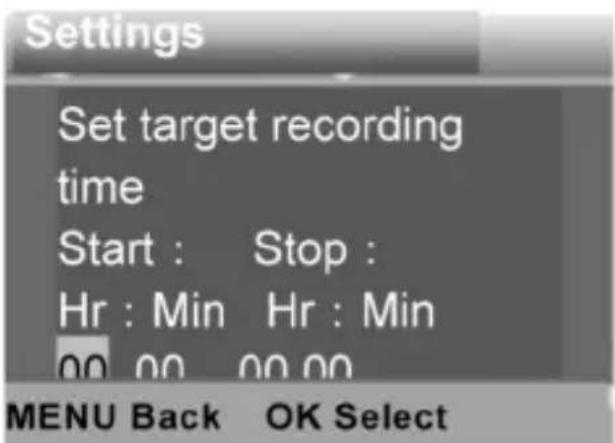
Target recording time
Set the target recording time. As shown in below picture, you can set the start and stop time. The camera will work just in the stated time slot. In other time, the camera will keep in standby state.
Options: On / Off.
Time lapse
In Time lapse menu, there are three options as below.
[Normal]: The camera will take pictures automatically as per set time interval. For example, set the interval time to 1 hour, the camera will take a photo each hour. If you want to observe that a plant blooms, the camera will take 24 photos in 24 hours to record the whole process of blooming.
[TL Video]: You can set the interval time. The time range is from 1 second to 24 hours. For example, set the interval to 1 hour, the camera will take a photo each hour. If the camera works for 24 hours, there will be 24 photos. These photos will be converted into a video.
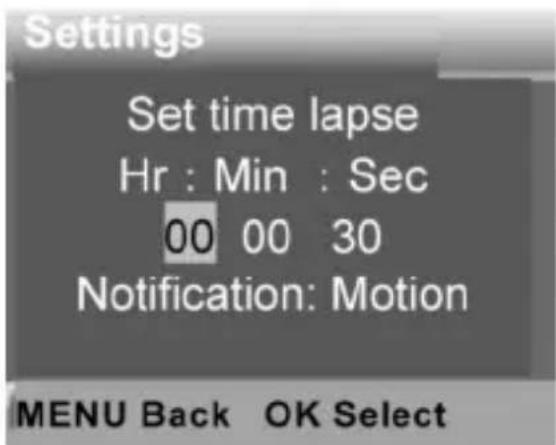
[Off]: Close the time lapse function.
Language
Set the language display on screen.
Options: English / German / Danish / Finnish / Swedish / Spanish / French / Italian / Dutch / Portuguese / Simplified Chinese / Japanese.
Endless Capture
Set the camera to record video in loop. Options: On / Off.
Time & date
Set the date and time of camera.
The date format: dd/mm/yyyy, yyyyMMdd, mm/dd/yyyy.
The time format: 24h, 12h.
Press Right button to choose the item. Press Up/Down button to adjust the value. And press OK button to confirm.
Options: Set time&date / Time format / Date format.
Photo stamp
Stamp the date&time on the photos or not.
Options: Time&date / Date / Off.
Password protection
Set the power-on password of the camera. The password is four digit, each digit ranges from 0 to 9.
If you forget the password, please reset the camera. Then all parameters will reset to the factory settings.
Options: On / Off.
Beep sound
Open/close the button sound.
Options: On / Off.
Format memory card
Formatting the memory card will delete all data permanently. Before using a new memory card or a card that has been used in another device previously, please format the memory card.
Options: Yes / No.
Serial NO.
Set the unique serial number for the camera. The number is four digit, each digit ranges from 0 to 9 and A to Z.
Options: On / Off.
Reset settings
Restore the camera to factory default settings including password,serial number and so on.
Options: On / Off.
Version
Look up the Firmware information of the camera.
Take Photos, Record Video, Playback
Switch the Mode Button to "Test". In this mode, you can take photos, record video and playback files manually.
- Take Photos: Press Capture button to switch to photo mode. Press Shot button to take a picture.
- Record Video: Press Video button to switch to video mode. Press Shot button to start to record a video clip. Press Shot button again to stop recording.
- Playback: Press Playback button to enter the playback interface. Press Up/Down button to scan photos or video. When playback video, press OK button to play the video. Press OK button again to have a pause. Press Menu button to stop playback. Press Playback button again to exit the playback mode.
Playback Menu:
1) Delete current file: Delete the current photo or video.
Options: Cancel / Delete.
2) Delete all files: Delete all photo and video files in the memory card.
Options: Cancel / Delete.
3) Activate slide show: Playback the photos in slide way. Each photo display 3 seconds. Press OK button to stop playing.
4) Write protect: Lock the file. It can avoid accident deletion.
Optio: Write-protect current file / Write-protect all files / Unlock current file / Unlock all files.
Working Mode
Switch the Mode Button to "On". After turn on the camera, the screen will display 15 seconds countdown. Then the LEDs and screen will go out. The camera begins to operate independently and enter standby mode.
If the wild animals enter the detection range of the motion sensors, the camera will be activated and detect the motion trail.
If the wild animals continue to move to the detection zone of the sensor, the camera will take photos or record video automatically.
When the wild animals leave the detection zone of the sensors, the camera will be deactivated and turn back to standby mode.
Night Mode
In night mode, the pictures just can display white and black.
When record a video for long time in the evening, the low voltage may have a great influence on the stability of the machine. Do not record video with low voltage in the evening.
Using the wall bracket
You can mount the camera on a wall or tree by the supplied wall bracket. Before mounting the wall bracket you should ensure that all existing screws are tight. The best installation height distance from the ground about 1 meter.
Components
1.Tripod screw
2 Lock nut
3 Pivot bolts
4 Drill holes
5 Hexagonal screw
6 Wall plugs
7 Screws
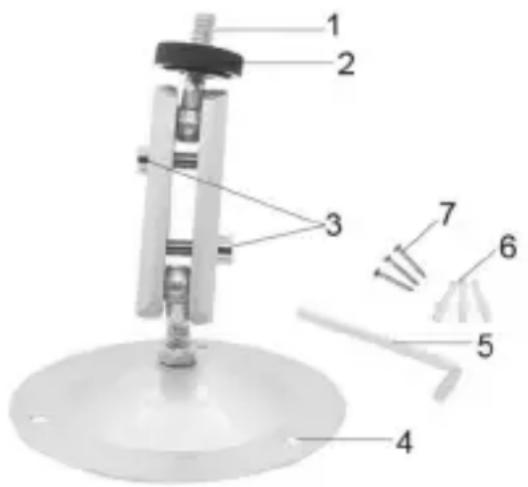
Mounting the wall bracket Required tools
- Drill
- 6 mm masonry/concrete drill bit
- Phillips head screwdriver
Caution
- Ensure that there are no electric lines, water or heating pipes installed at the proposed drilling location.
- The supplied wall plugs are only suitable for mounting on concrete or stone. Before starting the installation, please check your installation location carefully for its suitability for the plugs. The assembly material used must be suitable for the respective location. If in doubt, consult a professional.
Install Steps
- Mark the drill holes by holding the foot of the wall bracket at the desired mounting location and marking the hole positions.
- Use a drill with a 6 mm drill bit to drill the required holes and insert the plugs and insert the wall plugs flush with the wall.
- Screw the wall bracket to the wall using the supplied screws.
- Mount the camera on the tripod screw and screw the camera a little way on (about three turns).
- Turn the camera in the desired direction and lock it with the lock nut.
- To move the camera into its final position, undo the two pivot bolts a little, position the camera and fix the position by tightening the two pivot bolts.
Download Files To The Computer
There are two ways to download files from the memory card to a computer:
- By inserting the memory card into a card reader
- By connecting the camera to a computer using the supplied USB cable.
Using a Card Reader
- Pop-up the memory card from the camera and insert it into a card reader. Then connect the card reader to a computer.
- Open [My Computer] or [Windows Explorer] and double-click the removable disk icon that represents the memory card.
- Copy image or video files from the memory card to your computer.
Connecting the Camcorder to a PC by the USB Cable
- Connect the camera to the computer via USB cable. Turn on the camera, the screen will display"MSDC".
- Open [My Computer] or [Windows Explorer]. A"Removable Disk" appears in the drive list. Double-click the "Removable Disk" icon to view its contents. All files are stored in the folder named "DCIM".
- Copy the photos or files to your computer.
Guarantee: We grant on this product a guarantee of 24 months, according to the pertinent statutory regulations, from the date of the purchase by the initial user.
This guarantee covers all material or production defects; however, it does not cover the following: Faults and defects resulting from normal wear, including wearing parts, seals etc.; damages or defects arising or as a result of alteration.
We reserve the right to reject a guarantee claim if the purchase cannot be proven, or if the product was improperly serviced or was obviously erroneously maintained (not or insufficiently maintained; cleaning and servicing).
Please retain the proof of purchase documentation because this is valid as proof of date of purchase.
In case of a guarantee claim, the machine must be returned to the dealer in a clean state, and in its original packaging if possible, and not disassembled in any way. Proof of purchase must also be included.
Copyright by:
Bengen & Schnöten
All rights reserved. It is not permitted without written approval from Berger + Schröter to reproduce these operating instructions. It is also not permitted to reproduce extracts in any form that have been created or processed by use of electronic, mechanical or chemical procedures. Technical changes can be made at any time without prior announcement. The operating instructions are corrected regularly. We assume no liability for technical and typographical errors and their results.
Instructions d'utilisation Miniamera 16 MP Ref. Art. 31881
Éléments de laamera
Active/désactive le bouton son.
Options:On/Off.
Utiliser le support mural
Monter le support mural Outils requis
Perceuse
- Mègeche de forage maçonnerie/béton 6 mm
Tete de tournevis Phillips
Attention
Opties: 3 seconden 10 minutes.