Tyxia 2331 - Switch DELTA DORE - Free user manual and instructions
Find the device manual for free Tyxia 2331 DELTA DORE in PDF.



| Product type | Radio switch |
| Brand | Delta Dore |
| Model | Tyxia 2331 |
| Dimensions (approx.) | 45 x 45 mm (flush-mounted standard) |
| Power supply | 2 AAA batteries (not included) |
| Radio frequency | 868 MHz (proprietary protocol) |
| Radio range | Up to 100 m in open field, extended by mesh |
| Max number of actuators in mesh network | 16 |
| Max number of actuators in extended network | Unlimited (with repeaters) |
| Indicator light | Red/green/orange depending on status |
| Main functions | Control of roller shutters, lighting, centralization |
| Compatibility | TYXIA, Tymoov, Tydom actuators |
| Installation | Flush-mounted or surface-mounted |
| Maintenance | Clean with a soft dry cloth |
| Safety | Comply with applicable electrical standards |
| Spare parts | Contact Delta Dore customer service |
| Warranty | 2 years |
Frequently Asked Questions - Tyxia 2331 DELTA DORE
User questions about Tyxia 2331 DELTA DORE
0 question about this device. Answer the ones you know or ask your own.
Ask a new question about this device
Download the instructions for your Switch in PDF format for free! Find your manual Tyxia 2331 - DELTA DORE and take your electronic device back in hand. On this page are published all the documents necessary for the use of your device. Tyxia 2331 by DELTA DORE.
USER MANUAL Tyxia 2331 DELTA DORE
natural_image
Illustration of a hand inserting a plug into a socket (no text or symbols)
text_image
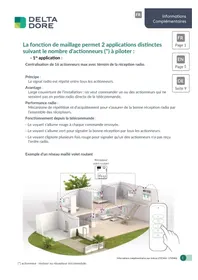
T2The mesh function enables 2 distinct applications depending on the number of actuators (\*) to be controlled:
- 1^st application:
Centralised control of max. 16 actuators with wireless reception indicator.
Principle:
the wireless signal is repeated between all actuators.
Advantage:
broad coverage of the installation: you want to control one or more actuators that would not be in direct wireless range of the remote control.
Wireless performance:
Repeat and acknowledge mechanism to ensure good wireless reception by all receivers.
Operation from remote control:
- The LED lights up red each time a command is issued.
- The LED lights up green to indicate good reception by all actuators.
- The LED flashes red several times to indicate that one of the actuators has not received the wireless command.
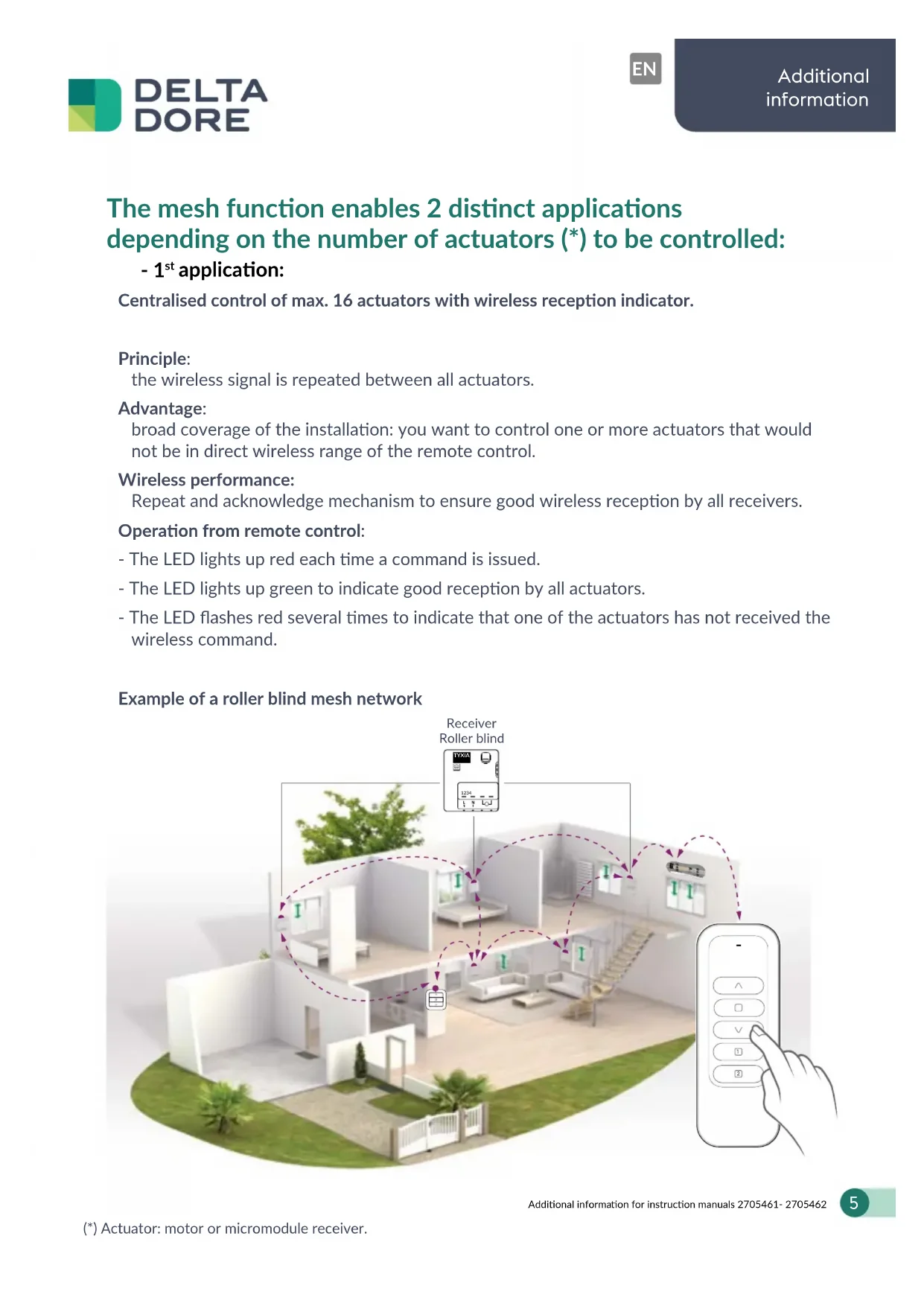
Example of a roller blind mesh network

flowchart
graph TD
    A["Receiver Roller blind"] --> B["Device placement"]
    B --> C["Remote control"]
    C --> D["Mobile phone with hand icon"]
    style A fill:#f9f,stroke:#333
    style B fill:#ccf,stroke:#333
    style C fill:#cfc,stroke:#333
    style D fill:#fcc,stroke:#333
- 2^nd application (>16 actuators\*):
Extended mesh network consisting of a mesh network (application 1) and additional actuators.
Required:
Pairing the additional actuators requires each of them to be located either within the direct wireless range of the transmitter or within the wireless range of an actuator already paired within a mesh network.
Principle:
The wireless signal is repeated by a limited number of actuators (16 max.), which ensure the propagation of the wireless signal to the other actuators (outside the mesh network).
Advantage:
Very broad coverage of the installation.
Operation from remote control:
- The LED lights up red each time a command is issued.
- The LED lights up green to indicate that the control command has been received by all the actuators in the mesh network and is being repeated to the additional actuators.
- The LED flashes red several times to indicate that one of the actuators in the mesh network has not received the wireless command.

text_image
Receiver Roller blind TYXIA 1234 Tymoov motor← - - → Roller blind mesh network
← -- ▶ Mesh lighting network
← - - ▶ Extended lighting network
Construction of the extended network
- 1st step: Construction of the mesh network.

During this step, it is important to select the receivers/motors (maximum of 16) spread over the entire installation to ensure the greatest possible wireless mesh coverage.
1/ Set the motors to awaiting pairing (press the o
button on their individual remote control for 3 seconds or via the Tydom application), the motor performs a brief up/down movement.
and/or
Set the receivers to pairing mode (press their button for 3 seconds or via the Tydom application), the receiver's LED flashes and the motor performs a brief up/down movement.
2/ On the centralised remote control, simultaneously press and hold ∧ and for 3 seconds, until its LED flashes. Release the buttib.
The remote control searches for the various motors or receivers. Its indicator flashes red, then briefly green as soon as a new receiver is detected.
3/ As soon as the remote control LED slowly flashes red, simultaneously press ∧ and ∨ for 3 seconds until the motors/receivers perform a brief up/down movement, then release.
- 2nd step: Construction of the extended network.
In this step, the additional motors/receivers (from the 17th on) are paired.
1/ Put the motors in awaiting pairing mode (press the button on their individual remote control for 3 seconds or via the Tydom application), the motor performs a brief up/down movement. and/or Put the receivers in pairing mode (press their button for 3 seconds or via the Tydom application), the receiver LED flashes and the motor performs a brief up/down movement.
2/ From the centralised remote control, Press button B once (Tyxia 1701) so that its orange LED flashes.
or
Press the T2 button once (Tyxia 2331) so that its orange LED flashes.

natural_image
Illustration of a hand inserting a circular component into a container with hooks (no text or symbols)
text_image
T23/ Simultaneously press and hold buttons ∧ et for 3 seconds.
4/ Check that the LED on the receiver(s) is no longer flashing or that the motor(s) perform a brief up/down movement.
Note:
Each time a command is sent from the transmitter, the LED will light up red then green if the receivers/motors confirm receipt of the wireless command. On the other hand, only the paired actuators in the mesh network are able to acknowledge, and therefore, it is not possible to ensure from the transmitter that the paired actuators on the extended network have received the wireless command.
Only a visual check can confirm that the command has been correctly received.

Precaution:
In the case of a mixed installation consisting of both 230V actuators (Tymoov motors or Tyxia receivers) and Tymoov Solar motors, the construction of an extended network is possible under the following conditions:
- The extended connection of a Tymoov Solar works if at least one Tymoov Solar engine is configured in the mesh network.
- The extended connection of a Tymoov 230V works if at least one Tymoov 230V motor is configured in the mesh network.
Note: 230V actuators and Tymoov Solar motors can be controlled from the same centralised remote control but will not communicate with one another.
natural_image
Illustration of a hand inserting a plug into a socket (no text or symbols)