HQAA10010 - Receiver HQ Power - Free user manual and instructions
Find the device manual for free HQAA10010 HQ Power in PDF.


| Product Type | Stereo Power Amplifier |
| Brand | HQ Power |
| Model | HQAA10010 |
| Power Supply | 100-115 / 220-230 V~, 50 Hz (voltage selector) |
| Output Power (4 Ω) | 2 x 130 W RMS |
| Output Power (8 Ω) | 2 x 90 W RMS |
| Frequency Response | 20-20 kHz |
| Input Sensitivity | AC 1 V |
| Max Input Level | 5.5 V |
| Balanced Input Impedance | 20 kΩ |
| Signal-to-Noise Ratio | 76 dB |
| Damping Factor | > 123 (at 1 kHz, 8 Ω) |
| Rise Time | 21 V/µs |
| Fuse | F5A |
| Dimensions | 425 x 300 x 90 mm |
| Weight | 6.9 kg |
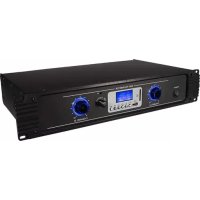
| Main Features | Stereo amplification, bridge mode, volume controls, LED indicators (power, fault, clip, signal) |
| Audio Inputs | 2 inputs (rear panel) |
| Speaker Outputs | Output terminals, Speakon connectors, bridge output |
| Safety | High voltage, do not open, indoor use only, do not expose to water |
| Maintenance | Disconnect before cleaning, use a damp cloth, no harsh chemicals |
| Warranty | 24 months for consumer use (conditions per manual) |
Frequently Asked Questions - HQAA10010 HQ Power
User questions about HQAA10010 HQ Power
0 question about this device. Answer the ones you know or ask your own.
Ask a new question about this device
Download the instructions for your Receiver in PDF format for free! Find your manual HQAA10010 - HQ Power and take your electronic device back in hand. On this page are published all the documents necessary for the use of your device. HQAA10010 by HQ Power.
USER MANUAL HQAA10010 HQ Power
text_image
PROFESSIONAL POWER AMPLIFIER POWER CAMBRILLUSER MANUAL 3
HANDLEIDING 7
MODE D'EMPLOI 11
MANUAL DEL USUARIO 15
To all residents of the European Union
Important environmental information about this product
This symbol on the device or the package indicates that disposal of the device after its lifecycle could harm the environment. Do not dispose of the unit (or batteries) as unsorted municipal waste; it should be taken to a specialized company for recycling. This device should be returned to your distributor or to a local recycling service. Respect the local environmental rules.
If in doubt, contact your local waste disposal authorities.
Thank you for choosing HQPower™! Please read the manual thoroughly before bringing this device into service. If the device was damaged in transit, do not install or use it and contact your dealer.
2. Safety Instructions

Read and understand this manual and all safety signs before using this appliance.
Indoor use only.
WARNING!
Dangerous high voltage. Risk of electroshock. Do not open.
- This device can be used by children aged from 8 years and above, and persons with reduced physical, sensory or mental capabilities or lack of experience and knowledge if they have been given supervision or instruction concerning the use of the device in a safe way and understand the hazards involved. Children shall not play with the device. Cleaning and user maintenance shall not be made by children without supervision.
- Do not expose this appliance to dripping or splashing liquids. Do not place objects filled with liquid, such as a vase, on top of the appliance.
- Do not block any ventilation openings. Install in accordance with the manufacturer's instructions.
- Do not install near any heat sources such as radiators, heat registers, stoves or other devices (including amplifiers) that produce heat.
- Only use attachments and accessories specified by the manufacturer.
- Unplug this appliance during lightning storms or when not in use for long periods of time.
- Protect the power cord from being walked on or pinched, particularly at the prongs, convenience receptacles, the point where they exit from the appliance.
- If the external flexible cable or cord of this device is damaged, it shall be exclusively replaced by the manufacturer or his service agent or a similar qualified person in order to avoid a hazard.
- Use only with the cart stand, tripod bracket or table specified by the manufacturer or sold with the appliance. When a cart is used, utilize caution when moving the cart/appliance combination to avoid injury from tipping over.
HQAA10010/HQAA10011
- Where the mains plug or an appliance coupler is used as the disconnect device, the disconnect device shall remain readily operable.
- This appliance may require the use of a different line cord, attachment plug, or both, depending on the available power source at installation. Connect this appliance only to the power source indicated on the appliance's rear panel. To reduce the risk of fire or electric shock, refer servicing to qualified service personnel or equivalent.
3. General Guidelines
- Refer to the Velleman ^® Service and Quality Warranty on the last pages of this manual.
- All modifications of the device are forbidden for safety reasons. Damage caused by user modifications to the device is not covered by the warranty.
- Only use the device for its intended purpose. Using the device in an unauthorised way will void the warranty.
- Damage caused by disregard of certain guidelines in this manual is not covered by the warranty and the dealer will not accept responsibility for any ensuing defects or problems.
- Nor Velleman nv nor its dealers can be held responsible for any damage (extraordinary, incidental or indirect) – of any nature (financial, physical...) arising from the possession, use or failure of this product.
- Keep this manual for future reference.
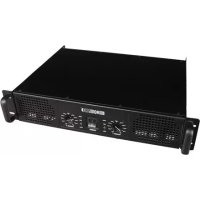
4. Overview
Front Panel
1 + 11 - Volume controls.
Adjust the volume to control the signal output of channels A and B.
2 + 7 - Fault LEDs.
The LEDs light up when the amplifier does not receive enough power or it is overheating.
3 + 8 - Power indicator LEDs.
4 + 9 - Clipping indicator LEDs.
The LEDs light up when the amplifier cuts the sound due to distortion.
5 + 10 - Audio signal input indicator LEDs.
The intensity of the LEDs will change indicating the strength of the channels' input signal.
6 - Power switch.
Press the power switch to switch on the amplifier.
Rear Panel
1 + 2 - Audio signal inputs.
3 - Stereo and bridging switch.
4 - Ground switch.
5 + 9 - Speaker output terminals.
6 + 8 - Speakon output sockets.
7 - Speakon bridging output socket.
Bridging output A and B channels for connecting an 8 Ω speaker.
10 - AC power socket.
11 - Ventilation fans.
12 - Fuse.
13 - Voltage switch.
5. Connection
Decide where the appliance is to be physically installed – it can be used free-standing or mounted in a standard 19" rack requiring two rack spaces. When installed, makes sure that both the front and the rear panels are unobstructed and that there is good ventilation around the entire unit.
Before switching on the appliance, make sure the appliance is switched off and the volume controls are at their minimum position. It is never a good idea to power up any amplifier that is not connected to loudspeakers.
Use the correct connectors to connect the appliance to the loudspeakers and sound system.
6. Using the Bridging Output
When the switch is placed in the STEREO position, the appliance functions as a true stereo amplifier, where both channels (1 and 2) can receive different input signals and produce independent output signals.
When the switch is placed in the BRIDGE position, channel 1 is routed to both power amplifiers bridged together, producing a single output signal.
In BRIDGE mode, connect the red (+) terminal of channel 1 to the positive input of your loudspeaker, and the red (+) terminal of channel 2 to the negative input of your loudspeaker. Do not use the black (-) output terminals of either channel.
When using the amplifier in BRIDGE mode, please make sure that your speaker impedance is greater than or equal to 8 Ω.
7. Care and Maintenance
Cleaning
- Disconnect from the mains before any cleaning operation.
- Occasionally wipe with a damp cloth to keep it looking new. Do not use harsh chemicals, cleaning solvents or strong detergents.
Long Periods of Non-Use
- Disconnect from the mains during long periods of non-use.
Service
This appliance should be serviced when:
- The power cord or the plug has been damaged.
- Objects have fallen or liquid has been spilled into the appliance.
- The appliance has been exposed to rain or water.
- The appliance does not appear to operate normally.
- The appliance has been damaged.
Maintenance
Do not attempt any inspection or maintenance by yourself. Refer all servicing to qualified personnel.
8. Technical Specifications
HQAA10010
power supply....100-115 / 220-230 V\~, 50 Hz
output power
2 x 130 W RMS (4 Ω)
2 x 90 W RMS (8 Ω)
frequency response....20-20 kHz
input sensitivity.... AC 1 V
max. input level....5.5 V
input impedance active balanced....20 kΩ
S/N ratio 76 dB
damping factor @ f=1 kHz with 8 Ω ....> 123
slew rate internal....21 V/Us
fuse....F5A
dimensions....425 x 300 x 90 mm
weight....6.9 kg
HQAA10011
power supply....100-115 / 220-230 V\~, 50 Hz
output power
2 × 250 W RMS (4 Ω)
2 x 170 W RMS (8 Ω)
frequency response....20-20 kHz
input sensitivity....AC 1.1 V
max. input level....5.5 V
input impedance active balanced....20 kΩ
S/N ratio 90 dB
damping factor @ f=1 kHz with 8 Ω ....> 152
slew rate internal....25 V/Us
fuse....F6.3A
dimensions....425 x 300 x 90 mm
weight....10.1 kg
Use this device with original accessories only. Velleman nv cannot be held responsible in the event of damage or injury resulting from (incorrect) use of this device. For more info concerning this product and the latest version of this manual, please visit our website www.hqpower.eu. The information in this manual is subject to change without prior notice.
© COPYRIGHT NOTICE
The copyright to this manual is owned by Velleman nv. All worldwide rights reserved. No part of this manual may be copied, reproduced, translated or reduced to any electronic medium or otherwise without the prior written consent of the copyright holder.
HANDLEIDING
1. Inleiding
3 + 8 - Vermogenleds.
4 + 9 - Clip-leds.
slew rate....21 V/Us
fusible....F5A
dimensiones....425 x 300 x 90 mm
peso....6.9 kg
HQAA10011
alimentación....100-115 / 220-230 V\~, 50 Hz
potencia de salida
2 × 250 W RMS (4 Ω)
2 × 170 W RMS (8 Ω)
slew rate....25 V/Us
fusible....F6.3A
dimensiones....425 x 300 x 90 mm
peso....10.1 kg
Velleman® Service and Quality Warranty
Since its foundation in 1972, Velleman® acquired extensive experience in the electronics world and currently distributes its products in over 85 countries.
All our products fulfil strict quality requirements and legal stipulations in the EU. In order to ensure the quality, our products regularly go through an extra quality check, both by an internal quality department and by specialized external organisations. If, all precautionary measures notwithstanding, problems should occur, please make appeal to our warranty (see guarantee conditions).
General Warranty Conditions Concerning Consumer Products (for EU):
- All consumer products are subject to a 24-month warranty on production flaws and defective material as from the original date of purchase.
- Velleman® can decide to replace an article with an equivalent article, or to refund the retail value totally or partially when the complaint is valid and a free repair or replacement of the article is impossible, or if the expenses are out of proportion.
You will be delivered a replacing article or a refund at the value of 100% of the purchase price in case of a flaw occurred in the first year after the date of purchase and delivery, or a replacing article at 50% of the purchase price or a refund at the value of 50% of the retail value in case of a flaw occurred in the second year after the date of purchase and delivery.
• Not covered by warranty:
- all direct or indirect damage caused after delivery to the article (e.g. by oxidation, shocks, falls, dust, dirt, humidity...), and by the article, as well as its contents (e.g. data loss), compensation for loss of profits;
- consumable goods, parts or accessories that are subject to an aging process during normal use, such as batteries (rechargeable, non-rechargeable, built-in or replaceable), lamps, rubber parts, drive belts... (unlimited list);
- flaws resulting from fire, water damage, lightning, accident, natural disaster, etc....;
- flaws caused deliberately, negligently or resulting from improper handling, negligent maintenance, abusive use or use contrary to the manufacturer's instructions;
- damage caused by a commercial, professional or collective use of the article (the warranty validity will be reduced to six (6) months when the article is used professionally);
- damage resulting from an inappropriate packing and shipping of the article:
- all damage caused by modification, repair or alteration performed by a third party without written permission by Velleman®.
- Articles to be repaired must be delivered to your Velleman® dealer, solidly packed (preferably in the original packaging), and be completed with the original receipt of purchase and a clear flaw description.
- Hint: In order to save on cost and time, please reread the manual and check if the flaw is caused by obvious causes prior to presenting the article for repair. Note that returning a non-defective article can also involve handling costs.
• Repairs occurring after warranty expiration are subject to shipping costs.
- The above conditions are without prejudice to all commercial warranties.
The above enumeration is subject to modification according to the article (see article's manual).