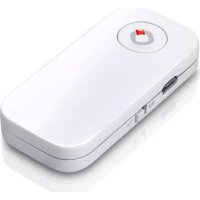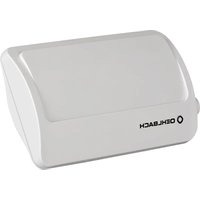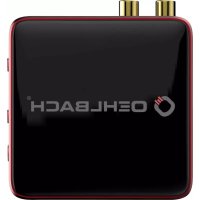
BTR Evolution 5.1 - Network card / adapter Oehlbach - Free user manual and instructions
Find the device manual for free BTR Evolution 5.1 Oehlbach in PDF.


| Product type | Bluetooth 5.0 2-in-1 Adapter (transmitter/receiver) |
| Brand | Oehlbach |
| Model | BTR Evolution 5.1 |
| Dimensions (L x H x D) | 75 x 75 x 19 mm |
| Weight | 0.145 kg |
| Power supply | 5 V / 100 mA (USB micro-B or power adapter) |
| Bluetooth version | 5.0 with aptX, aptX HD, aptX Low Latency, SBC codecs |
| Range | Up to 10 m |
| Connectors | 2 x RCA (Cinch), 2 x Toslink (optical SPDIF), USB micro-B |
| Main functions | Transmitter/receiver mode, multipoint pairing (2 devices), low latency (<40 ms) |
| Operating temperature | -10 to +55 °C |
| Relative humidity | 5 to 90 % |
| Certifications | CE, RoHS, WEEE |
| Warranty | 2 years |
| Package contents | BTR adapter, Toslink cable, RCA/3.5 mm adapter cable, USB cable, power adapter, manual |
| Care and cleaning | Clean with a dry cloth only |
| Safety | Do not expose to moisture, do not cover, avoid heat sources |
| Color | Silver and red |
| Chipset | CSR BC8675 |
Frequently Asked Questions - BTR Evolution 5.1 Oehlbach
User questions about BTR Evolution 5.1 Oehlbach
0 question about this device. Answer the ones you know or ask your own.
Ask a new question about this device
Download the instructions for your Network card / adapter in PDF format for free! Find your manual BTR Evolution 5.1 - Oehlbach and take your electronic device back in hand. On this page are published all the documents necessary for the use of your device. BTR Evolution 5.1 by Oehlbach.
USER MANUAL BTR Evolution 5.1 Oehlbach
Bluetooth Transmitter/Receiver
BTR Evolution 5.0
User manual | Warranty information

Use only power supplies listed in the user instructions, page 76 and following.
| GER | 6 |
| ENG | 16 |
| FRA | 26 |
| NLD | 36 |
| ITA | 46 |
| ESP | 56 |
| POL | 66 |
| GRE | 76 |
| RUS | 86 |
Bedienelemente / Operating Elements
Stromanschluss
Power port
Cinch Anschluss
RCA port
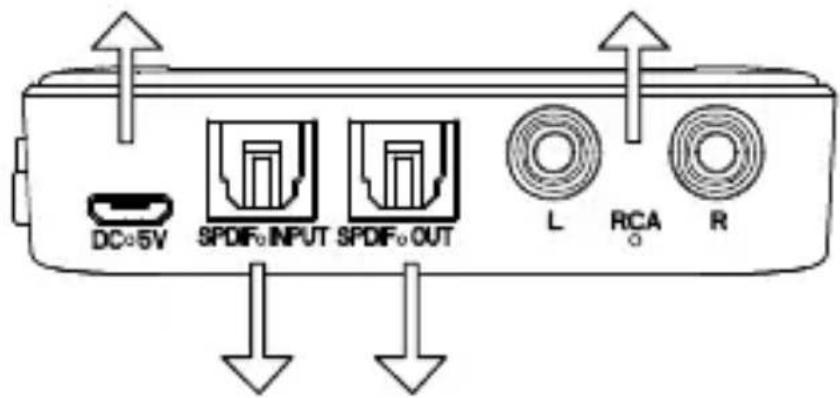
Optischer Eingang
Optical input
Optischer Ausgang
Optical output
AN / AUS Schalter
ON / OFF Switch
LED
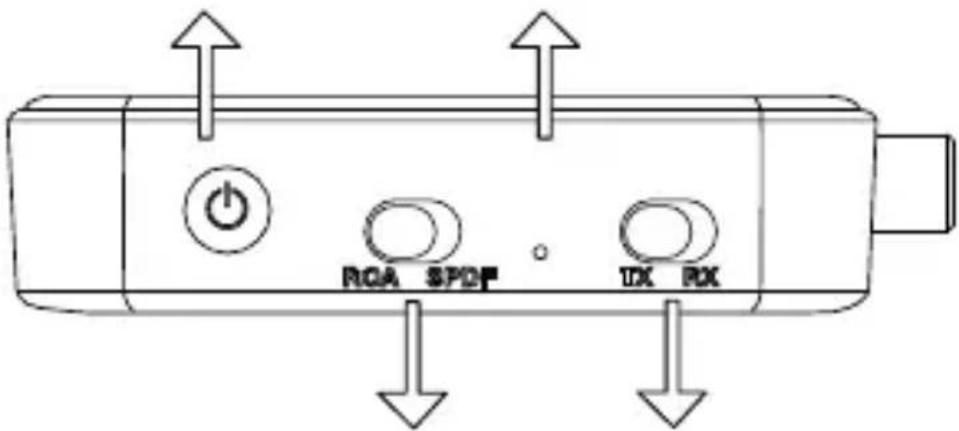
Audio Umschalter
Audio switch
Bluetooth Version: 5.0 - aptX, Aptx-LL HD,
Low Latency, SBC
Reichweite: bis 10m
Thank you, for choosing an Oehlbach® quality product. Please read these operating instructions in detail to ensure unrestricted and faultless functioning of the device.
Important safety instructions:
To avoid the risk of fire, electrical short circuit or damage to the product, please follow these instructions:
- do not expose the product to rain or moisture Do not place any vessels filled with water on the product.
- do not install the product in a bookshelf, built-in closet or similar confined space. Make sure that the unit is well ventilated.
- To prevent electrical short circuits or fire due to overheating, do not cover the unit or place objects on top of the unit.
- do not position the unit near heat sources such as radiators, stoves, etc.
- do not use near naked flames or candles
- clean the device only with a dry cloth.
- Unplug this apparatus during lightning storms or when unused for long periods of time.
- protect the power cord from violent impact such as crushing or knocks.
9 Use only the supplied accessories.
10 When servicing this product, consult qualified service personnel only.
Compliance with EU directives
This product may bear the CE mark. It complies with the EU Low Voltage Directive 2014/35/EU; EU Directive 2014/30/EU on Electromagnetic Compatibility; EU RoHS Directive 2011/65/EU; EU Directive on Waste Electrical and Electronic Equipment (WEEE) 2012/19/EC.
ENG
Oehlbach Kabel GmbH hereby declares that the Oehlbach BTR Evolution 5.0 device complies with the essential requirements and other relevant provisions of Directive 2014/53/EU.
You can obtain a free copy of the Declaration of Conformity by contacting your dealer, the sales department or the headquarters of Oehlbach Kabel GmbH. The contact information can be found at:
http://www.oehlbach.com.
The declaration of conformity can be found under: http://www.oehlbach.com/compliance/6052.
Operating frequency: 2402-2480 MHz Maximum radiated power according to EN 62479: 3.7 dBm
Disposal instructions

According to the European Directive 2012/19/EC, all electrical and electronic equipment must be disposed of separately via local collection points. Please observe the local regulations and do not dispose of your old devices with normal household waste.
Package contents
- Oehlbach BTR Evolution 5.0
- Toslink Cable
-2xRCA/3.5 mm jack adapter cable - USB cable for power supply
- Power supply unit (see page 76 and following)
- Operating instructions
The Oehlbach BTR Evolution 5.0 is a Bluetooth 5.0 2in1 adapter. In transmitter mode, audio signals can be received via the RCA interface or the SPDIF interface and sent wirelessly from the BTR Evolution 5.0 to other Bluetooth enabled devices. In receiver mode you can easily send music or audio content from your smartphone, tablet or computer wirelessly to the BTR Evolution 5.0 and output it in analogue via the RCA or SPDIF interface. Both is done in CD quality thanks to aptX HD support. Due to the low latency feature the BTR Evolution 5.0 achieves an extremely low latency of less than 40 ms and transmits the sound without noticeable delay.
Functions
- 2in1 Bluetooth adapter enables sending and receiving in one device
- Can be coupled with two devices simultaneously in transmitter mode as well as in receiver mode
- Bluetooth version 5.0
- RCA and SPDIF interface for analog signals
- aptX HD guarantees audio transmission in CD quality
• Very low latency of less than 40 ms
Specification
Bluetooth version: 5.0 - aptX, Aptx-LL HD, Low latency, SBC
Range: up to 10m
Temperature range: -10 to +55 °C
Admissible relative humidity:5 to 90
Power supply: 5V 100mA
Dimensions: 75 x 75 x 19 (W x H x D in mm)
Weight: 0,145 kg
Frequency band: 2.402GHz-2.480Ghz
Connections: 2 x Cinch, 2 x Toslink, USB-micro B 5V 100mA
Control elements: On/Off switch, TX/RX selection
AUX/SPDIF
selection
finish: silver, red
Chipset: CSR BC8675
Operation
Preparation
Before using the BTR Evolution, make sure that the mobile phones or computers you use with this product are sufficiently charged or connected to the mains.
BTR Evolution 5.0 as Bluetooth transmitter
In transmitter mode, the BTR Evolution 5.0 can be connected to other Bluetooth enabled devices that use a Bluetooth receiver to receive audio signals wirelessly. Here the BTR Evolution 5.0 acts as a Bluetooth transmitter:
- Before pairing the BTR Evolution 5.0 with devices, other Bluetooth enabled devices should be turned off. This will ensure a problem-free pairing of devices.
- Set the selector switch of the BTR Evolution 5.0 to "TX". Note that the BTR Evolution 5.0 is not connected to a power supply.
- Now connect the BTR Evolution to a power supply and press and hold the on/off switch of the BTR Evolution 5.0 for 3 seconds to switch it on. Then press the on/off switch twice in quick succession to enter pairing mode. The function light should now flash rapidly.
- the BTR Evolution 5.0 can now be found by other Bluetooth enabled devices and pairing is possible
- When pairing is complete, the LED is lit continuously and audio signals can be transmitted.
- to switch off the BTR Evolution 5.0, press and hold the on/off button for 3 seconds The LED will light up red twice.
BTR Evolution 5.0 as Bluetooth receiver
In receiver mode, the BTR Evolution 5.0 can be connected to other Bluetooth enabled devices that use a Bluetooth transmitter to send audio signals wirelessly. Here the BTR Evolution 5.0 acts as a Bluetooth receiver. To use the BTR Evolution 5.0 in receiver mode, set the selector switch of the BTR Evolution 5.0 to “RX” and follow the above instructions from point 3 onwards.
Functionality
Switch on
Press the On/Off button for at least 3 seconds. The blue LED lights up 3 times.
Switch off
Press the On/Off button for at least 2 seconds. A red light will flash once.
Automatic switch off
If no connection is established within 5 minutes in pairing mode, the BTR Evolution 5.0 will automatically switch off. If the power supply of the unit is too low, the unit will automatically switch off and/or cannot be switched on.
Change mode TX/RX
Remove the unit from the power supply and change the switch from TX to RX (or vice versa).
Changing the mode RCA/SPDIF
Change the switch from RCA to SPDIF (or vice versa)
Transmission Quality
The BTR Evolution 5.0 can display the Bluetooth transmission quality. In TX mode the:
Blue LED for SBC
Green LED for APTX
White LED for APTX-LL
Red and blue LED for APTX HD
Even in RX mode, the transmission quality is as follows:
Blue LED for SBC
Red LED for AAC
Green LED for APTX
White LED for APTX-LL
Red and blue LED for APTX-HD
As soon as no audio signal is transmitted, the LED lights up blue.
Coupling 2 devices (RX)
Select the RX mode and then connect the BTR Evolution 5.0 to the power supply and switch it on. Pair the mobile phone or other Bluetooth device with the BTR. After successful pairing, press the on/off button twice. This will disconnect the connection and search for a new device. From the second Bluetooth device, switch on the Bluetooth search mode and connect to the BTR Evolution. After successful pairing of the second Bluetooth device, turn on the first Bluetooth device and select the BTR Evolution from the paring list. After this step both Bluetooth devices are successfully connected. Note: Only one audio file can be transferred at a time and it can take several seconds to switch between different audio sources.
Pairing 2 devices (TX)
Set the BTR to TX mode. Now proceed as for pairing in RX mode.
Troubleshooting
The BTR Evolution 5.0 cannot be switched on
a) Please make sure that the BTR Evolution 5.0 is connected to a sufficient power source.
b) Check if you press and hold the on/off button for at least 2 seconds
The BTR Evolution 5.0 cannot be connected to another device
a) Make sure that the Bluetooth device is not more than 1m away during pairing mode.
b) Make sure that the device to be paired has Bluetooth enabled and is in search/pair mode.
c) Check that you have selected the correct Bluetooth (Receiver/Transmitter) mode.
The BTR Evolution 5.0 is connected to a device but it is not possible to play music
a) Make sure that both devices are coupled. Please note that the maximum range is 10 m. If there are walls or objects between the units, the range will be reduced.
b) Make sure that the volume control of the player is set between 50 and 100%.
Guarantee
We congratulate you! By your wise choice you have become the owner of an OEHLBACH® product. OEHLBACH® products enjoy an excellent reputation worldwide due to their high quality. This high quality standard makes it possible to provide a 2-year guarantee for this OEHLBACH® product. OEHLBACH® products are continuously monitored and tested throughout the entire manufacturing process. In case of service please note the following:
- the warranty period begins with the purchase of the product and is only for the first owner.
-
during the warranty period we will remove any defects, which can be proved to be defective in material or workmanship at our discretion by exchange or subsequent delivery. improvement of the defective parts. Further claims, in particular for reduction, rescission, damages or consequential damages are excluded. The warranty period is covered by of a warranty service by us is not affected.
-
the product must not be tampered with improperly have been taken.
-
if you wish to make a claim under the warranty, please contact first to your specialist dealer. Should it prove necessary to send the product to us, please make sure that you have pray for the fact that
- the product is shipped in its original packaging, - the purchase receipt is attached.
-
are excluded from the warranty:
-
Illuminants
- Wear parts
- Transport damage, visible or invisible (complaints for such damage must be reported immediately to the
transport company, (rail or post).
- Scratches in metal parts, front covers, etc. (These Defects must be reported within 5 days after purchase directly to your dealer).
- faults caused by incorrect installation, incorrect connection, improper operation (see operating instructions), or external violent influence, the device was not that are.
- Improperly repaired or modified equipment that has been on a side other than the one we opened.
- Consequential damage to third-party equipment
- Reimbursement of costs for damage repair
Technical documentation for external power supplies for REGULATION (EU) 2019/1782 according to the directive 2009/125/EG
| EN Value Unit | ||
| Manufacturer's name or trade mark, commercial registration number and address | Baoli91441900MA53651CX2201 Room, Building 2,No. 146, Chashi Road,Chashan Town, Dong-guan, Guangdong,China | |
| Model identifier 209U | ||
| Input voltage 100 - 240 V | ||
| Input AC frequency 50 - 60 Hz | ||
| Output voltage 4,75-5,25 V | ||
| Output current 2,00 A | ||
| Output power ≤0,3 W | ||
| Average active efficiency 81,3 % | ||
| Efficiency at low load(10 %) | 70,0 % | |
| No-load power consumption | 0,07 W |