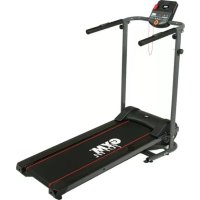
Slim Fold - Treadmills Gymform - Free user manual and instructions
Find the device manual for free Slim Fold Gymform in PDF.



| Product Type | Folding treadmill |
| Brand | Gymform |
| Model | Slim Fold |
| Unfolded Dimensions (L x W x H) | 1358 x 610 x 1175 mm |
| Folded Dimensions (L x W x H) | 535 x 610 x 1435 mm |
| Power Supply | 220-240 V ~ 50/60 Hz |
| Power | 500 W |
| Maximum Speed | 6 km/h |
| Maximum User Weight | 110 kg |
| Training Programs | Manual (P0), Interval (P1), Resistance (P2), Cardiovascular optimization (P3) |
| Display | Speed, time, distance, calories, heart rate (via hand grip sensors) |
| Safety | Safety key with clip, emergency stop |
| Folding | Yes, with locking knobs for easy folding/unfolding |
| Belt Centering | Adjustable via screw with supplied Allen key |
| Lubrication | Factory lubricated, relubrication recommended after 100 hours |
| Usage | Indoor, domestic, individual use |
| Category | HC (domestic use) |
| Standards | BS EN ISO 20957-1:2013, BS EN 957-6:2010+A1:2014 |
| Cleaning | Damp cloth for frame, dry cloth for control panel |
| Warranty | Against manufacturing defects (according to national legislation) |
| Country of Manufacture | China |
Frequently Asked Questions - Slim Fold Gymform
User questions about Slim Fold Gymform
0 question about this device. Answer the ones you know or ask your own.
Ask a new question about this device
Download the instructions for your Treadmills in PDF format for free! Find your manual Slim Fold - Gymform and take your electronic device back in hand. On this page are published all the documents necessary for the use of your device. Slim Fold by Gymform.
USER MANUAL Slim Fold Gymform
natural_image
Modern treadmill with black frame and red tread, displayed against a dark background (no visible text or symbols)SLIM FOLD TREADMILL
GYM form®

Instruction Manual

International patents pending. All imitations will be prosecuted. GYMFORM® SLIM FOLD TREADMILL is a registered EU/CTM trade mark.
1
text_image
1 28 6 5 26 26 17 9 4 7 18 16 3 19 29 10 12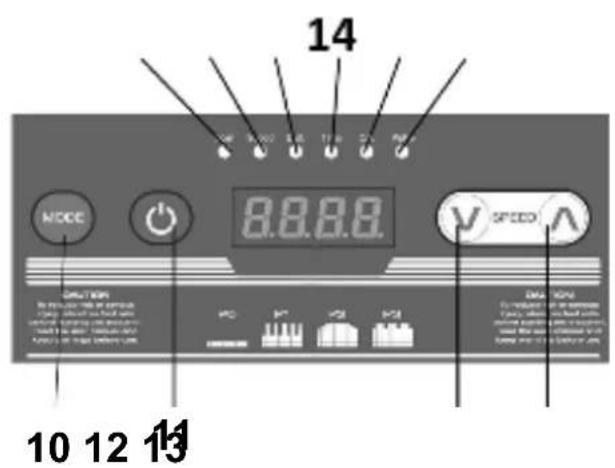
text_image
14 8.8.8.8 MODE SPEED 10 12 13 DATA: 14 14 SPEED 10 12 13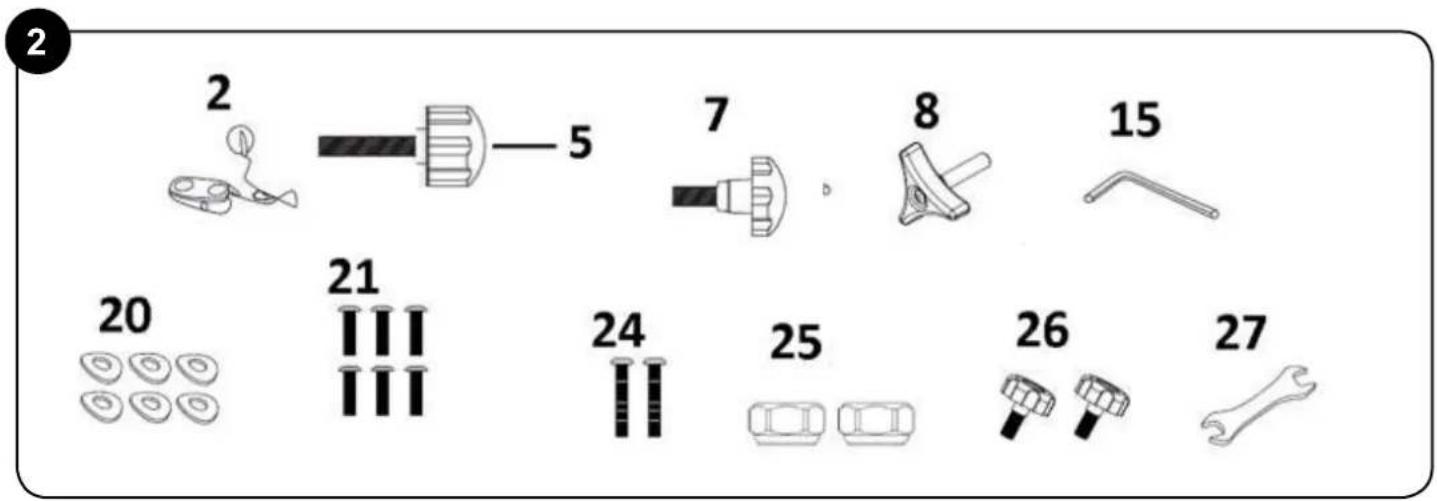
text_image
2 2 5 7 8 15 20 21 24 25 26 27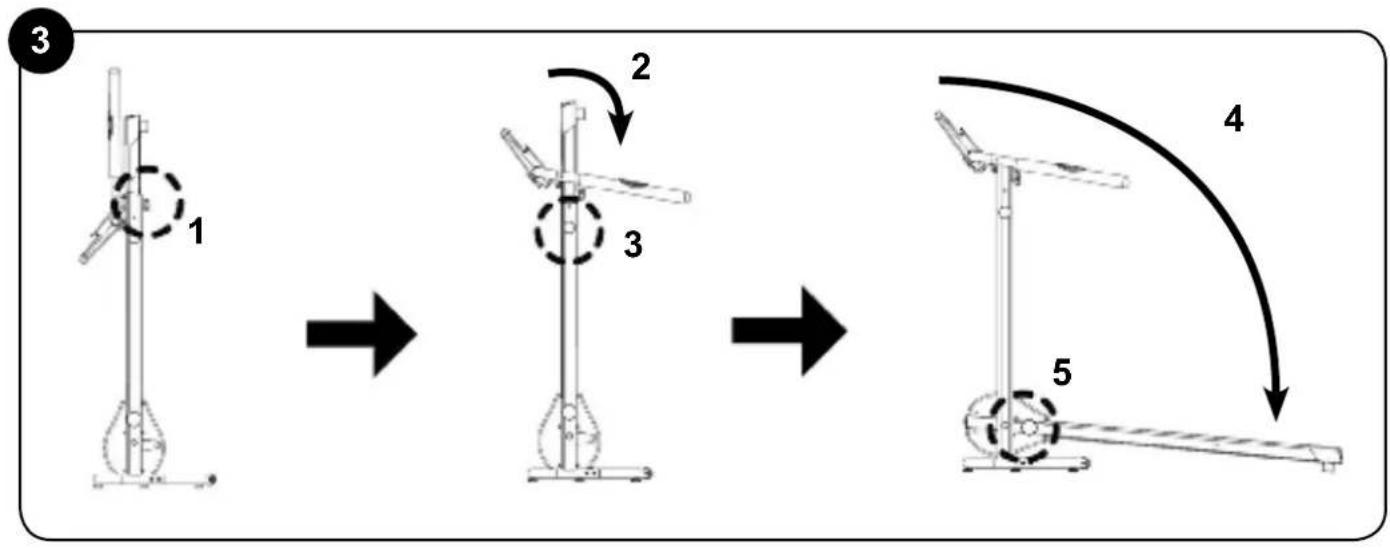
flowchart
graph TD
    A["Step 1: Device with circular head and lever"] --> B["Step 2: Rotation arrow"]
    B --> C["Step 3: Rotation arrow"]
    C --> D["Step 4: Curve with curved arrow"]
    D --> E["Step 5: Support structure with lever"]
flowchart
graph TD
    A["Step 1: Tractor with lever mechanism"] --> B["Step 2: Rotation arrow"]
    B --> C["Step 3: Rotation arrow with central component"]
    C --> D["Step 4: Rotation arrow with circular component"]
    D --> E["Step 5: Rotation arrow with curved arrow"]
text_image
5 1 2 36
text_image
18 21 20 21 20 197
text_image
1 25 24 5 22 23 24 26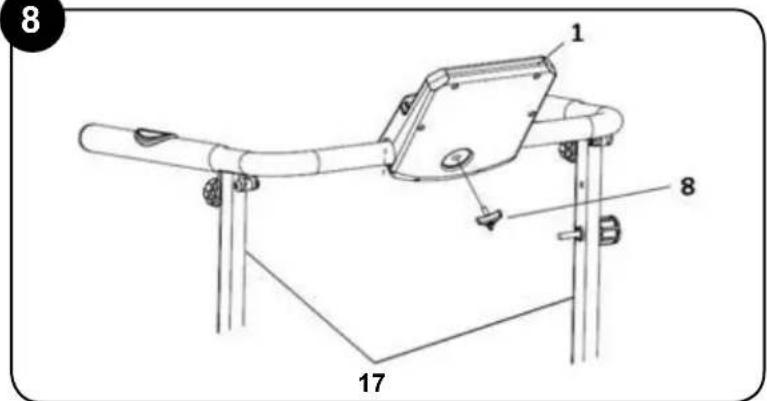
text_image
8 1 8 17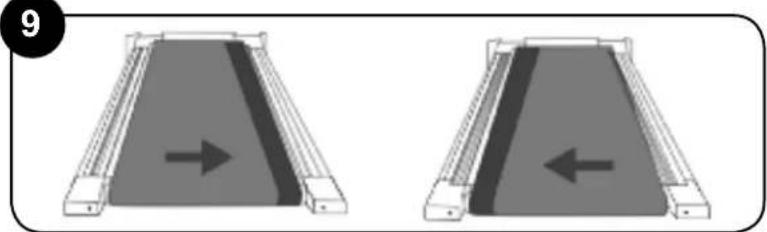
natural_image
Two identical diagrams showing a ramp mechanism with an arrow indicating direction, no text or symbols present.| P1 program | ||||||||||
| 6.0 km/h | ||||||||||
| 5.0 km/h | ||||||||||
| 4.0 km/h | ||||||||||
| 3.0 km/h | ||||||||||
| 2.0 km/h | ||||||||||
| 1.0 km/h | ||||||||||
| 0.0 km/h | ||||||||||
| Present 10 mins | 1 | 2 | 3 | 4 | 5 | 6 | 7 | 8 | 9 | 10 |
| Present 20 mins | 2 | 4 | 6 | 8 | 10 | 12 | 14 | 16 | 18 | 20 |
| Present 30 mins | 3 | 6 | 9 | 12 | 15 | 18 | 21 | 24 | 27 | 30 |
| P2 program | ||||||||||
| 6.0 km/h | ||||||||||
| 5.0 km/h | ||||||||||
| 4.0 km/h | ||||||||||
| 3.0 km/h | ||||||||||
| 2.0 km/h | ||||||||||
| 1.0 km/h | ||||||||||
| 0.0 km/h | ||||||||||
| Present 10 minutes | 1 | 2 | 3 | 4 | 5 | 6 | 7 | 8 | 9 | 10 |
| Present 20 minutes | 2 | 4 | 6 | 8 | 10 | 12 | 14 | 16 | 18 | 20 |
| Present 30 minutes | 3 | 6 | 9 | 12 | 15 | 18 | 21 | 24 | 27 | 30 |
| P3 program | ||||||||||
| 6.0 km/h | ||||||||||
| 5.0 km/h | ||||||||||
| 4.0 km/h | ||||||||||
| 3.0 km/h | ||||||||||
| 2.0 km/h | ||||||||||
| 1.0 km/h | ||||||||||
| 0.0 km/h | ||||||||||
| Preset 10 mins | 1 | 2 | 3 | 4 | 5 | 6 | 7 | 8 | 9 | 10 |
| Preset 20 mins | 2 | 4 | 6 | 8 | 10 | 12 | 14 | 16 | 18 | 20 |
| Preset 30 mins | 3 | 6 | 9 | 12 | 15 | 18 | 21 | 24 | 27 | 30 |
English
Warnings
Important: Keep these instructions for future reference. Read all instructions in the documentation provided with your exercise device before installation, including all assembly guides, user guides, and owner's manuals.
- Always follow basic safety precautions when using this device to reduce the chance of injury, fire or damage.
This appliance can be used by children aged from 8 years and above and persons with reduced physical, sensory or mental capabilities or lack of experience and knowledge if they have been given supervision or instruction concerning use of the appliance in a safe way and understand the hazards involved. Children shall not play with the appliance. Cleaning and user maintenance shall not be made by children without supervision. - Do not leave the device unattended when it is plugged in. Unplug the device from its power source when it is not in use.
- Make sure all users see a physician for a complete physical examination before they begin
any fitness program, especially in case of high blood pressure, high cholesterol levels, heart disease, a family history of any of the disorders mentioned, being over age 45, being a smoker, obesity, lack of regular training in the previous year, or when taking any kind of medication.
- Make sure the produce components are in good condition before using the device the first time. If the components are damaged, the device cannot be used. Please return it to your store.
- The device is only for personal, indoor use. It is not designed for commercial use.
- The distributor is not liable for any loss or damage caused by misuse of the device.
- Never tug on the power cable.
- Do not jump on the device because it may damage the unit.
- If the supply cord is damaged, it must be replaced by the manufacturer, its service agent or similarly qualified persons in order to avoid a hazard.
-
WARNING! Heart rate monitoring systems may be inaccurate. Over-exercising may result in serious injury or death. If you feel faint, stop exercising immediately.
-
The device makes more noise when bearing a load than when load free.
- The treadmill should not be operated while it is folded.
- 'Ensure the running surface has stopped completely before folding the device.
- Never try to service the equipment yourself. Consult an expert about the problem.
- 'After the device is used, it should always be turned off and cleaned. Turn the device off and disconnect it from the power source before you start cleaning it.
- If you use the device on a rug, make sure the ventilation openings are not covered.
- Do some warm-up exercises before you start using the device. Start the exercises slowly and gradually increase the intensity.
- The device can be used by only one person per session. It should not be used by more than one person at the same time.
- Pregnant women SHOULD NOT use the device.
- Stop using the device immediately if you feel uncomfortable or dizzy. Consult a physician immediately if you do not feel well or have chest pain or
any other symptoms.
- If you have not done exercise for a long time or if you have a heart condition, a circulatory disorder or an orthopaedic problem, consult a physician before using the device.
- This device is not designed for use by children or persons with reduced mental or physical capabilities unless they are supervised or instructed by someone responsible for their safety.
- Children should be supervised at all times to ensure they do not play with the device.
- Do not use the device if you weigh more than 110 kg.
- This device is designed for individual use. Any breakdown caused by improper use is not covered by the warranty.
- Make sure the device is on a flat surface. Do not use dangling clothing on the treadmill and do not scuff the treadmill, as this will make it difficult to use. Wear sport shoes when using the treadmill. Do not start the treadmill while standing on it. The best position when turning on the device is to stand with one foot on either side of the treadmill. If the initial speed of the treadmill is too fast, do not jump on the treadmill. Start using it at a lower speed and increase it gradually.
- Do not suddenly stop walking or running on the treadmill. Press the ON/OFF button and the treadmill will gradually stop.
- Stop walking when the treadmill stops.
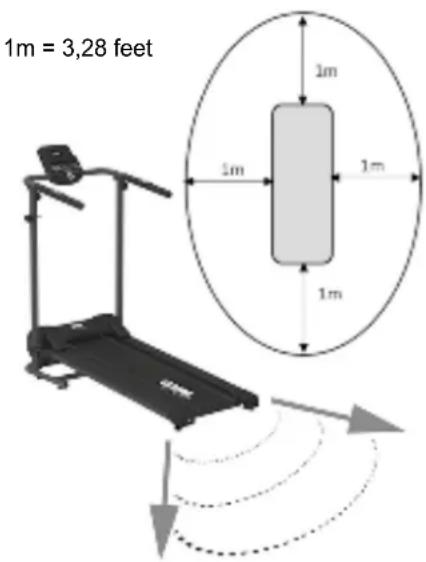
- Leave a safety area of 2 metres by 1 metre behind the treadmill.
text_image
1m = 3,28 feet 1m 1m 1m 1mPRECAUTION: DO NOT remove the cover of the control panel, as this may cause an electric shock. The parts inside cannot be repaired by the user.
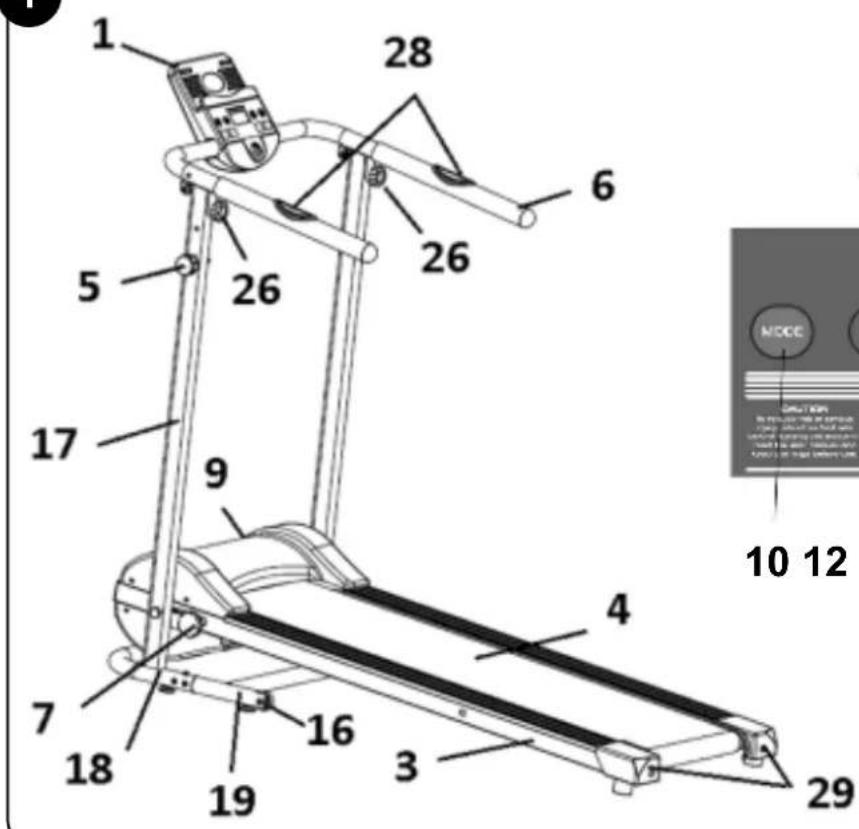
Product description
- Controlpanel
-
Emergencykey
3.Base -
Treadmill
- Vertical bar screw
6.Handlebars - Lockscrew
- Control panel screw
9.ON/OFFbutton -
MODE button
-
button
- ↓ button
- ↑ button
- Function indicators
- Small Allen key
- Wheels
- Vertical bars
- Metal base
- Base extension
- Washers x 6
- Screws x 6
- Handlebar cable
- Vertical bar cable
- Screws x 2
- Nuts x 2
- Handlebar screws
- Spanner
- Pulse sensors
- Belt screws
Assembly Instructions
- Open the box, unpack all the parts
and take out the treadmill.
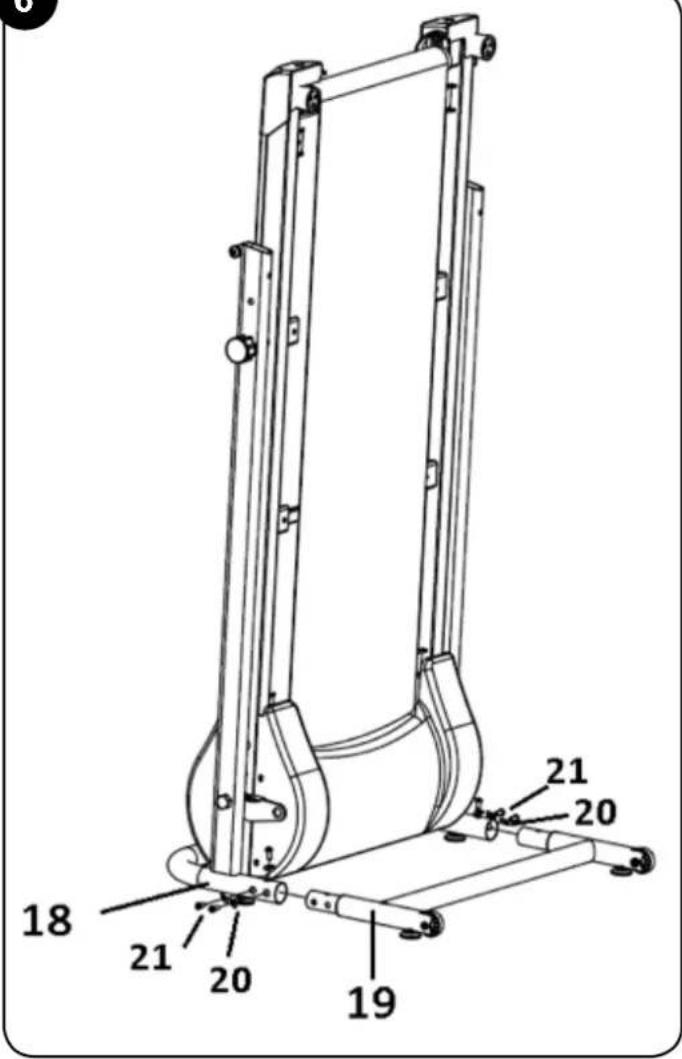
INSTALLING THE METAL BASE (See Picture 6) - Place' the treadmill in the upright position on a flat surface.
- Make sure that the screw on the vertical bar (5) is in place and is attaching the base (3) to the vertical bar (17).
- Attach the base extension (19) to the metal base (18) with six washers (20) and six screws (21) and the large Allen key (15).
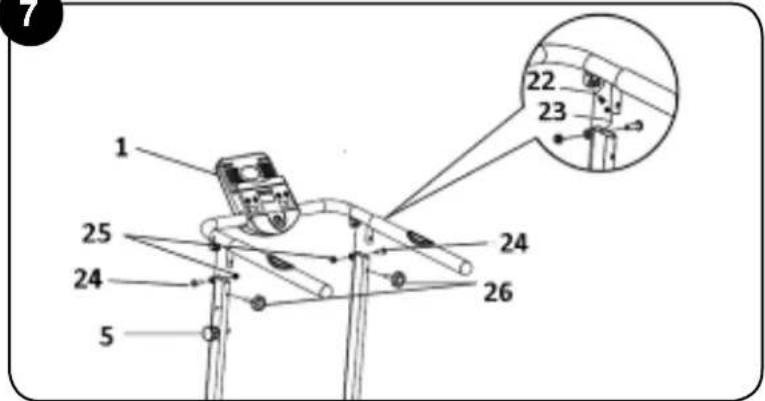
INSTALLING THE HANDLEBARS (See Picture 7) - Remove the screw on the vertical bar (5) that is connecting the base (3) to the vertical bar (17).
- Gradually lower the base (3) until it is resting on the floor.
- Connect the handlebar cable (22) to the vertical bar cable (23). See Picture 7.
- Place the handlebars (6) on top of the
vertical bars (17) and attach them with two screws (24) and nuts (25). Tighten them with the small Allen key (15) and spanner (27). Ensure that they are firmly attached.
- Attach the handlebars with the two handlebar screws (26).
INSTALLING THE CONTROL PANEL (See Picture 8)
- Lift up the control panel (1) so it is in the right position and then fasten it with the panel screw (8).
IMPORTANT:
- Before using the treadmill, always make sure that the base (3) is attached to the vertical bar (17). To do so, tighten the lock pin (7). (See Picture 3)
Instructions for Use:
- Connect the plug to the power supply.
-
Press the ON/OFF button (9) located on the bottom front of the device.
-
The emergency key (2) has a clip to attach it to clothing. Attach it to the clothing you are wearing.
-
Attach one end of the emergency key (2) to the control panel (1). It is a magnetic attachment. Adjust the length of the cable from the clip to the control panel so that it disconnects as soon as you move too far away from the control panel. Whenever you use the treadmill, attach the emergency key to the clothing you are wearing.
When the emergency key (2) is attached to the control panel (1), the screen will display 0.0.
-
Press the button (11) to start the treadmill belt. The device will not start working for three seconds, as displayed on the screen. The device will beep so you can get ready to use it. After three seconds, the belt will start moving, the device will go into manual mode and the speed will be displayed on the screen. The initial speed is 1 km/h.
-
Press the ↑ button (13) to increase the speed by intervals of 0.1 km/h each time you press the button. The maximum
speed is 6 km/h.
-
Press the ↓ button (12) to reduce the speed.
-
Press the MODE button (10) to view the other function options on the screen. Each time you press the button, a different function will be displayed: the SPEED, the TIME, the distance (DIST), the kilocalories burned (CAL) and heartbeat (PULSE). When the indicator displays the SCAN function, the information (speed, time, distance and calories) will be displayed on the screen every seconds without the need to press any buttons.
-
firmly find out your heart rate, select the PULSE option on the control panel and place your hands on each of the pulse sensors (28) and press down until the heartbeat is displayed on the screen.
- Each function indicator (14) will light up when the function is selected.
Note: Each time you use a programme, your data on distance, time and calories are saved. To set the panel to zero, press the MODE button (10) for two seconds once the belt has stopped.
- The treadmill has a manual mode (P0) and three automatic programmes:
P0 - Manual mode
P1 - Intervals
P2 - Resistance
P3 - Cardio Booster
To change programmes, first set the panel to zero. To set the panel to zero, press and hold down the MODE button (10) until you hear a beep. When you hear the beep, release the MODE button (10) and then press it until you reach the heartbeat function (PULSE). Then press the MODE button (10) again. The screen will flash on the programme you are working on (P0, P1, P2 or P3). Use the ↓ button (12) and the ↑ button (13) to choose the desired programme.
Even if you use the automatic programmes, the speed can be adjusted by increasing or reducing it to fit needs. When the speed is automatically changed on a programme, it is increased or reduced proportionately.
In programme P1, the speed is set and changes automatically, but the user can manually increase or reduce the speed in increments of 1 km/h.
The speed set in programme P2 can be reduced in increments of 1 km/h, but cannot be increased.
The speed set in programme P3 can be reduced in increments of 1 km/h, but cannot be increased.
five
Each time the programme speed is changed, you will hear three warning beeps so you are ready.
-
When you have chosen the programme you want to use, you can select the workout time before you begin. Go to the TIME function, which will be set at the default time of 30 minutes. The time can be reduced by pressing the button (12) or increased by pressing the ↑ button (13). The times available are 30, 20 and 10 minutes.
-
When the treadmill is operating and the
button ⏻ (11) is pressed, the treadmill will slow down and eventually stop. To restart the treadmill, press the button again and all the functions will the same as in the previous workout.
-
Press' the MODE button (10) for three seconds to erase all the previous functions and start a new workout.
-
If you want to stop the treadmill quickly, pull on the emergency key.
Unfolding the device (see Picture 3)
-
Remove the two handlebar screws (26).
-
Lower the handlebars (6) to the horizontal position.
-
Hold onto the base (3) with one hand and use the other to remove the screw on the vertical bar (5) and unlock the base.
-
Place the tréadmill in the upright position on a flat surface.
your Remove the protective plastic parts inserted into the metal base (18) before
attaching the base extension (19).
6. Slowly lower the base (3) until it is on the floor.
7. Firmly tighten the lock screw (7).
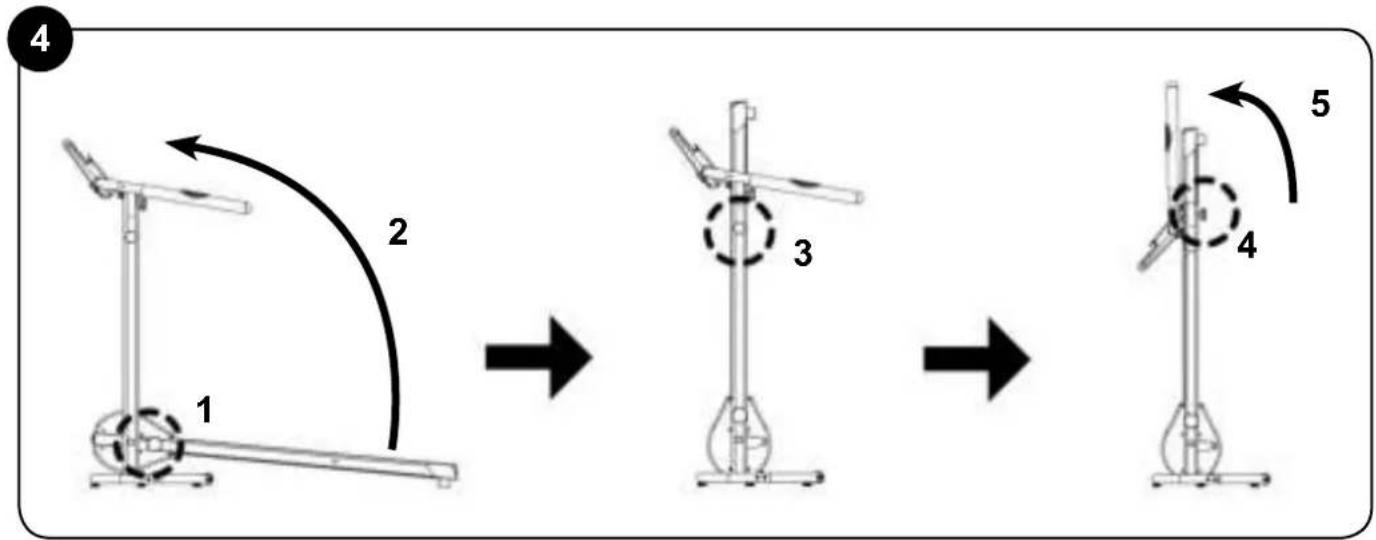
Device folding system (see Picture 4) 1. Loosen the lock screw (7).
- Raise the base to the v ^t rical position and hold it in place.
- Attach the base (3) to the vertical bars (17) using the screw on the vertical bar (5).
- Remove the two handlebar screws (26).
- Raise the handlebars (6) to the vertical position. Replace the two handlebar screws (26) so they are not lost.
- When the device is folded, it can be transported using the wheels (16).
Product Cleaning and Maintenance
- Before performing daily cleaning, make sure the device is off by pressing the ON/OFF button and pulling the plug from the power supply.
- Do not use abrasive products or solvents to clean the device.
- Remove any dirt from the device with a damp cloth.
- Use a dry cloth to clean the plug and control panel. Do not use a damp cloth.
- Do not use the device in very damp or dusty places that could cause the device to fail. Set up the device on a flat surface to prevent it from falling and breaking down.
- Do not use the device for more than an hour. Rest for an hour after each one-hour workout. The components should be kept clean. Both sides of the belt should be cleaned to reduce dirt build-up. Before using the device, make sure the treadmill surface is clean. Use soap and a damp cloth to clean the belt. Do not use solvents. Wipe off the sweat on the handlebars after each use.
- Anti-static lubricant was applied to the belt at the factory.
- Lubricant can be applied to the device after 100 hours of use. Apply a special
treadmill lubricant underneath the treadmill belt by lifting the belt away from the base slightly and applying the lubricant.
Centering the running belt:
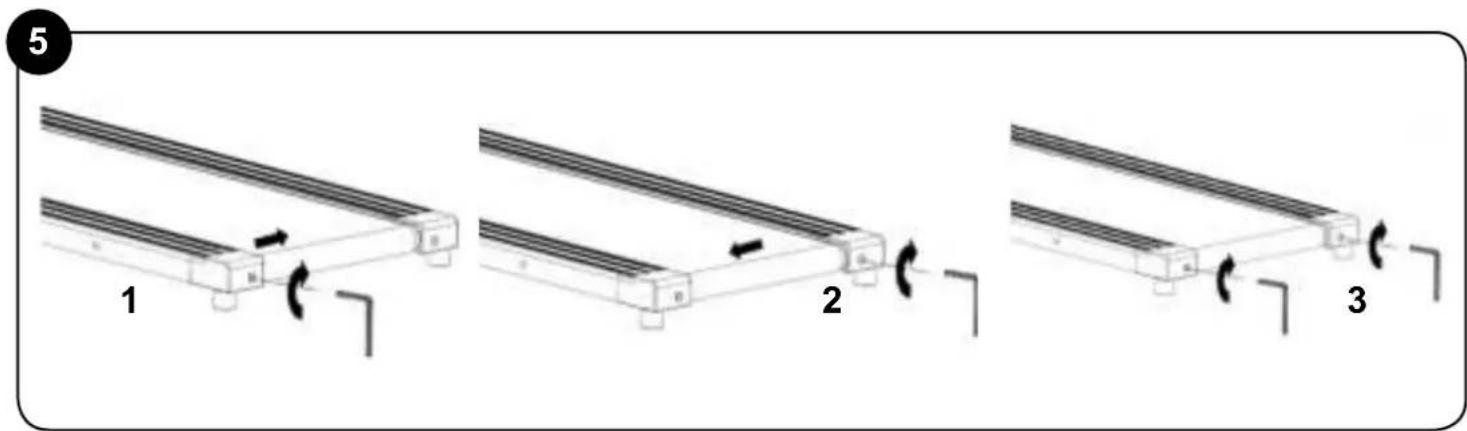
IMPORTANT: After continuous use, the belt may shift to one side due to the constant pressure of the feet. It should be centred again by adjusting the belt screws (29) with the small Allen key provided (15). See Picture 5: Check that the belt is centered. IF it is not, adjust the belt so that it runs freely (see below). Check that the running belt is correctly centered between the end caps every time before using the treadmill. Adjust the belt if needed, normally only a small adjustment is required. Screw half a turn clockwise on the side that the belt is too near to, then test for at least 15 seconds at 4km/h (check and adjust a further quarter or half turn until the belt is centered)
NOTE: Please check the distance between the running belt and edge, if it show as the picture 9 please centered the belt in the correct way.
Tightening the belt:
- If the treadmill belt (4) slides during use, it should be tightened. Switch OFF the treadmill and unplug it from the power source. Use the small Allen key (15) to give the left screws and then the right screws 1/4 of a turn in the anti-clockwise direction. Switch ON the main switch and start the treadmill running at 6 km/h. Walk on the treadmill. If it still slides, repeat the process until the belt no longer slides.
- If you do not plan to use the device for an extended period of time, please store it in a clean, dry place and prevent it from coming into contact with dust.
- Do not touch the ON/OFF button or the power cable with wet hands.
- Do not tug on the cable when unplugging the device. To prevent the cable from being damaged, do not place heavy objects on top of it and do not wrap it around the device. Do not use the device if the cable or the plug do not make a good connection. NOTE: the running surface belt should not be tightened too hard as this can cause noise and damage the machine
Technical Specifications:
Voltage: 220-240V Frequency: 50/60 Hz Power: 500 W
Comply with Normatives:
BS EN'ISO 20957-1: 2013
BS EN 957-6:2010+A1:2014
Unfolded Measurements
1358 mm x 610 mm x 1175 mm (L x W x H)
Folded Measurements
535 mm x 610 mm x 1435 mm (L x W x H) Packaging Measurements
1360mm x 280mm x 650mm (L x W x H) Gross Weight 27.5 kg
Net Weight 24.5 kg
Class HC product for household use
Gymform Slim Fold Treadmill (VDPGYCIND0124)
Disposal of materials
A symbol of a crossed-out wheeled bin means you should find out about and follow local regulations about disposing of this kind of product.
Do not dispose of this product as you would other household waste. Dispose of this device in accordance with the corresponding local regulations. Electrical and electronic devices contain hazardous substances that can have harmful effects on the environment and/or human health and should be recycled properly.
Quality Warranty:
This product is covered by a warranty against manufacturing defects subject to the time periods stipulated by the legislation in force in each country.
This warranty does not cover damages resulting from inadequate use, negligent commercial use, abnormal wear and tear, accidents or improper handling.
Australia & New Zealand only This product has the benefit of certain Consumer Guarantees. These are prescribed by the Australian Consumer Law & the New Zealand Consumer Guarantees Act 1993 both of which provide protection for consumers. There is no express warranty for this product in Australia or New Zealand. The above paragraph refers to other countries.
Made in China
Español
Advertencias
text_image
1m = 3,28 feet 1m 1m 1m 1m23- Cable tubo vertical
24- Tornillos x 2
25- Tuercas x 2
26- Tuercas manillar
27- Llave
1358mm X 610mm X 1175mm (L x W x H)
Medidas plegada
535 mm x 610 mm x 1435 mm (L x W x H)
Medidas embalaje
1360mm x 280mm x 650mm (L x Wx H)
Peso Bruto 27,5kg
Peso Neto 24.5kā
text_image
Diagram of a treadmill with an inset showing a rectangular object with dimensions labeled in meters.Dimensions emballage
1360mm x 280mm x 650mm (L x l x h)
Poids brut 27,5 kg
Poids net 24,5 kg
text_image
Diagram of a treadmill with an inset showing a rectangular object with dimensions labeled in meters.1360mm x 280mm x 650mm (L x B x H)
text_image
Diagram of a treadmill with an inset showing a rectangular object labeled '1m' and directional arrows indicating motion or positioning.1360mm x 280mm x 650mm (L x P x A)
Peso lordo: 27,5 kg
Peso netto: 24,5 kg
Gymform Slim Fold Treadmill
(VDPGYCIND0124)

DISMISSIONE E
ROTTAMAZIONE
DELL'APPARECCHIO
text_image
Diagram of a treadmill with an inset showing a rectangular object labeled '1m' with dimensions marked, illustrating motion or positioning.text_image
Diagram of a treadmill with an inset showing a rectangular object labeled '1m' with dimension annotations and motion arrows.PO Box 202, Spit Junction NSW 2088, Australia

ISL ITALY S.r.l. P.IVA: 06919170966 Via Donizetti 3 20122 Milano- Italia www.isl-italy.com
Distributed in UK by Best Direct (International) Ltd SUITES 17 & 18, RIVERSIDE HOUSE LOWER SOUTHEND ROAD WICKFORD, ESSEX SS11 8BB UK
Best Direct (International) Benelux B.V. Hogebrinkerweg 19B 3871 KM Hoevelaken The Netherlands www.bestdirect.nl Best Direct International Ltd, Asiakaspalvelu - Suomi: 029 193 0300 www.bestdirect.fi Kundtjänst - Sverige: 077 033 0300 www.bestdirect.se