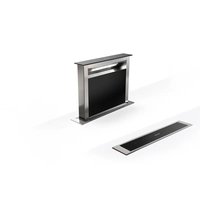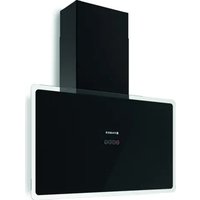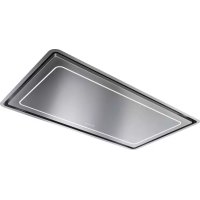
FABER HighLight 121 X - Basket

HighLight 121 X - Basket FABER - Free user manual and instructions

Find the device manual for free HighLight 121 X FABER in PDF.

📄 136 pages English EN Download 💬 AI Question 10 questions ⚙️ Specs
Notice FABER HighLight 121 X - page 3
Pick your language and provide your email: we'll send you a specifically translated version.
BrandFaber
ModelHighLight 121 X
Product typeExtractor hood
CategoryHood
Minimum installation height650 mm above cooking surface
Exhaust duct diameter120 mm minimum
Number of motor speeds4 (speed 1, 2, 3 and Intensive)
Intensive functionYes, timed 6 minutes
Delay functionYes, delayed shutdown of 30 minutes
LightingLED, adjustable maximum intensity
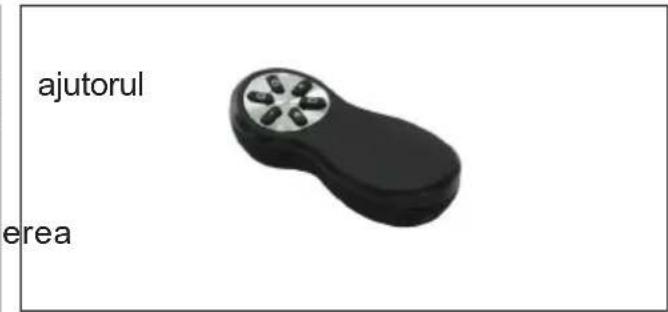
Remote controlYes, infrared remote control (LR03-AAA batteries not supplied)
Grease filter typeWashable metallic (dishwasher safe)
Activated carbon filterAnti-odor, replacement every 200 hours of operation
Grease filter saturation alarmYes, after 100 hours of operation
Carbon filter saturation alarmYes, after 200 hours of operation
Power supply230 V ~ 50 Hz (check rating plate)
Insulation classClass I (earth connection mandatory)
Maximum powerNot specified in the manual (estimated 300 W)
Dimensions (W x D x H)Not specified (model 121 X, probably 120 cm wide)
WeightNot specified (estimated 20 kg)
Noise levelNot specified (estimated 50-65 dB depending on speed)
Filter maintenanceMetallic filter: wash every 2 months; carbon filter: replace every 4-6 months
Exterior cleaningDamp cloth and neutral detergent
Safety instructionsDo not flambé under the hood, do not leave open flames, monitor deep fryers
RepairabilityContact authorized after-sales service for part replacement (lighting, remote control)

Frequently Asked Questions - HighLight 121 X FABER

How to clean the grease filters of my Faber HighLight 121 X hood?
The metallic grease filters can be washed in the dishwasher or by hand with a neutral detergent. It is recommended to clean them every 2 months, or more often with intensive use.Attention: always let the filters dry completely before reinstalling them.
When should I replace the activated carbon filter?
The activated carbon filter must be replaced after 200 hours of effective hood operation, i.e., approximately every 4 to 6 months depending on usage. The S1 indicator flashes to signal the saturation alarm.
How to reset the filter saturation alarm?
To reset the carbon filter alarm, press the T3 button for about 3 seconds when all loads are off. The LED S1 flashes 3 times. For the grease filter, reset is automatic after cleaning.
The remote control does not work, what to do?
Check the batteries (type LR03 AAA), replace them if necessary. Make sure you are within range and no obstacle blocks the signal. If the problem persists, pair the remote control by holding down the T4 button for 5 seconds until the LED flashes twice.
What is the minimum distance between the hood and the cooking surface?
The minimum safety distance is 650 mm. If the gas hob instructions specify a greater distance, follow that.
How to use the Delay function (delayed shutdown)?
Hold down the T1 button for about 3 seconds. The motor and lighting will turn off automatically after 30 minutes. To deactivate, press T1 again for a long time. The Delay function is not available in Intensive or 24h mode.
Can I use the hood without external evacuation?
Yes, in recirculation mode with activated carbon filter. In this case, the air is filtered and returned to the kitchen. Make sure the carbon filter is installed and replaced regularly.
What to do if the hood does not turn on?
Check the power supply: that the hood is plugged in and the bipolar switch is in the on position. If the cord is damaged, have it replaced by the manufacturer or an authorized service center.
How to clean the exterior of the hood?
Use a damp cloth and a neutral liquid detergent. Do not use abrasive or alcohol-based products. Avoid water entering the interior of the hood.
Can I control the hood with a universal remote control?
No, the supplied remote control is specific to this model. You must use the original remote control or purchase a replacement part from Faber's after-sales service.

User questions about HighLight 121 X FABER

0 question about this device. Answer the ones you know or ask your own.

Ask a new question about this device

The email remains private: it is only used to notify you if someone responds to your question.

No questions yet. Be the first to ask one.

Download the instructions for your Basket in PDF format for free! Find your manual HighLight 121 X - FABER and take your electronic device back in hand. On this page are published all the documents necessary for the use of your device. HighLight 121 X by FABER.

USER MANUAL HighLight 121 X FABER

natural_image Technical line drawing of a mechanical assembly with housing and mounting brackets (no text or symbols)

EN USER MANUAL....3

Recommendations and suggestions

  • The Instructions for Use apply to several versions of this appliance. Accordingly, you may find descriptions of individual features that do not apply to your specific appliance.
  • The manufacturer will not be held liable for any damages resulting from incorrect or improper installation.
  • The minimum safety distance between the cooker top and the extractor hood is 650 mm (some models can be installed at a lower height, please refer to the paragraphs on working dimensions and installation).
  • Check that the mains voltage corresponds to that indicated on the rating plate fixed to inside of the hood.
  • For Class I appliances, check that the domestic power supply guarantees adequate earthing. Connect the extractor to the exhaust flue through a minimum diameter 120 mm. The route of the flue as short as possible.
  • Do not connect the extractor hood to exhaust ducts carrying combustion fumes (boilers, fireplaces, etc.).
  • If the extractor is used in conjunction with non-electrical appliances (e.g. gas burning appliances), a sufficient degree of aeration must be guaranteed in the room in order to prevent the backflow of exhaust gas. The

kitchen must have an opening communicating directly with the open air in order to guarantee the entry of clean air. When the cooker hood is used in conjunction with appliances was supplied with energy other than electric, the negative pressure in the room must not exceed 0,04 mbar to prevent fumes being drawn back into the room by the cooker hood.

  • In the event of damage to the power cable, it must be replaced by the manufacturer or by the technical service department, in order to prevent any risks.
  • If the instructions for installation for the gas hob specify a greater distance specified above, has to be taken into account. Regulations concerning the dis-e charge of air have to be fulfilled.
  • Use only screws and small parts in support of the hood.

Warning: Failure to install the screws or fixing device in cordance with these instructions may result in electrical hazards.

- Connect the hood to the mains through a two-pole switch having a contact gap of at least 3 mm.

Use

  • The extractor hood has been designed exclusively for domestic use to eliminate kitchen smells.
  • Never use the hood for purposes other than for which it has been designed.
  • Never leave high naked flames under the hood when it is in

operation.

  • Adjust the flame intensity direct it onto the bottom of the pan only, making sure that it does not engulf the sides.
  • Deep fat fryers must be continuously monitored during use: overheated oil can burst into flames.
  • Do not flambè under the range hood; risk of fire.
  • This appliance can be used by children aged from 8 years and above and persons with reduced physical, sensory or mental capabilities or lack of experience and knowledge if they have been given supervision or instruction concerning use of the appliance in a safe way and understand the hazards involved. Children shall not play with the appliance. Cleaning and user maintenance shall not be made by children without supervision.
  • “CAUTION: Accessible parts may become hot when used with cooking appliances.”

Maintenance

- The symbol ☒ on the product or on its packaging indicates that this product may not be treated as household waste. Instead it shall be handed over to the applicable collection point for the recycling of electrical and electronic equipment. By ensuring this product is disposed of correctly, you will help prevent potential negative consequences for the environ-

ment and human health, which toould otherwise be caused by inappropriate waste handling of this product. For more detailed information about recycling of this product, please contact your local city office, your household waste disposal service or the shop where you purchased the product.

  • Switch off or unplug the appliance from the mains supply before carrying out any maintenance work.
  • Clean and/or replace the Filters after the specified time period (Fire hazard).

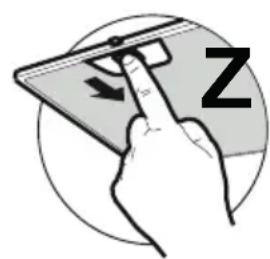
- The Grease filters must cleaned every 2 months of operation, or more frequently for particularly heavy usage, and can be washed in a dish-washer (Z).
FABER HighLight 121 X - Maintenance - 1

natural_image Hand holding a smartphone with a finger pointing at it, enclosed in a circular frame (no text or symbols)

- Clean the hood using a damp cloth and a neutral liquid detergent.
FABER HighLight 121 X - Maintenance - 2

text_image LT1T2T3T4 2 □ 3 □ I □ S1
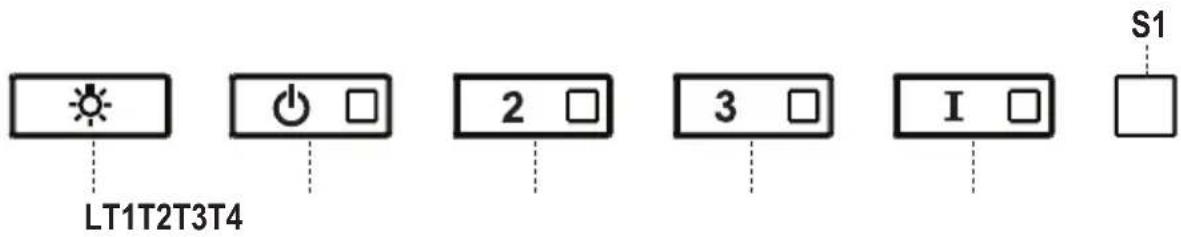
ButtonFunction Led
L Turns the lights ON/OFF at maximum strength. -
T1 Turns the motor on/off at speed one. -
Delay Function:Press and hold the button for approx. 3 seconds to Activate/Deactivate the Delay function (automatic switching off of the Motor, the Fans and the Lighting with a 30' delay).Cannot be enabled when Intensive or 24H are on.
T2 Turns the Motor on at speed two. -
Press and hold the button for approximately 5 seconds, with all the loads turned off (Motor and Lights), to turn the Activated Charcoal Filter alarm on.The relevant LED flashes twice to confirm.To turn the alarm off, press the button again and hold for at least 5 seconds.The relevant LED flashes once.
T3 Turns the Motor on at speed three. -
Press and hold the button for approximately 3 seconds, with all the loads turned off (Motor and Lights), to reset the Filter saturation alarm. The LED S1 flashes three times.
T4 Turns the Motor on at INTENSIVE.This speed is timed to run for 6 minutes. At the end of this time, the system returns automatically to the speed that was set before. If it is activated with the motor turned off, the hood will switch to OFF at the end of the time.-
Press and hold for 5 seconds to enable the remote control, indicated by the LED flashing twice.Press and hold for 5 seconds to disable the remote control, indicated by the LED flashing just once.
S1 Signals the Metal Grease Filter saturation alarm, indicating that it is necessary to wash the filters. The alarm is triggered after the Hood has been in operation for 100 working hours.Fixed
Signals the Activated Charcoal Filter saturation alarm. The filter must be changed after the Hood has been working for 200 hours.

Remote control

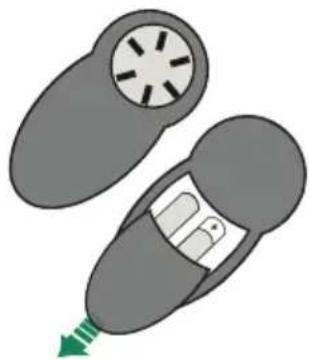
The appliance can be controlled using a remote control powered by a 1.5 V carbon-zinc alkaline batteries of the standard LR03-AAA type (not included).

  • Do not place the remote control near to heat sources.
  • Used batteries must be disposed of in the proper manner.
FABER HighLight 121 X - Remote control - 1

natural_image Diagram of a car interior showing a circular vent and seat, with a green arrow indicating direction (no text or symbols)

FABER HighLight 121 X - Remote control - 2

natural_image Black handheld electronic device with six circular buttons (no visible text or symbols)
Motor On/Off.
Decreases the working speed each time it is pressed.
+Increases the working speed each time it is pressed.
iActivates the INTENSIVE functionThis speed is timed to run for 6 minutes.At the end of this time, the system returns automatically to the speed that was set before. If it is activated with the motor turned off, it will switch to OFF at the end of the time. It is disabled by pressing the button again or pressing the “Motor OFF” button.
- Press this button briefly to activate total shutdown of the hood (lights + motor) after 30 minutes.- Press and hold this button for a few seconds to deactivate Delay mode, or turn the motor off. The relevant LED flashes every 0.5 seconds
Lights On / Off

Lighting

- For replacement contact technical support ("To purchase contact technical support").

natural_image Hand holding a smartphone with a finger pointing at it, enclosed in a circular frame (no text or symbols)
natural_image Top-down diagram of a car with a circular vent and internal compartment, showing a green arrow pointing to the bottom (no text or symbols)

FABER HighLight 121 X - Lighting - 1

natural_image Black handheld electronic device with six metallic buttons (no visible text or symbols)
natural_image Illustration of a hand holding a smartphone with a finger, showing a stylized 'Z' on the screen (no text or symbols beyond the character)
natural_image Diagram of a car interior with a circular vent and directional arrow (no text or symbols)

FABER HighLight 121 X - Lighting - 2

natural_image Black handheld electronic device with a circular knob (no visible text or symbols)
natural_image Hand holding a smartphone with a finger pointing at it, no visible text or symbols
natural_image Top-down diagram of a car with a circular vent and a rectangular seat, showing a green arrow pointing to the side (no text or symbols)

FABER HighLight 121 X - Lighting - 3

natural_image Black handheld electronic device with four metallic buttons (no visible text or symbols)
natural_image Hand holding a smartphone with a finger pointing at it, no visible text or symbols
natural_image Top-down diagram of a car with two wheels and a seat, showing a green arrow indicating motion (no text or symbols)

FABER HighLight 121 X - Lighting - 4

natural_image Black handheld electronic device with four metallic buttons (no visible text or symbols)
natural_image Illustration of a hand interacting with a smartphone screen displaying a 'Z' symbol (no text or symbols on the device itself)
natural_image Diagram of a car interior showing two seats with a circular vent and a green arrow indicating direction (no text or symbols)

FABER HighLight 121 X - Lighting - 5

natural_image Black handheld electronic device with four metallic buttons (no visible text or symbols)
natural_image Illustration of a hand interacting with a smartphone screen, showing a finger pointing at the screen (no text or symbols present)
natural_image Diagram of a car interior showing a circular vent and seat, with a green arrow indicating direction (no text or symbols)

FABER HighLight 121 X - Lighting - 6

natural_image Black handheld electronic device with six circular ports (no visible text or symbols)

FABER HighLight 121 X - Lighting - 7

natural_image Diagram of a car with a circular head and internal compartment, showing a green arrow pointing to the bottom part (no text or symbols present)

FABER HighLight 121 X - Lighting - 8

natural_image 3D rendered image of a black handheld electronic device with four circular ports (no text or symbols)
natural_image Illustration of a hand holding a smartphone with a finger pointing at it, no text or symbols present.
natural_image Top-down diagram of a car with a circular vent and a green arrow indicating motion (no text or symbols)

FABER HighLight 121 X - Lighting - 9

natural_image Black handheld electronic device with six metallic buttons (no visible text or symbols)
natural_image Hand holding a smartphone with a finger pointing at it, enclosed in a circular frame (no text or symbols)
natural_image Diagram of a car interior showing two compartments with a green arrow indicating direction (no text or symbols)

FABER HighLight 121 X - Lighting - 10

natural_image Black handheld electronic device with six metallic buttons (no visible text or symbols)

FABER HighLight 121 X - Lighting - 11

natural_image Black handheld electronic device with four circular ports, isolated on white background (no text or symbols)
natural_image Hand holding a smartphone with a finger pointing at it, no text or symbols visible
natural_image Top-down diagram of a car with a circular vent and a green arrow indicating motion (no text or symbols)

FABER HighLight 121 X - Lighting - 12

natural_image Black handheld electronic device with a circular knob (no visible text or symbols)
natural_image Hand holding a smartphone with a finger pointing at it, inside a circular frame (no text or symbols)
natural_image Diagram of a car interior showing two car seats with a circular vent and a green arrow indicating direction (no text or symbols)

FABER HighLight 121 X - Lighting - 13

natural_image Black handheld electronic device with six metallic buttons (no visible text or symbols)
natural_image Illustration of a hand holding a smartphone with a finger pointing at it, no text or symbols present
natural_image Diagram of a car interior showing two compartments with a central seat and a green arrow indicating direction (no text or symbols)

FABER HighLight 121 X - Lighting - 14

natural_image Black handheld electronic device with six circular ports (no visible text or symbols)

1,5 B

natural_image Hand holding a smartphone with a finger pointing at it, no visible text or symbols
natural_image Diagram of a car interior showing two views with a circular vent and a green arrow indicating direction (no text or symbols)

FABER HighLight 121 X - Lighting - 15

natural_image Black handheld electronic device with five circular ports (no visible text or symbols)

FABER HighLight 121 X - Lighting - 16

natural_image Black handheld electronic device with four buttons, isolated on white background (no text or symbols)
natural_image Hand holding a tablet with a finger pointing at it, no text or symbols visible

Apkope

natural_image Diagram of a car interior showing two compartments with a central seat and a green arrow indicating direction (no text or symbols)

FABER HighLight 121 X - Apkope - 1

natural_image Black handheld electronic device with six circular ports (no visible text or symbols)

FABER HighLight 121 X - Apkope - 2

natural_image Black handheld electronic device with four metallic buttons on a circular top (no text or symbols visible)
natural_image Hand holding a tablet with a finger pointing at it, enclosed in a circular frame (no text or symbols)
natural_image Diagram of a car interior showing a circular vent and seat, with a green arrow indicating direction (no text or symbols)

FABER HighLight 121 X - Apkope - 3

natural_image Black handheld electronic device with six metallic buttons (no visible text or symbols)
natural_image Hand holding a smartphone with a finger pointing at it, no text or symbols visible
natural_image Diagram of a car interior showing a circular vent and seat, with a green arrow indicating direction (no text or symbols)

FABER HighLight 121 X - Apkope - 4

natural_image Black handheld electronic device with six metallic buttons (no visible text or symbols)

3a

3

3

natural_image Hand holding a tablet with a finger pointing at it, enclosed in a circular frame (no text or symbols)
natural_image Top-down diagram of a car with a circular vent and arrow indicating motion (no text or symbols)

FABER HighLight 121 X - Apkope - 5

natural_image Black handheld electronic device with six metallic buttons (no visible text or symbols)
natural_image Illustration of a hand holding a tablet with a finger pointing at it, no text or symbols present.
natural_image Illustration of a car with a circular vent and a green arrow indicating motion (no text or symbols)

FABER HighLight 121 X - Apkope - 6

natural_image Black handheld electronic device with six metallic buttons (no visible text or symbols)
natural_image Hand holding a tablet with a finger pointing at it, enclosed in a circular frame (no text or symbols)
natural_image Top-down diagram of a car with a circular vent and a green arrow indicating motion (no text or symbols)

FABER HighLight 121 X - Apkope - 7

natural_image Black handheld electronic device with six metallic buttons (no visible text or symbols)
natural_image Illustration of a hand interacting with a smartphone screen, showing a finger pointing at the screen (no text or symbols present)
natural_image Top-down diagram of a car showing front and rear views with a green arrow indicating direction (no text or symbols)

FABER HighLight 121 X - Apkope - 8

natural_image Hand holding a smartphone with a finger pointing at it, no visible text or symbols
natural_image Diagram of a car interior showing two views with a green arrow indicating direction (no text or symbols)

pilotem

FABER HighLight 121 X - Apkope - 9

natural_image Black handheld electronic device with six metallic buttons (no visible text or symbols)

-AAA

należy

natural_image Hand holding a tablet device with a finger pointing at it, enclosed in a circular frame (no text or symbols)

- Očistite napu koristeći vlažnu krpu nadzire neutralni tekući deterdžent.

FABER HighLight 121 X - Apkope - 10

text_image LT1T2T3T4 2 3 I S1
Tipka Funkcija Led
LUključuje /isključuje svjetla na maksimalnu osvijetljenost.-
T1 Uključuje/isključuje motor na prvu brzinu. -
Funkcija Delay (Odgoda):Držeći pritisnutu tipku oko 3 sek., aktivira/deaktivira funkciju Delay (auto-matsko isključivanje motora, ventilatora i rasvjete odgođeno za 30').Ne može se aktivirati s uključenom funkcijom Intenzivna ili 24h.
T2 Uključuje motor na drugu brzinu. -
Držeći pritisnutu tipku oko 5 sekundi, kad su sve funkcije isključene (motor + svjetlo), aktivira se alarm filtara s aktivnim ugljenom prikazan dvostrukim bljeskanjem pripadajućeg leda.Za deaktiviranje se ponovno pritisne tipka na 5 sekundi što je prikazano jednim bljeskajem pripadajućeg leda.
T3 Uključuje motor na treću brzinu. -
Držeći pritisnutu tipku na oko 3 sekunde, kad su sve fubljekajućsključen (motor + svjetla), obavlja resetiranje alarma zasićenosti filtara, vizualizirano trostrukim bljeskanjem leda S1.
T4 Uključuje motor na INTENZIVNU brzinu.Ova brzina je tempirana na 6 minuta. Po isteku tog vremena, sustav se automatski vraća na prethodno izabranu brzinu. Aktivira se motora, a po isteku tog vremena prelazi u način OFF.- s isključenog
Držeći pritisnutu 5 sekundi aktivira se daljinski upravljač vizualizirano dvo-strukim bljeskanjem pripadajućeg leda.Držeći pritisnutu 5 sekundi deaktivira se daljinski upravljač, što je vizuali-zirano samo jednim bljeskajem pripadajućeg leda.
S1 Označava alarm zasićenosti metalnih filtara protiv masnoće i ih se opere. Alarm ulazi u funkciju nakon 100 sati efektivnog rada nape.Potsbjanoda
Označava alarm zasićenosti filtra protiv mirisa s aktivnim ugljenom, koji se mora zamijeniti nakon 200 sati efektivnog rada nape.

Daljinski Upravljač

Ovim uređajem može se upravljati daljinskog upravljača koji se napaja alkalnim cink-ugljik baterijama od 1,5 V standardnog tipa LR03-AAA (nisu uključene).

  • Ne ostavljajte daljinski upravljač u izvora topline.
  • Ne odlažite baterije u okoliš, odlažite ih u odgovarajuće kontejnere.

FABER HighLight 121 X - Daljinski Upravljač - 1

natural_image Top-down diagram of a car with a circular vent and internal compartment, showing a green arrow pointing to the bottom (no text or symbols)

pomoću

FABER HighLight 121 X - Daljinski Upravljač - 2

natural_image Black handheld electronic device with six metallic buttons (no visible text or symbols)

blizini

Uključuje/Isključuje motor.
Smanjuje brzinu rada svakim pritiskom.
+Povećava brzinu rada svakim pritiskom.
iAktivira funkciju INTENZIVNA.Ova brzina je tempirana na 6 minuta. Po isteku tog vremena sustav se automatski vraća na prethodno izabranu brzinu. Ako je aktivirana s isključenog motora, po vremena prelazi u način OFF (isključeno).Deaktivira se pritiskom na istu tipku ili tipku isključivanje motora.
- Kratkim pritiskom na ovu tipku aktivira se način potpunog zaustavljanja nape + svjetla) nakon 30 minuta.- Držeći pritisnutu tipku nekoliko deaktivira se način Delay ili isključuje motor.Pripadajući led bljeska svakih 0,5 sekundi.
Uključuje/isključuje svjetla.

isteku

(motor

sekundi,

Rasvjeta

- Za zamjenu kontaktirajte tehničku podršku ("Za kupnju se obratite tehničkoj podršci"),

natural_image Illustration of a hand interacting with a smartphone screen, showing a finger pointing at the screen (no text or symbols present)

in pod

natural_image Top-down diagram of a car with a circular head and internal compartment, showing a green arrow pointing to the bottom-right (no text or symbols)

FABER HighLight 121 X - Rasvjeta - 1

natural_image Black handheld electronic device with five circular ports (no visible text or symbols)
natural_image Illustration of a hand holding a smartphone with a finger pointing at it, no text or symbols present
natural_image Top-down diagram of a car with a circular vent and a green arrow indicating motion (no text or symbols)

FABER HighLight 121 X - Rasvjeta - 2

natural_image Black handheld electronic device with six metallic buttons (no visible text or symbols)
natural_image Hand holding a tablet with a finger pointing at it, no text or symbols visible

ile

natural_image Top-down diagram of a car with a circular vent and a green arrow indicating direction (no text or symbols)

FABER HighLight 121 X - Rasvjeta - 3

natural_image Black handheld electronic device with five circular ports (no visible text or symbols)
natural_image Illustration of a hand interacting with a smartphone screen, showing a finger pointing at the screen (no text or symbols present)
natural_image Top-down diagram of a car with a circular vent and a green arrow indicating direction (no text or symbols)

FABER HighLight 121 X - Rasvjeta - 4

natural_image Black handheld electronic device with six metallic buttons (no visible text or symbols)

ce

natural_image Illustration of a hand holding a smartphone with a finger pointing at it, no text or symbols present
natural_image Diagram of a car interior showing a circular vent and internal compartments, with a green arrow indicating direction (no text or symbols)

FABER HighLight 121 X - Rasvjeta - 5

natural_image Black handheld electronic device with six metallic buttons (no visible text or symbols)
natural_image Top-down diagram of a car with a circular vent and internal compartment, showing a green arrow pointing to the bottom (no text or symbols)

FABER HighLight 121 X - Rasvjeta - 6

natural_image Black handheld electronic device with six metallic buttons (no visible text or symbols)
natural_image Hand holding a smartphone with a finger pointing at it, no text or symbols visible
natural_image Top-down diagram of a car with a circular vent and a green arrow indicating motion (no text or symbols)

FABER HighLight 121 X - Rasvjeta - 7

natural_image Black handheld electronic device with six metallic buttons (no visible text or symbols)
natural_image Illustration of a hand interacting with a smartphone screen, showing a finger pointing at the screen (no text or symbols present)
natural_image Diagram of a car interior showing a circular vent and seat, with a green arrow indicating direction (no text or symbols)

FABER HighLight 121 X - Rasvjeta - 8

natural_image Black handheld electronic device with five circular buttons (no visible text or symbols)
Manual assistant
Powered by Anthropic
Waiting for your message
Product information

Brand : FABER

Model : HighLight 121 X

Category : Basket