08217 - Electronic muscle stimulator Maxxmee - Free user manual and instructions
Find the device manual for free 08217 Maxxmee in PDF.
User questions about 08217 Maxxmee
0 question about this device. Answer the ones you know or ask your own.
Ask a new question about this device
Download the instructions for your Electronic muscle stimulator in PDF format for free! Find your manual 08217 - Maxxmee and take your electronic device back in hand. On this page are published all the documents necessary for the use of your device. 08217 by Maxxmee.
USER MANUAL 08217 Maxxmee
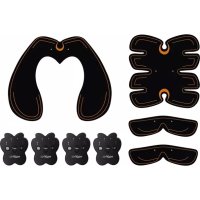
Items Supplied 9 Controller – At A Glance 9 Symbols 10 Signal Words 10 Intended Use 10 When May the Device Not Be Used? 11 Safety Notices 11 Inserting / Replacing Batteries 12 Safety Devices 12 Overview of Functions and Programmes 12 Use 13 Cleaning and Storage 14 Troubleshooting 15 Disposal 15 Technical Data 16 ITEMS SUPPLIED (Picture A) 1 Thigh / buttock pad 1 x 2 Controller 4 x 3 Arm / leg pad 2 x 4 Abdomen pad 1 x Operating instructions 1 x Check the items supplied for complete- ness and the components for transport damage. If you fi nd any damage, do not use the device but contact our customer service department. Remove any possible fi lms, stickers or transport protection from the device. Never remove the rating plate and any possible warnings!
Two batteries (1.5 V; AAA) per controller (2) are also required. CONTROLLER –
SYMBOLS Danger symbol: This symbol indi- cates possible dangers. Read the associated safety notices carefully and follow them. Supplementary information Read operating instructions before use! Symbol for direct current SIGNAL WORDS WARNING warns of possible serious injuries and danger to life NOTICE warns of material damage INTENDED USE ■ The device is intended to be used to stimulate the muscles of the abdo- men, legs, arms, back and buttocks. ■ Do not use the device while driving a vehicle or while sleeping. ■ The device should not be used before going to sleep. The stimulation may cause you problems getting to sleep. ■ The device is not designed for medical or therapeutic purposes. ■ The device is for personal use only and is not intended for commercial applications. ■ The device should only be used for the specifi ed purpose and only as described in the operating instruc- tions. Any other use is deemed to be improper. ■ The warranty does not cover faults caused by incorrect handling, damage or attempted repairs. The same ap- plies to normal wear and tear. Dear Customer, We are delighted that you have chosen the MAXXMEE EMS set. The comfortable and yet effective method of EMS (electromagnetic muscle stimulation) produces targeted muscle contractions. Thanks to the self-adhesive gel fi lm, the pads are simply stuck onto the particular region of the body and enable targeted stimulation of the muscles. If you have any questions about the device and about spare parts/accessories, contact the customer service department via our website: www.dspro.de/kundenservice We hope you have a lot of fun with your MAXXMEE EMS set. Information About the Operating Instructions Before using the device for the fi rst time, please read through these operating in- structions carefully and keep them for future reference and other users. They form an integral part of the device. The manufacturer and importer do not accept any liability if the information in these operating instructions is not complied with.EMS Set
NOT BE USED? ■ This device is not intended to be used by people (including children) with re- duced sensory or mental abilities or a lack of experience and/or knowledge, unless they are supervised by a per- son who is responsible for their safety or have received instruction from this person on how to use the device safely. There is a danger of injury from incorrect use! ■ Infants and people who are sleeping or unconscious must not be treated with the device. ■ The following people may use the device only following consultation with a doctor: ○ people who are fi tted with a pacemaker or similar medical implants; ○ people with heart disease or who suffer from epilepsy; ○ women who are pregnant or have just given birth; ○ people with varicose veins; ○ people suffering from diabetes; ○ people who have a malignant tumour; ○ people who suffer from circulation problems; ○ people with nerve damage or paralysis; ○ people who belong to a risk group or who have concerns about their health. ■ If you are unsure whether the device may be used, consult a responsible doctor. ■ Do not use the device on: ○ body parts with no feeling; ○ regions which have recently been operated on or are scarred; ○ the immediate vicinity of injured, infected, infl amed, (sun-)burnt or very sensitive skin; ○ swelling; ○ skin irritations, acne, birthmarks, warts, rosacea; ○ a skin rash or fungal infections. ■ Do not use the device on your head, neck, face, genital area or on the rib cage close to your heart. ■ Do not use the device if you have calf pain. ■ Do not use the device if you have a fever. SAFETY NOTICES WARNING – Danger of Injury ■ Keep children and animals away from plastic bags and fi lms. There is a dan- ger of suffocation. ■ Children must be supervised to ensure that they do not play with the device. There is a danger of injury from incorrect use! ■ Do not use the device in the immedi- ate vicinity of devices which operate using short waves or microwaves. Maintain a minimum gap of 1 metre. ■ The device must not be used near a mobile phone. Do not use a mobile phone while using the device. ■ Do not use the device if you are attached to high-frequency surgical devices or are in the vicinity of such devices or high-frequency commercial equipment. ■ Batteries can be deadly if swallowed. Batteries and controllers should be kept out of the reach of children and animals. If a battery is swallowed, seek medical assistance immediately. There is a danger of burns from battery acid! ■ If a battery leaks, do not allow your skin, eyes and mucous membranes to come into contact with the battery acid. If you touch battery acid, rinse the affected areas with abundant clearEN
water straight away and seek medical assistance immediately. There is a danger of burns from battery acid! ■ Do not use the device if it is dam- aged. NOTICE – Risk of Damage to Materi- al and Property ■ Use only the battery type specifi ed in the technical data. ■ Always replace all batteries together. Never use batteries of different types or brands, or batteries with different capacities. ■ Take the batteries out of the controllers when they are dead or if you will not be using the device for a prolonged period. This will prevent any damage that might occur if a battery leaks. ■ Remove a dead battery from the con- troller immediately. ■ Do not use the device in rooms with high humidity. ■ Do not bend the pads sharply. ■ Switch off the controllers before changing the position of the pads. ■ The pads must not come into con- tact during use with metal parts, e.g. on belts, wrist watches, jewellery or similar items. ■ Protect the device from: impacts, direct sunlight, sub-zero tempera- tures, persistent moisture and wet conditions. ■ Use only original accessories from the manufacturer in order to guarantee that there is no interference that may prevent the device from working and to avoid possible damage. INSERTING / REPLACING BATTERIES
Each controller (2) requires 2 batteries (1.5 V; AAA). Before inserting the batteries, check whether the contacts in the controller and on the batteries are clean, and clean them if necessary.
1. Slide open the battery compartment
cover on the bottom of a controller in the direction of the arrow.
2. Remove any used batteries and
dispose of them in an environmentally friendly way.
3. Insert two new batteries. Pay attention
to the correct polarity (+ / –).
4. Place on the battery compartment
cover and slide it counter to the direction of the arrow. The locking lug must engage audibly. SAFETY DEVICES The device has two built-in safety func- tions:
- The device automatically switches off after 10 seconds if no contact is established between the skin and silicon electrode.
- The device automatically switches off after 15 minutes of use.
OVERVIEW OF FUNCTIONS
AND PROGRAMMES Functions
- The ON / + button (8) is used to switch on the device, set the inten- sity of the muscle stimulation and confi rm the selected programme. The controllers have 9 intensity levels. The controllers start on level 1. If you keep pressing the button, the next-higherEMS Set
intensity level is set. The button needs to be pressed 9 times to reach the maximum intensity level.
- The OFF / – button (6) is used to switch off the device or decrease the intensity level. Press the button once to set the lower intensity level in each case.
- The MODE button (7) is used to select a stimulation programme. The programme lamps (5) indicate which programme has been selected (see “Programmes”). Intensity Level Level Intensity Function 1 – 3 Weak Warming up 4 – 7 Moderate Training 8 – 9 Strong Fat burning Programmes You can press the MODE button (7) to switch between the following stimulation programmes: Programme/ Lamps Function Description
Alternate between 3 seconds of muscle contrac- tions and 2 seconds of a break
Warming up / warm- ing down Rapid muscle con- tractions, tapping massage
“Running” training mode Stimulation with fast and slow elements Programme/ Lamps Function Description
“Swim- ming” training mode Alternating routine with lots of fast pulses
“Increas- ing con- sumption” training mode Very many, rapid mus- cle contrac- tions
“Muscle building” training mode Constant stimulation with long muscle con- tractions USE Please Note! ■ For reasons of hygiene, a pad should only be used by one person in order to prevent the transfer of skin infec- tions or similar complaints. ■ If you experience an unpleasant tingling sensation while using the device, stop using it immediately! ■ If you experience increased pain or increased tension, immediately switch off the device and stop using it and consult a doctor. ■ Do not use straight after eating. ■ We explicitly point out that with some people skin irritations or hypersensi- tivity may occur as a result of the elec- trical muscle stimulation. In this case, stop using the device immediately and consult a doctor if necessary. Beginners should stimulate a muscle group for no more than 15 minutes per day! We recommend beginners do no more than 1 – 2 units per day with a rest phase of at least 4 hours between the units!EN
Advanced users should stimulate each muscle group for no more than 30 min- utes a day. We recommend no more than 3 units per day, with a rest phase of at least 4 hours between the units. We ex- plicitly point out that improper use of the device and excessive muscle stimulation can be detrimental to your health.
2. Clean the areas of skin that are to be
stimulated beforehand.
3. Peel the protective fi lm off the pad
and place the silicon electrodes on the body so that the appropriate muscle groups can be stimulated (e.g. shoulders, upper arm, lower arm, back, abdomen, hips, thighs or calves). The optimum position is where the strongest contractions are felt.
Tip: You can stimulate several muscle groups simultaneously by positioning all pads at different places.
4. Once a pad has been placed on the
muscle group that is to be stimulat- ed, switch on the controller using the ON / + button (8).
5. Use the Mode button (7) to select a
programme (see the “Overview of Functions and Programmes” chap- ter). The corresponding programme lamp(s)(5) light up.
6. Confi rm the chosen programme with
If the programme lamp(s) only fl ash briefl y and then light up con- stantly, the pads are not properly in contact with the skin and the device switches off after approx. 10 seconds.
7. Use the ON / + and OFF / –buttons
(6) to set the intensity level you want (1 – 9) (see the “Overview of Func- tions and Programmes” chapter).
The device automatically switches off after 15 minutes. To switch it off before this, press the OFF / – button several times if necessary.
8. Take off the pad and clean it after
each use in the manner described in the “Cleaning and Storage” chapter.
CLEANING AND STORAGE
Please Note! ■ No liquid must get into the control- lers. Never immerse the controllers in water! ■ Do not use any sharp or abrasive cleaning agents or cleaning pads to clean the device. These may damage the surfaces.
1. Remove the controllers (2) from the
2. Clean the used pads under running
water and allow them to dry in the air. Do not use soap!
3. Clean the controllers with a slightly
damp cloth if necessary.
4. Cover the silicon electrodes with the
protective fi lms when the pads are completely dry.
5. Store all parts in a dry place which
is protected from moisture, dirt and direct sunlight and is out of the reach of children and animals.EMS Set
TROUBLESHOOTING If the device does not work properly, check whether you are able to rectify the problem yourself. If the problem cannot be solved with the steps below, contact the customer service department. Do not attempt to repair an elec- trical device yourself! A controller (2) does not work. / The programme lamps (5) do not light up. No batteries or empty batteries have been inserted in the controller. ► Insert / replace batteries. The batteries are inserted incorrectly. ► Pay attention to the correct polarity when inserting the batteries. The programme lamps (5) light up, but do not fl ash. There is no contact between the skin and silicon electrodes. ► Make sure that the pads fit correctly. The controller (2) is not correctly attached to the pad. ► Check whether the controller is cor- rectly attached to the press studs. The programme lights(5) are fl ash- ing, but no pulses are being sent to stimulate the muscles. The pad is not placed on correctly. ► Keep changing the position of the pad until the spot with the strongest muscle contraction has been found. The intensity level is set too low. ► Press the ON / + button (8) to increase the intensity level. The pads no longer stick. The pads are not clean. ► Clean the used pads under running water. The silicon electrodes are too old. ► A replacement set can be ordered via our customer service department. DISPOSAL Dispose of the packaging mate- rial in an environmentally friendly manner so that it can be recycled. Batteries should be removed from the controllers before disposing of the device and disposed of sepa- rately from the device at suitable collection points. This device is governed by the European Directive 2012/19/EU on waste electrical and electronic equipment (WEEE). Do not dispose of this device as normal domestic waste, but rather in an environ- mentally friendly manner via an offi cially approved waste disposal company.EN
EasyManual