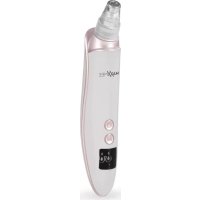
00906 - Face cleansing Maxxmee - Free user manual and instructions
Find the device manual for free 00906 Maxxmee in PDF.


| Brand | Maxxmee |
| Model | 00906 |
| Category | Face cleansing |
| Device type | Pore vacuum with microdermabrasion |
| Power supply | Integrated Li-Ion batteries 3.7 V, 600 mAh |
| Charging | via micro USB B port, mains adapter 5 V / ≥ 1 A (not included) |
| Charging time | Approximately 2 hours |
| Battery life | Approximately 50 minutes |
| Power | 5 W |
| Intensity levels | 3 adjustable levels |
| Included attachments | 6 attachments: 4 round of different sizes (small, medium, large, extra-large), 1 oval, 1 microcrystalline |
| Replacement filters included | 5 filters |
| Accessories provided | USB cable, user manual |
| Main functions | Pore cleansing, microdermabrasion, circulatory stimulation |
| Recommended use | 1 to 3 times per week depending on skin type, max 5 minutes per session |
| Maintenance | Clean the attachments under running water after each use; wipe the body with a damp cloth |
| Filter replacement | When the filter is dirty, replace it with a new one |
| Safety | Do not use on wounds, irritated skin, around the eyes; avoid water while charging; keep out of reach of children |
| Contraindications | Skin conditions, pacemaker, pregnancy (medical advice recommended) |
Frequently Asked Questions - 00906 Maxxmee
User questions about 00906 Maxxmee
0 question about this device. Answer the ones you know or ask your own.
Ask a new question about this device
Download the instructions for your Face cleansing in PDF format for free! Find your manual 00906 - Maxxmee and take your electronic device back in hand. On this page are published all the documents necessary for the use of your device. 00906 by Maxxmee.
USER MANUAL 00906 Maxxmee
Abbildung ähnlich.
Items Supplied and Device Overview 13
Symbols 15
Signal Words 15
Intended Use 15
When May the Device Not Be Used? 16
Safety Notices 16
Charging Up the Battery 18
Use 19
Cleaning and Storage 22
Changing the Filter 22
Technical Data 23
Disposal 23
ITEMS SUPPLIED AND DEVICE OVERVIEW
(Pictures A and B)
1 Medium round pore attachment, 1 x
2 Small round pore attachment, 1 x
3 Large round pore attachment, 1 x
4 Oval attachment, 1 x
5 Extra large round pore attachment, 1 x
6 Microcrystalline attachment, 1 x
7 Suction head
8 Main unit, 1 x
9 On / Off button
10 M Button for changing the intensity level (3 levels)
11 Display (indicates the intensity level and the battery charge)
12 USB socket
Not shown:
USB cable, 1 x
Operating instructions, 1 x
Replacement filter, 5 x
Check the items supplied for completeness and the components for transport damage. If you find any damage, do not use the device but contact our customer service department.
Remove any possible films, stickers or transport protection from the device. Never remove the rating plate and any possible warnings!

A USB mains adapter is also required for charging at the plug socket. This is not supplied with the device.
Dear Customer,
We are delighted that you have chosen the MAXXMEE Pore Cleaner Pro.
It uses modern vacuum technology to extract spots, blackheads and impurities quickly, efficiently and gently. 6 attachments and 3 intensity levels allow optimum use on any area and any skin type. With the microcrystalline attachment you can also support the natural regeneration of your skin: dead skin cells and skin flakes are removed and the skin tissue underneath can form new skin cells, elastin and collagen.
If you have any questions about the device and about spare parts/accessories, contact the customer service department via our website:
We hope you have a lot of fun with your MAXXMEE Pore Cleaner Pro.
Information About the Operating Instructions
Before using the device for the first time, please read through these operating instructions carefully and keep them for future reference and other users. They form an integral part of the device. The manufacturer and importer do not accept any liability if the information in these operating instructions is not complied with.
SYMBOLS

Supplementary information

Read the operating instructions before use!
Symbol for direct current
SIGNAL WORDS
Signal words indicate hazards if the associated notices are not followed.
DANGER – high risk, results in serious injury or death
WARNING – medium risk, may result in serious injury or death
NOTICE – may result in risk of damage to material
INTENDED USE
This device is intended for cleaning pores (removing sebum and blackheads) and microdermabrasion. The skin is sucked in by the device. The vacuum which is created pulls sebum and impurities out of the pores and stimulates blood circulation in the skin.
■ Warning of misuse! Do not use the device for cleaning ears.
■ Children and animals must not be treated with the device.
■ The device is for personal domestic use only, is not intended for commercial applications and is not intended to be used for medical or therapeutic purposes.
■ Use the device only for the intended purpose and as described in the operating instructions. Any other use is deemed to be improper.
WHEN MAY THE DEVICE NOT BE USED?
■ Do not use the device if you have an illness/dental problems.
■ People who have no feeling on their skin must not use the device.
■ The following people should only use the device after consulting their doctor: people with a pacemaker or electronic implant and other people who belong to a risk group or who have concerns about their health.
■ Do not use the device in the vicinity of or on:
o wounds,
- regions which have recently been operated on or are scarred.
o injuries and areas of swelling,
○ rosacea,
○ birthmarks and warts,
- injured, inflamed, (sun-)burnt, irritated or very sensitive skin,
- the genital area,
o body parts with no feeling.
If you are unsure whether the device may be used, consult the responsible doctor.
SAFETY NOTICES
- Do not make any modifications to the device. It may only be taken apart and / or repaired by the manufacturer, customer service department or a similarly qualified person (e.g. specialist workshop) in order to avoid any hazards.
DANGER – Danger of Electric Shock
If the device falls into water while it is connected to the mains power, pull the USB mains adapter out of the plug socket immediately! Only after this should you retrieve the device from the water.
■ Never touch the device and the connecting cable with wet hands when the device is connected to the mains power.
WARNING – Danger from Rechargeable Batteries
■ No liquid must get into the device. Do not immerse in water! Never use while bathing or showering!
■ Do not use the device if it has malfunctioned or fallen into water. Have it checked in a specialist workshop before using it again.
■ The device has a built-in battery. It must not be thrown into a fire or exposed to high temperatures of over +40°C. Do not expose it to direct sunlight for a prolonged period. Do not take the battery apart!
If the battery leaks, do not allow your skin, eyes and mucous membranes to come into contact with the battery acid. If you do touch battery acid, rinse the affected areas with abundant clear water straight away and seek medical assistance immediately.

WARNING – Danger of Fire
- Keep the device away from combustible materials and substances.
■ Do not cover the device during operation.

WARNING – Danger of Injury
- Keep children and animals away from the packaging material. There is a danger of suffocation.
■ Make sure that the USB cable is always kept out of the reach of young children and animals. There is a danger of strangulation. - Keep the device out of the reach of children. There is a danger of injury from incorrect use.
■ If you experience an unpleasant feeling while using the device, stop using it immediately!
■ Stop using the device if you experience skin redness or discolouration that lasts for more than 24 hours.
In the event of damage / faults, switch the device off immediately. Do not use the device if it or an attachment is damaged.
NOTICE – Risk of Damage to Material and Property
■ Only use the device if the filter is inserted in the suction head so that no dirt gets inside the device.
■ Store the device only in closed rooms.
■ Do not expose the device to any moisture.
■ Use and store the device at room temperature. Do not expose it to sub-zero temperatures or great temperature fluctuations.
■ Protect the device and accessories from impacts.
■ Do not place heavy objects on the device or its accessories.
■ Use only original accessories from the manufacturer in order to guarantee that there is no interference that may prevent the device from working and to avoid possible damage.
■ Do not leave the device switched on unattended.
■ Do not connect the device to a plug socket during a thunderstorm.
CHARGING UP THE BATTERY
Please Note!
■ Do not charge up on a computer because the computer might be damaged by the high charging current.
When a red battery symbol flashes on the display (11) or the device cannot be switched on, the battery is too weak and needs to be charged.
To connect the device to the plug socket, a USB mains adapter (5 V and ≥ 1 A; not supplied with the device) is required.
-
First plug the USB cable into the USB socket (12) and then connect to a power source with USB interface (preferably via a USB mains adapter to the plug socket). The charging process starts and a red battery symbol flashes on the display.
-
As soon as the battery symbol is lit constantly green, the battery is charged.
Disconnect the USB cable from the power source and then from the USB socket.
USE
Please Note
■ Steer well clear of the eyes and the thyroid glands when using the device.
■ For reasons of hygiene, the device should only be used by one person. After use the attachment should be cleaned thoroughly.
■ The device should be used no more than twice a week on dry skin, and no more than three times a week on oily or combination skin.
■ An individual application should not be longer than five minutes.
■ A tingling sensation and skin redness is normal during application and should disappear within an hour of the treatment finishing.
■ Before initial use you should test the device on your lower arm. If there is no undesired skin reaction, you can use the device on your face.
In order to avoid the formation of blotches, during the application the attachment should be kept in constant motion on the skin. If it is held in one spot for a number of seconds, this may cause a suction bruise. You are recommended to stretch the skin on the cheeks, for example, to avoid excessive suction.
■ Move the device slowly in straight lines. Do not move in circles and do not press on the skin!
■ After application, do not perform any peeling on the relevant skin sections.
Remove make-up and clean your face in the usual way and then dry it prior to treatment.
Clean the face and apply a care product after each treatment.
Six attachments are supplied:
• Medium round pore attachment (1) for cleaning normal areas, e.g. the T-zone, not suitable for the skin around the eyes
- Small round pore attachment (2) for cleaning pores in areas which are sensitive or are hard to reach, e.g. around the nose
- Large round pore attachment (3) for cleaning larger areas, e.g. the cheeks, not suitable for the skin around the eyes
- Extra large round pore attachment (5) for cleaning large areas down to the neckline, not suitable for the skin around the eyes
- Oval attachment (4) for narrower sections (e.g. the nasal wing or area around the mouth) and for stimulating blood flow to the skin
- Microcrystalline attachment (6) for microdermabrasion: Removing dead flakes of skin through rubbing and extraction on the face or the neckline

The attachments are easier to remove from the device if they are twisted slightly when pulling them off.
Pore Cleansing
For optimum results, the pores should be opened before the application. For this purpose you soak a small, clean flannel in hot water, wring it out and place it on your face. As an alternative you can carefully place your face above a dish with hot water, or use the device immediately after a shower or bath.
- Select a pore attachment depending on the area of application and place it on the suction head (7).
- Press the ⏻ On / Off button (9). The device switches on.
- To remove sebum and blackheads, place the pore attachment on the skin and guide it over the skin slowly in small straight lines
from the middle of the face outwards. Do not move it backwards and forwards along the same line. Repeat the process if necessary. Any acne spots should be vacuumed briefly before the pore attachment is quickly removed again. Do not move sideways!
- You can repeatedly press the M button (10) to increase the intensity level if necessary. There are three levels. The activated level is shown on the display (11).
- After the treatment, switch off the device using the On/Off button.
- Remove the pore attachment and clean it.
Microdermabrasion
- Place the microcrystalline attachment (6) on the suction head (7).
- Press the ⏻ On / Off button (9). The device switches on.
- When treating the face, start at the chin and work your way up to the forehead. Slowly move the microcrystalline attachment in straight lines from the middle of the face outwards. Only pull in one direction and do not press on the device!
- You can repeatedly press the M button (10) to increase the intensity level if necessary. There are three levels. The activated level is shown on the display (11).
- After the treatment, switch off the device using the On / Off button.
- Remove the microcrystalline attachment and clean it.
Stimulating Blood Flow in the Skin
- Place the oval attachment (4) on the suction head (7).
- Press the ⏻ On / Off button (9). The device switches on.
- Any areas where wrinkles form (e.g. around the mouth) should be vacuumed briefly before the oval attachment is quickly removed again. Do not repeat too often in one location – this could lead to blotches!
EN
-
You can repeatedly press the M button (10) to increase the intensity level if necessary. There are three levels. The activated level is shown on the display (11).
-
After the treatment, switch off the device using the On/Off button.
-
Remove the oval attachment and clean it.
CLEANING AND STORAGE
Please Note
■ Do not use any corrosive or abrasive cleaning agents!
- Clean the attachments under running water immediately after each use. Use a mild cleaning agent and cotton bud if necessary.
- Wipe down the main unit (8) with a damp cloth if necessary and then dry it.
- Store the device and accessories in a dry place that is protected from dust, dirt and direct sunlight and cannot be accessed by children or animals.
CHANGING THE FILTER
If the filter in the suction head (7) is dirty, it should be replaced. The items supplied include replacement filters.
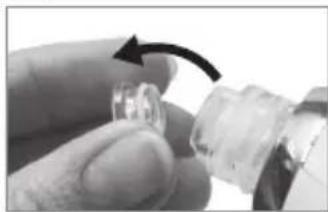
Similar to the one shown.
-
Pull the silicone plug out of the suction head (see picture).
-
Turn the suction head downwards so that the dirty filter drops out.
-
Insert a fresh filter into the suction head.
-
Insert the silicone plug back into the suction head.
TECHNICAL DATA
Article number: 00906
ID of operating
instructions: Z 00906 M DS V1 1120 md
Model number: BK-2703
Voltage supply: 3.7 V DC (1 x Li-ion battery; 600 mAh)
Charge time: approx. 2 h
Operating time: approx. 50 min
Power: 5 W
Interface: USB Micro B
Mains adapter
required: 5V and ≥1A

DISPOSAL
Dispose of the packaging material in an environmentally friendly manner so that it can be recycled.
This device is governed by the European Directive 2012/19/EU on waste electrical and electronic equipment (WEEE). Do not dispose of the device with built-in battery as normal domestic waste, but rather in an environmentally friendly manner via an officially approved waste disposal company.
All rights reserved.
SOMMAIRE
WAARSCHUWING – Gevaar door accu's
WAARSCHUWING – Brandgevaar
WAARSCHUWING – Verwondingsgevaar
- ITEMS SUPPLIED AND DEVICE OVERVIEW
- (PICTURES A AND B)
- DEAR CUSTOMER
- INFORMATION ABOUT THE OPERATING INSTRUCTIONS
- SYMBOLS
- SIGNAL WORDS
- INTENDED USE
- WHEN MAY THE DEVICE NOT BE USED
- SAFETY NOTICES
- DANGER – DANGER OF ELECTRIC SHOCK
- WARNING – DANGER FROM RECHARGEABLE BATTERIES
- WARNING – DANGER OF FIRE
- WARNING – DANGER OF INJURY
- NOTICE – RISK OF DAMAGE TO MATERIAL AND PROPERTY
- CHARGING UP THE BATTERY
- PLEASE NOTE
- USE
- PORE CLEANSING
- MICRODERMABRASION
- STIMULATING BLOOD FLOW IN THE SKIN
- EN
- CLEANING AND STORAGE
- CHANGING THE FILTER
- TECHNICAL DATA
- DISPOSAL
- SOMMAIRE
- WAARSCHUWING – GEVAAR DOOR ACCU'S
- WAARSCHUWING – BRANDGEVAAR
- WAARSCHUWING – VERWONDINGSGEVAAR
Brand : Maxxmee
Model : 00906
Category : Face cleansing