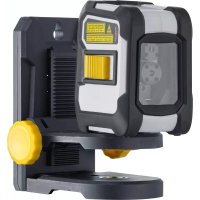
CompactCrossLaser Plus - Laser level Laserliner - Free user manual and instructions
Find the device manual for free CompactCrossLaser Plus Laserliner in PDF.


| Product Type | Automatic cross-line laser level |
| Brand | Laserliner |
| Model | CompactCrossLaser Plus |
| Self-leveling range | ±4° |
| Accuracy | ±0.35 mm/m |
| Working range (without receiver) | 15 m (depending on brightness) |
| Working range (with receiver) | 30 m |
| Laser wavelength | 635 nm |
| Laser class | 2 / <1 mW |
| Power supply | 2 AA alkaline batteries (LR6), 1.5 V |
| Battery life (alkaline) | 14 h |
| Dimensions (L x H x D) | 75 x 88 x 58 mm |
| Weight (including batteries) | 246 g |
| Main functions | Horizontal and vertical alignment, tilt mode, manual receiver mode, Bluetooth® interface for remote control |
| Care and cleaning | Clean with a slightly damp cloth, without solvents. Remove batteries before prolonged storage. Store in a dry, clean place. |
| Safety instructions | Laser class 2: do not look into the beam. Keep out of reach of children. Observe EMC and RED directives. Do not modify the device. |
| Spare parts and repairability | Calibration required if accuracy out of tolerance. Contact dealer or UMAREX-LASERLINER service. No specific spare parts mentioned. |
| General information | Indoor/outdoor use, working conditions: -10°C to 50°C, max humidity 80% rH. Max altitude 4000 m. Storage: -10°C to 70°C. Bluetooth LE 4.x interface, max range 10 m. |
| Optional accessories | Laser receiver RX, tripod |
Frequently Asked Questions - CompactCrossLaser Plus Laserliner
User questions about CompactCrossLaser Plus Laserliner
0 question about this device. Answer the ones you know or ask your own.
Ask a new question about this device
Download the instructions for your Laser level in PDF format for free! Find your manual CompactCrossLaser Plus - Laserliner and take your electronic device back in hand. On this page are published all the documents necessary for the use of your device. CompactCrossLaser Plus by Laserliner.
USER MANUAL CompactCrossLaser Plus Laserliner
Completely read through the operating instructions, the "Warranty and Additional Information" booklet as well as the latest information under the internet link at the end of these instructions. Follow the instructions they contain. This document must be kept in a safe place and passed on together with the device.
Function / Application
The automatic cross-line laser for aligning tiles, wall studding, windows, doors etc.
- The slope-mode feature is an extra that permits gradients to be laid out.
- RX-ready: integrated hand-held receiver mode
-Bluetooth® interface for remote control of the device
Automatic levelling range 4^ Accuracy 0,35 mm / m
General safety instructions
General safety instructions
- The device must only be used in accordance with its intended purpose and within the scope of the specifications.
- The measuring tools and accessories are not toys. Keep out of reach of children.
- Modifications or changes to the device are not permitted, this will otherwise invalidate the approval and safety specifications.
- Do not expose the device to mechanical stress, extreme temperatures, moisture or significant vibration.
- The device must no longer be used if one or more of its functions fail or the battery charge is weak.
- Please ensure compliance with the safety regulations set out by local and national authorities with regard to the correct and proper use of the device.
Safety instructions
Using class 2 lasers

Laser radiation! Do not stare into the beam! Class 2 laser · < 1 mW · 635 nm EN 60825-1:2014
CompactCross-Laser
- Attention: Do not look into the direct or reflected beam.
- Do not point the laser beam towards persons.
- If a person's eyes are exposed to class 2 laser radiation, they should shut their eyes and immediately move away from the beam.
- Tampering with (making changes to) the laser device is not permitted.
- Under no circumstances should optical instruments (magnifying glass, microscope, binoculars)
Safety instructions
Dealing with electromagnetic radiation
- The measuring device complies with electromagnetic compatibility regulations and limits in accordance with the EMC Directive 2014/30/EU which is covered by the Radio Equipment Directive 2014/53/EU.
- Local operating restrictions – for example, in hospitals, aircraft, petrol stations or in the vicinity of people with pacemakers – may apply. Electronic devices can potentially cause hazards or interference or be subject to hazards or interference.
- The measuring accuracy may be affected when working close to high voltages or high electromagnetic alternating fields.
Safety instructions
Dealing with RF radiation
- The measuring device is equipped with a wireless interface.
- The measuring device complies with electromagnetic compatibility and wireless radiation regulations and limits in accordance with the RED 2014/53/EU.
- Umarex GmbH & Co. KG hereby declares that the CompactCross-Laser radio equipment complies with the essential requirements and other provisions of the European Radio Equipment Directive 2014/53/EU (RED). The EU Declaration of Conformity can be found in its entirety at the following address:
http://laserliner.com/info?an AGO
- 实验原理
Always turn off all lasers and latch the pendulum in place before transporting, ON/OFF switch (4) in its "OFF" position!
Laserliner
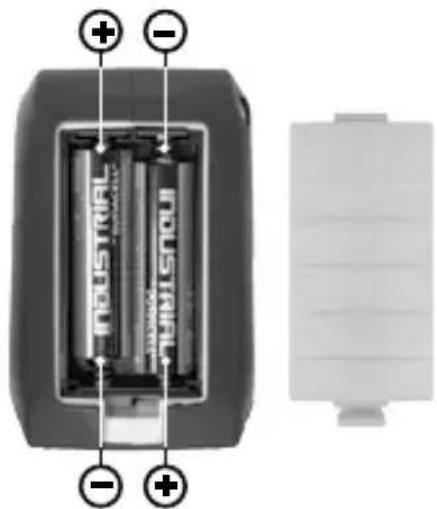
1 Inserting batteries
Open the battery compartment and insert batteries (2 x type AA) according to the symbols. Be sure to pay attention to polarity.
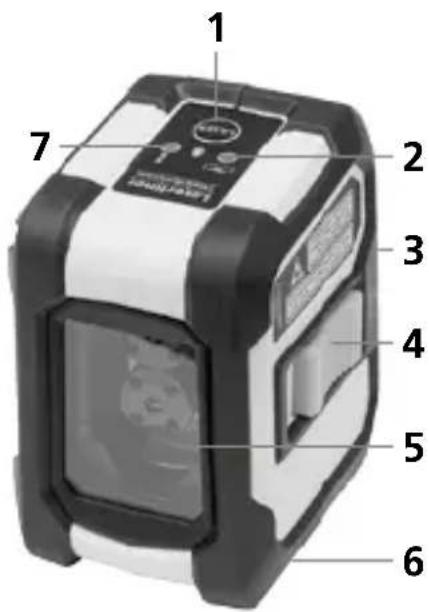
1 Laser line selection button / Hand receiver mode
2 LED levelling red: levelling off green: levelling on
3 Battery compartment (backside)
4 ON/OFF switch, transport retainer
5 Laser output windows
6 1/4" tripod threads (bottom)
7 LED hand receiver mode
2 Horizontal and vertical levelling
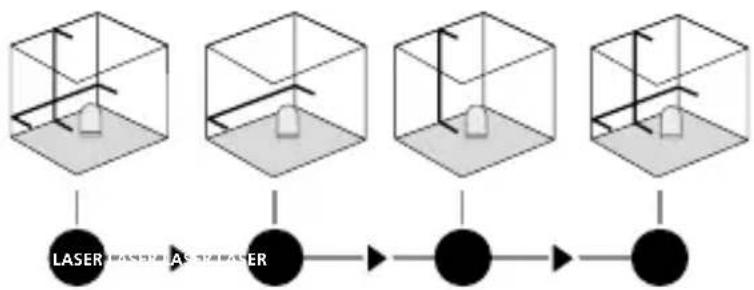
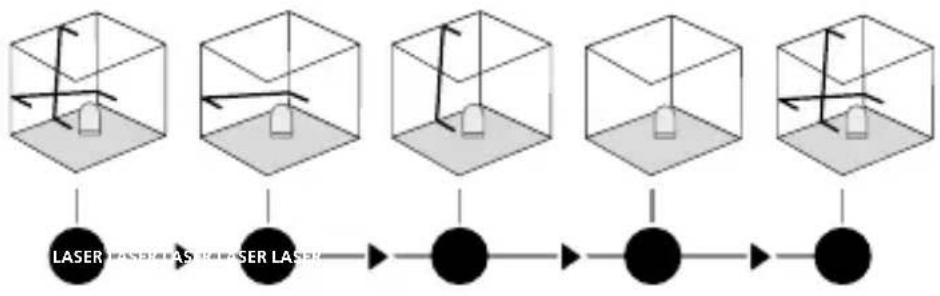
Release the transport restraint, set the ON/OFF switch (4) to "ON". The laser cross will appear. The laser lines can be switched individually with the selection button.
CompactCross-Laser

The transport restraint must be released for horizontal and vertical levelling. The LED (2) shows a permanent green light. The laser lines flash and the LED (2) lights red as soon as the device is outside the automatic levelling range of 4^ . Position the device such that it is within the levelling range. The LED (2) switches back to green and the laser lines stop flashing (steady light).
3 Slope mode
Do not release the transport restraint, set the ON/OFF switch (4) to "OFF". Select and switch on the laser with the selection button. Sloping planes can now be measured. This mode cannot be used to perform horizontal or vertical levelling as the laser lines are no longer aligned automatically. The LED lights constantly red.
4 Hand receiver mode
Optional: Working with the laser receiver RX
Use an RX laser receiver (optional) to carry out levelling at great distances or when the laser lines are no longer visible. To work with a laser receiver, switch the line laser to hand-held receiver mode by keeping button 1 (handheld receiver mode on / off) pressed. The laser lines will now pulsate with high frequency, making the laser The laser receiver can detect these pu
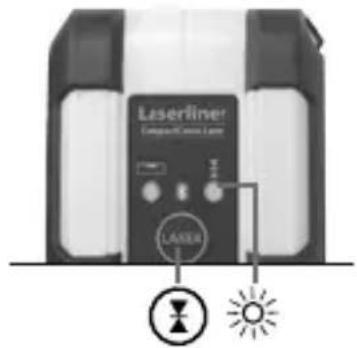

Observe the laser receiver's operating instructions for line lasers.
Laserliner
Preparing the calibration check
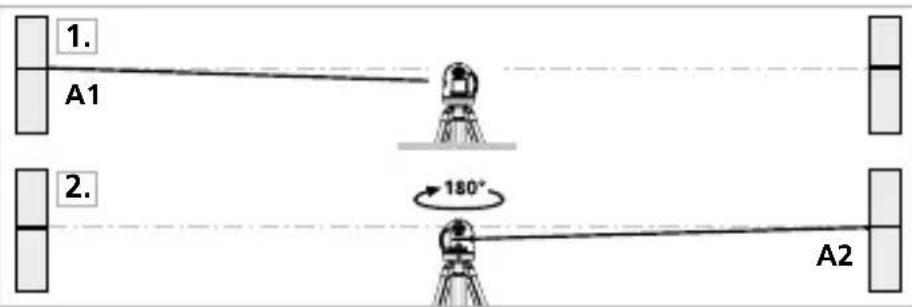
It is possible for you to check the calibration of the laser. To do this, position the device midway between 2 walls, which must be at least 5 metres apart. Switch the device on (LASER CROSS ON). The best calibration results are achieved if the device is mounted on a tripod.
- Mark point A1 on the wall.
- Turn the device through 180^ and mark point A2. You now have a horizontal reference between points A1 and A2.
Performing the calibration check
- Position the device as near as possible to the wall at the height of point A1.
- Turn the device through 180^ and mark point A3. The difference between points A2 and A3 is the tolerance.
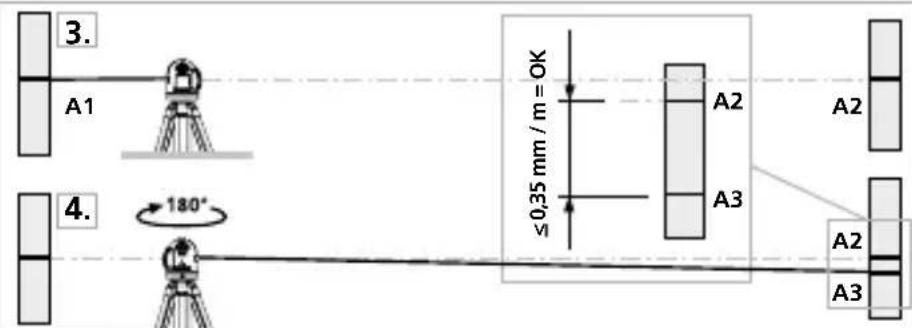

When A2 and A3 are more than 0.35mm / m apart, an adjustment is necessary. Contact your authorised dealer or else the UMAREX-LASERLINER Service Department.
Checking the vertical line
Position the device about 5m from a wall. Fix a plumb bob with a line of 2.5m length on the wall, making sure that the bob can swing freely. Switch on the device and align the vertical laser to the plumb line. The precision is within the specified tolerance if the deviation between the laser line and the plumb line is not greater than ± 1.75mm .
Checking the horizontal line
Position the device about 5m from a wall and switch on the cross laser. Mark point B on the wall. Turn the laser cross approx. 2.5m to the right
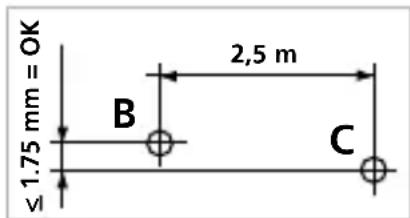
and mark point C. Check whether the horizontal line from point C is level with point B to within ± 1.75mm . Repeat the process by turning the laser to the left.

Regularly check the calibration before use, after transport and after extended periods of storage.
Data transfer
The device features a Bluetooth® function that enables wireless data transfer to mobile devices with a Bluetooth® interface (such as a smartphone or tablet).
The system prerequisites for a Bluetooth®* connection are specified at http://laserliner.com/info?an=ble
The device can set up a Bluetooth®* connection with Bluetooth 4.0 compatible devices.
The range is set to a maximum distance of 10m from the terminal device and greatly depends on the ambient conditions such as the thickness and composition of walls, sources of interference as well as the transmit / receive properties of the terminal device.
Once it has been activated, Bluetooth®* remains switched on indefinitely as the radio system is designed with exceptionally low power consumption.
A mobile device can link up to the active measuring device via an app.
Laserliner
Application (app)
An app is required to use the Bluetooth®* function. You can download the app from the corresponding stores for the specific type of terminal device:




Make sure that the Bluetooth* interface of the mobile device is activated.
After starting the app and activating the Bluetooth®* function, a connection can be set up between a mobile device and the measuring device. If the app detects several active measuring devices, select the matching device.
This measuring device can be connected automatically the next time it is switched on.
- The Bluetooth® word mark and the logo are registered trademarks of Bluetooth SIG Inc.
Additional functions via the app
The app offers a range of additional functions. If it is not possible to control your device via the app for technical reasons, reset the device to the factory settings by switching it off and back on again so that you can continue to use the regular functions without problems.
Information on maintenance and care
Clean all components with a damp cloth and do not use cleaning agents, scouring agents and solvents. Remove the battery(ies) before storing for longer periods. Store the device in a clean and dry place.
CompactCross-Laser
Calibration
The meter needs to be calibrated and tested on a regular basis to ensure it produces accurate measurement results. We recommend carrying out calibration once a year.
| Technical data | Subject to technical alterations. 18W41 |
| Self-levelling range | ± 4° |
| Accuracy | ± 0.35 mm / m |
| Operating range | 15 m (depending on room illumination) |
| Operating range with hand receiver | 30 m (depends on how the technology affects the difference in brightness) |
| Laser wavelength 6 | 35 nm |
| Laser class | 2 / < 1 mW |
| Power supply | 2 x 1.5 V alkaline batteries (type AA, LR6) |
| Operating time | 14 hours (alkaline batteries) |
| Operating conditions | -10°C ... 50°C, Max. humidity 80% rH, no condensation, Max. working altitude 4000 m above sea level |
| Storage conditions | -10°C ... 70°C, Max. humidity 80% rH |
| Radio module operating data | Bluetooth LE 4.x interface; Frequency band: ISM band 2400–2483.5 MHz, 40 channels; Transmission power: max. 10 mW; Bandwidth: 2 MHz; Bit rate: 1 Mbit/s; Modulation: GFSK/FHSS |
| Dimensions | 75 x 88 x 58 mm (W x H x D) |
| Weight | 246 g (incl. batteries) |
EU directives and disposal
This device complies with all necessary standards for the free movement of goods within the EU.
This product is an electric device and must be collected separately for disposal according to the European Directive on waste electrical and electronic equipment.
Further safety and supplementary notices at:
http://laserliner.com/info/?an AGO
Laserliner

- Function / Application
- General safety instructions
- Safety instructions
- CompactCross-Laser
- Laserliner
- Inserting batteries
- Horizontal and vertical levelling
- Slope mode
- Hand receiver mode
- Optional: Working with the laser receiver RX
- Preparing the calibration check
- Performing the calibration check
- Checking the vertical line
- Checking the horizontal line
- Data transfer
- Application (app)
- Additional functions via the app
- Information on maintenance and care
- Calibration
- EU directives and disposal
Brand : Laserliner
Model : CompactCrossLaser Plus
Category : Laser level