MultiSync LCD1970NXp - Monitor NEC - Free user manual and instructions
Find the device manual for free MultiSync LCD1970NXp NEC in PDF.



| Product Type | Color LCD Monitor |
| Brand | NEC |
| Model | MultiSync LCD1970NXp |
| Screen Size (diagonal) | 19 inches (48 cm) |
| Native Resolution | 1280 x 1024 |
| Aspect Ratio | 5:4 |
| Panel Type | LCD TFT |
| Video Inputs | VGA (D-Sub 15-pin) and DVI-D (digital) |
| Power Supply | 100-240 V AC, 50/60 Hz |
| Image Adjustments | Brightness, Contrast, Position, Clock, Phase, Colors (R/G/B), DV Mode |
| OSM Functions | Multilingual, OSM Lock, Power Off Timer, Factory Preset |
| Stand Ergonomics | Height adjustable, tilt, swivel |
| Compliance | ENERGY STAR, CE |
| Package Contents | Monitor, VGA cable, power cord, cable cover, CD-ROM, manual |
| Safety | Do not open the casing; avoid moisture; disconnect before cleaning |
| Cleaning | Soft cloth, mild detergent; do not use alcohol or solvents |
| VESA Mounting | VESA Compatible (100 x 100 mm) |
Frequently Asked Questions - MultiSync LCD1970NXp NEC
User questions about MultiSync LCD1970NXp NEC
0 question about this device. Answer the ones you know or ask your own.
Ask a new question about this device
Download the instructions for your Monitor in PDF format for free! Find your manual MultiSync LCD1970NXp - NEC and take your electronic device back in hand. On this page are published all the documents necessary for the use of your device. MultiSync LCD1970NXp by NEC.
USER MANUAL MultiSync LCD1970NXp NEC
MultiSync LCD1970V MultiSync LCD1970NX MultiSync LCD1970NXp
User's Manual
Canadian Department of Communications Compliance Statement
DOC: This Class B digital apparatus meets all requirements of the Canadian Interference-Causing Equipment Regulations.
C-UL: Bears the C-UL Mark and is in compliance with Canadian Safety Regulations according to CAN/CSA C22.2 No. 60950-1.
FCC Information
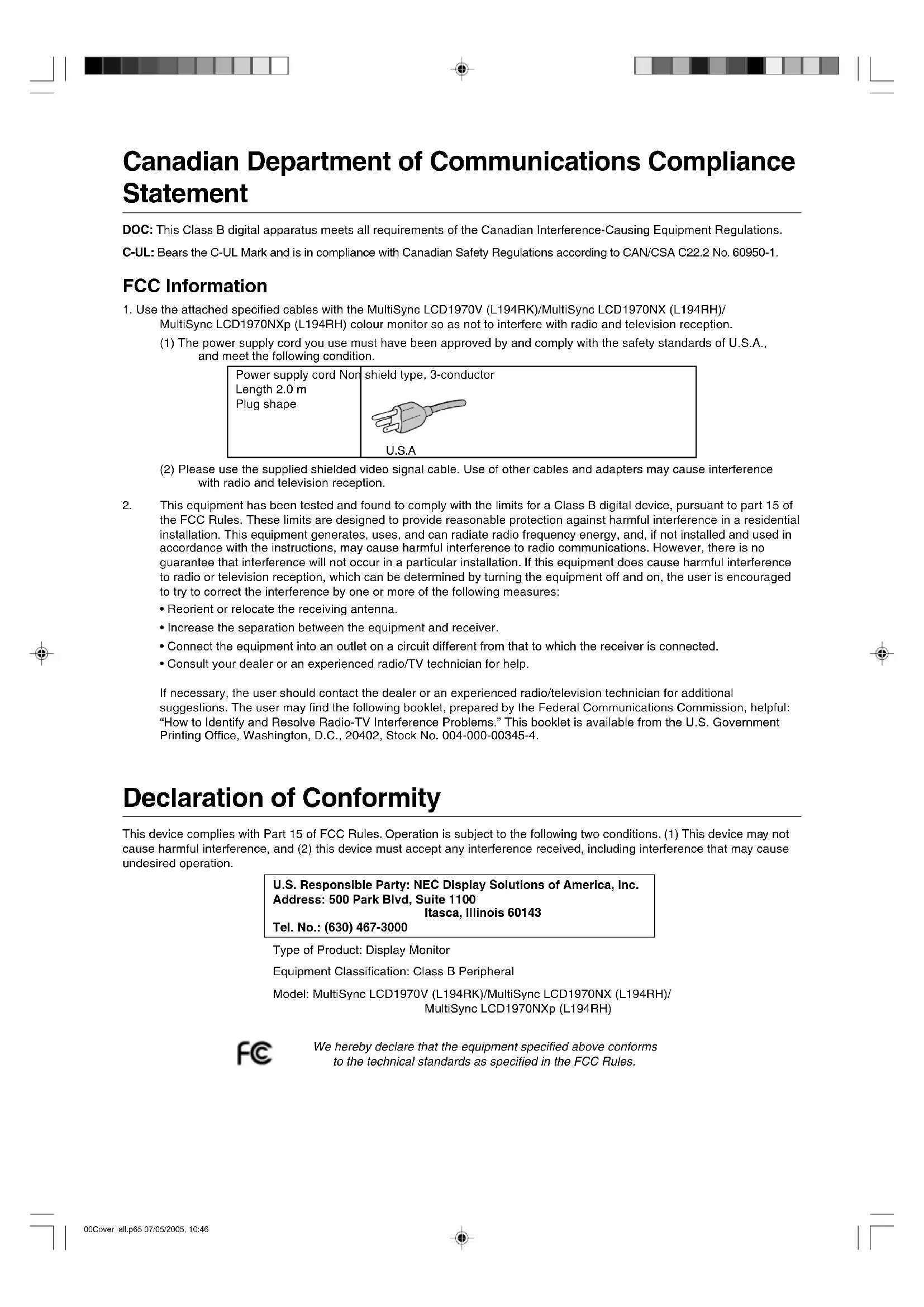
- Use the attached specified cables with the MultiSync LCD1970V (L194RK)/MultiSync LCD1970NX (L194RH)/ MultiSync LCD1970NXp (L194RH) colour monitor so as not to interfere with radio and television reception.
(1) The power supply cord you use must have been approved by and comply with the safety standards of U.S.A., and meet the following condition.

(2) Please use the supplied shielded video signal cable. Use of other cables and adapters may cause interference with radio and television reception.
-
This equipment has been tested and found to comply with the limits for a Class B digital device, pursuant to part 15 of the FCC Rules. These limits are designed to provide reasonable protection against harmful interference in a residential installation. This equipment generates, uses, and can radiate radio frequency energy, and, if not installed and used in accordance with the instructions, may cause harmful interference to radio communications. However, there is no guarantee that interference will not occur in a particular installation. If this equipment does cause harmful interference to radio or television reception, which can be determined by turning the equipment off and on, the user is encouraged to try to correct the interference by one or more of the following measures:
-
Reorient or relocate the receiving antenna.
- Increase the separation between the equipment and receiver.
- Connect the equipment into an outlet on a circuit different from that to which the receiver is connected.
- Consult your dealer or an experienced radio/TV technician for help.
If necessary, the user should contact the dealer or an experienced radio/television technician for additional suggestions. The user may find the following booklet, prepared by the Federal Communications Commission, helpful: "How to Identify and Resolve Radio-TV Interference Problems." This booklet is available from the U.S. Government Printing Office, Washington, D.C., 20402, Stock No. 004-000-00345-4.
Declaration of Conformity
This device complies with Part 15 of FCC Rules. Operation is subject to the following two conditions. (1) This device may not cause harmful interference, and (2) this device must accept any interference received, including interference that may cause undesired operation.
U.S. Responsible Party: NEC Display Solutions of America, Inc.
Address: 500 Park Blvd, Suite 1100
Itasca, Illinois 60143
Tel. No.: (630) 467-3000
Type of Product: Display Monitor
Equipment Classification: Class B Peripheral
Model: MultiSync LCD1970V (L194RK)/MultiSync LCD1970NX (L194RH)/
MultiSync LCD1970NXp (L194RH)

We hereby declare that the equipment specified above conforms to the technical standards as specified in the FCC Rules.
TcODevelopment
Congratulations!
The display you have just purchased carries the TCO'03 Displays label. This means that your display is designed, manufactured and tested according to some of the strictest quality and environmental requirements in the world. This makes for a high performance product, designed with the user in focus that also minimizes the impact on our natural environment.
Some of the features of the TCO'03 Display requirements:
Ergonomics
- Good visual ergonomics and image quality in order to improve the working environment for the user and to reduce sight and strain problems. Important parameters are luminance, contrast, resolution, reflectance, colour rendition and image stability.
Energy
- Energy-saving mode after a certain time - beneficial both for the user and the environment
- Electrical safety
Emissions
- Electromagnetic fields
- Noise emissions
Ecology
- The product must be prepared for recycling and the manufacturer must have a certified environmental management system such as EMAS or ISO 14001.
-
Restrictions on:
-
chlorinated and brominated flame retardants and polymers
- heavy metals such as cadmium, mercury and lead.
The requirements included in this label have been developed by TCO Development in cooperation with scientists, experts, users as well as manufacturers all over the world. Since the end of the 1980s TCO has been involved in influencing the development of IT equipment in a more user-friendly direction. Our labelling system started with displays in 1992 and is now requested by users and IT-manufacturers all over the world.
Manufacturer's Recycling and Energy Information
NEC DISPLAY SOLUTIONS is strongly committed to environmental protection and sees recycling as one of the company's top priorities in trying to minimize the burden placed on the environment. We are engaged in developing environmentally-friendly products, and always strive to help define and comply with the latest independent standards from agencies such as ISO (International Organisation for Standardization) and TCO (Swedish Trades Union).
For more information, and for help in recycling your old NEC monitors, please visit our website at
http://www.nec-display-solutions.com (in Europe) or
http://www.nec-display.com (in Japan) or
http://www.necdisplay.com (in USA).
Country-specific recycling programmes can also be found at:
Sweden - http://www.el-retur.se
Germany - http://www.recyclingpartner.de/
This monitor features an advanced energy saving capability. When a VESA Display Power Management Signaling (DPMS) Standard signal is sent to the monitor, the Energy Saving mode is activated. The monitor enters a single Energy Saving mode.
LCD1970V
| Mode Power consumption LED colour | ||
| Normal Operation Approx. 36W Green | ||
| Energy Saving Mode Less than 2W Amber | ||
| Off Mode Less than 1W Unlit | ||
LCD1970NX/NXp
| Mode Power consumption LED colour | ||
| Normal Operation Approx. 38W Green | ||
| Energy Saving Mode Less than 2W Amber | ||
| Off Mode Less than 1W Unlit |
Disposing of your old NEC product
Within the European Union
EU-wide legislation, as implemented in each Member State, requires that waste electrical and electronic products carrying the mark (left) must be disposed of separately from normal household waste. This includes monitors and electrical accessories, such as signal cables or power cords. When you need to dispose of your NEC display products, please follow the guidance of your local authority, or ask the shop where you purchased the product, or if applicable, follow any agreements made between yourself and NEC.
The mark on electrical and electronic products only applies to the current European Union Member States.
Outside the European Union
If you wish to dispose of used electrical and electronic products outside the European Union, please contact your local authority so as to comply with the correct disposal method.
Index
Warning, Caution. English-1
Declaration English-1
Contents English-2
Quick Start English-3
Controls English-7
Recommended use English-9
Varovani, Upozorneni. Cesky-1
Prohlasei Cesky-1
Obsah Cesky-2
Rychly start Cesky-3
Ovladaci prvky .. Cesky-7
Provozni pouyny Cesky-9
Warning, Vorsicht . . . . . . . . . . . . . . . . . . . . . . . . . . . . . . . . . . . . . . . . . . . . . . . . . . . . . . . . . . . . . . . . . .
Erklärung. . . . . . . . . . . . . . . . . . . . . . . . . . . . . . . . . . . . . . . . . . . . . . . . . . . . . . . . .
Inhalt der Verpackung . . . . . . . . . . . . . . . . . . . . . . . . . . . . . . . . . . . . . . . . . . . . . . . . . . . . . . . . . . . . . . . . . . . . . . . . . ..
TO PREVENT FIRE OR SHOCK HAZARDS, DO NOT EXPOSE THIS UNIT TO RAIN OR MOISTURE. ALSO, DO NOT USE THIS UNIT'S POLARIZED PLUG WITH AN EXTENSION CORD RECEPTACLE OR OTHER OUTLETS UNLESS THE PRONGS CAN BE FULLLY INSERTED.
REFRAIN FROM OPENING THE CABINET AS THERE ARE HIGH VOLTAGE COMPONENTS INSIDE. REFER SERVICING TO QUALIFIED SERVICE PERSONNEL.

CAUTION

CAUTION: TO REDUCE THE RISK OF ELECTRIC SHOCK, MAKE SURE POWER CORD IS UNPLUGGED FROM WALL SOCKET. TO FULLY DISENGAGE THE POWER TO THE UNIT, PLEASE DISCONNECT THE POWER CORD FROM THE AC OUTLET.DO NOT REMOVE COVER (OR BACK).NO USER SERVICEABLE PARTS INSIDE.REFER SERVICING TO QUALIFIED SERVICE PERSONNEL.

This symbol warns user that uninsulated voltage within the unit may have sufficient magnitude to cause electric shock. Therefore, it is dangerous to make any kind of contact with any part inside this unit.

This symbol alerts the user that important literature concerning the operation and maintenance of this unit has been included. Therefore, it should be read carefully in order to avoid any problems.
Caution:
When operating the MultiSync LCD1970V/MultiSync LCD1970NX/MultiSync LCD1970NXp with a 220-240V AC power source in Europe, use the power cord provided with the monitor.
In the UK, a BS approved power cord with a moulded plug has a Black (five Amps) fuse installed for use with this equipment. If a power cord is not supplied with this equipment please contact your supplier.
When operating the MultiSync LCD1970V/MultiSync LCD1970NX/MultiSync LCD1970NXp with a 220-240V AC power source in Australia, use the power cord provided with the monitor. If a power cord is not supplied with this equipment please contact your supplier.
For all other cases, use a power cord that matches the AC voltage of the power outlet and has been approved by and complies with the safety standard of your particular country.
Declaration
Declaration of the Manufacturer
We hereby certify that the colour monitor MultiSync
LCD1970V (L194RK)/MultiSync LCD1970NX
(L194RH)/MultiSync LCD1970NXp (L194RH) are in
compliance with
Council Directive 73/23/EEC:
-EN60950-1
Council Directive 89/336/EEC:
-EN55022
-EN 61000-3-2
-EN61000-3-3
-EN55024
and marked with

NEC Display Solutions, Ltd.
4-13-23, Shibaura,
Minato-Ku
Tokyo 108-0023, Japan
Windows is a registered trademark of Microsoft Corporation. NEC is a registered trademark of NEC Corporation. ENERGY STAR is a U.S. registered trademark.
OmniColor is a registered trademark of NEC Display Solutions Europe GmbH in the countries of EU and Switzerland.
ErgoDesign is a registered trademark of NEC Display Solutions, Ltd. in Austria, Benelux, Denmark, France, Germany, Italy, Norway, Spain, Sweden and U.K.
NaViSet is a trademark of NEC Display Solutions Europe GmbH in the countries of EU and Switzerland.
MultiSync is a registered trademark of NEC Display Solutions, Ltd. in the countries of U.K., Italy, Austria, Netherlands, Switzerland, Sweden, Spain, Denmark, Germany, Norway and Finland.
All other brands and product names are trademarks or registered trademarks of their respective owners.
As an ENERGY STAR® Partner, NEC Display Solutions of America, Inc. has determined that this product meets the ENERGY STAR guidelines for energy efficiency. The ENERGY STAR emblem does not represent EPA endorsement of any product or service.
Contents
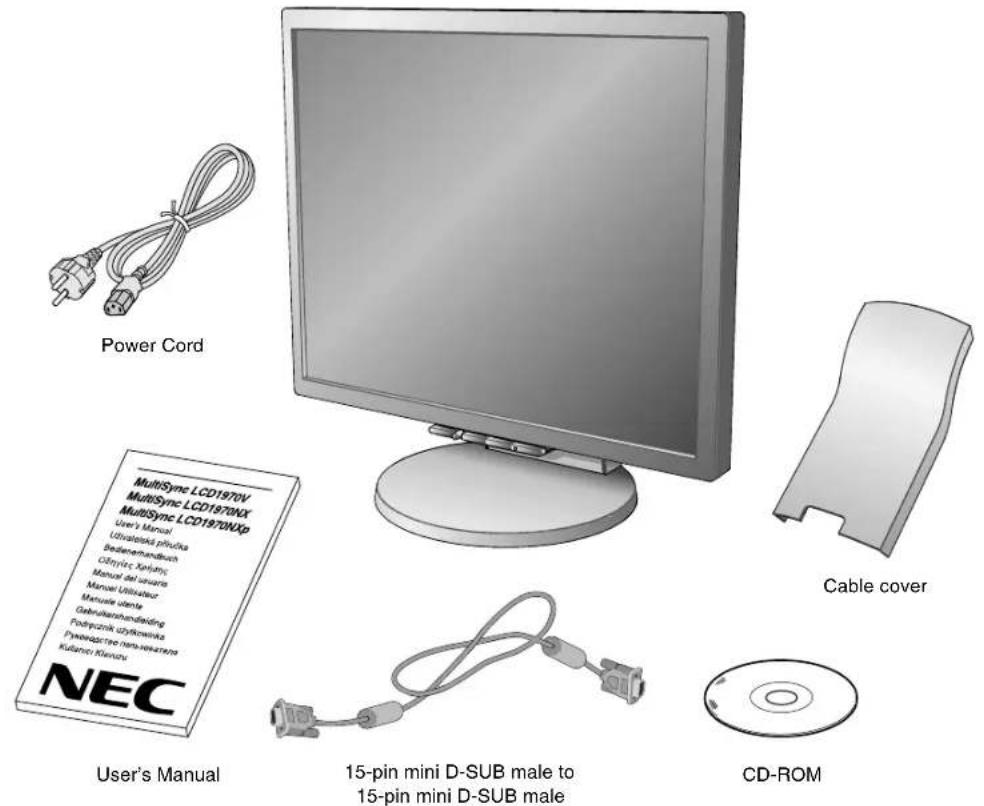
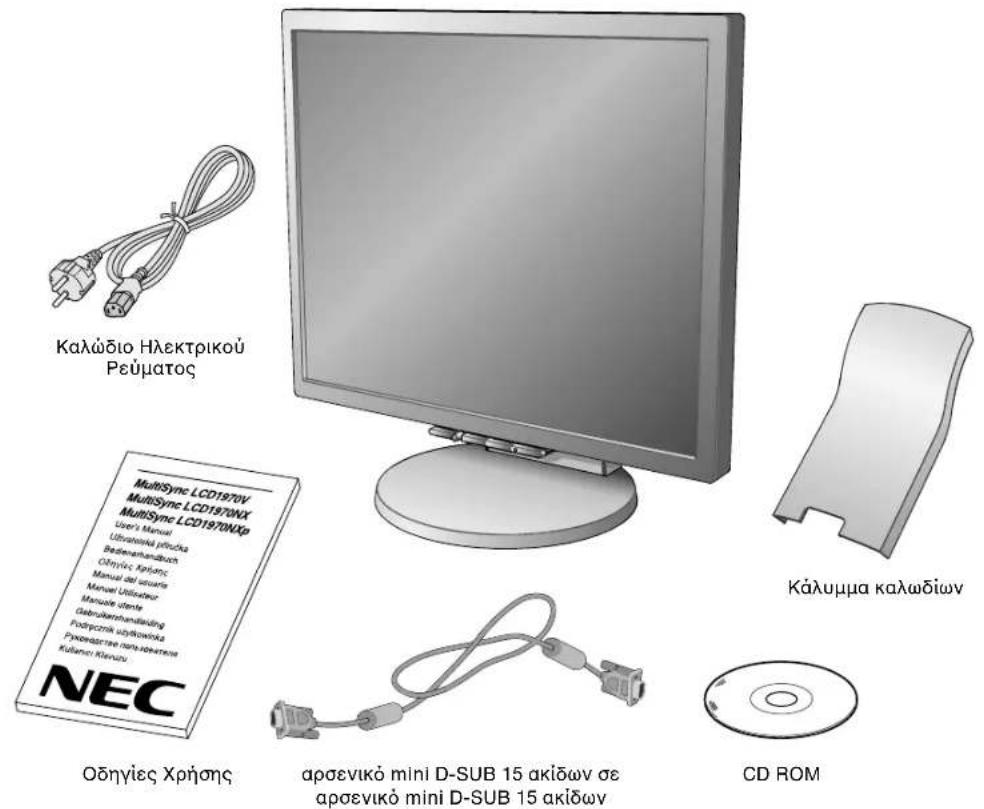
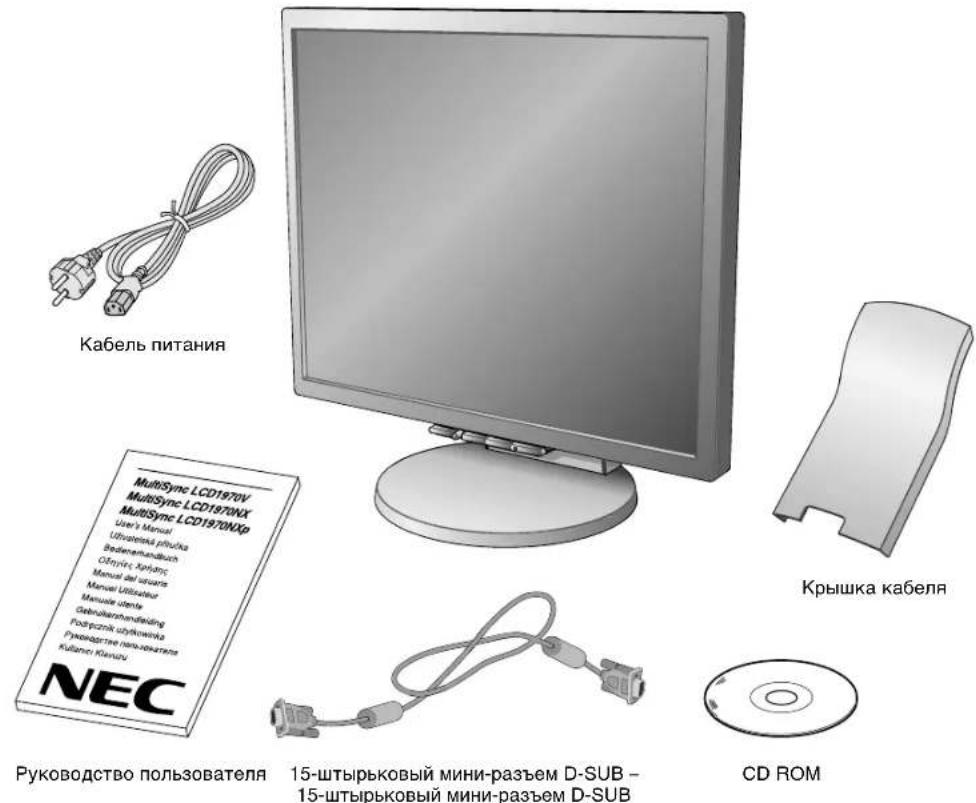
Your new NEC MultiSync LCD monitor box* should contain the following:
MultiSync LCD monitor with tilt/swivel/height adjust stand
Power Cord
- Cable cover
Video Signal Cable (15-pin mini D-SUB male to 15-pin mini D-SUB male)
- User's Manual
- CD ROM (includes complete User's Manual in PDF format).
To see the User's Manual, Acrobat Reader 4.0 or higher must be installed on your PC.
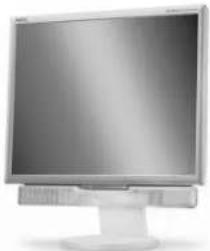
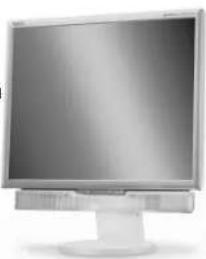
NOTE: This monitor can be equipped with optional loudspeakers: "MultiSync Sound bar". Please ask your dealer or check our website http://www.nec-display-solutions.com
- Remember to save your original box and packing material to transport or ship the monitor.
Quick Start
To attach the MultiSync LCD monitor to your system, follow these instructions:
- Turn off the power to your computer.
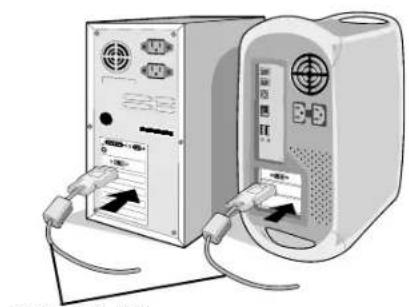
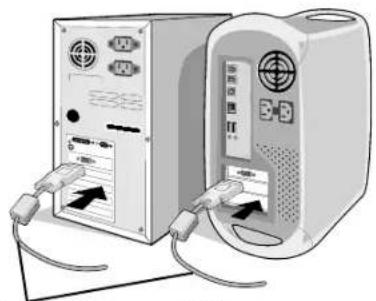
- For the PC or MAC with DVI digital output (NX/NXp only): Connect the DVI signal cable (not included) to the connector of the display card in your system (Figure A.1). Tighten all screws.
For the PC with Analog output: Connect the 15-pin mini D-SUB signal cable to the connector of the display card in your system (Figure A.2). Tighten all screws.
For the MAC: Connect the Macintosh cable adapter to the computer, then attach the 15-pin mini D-SUB signal cable to the Macintosh cable adapter (Figure B.1). Tighten all screws.
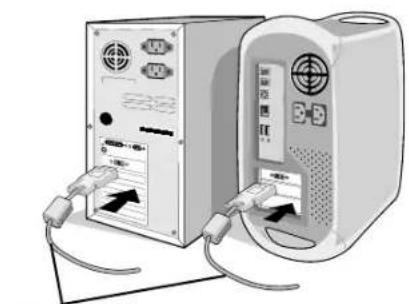
DVI signal cable (not included)
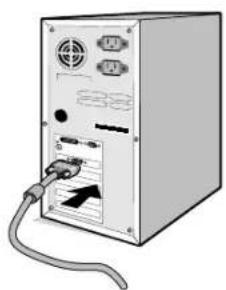
Figure A.2
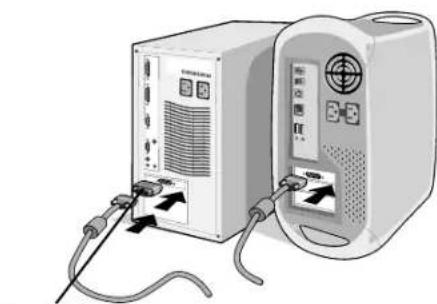
Macintosh Cable Adapter (not included)
NOTE: Some Macintosh systems do not require a Macintosh cable adapter.
- Place hands on each side of the monitor to tilt the LCD panel 30-degree angle and lift up to the highest position (Figure C.1).
- Connect all cables to the appropriate connectors (Figure C.1).
- Place power cord into the specific hooks indicated in Figure C.2.
- Place the D-Sub into the specific hooks indicated in Figure C.2.
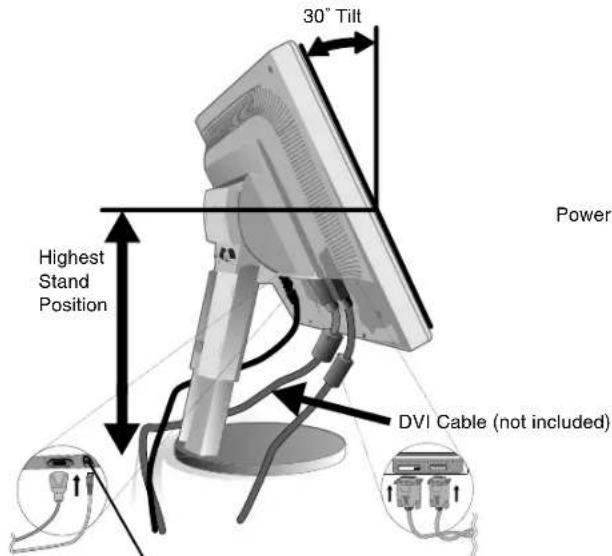
Figure C.1 Figure C.2
- NC-OUT (NX/NXp only)
- NEC optional product attachment.
- Do not use this connector unless specified.
- Place the DVI cable into the specific hooks indicated in Figure C.3.
- Make sure all cables are resting flat against the stand (Figure C.3).
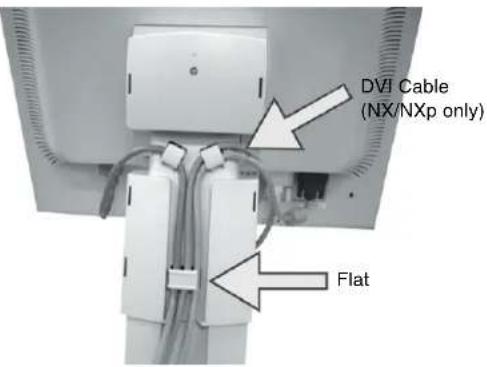
Figure C.3
- Hold the all cables firmly and place the cable cover onto the stand (Figure D.1). To remove the cable cover, lift the cover off as shown in Figure D.2.
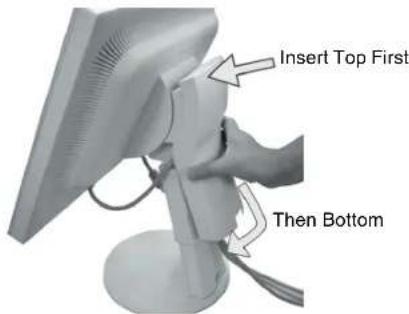
Figure D.1
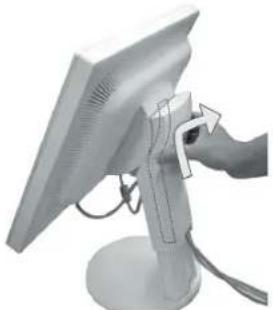
Figure D.2
- Connect the power cord to the power outlet (Figure E.1).
NOTE: If you have difficulty removing the cable cover, please push the lower opening upward to remove it, as show in Figure E.2.
NOTE: Please refer to Caution section of this manual for proper selection of AC power cord.
- The vacation switch on the back side of the monitor must be turned on (Figure E.1). Turn on the monitor with the front power button and the computer.
NOTE: The vacation switch is a true on/off switch. If this switch is on the OFF position, the monitor cannot be turned on using the front button. DO NOT switch on/off repeatedly.
-
No-Touch Auto Adjust automatically adjusts the monitor to optimal settings upon initial setup for most timings. For further adjustments, use the following OSM controls:
-
Auto Adjust Contrast (Analog input only)
- Auto Adjust (Analog input only)
Refer to the Controls section of this User's Manual for a full description of these OSM controls.
NOTE: If you have any problems, please refer to the Troubleshooting section of this User's Manual.
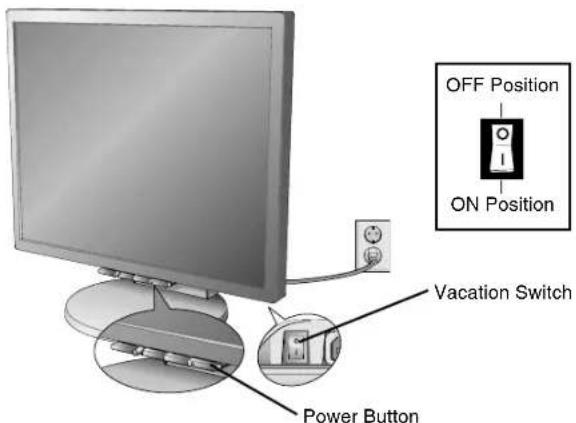
Figure E.1
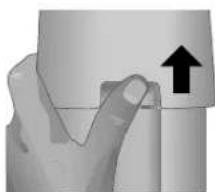
Figure E.2
English-4
Raise and Lower Monitor Screen
The monitor may be raised or lowered. To raise or lower screen, place hands on each side of the monitor and lift or lower to the desired height (Figure RL.1).
NOTE: Handle with care when raising or lowering the monitor screen.
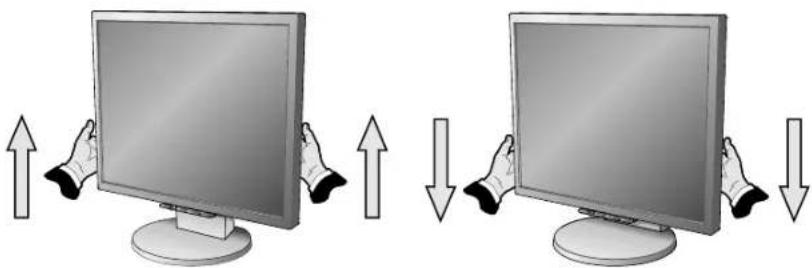
Figure RL.1
Tilt and Swivel
Grasp both sides of the monitor screen with your hands and adjust the tilt and swivel as desired (Figure TS.1).
NOTE: Handle with care when tilting and swivelling the monitor screen.
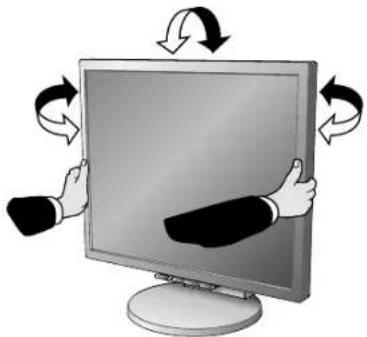
Figure TS.1
Remove Monitor Stand for Mounting
To prepare the monitor for alternate mounting purposes:
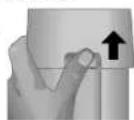
- Place hands on each side of the monitor and lift up to the highest position. Remove the cable cover (Figure S.1).
NOTE: If you have difficulty removing the cable cover, please push the lower opening upward to remove it, as shown in the figure beside.
- Disconnect all cables.
- Place monitor face down on a non-abrasive surface (Figure S.2).
NOTE: Handle with care when monitor facing down, for avoiding the damage to the front buttons. - Remove the 2 screws connecting the stand to the monitor (Figure S.2).
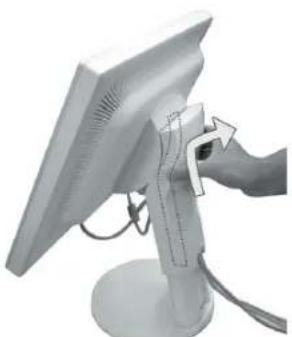
Figure S.1
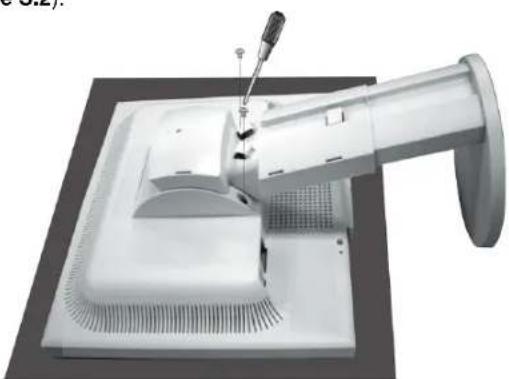
Figure S.2
English-5
- Lift up the stand to unlatch the upper hooks and remove the stand (Figure S.3).
- Remove the 2 screws on the top of the monitor (Figure S.4). The monitor is now ready for mounting in an alternate manner.
- Connect the cables to the back of the monitor.
- Reverse this process to re-attach stand.
NOTE: Use only VESA-compatible alternative mounting method. Handle with care when removing stand.
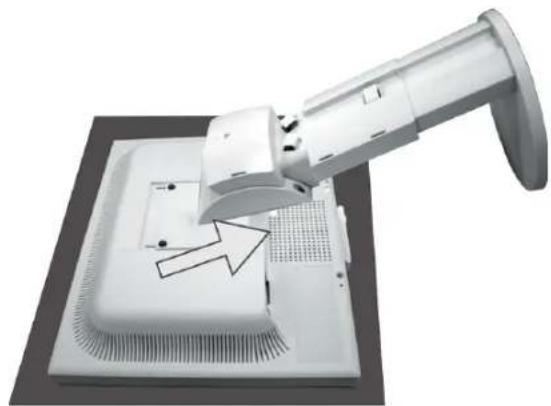
Figure S.3
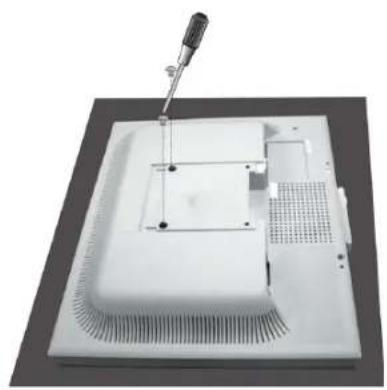
Figure S.4
Flexible Arm Installation
This LCD monitor is designed for use with a flexible arm. To mount the monitor to a flexible arm:
- Follow the instructions on how Remove Monitor Stand for Mounting to remove the stand.
- Using the 4 screws from the stand removal and attach the arm to the monitor (Figure F.1).
NOTE: The LCD monitor should only be used with an approved arm (e.g. GS mark). To meet the safety requirements, the monitor must be mounted to an arm, which guarantees the necessary stability under consideration of the weight of the monitor.
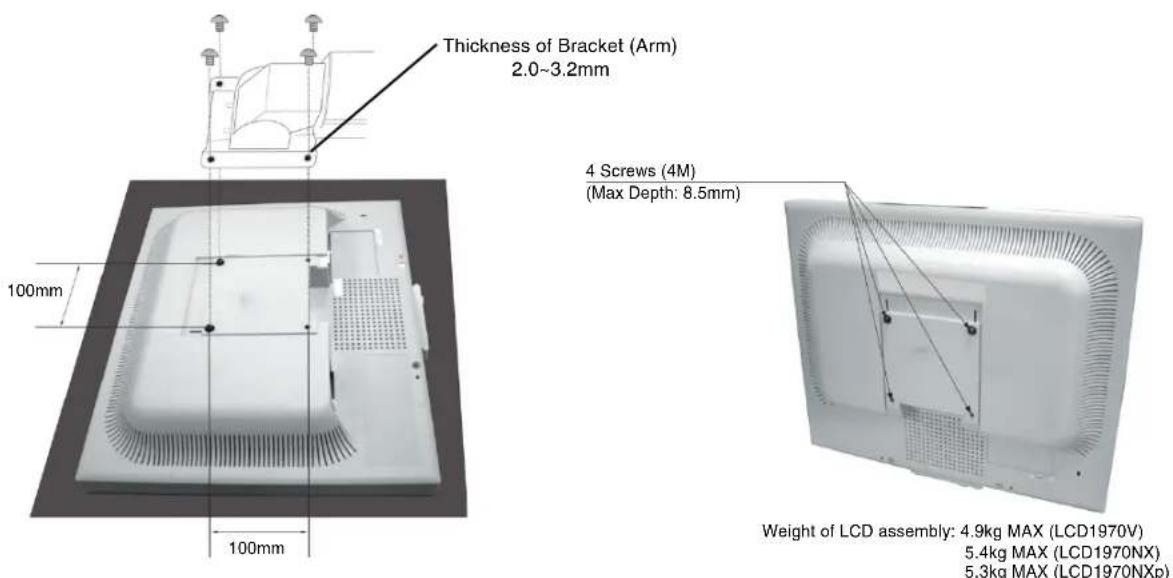
Figure F.1
Controls
OSM (On-Screen Manager) control buttons on the front of the monitor function as follows:
To access OSM menu, press any of the control buttons (MENU/EXIT, Left, Right, Down, Up).
To change signal input, press the SELECT button (NX/NXp only).
To change DV MODE, press the RESET button (NX/NXp only).
NOTE: OSM must be closed in order to change signal input.

LCD1970V LCD1970NX/LCD1970NXp
Button Menu
MENUE/EXIT Open OSM main menu. Exits the OSM controls.
Exits to the OSM main menu.
4-Direction-Key


Down
Left/Right Moves the highlighted area left/right to select control menus. Moves the bar left/right to increase or decrease the adjustment.
Down/Up Moves the highlighted area down/up to select one of the controls.
SELECT Active Auto Adjust function. Enter the OSM sub menu.
RESET Resets the highlighted control menu to the factory setting.
NOTE: When RESET is pressed in the main and sub-menu, a warning window will appear allowing you to cancel the RESET function by pressing the MENU/EXIT button.

Brightness/Contrast Controls
BRIGHTNESS
Adjusts the overall image and background screen brightness.
CONTRAST
Adjusts the image brightness in relation to the background.
DV MODE (NX/NXp only)
Allows you to select the suitable setting for Movie, Picture and etc.
AUTO CONTRAST (Analog input only)
Adjusts the image displayed to optimal settings.

Auto Adjust (Analog input only)
Automatically adjusts the Image Position, H. Size and Fine settings.

Image Controls (Analog input only)
LEFT / RIGHT
Controls Horizontal Image Position within the display area of the LCD.
DOWN / UP
Controls Vertical Image Position within the display area of the LCD.
H.SIZE
Adjusts the horizontal size by increasing or decreasing this setting.
FINE
Improves focus, clarity and image stability by increasing or decreasing this setting.
English-7

Colour Control System
Colour Control System: Six colour presets select the desired colour setting (sRGB and NATIVE colour presets are standard and cannot be changed).
R,G,B: Increases or decreases Red, Green or Blue colour depending upon which is selected. The change in colour will appear on screen and the direction (increase or decrease) will be shown by the bars.
NATIVE: Original colour presented by the LCD panel that is unadjustable.
sRGB: sRGB mode dramatically improves the colour fidelity in the desktop environment by a single standard RGB colour space. With this colour supported environment, the operator could easily and confidently communicate colour without further colour management overhead in the most common situations.

Tools
OFF TIMER: Monitor will automatically power-down when the end user has selected a predetermined amount of time.
HOT KEY: You can adjust the brightness and contrast directly. When this function is set to ON, you can adjust the brightness with left or right control and contrast with up or down control while the OSM menu is off.
FACTORY PRESET: Selecting Factory Preset allows you to reset all OSM control settings back to the factory settings. The RESET button will need to be held down for several seconds to take effect. Individual settings can be reset by highlighting the control to be reset and pressing the RESET button.

Menu Tools
LANGUAGE: OSM control menus are available in eight languages.
OSM LEFT/RIGHT: You can choose where you would like the OSM control image to appear horizontally on your screen.
OSM DOWN/UP: You can choose where you would like the OSM control image to appear vertically on your screen.
OSM Turn Off: The OSM control menu will stay on as long as it is in use. In the OSM Turn Off submenu, you can select how long the monitor waits after the last touch of a button to shut off the OSM control menu.
OSM Lock Out: This control completely locks out access to all OSM control functions without Brightness and Contrast. When attempting to activate OSM controls while in the Lock Out mode, a screen will appear indicating the OSM controls are locked out. To activate the OSM Lock Out function, press SELECT, then right control button and hold down simultaneously. To deactivate the OSM Lock Out, press SELECT, then left control button and hold down simultaneously while in the OSM menu.
RESOLUTION NOTIFIER: This optimal resolution is 1280 × 1024 . If ON is selected, a message will appear on the screen after 30 seconds, notifying you that the resolution is not at 1280 × 1024 .

Information
The Information menu indicates the current input, display resolution, horizontal and vertical frequency, and polarity settings of the monitor. The model and serial numbers of your monitor are also indicated.
OSM Warning
OSM Warning menus disappear with Exit button.
NO SIGNAL: This function gives a warning when there is no Horizontal or Vertical Sync. After power is turned on or when there is a change of input signal, the No Signal window will appear.
RESOLUTION NOTIFIER: This function gives a warning of use with optimized resolution. After power is turned on or when there is a change of input signal or the video signal doesn't have proper resolution, the Resolution Notifier window will open. This function can be disabled in the Menu Tools.
OUT OF RANGE: When input signal is non-supported timing or the video signal doesn't have proper timing, the Out of Range menu will appear.
Recommended use
Safety Precautions and Maintenance

FOR OPTIMUM PERFORMANCE, PLEASE NOTE THE FOLLOWING WHEN SETTING UP AND USING THE MULTISYNC LCD COLOUR MONITOR:

DO NOT OPEN THE MONITOR. There are no user serviceable parts inside and opening or removing covers may expose you to dangerous shock hazards or other risks. Refer all servicing to qualified service personnel.
- Do not spill any liquids into the cabinet or use your monitor near water.
- Do not insert objects of any kind into the cabinet slots, as they may touch dangerous voltage points, which can be harmful or fatal or may cause electric shock, fire or equipment failure.
- Do not place any heavy objects on the power cord. Damage to the cord may cause shock or fire.
- Do not place this product on a sloping or unstable cart, stand or table, as the monitor may fall, causing serious damage to the monitor.
- Do not place any objects onto the monitor and do not use the monitor outdoors.
- The inside of the fluorescent tube located within the LCD monitor contains mercury. Please follow the bylaws or rules of your municipality to dispose of the tube properly.
- Do not bend power cord.
- Do not use monitor in high temperatured, humid, dusty, or oily areas.
- Do not cover vent on monitor.
Immediately unplug your monitor from the wall outlet and refer servicing to qualified service personnel under the following conditions:
- When the power supply cord or plug is damaged.
- If liquid has been spilled, or objects have fallen into the monitor.
- If the monitor has been exposed to rain or water.
- If the monitor has been dropped or the cabinet damaged.
- If the monitor does not operate normally by following operating instructions.
If glass is broken, handle with care.
If monitor or glass is broken, do not come in contact with the liquid crystal and handle with care.

- Allow adequate ventilation around the monitor so that heat can properly dissipate. Do not block ventilated openings or place the monitor near a radiator or other heat sources. Do not put anything on top of monitor.
- The power cable connector is the primary means of detaching the system from the power supply. The monitor should be installed close to a power outlet which is easily accessible.
-
Handle with care when transporting. Save packaging for transporting.
-
Image Persistence: Please be aware that LCD Technology may experience a phenomenon known as Image Persistence. Image Persistence occurs when a residual or "ghost" image of a previous image remains visible on the screen. Unlike CRT monitors, LCD monitors' image persistence is not permanent, but constant images being displayed for a long period of time should be avoided. To alleviate image persistence, turn off the monitor for as long as the previous image was displayed. For example, if an image was on the monitor for one hour and a residual image remains, the monitor should be turned off for one hour to erase the image.
NOTE: As with all personal display devices, NEC DISPLAY SOLUTIONS recommends displaying moving images and using a moving screen saver at regular intervals whenever the screen is idle or turning off the monitor when not in use.

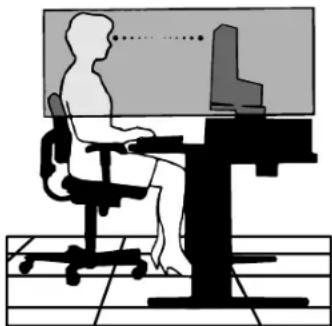
CORRECT PLACEMENT AND ADJUSTMENT OF THE MONITOR CAN REDUCE EYE, SHOULDER AND NECK FATIGUE. CHECK THE FOLLOWING WHEN YOU POSITION THE MONITOR:

- For optimum performance, allow 20 minutes for warm-up.
- Adjust the monitor height so that the top of the screen is at or slightly below eye level. Your eyes should look slightly downward when viewing the middle of the screen.
- Position your monitor no closer than 40~cm and no further away than 70~cm from your eyes. The optimal distance is 50~cm .
- Rest your eyes periodically by focusing on an object at least 20 feet away. Blink often.
- Position the monitor at a 90^ angle to windows and other light sources to minimize glare and reflections. Adjust the monitor tilt so that ceiling lights do not reflect on your screen.
If reflected light makes it hard for you to see your screen, use an anti-glare filter. - Adjust the monitor's brightness and contrast controls to enhance readability.
- Use a document holder placed close to the screen.
- Position whatever you are looking at most of the time (the screen or reference material) directly in front of you to minimize turning your head while you are typing.
- Avoid displaying fixed patterns on the monitor for long periods of time to avoid image persistence (after-image effects).
Get regular eye checkups.
Ergonomics
To realize the maximum ergonomics benefits, we recommend the following:
- Adjust the Brightness until the background raster disappears.
- Do not position the Contrast control to its maximum setting.
- Use the preset Size and Position controls with standard signals.
- Use the preset Colour Setting.
- Use non-interlaced signals with a vertical refresh rate between 60-75 Hz.
- Do not use primary colour blue on a dark background, as it is difficult to see and may produce eye fatigue to insufficient contrast.
Cleaning the LCD Panel
- When the liquid crystal panel is stained with dust or dirt, please wipe with soft cloth gently.
- Please do not rub the LCD panel with hard material.
- Please do not apply pressure to the LCD surface.
- Please do not use OA cleaner it will cause deterioration or discolor on the LCD surface.
Cleaning the Cabinet
- Unplug the power supply
Gently wipe the cabinet with a soft cloth
To clean the cabinet, dampen the cloth with a neutral detergent and water, wipe the cabinet and follow with a dry cloth.
NOTE: Many plastics are used on the surface of the cabinet. DO NOT clean with benzene, thinner, alkaline detergent, alcoholic system detergent, glass cleaner, wax, polish cleaner, soap powder, or insecticide. Do not touch rubber or vinyl to the cabinet for a long time. These types of fluids and fabrics can cause the paint to deteriorate, crack or peel.

VAROVÁNÍ

CHRAÑTE ZARÍZENÍ PRÉD DESTÉM A VLHKEM. ZABRÁNITE TAK NEBEZPEÇİ POŽÁRU NEBO URAZU ELEKTRICKYM PROUDEM. POLARIZOVANOU ZASTRČU JEDNOTKY NEPOUŽIVEJTE VE SPOJENI SE ZASUVKOU PRODLUžOVACI SNÜRY NEBO JINYMI ZASUVKAMI, POKUD KOLÍKY NELZE ZCELA ZASUNOUT.
UVNTR ZARIZENI SE NACHAZI VYSOKONAPETOV KOMPONENTY, PROTO SKRIN NEOTEVIREJTE. SERVIS SVERTE KVALIFIKOVANE OSOBE.

UPOZORNENI

UPOZORNENI: PRO SNIZENI RIZIKA URAZU ELEKTRICKYM PROUDEM ZKONTROLUJTE, ZDA JE NAPAJECI SNURA ODPOJENA ZE ZASUVKY. PRO UPLNE ODPOJENI ZDROJE NAPAJENI OD JEDNOTKY ODPOJTE NAPAJECI SNURU Z ELEKTRICKE ZASUVKY (NEOSTRANUITE KRYT). UVNITR SE NENACHAZEJI DILY, DO KTERYCH UZIVATEL MUZE ZASAHOVAT. SERVIS SVERTE KVALIFIKOVANE OSOBE.

NEC Display Solutions, Ltd.
4-13-23, Shibaura,
Minato-Ku
Tokyo 108-0023, Japan
NEC Display Solutions, Ltd.
4-13-23, Shibaura,
Minato-Ku
Tokyo 108-0023, Japan
Me to npov niotonoiouoe ot n eYxpwun
oovn MultiSync LCD1970V (L194RK)/MultiSync
LCD1970NX (L194RH)/MultiSync LCD1970NXp
NEC Display Solutions, Ltd.
4-13-23, Shibaura,
Minato-Ku
Tokyo 108-0023, Iantovia
Windows eivai ojma katae the Microsoft Corporation. NEC eivai ojma katae the NEC Corporation.
ENERGY STAR EIVAL onma katae thev ia tH. H.A.
OmniColor eivai oHa kaataeThev TNC NEC Display Solutions Europe GmbH otic xwepc tnc EE kal otny Eaeia.
To ErgoDesign eivai onma katateeov tnc NEC Display Solutions, Ltd. otnv Auotpiia, tic KaTsw Xwpec, tn Aavia, tn Faaia, tn Tepuavia, tv Iaia, tn Nopbnyia, tvn Ionavia, tn Soundelta, tvv Ayyia.
NaViSet eival onma katae v tnc NEC Display Solutions Europe GmbH otic xwepc tnc EE kal otnv Eaeia.
To MultiSync eivai o nma katae thec NEC Display Solutions, Ltd. 0nv Ayyia, Iaia,AuaTpi, Olambdaia, Eaeia
Zounbia,Ionavia,Anvia,Erpaia,NopnyiaKaIaavia.
OaEc oiaaaec pipuec kai ta ovouata npoiovw anoteaouov onmuata katateevevaavvtawv avtioxwKatoxwV.
NC taioc nE NERGY STAR, n NEC Display Solutions of America, Inc. exi anopaoei ot auto to npioiv oumuoppwetau e TIC yevikc odnyie nC NERGY STAR ia aototokotnta nC evepyiaac. To eBAnjua ENGY STAR dev avtipooWTEU tnv UTOOtnpiao onoiouhntote pioiovtoic anmpceiaac an tyv EPA.
Eλληνικα-1
περιεχόμενα
H ouakeuaia* Tns vae oac oovnc NEC MultiSync LCD npenei va nepiaaabe ta akoutheta:
Oboyn MultiSync LCD baonpuoounc klianoc/epiotpoqoc/uouc.
KaλδιO HAεκτριΚΟ ΠΕμματος.
Kaλuμα kaλωδiωv.
Kaawio 2nmaoEikovac (apoevko mini D-SUB 15 aikowv e apoeviok mini D-SUB 15 akiodw).
OdyicXpnns.
CD ROM (nepiaauabvei naneic Onyiec XpnoC oE uopn PDF). Tia va deite to Exyepidio XpnoC, 0a npenei va exe Eykaataotoei otov npoowniok oac unoloyiot noac to npoypauma Acrobat Reader 4.0 n veote npkdoon autou.
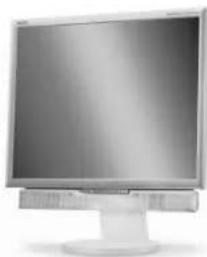
SHMEIOsH:Autn n o0ovn mnpelpi npoapetika va
eEonaiotei e nxiea:"Ppaum nXou
MultiSync".PwntoteTov npounthetautn
ocn eniokeptte Tnv io0oeAiaa mac
http://www.nec-display-solutions.com
* Ouuntheta va quadete to apxikokouti kai ta uukovkeuaoiac yia va ta xpnouonoiote o nepintwn oetaopac n aootolnc tnc oovnc.
Γρήγορη Εκκίνηση
Tia va ouvdeoet Tnv obovn MultiSync LCD OTo ouotma oac, aokouohote tic napakaw odnyie:
- Kλειστε το διακόπην λειτουργίας τοῦλογίαπης.
- Ia unoloyiATn PC n MAC 1e yniakn Edo DVI (movo otnv oovn NX/NXp): Suovot To kalawio anjatoC DVI (ev npiaabavetai otn oukeuaia) oTo ouvotnpa Tnc kaptac oovnc Tou unoloyoiTn oac (xnaA.1). ΣxiTe oaes tic biedes.
Tg PC e Avaojki Edo: Suovte To kaowio omaotc mini D-SUB 15 aikowv otny unodoxn tnc kaptac oovnc Tou unoayoiot nac (xnaA.2). ZpTe oae Tic bioc.
Tn Ynooyiota MAC: Suovoe To avtantop Tou kalwoiou Macintosh oTo uOLOyoiTo kai otouvexia ouvodote To kaWio anmuato mini D-SUB 15 aikow vTo avtantrop Tou kalwdiou Macintosh (XnB.1). ZpIe Tc iE c.
H. SIZE (OPIZONTIO MEREΘΟΣ)
Mnopeite va puθμioεTe to opizovTIO μeYeθoc auéavovTAC nEiδovTAC TIV tni autnc ts ρuθμionc.
FINE (MIKPOPYOMIzH)
Mnopeite va 8e5tiooTe Tnv Eotiaon, Tnv Eukpivia kai Tn OtaepoTnta Tnc Eikovac auEavovTac n eiovovvTac Tnv tui autns Tns puOmuons.
Eλληνικα-7

Directiva 89/336/CEE:
-EN55022
-EN61000-3-2
- EN 61000-3-3
-EN55024
y Ileva la marca

NEC Display Solutions, Ltd.
4-13-23, Shibaura,
Minato-Ku
Tokyo 108-0023, Japon
NEC Display Solutions, Ltd.
4-13-23, Shibaura,
Minato-Ku
Tokyo 108-0023, Japan
Cable video DVI (non inclus)
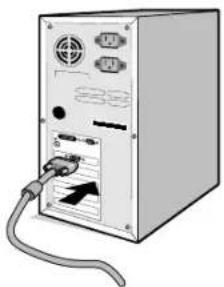
Figure A.2
NEC Display Solutions, Ltd.
4-13-23, Shibaura,
Minato-Ku
NEC Display Solutions, Ltd.
4-13-23, Shibaura,
Minato-Ku
Tokyo 108-0023, Japan
Brightness/Contrast Controls (Helderheid/contrast)
BRIGHTNESS (Helderheid)
NEC Display Solutions, Ltd.
4-13-23, Shibaura,
Minato-Ku
Tokyo 108-0023, Japonia
DOWN/UP (POZYCJA PIONOWA)
NEC Display Solutions, Ltd.
4-13-23, Shibaura,
Minato-Ku
Tokyo 108-0023, Japan

ME 06
Windows - 3TO 3apeHCTpnpoBAHHb TOBapHBn 3hak Microsoft Corporation. NEC - 3apeHCTpnpoBAHHb TOBAPHBn 3hak NEC Corporation. ENERGY STAR - 3TO 3apeHCTpnpoBAHHb B CUSA TOBAPHBn 3hak.
OmniColor ABHIECTaepnTPOBHBIM TObAPbHM 3HaKOM NEC Display Solutions Europe GmbH b ctpaHax EC n WBeuapn.
ErgoDesign ABnIeTc3apeHcTpnpOBaHHbIM TOBapHbIM 3HaKOM NEC Display Solutions, Ltd. B AbcTpH, cTpaHax BeHJIIOKC, DaHIM, PhaHmN, TepMaHmN, VtAHH, HopBerH, NcHAnH, WBeUH N BeHKnO6pTuHnN.
NaViSet ABnAETc ToproBbIM 3HaKOM NEC Display Solutions Europe GmbH b ctpaHax EC n IWeuapnn.
MultiSync ABNIECTCAperncpupobAHbIM ToBapHbIM 3hakOM KopnpaNN NEC Display Solutions, Ltd. B BeNko6pTaHn, HtAHH, ABCTPnn, HneepnaHax, WBeuapnn, WBeun, NcnaHm, DaHn, FepMaHm, HopBerHm, PhHnHdHm.
Bce octaHbHe mapKn Ha3BaHnI npOyKTOB RnRIOCTc TOBapHbIMN 3HaKaAMn UIN 3apeRNCpPobAHbIMN TOBAPHbIMN 3HaKaAMN COOTBeCTByIOUHX BnaDeIbueB. ByDyN napTHEPOM nporpamMbI ENERGY STAR, NEC Display Solutions of America, Inc., 1TO 3TOT npOyKT COOTBeCTByET npeKtNBAM nporpamMbI ENERGY STAR B OTHoWEHN 3dFpEKTNBHOCTM INCNOJ3OBaHnI 3HEPRMN. 3M6JIema ENERGY STAR He O3Haaye T oO6peHne EPA kakoro-Jin6o npOyKTA nIN yCyJrN.
Pycckn-1

Copepkmoe
B ynaKOBouHn Kopo6ke* HOBOr MOHITopa NEC MultiSync LCD dOnxHo 6bIb cneDuOoe:
- KK-MOHHTop MultiSync LCD c noctabkoДЯpyeYnIPOBKN HaKNoHa/NoBOPoTa/BbICOTbl
Ka6eJIb NITaHnA
KpbiokaKa6eHa
Ka6eBbNdeocnHaNa(15-wTbipkOBbMmHn-pa3bEmD-SUB-15-wTbipkbOBbMmHn-pa3bEmD-SUB)
PykoBOCTBO nonb3OBaTeNa
CD ROM (coepkaun noHoe pykoOCTBO noIb3oBATEN B fOpMaTE PDF). IINI pOCMOtra pyKOoCTBa noIb3oBATEN Heo6xOIMO, YTO6bHa PIK 6bHa yCTaHOBHeHa nporpaMMA Acrobat Reader Bercn 4.0 nnn noCneJeUoEi.
ПРИМЕЧАН. МОнТOP можET 6ьTБ obopydOBaH
ДОПОЛНТЕNBыIMN KOLOHКAMN -
MultiSync Soundbar. 3a ДОПОЛНТЕNBHOI
Инфорmaций образаNTecь K
пocтавику ИИ NOCEТe НAW саNT
http://www.nec-display-solutions.com
- 063aTeNbHO coXpaHnTe Kopo6ky u ynaKoBOuHb mATEpHaan dIra TpaHcNoptnOboKn u nnpeBc03Kn MoHtopa.
KpaTkoe pyKOBoCTBO IO NaCy pa6oTbI
YTO6bI NOKINOHHTB KK-MOHITOp MultiSync K CnCTeMe, BblNOJIHInTe CneDyIOUne DeiCTBIA:
- OTKIIOHTe IITaHHe KOMNbHOtepa.
2.ДЯ KMNBIOTepa PC MM Macintosh c uHpOBbIM BbIXOdom DVI (TOnbKO b MoeIN MultiSync LCD1970NX/NXp): IOKIIOHTe Ka6eB bIeOcHrHa DVI (He BXoNT B KOMNKeT NoCTaBKN) K pa3bemy nlaTb bIeOcaanTepa B KOMNBIOTpe (PncyHok A.1). 3aTRAHTe BCE BNHTbl.
Дя KMьтepa PC c aHaIorOBbIM BixOdom:ПоКнHOTe 15-МырькOBьm MNH-paBem Ka6eRnBuDEoCHrHaD-SUB K pa3bemy nIaTb BiNeOaIaTepe B KOMMbTepe (PucyHOK A.2). 3aTnHTe BCE BnHTbl.
IaKOMNbOtepa Macintosh: IoKIOUHTe Ka6eNb c aADANTepOM IaMacintosh K pa3bemy Ha KOMNbOTpe, 3aTeM IOcEOHNHTE Ka6eNB BnDEOCINHana c 15-NTbIPbKObIM MNH-pa3bEMOM D-SUB K Ka6eIO c aADANTepOM IaMaCINTosh (PcyHOK B.1). 3aTaNHTe BCE BnHTbl.
Ka6eB BuDeocnHana DVI (He BXoDnT B KOMnneKT)
PucyHok A.1 PucyHok B.1
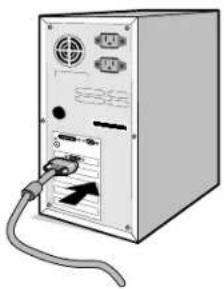
Pncyok A.2
YCTaHOBka Ha NOdBnKbI KPOHHTeH
DaHHbI KK-MOHHTOP MOKET 6bITb yCTAHOBnH Ha NOBnKbHb I KOHHTeH. YTO6bI yCTAHOBt b MOHHTOp Ha KPOHHTeH:
- cy6b CHaTB NOCTABKy, BblnoHHTe DeiCTBn, ONcaHHbE B pa3dene "OTcoeDInHeHne NODCTABKN MOHTopa nepey yCTAHOBKOJ".
2.ПикpenTe KpoHTeH K MOHTOpy c NMOUbIO 4 BnHTOB, KOtOpbIe OCTaJIncb NOcne CHATN NOcCTaBKn (Pcyhok F1).
PIMMEAHHE. KK-MOHITOP cIeDyET HcONb3OBAb TObKO C npEHa3HaehHbIM dNn Hero KPOHHTeHOM (HanpIMep, cTAndpa GS).BueJx CO6JIoDEHn IpaBn 6e3OnaCHOCT MoHTOp cIeDyET yCTaHaBJIbAte Ha KPOHHTeHe, oBeCneuBaIOeM Heo6XoDMyO yCTOHNBOCTc C yETOM BECA MOHTopa.
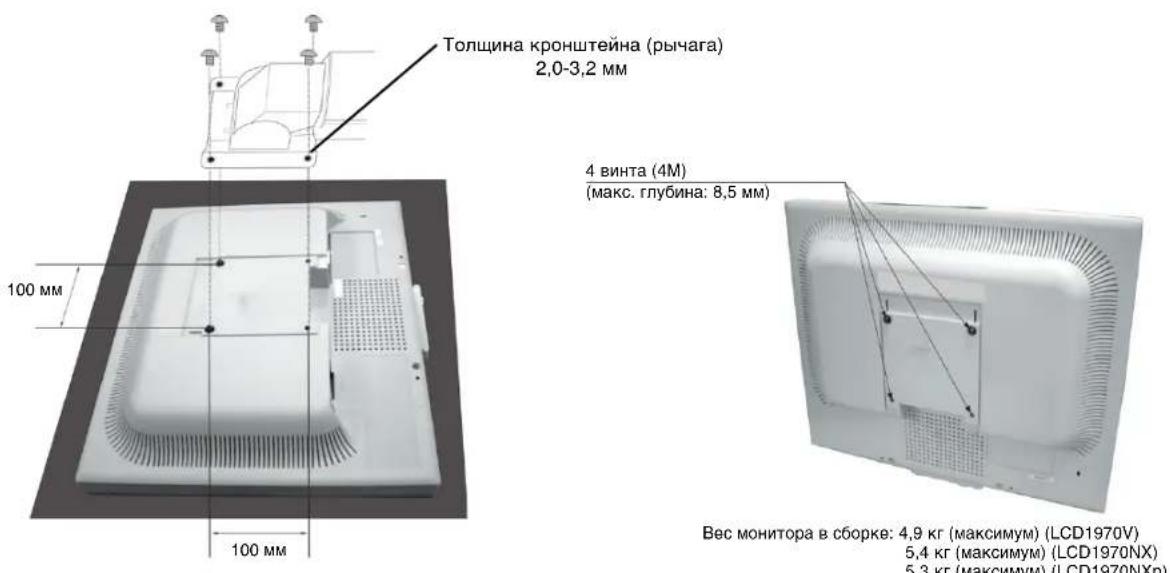
Pucyok F.1
OprahbI ynpaBJeHnA
KhoNkynpaBJIeHn3KpaHHoro MeHIO Ha nepeDHe NaneMOnHTopa BbINOJHrOT CLeDyUOuNe FyHKcM:
YTo6bBouTnB3KpaHHOe MeHO, HaxMnte IIO6yIO N3 KhoNOK ynpabJeHHa (MENU/EXIT, BneBO, BnpABO, BBepx, BHn3). YTo6bI 3MeHntb TIN BXoDHorO CnHaHa, HaxMnte KhoNky SELECT (BbIOP) (ToIbKO B moDeJIu LCD1970NX/NXp). DnR Bb6opa DV MODE (PEXIM DV) HaxMnte KhoNky "RESET" (CBPOC) (ToIbKO B moDeJIu LCD1970NX/NXp).
PIMMEUAHNE. UTo6bI N3MeHnTb TIN BXoHOrO CnHaJa, Heo6XoDmO 3aKpbItb 3kpaHHoe MeHO.
R3blK: 3kpaHHbIe MeHIO HAcTPOiKN IapaMeTPOB NpeBeDeHbI Ha BOCemb R3blKOB.
MEHIO-BIIEBO/BNPABO:MoXHO BbIbpaTb,B KaKOM MeCTe 3KpaHa (no rOpnOHTaII) DoJHXo OTo6paKaTbcr MeHIO HAcTpoIKn napaMeTPOB.
MEHIO-BHN3/BBEPX:MoKHO BbIpaTb,B KaKOM MeCTe 3KpaHa (NO BepTKaJI) DOJHXO OTo6paKaTbcr MeHIO HAcTpoKN npaMeTpOB.
BbIXoN 3Kp. MeHIO: MeHIO NaCTpoiKn npaMeTPOB 6yIeT OCTaBaTbcHa 3KpaHe, noka OHO NcNONb3yeTc. B NoDMeHIO "BbIXoN 3Kp. MeHIO MoXHO Bbl6paTB Bpem OxuDaHn Iocne IocNeHero HaxKaTn KHOKN Do 3aKpbITnM HeIO HaCTpoiKn npaMeTPOB.
Блokровka 3kp. MeHIO: C nOmoBIO 3TO rnapaMeTpa moXHO nONHOCbIO 6lOKpOBaT b DocTyN KO BCEM ФункцИМ MeHIO HAcTpoI KnapaMeTPOB, KpOME rpkocTn KOnTpacta. Пп nONbITke aKTHu3aIIM napamETPOB B peKIMe 6lOKpOBKn NOBtC TcoobSeHne, yKa3bIBaIOoee, YTO napaMeTpbl MeHIO 3a6lOKpOBaHbI. YTo6bl ВКЛQUHtB ФункцIO 6lOKpOBKn MeHIO, HaxmITE KhoNkY SELECT, 3aTeM KhoNkY "BnPaBO" u YdePknBaTe Obe KhoNk HaxkTaBM. ДЯ OTKIQUeHn 6lOKpOBKn MeHIO BOJdTe B MeHIO n HaxmITE KhoNkY SELECT, 3aTeM "BnEBo" u YdePknBaTe Obe KhoNk HaxkTaBM.
YBEOMJI. O PA3PEWEHNI: ONTIMaIbHbIM pa3peWeHnEM ABJHeTcR 1024 x 1280. EcnnФyHKUaKTHINPOBaHa (3haeHne BKL.), Ype3 30 cekyHn Ha 3kpaHne NOBHeTcR COo6eHne o TOM, YTO npaMeTp pa3peWeHNI OTIIuAeTcR OT 1024 x 1280.

HnΦopMaζη
B INHOPMaOnHHo MeHIO OTo6paKaIOTc TekyuIe NOKaTeN TNa BXoHOro CnHana, pa3peWeHn 3KpaHa, aCtOtbl rOp30HTaJIbHO H BepTnKaJIbHO pa3BepTKn I NOJpHocTN MOHITopa. TaKxE B 3OM MeHIO yKa3aHbMoDEnb H cepINHbH HOMep MOHITopa.
Ppeynpejckdne OSM
MeHIO npedynpeKdEHN OSM nCye3aOT npn HaxaTN KhoNkN Exit.
HET CnHJAA: 3Ta fynKUa BbIaet npdeynpejckJeHne npn OTCyTCTBn CNHXPOHN3aUN NORpOHTaJI INN NO BepTNKaJI. OKHO HET CnHJAA NOABNaEeTc npn BKIOueHm INTAHIN INN IN3MeHeHH BXOHDoro CnHJAA.
YBEOMJ. O PA3PEUHIN: 3Ta cyHKuIN Bblaet npeDynpexJeHne O Heo6xOIMOCn INCNOBJ3OBAHN ONTMM3IPOBAHORO pa3peuHIN. OKHO YBEOMJ. O PA3PEUHIN NOBnRETCn pN BKNIOeHN NITAHIN, INMHeHH INXODHORO CnHnA, HnPaBnBHom pa3peuHIN BnDEOCnHnA. 3Ty cyHKcIO MOXHO OTKIOHTB 3KpaHNO MEHIO.
BHE DNANA3OHA: Ecn BxOdnHcNHaI NMeeT HnOePcknBaemyIO CnHxpoHn3aunio, a TaKke B cnUyae HnpeBaNbHO CNHXPOHN3aunn BNdeocnHaI NOBnEeTc MeHIO BHE DNANA3OHA.
Pycckn-8
PekomeHdaunno3KcnpyaTaun
TexHnka 6e3oNaChOCTn H TexHnueCCKoe 06cIyKnBaHne

ПИ YCTAHOBKE И NGIOЛБЗОВАМИ CBETHΟ MOHITOPA MULTISYNC LCD ДЯ EGO ONTUMAJBHOI PA60Ты COБЛЮДАITE CLEДУОЛEE:

- HE BCKPbIBAHTE MOHITOP. BHytpn annapata HeT deTanei, KOtOpbe MoKet peMOHTnpoBaTb nonb30BaTeB, NO3OMy OTKpblTne n CHaTne KOpnyca MoKet npuBecTu K ONaChOMy nopaxeHIO 3NeKtpueckm TOKOM n DpymM TpaBMam. JI6oe TexHnueckoe o6cIyXnBaHne DOJIxHe BBINONHrTB KBaINΦnUPOBaHbCneuaNInCT.
He donyckaIte nonaHaHn JxndKocTe BHyTpB Kopnyca nIN NcNoJb3OBaHH MoHTopa PAOM C BOHO. - He BCTaBJIte HnKaKne IpeDMeTbI B OTBepCTnB KOpnyce, TAK KAK OHN MORYT cOnpNKACA TbC C DeTaJIAM NOD BBICOKM HAnPRAKeHHeM, YTO MOKeT 6bITb ONACHO INN PnBecTn K JeTaIbHOMy NCXOy, INN BbI3BaTb NopaxeHne 3NeKTpUeCKM TOKOM, BO3ROPaHHe INN HEnCnPaBHOcTb annapata.
- He knaite TjkeIbe npedMeTbHa Ka6eIb NtAHn. NoppeKdHne Ka6eIa MoKeT npBecTu K nopaxeHIO 3NeKtpuueckm TokOM nII B03ropaHIO.
- He CTaBbTe 3OT annapat Ha TeneKky, NoCTaBky NIN CTON C HAKNOHHO IN HEYCTOHNBOI NOBepxHOCTbIO, TAK KAK MOHTOP MOKeT yNactb, YTO npNBeDET KERO cepbeSHOMy NOBpeXDeHIO.
- He klaadte kaekne-lno ppeMetbHa MOHHTOp HHe nCnObl3yIe ero BHe nomueehna.
JIOMHecEHTHaIaMa, yCTaHOBHeHHa BHyTpN XKMOHITopA, coepxNT pTyb. CJeDyTe HnCTpyKUIM nI npabINam, deiCTByIOUIM Ha BaWe TeppTOpN, npYtIN3auM 3ToI naMbI.
He nepere6aTe ka6eIb nTuHaIa.
He nOJIb3yIe MOHITOp npn IOBblEHHoT EMMepaType, BnaXHOCTu NIN B MeCTax, rJe CkAnIbAeTcNblb IMACJHnCTBeBEueCTBa. - He 3akpbBaIte BeHTnJIaHIOHoe OTBepCTne Ha MOHTope.
B cnyae BO3HKNHOBeHHN CNe dyUOxN CNyauu HEmeJeHNO OTKIOHnTe Ka6bI NITaHn MOHTopa n3 3neKtpuecko np03eTKn I Bb3OBNTe KBAJIINPcnpoBaHnO rCneuaJIncTa:
- EcIn NOBpeKDeH Ka6eIb NITaHn IJN BUNKa.
- Ecnn B MOHITOP nonana XnKocTb nll KaKne-Jn6o npedMeTbl.
- Ecnn MoHHTop nonan noDdoKdb nnn B Body.
-Пи паденни монитора пл поьждени Корпуca. - EcIn MOHITOp He pa60TaET DoJXHBIM 6pa3OM pN BbINOJIHeHN INHCTpyKlM NO 3KcPIyatauN.
- Ecnn pa36nnoCb CTeKNo, co6nOdaTne octopoxHOCTb.
- Ecnn MoHHTop nnn cTeKnO pa3o6bEtCn, He npKacauTecb K nnKOMy KpncTaNny n co6JIOdaIte ocToPOXHOCTb.
- Oecneythe Heo6xOumoe Cbo6oHoe npoctpaHCTBO BOKpyr MOHTopa nBbHTnauu npabNbHoropaccenBaHnTenna.He3akpbBaTe BEHTnauoHHbte OTBepCTnI HpepaMeuaTc MOHTOp B HenocpeDCTBeHHo 6bn30ctnOT bataeONNeHN dpynx NcToHHKOB Tennla. He KnaDHT HnHero Ha MoHTOp.
KaBbNtAHnRAABHReTcOCHOBHbIM CpeCTBOM DnOTKIOUeHnCNCTeMbOT NCTOHTHnKA NITAHnMOHTOP Heo6xOIMO yCTaHaBnBaTb PdOM C nERKOoCTyHBm NCTOHTHKOM NITAHn. - Co6IIOaIte octopoxHoc7 npi nepeBo3ke. CoxpaHnte ynaKOBky Ha cnyuai nepeBo3kn.
3ΦΦekTbI NocceBeyHn: IMeTe B Bny, yTo npaBoTe XX-MoHTOpOB Bo3MOxHO Bo3HKnHOBeHne TaKOro RnEHHN, KaN OocceBeyHne. 3ΦΦeK T NocceBeyHn pOraBnRETC B TOM, yTo Ha 3KpaHe MOHTopa COxpaHReTCR OCTaTOHbI CnED npeDbIyUeero N3o6paxEHn. B OTNIHue OT MOHTOPOB C 3NEKTPoHNO-lyuEBbIMn Tpy6kAMn, Ha XK-MoHTopax 3ΦΦeK T NocceBeyHn ObpaTmH, Ho, Te Me He Mehee, cNe dyET n36eRaTB BBIOda Ha 3KpaH HnOdBHXHORO N3o6paxEHn B TEueHne DnITeNbHoro Bpemehn. YTObI OcnaBnt b 3ΦΦeK T NocceBeyHn, BIKIOHNTe MOHTOP Ha BpEMr, B TeueHne KOTOPORo HA 3KpaH BbIOdINOCb PneDbIyUeee N3o6paxEHne. HanPImep, ecnn n3o6paxEHne Ha MOHTope He MeHaIOCb B TeueHne Ondoro Yaca, nocne Hero COxpaHInc oCtatoTHhB cLd, dNaJdEHHN 3TOrO N3o6paxEHn MOHTOP CneDyET OKJIIOCHITb Ha Odn Yac.
PIMMEAHHE. Ka n I dnnBceX nepcoHaIbHbIX iNcIJIeEB, KOMnHaH NEC DISPLAY SOLUTIONS peKoMeHdyET BbIOuTb Ha 3kpaH NOdBHXbIe I3O6paKeHn I NCNoIb3ObA Tb INHaMnueckne 3KpaHbIe 3aCTaBKn, BKIOUaIOuIeCra Hepe3 OnpdeIeHHbI pOmeKyTOK BpEmHn PnI OTCyTCTBn I3MeHeHn Ha 3KpaHe, IIN BBIKHOuATb MOHTOp Ha Bpem, NOKa OH He IcNOJb3yeTcA.

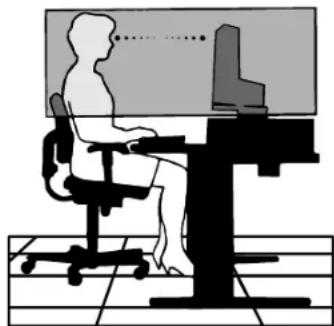
IPABINbHOE PA3MELJEHNE IN PEGYINIPOBKA MOHITOPA CHNKAET YTOMJIHNE IIA3,IIIEU IJEN.IPN PA3MELJEHNI MOHITOPA BblIOJIHRITE CJIEDIQUIUE YCIOBNA:

-ДЯ ONTIMaJIbHоР pa6ObI MOHToPадTe emy nporpeTcB B TeueHne 20 MInHyT.
- OtperynpyTe BbCOTy MOHITopa, YTO6bI BepxHn Kpa3KpHa HaxOINcH EMHOH NHXe yPOBn rna3. Ecn CMOTpeTb Ha CEHTp MOHITopa, B3rnnd DOJXeH 6bITb HAnpaBnEH HEMHOBOHN3.
- YctaHaBnBaIte MOHITOP TAK, YTO6bI 3KpaH HaxoDnJcH He 6NHexe 40 cm Hne daJIbwe 70 cm OT rna3. ONTmAmJIbHOe paCtOHHne - 50 cm.
-ДаваTe rna3am OTdbix,прюдчесн Фокусуг B3rJaH Na ppeMete, HaxoRueMcH na pacCTOrHn He MeHee 6 M. Yaue mopraTe.
Pacnonarate MOHTOP NOYROM 90KOKHAM IN DpyHM NCTOCHKM CBEta, YTO6bI yMeHbWNTb 6NkNn OTPaXeHn. OTPerynpyTe HAKLOH MOHTOPa TAK, YTO6bl CBET NOTOJOhBix CBeTINbHnKOB He OTPaXaNCHa 3KpaHe.
- EcIn OTpaxaemb CBeT 3aTpduHReT npocmTo p3o6paXeHn, nCnObl3yIte aHTu6NIKOBBI qNJIbTp.
- Otperynpyte npKocb n KOHTpactHOCTb MOHToPA dny ydo6cTBA npocMOTpa.
- IcnoIb3ayIte DepeKaTeIN DOKyMeHToB, paCNoJIOKeHHbIe pHdOM c3KpaHOM.
Pacnooxnte To, C hem Bbi pa6oTaete Taue BCero (3KpaH HnCnpaBOHbIe MaTepnaIbI), HENOCpeCTBeHNO nepeD co60, YTO6bl yMeHbWntb KOnuYeCTBO NOBOPOTB rOIOBbl np NeaytN.
- Ⅲ6eraTe dInTeBHOBO BcnpOn3BeHnHa MOHTope HeNoDBHXbIX N3O6paXeHn, YTO6bl NCKIIOHTb eΦeKtbl nocLeCbeHn (oΦeKtbl OCTaTOHOro N3O6paXeHn).
- Perynphno npobepaTe 3peHne.
3proHOMnka
ImaKcImaHbHO 3proHomn pa6oery MeTa peKomeHnyeTc nJeHyOuee:
- OtperynpyTe npKoCTb taKIM o6pa3OM, yTO6bl Ncye3 foHOBBI paCTp.
- He yctahabnbaite MaKcmaJIbHOe 3haueHHe KOHTpaTcHOctn.
- IcnoIb3yIte npedBapnteHbO yCTaHOBHeHHbe napameTpbi pa3Mepa n NOLOKeHHa CO cTaHdApTHbIMn BInDeOCnHaJAMN.
- IcnoIb3yIte npEbnBapntelHo yctaHOBHeHHbIe npaMeTpbl cBeTHocTn.
- IcnoIb3yIte BnDeocnHnblc nporpeccnBHO pa3BepTKoC ypoBHe perehepaun BnDeocnHa nabeBepTnKaJI 60-75 T
He nCnoB3yTe CnHn BcET B KaueCTBe OCHOBHO rBaTa Ha TEMHom FOHe, TaK KaK HeIOCTaOuHa R KOHTpACTHOCTb npINBOJNT K 3PntelbHOMY yTomneHIO u 6blctpo yCTanocTn rna3.
UcTkaKK-naHEn
3aarp3HbWuyocxNko-KpncTaanueckyno naneB MOXHO OCTOPOXH npOTnapb MTKO TkaHbIO.
- HeIb3a npOtnpaTb NOBepxHocTb KK-naHeJn XeCtKo TkaHbIO.
- HeIb3a CInbHO DaBnTb Ha XXK noBepxHocTb.
- Henb3Я nCnoB3OBaTb opraHnueckne oynCTnTeN, taK KaK 3To npBBeTeK NOBpeJdeHIO uIN o6ecuBcHnIO XX K nobepxHOCTn.
UncTkakopnyca
- OTKJIIOHTe MOHNTOP OT NCTOCHNA NITAHNA
- OctopoxHo npoTpne Kopnyc MrgKoT KAnbIO
- UTo6bI OUHCTNtB KOpNc, npOTpNTe KOpNc TKAHbIO, CMOueHHoB BOOIN HeHTpaJIbHbIM MOIOUM CpeDCTBOM, 3aTEM cyxOJ TKAHbIO.
IIN3ROTOBHeHn NOBepxHOCTN KOpNyCa NcNoB3yIOCTra3nUHbIE BnDbI NaCTMaCC. HEJIb3HcNOB3OBAbT DnA YnCTKN KOpNyCa 6eH3nH, PACTBOpNTEn, 8eONuHbE n CnInrTOcoDEpaKzme MOUoHcpeCDTa, OCHNTeTeHN DnC TeKoJ, BOC, NoIupOni, CTnpaNBbIE npoouKn IIN INHcKeTNuDbl. HeJIb3aDOpyCKaTb DnITeJIbHOro COpnIKoCHOBeHn pe3HOBbIX IIN BnHInIObBX NOBepXHOCTe KOPnyCOM. IpeueHCHeHbIe XnIKoCTn IMatePnaJIb MoYr BbI3BaT NobpeXDeHne, OTCnAnBaHne IIN pactpeckNaBaHne Kpackn.

DIKKAT

YANGIN VE SOK TEHLIKELERINI ONLEMEK IQIN CIHAZ YAGMUR YA DA NEME MARUZ KALMAMALIDIR. AYRICA BU CIHAZIN POLARIZE FIŞINI UCLAR TAM OTURMADİGI SÜRECE BIR UZATMA KABLOSU YA DA BAŞKA PRIZLERDE KULLANMAYIN.
ICERISINDE YUKSEK VOLTAJI BILESENLER BULUNDUGU IcIN KASAYI ACMAKTAN KAÇININ SERVIS IcIN YETKILI SERVIS PERSONELINE BASVURUN.

UYARI

UYARI: ELEKTRIK SOKU RISKINI AZALTMAK IÇIN, GUC KABLOSUNUN PRIZDEN ÇEKİLDIGINDEN EMIN OLUN. BIRIME GIDEN GUCUN TAMAMEN KESİLDIGINDEN EMIN OLMAK IÇIN, LUTFEN GUC KABLOSUNU AC PRIZINDEN ÇEKİN. KAPAGI (VEYA ARKASINI) AÇMAYIN. IÇ KISIMDA KULLANICININ ILGILENEBILECEGE HERHANGI BIR PARÇA BULUNMAMAKTADIR. SERVIS IÇIN YETKI LI SERVIS PERSONELINE BASVURUN.

NEC Display Solutions, Ltd.
4-13-23, Shibaura,
Minato-Ku
Tokyo 108-0023, Japonya
Windows, Microsoft Corporation'in kayitll ticari markasidir. NEC, NEC Corporation'in kayitll ticari markasidir. ENERGY STAR A.B.D kayitll ticari markadir.


- MultiSync LCD1970V MultiSync LCD1970NX MultiSync LCD1970NXp
- Canadian Department of Communications Compliance Statement
- FCC Information
- Declaration of Conformity
- TcODevelopment
- Congratulations!
- Ergonomics
- Energy
- Emissions
- Ecology
- Manufacturer's Recycling and Energy Information
- Country-specific recycling programmes can also be found at:
- Disposing of your old NEC product
- Within the European Union
- Outside the European Union
- Index
- CAUTION
- Caution:
- Declaration
- Declaration of the Manufacturer
- Contents
- Quick Start
- Raise and Lower Monitor Screen
- Tilt and Swivel
- Remove Monitor Stand for Mounting
- Flexible Arm Installation
- Controls
- OSM (On-Screen Manager) control buttons on the front of the monitor function as follows:
- LCD1970V LCD1970NX/LCD1970NXp
- Button Menu
- 4-Direction-Key
- Brightness/Contrast Controls
- BRIGHTNESS
- CONTRAST
- DV MODE (NX/NXp only)
- AUTO CONTRAST (Analog input only)
- Auto Adjust (Analog input only)
- Image Controls (Analog input only)
- LEFT / RIGHT
- DOWN / UP
- H.SIZE
- FINE
- Colour Control System
- Tools
- Menu Tools
- Information
- OSM Warning
- Recommended use
- FOR OPTIMUM PERFORMANCE, PLEASE NOTE THE FOLLOWING WHEN SETTING UP AND USING THE MULTISYNC LCD COLOUR MONITOR:
- CORRECT PLACEMENT AND ADJUSTMENT OF THE MONITOR CAN REDUCE EYE, SHOULDER AND NECK FATIGUE. CHECK THE FOLLOWING WHEN YOU POSITION THE MONITOR:
- Cleaning the LCD Panel
- Cleaning the Cabinet
- VAROVÁNÍ
- UPOZORNENI
- περιεχόμενα
- Γρήγορη Εκκίνηση
- SIZE (OPIZONTIO MEREΘΟΣ)
- FINE (MIKPOPYOMIzH)
- Brightness/Contrast Controls (Helderheid/contrast)
- BRIGHTNESS (Helderheid)
- DOWN/UP (POZYCJA PIONOWA)
- Pycckn-1
- Copepkmoe
- KpaTkoe pyKOBoCTBO IO NaCy pa6oTbI
- YCTaHOBka Ha NOdBnKbI KPOHHTeH
- OprahbI ynpaBJeHnA
- KhoNkynpaBJIeHn3KpaHHoro MeHIO Ha nepeDHe NaneMOnHTopa BbINOJHrOT CLeDyUOuNe FyHKcM:
- HnΦopMaζη
- Ppeynpejckdne OSM
- Pycckn-8
- PekomeHdaunno3KcnpyaTaun
- ПИ YCTAHOBKE И NGIOЛБЗОВАМИ CBETHΟ MOHITOPA MULTISYNC LCD ДЯ EGO ONTUMAJBHOI PA60Ты COБЛЮДАITE CLEДУОЛEE:
- IPABINbHOE PA3MELJEHNE IN PEGYINIPOBKA MOHITOPA CHNKAET YTOMJIHNE IIA3,IIIEU IJEN.IPN PA3MELJEHNI MOHITOPA BblIOJIHRITE CJIEDIQUIUE YCIOBNA:
- 3proHOMnka
- UcTkaKK-naHEn
- UncTkakopnyca
- DIKKAT
- UYARI
Brand : NEC
Model : MultiSync LCD1970NXp
Category : Monitor