EasyManual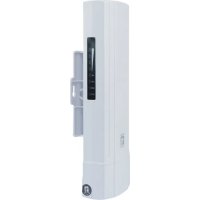
WAB8010 - Access Point LEVELONE - Free user manual and instructions
Find the device manual for free WAB8010 LEVELONE in PDF.


User questions about WAB8010 LEVELONE
0 question about this device. Answer the ones you know or ask your own.
Ask a new question about this device
Download the instructions for your Access Point in PDF format for free! Find your manual WAB8010 - LEVELONE and take your electronic device back in hand. On this page are published all the documents necessary for the use of your device. WAB8010 by LEVELONE.
USER MANUAL WAB8010 LEVELONE
marking is a certification mark that indicates conformity with health, safety, and environmental protection standards for products sold within the European Economic Area (EEA).The CE marking is also found on products sold outside the EEA that have been manufactured to EEA standards. This makes the CE marking recognizable worldwide even to people who are not familiar with the European Economic Area.
WEEE is waste electrical and electronic equipment. It is end-of-life electrical and electronic equipment and covers virtually everything with a plug or battery. ... The EC introduced the WEEE Directive in 2002 to address the environmental impacts of unwanted electrical and electronic equipment at end-of-life disposal.
Management Web UI DIP Switch to Master CPE (AP Mode)
DIP Switch to Slave CPE (Repeater Mode)
l Point to Point Connection Press the reset button on both master and slave CPEs to start the fast bridge.- 5 - l Point to mult Point Connection Press the reset button on both 1 master and mult slave CPEs to the start fast bridge.- 6 - English
This product is provided with the following accessories in the box; please check them carefully. If any of the accessories is missing or damaged, please contact with your local dealer timely. (Power adapter unit is to be ordered separately) Serial number Name Quantity Note
EU Declaration of Conformity
Pole Mounting Hose Clamp (40-64mm)
The installation environment for the wireless access point must meet the following requirements: l The wireless access point must avoid direct sunlight, away from heat and sources of strong electromagnetic interference. l The wireless access point must be placed in a cool, dry place, and there should be enough gap for heat dissipation all around for the purpose of ventilation and heat dissipation.- 7 - Note: The IP address of wireless access point be within the same subnet as your computer
3. Software Installation
l To enable network communication with wireless access point, your com- puter must have a proper IP address, e.g. 192.168.188.188.
l Launch a Web browser (Google Chrome for example), enter the AP’s default LAN IP address 192.168.188.253 in the address bar, and then press Enter, as shown in the following picture. Then enter the default of password of admin in the Password fields, click “OK” to access the AP’s Web GUI.- 8 - Deutsch
Pole Mounting Hose Clamp (40-64mm)