WAB6010 - Access Point LEVELONE - Free user manual and instructions
Find the device manual for free WAB6010 LEVELONE in PDF.


User questions about WAB6010 LEVELONE
0 question about this device. Answer the ones you know or ask your own.
Ask a new question about this device
Download the instructions for your Access Point in PDF format for free! Find your manual WAB6010 - LEVELONE and take your electronic device back in hand. On this page are published all the documents necessary for the use of your device. WAB6010 by LEVELONE.
USER MANUAL WAB6010 LEVELONE
Quick Installation Guide
( WAB-6010 )

text_image
level® oneHW: v1
QIG: v1.4
Package Contents
- Quick Installation Guide
- RJ45 Network Cable
- Pole Mounting Hose Clamp (40-64mm)
- Resource CD (User Manual, QIG)
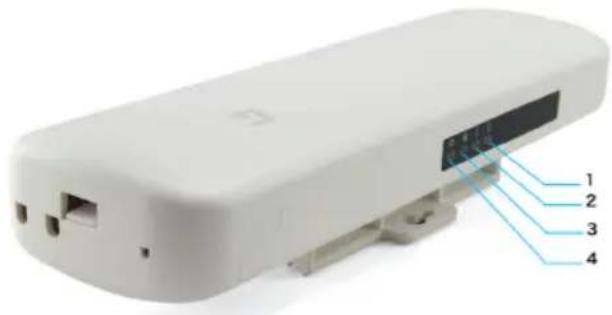
Light Description
Front Panel
natural_image
White electronic device casing with labeled ports and internal components (no text or symbols visible)Back Side
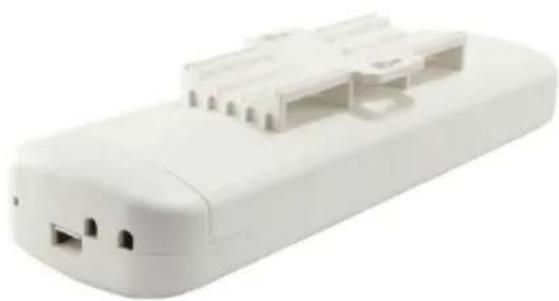
natural_image
White plastic electronic device with attached port ports and connectors (no visible text or symbols)| Marked number | LED | Color | Status | Description |
| 1 | LAN | Green | On | On LAN is connected |
| 2 | WAN | Green | On | On WAN is connected |
| 3 | WIFI | Green | Blinking | On 2.4G WIFI is on |
| 4 | Power | Green | Solow Blinking | On Device is powered on |
| Green | Fast Blinking | Reset to Defaults |
Interface Description
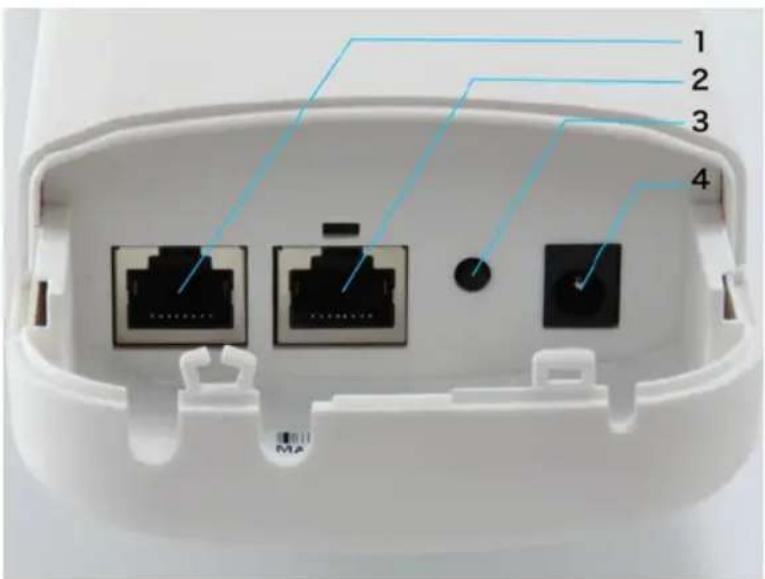
text_image
1 2 3 4| Marked number | Interface / Button | Description |
| 1 | LAN port(10/100Mbps RJ45 port) | The LAN port is used to connect to network devices, such as a switch or PC / NB |
| 2 | WAN/POE port(10/100Mbps RJ45 port) | The WAN/POE port is used to connect to network devices, such as a POE switch OR POE adapter to power the device. (POE Power adapter unit is to be ordered separately) |
| 3 | Reset to Default | WAB-6010 powered on, press the Reset button for 10 seconds until the Signal Strength LED blink faster than ever. The AP will restart itself and reset the device to factory default settings. |
| 4 | DC | 12V/1A DC input injector (Power adapter unit is to be ordered separately) |
Default Settings
| IP Address | 192.168.188.253 |
| Password | admin |
Hardware Installation
Power on the Device.
To power on the AP, you can use one of the following methods:
- Plug one end of your Ethernet cable into the WAN port of the AP, and the other end into a port on a PoE switch or a 802.3at PoE injector.
- Connect the power adapter. (Power adapter unit is to be ordered separately)
Configuring the Device
To set up and manage the AP, you can use one of the following methods:
- Connect the access point and your computer to the same switch or router.Manage the access point from the computer. (Figure 1)
Software Installation
To login to the LevelOne AP, please perform the following steps:
- Check Your Network Settings to login web UI.
Please make sure your PC can get IP address automatically, so the router can communicate with your PC during configuration.
- Select "Control Panel" > "Network Connections".
- Right click the "Local Area Connection" and choose "Properties".
- Select the TCP/IP protocol for your network card.
-
Change the IP Address of PC: To configure the IP Address, click the network icon to open the Ethernet dialog to configure the IP Address. Select "Properties", choose "Internet Protocol (TCP/IP)" and select "Properties". Input the IP Address "192.168.188.2 \~ 192.168.188.250" and continue. (Figure 2)
-
Launch a Web browser (Microsoft Internet Explorer 8 for example), enter the AP's default LAN IP address 192.168.188.253 in the address bar, and then press Enter, as shown in the following picture. (Figure 3)
-
Then enter the default user name of admin and password of admin in the User Name and Password fields, click "OK" to access the AP's Web GUI. (Figure 4)
Deutsch
Default Settings
| Standard-IP-Adresse | 192.168.188.253 |
| Kennwort | admin |
flowchart
graph LR
    A["AP"] --> B["POE Switch"]
    B --> C["PC"]
Figure 2
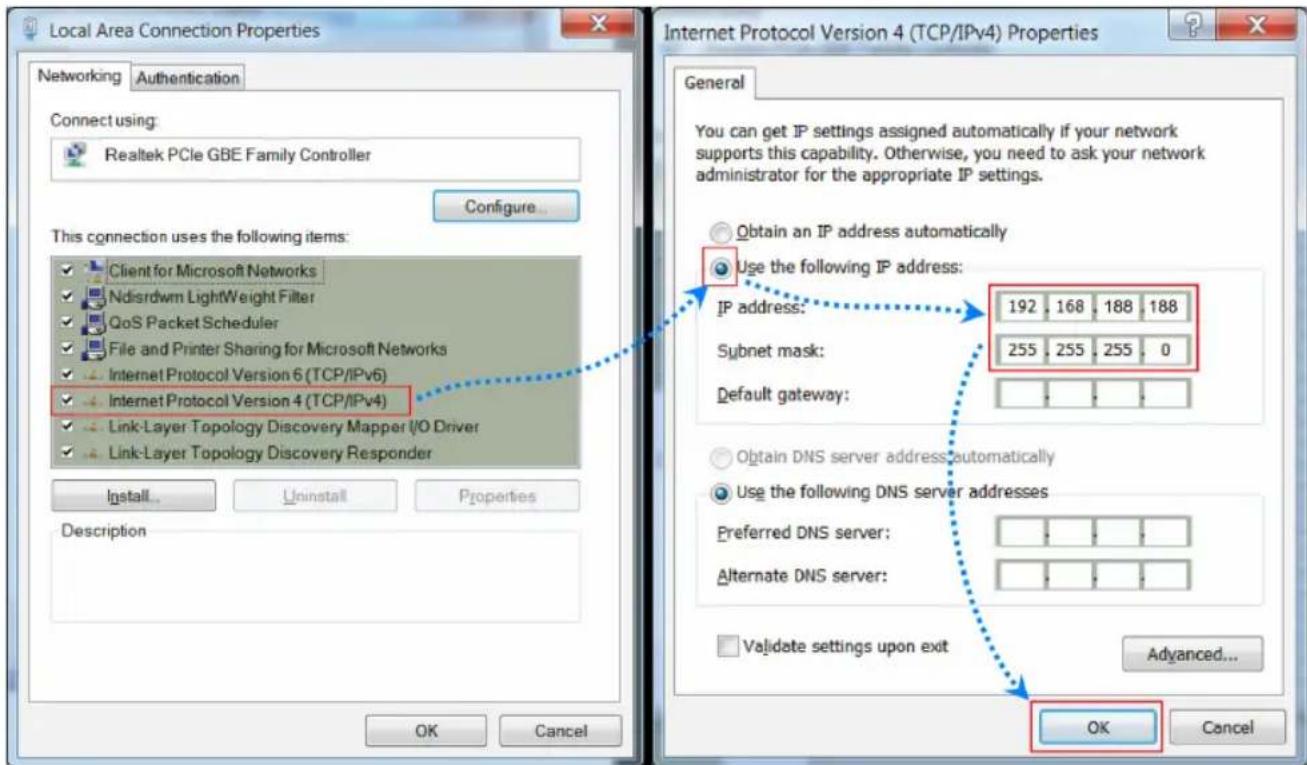
text_image
Local Area Connection Properties Networking Authentication Connect using: Realtek PCIe GBE Family Controller Configure... This connection uses the following items: Client for Microsoft Networks Ndisrdwm Lightweight Filter QoS Packet Scheduler File and Printer Sharing for Microsoft Networks Internet Protocol Version 6 (TCP/IPv6) Internet Protocol Version 4 (TCP/IPv4) Link-Layer Topology Discovery Mapper I/O Driver Link-Layer Topology Discovery Responder Install... Uninstall Properties Description Internet Protocol Version 4 (TCP/IPv4) Properties General You can get IP settings assigned automatically if your network supports this capability. Otherwise, you need to ask your network administrator for the appropriate IP settings. Obtain an IP address automatically Use the following IP address: IP address: 192 , 168 , 188 , 188 Subnet mask: 255 , 255 , 255 , 0 Default gateway: Obtain DNS server address automatically Use the following DNS server addresses Preferred DNS server: Alternate DNS server: Validate settings upon exit Advanced... OK CancelFigure 3

text_image
192.168.188.253/ New tabFigure 4