WAB-3003 - Access Point LEVELONE - Free user manual and instructions
Find the device manual for free WAB-3003 LEVELONE in PDF.


User questions about WAB-3003 LEVELONE
0 question about this device. Answer the ones you know or ask your own.
Ask a new question about this device
Download the instructions for your Access Point in PDF format for free! Find your manual WAB-3003 - LEVELONE and take your electronic device back in hand. On this page are published all the documents necessary for the use of your device. WAB-3003 by LEVELONE.
USER MANUAL WAB-3003 LEVELONE
natural_image
Abstract geometric pattern composed of blue squares forming a stylized 'T' shape (no text or symbols)levelone®
WAB-3003
108M 11g Outdoor PoE
CPE/ AP/ Bridge
User's Manual v1.3
natural_image
Exterior view of a metallic industrial device with ribbed internal structure and mounting base (no visible text or symbols)Regulatory Information
Safety Information
WAB-3003 has been evaluated to, and conforms to the product safety specifications.
Caution:
This product was qualified under test conditions that included the use of the power supplying equipment. To ensure regulatory and safety compliance, use only the provided power supplying equipment and install them properly.
- To prevent electrical shock, this device may require a grounding conductor in the line cord. Connect the unit to a grounding type ac wall outlet using the power supplying equipment supplied with the unit.
- To avoid the risk of electric shock and for a safety outdoor installation, you may need other items, such as surge arrestors.
■ To avoid the risk of electric shock from lightening, do not install or use this product during an electrical storm.
- Operate and install this product as described in this manual. This device must be installed and used in strict accordance with the manufacturer's instructions.
- Do not open the device casing. Do not perform any servicing other than that contained in the installation and troubleshooting instructions. Refer all servicing to qualified service personnel.

FCC Certification
A560 and A561 use the same circuitry and housing except the antenna type. They both are evaluated and certified according to FCC Rules Part 15 subpart C under one granted FCC-ID.
FCC Caution
This device complies with Part 15 of the FCC Rules. Operation is subject to the following two conditions: (1) This device may not cause harmful interference, and (2) this device must accept any interference received, including interference that may cause undesired operation.
Caution:
- Any changes or modifications not expressly approved by the party responsible for compliance could void the user's authority to operate this equipment.
FCC Radiation Exposure Statement:
This equipment complies with FCC radiation exposure limits set forth for an uncontrolled environment. This equipment should be installed and operated with minimum distance 20cm between the radiator & your body.
FCC Class B Statement
This equipment has been tested and found to comply with the limits for a Class B digital device, pursuant to Part 15 of the FCC Rules. These limits are designed to provide reasonable protection against harmful interference in a residential installation. This equipment generates and uses radio frequency energy and, if not installed and used in accordance with the instructions, may cause interference to radio communications. However, there is no guarantee that interference will not occur in a particular installation. If this equipment does cause interference to radio or television reception, which can be determined by turning the equipment off and on, the user is encouraged to try to correct the interference by one or more of the following measures:
■ Reorient or relocate the receiving antenna or cable input device.
■ Increase the separation between the equipment and receiver.
■ Connect the equipment into an outlet on a circuit different from that to which the receiver is connected.
- Consult the dealer or an experienced radio/TV technician for help.
CE
Declaration of Conformity with Regard to the 1999/5/EC (R&TTE Directive) for
European Community, Switzerland, Norway, Iceland, and Liechtenstein
Model: WAB-3003
For 2.4 GHz radios, the devices have been tested and passed the requirements of the following standards, and hence fulfills the EMC and safety requirements of R&TTE Directive within the CE marking requirement.
• Radio: EN 300.328:2006
• Radio: EN 50392:2004
• EMC: EN 301.489-1:2005, EN 301.489-17:2002,
EN 61000-3-2, EN 61000-3-3.
EN 61000-4-2, EN 61000-4-3, EN 61000-4-4,
EN 61000-4-5, EN 61000-4-6, EN 61000-4-11
- EMC: EN 55022:2006 Class B, EN 55024:1998 + A1:2001 + A2:2003 including the followings:
• Safety: EN 60950-1:2001 + A11:2004,
Table of Contents
1. Introduction .... 1
1.1 Overview ....1
1.2 Functionalities ....3
1.3 Document Conventions....4
2. System Overview 5
2.1 Package Contents ....5
2.2 Panel Function Description....6
3. Installation 7
3.1 Hardware Installation....7
3.2 Basic Configuration 8
3.2.1 Introduction to Web Management Interface 8
3.2.2 Quick Configuration 13
4. AP Mode Configuration....23
4.1 System 25
4.1.1 System Information....26
4.1.2 Operating Mode....28
4.1.3 Network Settings....29
4.1.4 Management Services....30
4.1.5 QoS Classification 32
4.2 Wireless 33
4.2.1 Virtual AP Overview 34
4.2.2 General Settings 35
4.2.3 VAP Configuration....37
4.2.4 Security Settings 38
4.2.5 Repeater Settings....43
4.2.6 Advanced Wireless Settings....46
4.2.7 Access Control Settings....48
4.2.8 Site Survey 51
4.3 Firewall....53
4.3.1 Layer 2 Firewall Settings ....53
4.3.2 Firewall Service 60
4.3.3 Advanced Firewall Settings....61
4.4 Utilities 62
4.4.1 Change Password....63
4.4.2 Network Utilities....64
4.4.3 Configuration Save & Restore....65
4.4.4 System Upgrade....66
4.4.5 Reboot....67
4.5 Status....68
4.5.1. System Overview....69
4.5.2. Associated Client Status 71
4.5.3. Repeater Information....72
4.5.4. Event Log....74
4.6 Online Help....75
5. CPE Mode Configuration 76
5.1 System 78
5.1.1 System Information....79
5.1.2 Operating Mode....81
5.1.3 Network Settings....82
WAB-3003 108M 11g Outdoor PoE CPE/ AP/ Bridge
5.1.4 Management Services....85
5.2 Wireless 87
5.2.1 General Settings 88
5.2.2 Advanced Wireless Settings....89
5.2.3 Security Settings 90
5.2.4 Site Survey 93
5.3 Firewall....96
5.3.1 IP/ Port Forwarding....97
5.3.2 Demilitarized Zone 98
5.4 Utilities 99
5.4.1 Change Password....100
5.4.2 Network Utilities....101
5.4.3 Configuration Save & Restore....102
5.4.4 System Upgrade....103
5.4.5 Reboot....104
5.5 Status....105
5.5.1 System Overview....106
5.5.2 Event Log....108
5.5.3 DHCP Leases....109
5.5.4 UPnP Status 110
5.6 Online Help....111
Appendix A.
System Management Account Privileges.... 112
1. Introduction
1.1 Overview
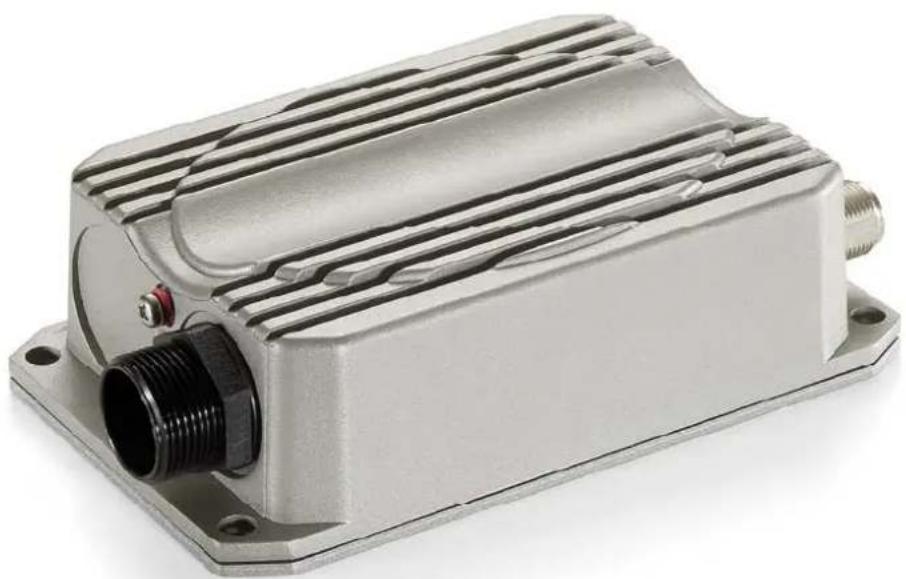
This manual is intended for system integrators, field engineers and network administrators to set up WAB-3003 108M Outdoor PoE AP/ CPE/ Bridge in their network environments. It contains step-by-step procedures and graphic examples to guide users with networking knowledge to complete the installation.
natural_image
Exterior view of a cylindrical mechanical component with a protruding shaft (no text or symbols visible)WAB-3003 (with N type antenna)
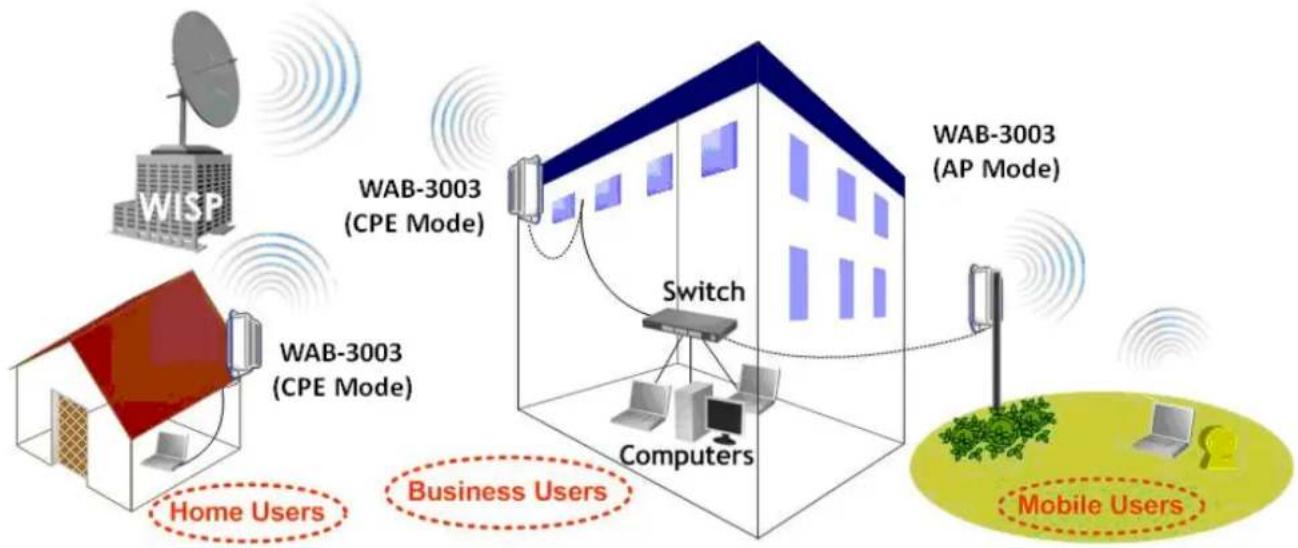
The 802.11 b/g compliant WAB-3003 is a multi-mode Last-Mile Broadband solution for Wireless Internet Service Provider (WISP). It can be used as an outdoor Customer Premises Equipment (CPE mode) to receive wireless signal over the last mile, helping WISPs deliver wireless broadband Internet service to new residential and business customers, where wired broadband Internet service, such as cable and DSL, cannot serve. In addition, it can be deployed as a traditional fixed wireless Access Point (AP mode), either indoors or outdoors.
The WAB-3003 is compact in size and weatherproof. Coming with a mounting kit, it can be mounted on a pole or wall. Specifically developed for outdoor use, the fully-hardened, IP68-rated WAB-3003 can withstand wind, rain, lightning, power surges, and extreme temperatures.
The following is a network diagram for a typical WISP application.
flowchart
graph TD
    A["WISP"] --> B["WABC-3003 (CPE Mode)"]
    B --> C["Switch"]
    C --> D["Computers"]
    D --> E["Mobile Users"]
    F["Home Users"] --> G["Business Users"]
    H["WABC-3003 (AP Mode)"] --> I["Switch"]
    I --> J["Computers"]
    J --> K["Mobile Users"]
WAB-3003 Long range wireless transmission
The WAB-3003 can be deployed in various environments, for example:
- Hot zones such as business districts, office complexes, airports, hotels, conference centers, recreation areas, and shopping malls.
- Wireless CPE for Multi Dwelling Unit (MDU) /Multi Tenant Unit (MTU), such as apartments, dormitories, and office complexes.
• Outdoor access point for school campuses, enterprise campuses, or manufacture plants. - Indoor access point for hotels, factories, or warehouses where metal industrial grade devices are preferred.
• Public hotspot operation for café, parks, convention centers, shopping malls, or airports. - Wireless coverage for indoor and outdoor ground for private resorts, acre estate/home's yards, or gulf course communities.

1.2 Functionalities
- Acts as a “Wireless Modem” to bring wireless bandwidth to home and office buildings.
- Wireless Bandwidth Allocation (uplink/downlink) delivered to each building depending on different subscription plans.
- Full range of wireless security mechanisms such as WEP, WPA and WPA2 (802.11i) that are important for enterprise wireless deployments.
- Acts as a Home Router for IP Sharing and firewall, all-in-one installation solution - no need for extra router.
- Purposely built rugged access point for harsh outdoor / industrial conditions.
- Weatherproof and watertight from its rugged aluminum housing (IP68 Approved).
• Power over Ethernet (PoE) built-in for single cable installation. -
On board Ethernet surge protection.
• Multiple operation modes : -
AP Base Station Mode
○ WISP CPE Mode
○ WDS Bridge Mode - Universal Repeater Mode
1.3 Document Conventions
| Caution: | Represents essential steps, actions, or messages that should not be ignored. |
| Note: | Contains related information that corresponds to a topic. |
 | Indicates that clicking this button will save the changes you made, but you must reboot the system upon the completion of all configuration settings for the changes to take effect. |
 | Indicates that clicking this button will clear what you have set before the settings are applied. |
2. System Overview
2.1 Package Contents
The standard package of WAB-3003 includes:
- WAB-3003 x 1
- Quick Installation Guide (QIG) x 1
- CD-ROM (with User's Manual and QIG) x 1
- PSE with AC cable x 1
- Mounting Kit x 1
• Water Proof Connector (installed) x 1
Caution:
It is highly recommended to use all the components supplied to ensure best performance of the system.
2.2 Panel Function Description
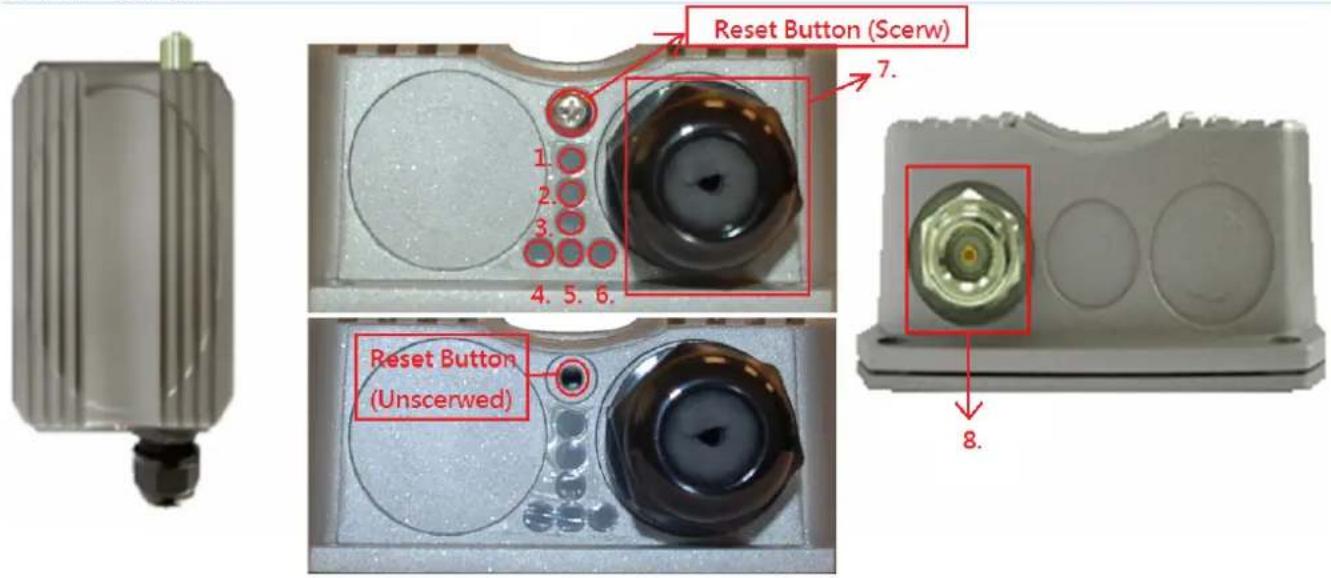
WAB-3003
text_image
Reset Button (Screw) 1. 2. 3. 4. 5. 6. Reset Button (Unscerwed) 7. 8.| 1 | Power | Red LED ON indicated Power on, and OFF indicates power off |
| 2~3 Wireless Signal Strength For showing the signal strength situation (2:Yellow; 3:Green) | ||
| 4 | WLAN | Green LED ON indicates system ready |
| 5 Wireless Signal Strength For Showing the signal strength situation | ||
| 6 | Ethernet | Green LED ON indicates connection, OFF indicates no connection, and BLINKING indicates transmitting data |
| 7 RJ-45 PoE Connector For connecting to the Power Sourcing Equipment(PSE) | ||
| 8 N-type Connector For connecting to an antenna | ||
| 9 Reset Button * (Screw) For testing the system of AP | ||
Reset Procedure
Make sure the WAB-3003 completes booting and is already running
(The booting process of system usually takes 2 minutes)
Unscrew the screw then you will see the reset button (inside the hole)
Use the provided reset pin to press and hold the reset button for 15 seconds
Release the reset button and leave the system re-booting for 2minutes
3. Installation
3.1 Hardware Installation
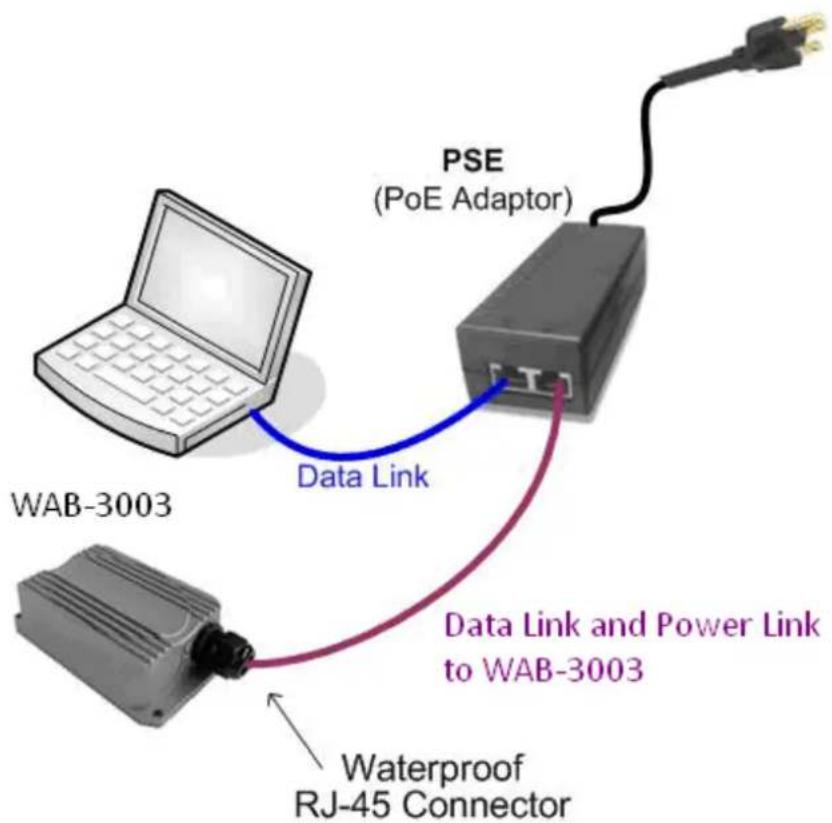
The following diagram is a basic network topology which can be used for testing and configuring the WAB-3003.
text_image
PSE (PoE Adaptor) Data Link WAB-3003 Data Link and Power Link to WAB-3003 Waterproof RJ-45 ConnectorInstallation Steps:
Step 1. Connect an antenna to the connector.
Step 2. Connect the PSE (POWER & DATA OUT) to the PSE 1 connector on the lower panel.
Step 3. Connect one end of an Ethernet cable to the PSE 2 connector on the lower panel and connect the other end to a computer.
Step 4. Connect the power cord to the PSE.
Step 5. Power on the PSE in order to supply power to the WAB-3003.
3.2 Basic Configuration
3.2.1 Introduction to Web Management Interface
WAB-3003 provides a user friendly web management interface for configuration. As WAB-3003 is a dual-mode system which can be configured as either an access point (AP Mode) or a gateway (CPE Mode) based on your needs, it is required to follow the respective installation procedures provided to properly set up the desired mode for this system.
- Default IP Address of Web Management Interface:
The default IP address and Subnet Mask for the CPE mode and AP mode are as follows:
| AP Mode | CPE Mode Mode | |
| 192.168.0.1 | 192.168.0.1 IP Address | |
| Subnet Mask 255.2 | 255.2 | 255.2 |
- Default User Name and Password:
The default User name and Password for the root and admin accounts are as follows:
| Mode AP Mode | CPE Mode | ||
| Management Account | Root Account Root Account Admin Account | ||
| User Name root | root | admin | |
| Password | admin | admin | admin |
There are two system management accounts for AP & CPE modes to maintain the system, root and admin, and each has different levels of management capabilities. The root account is empowered with full privileges while the admin account is with partial ones; there is only one management account for AP mode, root. For more information on the privileges of these two accounts, please refer to Appendix A. System Management Account Privileges.
< AP Mode - Default Mode >
Step 1: IP Segment Set-up for Administrator PC
Set a static IP address on the same subnet mask as WAB-3003 in TCP/IP of the administrator PC, such as the following example. Do not duplicate the IP address used here with the IP address of WAB-3003 or any other devices within the same network.
>> Example of IP Segment:
The valid range of IP address is 1 \~ 254. However, 1 must be avoided as it is already used by WAB-3003. Below depicts an example of using 100 (the underlined value can be changed as desired).
• IP Address: 192.168.0.100
- Subnet Mask: 255.255.255.0
Step 2: Launch Web Browser
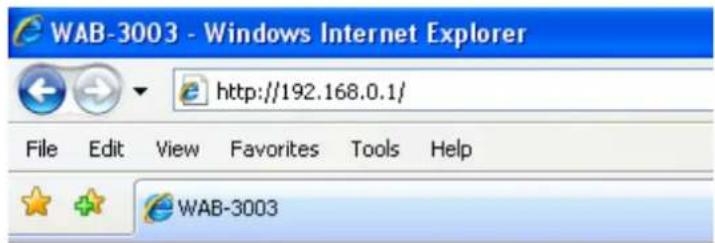
Launch a web browser to access the web management interface of AP mode by entering the default IP address, http://192.168.0.1/, in the URL field, and then press Enter.
text_image
WAB-3003 - Windows Internet Explorer http://192.168.0.1/ File Edit View Favorites Tools Help WAB-3003Caution:
Using an incorrect default IP address will result in no Login page shown on the web browser. Please make sure a correct IP address is used for the desired mode; refer to Section 3.2.1 Instruction to Web Management Interface for detailed default IP addresses.
Step 3: System Login
The system manager Login Page will then appear.
Enter "root" in the User name field and "admin" in the Password field, and then click OK to log in.

text_image
levelone® Username: Password: LoginStep 4: Login Success
The System Overview page will appear after a successful login.
To logout, simply click on the Logout button on the top right hand corner of the management interface.

text_image
levelone® WAB-3003 Wireless Outdoor AP Home Logout ? Help System Wireless Firewall Utilities Status Overview Clients Event Log Home > Status > System Overview System Overview System System Name WAB-3003 Firmware Version 1.00.00 Build Number 1.10-1.2617 Location Greenwich Site EN-E Device Time 1999/12/31 16:03:30 System Up Time 0 days, 0:03:30 Operating Mode AP Radio Status MAC Address 00:1F:D4:00:20:F1 Band 802.11b+g Channel 1 TX Power Highest AP Status Profile Name BSSID ESSID Security Type Online Clients VAP-1 00:1F:D4:00:20:F1 LevelOne None 0 LAN Interface MAC Address 00:1F:D4:00:20:F0 IP Address 192.168.0.1 Subnet Mask 255.255.255.0 Gateway 192.168.0.254Note:
By default, AP mode is enabled. Therefore, the administrator must login to the system via the AP mode login page at the first time. The administrator is then able to switch between modes afterwards. For information on switching between modes, please refer to Section 4.1.2 Operating Mode.
< CPE Mode >
Step 1: Launch Web Browser
Launch a web browser to access the web management interface of CPE mode by entering the default IP address, http://192.168.0.1/, in the URL field, and then press Enter.

text_image
WAB-3003 - Windows Internet Explorer http://192.168.0.1/ File Edit View Favorites Tools Help WAB-3003Step 2: System Login
The system manager Login Page will then appear.
Enter "root" in the User name field and "admin" in the Password field, and then click OK to log in. Below depicts an example of using the root manager account.

text_image
levelone® Username: root Password: •••••• LoginStep 3: Login Success
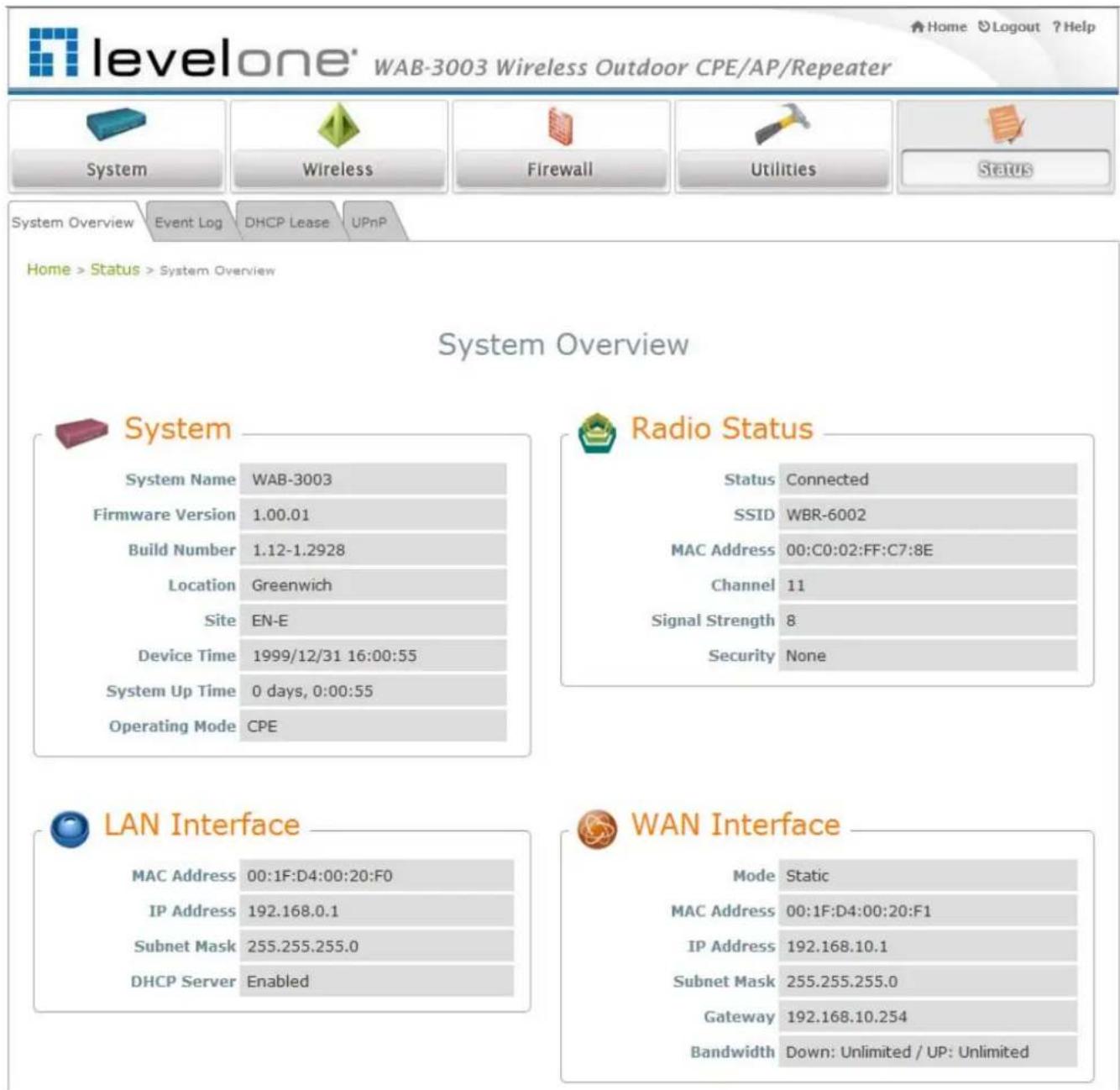
After a successful login into WAB-3003, a System Overview page of web management interface will appear.
To logout, simply click on the Logout button at the upper right hand corner of the interface.
text_image
levelone® WAB-3003 Wireless Outdoor CPE/AP/Repeater Home Logout ? Help System Wireless Firewall Utilities Status System Overview Event Log DHCP Lease UPnP Home > Status > System Overview System Overview System System Name WAB-3003 Firmware Version 1.00.01 Build Number 1.12-1.2928 Location Greenwich Site EN-E Device Time 1999/12/31 16:00:55 System Up Time 0 days, 0:00:55 Operating Mode CPE Radio Status Status Connected SSID WBR-6002 MAC Address 00:C0:02:FF:C7:8E Channel 11 Signal Strength 8 Security None LAN Interface MAC Address 00:1F:D4:00:20:F0 IP Address 192.168.0.1 Subnet Mask 255.255.255.0 DHCP Server Enabled WAN Interface Mode Static MAC Address 00:1F:D4:00:20:F1 IP Address 192.168.10.1 Subnet Mask 255.255.255.0 Gateway 192.168.10.254 Bandwidth Down: Unlimited / UP: Unlimited3.2.2 Quick Configuration
WAB-3003 is a dual-mode system which can be configured as either an access point (AP Mode) or a gateway (CPE Mode) based on deployment needs. This section provides a step-by-step configuration procedure for installing CPE mode and AP mode respectively.
< AP Mode - Default Mode>
Step 1:
Mode
Confirmation
text_image
levelone® WAB-3003 Wireless Outdoor CPE/AP/Repeater System Wireless Firewall Utilities Status Overview Clients Repeater Event LogHome > Status > System Overview
System Overview

System
System Name WAB-3003
MAC Address 00:1F:D4:00:20:F1
Band 802.11b+g
Channel 1
TX Power Highest

LAN Interface
MAC Address 00:1F:D4:00:20:F0
IP Address 192.168.0.1
Subnet Mask 255.255.255.0
Gateway 192.168.0.254

AP Status
| Profile Name | BSSID | ESSID | Security Type | Online Clients |
| VAP-1 | 00:1F:D4:00:20:F1 | LevelOne | None | 0 |
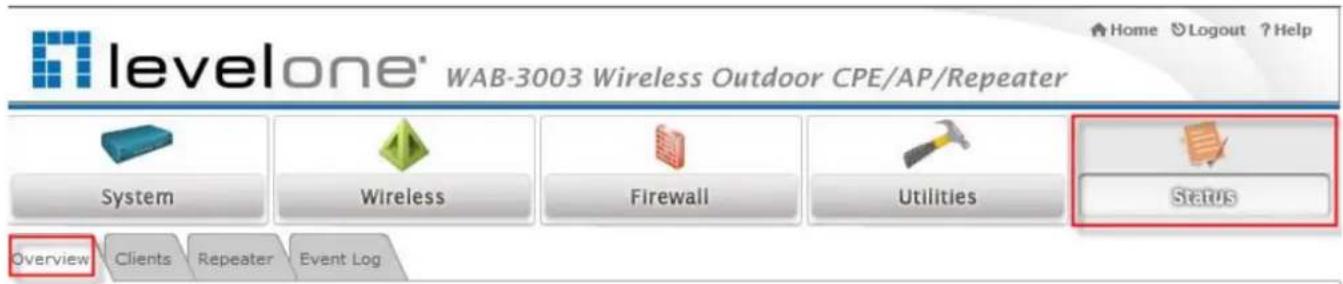
▶ Ensure that the Operating Mode is currently at AP mode.
Click on the Status button and then select the System Overview tab. The Operating Mode is at the System section on the System Overview page.
Note:
For more information on switching to AP mode, if it is not currently active, please refer to AP Mode Section 4.1.2 Operating Mode.
Step 2: Change Password

text_image
levelone® WAB-3003 Wireless Outdoor CPE/AP/Repeater System Wireless Firewall Utilities Status Change Password Network Utilities Config Save & Restore System Upgrade Reboot Home > Utilities > Change Password Change Password Name : root Old Password : •••••• New Password : •••••• • up to 32 characters Re-enter New Password : •••••• | SAVE CLEARClick on the Utilities button and then select the Password tab.
Enter a new password in the New Password field and retype it in the Re-enter New Password field.
▶ Click SAVE to save the changes.
Step 3:
Network
Settings

text_image
levelone® WAB-3003 Wireless Outdoor CPE/AP/Repeater Home Logout ? Help System Wireless Firewall Utilities Status System Information Operating Mode Network Management QoS Classification Home > System > Network Interface Network Settings Mode : Static DHCP Renew IP Address : 192.168.0.1 Netmask : 255.255.255.0 Default Gateway : 192.168.0.254 Primary DNS Server : 168.95.1.1 Alternate DNS Server : Layer2 STP : Disable Enable SAVE CLEAR【Settings here are for example only.】
Click on the System button and then select the Network tab.
▶ Enable Static, and then enter the related information in the fields marked with red asterisks.
▶ Click SAVE to save the settings.
Step 4:
SSID
Settings

levelone
WAB-3003 Wireless Outdoor CPE/AP/Repeater
Home Logout ?Help

System

wireless

Firewall

Utilities

Status
VAP Overview
General
VAP Config
Security
Repeater
Advanced
Access Control
Site Survey
Home > Wireless > General
General Settings
Band :
802.11b+802.11g
Super G :
Bursting
Fast Frames
Dynamic Turbo
Short Preamble :
© Disable
Enable
Channel :
1
Max Transmit Rate :
Auto
Transmit Power :
Auto
Beacon Interval :
100 =(100 - 500ms)
SAVE
CLEAR
Click on the Wireless button and then select the General tab.
Band: Select an appropriate band from the drop-down list box.

levelone
WAB-3003 Wireless Outdoor CPE/AP/Repeater
Home Ⓧ Logout ? Help

System

Wireless

Firewall

Utilities

Status
VAP Overview
General
VAP Config
Security
Repeater
Advanced
Access Control
Site Survey
Home > Wireless > VAP Config
VAP Configuration
Profile Name : VAP-1
VAP
Disable Enable
VAP-1
ESSID
LevelOne
VLAN ID
Disable Enable
VLAN ID
=(1-4094)
SAVE
CLEAR
Click on the Wireless button and then select the VAP Config tab.
ESSID: Enter respective ESSID for each VAP in the ESSID field or use the default. ESSID (Extended Service Set Identifier) is a unique identifier used for networking devices to get associated with WAB-3003
Note:
For QoS classification, please enable VLAN ID and specify a VLAN ID with respective ESSID. Click SAVE to save the settings.
Step 5:
Security
Settings
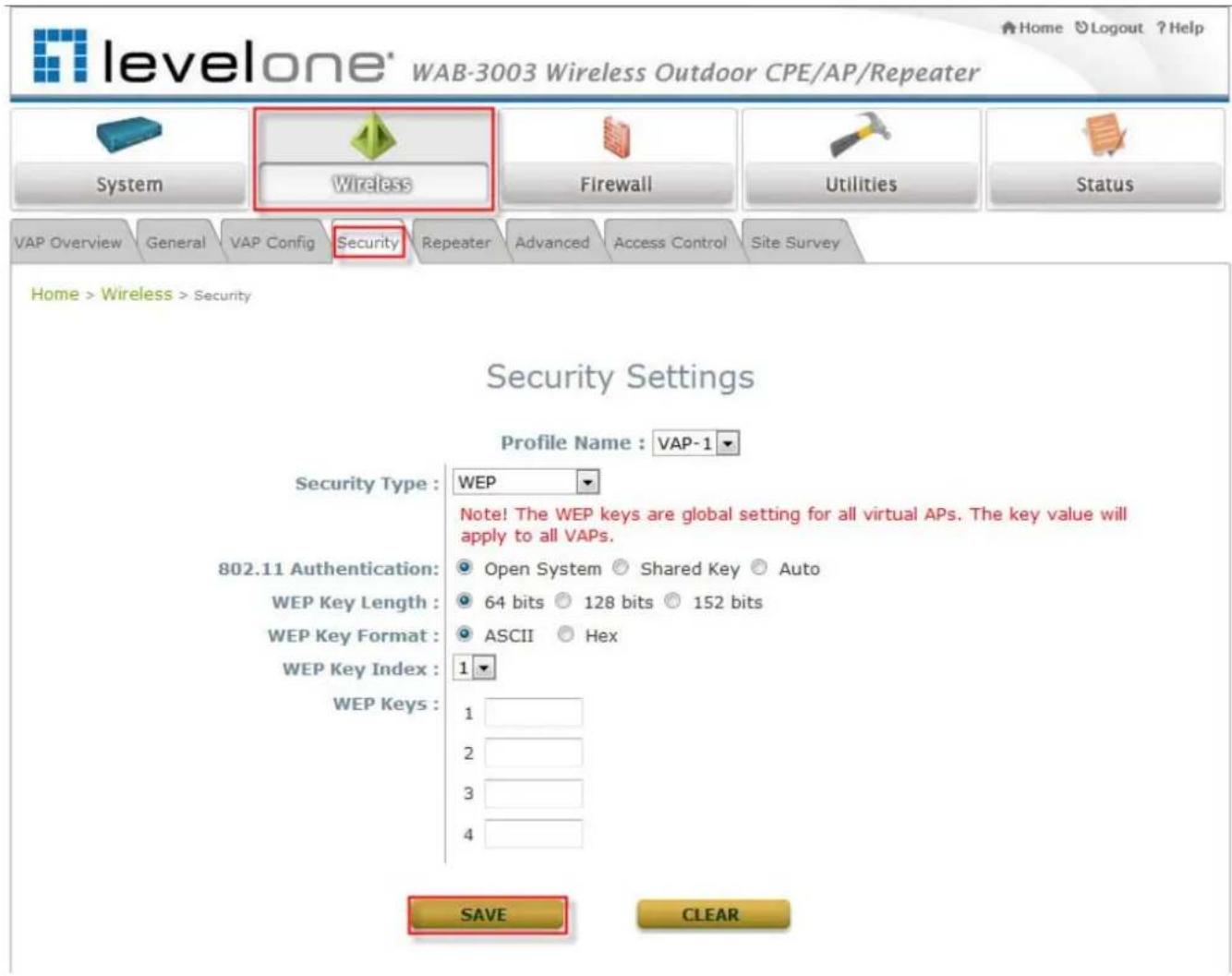
text_image
levelone® WAB-3003 Wireless Outdoor CPE/AP/Repeater System Wireless Firewall Utilities Status VAP Overview General VAP Config Security Repeater Advanced Access Control Site Survey Home > Wireless > Security Security Settings Profile Name : VAP-1 Security Type : WEP Note! The WEP keys are global setting for all virtual APs. The key value will apply to all VAPs. 802.11 Authentication: Open System Shared Key Auto WEP Key Length: 64 bits 128 bits 152 bits WEP Key Format: ASCII Hex WEP Key Index: 1 WEP Keys: 1 2 3 4 SAVE CLEARClick on the Wireless button and then select the Security tab.
Select the desired VAP Profile and Security Type from the drop-down list boxes. The above figure depicts an example of selecting VAP-1 and WEP.
▶ Enter the information required in the blank fields.
Caution:
You must use the same information provided here to configure the network devices that are to be associated with WAB-3003.
Click SAVE to save all settings configured so far; all updated settings will take effect upon reboot.
Congratulations!
The AP mode is now successfully configured.
< CPE Mode >
Step 1:
Mode
Confirmation
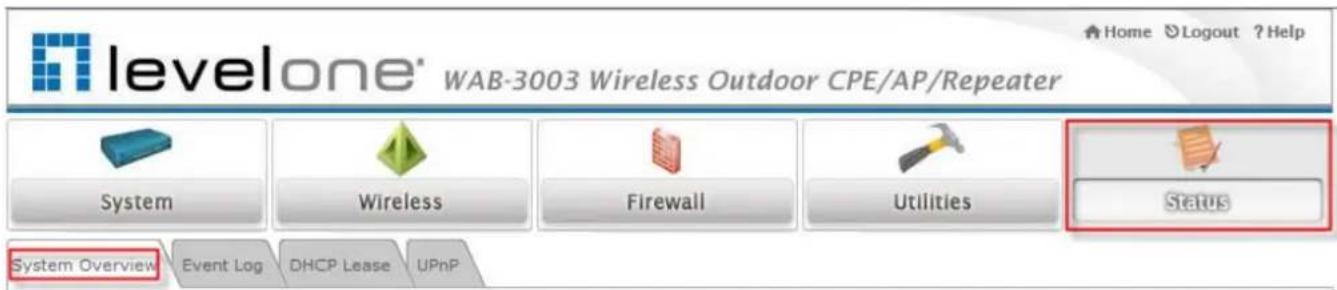
text_image
levelone® WAB-3003 Wireless Outdoor CPE/AP/Repeater Home ⬆ Logout ? Help System Wireless Firewall Utilities Status System Overview Event Log DHCP Lease UPnPHome > Status > System Overview
System Overview

System
System Name WAB-3003
Device Time 1999/12/31 16:04:52
System Up Time 0 days, 0:04:52
Operating Mode CPE

Radio Status
Status Connected
SSID WBR-6002
MAC Address 00:C0:02:FF:C7:8E
Channel 11
Signal Strength 5
Security None

LAN Interface
MAC Address 00:1F:D4:00:20:F0
IP Address 192.168.0.1
Subnet Mask 255.255.255.0
DHCP Server Enabled

WAN Interface
Mode Static
MAC Address 00:1F:D4:00:20:F1
IP Address 192.168.10.1
Subnet Mask 255.255.255.0
Gateway 192.168.10.254
Bandwidth Down: Unlimited / UP: Unlimited
▶ Ensure that the Operating Mode is currently at CPE mode.
Click on the Status button and then select the System Overview tab. The Operating Mode is at the System section on the System Overview page.
Note:
For more information on switching to CPE mode, if it is not currently active, please refer to Section 5.1.2 Operating Mode.
Step 2: Change Password
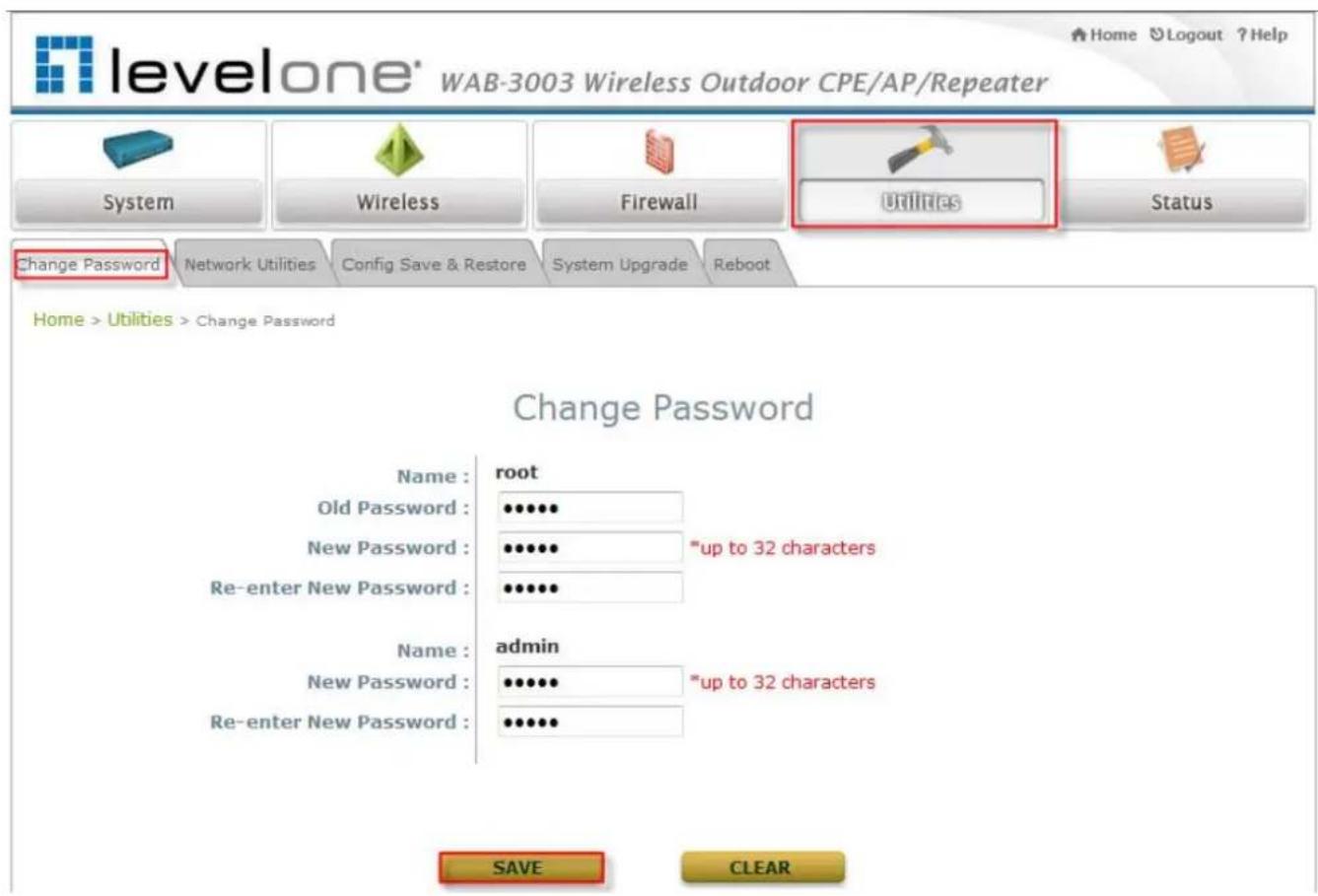
text_image
levelone® WAB-3003 Wireless Outdoor CPE/AP/Repeater System Wireless Firewall Utilities Status Change Password Network Utilities Config Save & Restore System Upgrade Reboot Home > Utilities > Change Password Change Password Name : root Old Password : •••••• New Password : •••••• • up to 32 characters Re-enter New Password : •••••• Name : admin New Password : •••••• • up to 32 characters Re-enter New Password : •••••• SAVE CLEARClick on the Utilities button and then select the Change Password tab.
▶ Change Root Account Password
- Enter the old password in the Old Password field, which default password is "admin".
- Enter a new password in the New Password field and retype it in the Re-enter New Password field.
▶ Change Admin Account Password
- Enter a new password in the New Password field and retype it in the Re-enter New Password field.
▶ Click SAVE to save the changes.
Step 3:
Site Survey
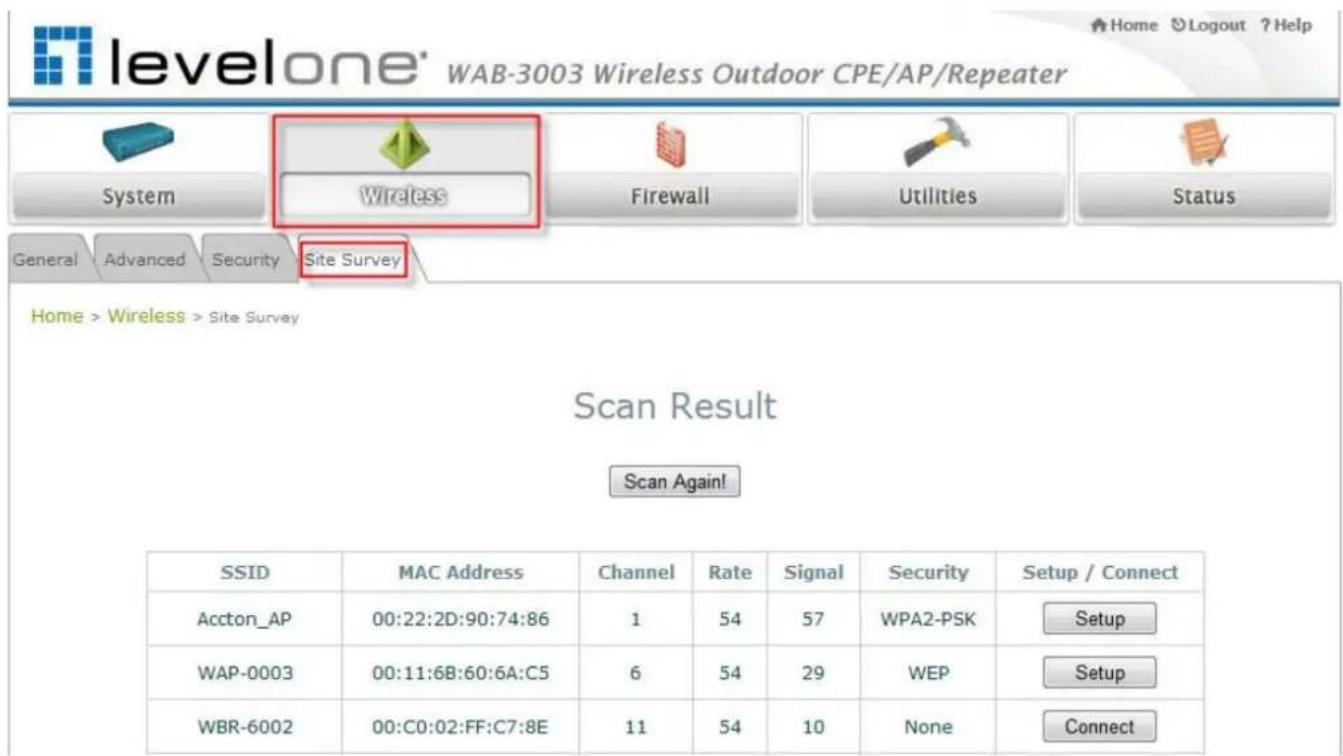
text_image
levelone' WAB-3003 Wireless Outdoor CPE/AP/Repeater System Wireless Firewall Utilities Status General Advanced Security Site Survey Home > Wireless > Site Survey Scan Result Scan Again! SSID MAC Address Channel Rate Signal Security Setup / Connect Accton_AP 00:22:2D:90:74:86 1 54 57 WPA2-PSK Setup WAP-0003 00:11:6B:60:6A:C5 6 54 29 WEP Setup WBR-6002 00:C0:02:FF:C7:8E 11 54 10 None Connect【The scan result displayed here is an example only.】
Click on the Wireless button and then select the Site Survey tab.
The system will automatically scan and display all available APs in the same WAB-3003's coverage area.
Click Scan Again if the APs to be associated with are not listed on the Scan Result list.
Step 4: Select AP to be Associated
Select an AP to be associated with from the Scan Result list provided in Step 3.
Step 5:
Security
Settings

text_image
levelone' WAB-3003 Wireless Outdoor CPE/AP/Repeater System Wireless Firewall Utilities Status General Advanced Security Site Survey Home > Wireless > Site Survey Scan Result Scan Again! SSID MAC Address Channel Rate Signal Security Setup / Connect Accton_AP 00:22:2D:90:74:86 1 54 57 WPA2-PSK Setup WAP-0003 00:11:6B:60:6A:C5 6 54 29 WEP Setup WBR-6002 00:C0:02:FF:C7:8E 11 54 10 None Connect Pre-shared Cipher : TKIP Pre-shared Key Type : ○ PSK(Hex) *(64 chars) ○ Passphrase *(8 - 63 chars) Pre-shared Key : ConnectThe above figure depicts an example of selecting Accton_AP (encrypted via WPA2-PSK security type).
Click Setup, and then a related encryption configuration box will appear.
Enter the information required in the configuration box. Information to be entered must be exactly the same as configured in this AP.
▶ Click Connect to start the connection.
Step 6: Network Interface Configuration
Click on the System button and then select the Network tab.

text_image
levelone® WAB-3003 Wireless Outdoor CPE/AP/Repeater System Wireless Firewall Utilities Status System Information Operating Mode Network Management Home > System > Network Interface WAN Configuration Mode : Static DHCP Renew IP Address : 192.168.10.1 Netmask : 255.255.255.0 Default Gateway : 192.168.10.254 Primary DNS Server : 168.95.1.1 Alternate DNS Server : Bandwidth Limit : Download : Unlimited Upload : Unlimited【Settings here are for example only.】
WAN Configuration
Enable Static, and then enter the related information in the fields marked with red asterisks.
▶ Click SAVE to save the settings.
Dynamic DNS Configuration
The Dynamic DNS section is on the same page as WAN Configuration section.
When enabled, choose the service Provider with provided Host Name, User Name/E-mail, and Password/Key.
▶ Click SAVE to activate all settings configured so far.
LAN Configuration
The LAN Configuration section is on the same page as WAN Configuration section.
Enter the IP Address and Netmask of the LAN port.
Click SAVE to save all settings configured so far; all updated settings will take effect upon reboot.
Congratulations!
The CPE mode is now successfully configured.
4. AP Mode Configuration
When AP mode is activated, the system can be configured as an Access Point, or a Repeater, or an Access Point with Repeater depending on deployment needs. This chapter will guide you through setting up the AP mode with graphical illustrations. The following table shows all the functions of WAB-3003 in its AP mode.
| OPTION | System | Wireless | Firewall | Utilities | Status |
| FUNCTION | System Information | VAP Overview | Firewall List | Change Password | System Overview |
| Operating Mode | General Settings | Service | Network Utilities | Associate Client Status | |
| Network Settings | VAP Configuration | Advanced | Configuration Save & Restore | Repeater Information | |
| Management Services | Security Settings | System Upgrade | Event Log | ||
| QoS Classification | Repeater Settings | Reboot | |||
| Advanced Wireless Settings | |||||
| Access Control Settings | |||||
| Site Survey |
Table 4-1: AP Mode Functions
WAB-3003 108M 11g Outdoor PoE CPE/ AP/ Bridge

levelone
Home Logout ?Help
WAB-3003 Wireless Outdoor CPE/AP/Repeater

System

Wireless

Firewall

Utilities

Status

Home > Status > System Overview
System Overview

System
System Name WAB-3003
MAC Address 00:1F:D4:00:20:F1
Band 802.11b+g
Channel 1
TX Power Highest

LAN Interface
MAC Address 00:1F:D4:00:20:F0
IP Address 192.168.0.1
Subnet Mask 255.255.255.0
Gateway 192.168.0.254

AP Status
| Profile Name | BSSID | ESSID | Security Type | Online Clients |
| VAP-1 | 00:1F:D4:00:20:F1 | LevelOne | None | 0 |
Figure 4-1: AP Mode Main Page
4.1 System
This section provides information for configuring the following functions: System Information, Operating Mode, Network Settings, Management Services, and QoS Classification.
text_image
levelone® WAB-3003 Wireless Outdoor CPE/AP/Repeater System Wireless Firewall Utilities Status System Information Operating Mode Network Management QoS Classification Home > System > General System Information Name : WAB-3003 Description : Location : Time Device Time : 1999/12/31 16:11:05 Time Zone : (GMT-08:00)Pacific Time(US&Canada),Tijuana Time : Enable NTP Manually set up Set Date : ---- Year -- Month -- Day Set Time : -- Hour -- Min -- Sec SAVE CLEARNote:
A system restart is required when a reminding message appears after clicking the SAVE button; all settings entered and saved will take effect only after the system restart.
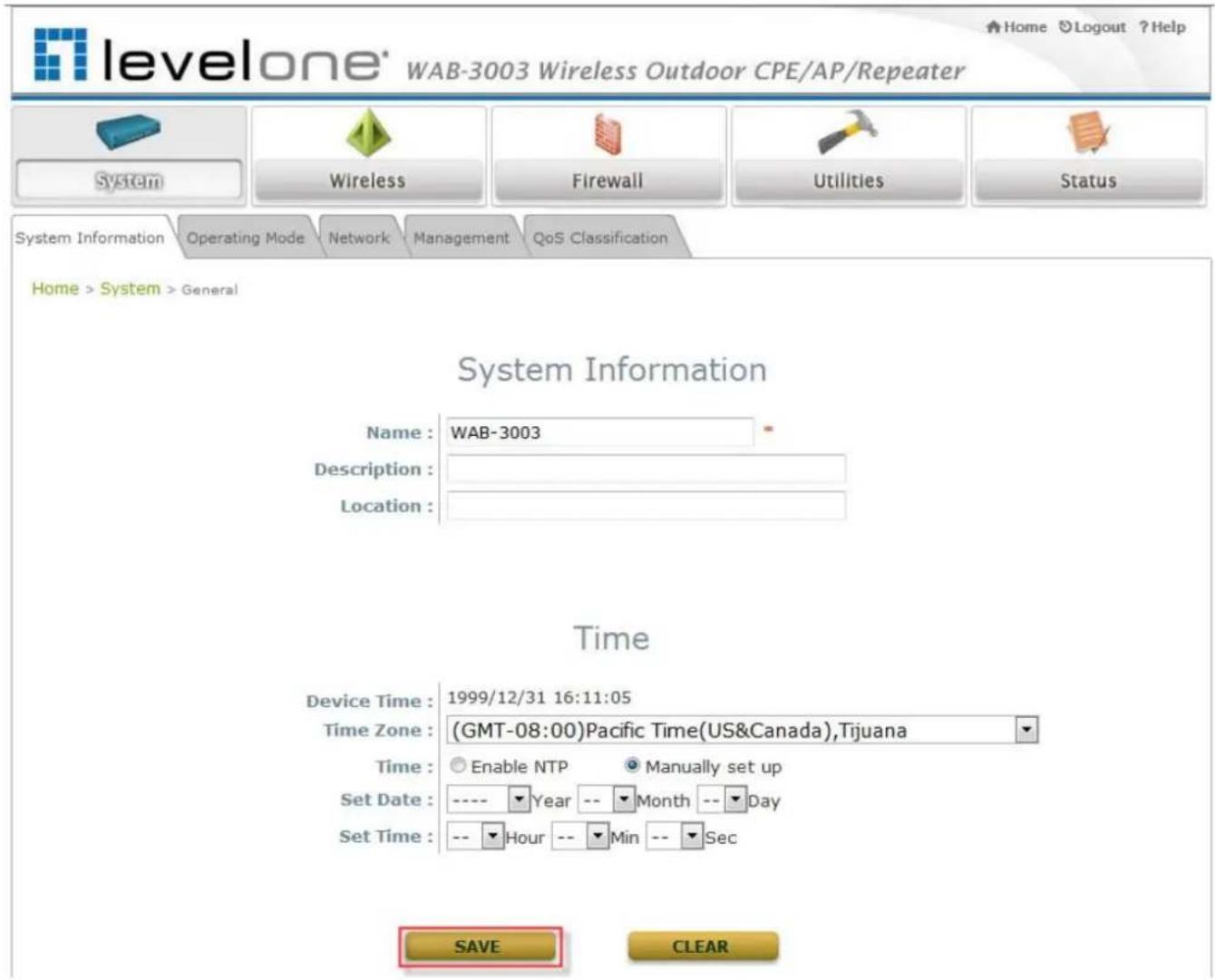
4.1.1 System Information
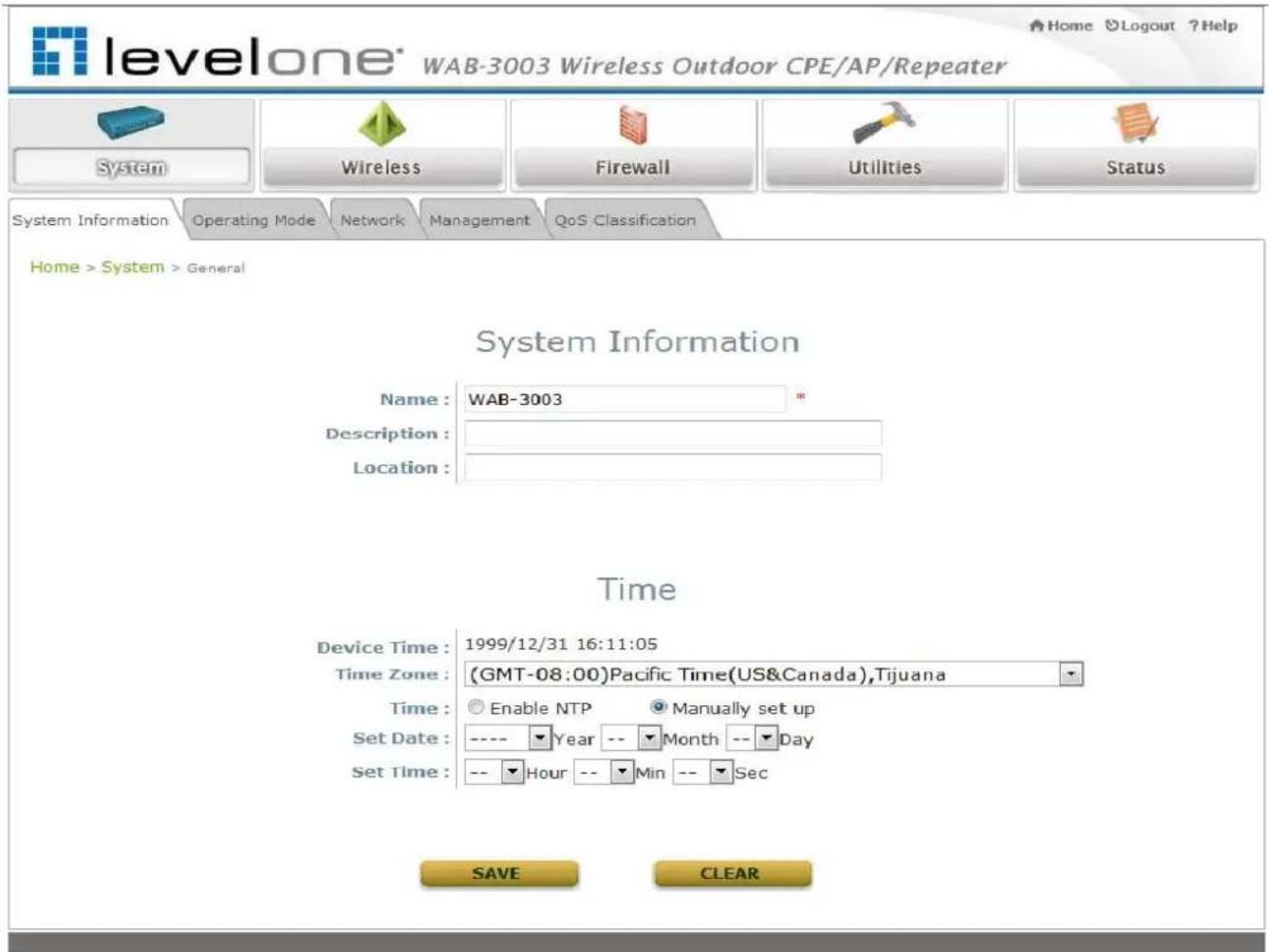
For maintenance purpose, it is required to specify the system name, its location and corresponding basic parameters. Fields such as Name, Description and Location are used for mnemonic purpose. It is recommended to have different values in each AP.
text_image
levelone® WAB-3003 Wireless Outdoor CPE/AP/Repeater Home Logout ?Help System Wireless Firewall Utilities Status System Information Operating Mode Network Management QoS Classification Home > System > General System Information Name: WAB-3003 * Description: Location: Time Device Time: 1999/12/31 16:11:05 Time Zone: (GMT-08:00)Pacific Time(US&Canada),Tijuana Time: Enable NTP Manually set up Set Date: ---- Year -- Month -- Day Set Time: -- Hour -- Min -- Sec SAVE CLEAR- System Information
For maintenance purpose, it is recommended to have the following information stated as clearly as possible. Fields Name, Description, and Location are used for mnemonic purpose. It is recommended to have different values in each wireless device.
Name: The system name used to identify this system
➢ Description: Further information of the system.
➢ Location: The information on geographical location of the system for the administrator to locate the system easily.
- Time
Time settings allow the system time synchronized with NTP server or manually set.
➢ Device Time: Display the current time of the system.
Time Zone: Select an appropriate time zone from the drop-down list box.
➢ Synchronization: Synchronize the system time either by NTP server or manual setup.
WAB-3003 108M 11g Outdoor PoE CPE/ AP/ Bridge
(1) Enable
NTP:
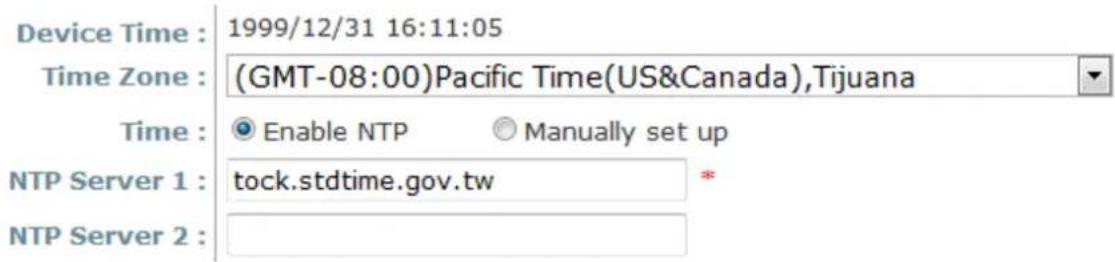
By selecting Enable NTP, WAB-3003 can synchronize its system time with the NTP server automatically. While this method is chosen, at least one NTP server's IP address or domain name must be provided. If FQDN (full qualified domain name) is used as the IP address of NTP server, the DNS server must also be activated (please refer to 4.1.3 Network Settings).
Time
text_image
Device Time : 1999/12/31 16:11:05 Time Zone : (GMT-08:00)Pacific Time(US&Canada),Tijuana Time : Enable NTP Manually set up NTP Server 1 : tock.stdtime.gov.tw * NTP Server 2 :(2) Manually
set
up:
By selecting Manually set up, the administrator can manually set the system date and time.
Time

text_image
Device Time : 1999/12/31 16:11:05 Time Zone : (GMT-08:00)Pacific Time(US&Canada),Tijuana Time : Enable NTP Manually set up Set Date : ---- Year -- Month -- Day Set Time : -- Hour -- Min -- Sec- Set Date: Select the appropriate Year, Month, and Day from the drop-down list box.
- Set Time: Select the appropriate Hour, Min, and Sec from the drop-down list box.
4.1.2 Operating Mode
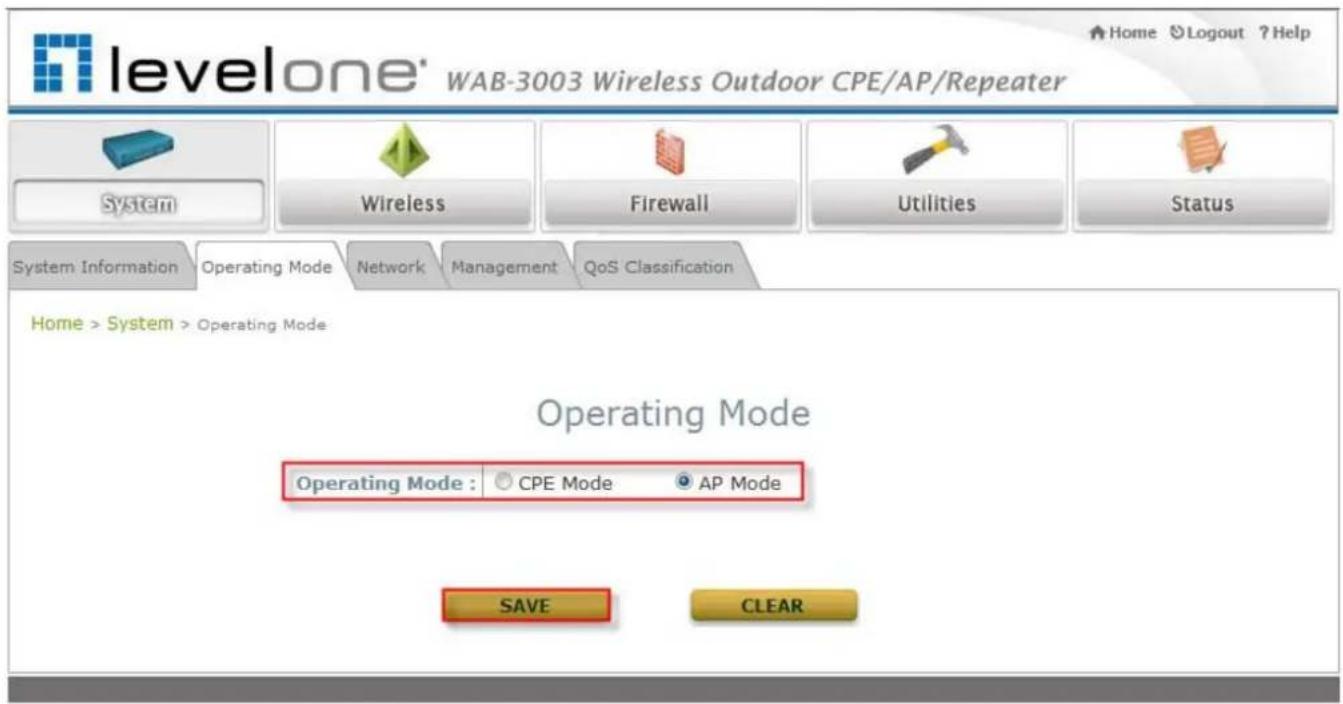
WAB-3003 supports two operation modes: CPE mode and AP mode. The administrator can set the desired mode on this page, and then configure the system according to deployment needs.
text_image
levelone® WAB-3003 Wireless Outdoor CPE/AP/Repeater System Wireless Firewall Utilities Status System Information Operating Mode Network Management QoS Classification Home > System > Operating Mode Operating Mode Operating Mode : CPE Mode AP Mode SAVE CLEAR- Operating Mode: Select the desired mode and then click SAVE to save the setting.
Note:
After clicking SAVE, the system will immediately ask for a reboot to activate the selected mode.
4.1.3 Network Settings
LAN settings can be configured on this page.

text_image
levelone® WAB-3003 Wireless Outdoor CPE/AP/Repeater Home Logout ? Help System Wireless Firewall Utilities Status System Information Operating Mode Network Management QoS Classification Home > System > Network Interface Network Settings Mode : Static DHCP Renew IP Address : 192.168.0.1 Netmask : 255.255.255.0 Default Gateway : 192.168.0.254 Primary DNS Server : 168.95.1.1 Alternate DNS Server : Layer2 STP : Disable Enable SAVE CLEAR• Mode: Determine the way to obtain the IP address, by DHCP or Static manually set.
Static: Static setting is set these parameters manually. The basic parameters need to provide such as IP address, subnet mask and Gateway.
- IP Address: The IP address of the LAN port.
- Netmask: The Subnet mask of the LAN port.
- Gateway: The Gateway IP address of the LAN port.
o Primary/ Secondary DNS Server: Please provide at least on DNS server's IP address.
DHCP: The option is provided when a DHCP server is provided in the network. The following IP address/Netmask/Gateway setting will be disabled.
- Layer 2 STP: Depends on the configuration of the system including wired and wireless settings, when it is configured to bring several networks, we need enable STP.
4.1.4 Management Services
The system supports VLAN, SNMP, Remote Syslog, and Auto Reboot functions for easy management. These functions can be configured on this page.

text_image
levelone® WAB-3003 Wireless Outdoor CPE/AP/Repeater Home Logout ? Help System Wireless Firewall Utilities Status System Information Operating Mode Network Management QoS Classification Home > System > Management Services Management Services VLAN for Management: SNMP Configuration: System Log: Auto Reboot: Disable Enable VLAN ID : "(1 - 4094) Disable Enable Community String : Read : Write : Trap : Disable Enable Server IP : Disable Enable SYSLOG Server IP : 192.168.1.254 Server Port : 514 SYSLOG Level : Error Disable Enable Reboot Time : 03:00 SAVE CLEAR- VL AN for Management: The Ethernet traffic from the system can be tagged with VLAN tag with specific ID.
- SNMP Configuration: By enabling SNMP service, the remote SNMP manager could obtain the system status.
➢ Enable/ Disable: Select Enable to activate this function or Disable to inactivate it.
Community String: The community string is required when accessing the Management Information Base (MIB) of the system.
- Read: Enter the community string to access the MIB with Read privilege.
- Write: Enter the community string to access the MIB with Write privilege.
Trap: When enabled, events on Cold Start, Interface UP & Down, and Association & Disassociation can be reported to an assigned server.
○ Enable/ Disable: Select Enable to activate this function or Disable to inactivate it.
- Server IP Address: Enter the IP address of the assigned server for receiving the trap report.
- Syslog Configuration: By enabling this function, specify a remote syslog server which could accept system log messages from the system remotely. Therefore, by reading the syslog message in the remote server, review activities of all installed the system in the network.
➢ Enable/ Disable: Select Enable to activate this function or Disable to inactivate it.
Server IP: The IP address of the Syslog server for receiving the reported events.
Server Port: The port number of the Syslog server.
Log Level: Select the desired level of received events from the drop-down list box.
- Auto Reboot: The option can be enabled to reboot system automatically with preferred Reboot Time from drop-down list.
➢ Enable/ Disable: Select Enable to activate this function or Disable to deactivate it.
➢ Reb oot Time: Select an appropriate time from the drop-down list box. Since all users on the network will be disconnected during reboot, it is suggested to set the reboot time during an off-peak period to reduce impacts on online users.
4.1.5 QoS Classification

text_image
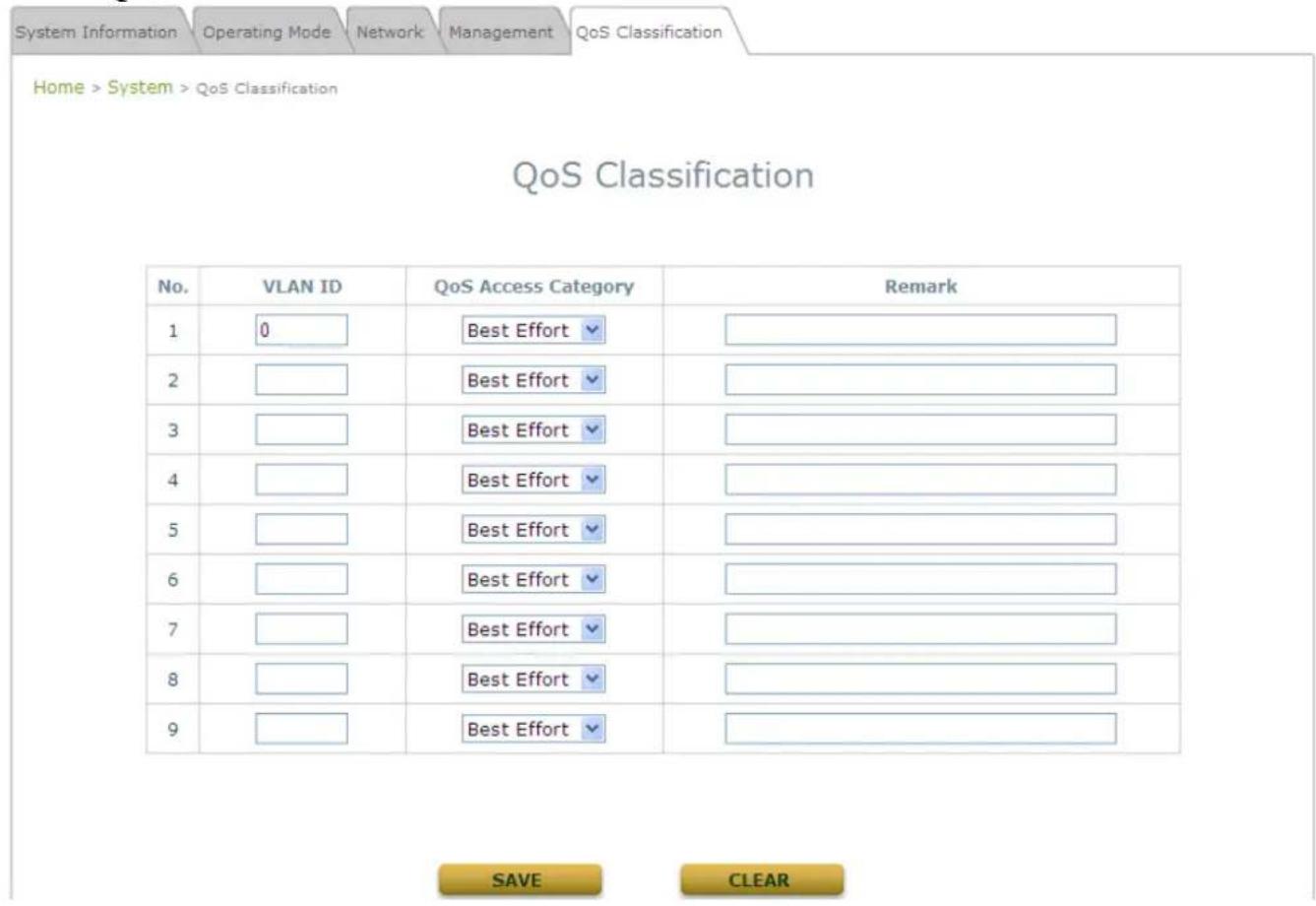
levelone' WAB-3003 Wireless Outdoor CPE/AP/Repeater System Wireless Firewall Utilities Status System Information Operating Mode Network Management QoS Classification Home > System > QoS Classification QoS Classification Status : Enable Disable SAVE CLEARThe system supports function of QoS classification where specified VLAN ID can be assigned to a specific QoS access category for priority handling of traffics.
Enable QoS
text_image
System Information Operating Mode Network Management QoS Classification Home > System > QoS Classification QoS Classification No. VLAN ID QoS Access Category Remark 1 0 Best Effort 2 Best Effort 3 Best Effort 4 Best Effort 5 Best Effort 6 Best Effort 7 Best Effort 8 Best Effort 9 Best Effort SAVE CLEAR4.2 Wireless
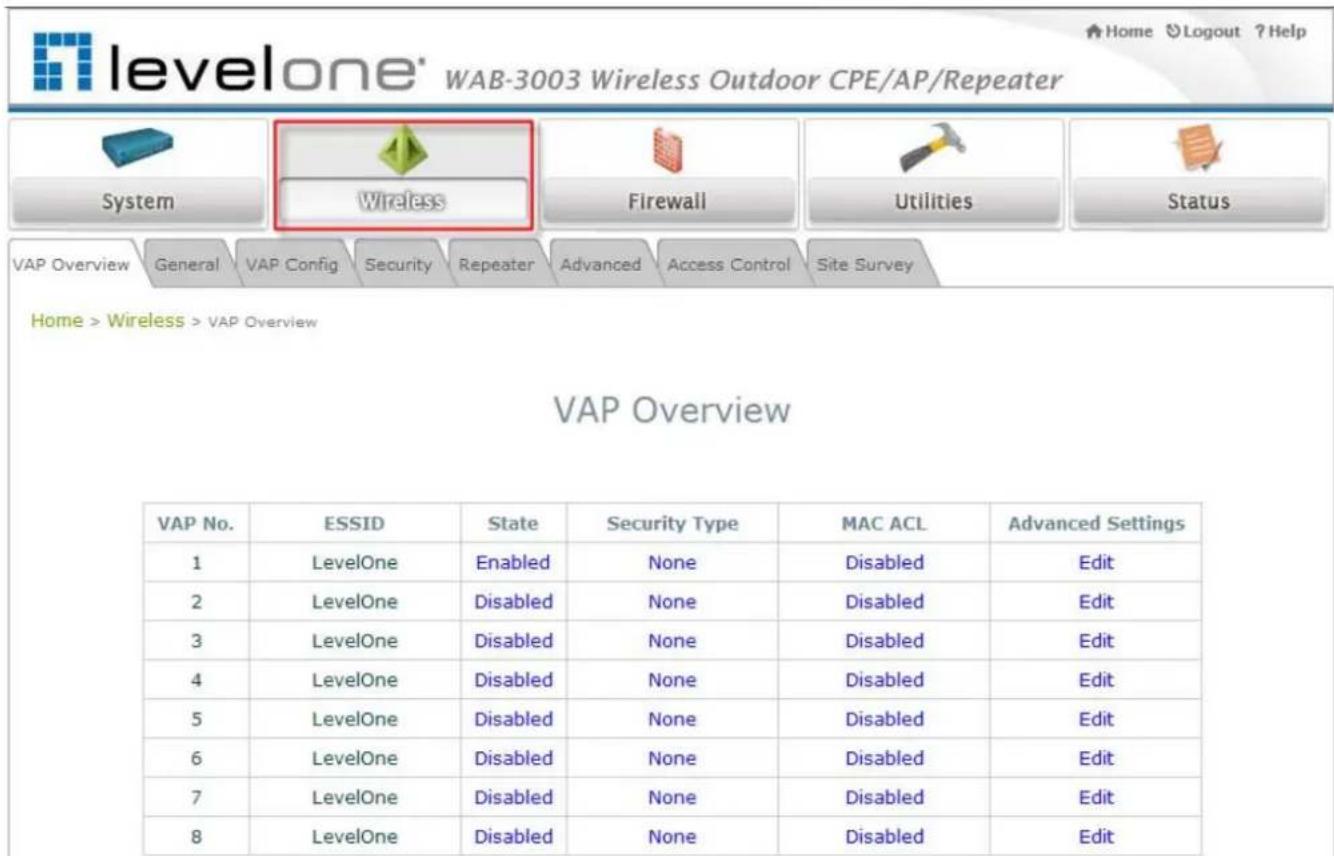
The administrator can configure the following wireless settings on this page: VAP Overview, General Settings, VAP Configuration, Security Settings, Repeater Settings, Advanced Wireless Settings, Access Control Settings, and Site Survey. The system supports up to eight Virtual Access Points (VAPs). Each VAP can have its own settings including ESSID, VLAN ID, security settings, etc. Such VAP capability enables different levels of service to meet actual requirements.
text_image
levelone® WAB-3003 Wireless Outdoor CPE/AP/Repeater System Wireless Firewall Utilities Status VAP Overview General VAP Config Security Repeater Advanced Access Control Site Survey Home > Wireless > VAP Overview VAP Overview VAP No. ESSID State Security Type MAC ACL Advanced Settings 1 LevelOne Enabled None Disabled Edit 2 LevelOne Disabled None Disabled Edit 3 LevelOne Disabled None Disabled Edit 4 LevelOne Disabled None Disabled Edit 5 LevelOne Disabled None Disabled Edit 6 LevelOne Disabled None Disabled Edit 7 LevelOne Disabled None Disabled Edit 8 LevelOne Disabled None Disabled Edit4.2.1 Virtual AP Overview
An overall status is collected in this page, including Enable/Disable State, Security Type, MAC ACL state, and Advanced Settings. The system has 8 VAPs; each has its own settings. In this table, please click on the hyperlink for further configuration of each VAP respectively.

text_image
levelone WAB-3003 Wireless Outdoor CPE/AP/Repeater System Wireless Firewall Utilities Status VAP Overview General VAP Config Security Repeater Advanced Access Control Site Survey Home > Wireless > VAP Overview VAP Overview VAP No. ESSID State Security Type MAC ACL Advanced Settings 1 LevelOne Enabled None Disabled Edit 2 LevelOne Disabled None Disabled Edit 3 LevelOne Disabled None Disabled Edit 4 LevelOne Disabled None Disabled Edit 5 LevelOne Disabled None Disabled Edit 6 LevelOne Disabled None Disabled Edit 7 LevelOne Disabled None Disabled Edit 8 LevelOne Disabled None Disabled Edit• State: The hyperlink showing Enable or Disable connects to the screen of VAP Configuration.
- Security Type: The hyperlink showing security type connects to the screen of Security Settings.
- MAC ACL: The hyperlink showing Allow or Disable connects to the screen of Access Control Settings.
- Advanced Settings: The hyperlink of advanced settings connects to the screen of Advanced Wireless Settings.
4.2.2 General Settings
This section is for configuring the system RF settings.

text_image
levelone® WAB-3003 Wireless Outdoor CPE/AP/Repeater System Wireless Firewall Utilities Status VAP Overview General VAP Config Security Repeater Advanced Access Control Site Survey Home > Wireless > General General Settings Band : 802.11b+802.11g Super G : Bursting Fast Frames Dynamic Turbo Short Preamble : Disable Enable Channel : 1 Max Transmit Rate : Auto Transmit Power : Auto Beacon Interval : 100 *(100 - 500ms) SAVE CLEAR- Band: Select an appropriate wireless frequency band of this system. Select one frequency band from Disable, 802.11b, 802.11g or mixed mode 802.11b+802.11g.
- Super G: Options of Bursting, Fast Frames, and Atheros' featured Dynamic Turbo can be selected to boost wireless throughput.
- Short Preamble: The option can be turned on the enable Short-Preamble frames.
- Channel: Select the appropriate channel from the drop-down list box to correspond with your network settings, for example, Channel 1-11 is available in North America and Channel 1-13 in Europe, or choose the default Auto.
• Max Transmit Rate: Select transmit rate from 1M to 54M or Auto.
• Transmit Power: Select from the lowest to highest power level or choose Auto. - Beacon Interval: Enter a value between 100 and 500 ms. The default is 100 milliseconds. The specified value represents the amount of time between beacon signal transmissions.
WAB-3003 108M 11g Outdoor PoE CPE/ AP/ Bridge
The RF settings in this page will be applied to all VAPs.
Under normal circumstances, the available RF configurations are illustrated as below:
| Band | Super | Short Preamble | Channel | Max Transmit Rate | Transmit Power |
| Disable | N/A | N/A | N/A | N/A | |
| 802.11b | N/A | Disable/Enable | Auto,able 1, 13, or 14 | 1M, 2M, 5.5M, 11M | Auto, Lowest, Low, Medium, High, Highest |
| 802.11g | Bursting, Compression, Fast Frames, Dynamic Turbo | Disable/Enable | Auto, 1~11 or 13 | 6M, 9M, 12M, 18M, 24M, 36M, 48M, 54M | |
| 802.11b+802.11g | Bursting, Compression, Fast Frames, Dynamic Turbo | Disable/Enable | Auto, 1~11, 13, or 14 | 1M, 2M, 5.5M, 6M, 9M, 11M, 12M, 18M, 24M, 36M, 48M, 54M |
4.2.3 VAP Configuration
text_image
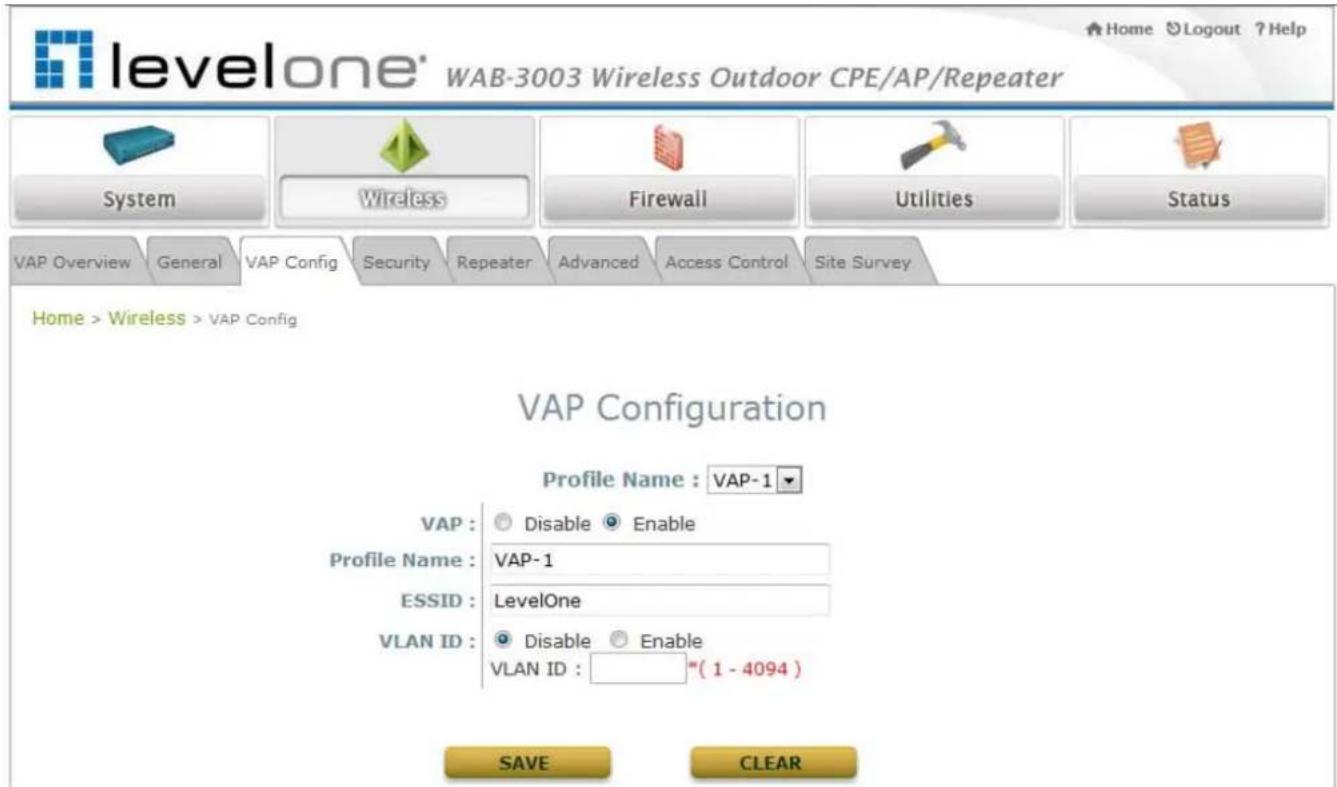
levelone® WAB-3003 Wireless Outdoor CPE/AP/Repeater System Wireless Firewall Utilities Status VAP Overview General VAP Config Security Repeater Advanced Access Control Site Survey Home > Wireless > VAP Config VAP Configuration Profile Name : VAP-1 VAP : Disable Enable Profile Name : VAP-1 ESSID : LevelOne VLAN ID : Disable Enable VLAN ID : "(1 - 4094)" SAVE CLEARTo enable each VAP, the administrator must configure each VAP manually. The settings of each VAP are collected as its profile.
• VAP: Enable or disable VAP function.
• Profile Name: The profile name of each VAP for identity/management purpose.
- ESSID: ESSID (Extended Service Set ID) indicates a unique SSID used by a client device to associate with a specified VAP. ESSID determines the service level assigned to a client.
- VLAN ID: The system supports tagged VLANs (virtual LANs). To enable VLAN function, each VAP must have a unique VLAN ID; valid values are ranged from 1 to 4094.
4.2.4 Security Settings
The system supports various user authentication and data encryption methods in each VAP profile. Thus the administrator can depend on the need to provide different service levels to clients. The security type includes None, WEP, 802.1X, WPA-PSK, and WPA-RADIUS.
• None: No authentication is required.

text_image
levelone® WAB-3003 Wireless Outdoor CPE/AP/Repeater System Wireless Firewall Utilities Status VAP Overview General VAP Config Security Repeater Advanced Access Control Site Survey Home > Wireless > Security Security Settings Profile Name : VAP-1 Security Type : None SAVE CLEARWAB-3003 108M 11g Outdoor PoE CPE/ AP/ Bridge
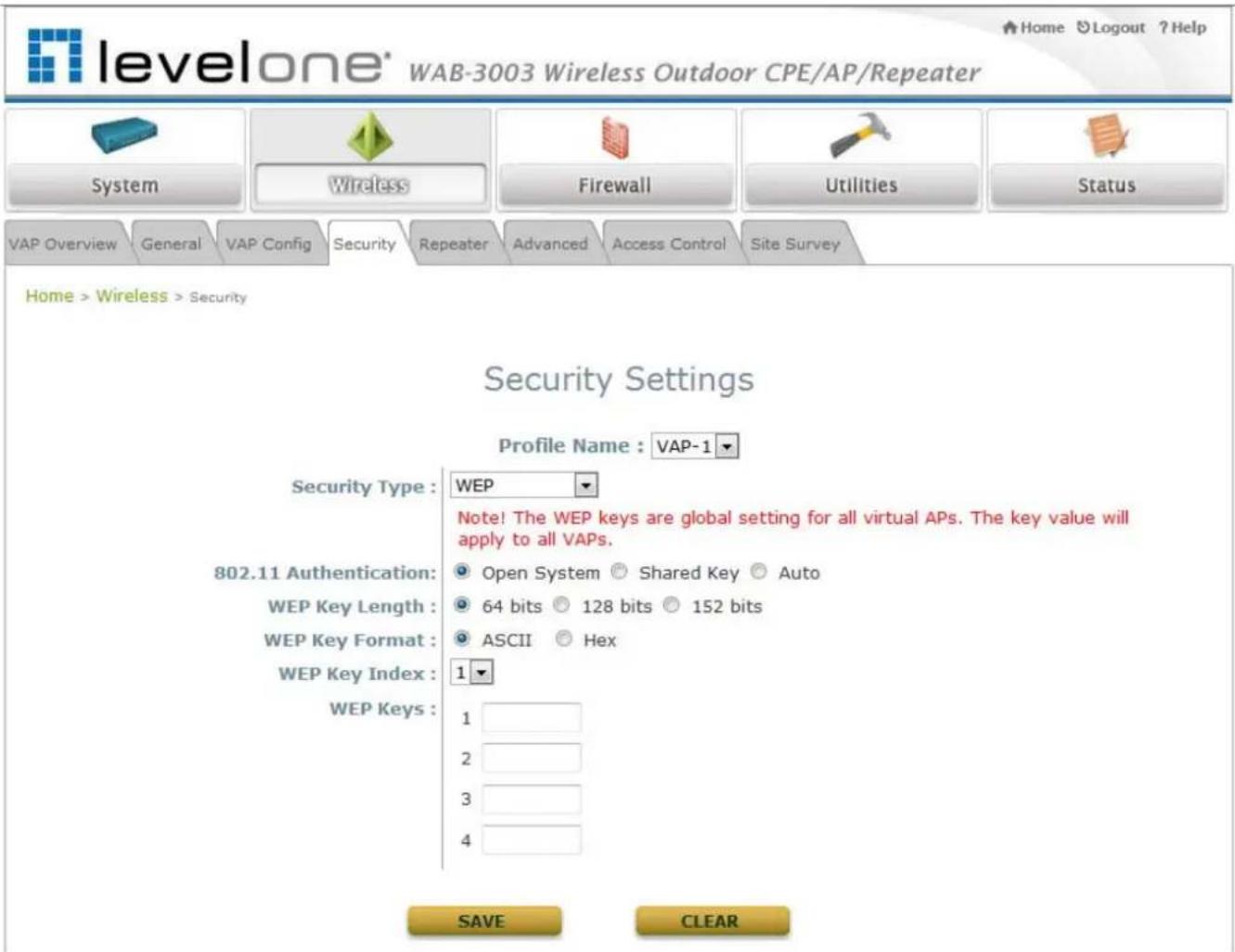
- WEP: WEP (Wired Equivalent Privacy) supports key length of 64/128/152 bits.
text_image
levelone® WAB-3003 Wireless Outdoor CPE/AP/Repeater Home Logout ? Help System Wireless Firewall Utilities Status VAP Overview General VAP Config Security Repeater Advanced Access Control Site Survey Home > Wireless > Security Security Settings Profile Name : VAP-1 Security Type : WEP Note! The WEP keys are global setting for all virtual APs. The key value will apply to all VAPs. 802.11 Authentication: Open System Shared Key Auto WEP Key Length: 64 bits 128 bits 152 bits WEP Key Format: ASCII Hex WEP Key Index: 1 WEP Keys: 1 2 3 4 SAVE CLEAR802.11 Authentication: Select from Open System, Shared Key, or Auto.
WEP Key Length: Select from 64-bit, 128-bit, or 152-bit key length.
WEP Key Format: Select from ASCII or Hex format for the WEP key.
WEP Key Index: Select a key index from 1 through 4. The WEP key index is a number that specifies which WEP key to use for the encryption of wireless frames during data transmission.
WEP Keys: Provide WEP key value; the system supports up to 4 sets of WEP keys.
WAB-3003 108M 11g Outdoor PoE CPE/ AP/ Bridge
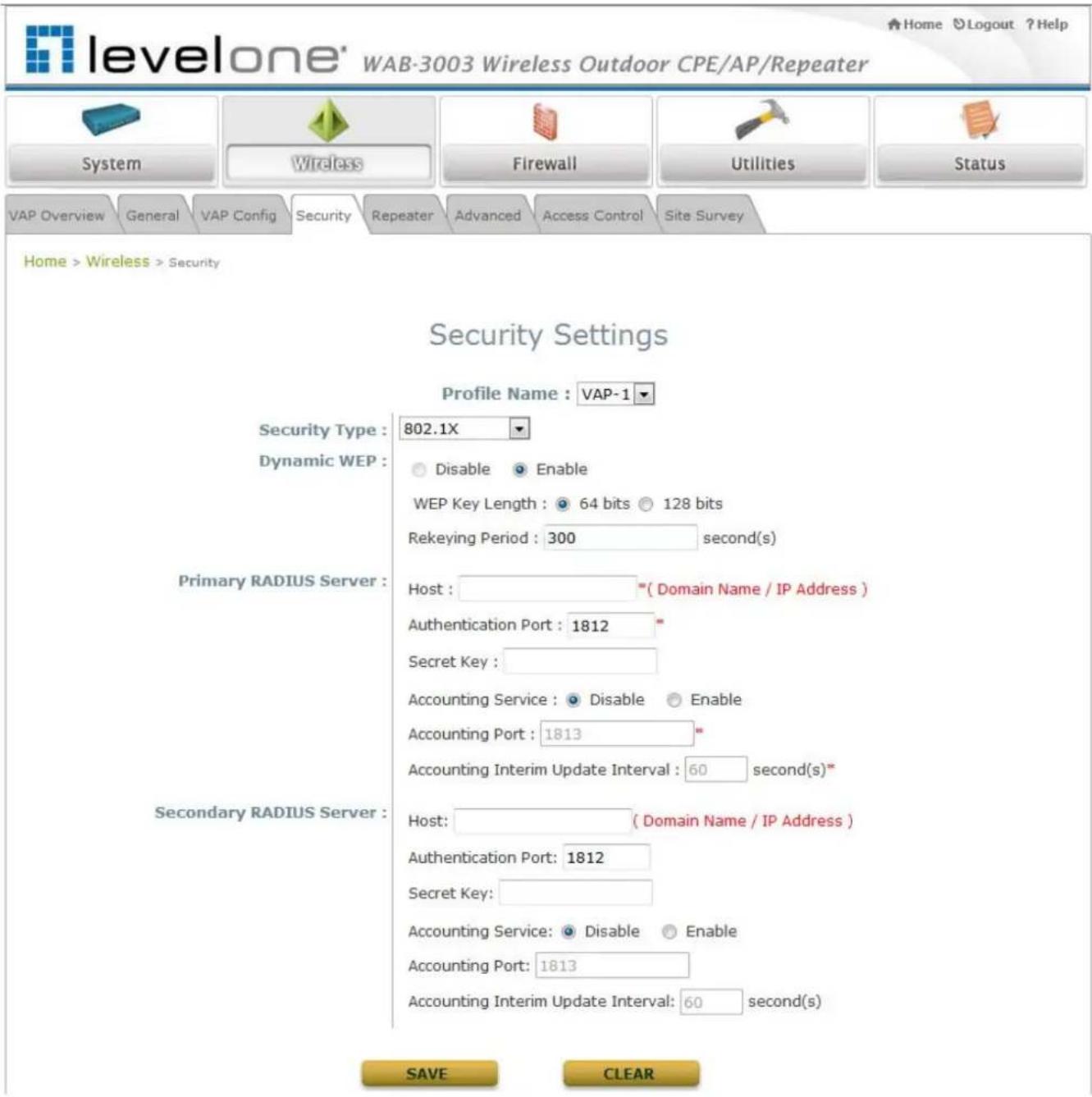
● 80 2.1X: Provide RADIUS authentication and enhanced WEP.
text_image
levelone' WAB-3003 Wireless Outdoor CPE/AP/Repeater Home Logout ? Help System Wireless Firewall Utilities Status VAP Overview General VAP Config Security Repeater Advanced Access Control Site Survey Home > Wireless > Security Security Settings Profile Name : VAP-1 Security Type : 802.1X Dynamic WEP : Primary RADIUS Server : Host : " ( Domain Name / IP Address ) Authentication Port : 1812 " Secret Key : Accounting Service : Disable Enable Accounting Port : 1813 " Accounting Interim Update Interval : 60 second(s)" Secondary RADIUS Server : Host: ( Domain Name / IP Address ) Authentication Port: 1812 Secret Key: Accounting Service: Disable Enable Accounting Port: 1813 Accounting Interim Update Interval: 60 second(s) SAVE CLEARDynamic WEP Settings:
- Dynamic WEP: By enabling this function, the system will automatically generate WEP keys for encryption.
- WEK Key Length: Select from 64-bit or 128-bit key length.
- Rekeying Period: The time interval for the WEP key to be updated; the time unit is in second.
WAB-3003 108M 11g Outdoor PoE CPE/ AP/ Bridge
Primary RADI US Server Settings:
○ Host: Enter the IP address or domain name of the RADIUS server.
- Authentication Port: The port number used by the RADIUS server. Specify a port number or use the default, 1812.
Secret Key: The secret key for the system to communicate with the RADIUS server.
- Accounting Service: Enable or disable the accounting service.
- Accountin Port: The port number used by the RADIUS server. Specify a port number or use the default, 1813.
- Accounting Interim Update Interval: The time interval for the accounting to be updated; the time unit is in second.
● WPA-PSK: Provide shared key authenticaiton in WPA data encryption.

text_image
levelone® WAB-3003 Wireless Outdoor CPE/AP/Repeater System Wireless Firewall Utilities Status VAP Overview General VAP Config Security Repeater Advanced Access Control Site Survey Home > Wireless > Security Security Settings Profile Name : VAP-1 Security Type : WPA-PSK Cipher Suite : TKIP (WPA) Pre-shared Key Type : PSK(Hex)^(64 chars) Passphrase^(8 - 63 chars) Pre-shared Key : Group Key Update Period: 600 second(s) SAVE CLEAR➢ Cipher Suite: Select an encryption method from TKIP (WPA), AES (WPA), TKIP(WAP2), AES (WAP2), or Mixed.
Pre-shared Key Type: Select a pre-shared key type: PSK (Hex) or Passphrase.
Pre-shared Key: Enter the key value for the pre-shared key; the format of the key value depends on the key type selected.
Group Key Update Period: The time interval for the Group Key to be renewed; the time unit is in second.
WAB-3003 108M 11g Outdoor PoE CPE/ AP/ Bridge
- WPA-RADIUS: Authenticate users by RADIUS and provide WPA data encryption.

text_image
levelone' WAB-3003 Wireless Outdoor CPE/AP/Repeater System Wireless Firewall Utilities Status VAP Overview General VAP Config Security Repeater Advanced Access Control Site Survey Home > Wireless > Security Security Settings Profile Name : VAP-1 Security Type : WPA-RADIUS Cipher Suite : TKIP (WPA) Group Key Update Period: 600 second(s) Primary RADIUS Server : Host : *(Domain Name / IP Address) Authentication Port : 1812 * Secret Key : Accounting Service : Disable Enable Accounting Port : 1813 * Accounting Interim Update Interval : 60 second(s)* Secondary RADIUS Server : Host: ( Domain Name / IP Address ) Authentication Port: 1812 Secret Key: Accounting Service: Disable Enable Accounting Port: 1813 Accounting Interim Update Interval: 60 second(s) SAVE CLEARWPA Settings:
- Cipher Suite: Select an encryption method from TKIP (WPA), AES (WPA), TKIP(WAP2), AES (WAP2), or Mixed.
- Group Key Update Period: The time interval for the Group Key to be renewed; the time unit is in second.
Primary RADIUS Server Settings:
○ Host: Enter the IP address or domain name of the RADIUS server.
- Authentication Port: The port number used by the RADIUS server. Specify a port number or use the default, 1812.
Secret Key: The secret key for the system to communicate with the RADIUS server.
- Accounting Service: Enable or disable the accounting service.
- Accounting Port: The port number used by the RADIUS server. Specify a port number or use the default, 1813.
- Accounting Interim Update Interval: The time interval for the accounting to be updated; the time unit is in second.
4.2.5 Repeater Settings
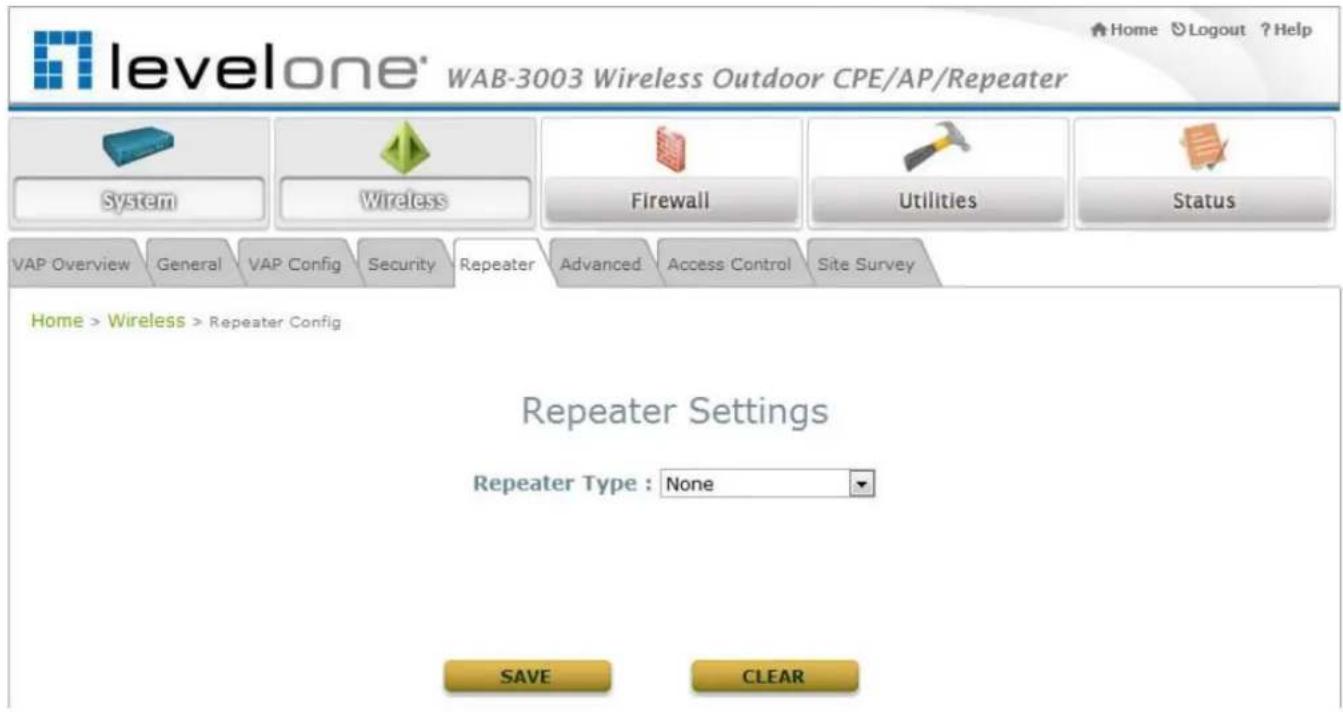
The system can serve as an Access Point, a Repeater, or an Access Point with Repeater depending on deployment needs. Select a Repeater Type from the drop-down list box and proceed with the related settings.
- None: When None is selected, the system is acting as an Access Point only; therefore, no further configuration is required here
text_image
levelone® WAB-3003 Wireless Outdoor CPE/AP/Repeater System Wireless Firewall Utilities Status VAP Overview General VAP Config Security Repeater Advanced Access Control Site Survey Home > Wireless > Repeater Config Repeater Settings Repeater Type : None SAVE CLEARWAB-3003 108M 11g Outdoor PoE CPE/ AP/ Bridge
- WDS: The device supports up to 8 WDS peers. After providing WDS peer's MAC address, click on Add to add this link to the table shown on User Interface.

text_image
levelone' WAB-3003 Wireless Outdoor CPE/AP/Repeater System Wireless Firewall Utilities Status VAP Overview General VAP Config Security Repeater Advanced Access Control Site Survey Home > Wireless > Repeater Config Repeater Settings Repeater Type : WDS WDS Profile : RF Card A : WDS Link 1 WDS : Disable MAC Address : Security type : None Site Distance : 1000 meter(s) (With optional smart Slot Time, ACK Timeout and CTS Timeout generation) Slot Time : 13 micro second(s) ACK Timeout : 29 micro second(s) CTS Timeout : 29 micro second(s) SAVE CLEAREnable: Select Enable to activate the specified WDS link.
MAC Address: Enter the MAC address of the WDS peer. Click Add to add it into the list.
Security Type: Select an appropriate security type for the WDS link, either None, WEP or TKIP/ AES; the type selected needs to be the same as the one configured at the WDS peer.
Site Distance: Fill in the distance from the farthest WDS peer to derive the suggested values for Slot Time, ACK Timeout, and CTS Timeout.
Slot Time: With the concern of common medium access, Slot Time will allow the station to learn possible access from other station at the beginning of previous slot. This value should be equal or less than half of ACK/CTS Timeout.
ACK Timeout: A valid 802.11 data transmission will be acknowledged with suck "ACK" from the receiving radio or the retransmission will start if such ACK is not received within Timeout period. This value should be set equal or larger than RTT to the farthest WDS peer.
CTS Timeout: This CTS acknowledges the previous sent RTS request in 802.11 common medium access. Its Timeout value can be treated the same as that for ACK Timeout and should be set equal or larger than RTT to the farthest WDS peer.
WAB-3003 108M 11g Outdoor PoE CPE/ AP/ Bridge
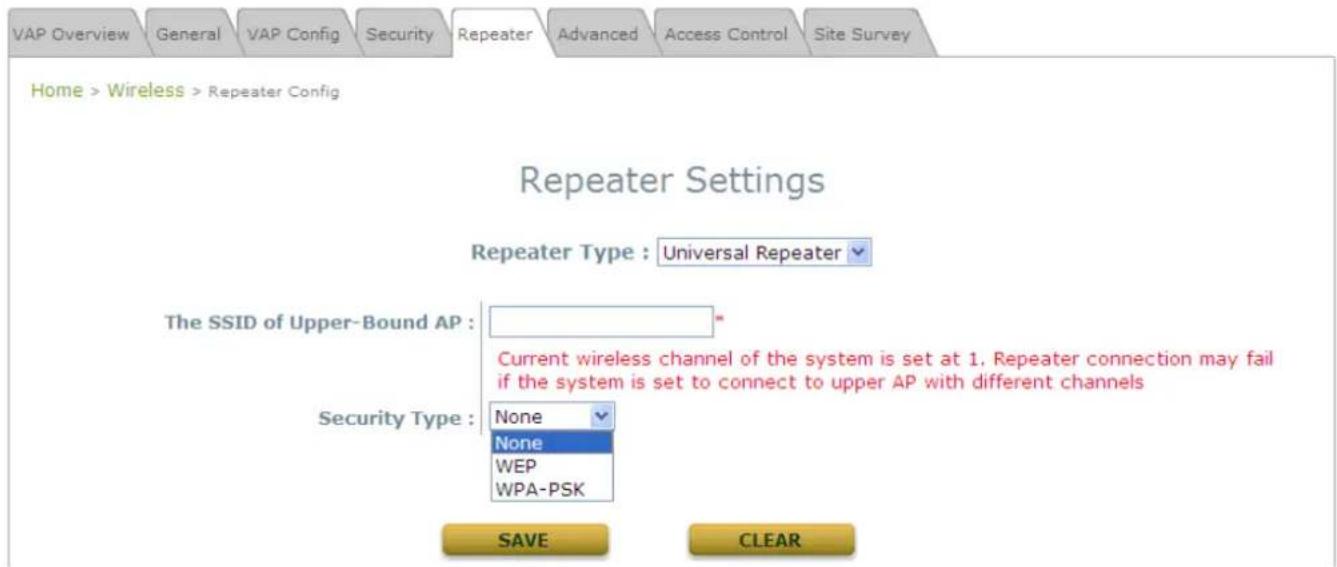
- Uni versal Repeater: If Universal Repeater is chosen, please provide the SSID of upper-bound AP for uplink connection; Security Type (None, WEP, or WPA-PSK) can be configured for this Repeater connection. Please note the security type configured here needs to be the same as upper-bound AP to be connected.
text_image
VAP Overview General VAP Config Security Repeater Advanced Access Control Site Survey Home > Wireless > Repeater Config Repeater Settings Repeater Type : Universal Repeater The SSID of Upper-Bound AP : Current wireless channel of the system is set at 1. Repeater connection may fail if the system is set to connect to upper AP with different channels Security Type : None None WEP WPA-PSK SAVE CLEARThe SSID of Upper-Bound AP: Specify the SSID of the upper-bound AP that the system is used to extend that AP's wireless service coverage.
➢ Security Type: Select the security type used by the upper-bound AP, None, WEP or WPA-PSK. Security settings configured here must be the same as the upper-bound AP.
4.2.6 Advanced Wireless Settings
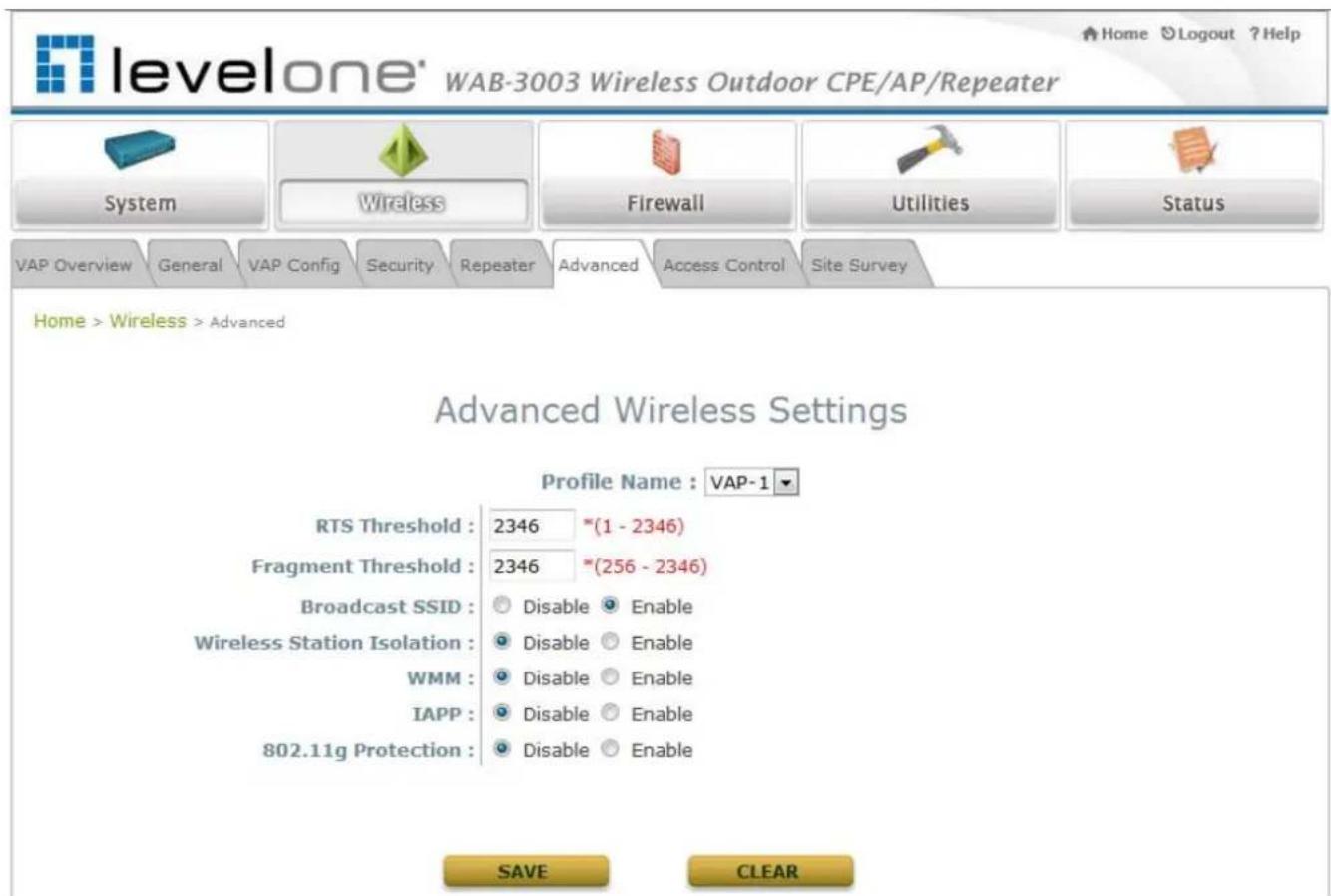
The advanced wireless settings for the system's VAP profiles allow customization of data transmission settings. The administrator can tune the following parameters to improve network communication performance if a poor connection occurs.
text_image
levelone® WAB-3003 Wireless Outdoor CPE/AP/Repeater System Wireless Firewall Utilities Status VAP Overview General VAP Config Security Repeater Advanced Access Control Site Survey Home > Wireless > Advanced Advanced Wireless Settings Profile Name : VAP-1 RTS Threshold : 2346 *(1 - 2346) Fragment Threshold : 2346 *(256 - 2346) Broadcast SSID : Disable Enable Wireless Station Isolation : Disable Enable WMM : Disable Enable IAPP : Disable Enable 802.11g Protection : Disable Enable SAVE CLEAR- RTS Threshold: To control station access to the medium and to alleviate this effect of the hidden terminal problem, the administrator can tune this RTS threshold value. A lower RTS Threshold setting can be useful in areas where many client devices are associating with WAB-3003 or in areas where the clients are far apart and can detect only WAB-3003 and not each other.
- Fragmentation Threshold: A unicast frame larger than this threshold will be fragmented before transmission. If a significant number of collisions are occurring, the administrator can try to set a smaller value of the threshold to see whether it helps. A smaller value results in smaller packets but allows a larger number of packets in transmission. A lower Fragment Threshold setting can be useful in areas where communication is poor or disturbed by a serious amount of radio interference.
WAB-3003 108M 11g Outdoor PoE CPE/ AP/ Bridge
- Broa dcast SSID: Disabling this function will prevent the system from broadcasting its SSID. If you disable broadcast of the SSID, only devices that have the correct SSID can connect to the system.
- Wireless Station Isolation: By enabling this function, all stations associated with the system can only communicate with the system.
- WMM: The default is Disable. Wi-Fi Multimedia (WMM) is a Quality of Service (QoS) feature that prioritizes wireless data packets based on four access categories: voice, video, best effort, and background. Applications without WMM and applications that do not require QoS are assigned to the best-effort category, which receives a lower priority than voice and video. In short, WMM decides which data streams are the most important and assign them a higher traffic priority.
< To receive the benefits of WMM QoS >
- The application must support WMM.
- You must enable WMM in this system.
-
You must enable WMM in the wireless adapter in your computer.
-
IAPP: IAPP (Inter Access Point Protocol) is a protocol by which access points share information about the stations that are connected to them. By enabling this function, the system will automatically broadcast information of associated wireless stations to its peer access points. This will help wireless stations roam smoothly among IAPP-enabled access points in the same wireless LAN.
- 802.11g Protection: When enabled, the associated 802.11g stations will benefit from this function since their transmission speed will not be affected by the surrounding 802.11b stations.
4.2.7 Access Control Settings
The administrator can restrict the wireless access of client devices based on their MAC addresses.

text_image
levelone® WAB-3003 Wireless Outdoor CPE/AP/Repeater System Wireless Firewall Utilities Status VAP Overview General VAP Config Security Repeater Advanced Access Control Site Survey Home > Wireless > Access Control Access Control Settings Profile Name : VAP-1 Maximum Number of Clients : 32 *(Range: 1 ~ 32) Access Control Type : Disable Access Control SAVE CLEAR• Maximum Number of Clients
The system supports various methods of authenticating clients for using wireless LAN. The default policy is unlimited access without any authentication required. To restrict the station number of wireless connections, simply change the Maximum Number of Stations to a desired number. For example, while the number of stations is set to 20, only 20 stations are allowed to connect to the specified VAP.
- Access Control Type
The selected Access Control Type will be the activated policy while the rest will be omitted. The following is a list of the supported methods for MAC ACL control:
(1) Disable Access Control
No MAC address check required.
WAB-3003 108M 11g Outdoor PoE CPE/ AP/ Bridge
(2) MAC ACL Allow List
Deny all except those in the Allow List. When selecting MAC ACL Allow List, all wireless connections to the specified VAP will be denied except the MAC addresses listed in the Allow List ("allowed MAC addresses"). The administrator can disable any allowed MAC address to connect to the VAP temporarily by checking Disable. For example, 11:22:33:44:55:66 is in the Allow List; to temporarily deny its access, check Disable in the State section.

text_image
levelone® WAB-3003 Wireless Outdoor CPE/AP/Repeater System Wireless Firewall Utilities Status VAP Overview General VAP Config Security Repeater Advanced Access Control Site Survey Home > Wireless > Access Control Access Control Settings Profile Name : VAP-1 Maximum Number of Clients : 32 *(Range: 1 ~ 32) Access Control Type : MAC ACL Allow List No. MAC Address State 1 11:22:33:44:55:66 Disable Enable 2 3 Disable Enable Disable Enable(3) MAC ACL Deny List
Allow all except those in the Deny List. When selecting MAC ACL Deny List, all wireless connections to the specified VAP will be allowed except the MAC addresses listed in the Deny List ("denied MAC addresses"). The administrator can allow any denied MAC address to connect to the VAP temporarily by checking Enable.

text_image
levelone® WAB-3003 Wireless Outdoor CPE/AP/Repeater System Wireless Firewall Utilities Status VAP Overview General VAP Config Security Repeater Advanced Access Control Site Survey Home > Wireless > Access Control Access Control Settings Profile Name : VAP-1 ▼ Maximum Number of Clients : 32 *(Range: 1 ~ 32 ) Access Control Type : MAC ACL Deny List ▼ No. MAC Address State 1 1a:2b:3c:4d:5e:6f Disable Enable 2 3 Disable Enable Disable Enable(4) RA DIUS ACL
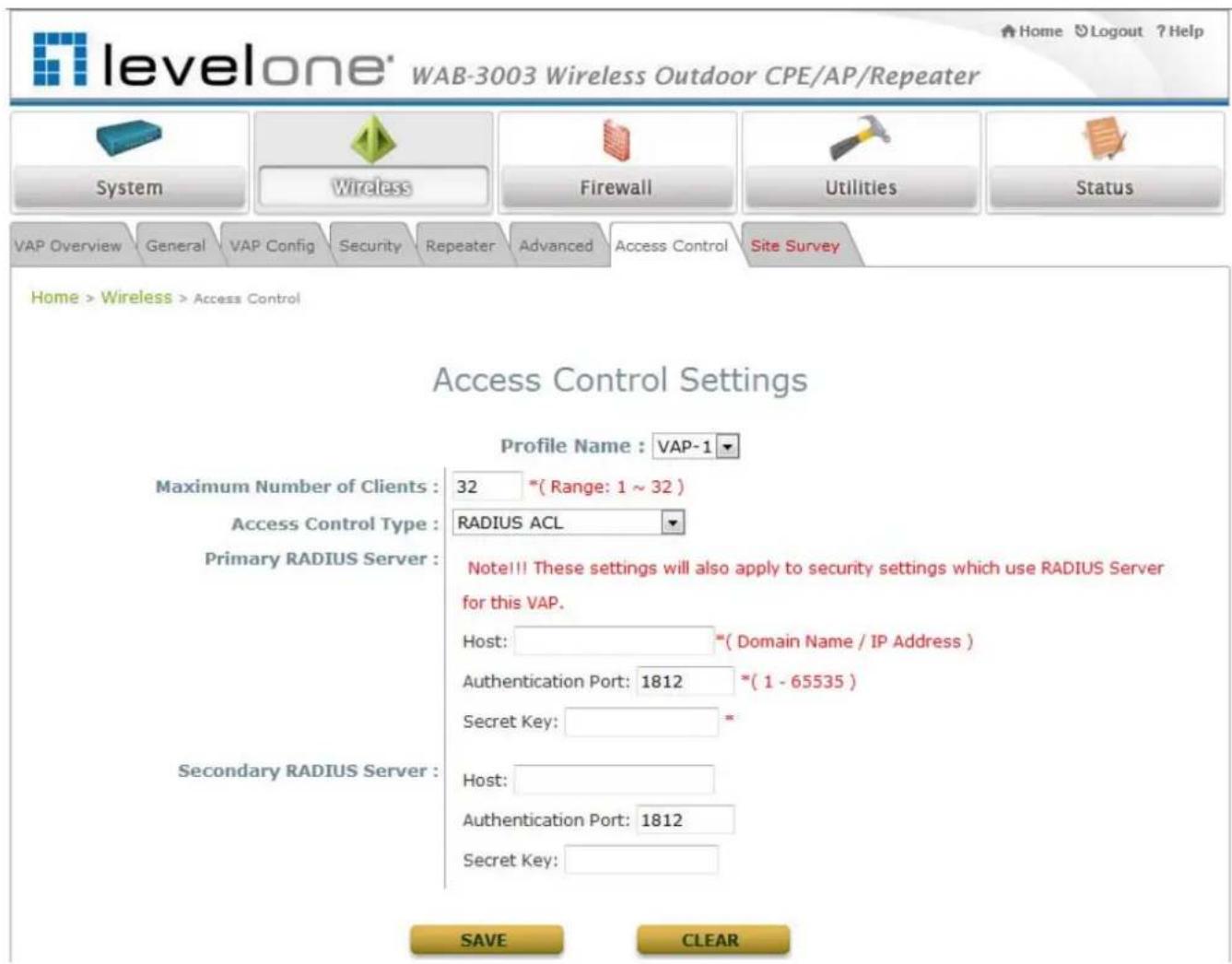
Authenticate incoming MAC addresses by RADIUS. When selecting RADIUS ACL, all incoming MAC addresses will be authenticated by RADIUS. Please note that each VAP's MAC ACL and its security type (showing on the Security Settings page) share the same RADIUS configuration.
text_image
levelone® WAB-3003 Wireless Outdoor CPE/AP/Repeater System Wireless Firewall Utilities Status VAP Overview General VAP Config Security Repeater Advanced Access Control Site Survey Home > Wireless > Access Control Access Control Settings Profile Name : VAP-1 Maximum Number of Clients : 32 *(Range: 1 ~ 32) Access Control Type : RADIUS ACL Primary RADIUS Server : Note!! These settings will also apply to security settings which use RADIUS Server for this VAP. Host: *(Domain Name / IP Address ) Authentication Port: 1812 *(1 - 65535 ) Secret Key: * Secondary RADIUS Server : Host: Authentication Port: 1812 Secret Key: SAVE CLEAR4.2.8 Site Survey
The system can scan and display all surrounding available access points (APs) when Universal Repeater is enabled. Site Survey is a useful tool to provide information about the surrounding wireless environment; available APs are shown with their respective SSID, MAC Address, Channel, Rate setting, Signal reading and Security type. The administrator can click Setup or Connect to configure the wireless connection for Universal Repeater according to the mentioned readings.
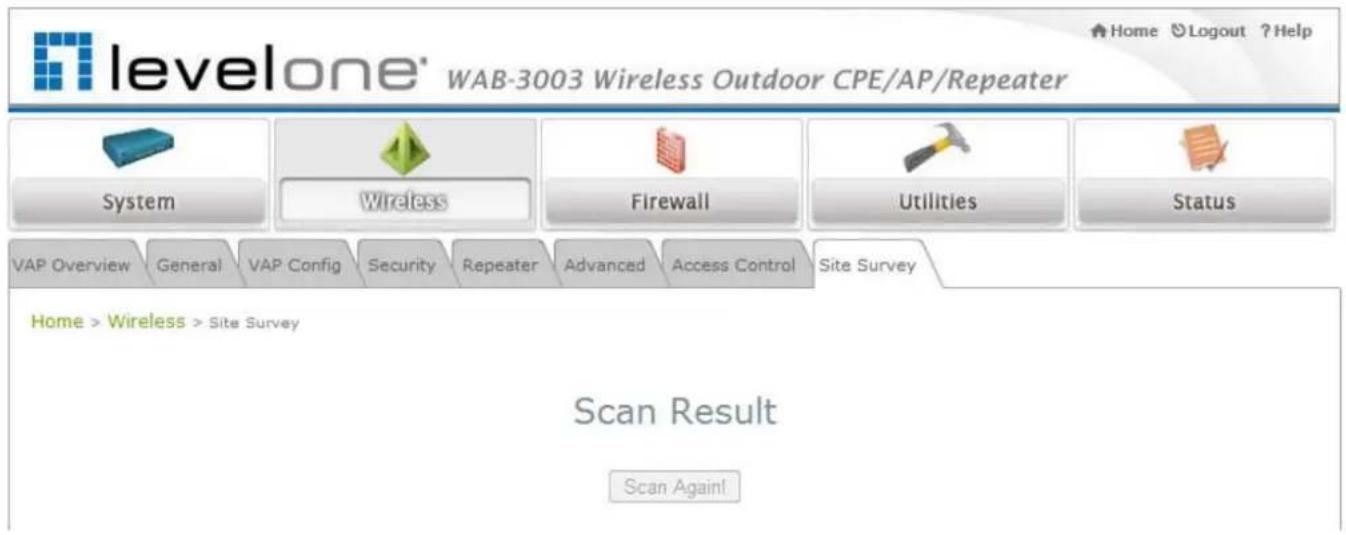
text_image
levelone® WAB-3003 Wireless Outdoor CPE/AP/Repeater System Wireless Firewall Utilities Status VAP Overview General VAP Config Security Repeater Advanced Access Control Site Survey Home > Wireless > Site Survey Scan Result Scan Again!Figure 4-2-8-1: Site Survey- when repeater function is disabled.
Scan Result
Scan Again!
| SSID | MAC Address | Channel | Rate | Signal | Security | Setup / Connect |
| Accton_AP | 00:22:2D:90:74:86 | 1 | 54 | 57 | WPA2-PSK | Setup |
| WAP-0003 | 00:11:6B:60:6A:C5 | 6 | 54 | 29 | WEP | Setup |
| WBR-6002 | 00:C0:02:FF:C7:8E | 11 | 54 | 10 | None | Connect |
Figure 4-2-8-2: Site Survey- when repeater function is enabled (example only)
- SSID: The SSID (Service Set ID) of the AP found in the system's coverage area.
• MAC Address: The MAC address of the respective AP.
• Channel: The channel number currently used by the respective AP or repeater.
• Rate: The transmitting rate of the respective AP.
• Signal: The signal strength of the respective AP.
• Security: The encryption type used by the respective AP
WAB-3003 108M 11g Outdoor PoE CPE/ AP/ Bridge
- Setu p/ Connect:
Connect: Click Connect to associate with the respective AP directly; no further configuration is required.
| AP | 00:1F:D4:39:10:74 | 11 | 54 | 54 | None | Connected |
➢ Setup: Click Setup to configure security settings for associating with the respective AP.
- WEP: Click Setup to configure the WEP setting for associating with the target AP.
WAP-0003
00:11:6B:60:6A:C5
6
54
40
WEP
Setup
The following configuration box will then appear at the bottom of the screen. For more information on the WEP security settings, please refer to Section 4.2.4. Security Settings.
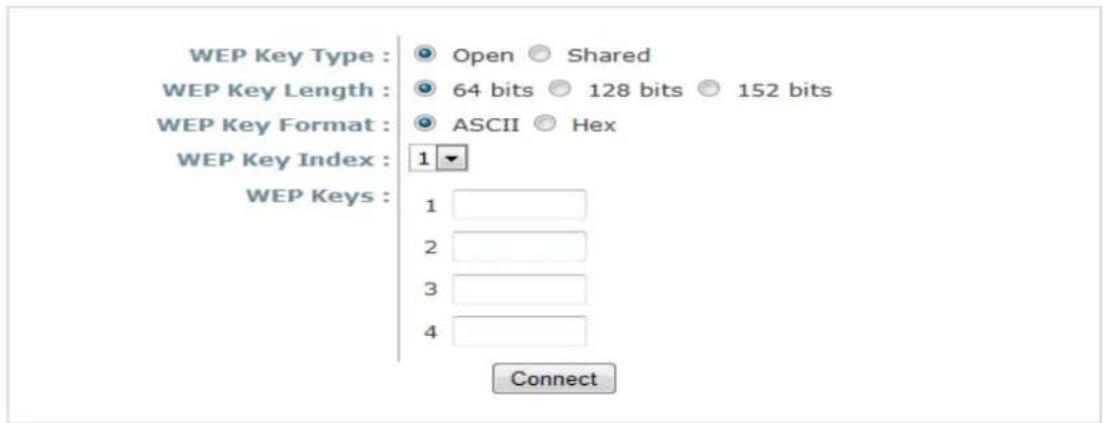
text_image
WEP Key Type : Open Shared WEP Key Length : 64 bits 128 bits 152 bits WEP Key Format : ASCII Hex WEP Key Index : 1 WEP Keys : 1 2 3 4 Connect- WPA-PSK: Click Setup to configure the WPA-PSK setting for associating with the target AP.
Accton_AP
00:22:2D:90:74:86
1
54
59
WPA2-PSK
Setup
The following configuration box will then appear at the bottom of the screen. For more information on the WPA-PSK security settings, please refer to Section 4.2.4. Security Settings.

text_image
Pre-shared Cipher : TKIP Pre-shared Key Type : PSK(Hex) *(64 chars) Passphrase *(8 - 63 chars) Pre-shared Key : Connect4.3 Firewall
The system provides an added security feature, L2 firewall, in addition to typical AP security. Layer-2 firewall offers a firewall function that is tailored specifically for layer 2 traffics, providing another choice of shield against possible security threats coming from/going to WLAN (AP interfaces); hence, besides firewall policies configured on gateways, this extra security feature will assist to mitigate possible security breach.
4.3.1 Layer 2 Firewall Settings
It provides an overview of firewall rules in the system; 6 default rules with up to total 20 firewall rules are available for configuration.

text_image
levelone® WAB-3003 Wireless Outdoor CPE/AP/Repeater System Wireless Firewall Utilities Status Firewall List Service AdvancedHome > Firewall > Firewall List
Layer 2 Firewall Settings
| Enable Layer 2 Firewall | Disable Enable | |||||
| No. | State | Action | Name | EtherType | Remark | Setting |
| 1 | DROP | CDP and VTP | IEEE_8023 | Del Ed In Mv | ||
| 2 | DROP | STP | IEEE_8023 | Del Ed In Mv | ||
| 3 | DROP | GARP | IEEE_8023 | Del Ed In Mv | ||
| 4 | DROP | RIP | IPv4 | Del Ed In Mv | ||
| 5 | DROP | HSRP | IPv4 | Del Ed In Mv | ||
| 6 | DROP | OSPF | IPv4 | Del Ed In Mv | ||
| 7 | Del Ed In Mv | |||||
| 8 | Del Ed In Mv | |||||
| 9 | Del Ed In Mv | |||||
| 10 | Del Ed In Mv | |||||
First Prev Next Last (total: 20)


WAB-3003 108M 11g Outdoor PoE CPE/ AP/ Bridge
From the overview table, each rule is designated with the following fields:
- No.: The numbering will decide the priority to let system carry out the available firewall rules in the table.
◆ State: The check marks will enable the respective rules.
Action: "DROP" denotes a block rule; "ACCEPT" denotes a pass rule.
◆ Name: It shows the name of rule.
◆ Ether Type: It denotes the type of traffics subject to this rule.
♦ Remark: It shows the note of this rule.
Setting: 4 actions are available; "Del" denotes to delete the rule, "Ed" denotes to edit the rule, "In" denotes to insert a rule, and "Mv" denotes to move the rule.
>> To delete a specific rule,
"Del" in "Setting" column of firewall list will lead to the following page for removal confirmation. After "SAVE" button is clicked and system reboot, the rule will be removed.

Home > Firewall > Firewall List
Layer 2 Firewall Settings
Remove rule 1


To edit a specific rule,
"Ed" in "Setting" column of firewall list will lead to the following page for detail configuration. From this page, the rule can be edited form scratch or from an existing rule for revision.

text_image
levelone® WAB-3003 Wireless Outdoor CPE/AP/Repeater Home Logout ?Help System Wireless Firewall Utilities Status Firewall List Service Advanced Home > Firewall List > Rule Config Layer 2 Firewall Configuration Rule ID : 1 Rule name : CDP and VTP EtherType : IEEE802.3 Interface : From To VAP1 DSAP/SSAP : aa Type : 2000 (ie IPv4: 0800) Source : MAC Address: Mask: Destination : MAC Address: 01:00:0C:CC:CC:CC Mask: Action : Block Pass Remark : SAVE CLEARWAB-3003 108M 11g Outdoor PoE CPE/ AP/ Bridge
- Rule ID: The numbering of this specific rule will decide its priority among available firewall rules in the table.
◆ Rule name: The rule name can be specified here.
◆ Ether Type: The drop-down list will provide the available types of traffics (ALL, IPv4, IEEE802.3, 802.1Q, ARP, and RARP) subject to this rule.
◆ Interface: It can indicate inbound/outbound direction with desired interfaces (VAP1\~VAP8)
◆ Service (when Ether Type is IPv4): Select the available upper layer protocols/services from the drop-down list.
◆ DSAP/ SSAP (when Ether Type is IEEE802.3): The value can be further specified for the fields in 802.2 LLC frame header. - Type (when Ether Type is IEEE802.3): The field can be used to indicate the type of encapsulated traffics.
- Vlan ID (when Ether Type is 802.1Q): The Vlan ID is provided to associate with certain VLAN-tagging traffics.
- Priority (when Ether Type is 802.1Q): It denotes the priority level with associated VLAN traffics.
◆ Encapsulated Type (when EtherType is 802.1Q): It can be used to indicate the type of encapsulated traffics.
◆ Opcode (when EtherType is ARP/ RARP): This list can be used to specify the ARP Opcode in ARP header.
Source: MAC Address/Mask indicates the source MAC; IP Address/Mask indicates the source IP address (when EtherType is IPv4); ARP IP/MAC & MASK indicate the ARP payload fields.
Destination: MAC Address/Mask indicates the destination MAC; IP Address/Mask indicates the destination IP address (when EtherType is IPv4); ARP IP/MAC & MASK indicate the ARP payload fields.
Action: The rule can be chosen to be "Block" or "Pass".
◆ Remark: The note of this rule can be specified here.
When the configuration for firewall rules is provided, please click "SAVE" and reboot system to let the firewall rules take effect.
WAB-3003 108M 11g Outdoor PoE CPE/ AP/ Bridge
To insert a specific rule,
"In" in "Setting" column of firewall list will lead to the following page for detail configuration with rule ID for the current inserted rule.
From this page, the rule can be edited form scratch or from an existing rule for revision.
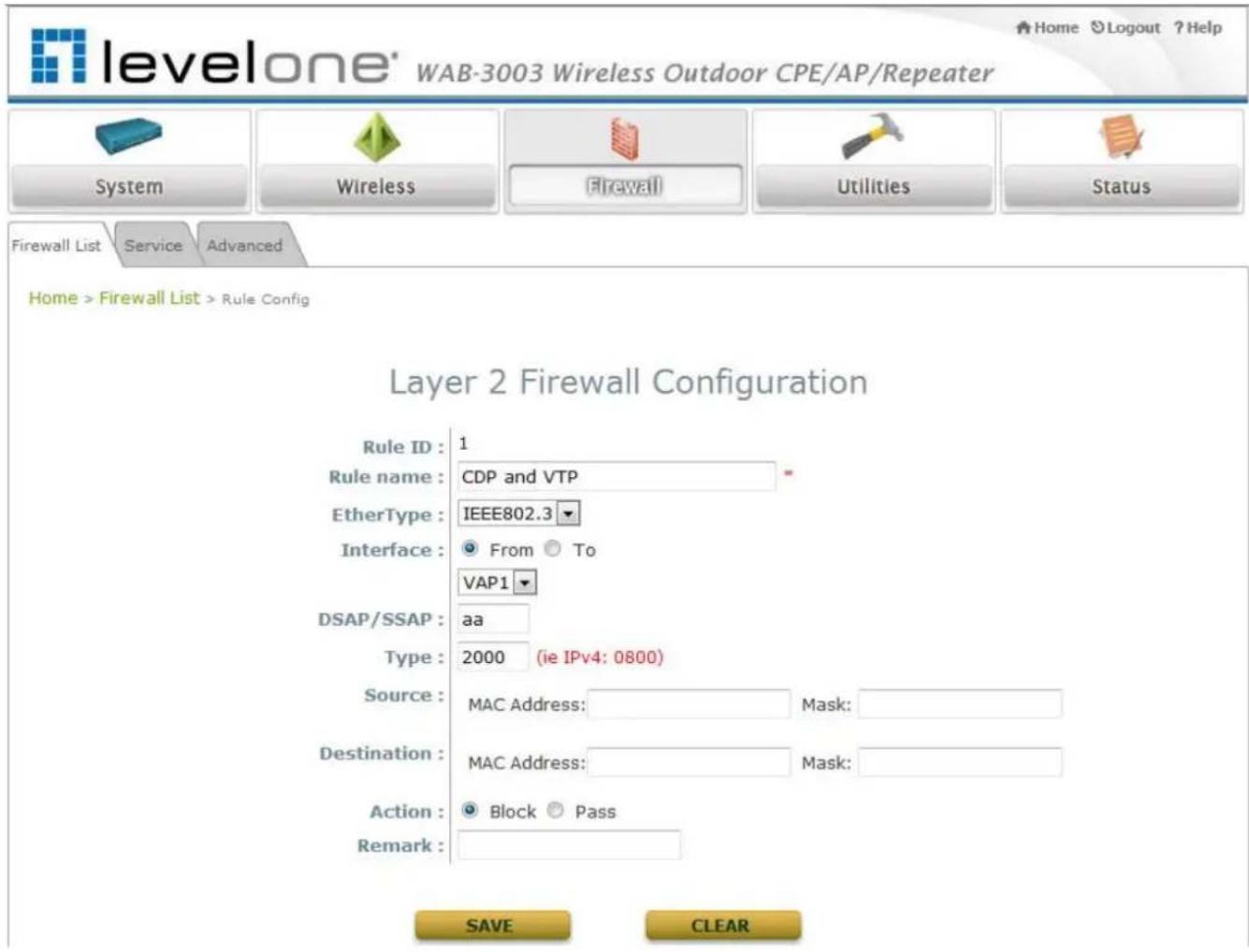
text_image
levelone® WAB-3003 Wireless Outdoor CPE/AP/Repeater Home Logout ? Help System Wireless Firewall Utilities Status Firewall List Service Advanced Home > Firewall List > Rule Config Layer 2 Firewall Configuration Rule ID : 1 Rule name : CDP and VTP EtherType : IEEE802.3 Interface : From To VAP1 DSAP/SSAP : aa Type : 2000 (ie IPv4: 0800) Source : MAC Address: Mask: Destination : MAC Address: Mask: Action : Block Pass Remark : SAVE CLEARWAB-3003 108M 11g Outdoor PoE CPE/ AP/ Bridge
To move a specific rule,
"Mv" in "Setting" column of firewall list will lead to the following page for re-ordering confirmation. After "SAVE" button is clicked and system reboot, the order of rules will be updated.
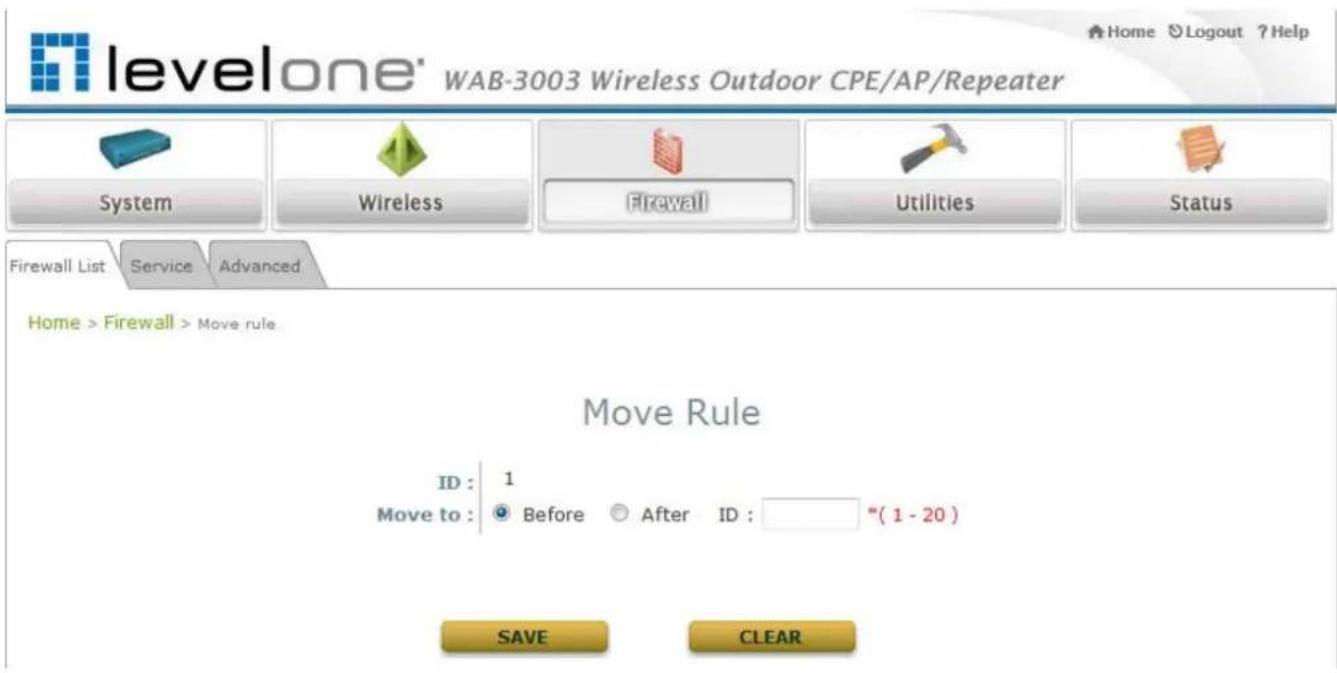
text_image
levelone" WAB-3003 Wireless Outdoor CPE/AP/Repeater System Wireless Firewall Utilities Status Firewall List Service Advanced Home > Firewall > Move rule Move Rule ID : 1 Move to : Before After ID : "(1 - 20) SAVE CLEARWAB-3003 108M 11g Outdoor PoE CPE/ AP/ Bridge
Please make sure all desired rules (state of rule) are checked and saved in overview page; the rule will be enforced upon system reboot.
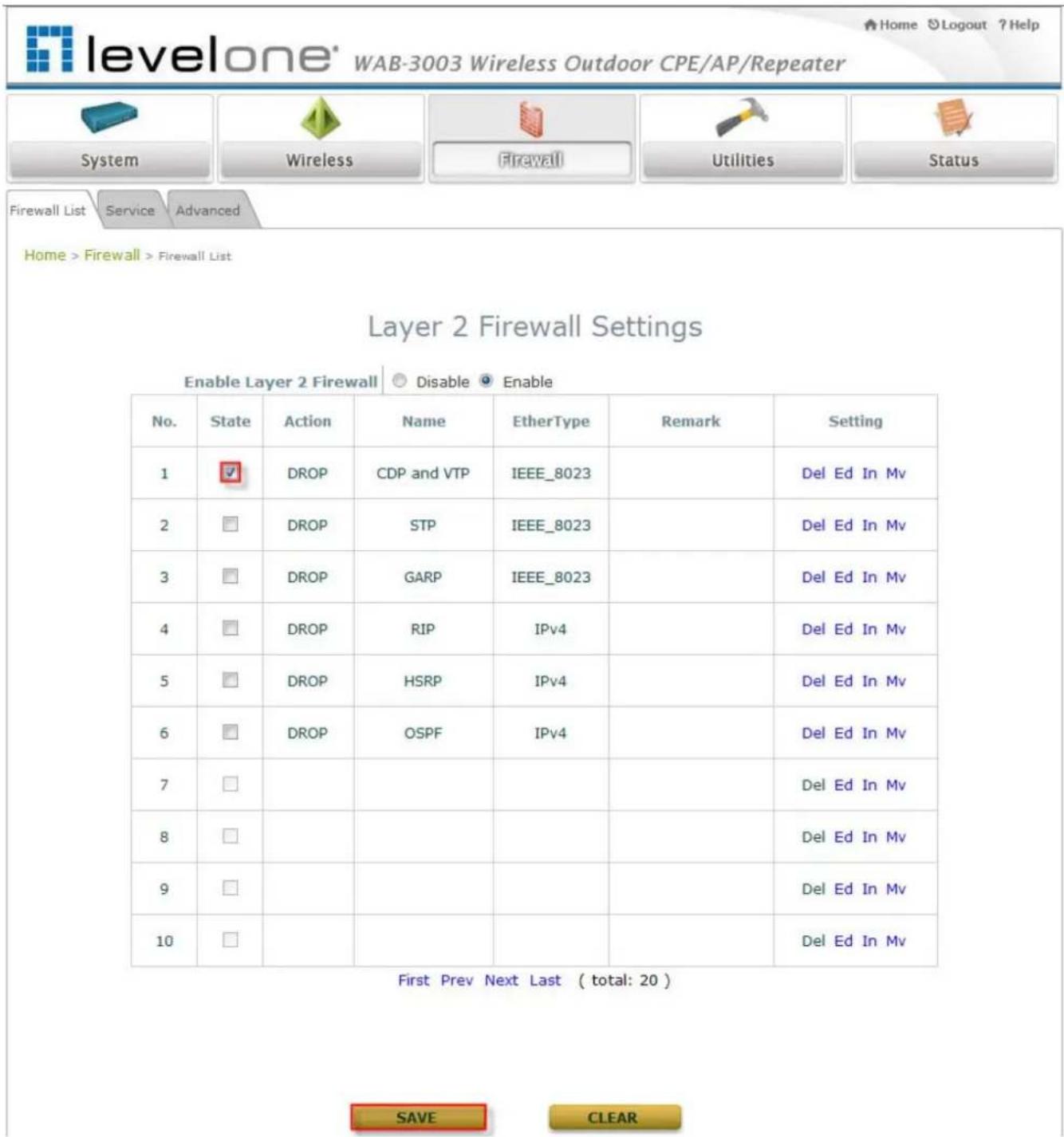
text_image
levelone® WAB-3003 Wireless Outdoor CPE/AP/Repeater System Wireless Firewall Utilities Status Firewall List Service Advanced Home > Firewall > Firewall List Layer 2 Firewall Settings Enable Layer 2 Firewall Disable Enable No. State Action Name EtherType Remark Setting 1 DROP CDP and VTP IEEE_8023 Del Ed In Mv 2 DROP STP IEEE_8023 Del Ed In Mv 3 DROP GARP IEEE_8023 Del Ed In Mv 4 DROP RIP IPv4 Del Ed In Mv 5 DROP HSRP IPv4 Del Ed In Mv 6 DROP OSPF IPv4 Del Ed In Mv 7 8 9 10 First Prev Next Last ( total: 20 ) SAVE CLEARLayer 2 Firewall Settings (Check State)
4.3.2 Firewall Service
The administrator can add or delete firewall services here; the services in this list will become options to choose in firewall rule (when Ether Type is IPv4).
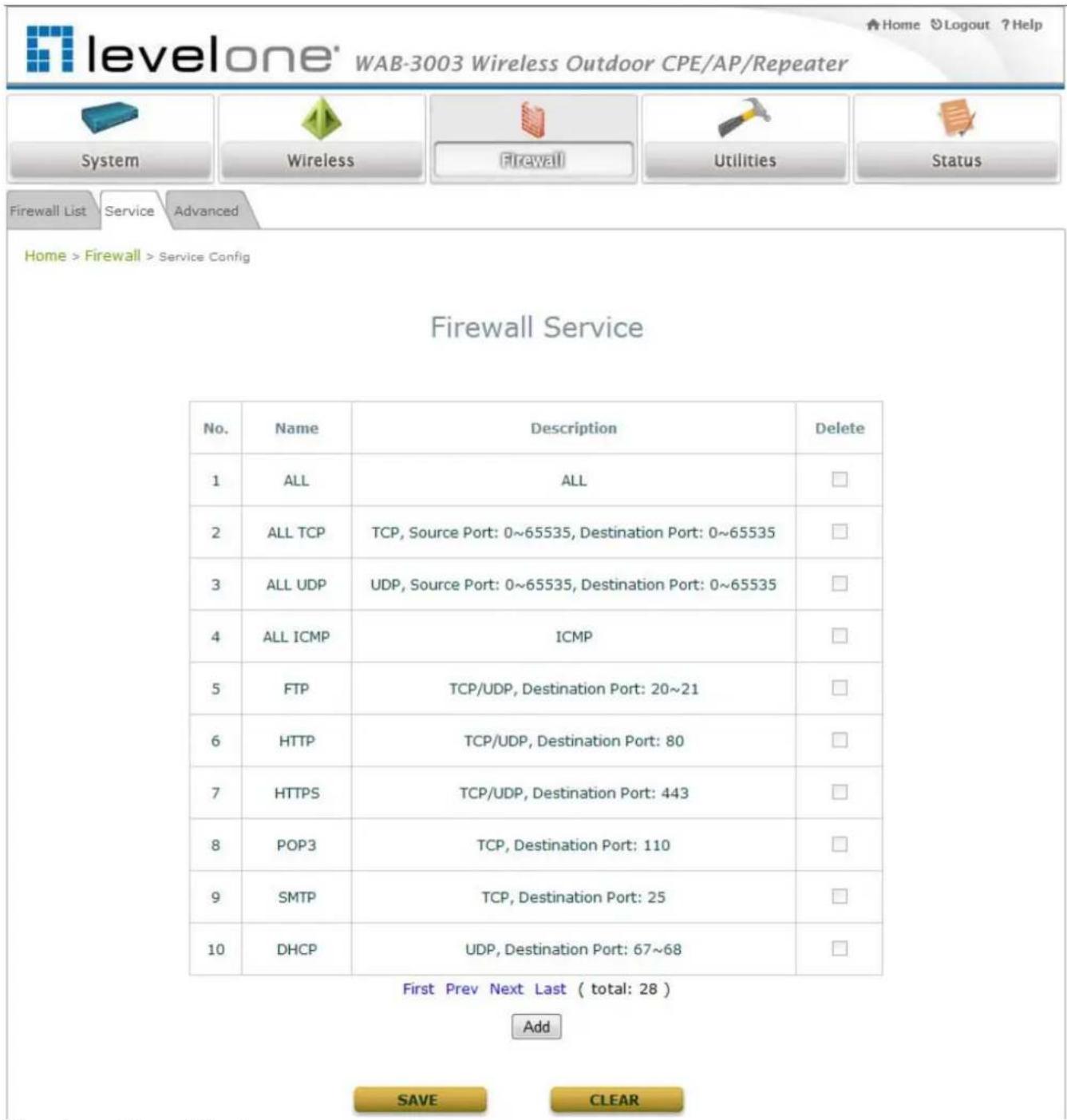
text_image
levelone® WAB-3003 Wireless Outdoor CPE/AP/Repeater System Wireless Firewall Utilities Status Firewall List Service Advanced Home > Firewall > Service Config Firewall Service No. Name Description Delete 1 ALL ALL 2 ALL TCP TCP, Source Port: 0~65535, Destination Port: 0~65535 3 ALL UDP UDP, Source Port: 0~65535, Destination Port: 0~65535 4 ALL ICMP ICMP 5 FTP TCP/UDP, Destination Port: 20~21 6 HTTP TCP/UDP, Destination Port: 80 7 HTTPS TCP/UDP, Destination Port: 443 8 POP3 TCP, Destination Port: 110 9 SMTP TCP, Destination Port: 25 10 DHCP UDP, Destination Port: 67~68 First Prev Next Last ( total: 28 ) Add SAVE CLEAROverview of Firewall Services
There are 28 firewall services available in default settings; these default services cannot be deleted but can be disabled. If changes are made, please click SAVE to save the settings before leaving this page.
4.3.3 Advanced Firewall Settings
Advanced firewall settings are used to supplement the firewall rules, providing extra security enhancement against DHCP and ARP traffics traversing the available interfaces of system.
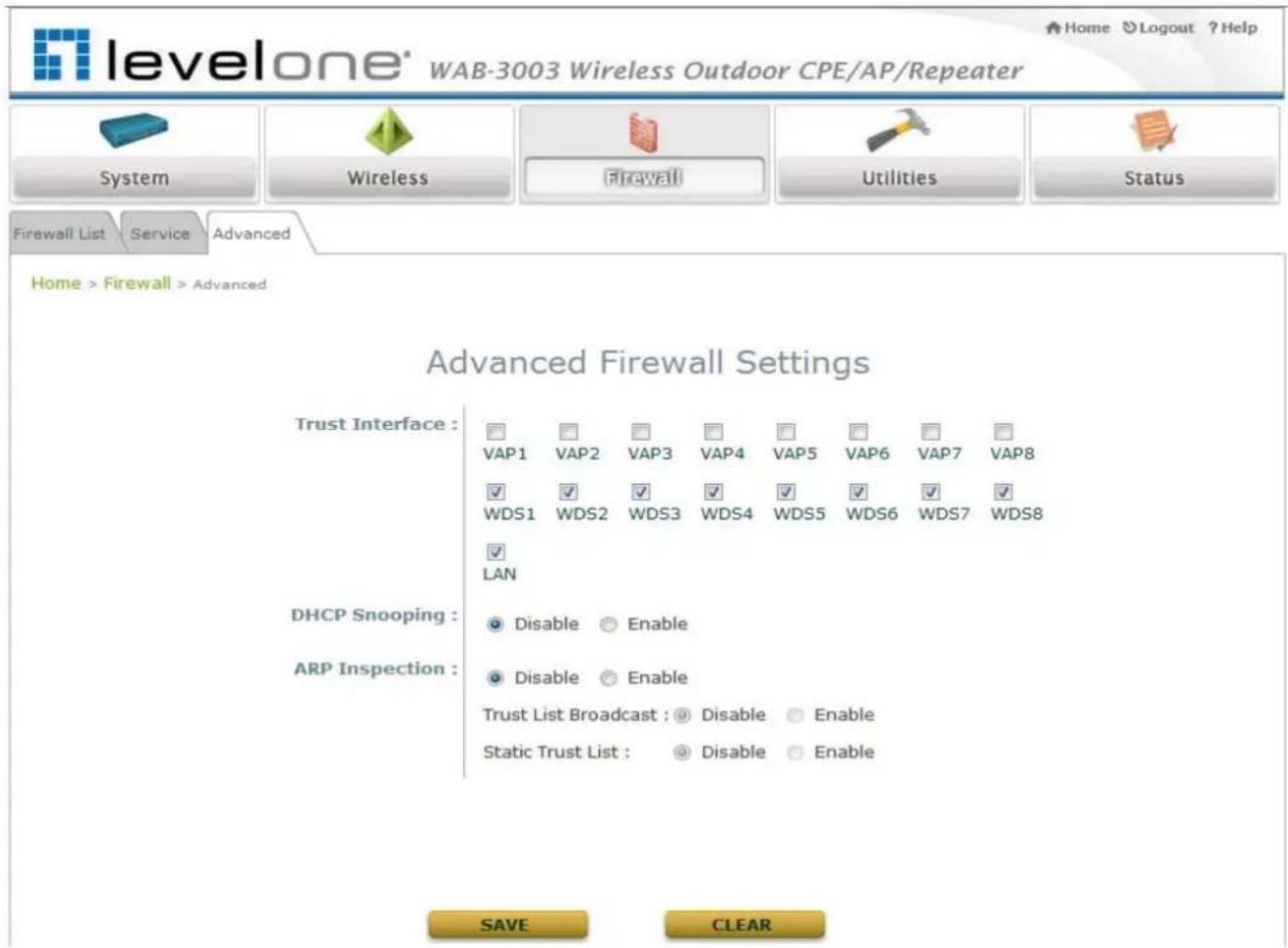
text_image
levelone® WAB-3003 Wireless Outdoor CPE/AP/Repeater System Wireless Firewall Utilities Status Firewall List Service Advanced Home > Firewall > Advanced Advanced Firewall Settings Trust Interface : VAP1 VAP2 VAP3 VAP4 VAP5 VAP6 VAP7 VAP8 WDS1 WDS2 WDS3 WDS4 WDS5 WDS6 WDS7 WDS8 LAN DHCP Snooping : Disable Enable ARP Inspection : Disable Enable Trust List Broadcast : Disable Enable Static Trust List : Disable Enable SAVE CLEAR- Trust Interface: Each interface can be checked individually to mark as trusted interfaces; security enforcements on DHCP/ARP like DHCP snooping and ARP inspection will be carried out on non-trusted interfaces.
- DHCP Snooping: When enabled, DHCP packets will be validated against possible threats like DHCP starvation attack; in addition, the trusted DHCP server (IP/MAC) can be specified to prevent rogue DHCP server.
- ARP Inspection: When enabled, ARP packets will be validated against ARP spoofing. Trust List Broadcast can be enabled to let other WAB-3003 (with L2 firewall feature) learn the trusted MAC/IP pairs to issue ARP requests. Static Trust List can be used to add MAC or MAC/IP pairs to issue ARP request. Other network nodes can still send their ARP requests; however, if their IP appears in the static list (with different MAC), their ARP requests will be dropped to prevent eavesdropping.
If any settings are made, please click SAVE to save the configuration before leaving this page.
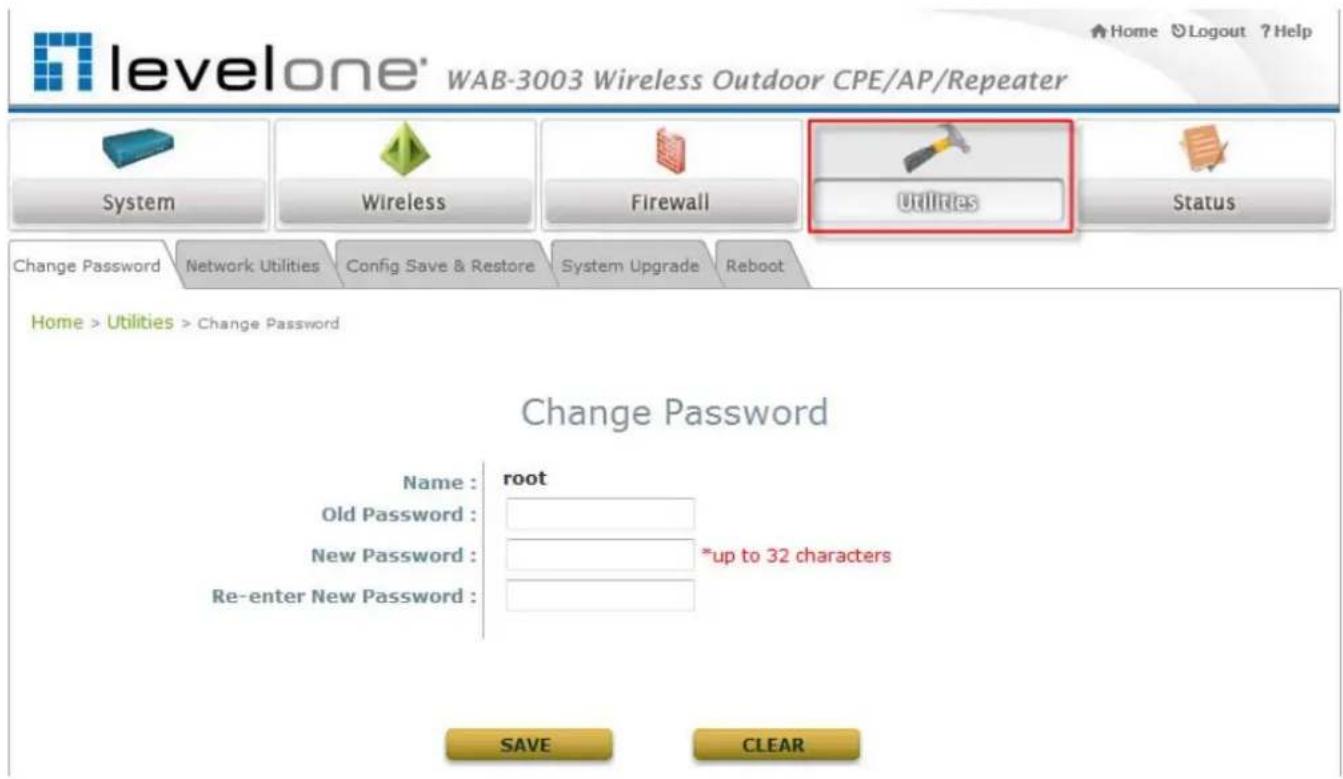
4.4 Utilities
The administrator can maintain the system on this page: Change Password, Network Utilities, Configuration Save & Restore, System Upgrade, and Reboot.
text_image
levelone® WAB-3003 Wireless Outdoor CPE/AP/Repeater Home Logout ?Help System Wireless Firewall Utilities Status Change Password Network Utilities Config Save & Restore System Upgrade Reboot Home > Utilities > Change Password Change Password Name : root Old Password : New Password : *up to 32 characters Re-enter New Password : SAVE CLEAR4.4.1 Change Password
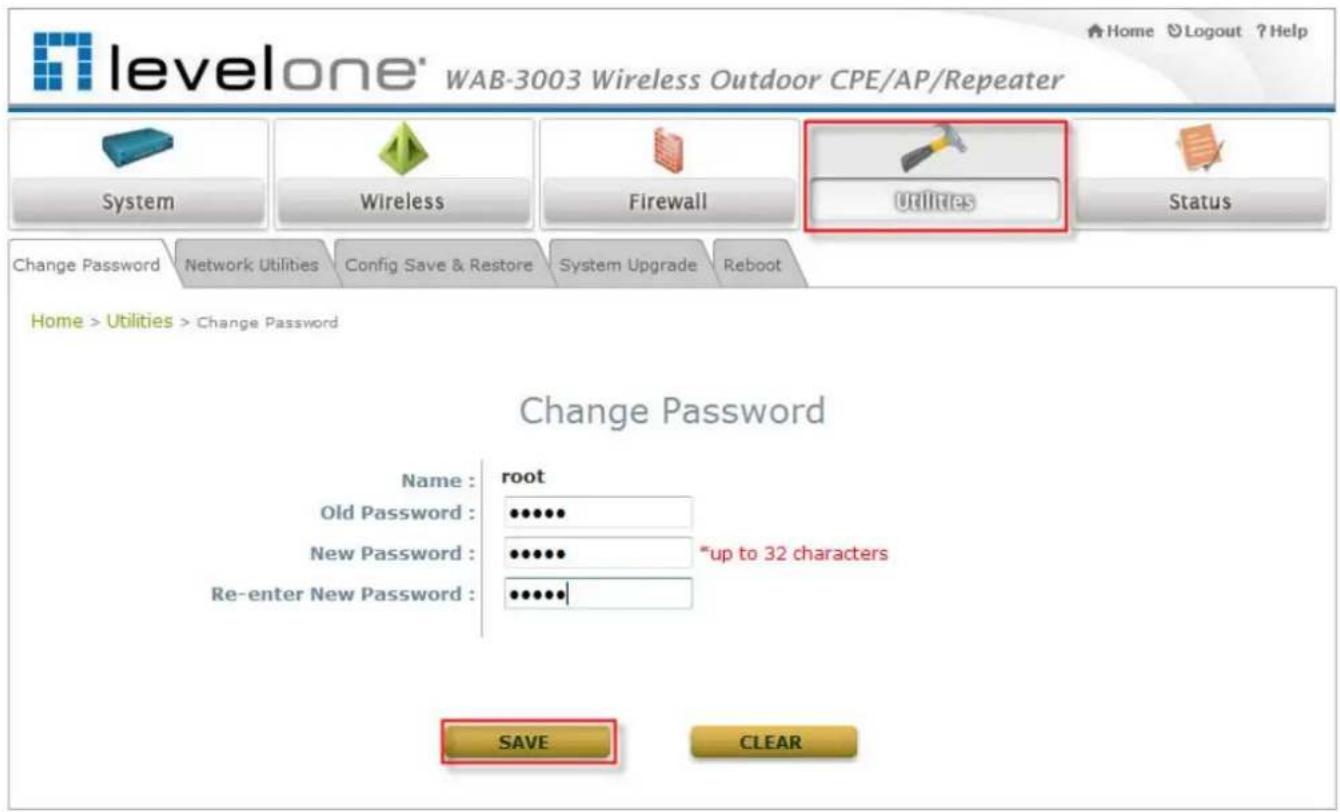
The administrator can update or change password. The system provides one management account for AP mode, root account. The administrator can change password on this page.
text_image
levelone® WAB-3003 Wireless Outdoor CPE/AP/Repeater System Wireless Firewall Utilities Status Change Password Network Utilities Config Save & Restore System Upgrade Reboot Home > Utilities > Change Password Change Password Name : root Old Password : •••••• New Password : ••••••• Re-enter New Password : ••••••• *up to 32 characters SAVE CLEAR"root" account: Enter the original password ("admin") and a new password, and then re-enter the new password in the Re-enter New Password field. Click SAVE to save the new password.
4.4.2 Network Utilities
The administrator can check the network connectivity via this function. The current provided network utility is Ping and the target host FQDN-compliant name or IP address can be provided to test network connection.

text_image
Change Password Network Utilities Config Save & Restore System Upgrade Reboot Home > Utilities > Network Utilities Network Utilities Ping Host (Domain/IP) : Ping- Ping Host (Domain/ IP): Enter the domain name or IP address of a target device for diagnosis purpose, for example, www.google.com, and click Ping to proceed. The ping result will be shown in the Result field.

text_image
levelone® WAB-3003 Wireless Outdoor CPE/AP/Repeater System Wireless Firewall Utilities Status Change Password Network Utilities Config Save & Restore System Upgrade Reboot Home > Utilities > Network Utilities Network Utilities Ping Host (Domain/IP) : www.google.com Ping ping: www.google.com: (66.249.89.147): 56 data bytes4.4.3 Configuration Save & Restore
This function is used to backup or restore the current settings. The system can be restored to the default setting by clicking on Reset. The setting of the device can be back up to a file. It can be used to duplicate setting to the other WAB-3003 device.

text_image
levelone® WAB-3003 Wireless Outdoor CPE/AP/Repeater System Wireless Firewall Utilities Status Change Password Network Utilities Config Save & Restore System Upgrade Reboot Home > Ublities > Config Save & Restore Configuration Backup & Restore Reset to Default: Reset Backup System Settings: Backup Restore System Settings: 浏览... Restore- Reset to Default:
Click Reset to load the factory default settings of WAB-3003. A pop-up screen will appear to reconfirm the request to restart the system. Click OK to proceed, or click Cancel to cancel the restart request.
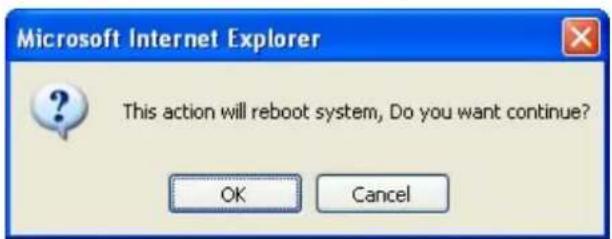
text_image
Microsoft Internet Explorer This action will reboot system, Do you want continue? OK CancelA warning message as displayed below will appear during the reboot period. The system power must be turned on before the completion of the reboot process.
The System Overview page will appear upon the completion of reboot.
- Backup System Settings: Click Save to save the current system settings to a local disk such as the hard disk drive (HDD) of a local computer or a compact disc (CD).
- Restore System Settings: Click Browse to search for a previously saved backup file, and then click Upload to restore the settings. The backup file will replace the active configuration file currently running on the system.
4.4.4 System Upgrade
To upgrade the system firmware, click Browse to search for the new firmware file, and then click Apply to execute the upgrade process. The first step is to acquire the correct firmware file and supply it in the User Interface field. During firmware update, please don't turn off the power to prevent from damaging the device permanently.
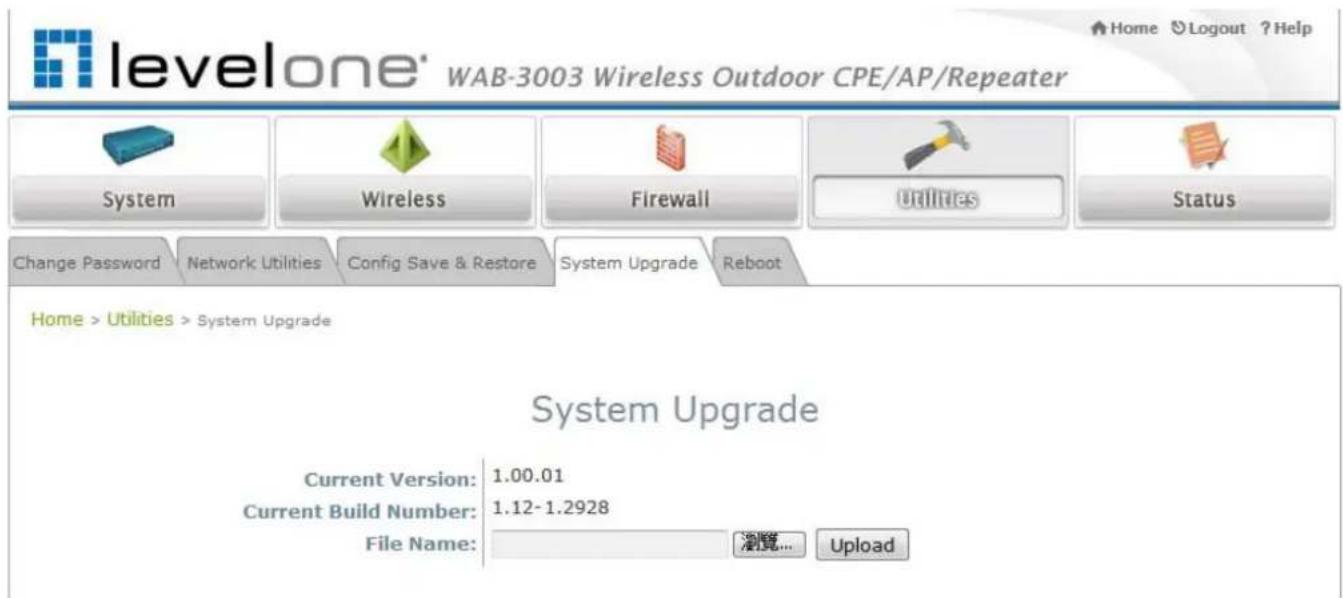
text_image
levelone' WAB-3003 Wireless Outdoor CPE/AP/Repeater System Wireless Firewall Utilities Status Change Password Network Utilities Config Save & Restore System Upgrade Reboot Home > Utilities > System Upgrade System Upgrade Current Version: 1.00.01 Current Build Number: 1.12-1.2928 File Name: 浏览... UploadNote:
- To prevent data loss during firmware upgrade, please back up the current settings before proceeding further.
- Please restart the system after the upgrade. Do not interrupt the system, i.e. power on/off, during the upgrade or restart process since it may cause damage to the system.
4.4.5 Reboot
The administrator can reboot the device remotely. Click Reboot to restart the system immediately.

text_image
levelone® WAB-3003 Wireless Outdoor CPE/AP/Repeater System Wireless Firewall Utilities Status Change Password Network Utilities Config Save & Restore System Upgrade Reboot Home > Utilities > Reboot Reboot the System Reboot may take several minutes to complete. The Admin Login Page will be shown after system boots up. RebootA pop-up screen will appear to confirm the request to restart the system. Click OK to proceed, or click Cancel to cancel the restart request.

text_image
Windows Internet Explorer Do you want to reboot the system? OK CancelA warning message as displayed below will appear during the reboot period. The system power must be turned on before the completion of the reboot process.

text_image
levelone' WAB-3003 Wireless Outdoor CPE/AP/Repeater System Wireless Firewall Utilities Status Change Password Network Utilities Config Save & Restore System Upgrade Reboot Home > Utilities > Reboot Now rebooting the System Reboot may take several minutes to complete. The home page will be shown after system boots up. If the web page does not go back for a long time, please click the following link : WAB-3003The System Overview page will appear upon the completion of reboot.
4.5 Status
This section displays the status of System Overview, Clients, Repeater, and Event Log.
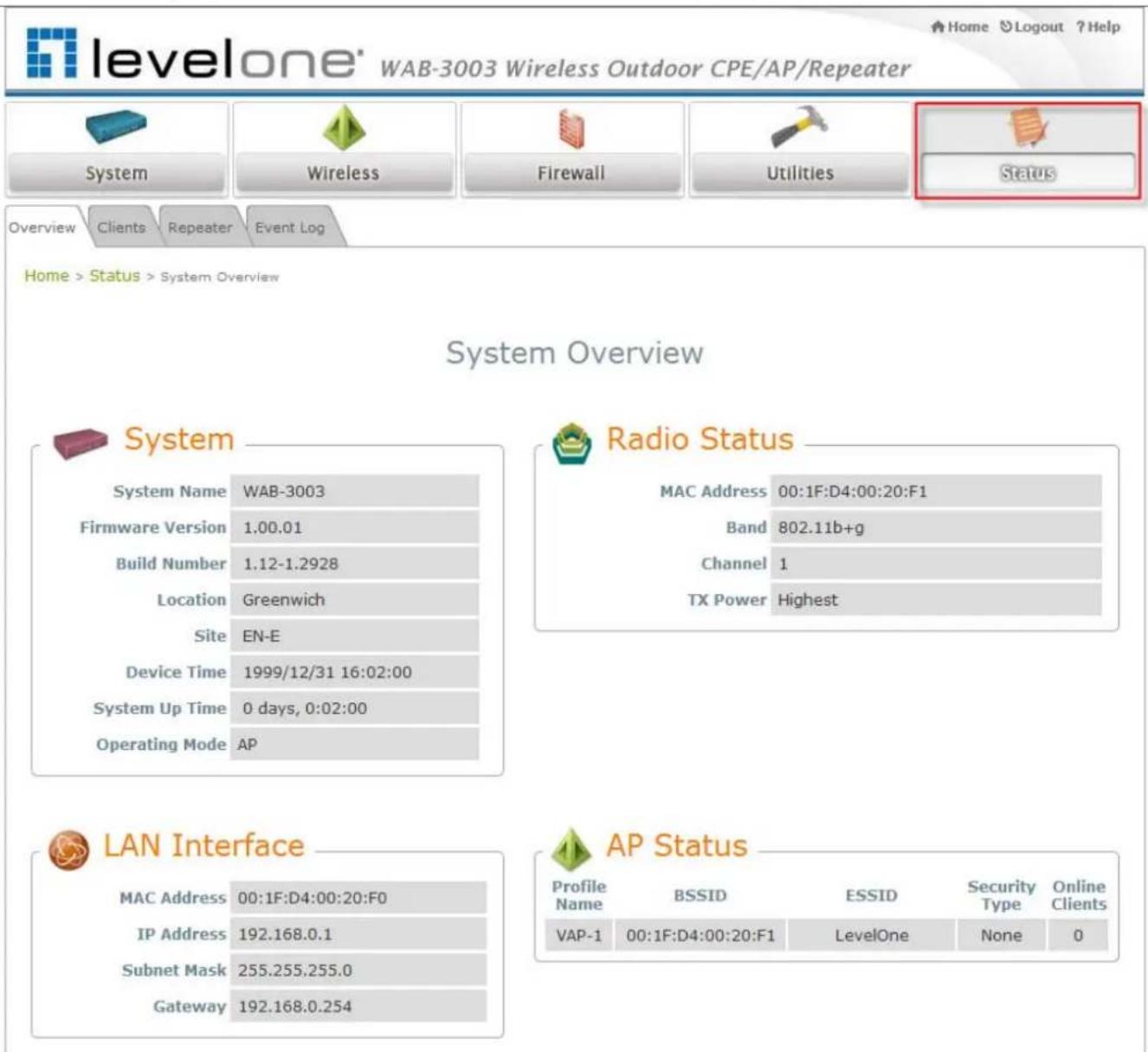
text_image
levelone® WAB-3003 Wireless Outdoor CPE/AP/Repeater Home Logout ?Help System Wireless Firewall Utilities Status Overview Clients Repeater Event Log Home > Status > System Overview System Overview System System Name WAB-3003 Firmware Version 1.00.01 Build Number 1.12-1.2928 Location Greenwich Site EN-E Device Time 1999/12/31 16:02:00 System Up Time 0 days, 0:02:00 Operating Mode AP Radio Status MAC Address 00:1F:D4:00:20:F1 Band 802.11b+g Channel 1 TX Power Highest LAN Interface MAC Address 00:1F:D4:00:20:F0 IP Address 192.168.0.1 Subnet Mask 255.255.255.0 Gateway 192.168.0.254 AP Status Profile Name BSSID ESSID Security Type Online Clients VAP-1 00:1F:D4:00:20:F1 LevelOne None 04.5.1. System Overview
The System Overview page provides an overview of the system status for the administrator.

text_image
levelone® WAB-3003 Wireless Outdoor CPE/AP/Repeater Home Logout ? Help System Wireless Firewall Utilities Status Overview Clients Repeater Event Log Home > Status > System Overview System Overview System System Name WAB-3003 Firmware Version 1.00.01 Build Number 1.12-1.2928 Location Greenwich Site EN-E Device Time 1999/12/31 16:02:00 System Up Time 0 days, 0:02:00 Operating Mode AP Radio Status MAC Address 00:1F:D4:00:20:F1 Band 802.11b+g Channel 1 TX Power Highest LAN Interface MAC Address 00:1F:D4:00:20:F0 IP Address 192.168.0.1 Subnet Mask 255.255.255.0 Gateway 192.168.0.254 AP Status Profile Name BSSID ESSID Security Type Online Clients VAP-1 00:1F:D4:00:20:F1 LevelOne None 0The description of the table is shown below:
| ITEM DES | CRIPTION | |
| System | System Name The name provided in System Information. | |
| Firmware Version The present firmware version of the system. | ||
| Build Number The Build Number of the firmware. | ||
| Location The location provided in System Information. | ||
| Site The firmware version for specific region. | ||
| Device Time The current time on the device. | ||
| System Up Time The system elapsing time since last reboot. | ||
| Operating Mode Either CPE or AP. | ||
| LAN Interface | MAC Address The MAC address of LAN Interface. | |
| IP Address The IP address of the LAN Interface. | ||
| Subnet Mask The Subnet Mask of the LAN Interface. | ||
| Gateway The gateway of LAN interface. | ||
| Radio Status | MAC Address The MAC address of RF interface. | |
| Band The operating band. | ||
| Channel The operating channel. | ||
| Tx Power The level of transmitted power. | ||
| AP Status | BSSID The BSSID (MAC) of AP. | |
| ESSID The assigned ESSID of AP. | ||
| Security Type The security type of AP. | ||
| Online Client The number of online clients associated with AP. | ||
4.5.2. Associated Client Status
The administrator can remotely oversee the status of all associated clients on this page. Associated client's MAC, SNR and Idle Time are listed in the table.

text_image
Overview Clients Repeater Event Log Home > Status > Wireless Clients Associated Client Status Client List Associated VAP ESSID MAC Address SNR (dB) Idle Time (secs) Disconnect VAP-1 LevelOne 00:18:de:de:0a:45 11 23 Kick• Associated VAP: The specific VAP which the client is associated with.
• ESSI D: The Extended Service Set ID which the client is associated with.
• MAC Address: The MAC address of associated clients.
• SNR: The Signal to Noise Ratio of respective client's association.
- Idle Time: Time period that the associated client is inactive; the time unit is in second.
- Disconnect: Click "Kick" to disconnect the client from this AP.
4.5.3. Repeater Information
The administrator can review detailed information of the repeater function on this page. Information of repeater's status, mode and encryption is provided.
- WDS Link Status: The table will be displayed when WDS mode is selected. For more information on the repeater type, please refer to Section 4.2.5 Repeater Settings.
➢ Status: The status of the repeater function either Enabled or Disabled.
MAC Address: The MAC Address of the WDS peer.
RSSI: Received Signal Strength Indication, a measurement of received radio signal over WDS link.
Tx Rate: The transmit rate of the Repeater.
Tx Count: The accumulative number of transmission counts.
Tx Error: The accumulative number of transmission errors.
Encryption: The encryption type used: None, WEP, or WPA-PSK.

Home > Status > Repeater Information
Repeater Information

WDS Link Status
| Item | Status | MAC Address | RSSI | TX Rate | TX Count | TX Error | Encryption |
| 1 | Enabled | 0A:11:A3:08:09:56 | 0 | 54 M | 46 | 46 | None |
| 2 | Disabled | N/A | N/A | N/A | N/A | N/A | |
| 3 | Disabled | N/A | N/A | N/A | N/A | N/A | |
| 4 | Disabled | N/A | N/A | N/A | N/A | N/A |
Fig. 4.5.3-1 WDS
WAB-3003 108M 11g Outdoor PoE CPE/ AP/ Bridge
- Uni versal Repeater: The table will be displayed when Universal Repeater mode is selected. For more information on the repeater type, please refer to Section 4.2.5 Repeater Settings.
➢ SSID: SSID of the upper-bound AP to be associated with.
Tx Rate: The transmit rate of the Repeater.
SNR: The SNR (Signal to Noise Ratio) indicates the relative signal strength between the upper-bound AP and the system.
Tx Count: The accumulative number of transmission counts.
Tx Error: The accumulative number of transmission errors.
Encryption: The encryption type used: None, WEP, or WPA-PSK.

Home > Status > Repeater Information
Repeater Information

Universal Repeater
SSID AP
Status Enabled
TX Rate 36 Mbits
SNR 39
TX Count 14 Bytes
TX Error 2 Packets
Encryption None
Fig 4.5.3-2 Universal Repeater
4.5.4. Event Log
Event log provides the records of the system activities. All the system events are shown here.
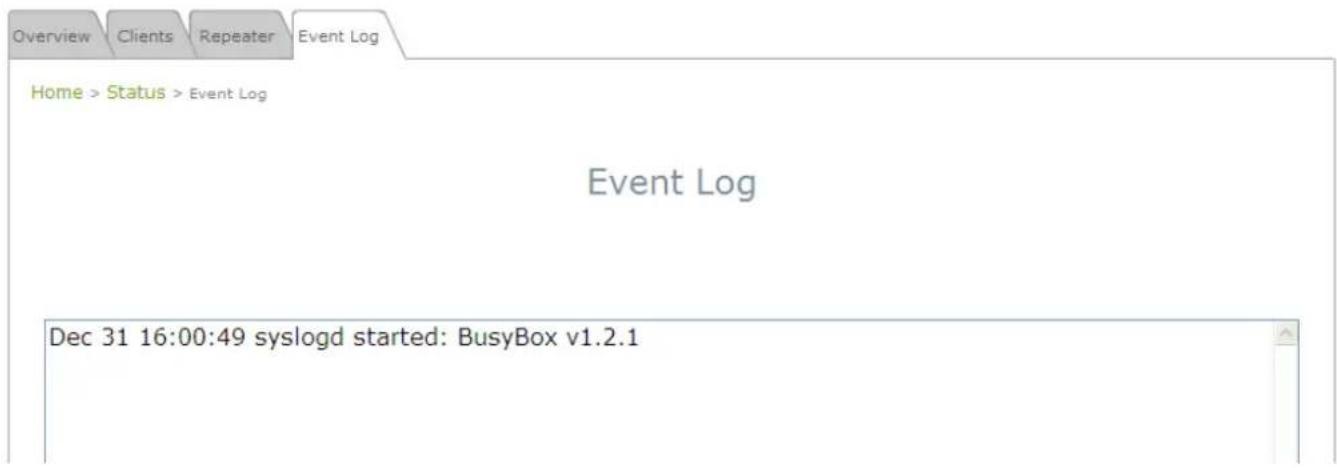
text_image
Home > Status > Event Log Event Log Dec 31 16:00:49 syslogd started: BusyBox v1.2.1Note:
As the Event Log is stored in RAM, it will be refreshed after the system is restarted. The system also supports a Syslog reporting function of reporting the events to an external Syslog server.
- Date/ Time: The date and time when the event happened.
- Hostname: Indicate which Host records this event. Note that all events in this page are local events and this field of all events is the same. However, in remote Syslog service, this field will help the network administrator identify which event is from this system. For more information, please refer to Section 4.1.4 Management Services.
- Process name (with square brackets): Indicate which process with the specific event is associated.
• Description: Description of the event.
4.6 Online Help
The Help button is at the upper right hand corner of the display screen.
Click Help for the Online Help window, and then click the hyperlink of the desired topic for further information.
Online Help (AP Mode)
Organization of the Configuration Web:
| System | Wireless | Firewall | Utilities | Status |
| System Information | VAP Overview | Firewall List | Password | System Overview |
| Operating Mode | General | Service | Network Utilities | Clients |
| Network | VAP Config | Advanced | Config Save Restore | Repeater |
| Management Services | Security | System Upgrade | Event Log | |
| Repeater | Reboot | |||
| Advanced | ||||
| Access Control | ||||
| Site Survey |
5. CPE Mode Configuration
When CPE mode is activated, the system acts as a gateway where it connects to the WAN wirelessly and provides Ethernet connection to users via wired LAN. This chapter will guide you through setting up the CPE mode with graphical illustrations. The following table shows all the functions of WAB-3003 in its CPE mode.
| OPTION | System | Wireless | Firewall | Utilities | Status |
| FUNCTION | System Information | General Setting | IP/ Port Forwarding | Change Password | System Overview |
| Operating Mode | Advanced Wireless Settings | Demilitarized Zone | Network Utilities | Event Log | |
| Network Settings | Security Settings | Configuration Save & Restore | DHCP Lease | ||
| Management Services | Site Survey | UPnP Status | System Upgrade | ||
| Reboot |
Table 5-1: CPE Mode Functions
WAB-3003 108M 11g Outdoor PoE CPE/ AP/ Bridge

levelone
WAB-3003 Wireless Outdoor CPE/AP/Repeater
Home Logout ?Help

System

Wireless

Firewall

Utilities

Status
System Overview
Event Log
DHCP Lease
UPnP
Home > Status > System Overview
System Overview

System
System Name WAB-3003
Device Time 1999/12/31 16:00:55
System Up Time 0 days, 0:00:55
Operating Mode CPE

Radio Status
Status Connected
SSID Bzeek Free WiFi
MAC Address 00:1C:BF:25:F4:B8
Channel 7
Signal Strength 48
Security None

LAN Interface
MAC Address 00:1F:D4:00:20:F0
IP Address 192.168.0.1
Subnet Mask 255.255.255.0
DHCP Server Enabled

WAN Interface
Mode Static
MAC Address 00:1F:D4:00:20:F1
IP Address 192.168.10.1
Subnet Mask 255.255.255.0
Gateway 192.168.10.254
Bandwidth Down: Unlimited / UP: Unlimited
Figure 5-1: CPE Mode Main Page
5.1 System
This section provides information in configuring the following functions: System Information, Operating Mode, Network Settings, and Management Services.
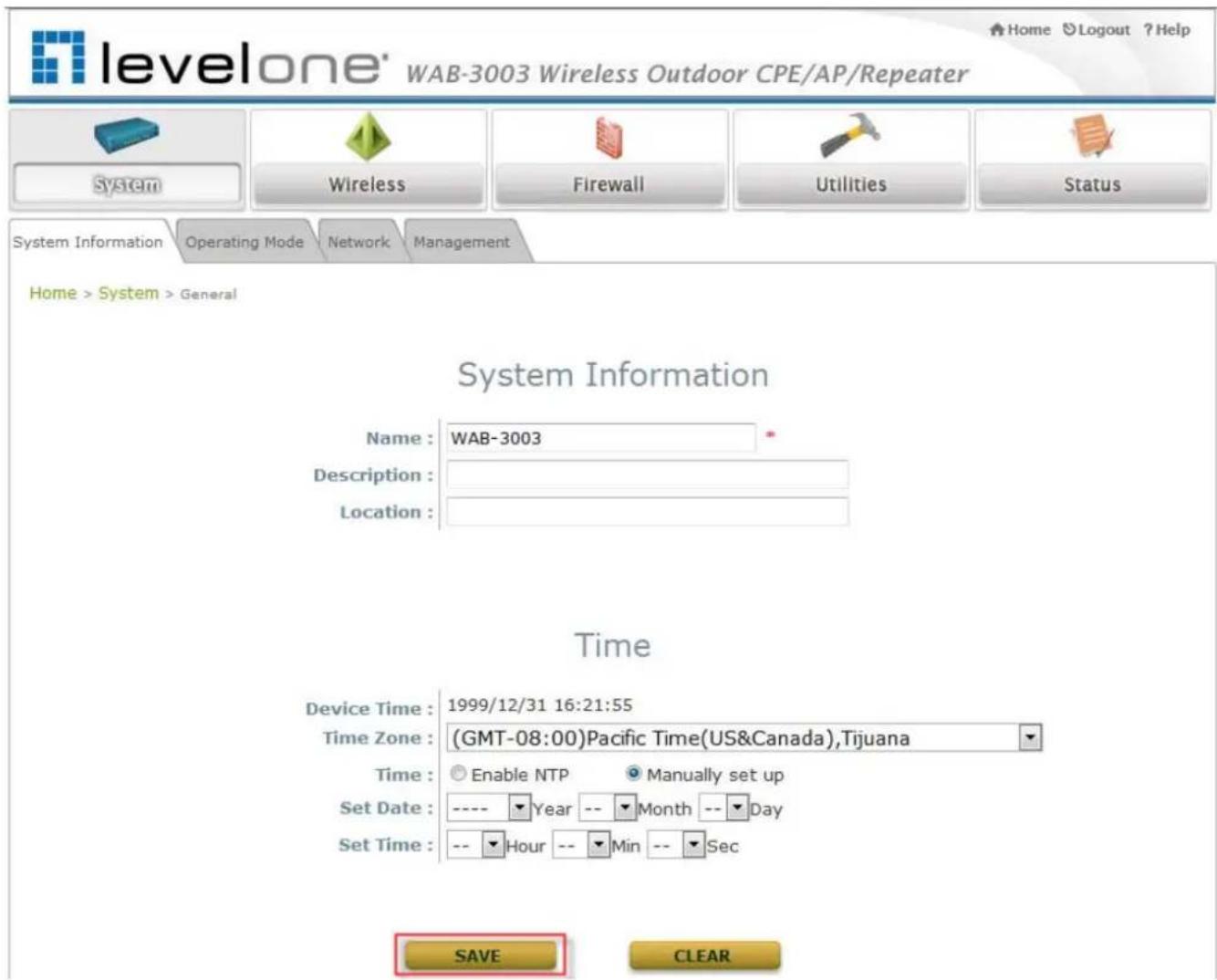
text_image
levelone' WAB-3003 Wireless Outdoor CPE/AP/Repeater Home Logout ?Help System Wireless Firewall Utilities Status System Information Operating Mode Network Management Home > System > General System Information Name : WAB-3003 Description : Location : Time Device Time : 1999/12/31 16:21:55 Time Zone : (GMT-08:00)Pacific Time(US&Canada),Tijuana Time : Enable NTP Manually set up Set Date : ---- Year -- Month -- Day Set Time : -- Hour -- Min -- Sec SAVE CLEARNote:
A system restart is required when a reminding message appears after clicking the SAVE button; all settings entered and saved will take effect only after a system restart.
5.1.1 System Information
For maintenance purpose, it is required to specify the system name, its location and corresponding basic parameters. Fields such as Name, Description and Location are used for mnemonic purpose. It is recommended to have different values in each AP.
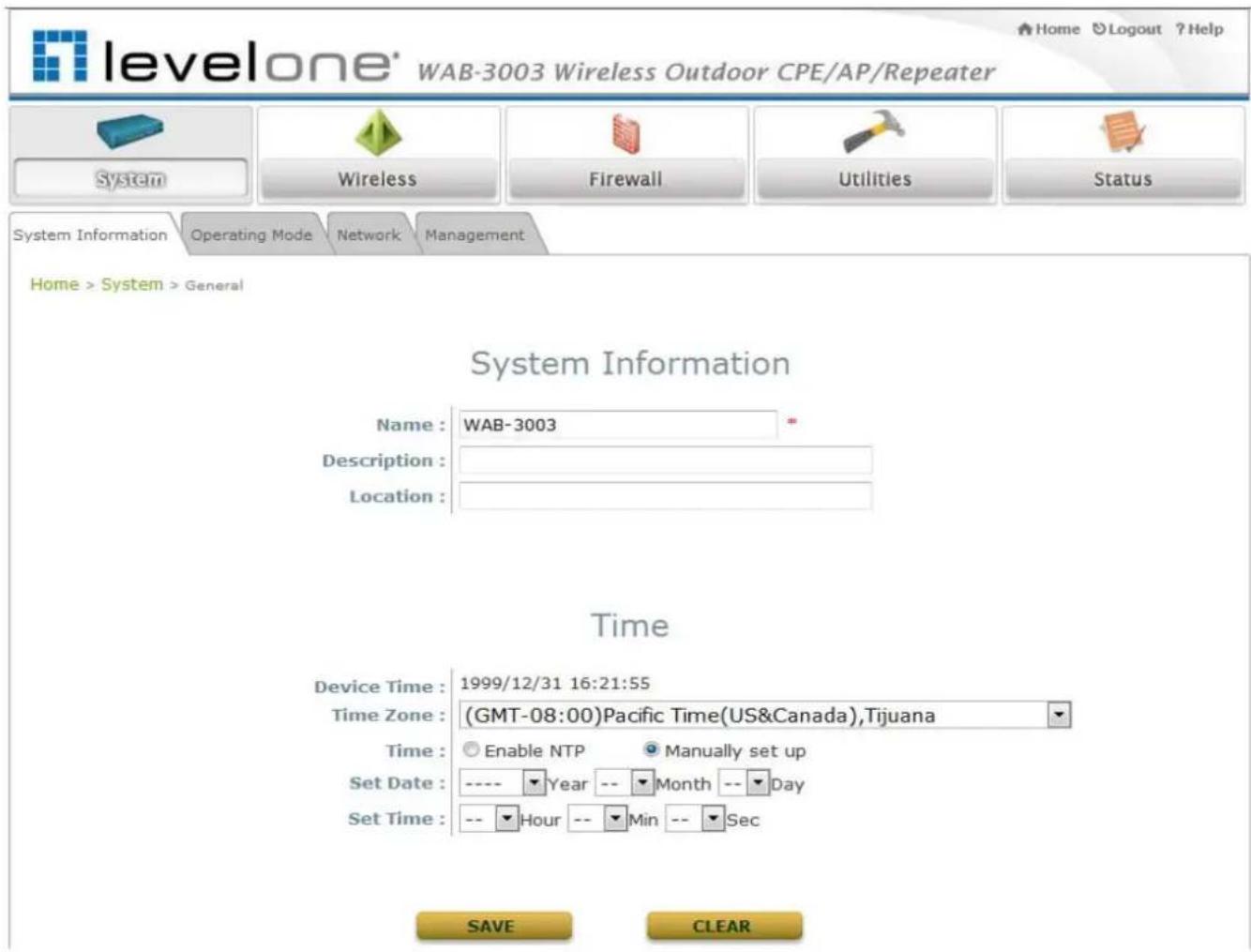
text_image
levelone® WAB-3003 Wireless Outdoor CPE/AP/Repeater System Wireless Firewall Utilities Status System Information Operating Mode Network Management Home > System > General System Information Name : WAB-3003 * Description : Location : Time Device Time : 1999/12/31 16:21:55 Time Zone : (GMT-08:00)Pacific Time(US&Canada),Tijuana Time : Enable NTP Manually set up Set Date : ---- Year -- Month -- Day Set Time : -- Hour -- Min -- Sec SAVE CLEAR- System Information
For maintenance purpose, it is recommended to have the following information stated as clearly as possible. Fields Name, Description, and Location are used for mnemonic purpose. It is recommended to have different values in each wireless device.
Name: The system name used to identify this system
➢ Description: Further information of the system.
➢ Location: Information about the geographical location of the system, which can help the administrator locate it easily.
- Time
Time settings allow the system time synchronized with NTP server or manually set.
➢ Device Time: Display the current time of the system.
Time Zone: Select an appropriate time zone from the drop-down list box.
WAB-3003 108M 11g Outdoor PoE CPE/ AP/ Bridge
➢ Synchronization: Synchronize the system time either by NTP server or manual setup.
(1) Enable NTP:
By selecting Enable NTP, WAB-3003 can synchronize its system time with the NTP server automatically. While this method is chosen, at least one NTP server's IP address or domain name must be provided. If FQDN (Full Qualified Domain Name) is used as the IP address of NTP server, the DNS server must also be activated (please refer to 5.1.3 Network Settings).
Time

text_image
Device Time : 1999/12/31 16:04:08 Time Zone : (GMT-08:00)Pacific Time(US&Canada),Tijuana Time : Enable NTP Manually set up NTP Server 1 : tock.stdtime.gov.tw * NTP Server 2 :(2) Manually
set
up:
By selecting Set manually set up, the administrator can manually set the system date and time.
Time

text_image
Device Time : 1999/12/31 16:04:08 Time Zone : (GMT-08:00)Pacific Time(US&Canada),Tijuana Time : Enable NTP Manually set up Set Date : ---- Year -- Month -- Day Set Time : -- Hour -- Min -- Sec- Set Date: Select the appropriate Year, Month, and Day from the drop-down list box.
- Set Time: Select the appropriate Hour, Min, and Sec from the drop-down list box.
5.1.2 Operating Mode
WAB-3003 supports two operation modes: CPE mode and AP mode. The administrator can set the desired mode on this page, and then configure the system according to deployment needs.

text_image
levelone® WAB-3003 Wireless Outdoor CPE/AP/Repeater System Wireless Firewall Utilities Status System Information Operating Mode Network Management Home > System > Operating Mode Operating Mode Operating Mode : CPE Mode AP Mode SAVE CLEAR- Operating Mode: Select CPE Mode and then click SAVE to save the setting.
Note:
After clicking SAVE, the system will immediately ask for a reboot to activate the selected mode.
5.1.3 Network Settings
WAN and LAN settings can be configured on this page.

text_image
levelone® WAB-3003 Wireless Outdoor CPE/AP/Repeater Home > System > Network Interface System Wireless Firewall Utilities Status System Information Operating Mode Network Management Home > System > Network Interface WAN Configuration Mode: Static DHCP Renew IP Address: 192.168.10.1 Netmask: 255.255.255.0 Default Gateway: 192.168.10.254 Primary DNS Server: 168.95.1.1 Alternate DNS Server: Bandwidth Limit: Download: Unlimited Upload: Unlimited Dynamic DNS (DDNS) DDNS: Disable Enable Provider: Host Name: User Name / E-mail: Password / Key: LAN Configuration IP Address: 192.168.0.1 Netmask: 255.255.255.0 DHCP Server: Disable Enable Start IP: 192.168.0.2 End IP: 192.168.0.254 Preferred DNS Server: 168.95.1.1 Alternated DNS Server: WINS Server IP: Domain Name: Lease Time: 1 Day SAVE CLEAR- WAN Configuration: Determine the way to obtain the IP address, by Static or DHCP.
➢ Mode: Determine the way to obtain the IP address, by DHCP or Static.
- Static: The administrator can manually set up the static WAN IP address.
- IP Address: The IP address of the WAN port.
- Netmask: The subnet mask of the WAN port.
- Gateway: The gateway IP address of the WAN port.
- Primary DNS Server: The IP address of the primary DNS (Domain Name System) server.
- Secondary DNS Server: The IP address of the substitute DNS server.
- DHCP: This connection type is applicable when the system is connected to a network with the presence of a DHCP server; all related IP information required will be provided by the DHCP server automatically.
Bandwidth Limit:
- Download: The maximum download bandwidth of WAN interface to be shared by clients.
○ Upload: The maximum upload bandwidth of the WAN interface to be shared by clients.
- Dynamic DNS: The option can be enabled to bind FQDN-compliant Host Name with this device. If enabled, the service Provider must be chosen from the drop-down list with provided Host Name, User Name, User Email and Password.
➢ DDNS: Select Enable to activate this function or Disable to inactivate it.
Provider: The name of the DDNS provider that the system is registered with. Select a DDNS provider from the drop-down list box.
Host Name: The FQDN registered with the selected DDNS provider.
User name/ E-mail: The account ID, user name or e-mail, registered with the DDNS provider.
➢ Password/ Key: The password of the account registered with the DDNS provider.
WAB-3003 108M 11g Outdoor PoE CPE/ AP/ Bridge
- LAN Configuration: Configure LAN and DHCP settings on this page. IP Address and Netmask are required fields to set up LAN interface.
IP Address: The IP address of the LAN port.
Netmask: The Subnet mask of the LAN port.
DHCP Server: If enabled, devices connected to this system can obtain an IP address automatically.
○ Enable/ Disable: Select Enable to activate this function or Disable to inactivate it.
- Start IP / End IP: Specify the range of IP addresses to be distributed by the DHCP server to clients.
- Preferred DNS Server: Enter the IP address of a preferred DNS server; this field is required.
Alternate DNS Server: Enter the IP address of a secondary DNS server; this is optional.
- WINS Server IP: Enter the IP address of a WINS (Windows Internet Name Service) server; this is optional.
- Domain Name: Enter the domain name for this network.
Lease Time: It can be chosen from the drop-down list to renew Leased LAN IP.
5.1.4 Management Services
The system supports SNMP, Syslog, UPnP, and Auto Reboot functions for easy management. These functions can be configured on this page.
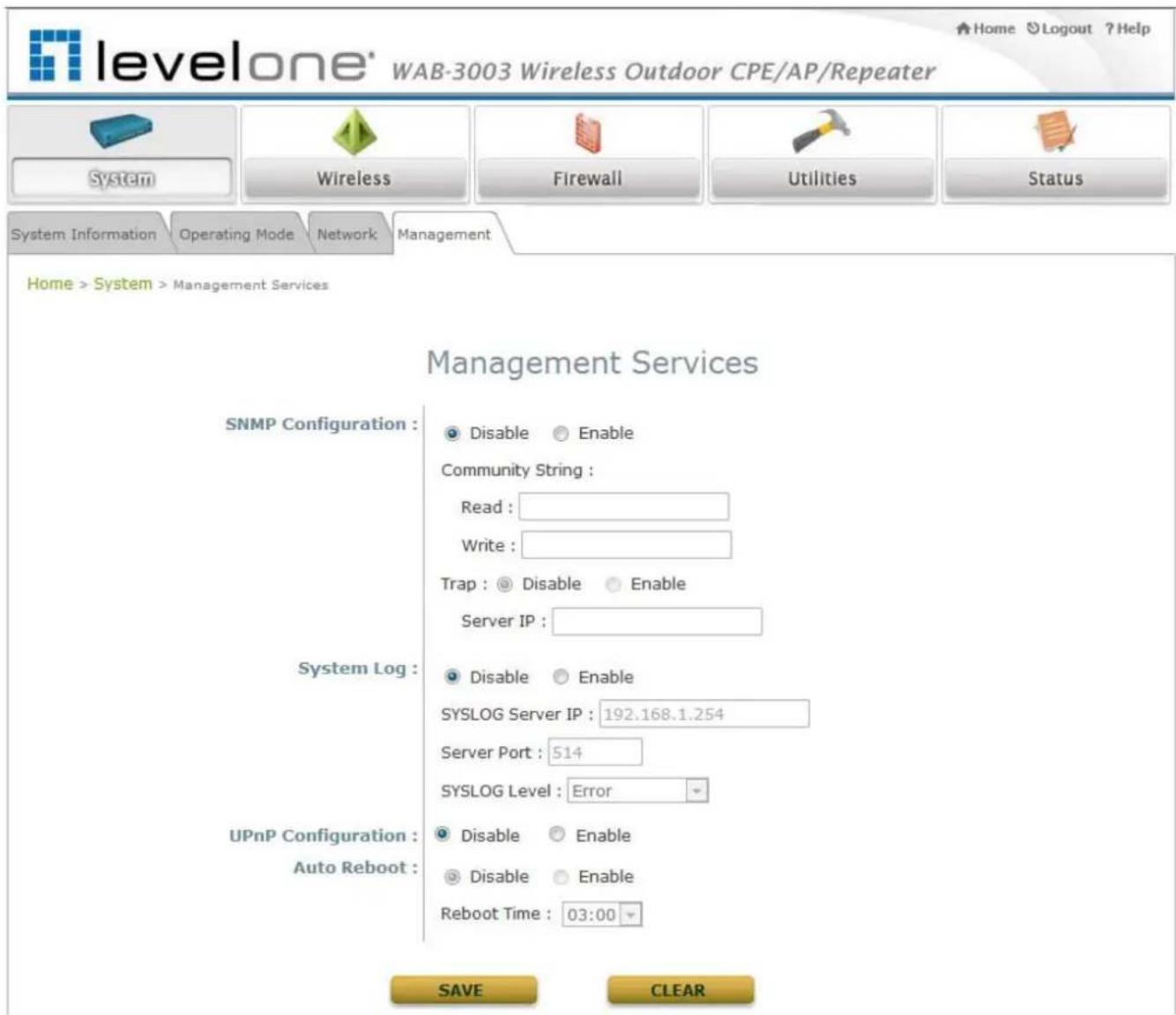
text_image
levelone® WAB-3003 Wireless Outdoor CPE/AP/Repeater Home Logout ?Help System Wireless Firewall Utilities Status System Information Operating Mode Network Management Home > System > Management Services Management Services SNMP Configuration : Disable Enable Community String : Read : Write : Trap : Disable Enable Server IP : System Log : Disable Enable SYSLOG Server IP : 192.168.1.254 Server Port : 514 SYSLOG Level : Error UPnP Configuration : Disable Enable Auto Reboot : Disable Enable Reboot Time : 03:00 SAVE CLEAR- SNMP Configuration: By enabling SNMP function, the administrator can obtain the system information remotely.
➢ Enable/ Disable: Select Enable to activate this function or Disable to inactivate it.
Community String: The community string is required when accessing the Management Information Base (MIB) of the system.
- Read: Enter the community string for accessing the MIB with Read privilege.
Write: Enter the community string for accessing the MIB with Write privilege.
WAB-3003 108M 11g Outdoor PoE CPE/ AP/ Bridge
Trap: When enabled, events on Cold Start, Interface UP & Down, and Association & Disassociation can be reported to an assigned server.
○ Enable/ Disable: Select Enable to activate this function or Disable to inactivate it.
- Server IP Address: Enter the IP address of the assigned server for receiving the trap report.
- System Log: By enabling this function, specify a remote Syslog server to accept system log messages from the system remotely.
➢ Enable/ Disable: Select Enable to activate this function or Disable to inactivate it.
➢ SYSLOG Server IP: The IP address of the Syslog server for receiving the reported events.
Server Port: The port number of the Syslog server.
➢ SYSLOG Level: Select the desired level of received events from the drop-down list box.
- UPnP Configuration: This option can be enabled if UPnP service is required by LAN device.
➢ Enable/ Disable: Select Enable to activate this function or Disable to inactivate it.
• Auto Reboot: The system can be functioning in a healthier state when this service is enabled.
➢ Enable/ Disable: Select Enable to activate this function or Disable to inactivate it.
➢ Reboot Time: Select an appropriate time from the drop-down list box. Since all users on the network will be disconnected during reboot, it is suggested to set the reboot time during an off-peak period to reduce impacts on the online users.
5.2 Wireless
This section is for configuring wireless settings for this system to associate with its uplink access point.
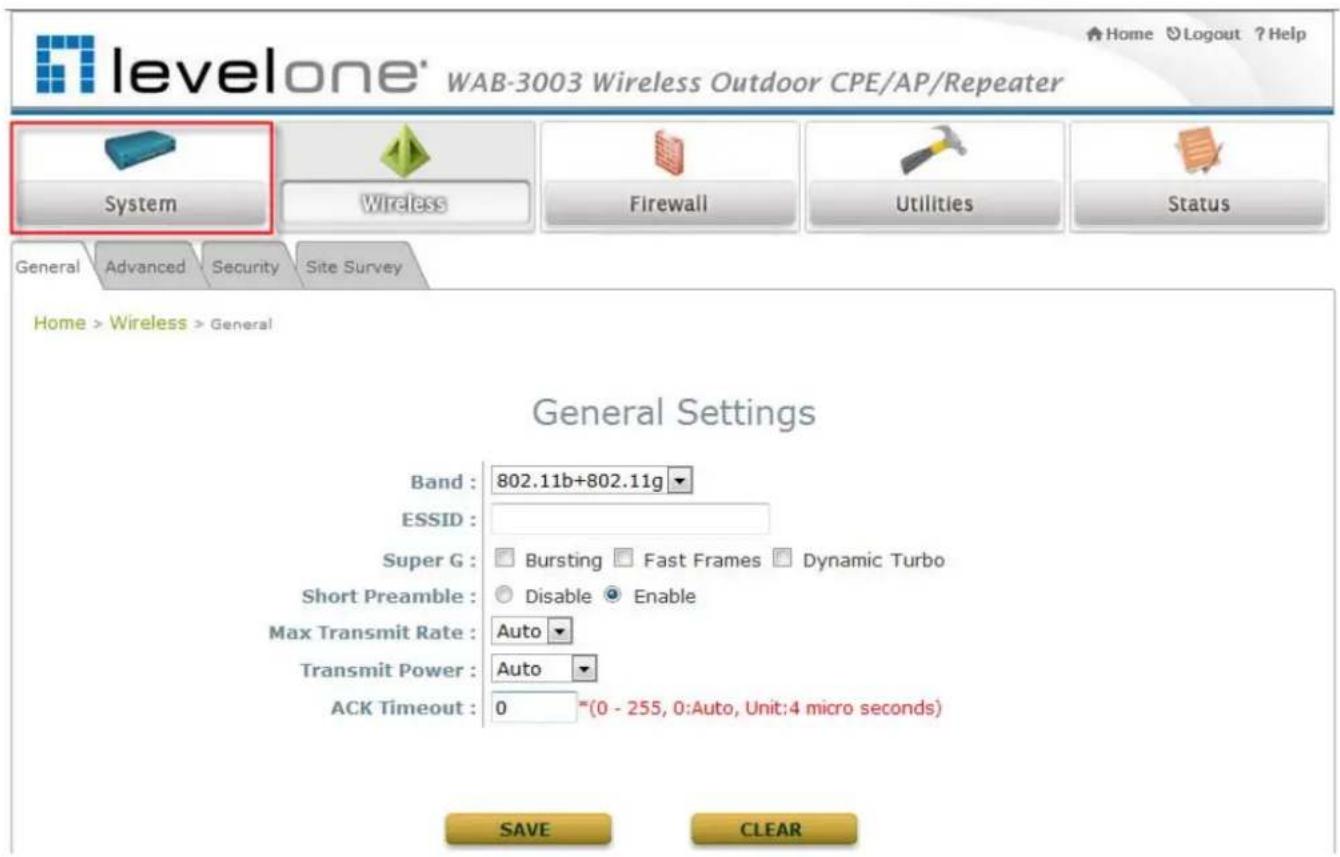
text_image
levelone® WAB-3003 Wireless Outdoor CPE/AP/Repeater System Wireless Firewall Utilities Status General Advanced Security Site Survey Home > Wireless > General General Settings Band : 802.11b+802.11g ESSID : Super G : Bursting Fast Frames Dynamic Turbo Short Preamble : Disable Enable Max Transmit Rate : Auto Transmit Power : Auto ACK Timeout : 0 *(0 - 255, 0:Auto, Unit:4 micro seconds) SAVE CLEAR5.2.1 General Settings
This section is for configuring the system RF settings.
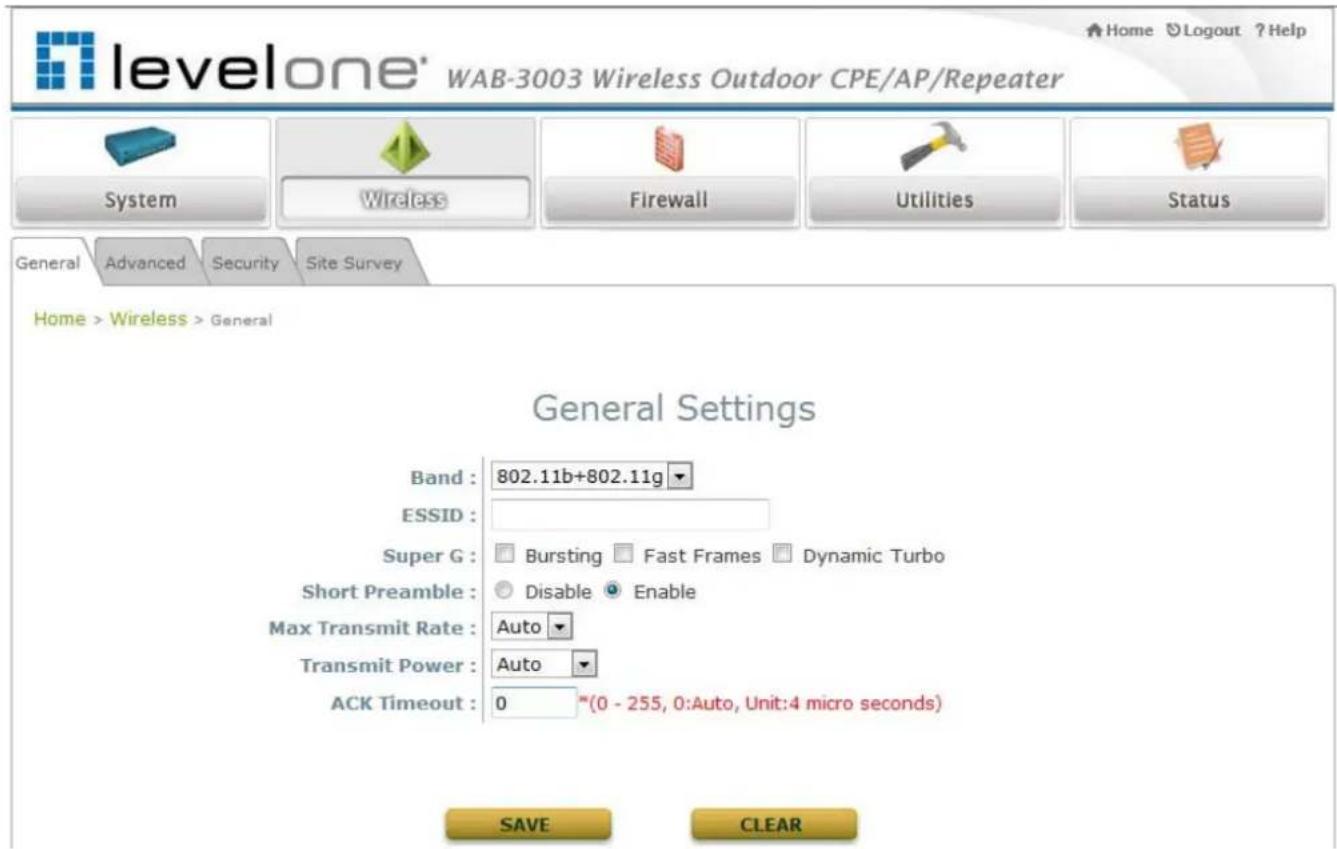
text_image
levelone® WAB-3003 Wireless Outdoor CPE/AP/Repeater System Wireless Firewall Utilities Status General Advanced Security Site Survey Home > Wireless > General General Settings Band : 802.11b+802.11g ESSID : Super G : Bursting Fast Frames Dynamic Turbo Short Preamble : Disable Enable Max Transmit Rate : Auto Transmit Power : Auto ACK Timeout : 0 *(0 - 255, 0:Auto, Unit:4 micro seconds) SAVE CLEAR- Band: Select an appropriate wireless band: 802.11b, 802.11g or mixed mode 802.11b+802.11g, or select Disable if the function is not required.
- ESSID: The ESSID (Service Set ID) of the client device that the system is to be associated with.
- Super G: Options of Bursting, Fast Frames, and Atheros' featured Dynamic Turbo can be selected to boost wireless throughput.
- Short Preamble: The short preamble with a 56-bit synchronization field can improve WLAN transmission efficiency. Select Enable to use Short Preamble or Disable to use Long Preamble with a 128-bit synchronization field.
- Max Transmit Rate: The maximum wireless transmitting rate. Select the desired rate from the drop-down list box. The system uses the highest possible rate when Auto is selected.
- Transmit Power: The signal strength transmitted from the system. Select among Auto, Lowest, Low, Medium, High, and Highest from the drop-down list box.
- ACK Timeout: When packet loss is increasing over longer distance, ACK Timeout can be used to alleviate this issue.
5.2.2 Advanced Wireless Settings
The administrator can set the RTS threshold and fragmentation threshold on this page. In most circumstance, the default settings can meet general requirements. If occasionally wireless network needs to be tuned, the following parameters will assist with that purpose.
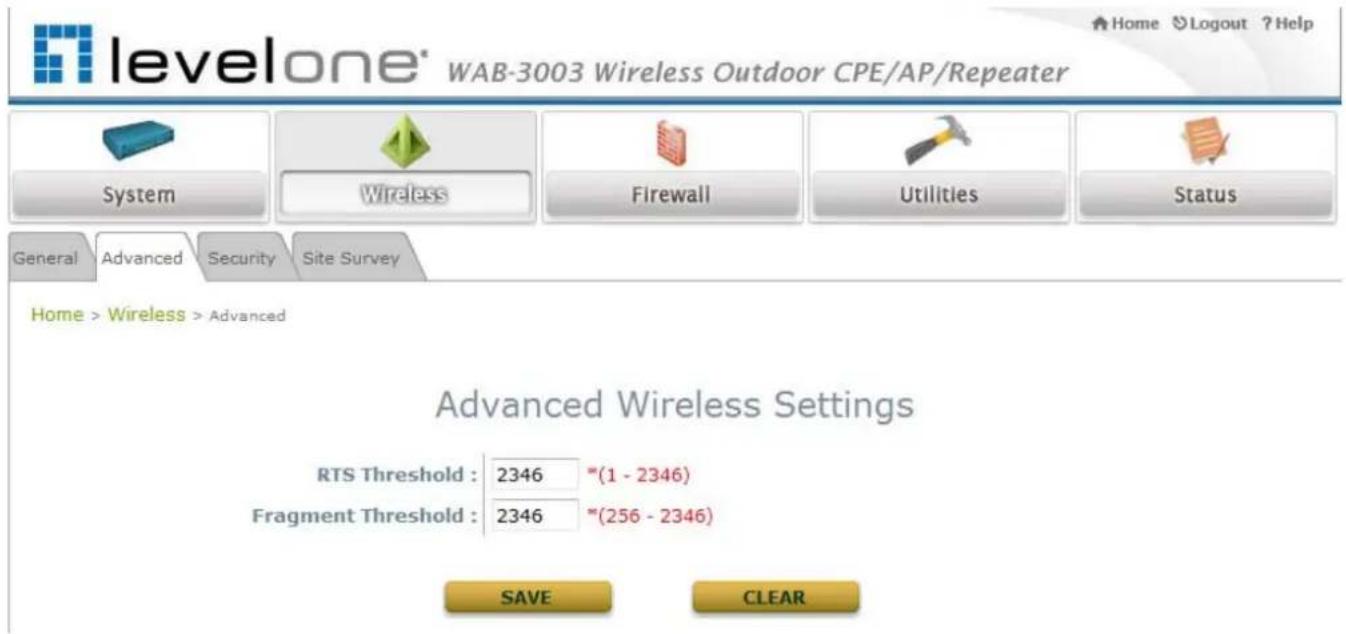
text_image
levelone® WAB-3003 Wireless Outdoor CPE/AP/Repeater System Wireless Firewall Utilities Status General Advanced Security Site Survey Home > Wireless > Advanced Advanced Wireless Settings RTS Threshold : 2346 *(1 - 2346) Fragment Threshold : 2346 **(256 - 2346) SAVE CLEAR- RTS Threshold: To control station access to the medium and to alleviate this effect of the hidden terminal problem, the administrator can tune this RTS threshold value. A lower RTS Threshold setting can be useful in areas where many client devices are associating with WAB-3003 or in areas where the clients are far apart and can detect only WAB-3003 and not each other.
- Fragmentation Threshold: An uncast frame larger than this threshold will be fragmented before transmission. If a significant number of collisions are occurring, the administrator can try to set a smaller value of the threshold to see whether it helps. A smaller value results in smaller packets but allows a larger number of packets in transmission. A lower Fragment Threshold setting can be useful in areas where communication is poor or disturbed by a serious amount of radio interference.
5.2.3 Security Settings
The system supports various authentication and data encryption methods. The security type includes: None, WEP and WPA-PSK.
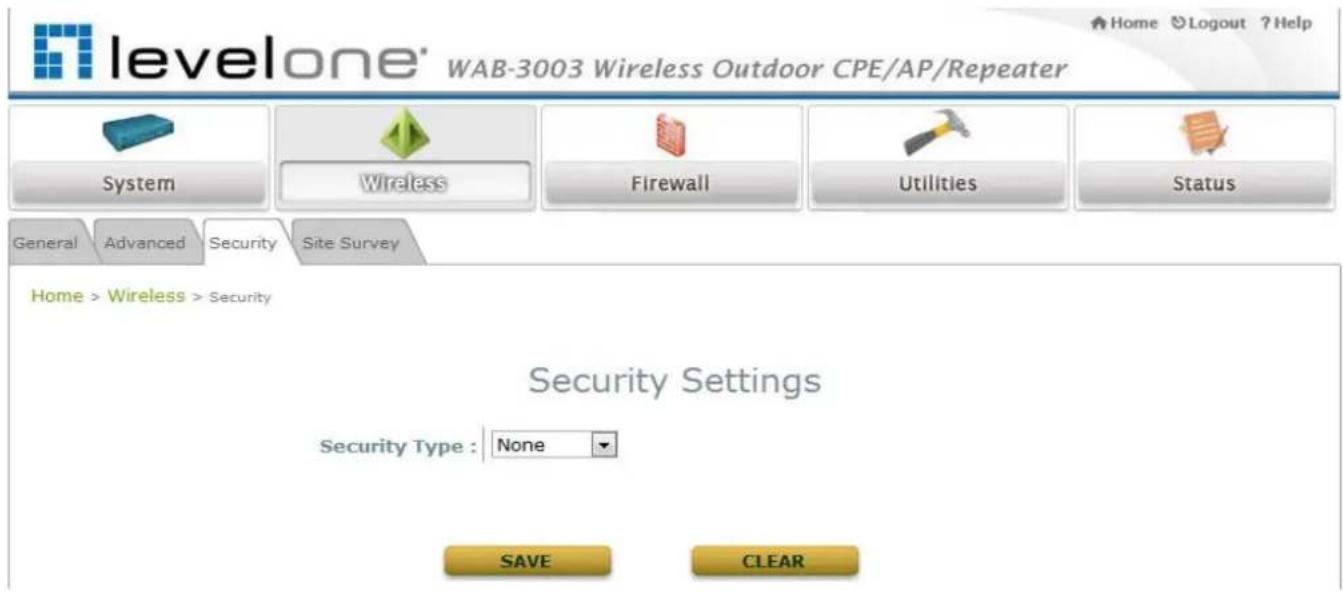
text_image
levelone' WAB-3003 Wireless Outdoor CPE/AP/Repeater System Wireless Firewall Utilities Status General Advanced Security Site Survey Home > Wireless > Security Security Settings Security Type : None SAVE CLEAR• None: No authentication is required.
WAB-3003 108M 11g Outdoor PoE CPE/ AP/ Bridge
- WEP: WEP (Wired Equivalent Privacy) supports key length of 64/128/152 bits.

text_image
levelone® WAB-3003 Wireless Outdoor CPE/AP/Repeater System Wireless Firewall Utilities Status General Advanced Security Site Survey Home > Wireless > Security Security Settings Security Type : WEP 802.11 Authentication: Open System Shared Key WEP Key Length : 64 bits 128 bits 152 bits WEP Key Format : ASCII Hex WEP Key Index : 1 WEP Keys : 1 2 3 4 SAVE CLEAR802.11 Authentication: Select from Open System, Shared Key, or Auto.
WEP Key Length: Select from 64-bit or 128-bit key length.
WEP Key Format: Select from ASCII or Hex format for the WEP key.
WEP Key Index: Select a key index from 1 through 4. The WEP key index is a number that specifies which WEP key to use for the encryption of wireless frames during data transmission.
WEP Keys: Provide WEP key value; the system supports up to 4 sets of WEP keys.
WAB-3003 108M 11g Outdoor PoE CPE/ AP/ Bridge
- WPA-PSK: WP A-PSK (WI-Fi Protected Access Pre-shared Key) supports pre-shared key authentication and WPA data encryption (TKIP/AES).

text_image
levelone' WAB-3003 Wireless Outdoor CPE/AP/Repeater System Wireless Firewall Utilities Status General Advanced Security Site Survey Home > Wireless > Security Security Settings Security Type : WPA-PSK Cipher Suite : TKIP (WPA) Pre-shared Key Type : PSK(Hex)*( 64 chars ) Passphrase*( 8 - 63 chars ) Pre-shared Key : Group Key Update Period: 600 second(s) SAVE CLEAR➢ Cipher Suite: Select an encryption method from TKIP(WPA/WPA2) and AES (WPA/WPA2).
Pre-shared Key Type: Select a pre-shared key type: PSK (Hex) or Passphrase.
Pre-shared Key: Enter the key value for the pre-shared key; the format of the key value depends on the key type selected.
Group Key Update Period: The time interval for the Group Key to be renewed. Enter the time length required; the time unit is in second.
5.2.4 Site Survey
The system can scan and display all surrounding available access points (APs). The administrator can then select an AP to be associated with the system on this page.
Site Survey is a useful tool to provide information about the surrounding wireless environment; available APs are shown with their respective SSID, MAC Address, Channel, Rate setting, Signal reading and Security type. The administrator can click Setup or Connect to configure the wireless connection according to the mentioned readings.

text_image
levelone' WAB-3003 Wireless Outdoor CPE/AP/Repeater System Wireless Firewall Utilities Status General Advanced Security Site Survey Home > Wireless > Site Survey Scan Result Scan Again! SSID MAC Address Channel Rate Signal Security Setup / Connect Accton_AP 00:22:2D:90:74:86 1 54 59 WPA2-PSK Setup WAP-0003 00:11:6B:60:6A:C5 6 54 40 WEP Setup vivi 00:19:70:2B:F2:6D 11 54 9 WPA2-PSK Setup Pre-shared Cipher : TKIP Pre-shared Key Type : PSK(Hex) *(64 chars) Passphrase *(8 - 63 chars) Pre-shared Key : ConnectFigure 5-2-4-1: AP Scan Result (example only)
- SSID: The SSID (Service Set ID) of the AP found in the system's coverage area.
• MAC Address: The MAC address of the respective AP.
• Channel: The channel number currently used by the respective AP.
• Rate: The transmitting rate of the respective AP.
• Signal: The signal strength of the respective AP.
• Security: The encryption type used by the respective AP.
WAB-3003 108M 11g Outdoor PoE CPE/ AP/ Bridge
- Setu p / Connect:
Connect: Click Connect to associate with the respective AP directly; no further configuration is required.
| AP | 00:1F:D4:39:10:74 | 11 | 54 | 49 | None | Connected |
Setup: Click Setup to configure security settings for associating with the respective AP or repeater.
- WEP: Click Setup to configure the WEP setting for associating with the target AP.
| WAP-0003 | 00:11:6B:60:6A:C5 | 6 | 54 | 40 | WEP | Setup |
The following configuration box will then appear at the bottom of the screen. For more information on the WEP security settings, please refer to Section 5.2.3 Security Settings.

text_image
WEP Key Type : Open Shared WEP Key Length : 64 bits 128 bits 152 bits WEP Key Format : ASCII Hex WEP Key Index : 1 WEP Keys : 1 2 3 4 ConnectWAB-3003 108M 11g Outdoor PoE CPE/ AP/ Bridge
- WPA-PSK: C lick Setup to configure the WPA-PSK setting for associating with the target AP.
Accton_AP
00:22:2D:90:74:86
1
54
59
WPA2-PSK
Setup
The following configuration box will then appear at the bottom of the screen. For more information on the WPA-PSK security settings, please refer to Section 5.2.3- Security Settings.
Pre-shared Cipher :
Pre-shared Key Type :
TKIP

PSK(Hex) *(64 chars)

Passphrase *(8 - 63 chars)
Pre-shared Key :
text_image
Connect5.3 Firewall
The system supports the following firewall functions: IP/ Port forwarding and DMZ (Demilitarized Zone). The administrator can allow a certain part of the network to be exposed to the Internet in limited and controlled ways for special purposes such as game and voice applications.

text_image
levelone® WAB-3003 Wireless Outdoor CPE/AP/Repeater System Wireless Firewall Utilities Status IP/Port Forwarding DMZ Home > Firewall > IP/Port Forwarding IP/Port Forwarding Service Name External Port Range Internal IP Address Protocol TCP/UDP Add IP/Port Forwarding Item Service Name External Port Range Internal IP Address Protocol State Delete Edit SAVE CLEAR5.3.1 IP/ Port Forwarding
A certain part of the network can be exposed to the Internet in a limited and controlled way for special-purpose Internet services such as on-line game or video conferencing on this page. Please ensure that the internal port to be used is not occupied by other applications.

text_image
levelone® WAB-3003 Wireless Outdoor CPE/AP/Repeater System Wireless Firewall Utilities Status IP/Port Forwarding DMZ Home > Firewall > IP/Port Forwarding IP/Port Forwarding Service Name External Port Range Internal IP Address Protocol TCP/UDP Add IP/Port Forwarding Item Service Name External Port Range Internal IP Address Protocol State Delete Edit SAVE CLEAR- Service Name: The administrator can provide an easy remembered alias for the specific forwarding.
- External Port Range: The external port for forwarding traffic can be selected from the dropdown list or specified by choosing User Define to set the range manually.
- Internal IP Address: Enter the LAN IP address to receive the forwarding traffic.
- Protocol: Forwarding traffic protocol can be selected from drop-down list to be TCP/ UCP, TCP or UDP.
- Add: Click Add to activate the new service.
- IP/ Port Forwarding: Details of current services available. Click Delete to remove the specified service. Click Edit to configure the current setting.
IP/Port Forwarding
| Item | Service Name | External Port Range | Internal IP Address | Protocol | State | Delete | Edit |
| 1 | GAME | 6112 | 10.30.5.112 | TCP/UDP | ○ Disable ○ Enable | Delete | Edit |
| 2 | Phone | 6670 | 10.30.5.250 | TCP/UDP | ○ Disable ○ Enable | Delete | Edit |
5.3.2 Demilitarized Zone
The DMZ (Demilitarized Zone) allows one local computer or server (used as a DMZ host) to be exposed to the Internet for special-purpose Internet services such as functioning as a web server. External users can access the DMZ host without authentication.
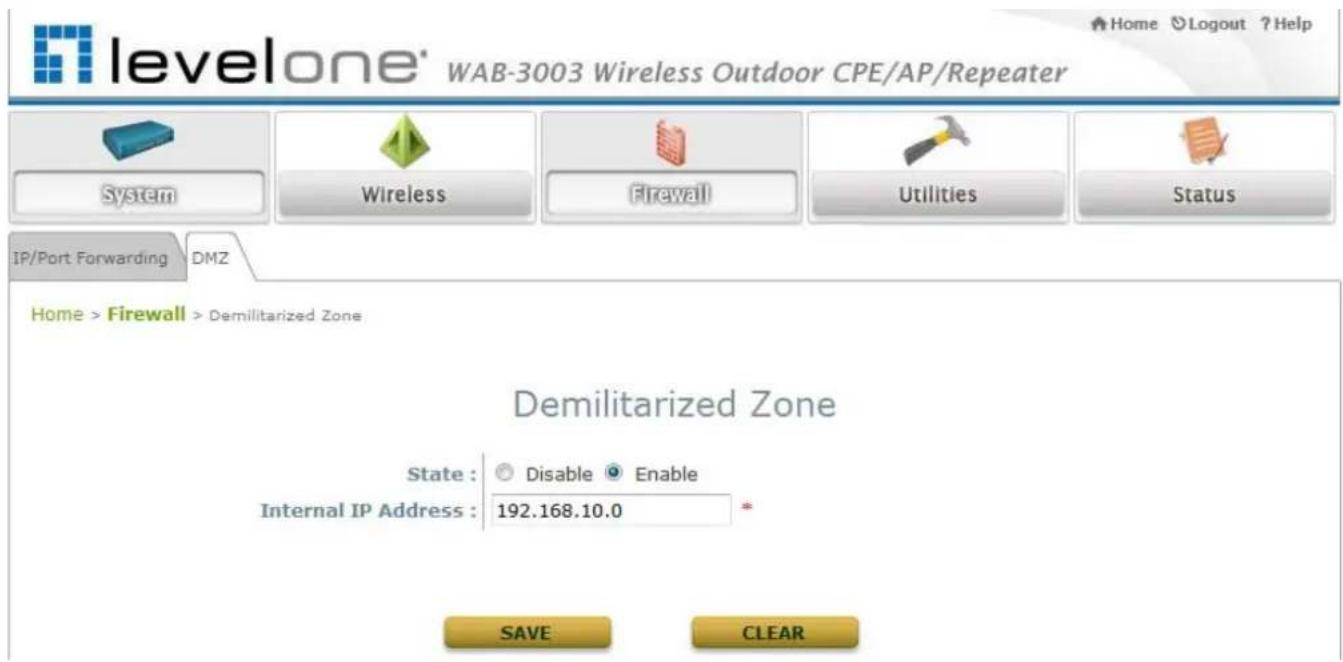
text_image
levelone® WAB-3003 Wireless Outdoor CPE/AP/Repeater System Wireless Firewall Utilities Status IP/Port Forwarding DMZ Home > Firewall > Demilitarized Zone Demilitarized Zone State : Disable Enable Internal IP Address : 192.168.10.0 * SAVE CLEAR- Enable: Select Enable to activate this function or Disable to deactivate it.
- Internal IP Address: Fill in the internal IP address to allow system forwarding traffic other than those specifically listed in IP/Port Forwarding.
5.4 Utilities
The system provides Change Password, Network Utilities, Configuration Save & Restore, System Upgrade, and Reboot functions for maintenance.

text_image
levelone® WAB-3003 Wireless Outdoor CPE/AP/Repeater Home Logout ? Help System Wireless Firewall Utilities Status Change Password Network Utilities Config Save & Restore System Upgrade Reboot Home > Utilities > Change Password Change Password Name : root Old Password : •••••• New Password : •••••• • up to 32 characters Re-enter New Password : •••••• Name : admin New Password : •••••• • up to 32 characters Re-enter New Password : •••••• SAVE CLEAR5.4.1 Change Password
The administrator can update or change password. The system provides two management accounts for CPE mode, root and admin. The root account is empowered with full privileges while the admin account is with partial. For more information on the respective privileges of these two management accounts, please refer to Appendix A. System Management Privileges.
- “root” account management: The root administrator is entitled to changing passwords for both the root and admin account.
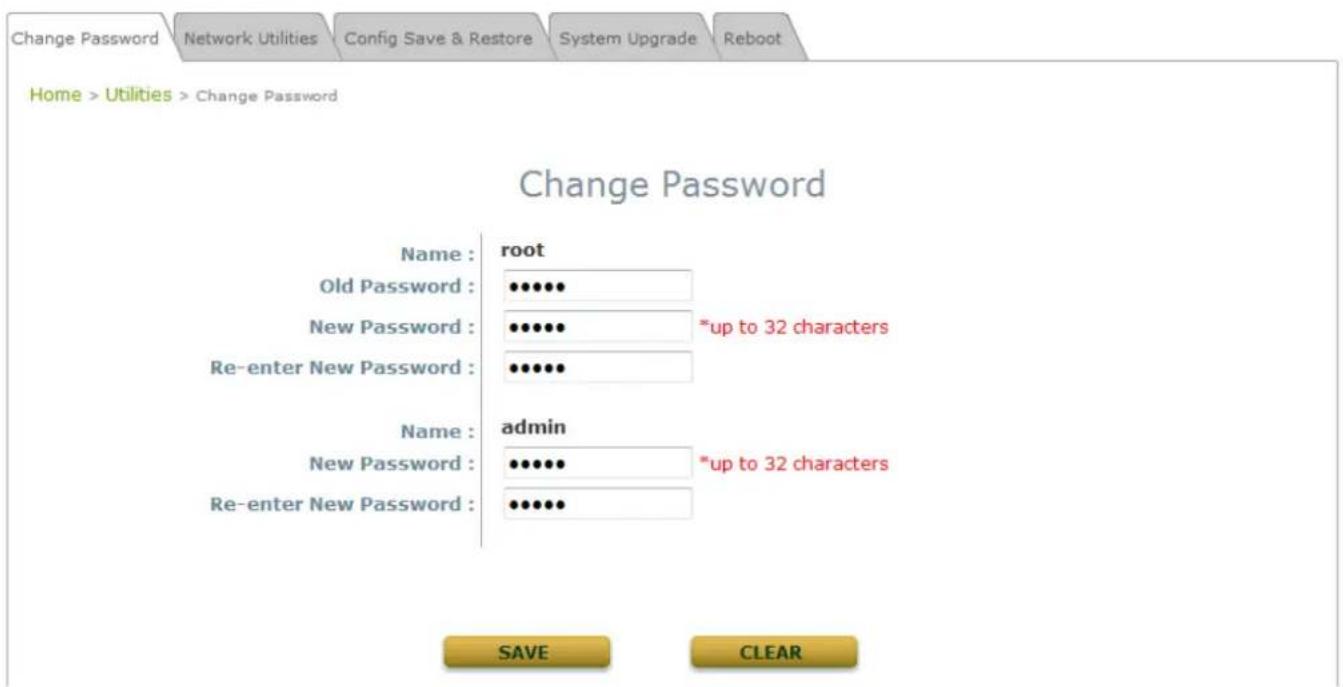
text_image
Change Password Network Utilities Config Save & Restore System Upgrade Reboot Home > Utilities > Change Password Change Password Name : root Old Password : •••••• New Password : •••••• *up to 32 characters Re-enter New Password : •••••• Name : admin New Password : •••••• *up to 32 characters Re-enter New Password : •••••• SAVE CLEAR"root" account: Enter the original password ("admin") and a new password, and then re-enter the new password in the Re-enter New Password field. Click SAVE to activate the new password.
“admin” account: Enter a new password, and then re-enter it in the Re-enter New Password field. The root administrator is acting as a superintendent here; thus, entering the old password is not required. Click SAVE to activate the new password.
5.4.2 Network Utilities
The administrator can check the WAN and LAN connectivity via this function. The current provided network utility is Ping and the target host FQDN-compliant name or IP address can be provided to test network connection.
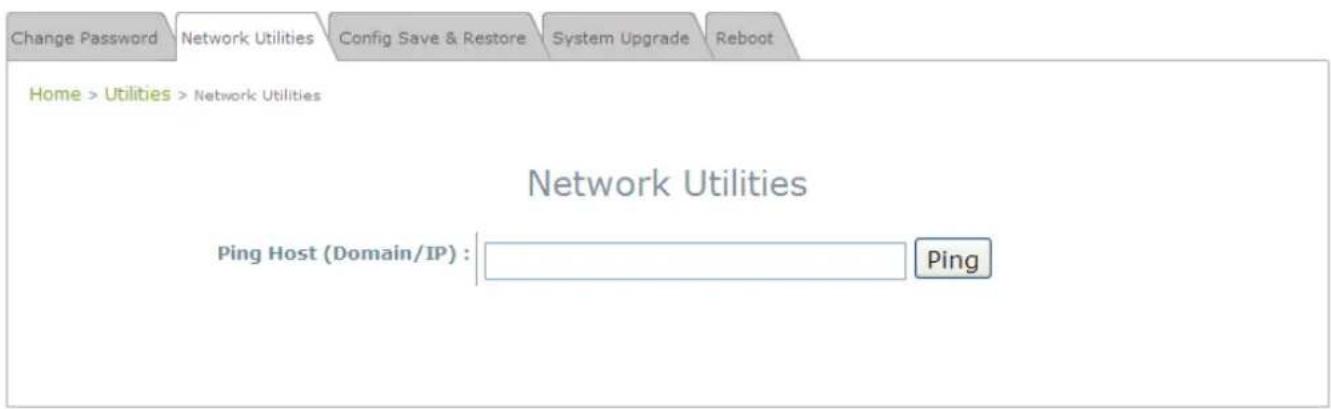
text_image
Change Password Network Utilities Config Save & Restore System Upgrade Reboot Home > Utilities > Network Utilities Network Utilities Ping Host (Domain/IP) : Ping- Ping Host (Domain/ IP): Enter the domain name or IP address of a target device for diagnosis purpose, for example, www.google.com , and click PING to proceed. The ping result will be shown in the Result field.
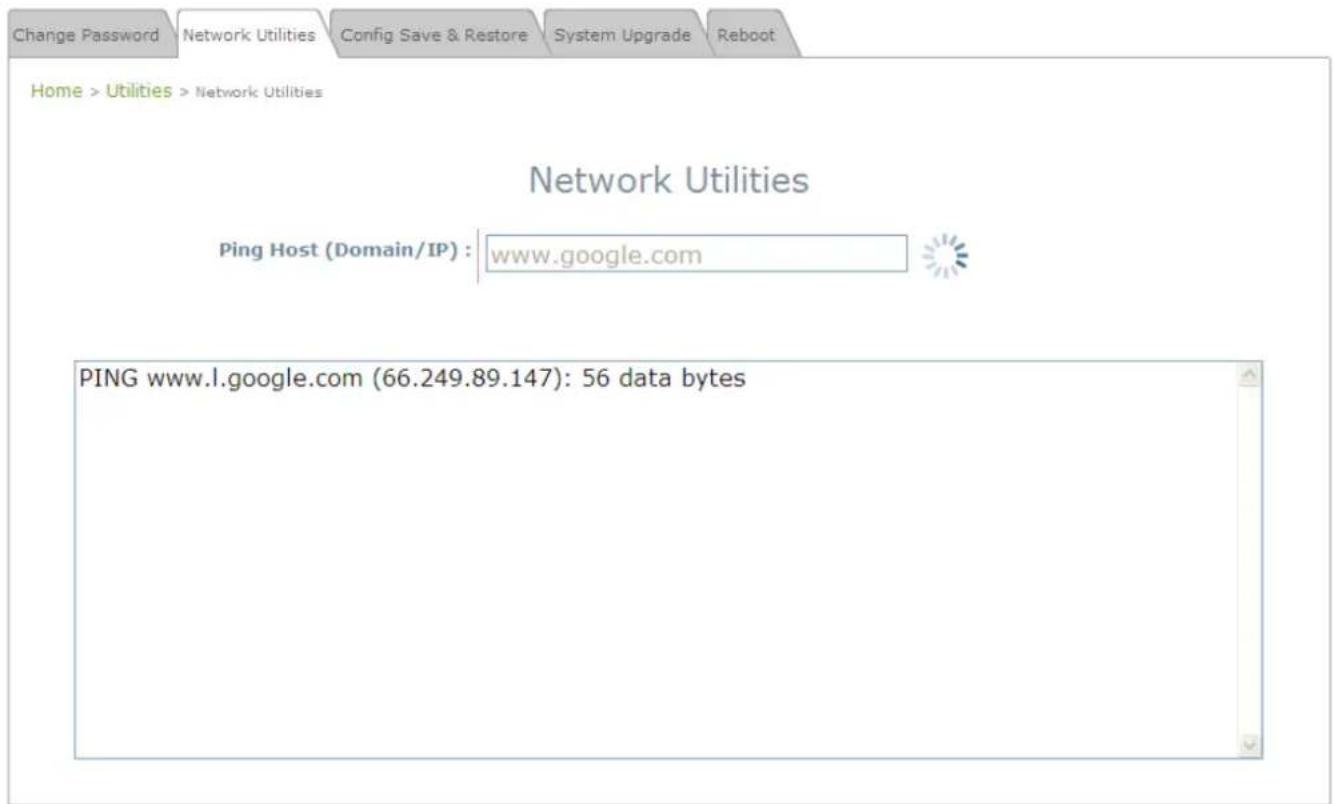
text_image
Change Password Network Utilities Config Save & Restore System Upgrade Reboot Home > Utilities > Network Utilities Network Utilities Ping Host (Domain/IP) : www.google.com PING www.l.google.com (66.249.89.147): 56 data bytes5.4.3 Configuration Save & Restore
This function is used to backup or restore the current settings. The system can be restored to the default setting by clicking on Reset. The setting of the device can be backup to a file. It can be used to duplicate setting to the other WAB-3003 device.
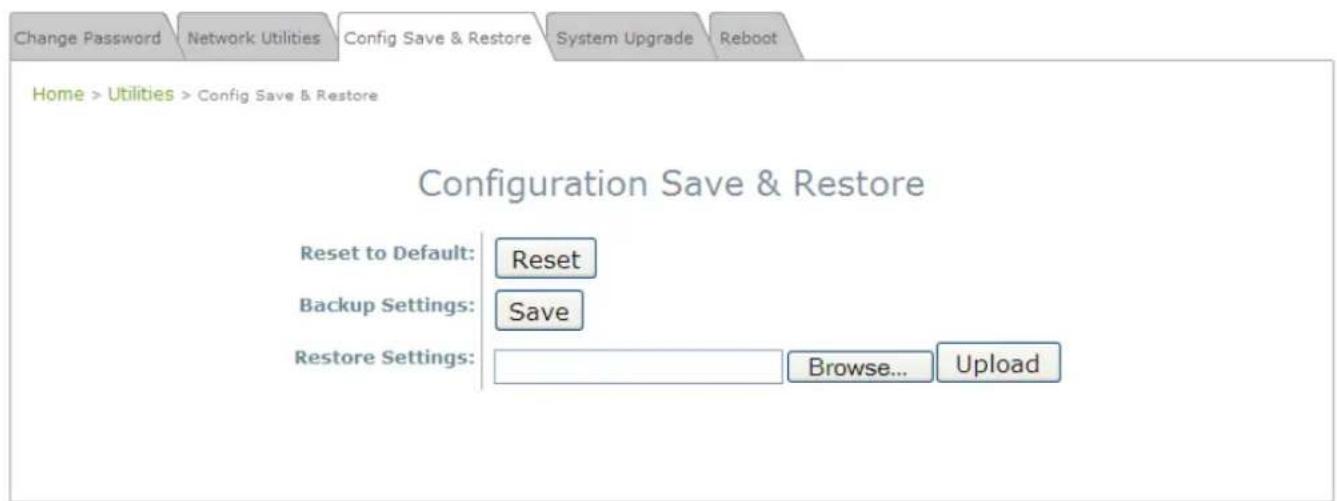
text_image
Change Password Network Utilities Config Save & Restore System Upgrade Reboot Home > Utilities > Config Save & Restore Configuration Save & Restore Reset to Default: Reset Backup Settings: Save Restore Settings: Browse... Upload- Reset to Default:
Click Reset to load the factory default settings of WAB-3003. A pop-up screen will appear to reconfirm the request to restart the system. Click OK to proceed, or click Cancel to cancel the restart request.
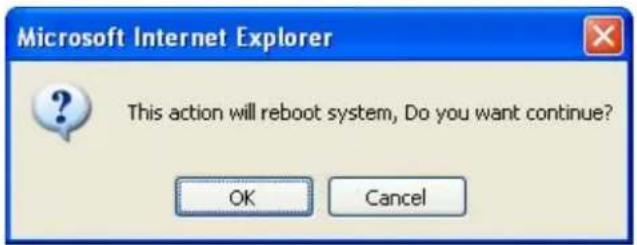
text_image
Microsoft Internet Explorer This action will reboot system, Do you want continue? OK CancelA warning message as displayed below will appear during the reboot period. The system power must be turned on before the completion of the reboot process.
The System Overview page will appear upon the completion of reboot.
- Backup Settings: Click Save to save the current system settings to a local disk such as the hard disk drive (HDD) of a local computer or a compact disc (CD).
- Restore Settings: Click Browse to search for a previously saved backup file, and then click Upload to restore the settings. The backup file will replace the active configuration file currently running on the system.
5.4.4 System Upgrade
To upgrade the system firmware, click Browse to search for the new firmware file, and then click APPLY to execute the upgrade process. The first step is to acquire the correct firmware file and supply it in the User Interface field. During firmware update, please don't turn off the power to prevent from damaging the device permanently.
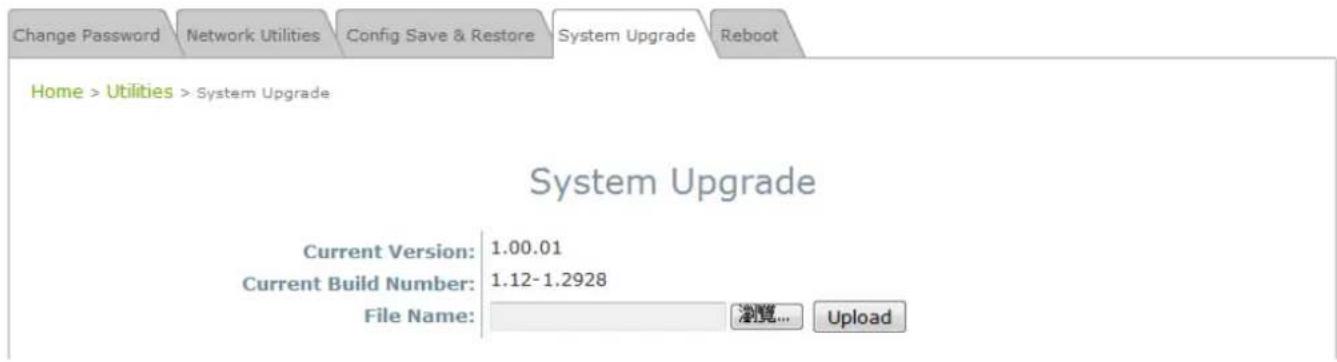
text_image
Change Password Network Utilities Config Save & Restore System Upgrade Reboot Home > Utilities > System Upgrade System Upgrade Current Version: 1.00.01 Current Build Number: 1.12-1.2928 File Name: 浏览... UploadNote:
- To prevent data loss during firmware upgrade, please back up the current settings before proceeding further.
- Please restart the system after the upgrade. Do not interrupt the system, i.e. power on/off, during the upgrade or restart process as this may damage the system.
5.4.5 Reboot
The administrator can reboot the device remotely. Click Restart to restart the system immediately.

text_image
levelone® WAB-3003 Wireless Outdoor CPE/AP/Repeater System Wireless Firewall Utilities Status Change Password Network Utilities Config Save & Restore System Upgrade Reboot Home > Utilities > Reboot Reboot the System Reboot may take several minutes to complete. The Admin Login Page will be shown after system boots up. RebootA pop-up screen will appear to confirm the request to restart the system. Click OK to proceed, or click Cancel to cancel the restart request.

text_image
Windows Internet Explorer Do you want to reboot the system? OK CancelA warning message as displayed below will appear during the reboot period. The system power must be turned on before the completion of the reboot process.
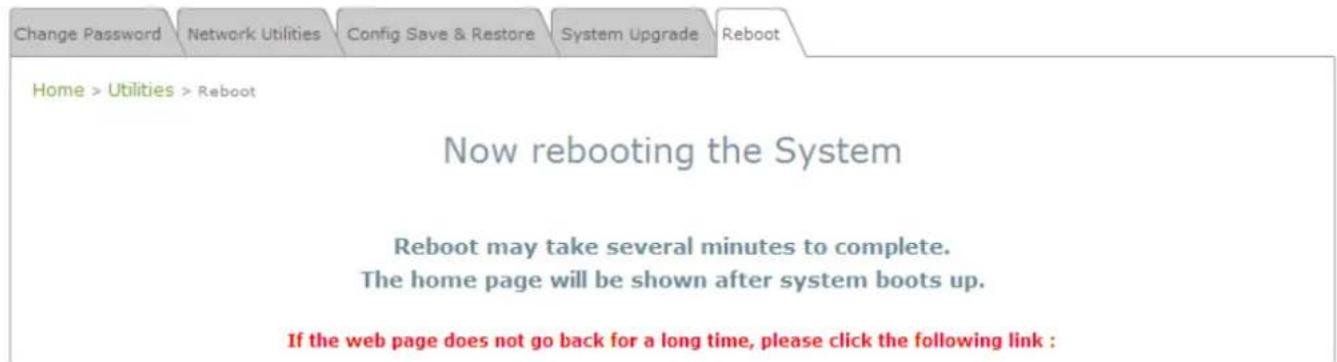
text_image
Change Password Network Utilities Config Save & Restore System Upgrade Reboot Home > Utilities > Reboot Now rebooting the System Reboot may take several minutes to complete. The home page will be shown after system boots up. If the web page does not go back for a long time, please click the following link :The System Overview page will appear upon the completion of reboot.
5.5 Status
This section displays the status of System Overview, Event Log, DHCP Lease and UPnP.
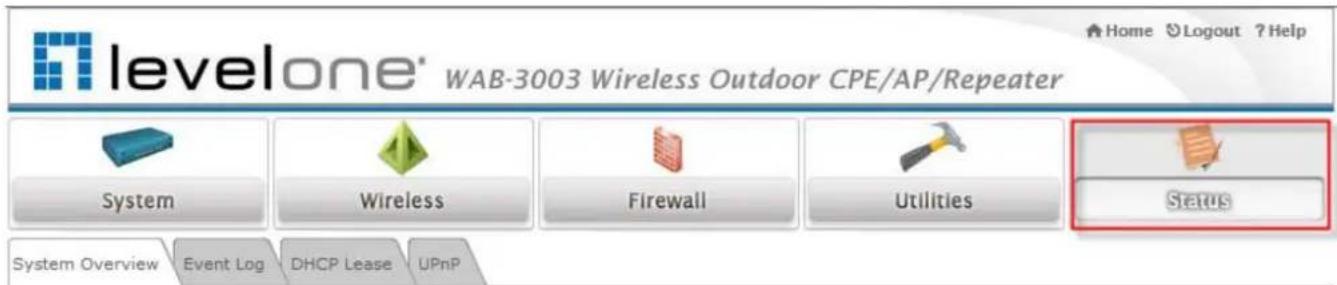
text_image
levelone® WAB-3003 Wireless Outdoor CPE/AP/Repeater System Wireless Firewall Utilities Status System Overview Event Log DHCP Lease UPnPHome > Status > System Overview
System Overview

System
System Name WAB-3003
Device Time 1999/12/31 17:28:04
System Up Time 0 days, 1:28:04
Operating Mode CPE

Radio Status
Status Connected
SSID WLAN14
MAC Address 00:00:00:00:00:00
Channel 6
Signal Strength 0
Security None

LAN Interface
MAC Address 00:1F:D4:00:20:F0
IP Address 192.168.0.1
Subnet Mask 255.255.255.0
DHCP Server Enabled

WAN Interface
Mode Static
MAC Address 00:1F:D4:00:20:F1
IP Address 192.168.10.1
Subnet Mask 255.255.255.0
Gateway 192.168.10.254
Bandwidth Down: Unlimited / UP: Unlimited
5.5.1 System Overview
The System Overview page provides an overview of the system status for the administrator.

text_image
levelone® WAB-3003 Wireless Outdoor CPE/AP/Repeater Home Logout ? Help System Wireless Firewall Utilities Status System Overview Event Log DHCP Lease UPnP Home > Status > System Overview System Overview System System Name WAB-3003 Firmware Version 1.00.01 Build Number 1.12-1.2928 Location Greenwich Site EN-E Device Time 1999/12/31 16:04:52 System Up Time 0 days, 0:04:52 Operating Mode CPE Radio Status Status Connected SSID WBR-6002 MAC Address 00:C0:02:FF:C7:8E Channel 11 Signal Strength 5 Security None LAN Interface MAC Address 00:1F:D4:00:20:F0 IP Address 192.168.0.1 Subnet Mask 255.255.255.0 DHCP Server Enabled WAN Interface Mode Static MAC Address 00:1F:D4:00:20:F1 IP Address 192.168.10.1 Subnet Mask 255.255.255.0 Gateway 192.168.10.254 Bandwidth Down: Unlimited / UP: UnlimitedThe description of the table is shown below:
| ITEM DESCRIPTION | ||
| System | System Name The name provided in System Information. | |
| Firmware Version | The present firmware version of the system. | |
| Build Number The Build Number of the firmware. | ||
| Location The location provided in System Information. | ||
| Site The firmware version for specific region. | ||
| Device Time The current time on the device. | ||
| System Up Time The system elapsing time since last reboot. | ||
| Operating Mode Either CPE or AP. | ||
| LAN Interface | MAC Address The MAC address of LAN Interface. | |
| IP Address The IP address of the LAN Interface. | ||
| Subnet Mask The Subnet Mask of the LAN Interface. | ||
| DHCP Server DHCP server status. | ||
| Radio Status | Status | The RF status. |
| SSID | The SSID of the associated AP. | |
| MAC Address The MAC address of the associated AP. | ||
| Channel | The operating channel. | |
| Signal Strength | The signal strength reading of the wireless connection. | |
| Security | The security type used for wireless connection. | |
| WAN Status | Mode | The method to obtain IP for the WAN interface. |
| MAC Address The MAC address of the WAN (RF) Interface. | ||
| IP Address The IP address of the WAN interface. | ||
| Subnet Mask The Subnet Mask of the WAN interface. | ||
| Gateway | The gateway IP address. | |
| Bandwidth | The bandwidth setting of the WAN interface. | |
5.5.2 Event Log
Event log provides the records of the system activities. All the system events are shown here.

text_image
levelone® WAB-3003 Wireless Outdoor CPE/AP/Repeater Home Logout ?Help System Wireless Firewall Utilities Status System Overview Event Log DHCP Lease UPnP Home > Status > Event Log Event Log Dec 31 16:00:49 syslogd started: BusyBox v1.2.1 SAVE LOG CLEARNote:
As the Event Log is stored in RAM, it will be refreshed after the system is restarted. The system also supports a Syslog reporting function of reporting the events to an external Syslog server.
- Date/ Time: The date and time of the record when the event happened.
- Hostname: Indicate which Host records this event. Note that all events in this page are local events and this field of all events is the same. However, in remote syslog service, this field will help the network administrator identify which event is from this system. For more information, please refer to Section 5.1.4 Management Services.
- Process name (with square brackets): Indicate which process with the specific event is associated.
• Description: Description of the event.
5.5.3 DHCP Leases
The table provides information about the leased LAN IP address with binding MAC address and expiration time.

text_image
System Overview Event Log DHCP Lease UPnP Home > Status > DHCP Leases DHCP Leases DHCP Leases No IP MAC Address Expires in 1 192.168.1.2 00:0d:60:cb:76:82 22hours,15minutes,20seconds• No: The item number of the LAN IP leased.
• IP: The IP address assigned by DHCP server to a specific LAN device.
• MAC Address: The MAC address of the LAN device.
- Expires in: The expiration time of the leased IP address.
5.5.4 UPnP Status
The table provides information about the UPnP overview such as Protocol, Internal Port, External Port, and IP Address.
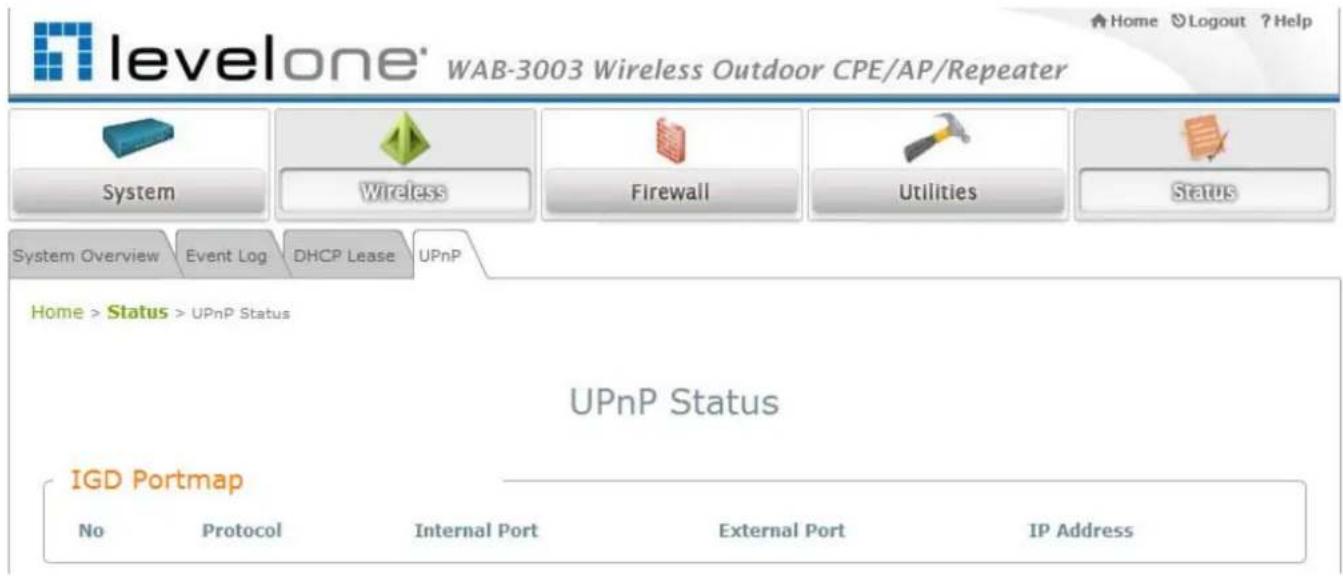
text_image
levelone' WAB-3003 Wireless Outdoor CPE/AP/Repeater System Wireless Firewall Utilities Status System Overview Event Log DHCP Lease UPnP Home > Status > UPnP Status UPnP Status IGD Portmap No Protocol Internal Port External Port IP Address- IGD Portmap:
No: The item number of an UPnP device.
Protocol: The Protocol used by the UPnP device.
Internal Port: The internal port number of the UPnP device.
External Port: The mapped external port number of the system.
IP Address: The IP address of the UPnP device.
5.6 Online Help
The Help button is at the upper right hand corner of the display screen.
Click Help for the Online Help window, and then click the hyperlink of the desired topic for further information.

text_image
levelone® WAB-3003 Wireless Outdoor CPE/AP/Repeater System Wireless Firewall Utilities StatusOnline Help (CPE Mode)
Organization of the Configuration Web:
| System | Wireless | Firewall | Utilities | Status |
| System Information | General | IP/Port Forwarding | Password | System Overview |
| Operating Mode | Advanced | DMZ | Network Utilities | Event Log |
| Network | Security | Config Save & Restore | DHCP Lease | |
| Management Services | Site Survey | System Upgrade | UPnP | |
| Reboot | ||||
Appendix A.
System Management Account Privileges
The system provides two system management accounts for CPE mode, root and admin. The root account is empowered with full privileges while the admin account is with partial.
The management privileges of the admin account are shown in the following table.
| Main Menu | Sub Menu Group Admin | in Privilege | |
| System | System Information | System Information Read | |
| Time | Read | ||
| Operating Mode Operating | g Mode Read | ||
| Network | WAN Configuration Read | ||
| Dynamic DNS Read & Write | |||
| LAN Configuration Read & Write | |||
| Management Services | SNMP Configuration Read | ||
| Syslog Configuration Read | |||
| UPnP Configuration | Read & Write | ||
| Auto Reboot | Read | ||
| Wireless | General | General Settings | Read |
| Advanced | Advanced Wireless Settings | Read | |
| Security | Security Settings | Read | |
| Site Survey | Read | ||
| Firewall | IP/Port Forwarding | Read & Write | |
| DMZ | Read & Write | ||
| Utilities | Password | Admin Password | Read & Write |
| Network Utilities | Read & Write | ||
| Config Save & Restore | Reset to Default | Read | |
| Backup Settings | Read & Write | ||
| Restore Settings Read | |||
| System Upgrade | Read | ||
| Reboot | Read & Write |