WAP-31000 - Access Point LEVELONE - Free user manual and instructions
Find the device manual for free WAP-31000 LEVELONE in PDF.


User questions about WAP-31000 LEVELONE
0 question about this device. Answer the ones you know or ask your own.
Ask a new question about this device
Download the instructions for your Access Point in PDF format for free! Find your manual WAP-31000 - LEVELONE and take your electronic device back in hand. On this page are published all the documents necessary for the use of your device. WAP-31000 by LEVELONE.
USER MANUAL WAP-31000 LEVELONE
text_image
level® oneLevelOne
WAP-3000 / WAP-3100
11g Wireless AP
Quick Installation Guide
English
Português
Deutsch
Svenska
Français
Slovenščina
Español
繁體中文
Dutch 한국어
Dansk Русский
Italiano

Ελληνικά
English
Installation
-
Select a suitable location for your WAP-3000 / WAP-3100. To maximize reliability and performance, follow these guidelines:
-
Use an elevated location. (i.e. - On the top of a cubicle, or mounted on the wall.)
-
Place the WAP-3000 / WAP-3100 near the center of your wireless coverage area.
-
You need to assign your PC a Static IP address so the WAP-3000 / WAP-3100 can communicate with your PC during configuration.
-
Select "Control Panel" > "Network Connections".
- Right click the “Local Area Connection” and choose “Properties”.
- Select the TCP/IP protocol for your network card.
- Click on the Properties button. You should then see the following screen.

text_image
Local Area Connection Properties General Authentication Advanced Connect using: Intel(R) PRO/1000 MT Mobile Conn Configure... This connection uses the following items: DoS Packet Scheduler IP Internet Protocol (TCP/IP) Install Uninstall Properties Description Transmission Control Protocol/Internet Protocol. The default wide area network protocol that provides communication across diverse interconnected networks. Show icon in notification area when connected Notify me when this connection has limited or no connectivity Internet Protocol (TCP/IP) Properties General You can get IP settings assigned automatically if your network supports this capability. Otherwise, you need to ask your network administrator for the appropriate IP settings. Obtain an IP address automatically Use the following IP address: IP address: 192, 168, 0, 339 Subnet mask: 255, 255, 255, 0 Default gateways: Obtain DNS server address automatically Use the following DNS server addresses: Preferred DNS server: . . . Alternate DNS server: | Advanced... OK Cancel- Click on "Use the following IP address" and enter the following IP address and subnet mask.
IP address: 192.168.0.229
Subnet mask: 255.255.255.0
- Click "OK".
- Now, use a standard LAN cable to connect the "LAN" port on the WAP-3000 / WAP-3100.
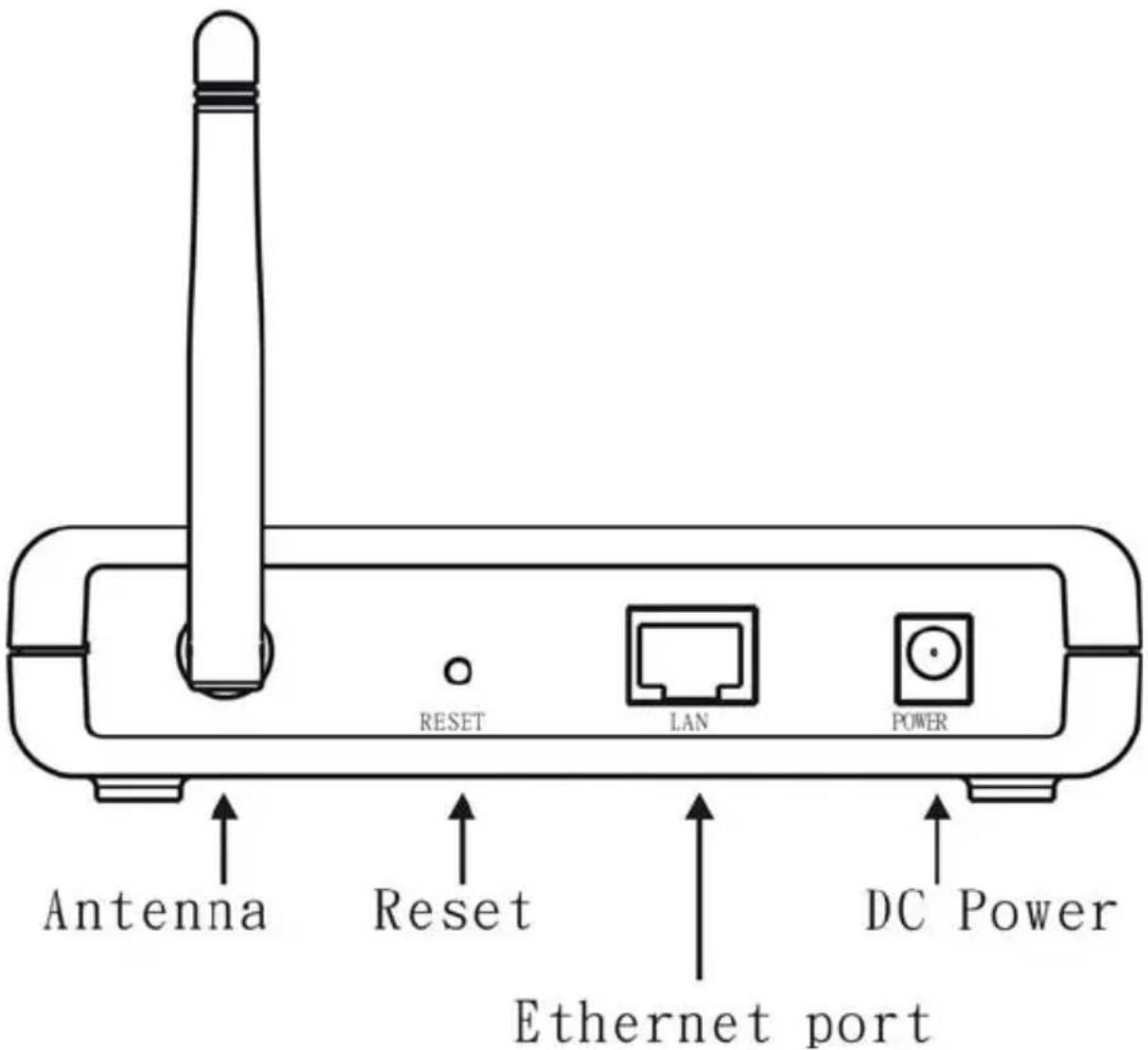
text_image
RESET LAN POWER Antenna Reset Ethernet port DC Power- Connect the supplied power adapter to the WAP-3000 / WAP-3100 and power up.
(WAP-3100 11g Wireless PoE AP also complaints with IEEE 802.3af PoE PD standard)
- Start your Web browser. In the Address box, enter the WAP-3000 / WAP-3100's default IP Address:
http://192.168.0.254
- When prompted, use the following username and password.
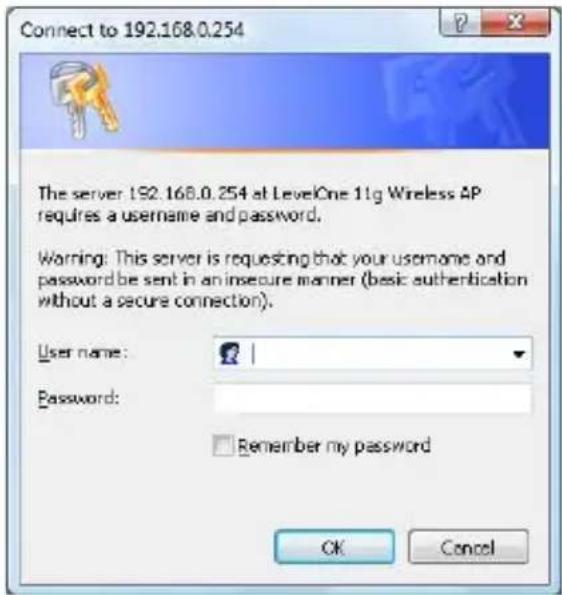
text_image
Connect to 192.168.0.254 The server 192.168.0.254 at LevelOne 11g Wireless AP requires a username and password. Warning: This server is requesting that your username and password be sent in an insecure manner (basic authentication without a secure connection). User name: Password: Remember my password OK CancelUser name: admin
Password: password
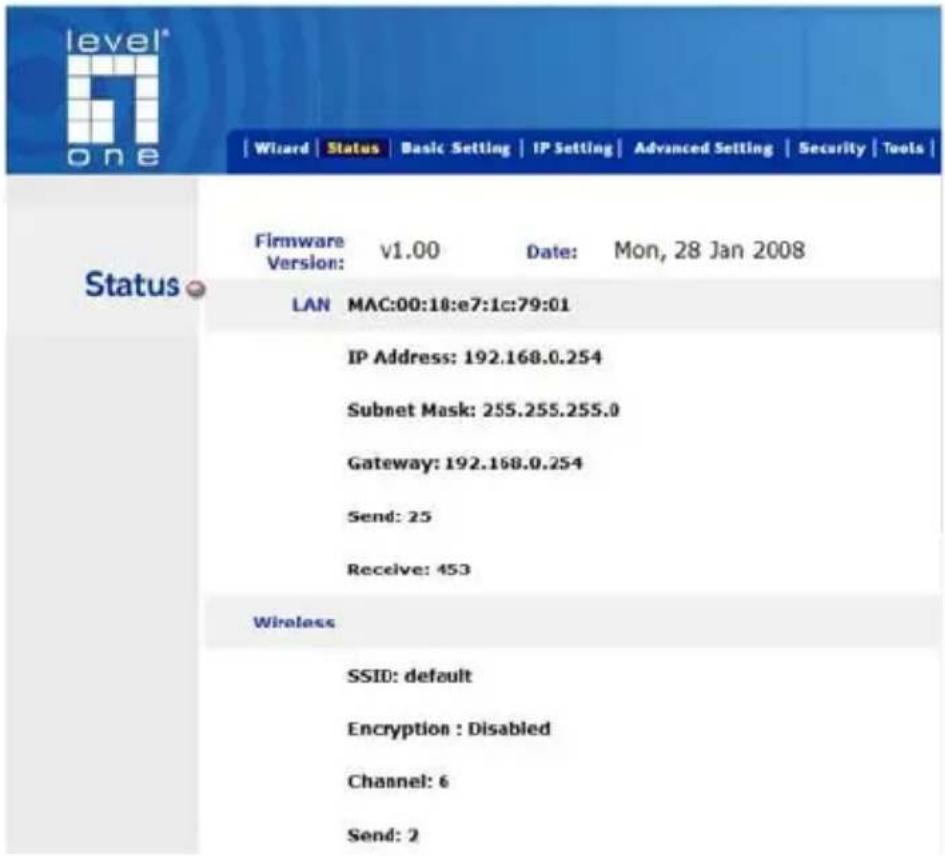
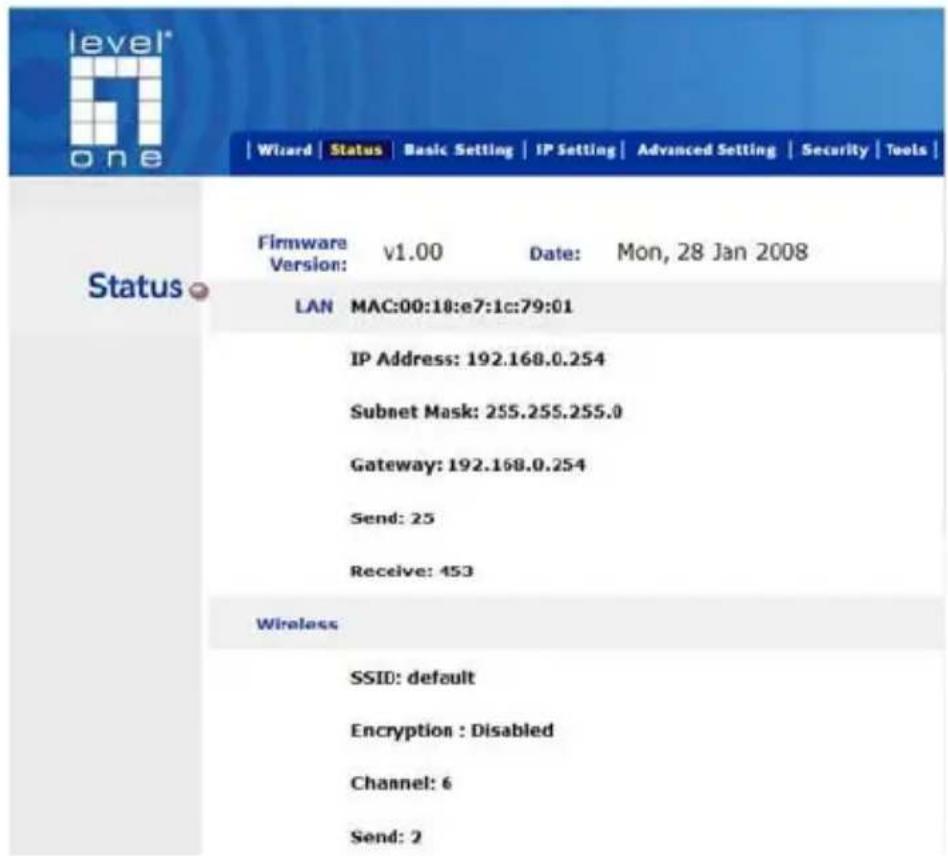
text_image
level* one | Wizard | Status | Basic Setting | IP Setting | Advanced Setting | Security | Tools | Status Firmware v1.00 Date: Mon, 28 Jan 2008 Version: LAN MAC:00:10:e7:1c:79:01 IP Address: 192.168.0.254 Subnet Mask: 255.255.255.0 Gateway: 192.168.0.254 Send: 25 Receive: 453 Wireless SSID: default Encryption : Disabled Channel: 6 Send: 2
If you want to change the default setting, please see the user manual located on the CD for details.
Default Settings
| IP Address 192.168.0.254 | |
| User Name admin | |
| Password password | |
| Wireless Mode Enable | |
| SSID default | |
| Security None | |
Technical Support
Thank you for selecting LevelOne products. LeveOne's website contains the latest user documentation and software updates for LevelOne products.
Please contact LevelOne Technical Support through our website.
World Wide Web
http://www.level1.com
Deutsch
Installation
text_image
Local Area Connection Properties General Authentication Advanced Connect using: Intel(R) PRO/1000 MT Mobile Conne Configure This connection uses the following items: QoS Packet Scheduler Internet Protocol (TCP/IP) Install Uninstall Properties Description Transmission Control Protocol/Internet Protocol. The default wide area network protocol that provides communication across diverse interconnected networks. Show icon in notification area when connected Notify me when this connection has limited or no connectivity Internet Protocol (TCP/IP) Properties General You can get IP settings assigned automatically if your network supports this capability. Otherwise, you need to ask your network administrator for the appropriate IP settings. Obtain an IP address automatically Use the following IP address: IP address: 192, 160, 0, 229 Subnet mask: 255, 255, 255, 0 Default gateway: . Obtain DNS server address automatically Use the following DNS server addresses: Preferred DNS server Alternate DNS server Advanced OK Canceltext_image
Connect to 192.168.0.254 The server 192.168.0.254 at LevelOne 11g Wireless AP requires a username and password. Warning: This server is requesting that your username and password be sent in an insecure manner (basic authentication without a secure connection). User name: Password: Remember my password OK CancelBenutzername:
admin
Kennwort: password

text_image
level* one | Wizard | Status | Basic Setting | IP Setting | Advanced Setting | Security | Tools | Status Firmware v1.00 Date: Mon, 28 Jan 2008 Version: LAN MAC:00:10:e7:1c:79:01 IP Address: 192.168.0.254 Subnet Mask: 255.255.255.0 Gateway: 192.168.0.254 Send: 25 Receive: 453 Wireless SSID: default Encryption : Disabled Channel: 6 Send: 2
text_image
Local Area Connection Properties General Authentication Advanced Connect using Intel(R) PRO/1000 MT Mobile Come Configure... This connection uses the following items: QuS Packet Schedule Internet Protocol (TCP/IP) Initial Un installed Properties Description Transmission Control Protocol/InternetProtocol. The default wide area network protocol that provides communication across diverse interconnected networks. Show icon in notification area when connected Notify me when this connection has limited or no connectivity Internet Protocol (TCP/IP) Properties General You can get IP settings assigned automatically if you network supports this capability. Otherwise, you need to ask your network administrator for the appropriate IP settings. Obtain an IP address automatically Use the following IP address: IP address: 132.168.0.229 Subnet mask: 25.255.255.0 Default gateway: . . . Obtain DNS server address automatically Use the following DNS server addresses: Preferred DNS server: . . . Alternate DNS server: 1 . . . Advanced... OK Canceltext_image
Connect to 192.168.0.254 The server 192.168.0.254 at LevelOne 11g Wireless AP requires a username and password. Warning: This server is requesting that your username and password be sent in an insecure manner (basic authentication without a secure connection). User name: Password: Remember my password OK Canceltext_image
level* one | Wizard | Status | Basic Setting | IP Setting | Advanced Setting | Security | Tools | Status Firmware v1.00 Date: Mon, 28 Jan 2008 Version: LAN MAC:00:10:e7:1c:79:01 IP Address: 192.168.0.254 Subnet Mask: 255.255.255.0 Gateway: 192.168.0.254 Send: 25 Receive: 453 Wireless SSID: default Encryption : Disabled Channel: 6 Send: 2
text_image
Local Area Connection Properties General Authentication Advanced Connect using: Intel(R) PRO/1000 MT Mobile Conn Configure... This connection uses the following items: QoS Packet Schedules * Internet Protocol (TCP/IP) Description Transmission Control Protocol/Internet Protocol. The default wide area network protocol that provides communication across diverse interconnected networks. Show icon in notification area when connected Notify me when this connection has limited or no connectivity Internet Protocol (TCP/IP) Properties General You can set IP settings assigned automatically if your network supports this capability. Otherwise, you need to ask your network administrator for the appropriate IP settings: Obtain an IP address automatically Use the following IP address: IP address: 192 . 168 . 0 . 229 Subnet mask: 255 . 255 . 255 . 0 Default gateway: . Obtain DNS server address automatically Use the following DNS server addresses: Preferred DNS server: Alternate DNS server: | Advanced... OK Canceltext_image
Connect to 192.168.0.254 The server 192.168.0.254 at LevelOne 11g Wireless AP requires a username and password. Warning: This server is requesting that your username and password be sent in an insecure manner (basic authentication without a secure connection). User name: Password: Remember my password OK Canceltext_image
level* one | Wizard | Status | Basic Setting | IP Setting | Advanced Setting | Security | Tools | Status Firmware v1.00 Date: Mon, 28 Jan 2008 Version: LAN MAC:00:18:e7:1c:79:01 IP Address: 192.168.0.254 Subnet Mask: 255.255.255.0 Gateway: 192.168.0.254 Send: 25 Receive: 453 Wireless SSID: default Encryption : Disabled Channel: 6 Send: 2
text_image
Local Area Connection Properties General Authentication Advanced Connect using: Intel(R) PRO/1000 MT Mobile Conn Configure... This connection uses the following items: DoS Packet Scheduler IP Internet Protocol (TCP/IP) Install Uninstall Properties Description Transmission Control Protocol/Internet Protocol. The default wide area network protocol that provides communication across diverse interconnected networks. Show icon in notification area when connected Notify me when this connection has limited or no connectivity Internet Protocol (TCP/IP) Properties General You can get IP settings assigned automatically if your network supports this capability. Otherwise, you need to ask your network administrator for the appropriate IP settings. Obtain an IP address automatically Use the following IP address: IP address: 192, 168, 0, 339 Subnet mask: 255, 255, 255, 0 Default gateways: Obtain DNS server address automatically Use the following DNS server addresses: Preferred DNS server: . . . Alternate DNS server: | Advanced... OK Canceltext_image
Connect to 192.168.0.254 The server 192.168.0.254 at LevelOne 11g Wireless AP requires a username and password. Warning: This server is requesting that your username and password be sent in an insecure manner (basic authentication without a secure connection). User name: Password: Remember my password OK Canceltext_image
level* one | Wizard | Status | Basic Setting | IP Setting | Advanced Setting | Security | Tools | Status Firmware v1.00 Date: Mon, 28 Jan 2008 Version: LAN MAC:00:10:e7:1c:79:01 IP Address: 192.168.0.254 Subnet Mask: 255.255.255.0 Gateway: 192.168.0.254 Send: 25 Receive: 453 Wireless SSID: default Encryption : Disabled Channel: 6 Send: 2
text_image
Local Area Connection Properties General Authentication Advanced Connect using: Intel(R) PRO/1000 MT Mobile Conn Configure... This connection uses the following items: DoS Packet Scheduler IP Internet Protocol (TCP/IP) Install Uninstall Properties Description Transmission Control Protocol/Internet Protocol. The default wide area network protocol that provides communication across diverse interconnected networks. Show icon in notification area when connected Notify me when this connection has limited or no connectivity Internet Protocol (TCP/IP) Properties General You can get IP settings assigned automatically if your network supports this capability. Otherwise, you need to ask your network administrator for the appropriate IP settings. Obtain an IP address automatically Use the following IP address: IP address: 192, 168, 0, 339 Subnet mask: 255, 255, 255, 0 Default gateways: Obtain DNS server address automatically Use the following DNS server addresses: Preferred DNS server: . . . Alternate DNS server: | Advanced... OK Cancel- Klik på “Use the following IP address” (Brug den følgende IP adresse) og indtast nedenstående IP adresse og undernetmaske:
IP adresse: 192.168.0.229
Undernetmaske: 255.255.255.0
- Klik på "OK".
text_image
Connect to 192.168.0.254 The server 192.168.0.254 at LevelOne 11g Wireless AP requires a username and password. Warning: This server is requesting that your username and password be sent in an insecure manner (basic authentication without a secure connection). User name: Password: Remember my password OK CancelBrugernavn: admin
Adgangskode: password

text_image
level* one | Wizard | Status | Basic Setting | IP Setting | Advanced Setting | Security | Tools | Status Firmware v1.00 Date: Mon, 28 Jan 2008 Version: LAN MAC:00:18:e7:1c:79:01 IP Address: 192.160.0.254 Subnet Mask: 255.255.255.0 Gateway: 192.168.0.254 Send: 25 Receive: 453 Wireless SSID: default Encryption : Disabled Channel: 6 Send: 2
text_image
Local Area Connection Properties General Authentication Advanced Connect using: Intel(R) PRO/1000 MT Mobile Conn Configure... This connection uses the following items: QoS Packet Schedules * Internet Protocol (TCP/IP) Description Transmission Control Protocol/Internet Protocol. The default wide area network protocol that provides communication across diverse interconnected networks. Show icon in notification area when connected Notify me when this connection has limited or no connectivity Internet Protocol (TCP/IP) Properties General You can set IP settings assigned automatically if your network supports this capability. Otherwise, you need to ask your network administrator for the appropriate IP settings: Obtain an IP address automatically Use the following IP address: IP address: 192 . 168 . 0 . 229 Subnet mask: 255 . 255 . 255 . 0 Default gateway: . Obtain DNS server address automatically Use the following DNS server addresses: Preferred DNS server: Alternate DNS server: | Advanced... OK Canceltext_image
Connect to 192.168.0.254 The server 192.168.0.254 at LevelOne 11g Wireless AP requires a username and password. Warning: This server is requesting that your username and password be sent in an insecure manner (basic authentication without a secure connection). User name: Password: Remember my password OK CancelNome utente: admin
Password: password

text_image
level* one | Wizard | Status | Basic Setting | IP Setting | Advanced Setting | Security | Tools | Status Firmware v1.00 Date: Mon, 28 Jan 2008 Version: LAN MAC:00:10:e7:1c:79:01 IP Address: 192.168.0.254 Subnet Mask: 255.255.255.0 Gateway: 192.168.0.254 Send: 25 Receive: 453 Wireless SSID: default Encryption : Disabled Channel: 6 Send: 2
text_image
Local Area Connection Properties General Authentication Advanced Connect using: Intel(R) PRO/1000 MT Mobile Conms Configure... This connection uses the following items: QoS Packet Scheduler Internet Protocol (TCP/IP) Install Uninstall Properties Description Transmission Control Protocol/Internet Protocol. The default wide area network protocol that provides communication across diverse interconnected networks. Show icon in notification area when connected Notify me when this connection has limited or no connectivity Internet Protocol (TCP/IP) Properties General You can get IP settings assigned automatically if your network supports this capability. Otherwise, you need to ask your network administrator for the appropriate IP settings. Obtain an IP address automatically Use the following IP address: IP address: 192 . 168 . 0 . 239 Subnet mask: 255 . 255 . 255 . 0 Default gateways : . Obtain DNS server address automatically Use the following DNS server addresses: Preferred DNS server: . Alternate DNS server: Advanced... OK Canceltext_image
Connect to 192.168.0.254 The server 192.168.0.254 at LevelOne 11g Wireless AP requires a username and password. Warning: This server is requesting that your username and password be sent in an insecure manner (basic authentication without a secure connection). User name: Password: Remember my password OK CancelΌνομα χρήστη:
admin
Κωδικός πρόσβασης:
password

text_image
level* one | Wizard | Status | Basic Setting | IP Setting | Advanced Setting | Security | Tools | Status Firmware v1.00 Date: Mon, 28 Jan 2008 Version: LAN MAC:00:18:e7:1c:79:01 IP Address: 192.168.0.254 Subnet Mask: 255.255.255.0 Gateway: 192.168.0.254 Send: 25 Receive: 453 Wireless SSID: default Encryption : Disabled Channel: 6 Send: 2
text_image
Local Area Connection Properties General Authentication Advanced Connect using: Intel(R) PRO/1000 MT Mobile Conne Configure This connection uses the following items: QoS Packet Scheduler Internet Protocol (TCP/IP) Install Uninstall Properties Description Transmission Control Protocol/Internet Protocol. The default wide area network protocol that provides communication across diverse interconnected networks. Show icon in notification area when connected Notify me when this connection has limited or no connectivity Internet Protocol (TCP/IP) Properties General You can get IP settings assigned automatically if your network supports this capability. Otherwise, you need to ask your network administrator for the appropriate IP settings. Obtain an IP address automatically Use the following IP address: IP address: 192, 160, 0, 229 Subnet mask: 255, 255, 255, 0 Default gateway: . Obtain DNS server address automatically Use the following DNS server addresses: Preferred DNS server Alternate DNS server Advanced OK Canceltext_image
Connect to 192.168.0.254 The server 192.168.0.254 at LevelOne 11g Wireless AP requires a username and password. Warning: This server is requesting that your username and password be sent in an insecure manner (basic authentication without a secure connection). User name: Password: Remember my password OK Canceltext_image
level* one | Wizard | Status | Basic Setting | IP Setting | Advanced Setting | Security | Tools | Status Firmware v1.00 Date: Mon, 28 Jan 2008 Version: LAN MAC:00:10:e7:1c:79:01 IP Address: 192.168.0.254 Subnet Mask: 255.255.255.0 Gateway: 192.168.0.254 Send: 25 Receive: 453 Wireless SSID: default Encryption : Disabled Channel: 6 Send: 2
text_image
Local Area Connection Properties General Authentication Advanced Connect using: Intel(R) PRO/1000 MT Mobile Conms Configure... This connection uses the following items: DoS Packet Scheduler Internet Protocol (TCP/IP) Install Uninstall Properties Description Transmission Control Protocol/Internet Protocol. The default wide area network protocol that provides communication across diverse interconnected networks. Show icon in notification area when connected Notify me when this connection has limited or no connectivity Internet Protocol (TCP/IP) Properties General You can get IP settings assigned automatically if your network supports this capability. Otherwise, you need to ask your network administrator for the appropriate IP settings. Obtain an IP address automatically Use the following IP address: IP address: 192, 168, 0, 239 Subnet mask: 255, 255, 255, 0 Default gateways: Obtain DNS server address automatically Use the following DNS server addresses: Preferred DNS server: . . . Alternate DNS server: I . . . Advanced... OK Canceltext_image
Connect to 192.168.0.254 The server 192.168.0.254 at LevelOne 11g Wireless AP requires a username and password. Warning: This server is requesting that your username and password be sent in an insecure manner (basic authentication without a secure connection). User name: Password: Remember my password OK CancelAnvändarnamn:
admin
Lösenord: password

text_image
level* one | Wizard | Status | Basic Setting | IP Setting | Advanced Setting | Security | Tools | Status Firmware v1.00 Date: Mon, 28 Jan 2008 Version: LAN MAC:00:18:e7:1c:79:01 IP Address: 192.168.0.254 Subnet Mask: 255.255.255.0 Gateway: 192.168.0.254 Send: 25 Receive: 453 Wireless SSID: default Encryption : Disabled Channel: 6 Send: 2
text_image
Local Area Connections Properties General Authentication Advanced Connect using: Intel(R) PRO/1000 MT Mobile Conne This connection uses the following items: QoS Packet Schedules Internet Protocol (TCP/IP) Description Transmission Control Protocol/Internet Protocol. The default wide area network protocol that provides communication across diverse interconnected networks. Show icon in notification area when connected Notify me when this connection has limited or no connectivity Internet Protocol (TCP/IP) Properties General You can get IP settings assigned automatically if your network supports this capability. Otherwise, you need to ask your network administrator for the appropriate IP settings. Obtain an IP address automatically Use the following IP address: IP address: 192 168 0 229 Subnet mask: 255 255 255 0 Default gateway: Obtain DNS server address automatically Use the following DNS server addresses: Preferred DNS server: Alternate DNS server: Advanced... OK Cancel- Kliknite na “Use the following IP address” (Uporabi naslednji IP naslov) in vnesite naslednji IP naslov in masko podmrežja.
IP naslov: 192.168.0.229
Maska podmrežja: 255.255.255.0
- Kliknite "OK" (V redu).
- Sedaj uporabite standardni kabel LAN in povežite vrata "LAN" v WAP-3000 / WAP-3100.

text_image
RESET LAN POWER Antenna Reset Ethernet port DC Power- Povežite priloženi napajalni adapter v WAP-3000 / WAP-3100 in ga vklopite.
- Zaženite internetni brskalnik. V naslovno vrstico vnesite privzeti IP naslov WAP-3000 / WAP-3100:
http://192.168.0.254
text_image
Connect to 192.168.0.254 The server: 192.168.0.254 at LevelOne 11g Wireless AP requires a username and password. Warning: This server is requesting that your username and password be sent in an insecure manner (basic authentication without a secure connection). User name: Password: Remember my password OK Canceltext_image
level* one | Wizard | Status | Basic Setting | IP Setting | Advanced Setting | Security | Tools | Status Firmware v1.00 Date: Mon, 28 Jan 2008 Version: LAN MAC:00:10:e7:1c:79:01 IP Address: 192.168.0.254 Subnet Mask: 255.255.255.0 Gateway: 192.168.0.254 Send: 25 Receive: 453 Wireless SSID: default Encryption : Disabled Channel: 6 Send: 2
text_image
Local Area Connection Properties General Authentication Advanced Connect using: Intel(R) PRO/1000 MT Mobile Conn Configure... This connection uses the following items: DoS Packet Scheduler IP Internet Protocol (TCP/IP) Install Uninstall Properties Description Transmission Control Protocol/Internet Protocol. The default wide area network protocol that provides communication across diverse interconnected networks. Show icon in notification area when connected Notify me when this connection has limited or no connectivity Internet Protocol (TCP/IP) Properties General You can get IP settings assigned automatically if your network supports this capability. Otherwise, you need to ask your network administrator for the appropriate IP settings. Obtain an IP address automatically Use the following IP address: IP address: 192, 168, 0, 339 Subnet mask: 255, 255, 255, 0 Default gateways: Obtain DNS server address automatically Use the following DNS server addresses: Preferred DNS server: . . . Alternate DNS server: | Advanced... OK Canceltext_image
Connect to 192.168.0.254 The server 192.168.0.254 at LevelOne 11g Wireless AP requires a username and password. Warning: This server is requesting that your username and password be sent in an insecure manner (basic authentication without a secure connection). User name: Password: Remember my password OK CancelUser name: admin
Password: password

text_image
level* one | Wizard | Status | Basic Setting | IP Setting | Advanced Setting | Security | Tools | Status Firmware v1.00 Date: Mon, 28 Jan 2008 Version: LAN MAC:00:18:e7:1c:79:01 IP Address: 192.168.0.254 Subnet Mask: 255.255.255.0 Gateway: 192.168.0.254 Send: 25 Receive: 453 Wireless SSID: default Encryption : Disabled Channel: 6 Send: 2
text_image
Local Area Connection Properties General Authentication Advanced Connect using Intel(R) PRO/1000 MT Mobile Conne Configure... This connection uses the following items: DoS Packet Scheduler Internet Protocol(TCP/IP) Install... Uninstall Properties Description Transmission Control Protocol/Internet Protocol The default wide area network protocol that provides communication across diverse interconnected networks. Show icon in notification area when connected Notify me when this connection has limited or no connectivity Internet Protocol (TCP/IP) Properties General You can get IP settings assigned automatically if your network supports this capability. Otherwise, you need to ask your network administrator for the appropriate IP settings. Obtain an IP address automatically Use the following IP address: IP address: 192 . 168 . 0 . 229 Subnet mask: 255 . 255 . 255 . 0 Default gateway: . Obtain DNS server address automatically Use the following DNS server addresses: Preferred DNS server: . Alternate DNS server: | Advanced... OK Cancel OK Canceltext_image
Connect to 192.168.0.254 The server 192.168.0.254 at LevelOne 11g Wireless AP requires a username and password. Warning: This server is requesting that your username and password be sent in an insecure manner (basic authentication without a secure connection). User name: Password: Remember my password OK Cancel사용자 이름: admin
암호: password

text_image
level* one | Wizard | Status | Basic Setting | IP Setting | Advanced Setting | Security | Tools | Status Firmware v1.00 Date: Mon, 28 Jan 2008 Version: LAN MAC:00:10:e7:1c:79:01 IP Address: 192.168.0.254 Subnet Mask: 255.255.255.0 Gateway: 192.168.0.254 Send: 25 Receive: 453 Wireless SSID: default Encryption : Disabled Channel: 6 Send: 2
text_image
Local Area Connection Properties General Authentication Advanced Connect using: Intel(R) PRO/1000 MT Mobile Conne Configure This connection uses the following items: QoS Packet Scheduler Internet Protocol (TCP/IP) Install Uninstall Properties Description Transmission Control Protocol/Internet Protocol. The default wide area network protocol that provides communication across diverse interconnected networks. Show icon in notification area when connected Notify me when this connection has limited or no connectivity Internet Protocol (TCP/IP) Properties General You can get IP settings assigned automatically if your network supports this capability. Otherwise, you need to ask your network administrator for the appropriate IP settings. Obtain an IP address automatically Use the following IP address: IP address: 192, 160, 0, 229 Subnet mask: 255, 255, 255, 0 Default gateway: . Obtain DNS server address automatically Use the following DNS server addresses: Preferred DNS server Alternate DNS server Advanced OK Canceltext_image
Connect to 192.168.0.254 The server 192.168.0.254 at LevelOne 11g Wireless AP requires a username and password. Warning: This server is requesting that your username and password be sent in an insecure manner (basic authentication without a secure connection). User name: Password: Remember my password OK Canceltext_image
level* one | Wizard | Status | Basic Setting | IP Setting | Advanced Setting | Security | Tools | Status Firmware v1.00 Date: Mon, 28 Jan 2008 Version: LAN MAC:00:10:e7:1c:79:01 IP Address: 192.168.0.254 Subnet Mask: 255.255.255.0 Gateway: 192.168.0.254 Send: 25 Receive: 453 Wireless SSID: default Encryption : Disabled Channel: 6 Send: 2
text_image
Local Area Connection Properties General Authentication Advanced Connect using Intel(R) PRO/1000 MT Mobile Conne Configure... This connection uses the following items: QoS Packet Scheduler Internet Protocol (TCP/IP) Install... Uninstall Properties Description Transmission Control Protocol/Internet Protocol The default wide area network protocol that provides communication across diverse interconnected networks. Show icon in notification area when connected Notify me when this connection has limited or no connectivity Internet Protocol (TCP/IP) Properties General You can get IP settings assigned automatically if your network supports this capability. Otherwise, you need to ask your network administrator for the appropriate IP settings. Obtain an IP address automatically Use the following IP address: IP address: 192 . 168 . 0 . 229 Subnet mask: 255 . 255 . 255 . 0 Default gateway: . Obtain DNS server address automatically Use the following DNS server addresses: Preferred DNS server: . Alternate DNS server: | Advanced... OK Cancel OK Cancel192.168.0.229:(IP عنوان) "IP address"
text_image
) User name admin:(المستخدم) Password) password:(المرور) Connect to 192.168.0.254 The server: 192.168.0.254 at LevelOne 11g Wireless AP requires a username and password. Warning: This server is requesting that your username and password be sent in an insecure manner (basic authentication without a secure connection). User name: Password: Remember my password OK Cancel