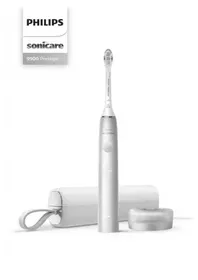
Sonicare 9900 Prestige HX9990 - Electric toothbrush PHILIPS - Free user manual and instructions
Find the device manual for free Sonicare 9900 Prestige HX9990 PHILIPS in PDF.



User questions about Sonicare 9900 Prestige HX9990 PHILIPS
0 question about this device. Answer the ones you know or ask your own.
Ask a new question about this device
Download the instructions for your Electric toothbrush in PDF format for free! Find your manual Sonicare 9900 Prestige HX9990 - PHILIPS and take your electronic device back in hand. On this page are published all the documents necessary for the use of your device. Sonicare 9900 Prestige HX9990 by PHILIPS.
USER MANUAL Sonicare 9900 Prestige HX9990 PHILIPS
Congratulations on your new Philips Sonicare power toothbrush! Superior plaque removal, whiter teeth, and healthier gums are at your fingertips. Using Sonicare's combination of gentle sonic technology and clinically developed and proven features, you can be confident that you're getting the very best clean, every time.
text_image
QR code image containing encoded data, no visible human-readable textFurther support and product registration are available to you at: www.philips.com/Prestige-Get-Started
Welcome to the Philips Sonicare family!
IMPORTANT SAFEGUARDS
READ ALL INSTRUCTIONS BEFORE USE
Read this user manual carefully before you use the appliance and save it for future reference.
When using electrical products, especially when children are present, basic safety precautions should always be followed, including the following:
DANGERS
To reduce the risk of electrocution:
- Keep the USB wall adapter and chargers away from water.
- Do not place or store product where it can fall or be pulled into a tub or sink.
- Do not place in or drop into water or other liquid.
- Do not immerse the charger in water or any other liquid.
- Do not reach for a product that has fallen into water. Unplug immediately.
- Do not use while bathing.
- After cleaning, make sure the USB wall adapter is completely dry before you connect it to a power outlet.
WARNINGS
To reduce the risk of burns, electrocution, fire or physical injury:
- Never use the USB wall adapter if it is damaged.
- If the appliance is damaged in any way (brush head, toothbrush handle, USB wall adapter, charging travel case and/or charger), stop using it.
- This appliance contains no user serviceable parts. If the appliance is damaged, contact the Consumer Care Center in your country (see 'Warranty and support').
- The charging base's cord cannot be replaced. If the charging base cord is damaged, discard the charging base.
- Always have the USB wall adapters and chargers replaced with one of the original type in order to avoid a hazard.
- Keep cord away from heated surfaces.
- Do not use the charger outdoors.
- Do not use the charger if dropped into water.
- This product is designed to clean your teeth, gums and tongue only. Use this product only for its intended use as described in this booklet. Discontinue use of this product and contact a physician/dentist if discomfort or pain is experienced.
8English
- This appliance may be used by children aged from 8 years and above and persons with reduced physical, sensory or mental capabilities, or lack of experience and knowledge, if they have been given supervision or instruction concerning the safe use of the appliance and understand the hazards involved. Cleaning and user maintenance shall not be performed by children without supervision.
- Children shall not play with the appliance.
- Do not use attachments other than those recommended by Philips Sonicare.
- To avoid damage to the product, do not place the brush head, handle, charger or charger covers in the dishwasher for cleaning.
MEDICAL WARNINGS
- Consult your dental professional before you use this product if you have had oral or gum surgery in the previous 2 months.
- Contact your dental professional if excessive bleeding occurs after using this product or bleeding continues to occur after 1 week of use.
- If you have a pacemaker or other implanted device contact your physician or the device manufacturer prior to use.
- Sonicare has been tested and is compliant with safety standards for electromagnetic devices.
- Consult your physician prior to using the Sonicare if you have medical concerns.
Battery safety instructions
- Only use this product for its intended purpose and follow the general and battery safety instructions as described in this user manual. Any misuse can cause electric shock, burns, fire and other hazards or injuries.
- To charge the battery, only use the USB wall adapter, charging base and charging travel case provided with the product: WAA1001, WAA200, HX9200 or HX9200/B, and TCC1001, TCC2001, TCC3001, CBB1001 or CBB2001. Do not use an extension cord.
- Charge, use and store the product at a temperature between 0 °C and 40 °C.
- Do not burn products and their batteries and do not expose them to direct sunlight or to high temperatures (e.g. in hot cars or near hot stoves). Batteries may explode if overheated.
- If the product becomes abnormally hot, gives off an abnormal smell, changes color or if charging takes much longer than usual, stop using and charging the product and contact Philips support directly or a Philips service center at www.philips.com/support, or toll free at 1-800-682-7664.
- Do not place products and their batteries in microwave ovens or on induction cookers.
- This product contains a rechargeable battery that is non-replaceable. Do not open the product to replace the rechargeable battery during the usable life of your device.
- When you handle batteries, make sure that your hands, the product and the batteries are dry.
- To prevent batteries from heating up or releasing toxic or hazardous substances, do not modify, pierce or damage products and batteries and do not disassemble, short-circuit, overcharge or reverse charge batteries during the usable life of your device.
- To avoid accidental short-circuiting of batteries after removal, do not let battery terminals come into contact with metal objects (e.g. coins, hairpins, rings). Do not wrap batteries in aluminum foil. Tape battery terminals or put batteries in a plastic bag before you discard them.
10English
- If batteries are damaged or leaking, avoid contact with the skin or eyes. If this occurs, immediately rinse well with water and seek medical care.
SAVE THESE INSTRUCTIONS
Electromagnetic fields (EMF)
This Philips appliance complies with all applicable standards and regulations regarding exposure to electromagnetic fields.
FCC & ISED Compliance
- Radio Equipment in this product operates at 13.56 MHz
- Maximum RF power transmitted by the Radio Equipment is 30.16dBm
- The Bluetooth radio frequency interface in this product operates at 2.4 GHz. The maximum output power by the Bluetooth appliance is 3 dBm
Changes or modifications not expressly approved by Philips could void the user's FCC authorization to operate the toothbrush.
For the United States
This device complies with Part 15 of FCC Rules. Operation is subject to the following two conditions: (1) this device may not cause harmful interference, and (2) this device must
accept any interference received, including interference that may cause undesired operation.
This equipment has been tested and found to comply with the limits for a Class B digital device, pursuant to part 15 of the FCC Rules. These limits are designed to provide reasonable protection against harmful interference in a residential installation. This equipment generates, uses and can radiate radio frequency energy and, if not installed and used in accordance with the instructions, may cause harmful interference to radio communications. However, there is no guarantee that interference will not occur in a particular installation. If this equipment does cause harmful interference to radio or television reception, which can be determined by turning the equipment (handle) off and on, the user is encouraged to try to correct the interference by one or more of the following measures:
- Reorient or relocate the receiving antenna (of the radio or television).
- Increase the separation between the equipment (handle) and receiver.
- Connect the equipment (charger) into an outlet on a circuit different from that to which the receiver is connected.
- Consult the dealer or an experienced radio/TV technician for help.
For Canada
This device contains license-exempt transmitter(s)/receiver(s) that comply with Innovation, Science and Economic Development Canada's license-exempt RSS(s). Operation is subject to the following two conditions: 1. This device may not cause interference. 2. This device must accept any interference, including interference that may cause undesired operation of the device.
Intended use
Sonicare Prestige power toothbrushes are intended to remove adherent plaque and food debris from the teeth to reduce tooth decay and improve and maintain oral health. Prestige power toothbrushes are intended for consumer home use. Use by children should be supervised by an adult.
Your Philips Sonicare
1 Hygienic travel cap
2 Premium All-in-One brush head (A3)
3 BrushSync symbol
4 Handle
5 Power on/off button
6 Intensity indicator and hidden button
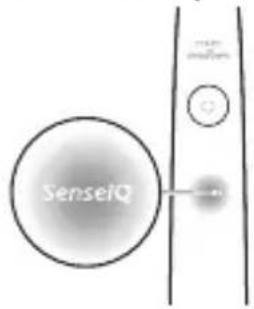
7 SenselQ indicator
8 Brush head replacement reminder indicator
9 Battery indicator
10 Brushing feedback light
11 Charging base
12 Charging stand
13 USB-A wall adapter
14 USB-C cord
15 Charging travel case
16 USB-C socket
Note: The content of the box may vary based on the model purchased.
The following symbols may appear on the product:
Read Operator's Manual.

natural_image
Simple line drawing of an open book with no text or symbols visible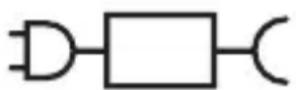
XXXXXX
Detachable Power Supply Part: The "xxxxxx" indicates the model number of the approved chargers to be used.
Sonicare App - Getting Started
The Sonicare app pairs with your toothbrush to provide you a connected experience. By connecting your toothbrush to your Sonicare app account, you will be able to:
- Customize your Sonicare toothbrush settings according to your preferred modes, intensity and toothbrush feedback.
- Track your brushing progress.
- Receive personalized tips and actionable recommendations to improve your oral health.
text_image
QR code image containing encoded data, no visible human-readable text
natural_image
Illustration of a hand interacting with a smartphone displaying a grid interface (no text or symbols visible)- Access the full range of benefits and receive ongoing upgrades to your Prestige experience.
The app is compatible with a wide range of iPhone and Android™ smartphones.
More information is available at
www.philips.com/Prestige-Get-Started
To start using the Sonicare app:
1 Download the Sonicare app to your phone.
2 Ensure your phone's Bluetooth is turned on.
3 Pick up your toothbrush to ensure it is active (lights on).
4 Open the app and follow guided steps.
5 Pair your toothbrush with the app.
6 Create your account via the app. Complete firmware update, if prompted, to access the latest improvements and features.
7 Brush regularly. You are ready to start your connected experience. When you regularly sync the toothbrush with the app, you can receive updates to help improve your oral healthcare.
8 Sync regularly.
- To sync manually: Pair/connect your toothbrush with the app every couple of weeks to benefit from the app features/capabilities.
- To sync automatically: Allow location permission while setting up the app. By allowing location permissions, your phone knows when it is in the connection range of your toothbrush and can refresh your brushing data to the app to provide the latest insights and recommendations
Note: Make sure your phone's Bluetooth is turned on when using the app so that your toothbrush can transfer and update your brushing data to the app. If you have questions about why your brushing data is collected, be sure to review the Sonicare Privacy Statement, available throughout the app setup process.
App - Features
The Sonicare App provides customizable settings for your toothbrush according to your preference, including:
- Intensity Settings
- Mode Controls
- Enable and disable Adaptive Intensity
- Enable and disable Scrubbing feedback
Brush Head
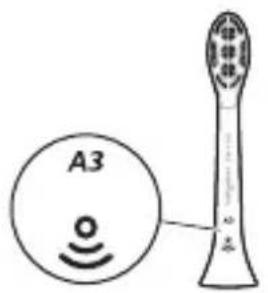
Your Sonicare Prestige power toothbrush comes with the new "Premium All-in-One brush head" (A3). This brush head is specifically designed to provide exceptional plaque removal, whitening (stain removal), and gum health benefits.
16English
text_image
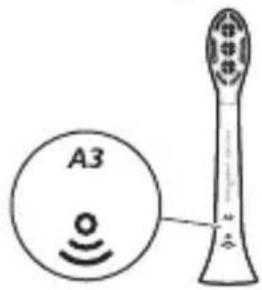
A3Premium All-in-One brush heads come with BrushSync Technology (see description below) as indicated by the symbol at the bottom of the brush head.
To explore our full range of brush head options, please visit our website for more information:
www.philips.com/toothbrush-heads
Using your Philips Sonicare
Brushing instructions
natural_image
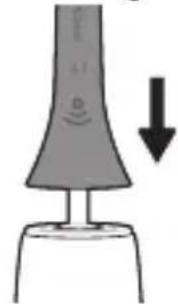
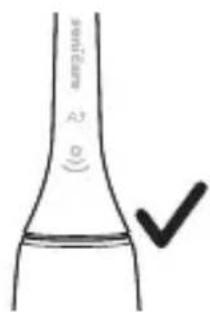
Simple diagram of a device with a downward arrow indicating motion or force (no text or symbols)1 Push the brush head firmly onto the handle.
text_image
A3 O ✓Note: It is normal to see a slight gap between the brush head and the handle. This allows the brush head to vibrate properly.
natural_image
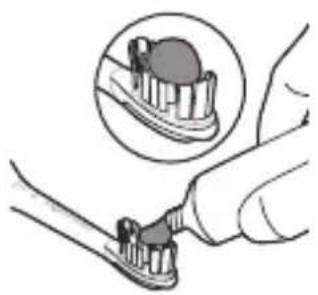
Illustration of a toothbrush applying material to a tooth, with an inset showing the same tooth (no text or symbols present)2 Wet the bristles and apply a small amount of toothpaste.
natural_image
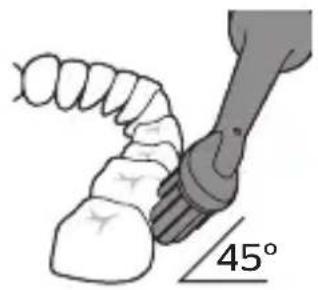
Illustration of a hand holding a tool with a 45-degree angle marker (no text or symbols on the diagram itself)3 Place the toothbrush bristles against the teeth at a slight angle (45 degrees). Apply light pressure to make the bristles reach the gumline or slightly beneath the gumline.
Note: Keep the center of the brush head in contact with the teeth at all times.
natural_image
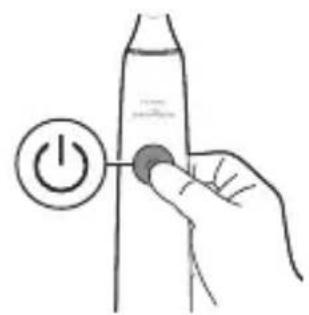
Hand holding a power button next to a bottle (no text or symbols visible)4 Press the power on/off button to turn on the Philips Sonicare.
natural_image
Illustration of a dental tool interacting with teeth and jawbone (no text or symbols)5 Apply light pressure to maximize Philips Sonicare's effectiveness and let the Philips Sonicare toothbrush do the brushing for you.
natural_image
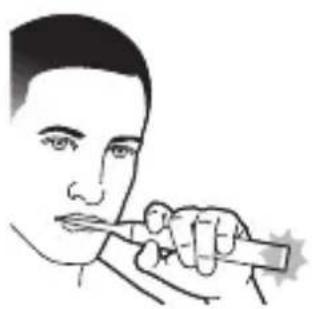
Line drawing of a person holding a pen, no text or symbols presentNote: The bristles should slightly flare. Do not scrub. A change in vibration from the handle and the brushing feedback light flashes purple to alert you when you apply too much pressure.
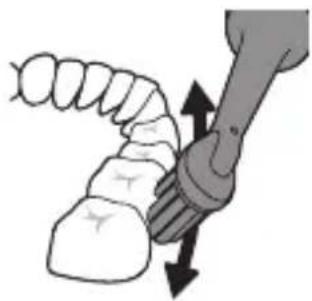
Gently move the brush head slowly across the teeth in a small back and forth motion so the longer bristles reach between your teeth. Continue this motion throughout the brushing cycle.
18English
natural_image
Illustration of dental arching technique with tooth removal and tool (no text or symbols)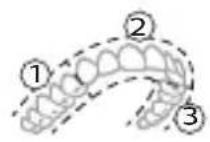
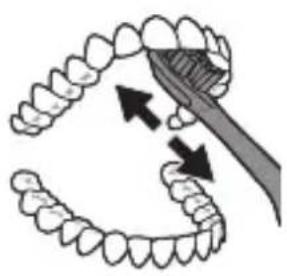
6 To clean the inside surfaces of the front teeth, tilt the brush handle semi-upright and make several vertical overlapping brushing strokes on each tooth.
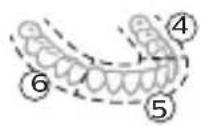
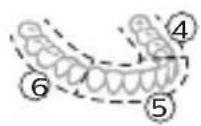
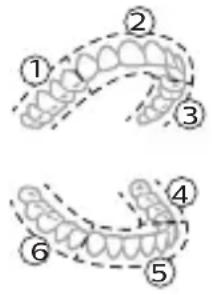
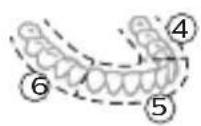
7 The BrushPacer divides the brushing time into six equal segments and indicates when you should move to the next area. Segments are indicated with a brief pause in vibration. The toothbrush automatically stops at the end of the brushing session.
Note: Your Philips Sonicare toothbrush is safe to use on braces, dental modifications and dental restorations (fillings, crowns, veneers)
Brushing modes
Your power toothbrush comes pre-set to the all-in-one clean mode that provides the dentist recommended 2 minute brushing routine, with a six segment brush pacer.
To personalize your brushing mode you can customize your power toothbrush settings from the Sonicare app (see 'Sonicare App - Getting Started').
Note: Although a mode is not displayed on the toothbrush handle, you can update the mode any time from the Sonicare App and your selection will be stored.
Intensity settings
natural_image
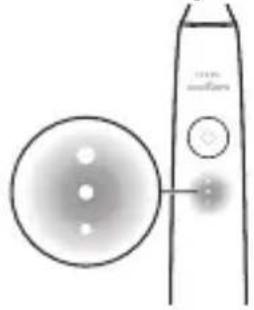
Simple line drawing of a device with a circular component and a vertical screen (no text or symbols)Your power toothbrush comes with 3 different intensity settings:
- High intensity (three lights)
- Medium intensity (two lights)
- Low intensity (one light)
text_image
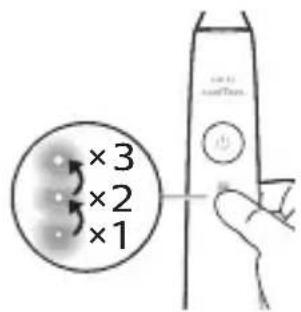
×3 ×2 ×1To manually select your desired intensity, press the intensity indicator lights on the handle, to cycle through the options. The intensity setting can be changed before, during, or after brushing.
Note: The intensity setting can also be customized from the Sonicare app.
BrushSync technology
text_image
A3BrushSync technology enables your brush head to communicate with your handle using a microchip. The 🔊 symbol at the bottom of the brush head indicates that the brush head is equipped with this technology.
BrushSync technology enables:
- Brush head replacement reminder
- BrushSync mode paring (for Tongue Care brush heads)
Features
- SenselQ
- Pressure Sensor Feedback
- Adaptive Intensity
- Scrubbing Feedback
- BrushPacer
- Brush head replacement reminder
20English
SenselQ
text_image
SenseIQYour Sonicare is equipped with SenselQ technology that is a combination of smart features that observe your brushing behaviors (e.g. motions, habits, brush head choice) and provide personalized feedback and recommendations.
The SenseIQ features include:
- Adaptive Intensity
- Real time feedback:
- Scrubbing Feedback
- Pressure Sensor Feedback
- Personalized recommendations in the app
- Brushing behavior feedback in the app
The SenselQ icon on the handle will illuminate when the smart features are active:
- while brushing
- to confirm enabling and disabling of settings
Pressure Sensor Feedback
natural_image
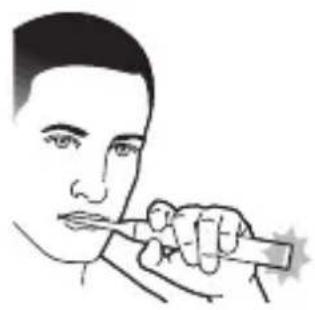
Line drawing of a person holding a pen, no text or symbols presentYour Sonicare toothbrush measures the pressure you apply while brushing to protect your gums and teeth from damage.
If you apply excess pressure, the handle will change its vibration and the brushing feedback light will flash (purple) at the bottom of the handle until you reduce the pressure.
Note: The Pressure Sensor comes activated with your product. To deactivate this feature, see 'Activating or deactivating features'.
Adaptive intensity
Your Sonicare toothbrush is designed with Adaptive Intensity to protect your gums. If you apply excess pressure for an extended period of time, your toothbrush will automatically lower the intensity setting 1 level. You will experience a brief pause in the pressure feedback and feel the intensity adjust to the next lower level.
Note: Adaptive Intensity comes activated with your product. To deactivate this feature, see 'Activating or deactivating features'.
Note: Every new brushing cycle the intensity will go back to your pre-selected setting.
Scrubbing Feedback
Your Sonicare toothbrush measures the motions while brushing to detect scrubbing behavior (see brushing instructions for optimal technique). If you regularly scrub while brushing, the app will recommend that you enable Scrubbing Feedback.
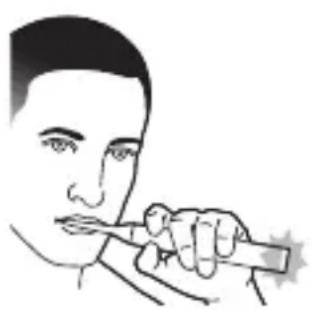
When Scrubbing Feedback is activated the brushing feedback light at the bottom of the handle will illuminate amber and the handle will change its vibration as a reminder to stop scrubbing. The brushing feedback light will turn off when you stop scrubbing.
Note: Scrubbing Feedback comes deactivated. To activate this feature, see 'Activating or deactivating features'.
natural_image
Line drawing of a person using a handheld tool to apply or write (no text or symbols present)22English
BrushPacer
text_image
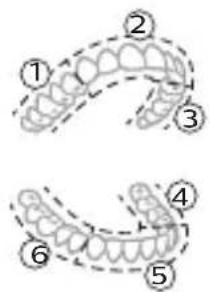
Diagram showing two dental arch structures with numbered labels indicating different tooth positions or regions.The BrushPacer divides the brushing time into six equal segments and indicates when you should move to the next area. Segments are indicated with a brief pause in vibration. The toothbrush automatically stops at the end of the brushing session.
Note: Additional segments may be added when you use White+ or Gum Health Modes. See Sonicare app for mode descriptions.
Brush head replacement reminder
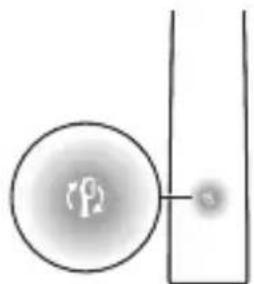
Your Sonicare toothbrush will track the wear of your smart brush head, using the BrushSync technology to measure:
- The overall pressure you apply while brushing
- The total time you have brushed with your brush head
natural_image
Simple diagram showing a circular object with a small circle connected to a vertical line, no text or symbols present.Once your brush head is no longer effective, the brush head replacement reminder indicator light will blink amber and the handle will make a series of beeps and tones to indicate it is time to replace your brush head.
Note: The brush head replacement reminder comes activated with your product. To deactivate this feature, see 'Activating or deactivating features'.
Activating or deactivating features
You can activate or deactivate the following features of your toothbrush:
- Adaptive Intensity
- Pressure Sensor Feedback
- Scrubbing Feedback
- Brush head replacement reminder
Note: Adaptive Intensity will be deactivated when pressure sensor is deactivated.
From app
The following features can be activated or deactivated from the Sonicare app.
- Adaptive Intensity
- Scrubbing Feedback
For instruction for how to connect to the app (see 'Sonicare App - Getting Started').
From handle
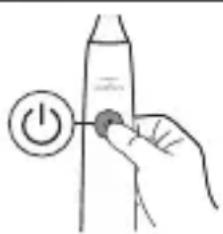
Step 1: Place the handle on the charging stand.
natural_image
Hand holding a power button icon with a battery (no text or symbols)Step 2: Press and hold power button for:
24English
| Adaptive intensity | Brush head replacement reminder | Pressure Sensor Feedback | |
| up to 3 seconds | Up to 5 seconds | Up to 7 seconds | |
| ↓ ↓ ↓ | |||
| Step 3: Let go power button when you hear | |||
| 1 beep 1 beep and then 2 beeps | 1 beep, 2 beeps and then 3 beeps | ||
| ↓ ↓ ↓ | |||
| SenseIQ indicator lights up for 3 seconds | Brush head replacement reminder indicator lights up for 3 seconds | SenseIQ indicator and light ring lights up purple for 3 seconds | |
| Together with: | |||
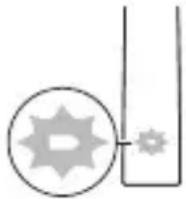 | If you see the battery indication blink white 3 times and hear 3 tones from low to high, then the feature has been activated. | ||
| OR | |||
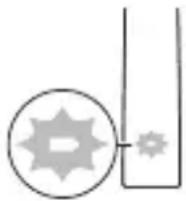 | If you see battery indication blink amber 3 times and hear 3 tones high to low, then the feature has been deactivated. | ||
Charging and battery status
Charging on charger base
text_image
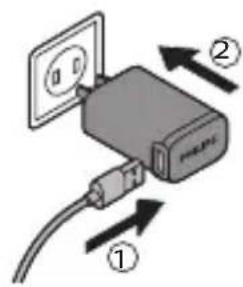
Diagram showing a device with labeled components and directional arrows indicating flow or movement.1 Plug the USB cord of the charging base into the USB wall adapter and plug the wall adapter into an electrical outlet.
natural_image
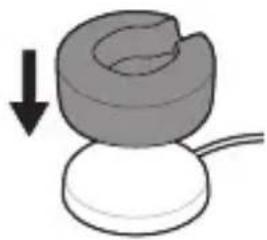
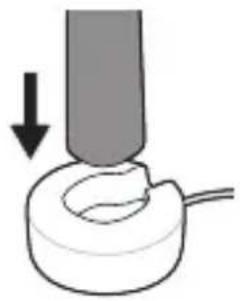
Simple diagram of a mechanical component with a downward arrow indicating force or direction (no text or symbols)2 Place the charging stand (clear cover) on the charging base.
natural_image
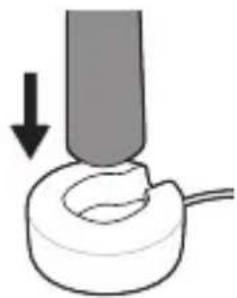
Simple line drawing of a mechanical component with an arrow indicating downward motion (no text or symbols)3 Place the toothbrush handle on the charger.
natural_image
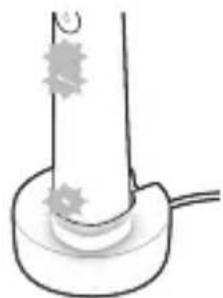
Simple line drawing of a cylindrical object with star-shaped markings and a base, no text or symbols present.a To indicate charging has started successfully, the toothbrush will beep twice and the lights will illuminate in an upward motion.
b While charging the battery indicator blinks in white.
4 Leave the toothbrush on the charger until it is fully charged. The battery light will turn off (stop blinking) when the handle has finished charging.
Note: It may take up to 16 hours to fully charge your Sonicare toothbrush.
Charging with the travel case
natural_image
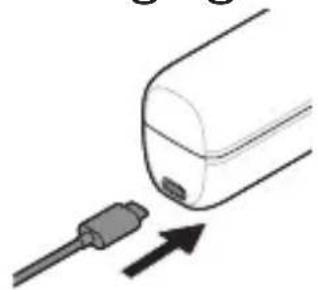
Diagram showing a connector inserted into a cylindrical device with an arrow indicating direction (no text or symbols)1 Plug the USB cord into the travel case and into the USB wall adapter.
2 Plug the wall adapter into an electrical outlet.
text_image
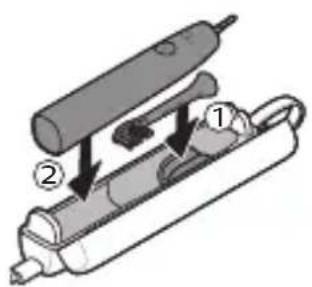
Diagram of a handheld electric shaver with labeled parts 1 and 23 Place toothbrush into travel case.
natural_image
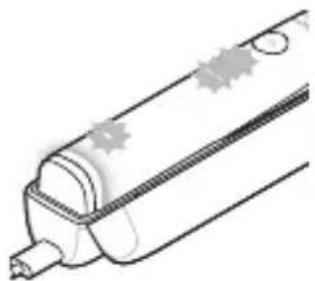
Illustration of a cylindrical object with star-shaped markings and a pointed tip, no text or symbols presenta To indicate charging has started successfully, the toothbrush will beep twice and the lights will illuminate in an upward motion.
b While charging the battery indicator blinks in white.
4 Leave travel case plugged in until toothbrush is fully charged. The battery light will turn off (stop blinking) when the handle has finished charging.
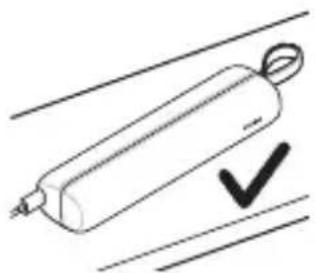
Note: Make sure the travel case is placed on its side for better stability.
natural_image
Simple line drawing of a cylindrical object with a looped end, marked with a checkmark (no text or symbols)Battery Status (when handle is on a working charger or travel case)
When the handle is placed on the charger or in the travel case, the battery indication will communicate the battery level.
Battery status Battery indication
| Charging Blinks in white | |
| Full Illuminates white for | 30 seconds and then turns off. |
Battery Status (when handle is not placed on Charger)
When the toothbrush is awake, the battery light at the bottom of the handle will indicate the status of the battery.
Battery status Battery indication Sound
| Full Illuminated in white - | |
| Partially full Blinks white - | |
| Low Blinks amber The handle emits | 3 beeps after brushing |
| Empty Blinks amber The handle emits | 2 sets of beeps after brushing |
Cleaning
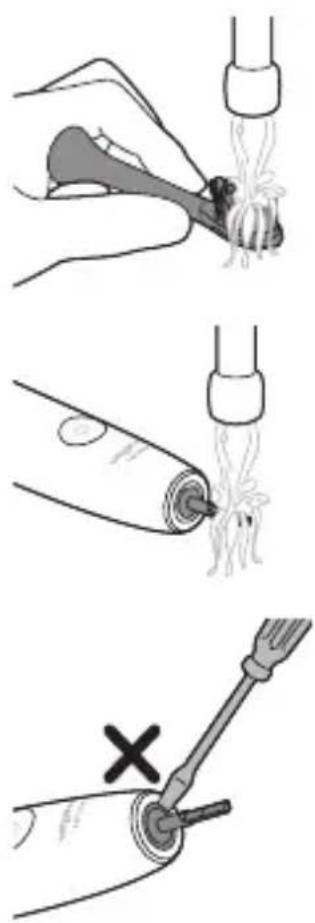
Brush head and handle
The brush heads and handle can be cleaned by rinsing it with warm water.
1 Remove the brush head from the handle and rinse it thoroughly.
2 Rinse the entire handle, especially the brush head connection. Gently clean around the rubber seal. At least once a week.
Note: Do not push on the rubber seal at the top of the handle.
Travel case and charger
1 Unplug the charger and travel case before you clean them.
2 Use damp cloth to wipe the surface of the charger and travel case.
Danger: Unplug the USB wall adapter and chargers before cleaning them.
Cautions:
- Do not clean the product or accessories in the dishwasher.
-
Do not use isopropyl alcohol, vinegar, bleach, or any other house hold cleaning products, to clean the product or accessories as this may cause discoloration.
-
Make sure brush head and toothbrush are dry before storing in travel case.
- Do not use essential oils to clean the brush head, the product or accessories as this can cause damage
Storage
If you are not going to use the product for an extended period of time, unplug it from the electrical outlet, clean it and store it in a cool and dry place away from direct sunlight.
Disposal

text_image
RECYCLE RBRC 1.800.822.8837- This product contains a rechargeable lithium-ion battery which must be disposed of properly.
- Contact your local town or city officials for battery disposal information. You can also call 1-800-822-8837 or visit www.call2recycle.org for battery drop-off locations.
- For assistance, visit our website www.philips.com/support or call 1-800-682-7664 toll free.
- Your product is designed and manufactured with high quality materials and components, which can be recycled and reused. For recycling information, please contact your local waste management facilities or visit www.recycle.philips.com.
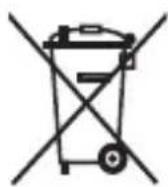
- This symbol means that electrical products and batteries shall not be disposed of with normal household waste.
The built-in rechargeable battery must be removed by a qualified professional when the product is discarded. Instructions for removal of built-in rechargeable batteries can be found on www.philips.com/support.
Warranty and support
Philips warrants its products for two years after the date of purchase. Defects due to faulty materials and workmanship will be repaired or replaced at Philips' expense provided that convincing proof of purchase in the qualifying period is provided.
Philips recommends use of genuine Sonicare brush heads for optimal performance. Use of other brush heads may damage your Sonicare toothbrush and limit your warranty protection. Contact our Consumer Care Center at 1-800-682-7664 (North America), outside North America contact your local Philips Consumer Care Center. Internet information:
www.sonicare.com (North America) or www.philips.com/support (outside North America).
WARRANTY EXCLUSIONS
What is not covered under warranty:
- Brush heads.
- Damage caused by use of unauthorized replacement parts or unauthorized brush heads.
- Damage caused by misuse, abuse, neglect, alterations or unauthorized repair.
- Normal wear and tear, including chips, scratches, abrasions, discoloration or fading.
IMPLIED WARRANTIES
ANY IMPLIED WARRANTIES, INCLUDING IMPLIED WARRANTIES OF MERCHANTABILITY AND FITNESS FOR A PARTICULAR PURPOSE, SHALL BE LIMITED TO THE DURATION OF THE EXPRESS WARRANTIES SET FORTH ABOVE. IN SOME STATES LIMITATIONS ON DURATION OF IMPLIED WARRANTIES DO NOT APPLY.
LIMITATION OF REMEDIES
IN NO EVENT SHALL PHILIPS OR ANY OF ITS AFFILIATED OR SUBSIDIARY COMPANIES BE LIABLE FOR ANY SPECIAL, INCIDENTAL OR CONSEQUENTIAL DAMAGES BASED UPON BREACH OF WARRANTY, BREACH OF CONTRACT, NEGLIGENCE, TORT, OR ANY OTHER LEGAL THEORY. SUCH DAMAGES INCLUDE, WITHOUT LIMITATION, LOSS OF SAVINGS OR REVENUE; LOSS OF PROFIT; LOSS OF USE; THE CLAIMS OF THIRD PARTIES INCLUDING, WITHOUT LIMITATION, DENTISTS
AND DENTAL HYGIENISTS; AND COST OF ANY SUBSTITUTE EQUIPMENT OR SERVICES. SOME STATES DO NOT ALLOW THE EXCLUSION OR LIMITATION OF INCIDENTAL OR CONSEQUENTIAL DAMAGES.
Note: The Bluetooth® word mark and logos are registered trademarks owned by Bluetooth SIG, Inc. and any use of such marks by KPNV is under license.
Introducción
text_image
QR code image containing encoded data, no visible human-readable textnatural_image
Simple line drawing of an open book with no text or symbols visibletext_image
QR code image containing encoded data, no visible human-readable text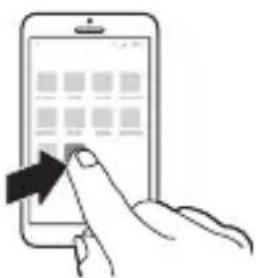
natural_image
Illustration of a hand interacting with a smartphone displaying a grid interface (no text or symbols visible)www.philips.com/toothbrush-heads
Uso del Philips Sonicare
natural_image
Simple diagram of a device with a downward arrow, no text or symbols presentnatural_image
Illustration showing two dental tool steps: first with toothbrush and magnified detail, second with toothbrush and angle measurement (45°)text_image
Illustration showing two-step dental tool manipulation: power switch and toothbrushing techniquenatural_image
Line drawing of a person holding a pen, no text or symbols presentnatural_image
Illustration of dental tool applying toothbrush to upper teeth (no text or symbols)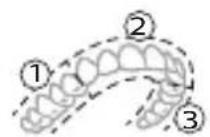
natural_image
Simple line drawing of a toothbrush and a circular object with three dots, no text or symbols present.text_image
SenseIQ mediumnatural_image
Line drawing of a person applying a toothbrush to their mouth (no text or symbols)natural_image
Line drawing of a person using a pen to apply or write (no text or symbols present)BrushPacer
text_image
Diagram showing two dental arch structures with numbered labels indicating different tooth locations or regions.natural_image
Simple diagram showing a circular object with a small circle connected to a vertical line, no text or symbols present.natural_image
Hand holding a power button next to a cylindrical object (no text or symbols visible)text_image
Diagram of a device with labeled parts and directional arrows indicating movement or flownatural_image
Simple diagram of a mechanical component with a downward arrow indicating force or direction (no text or symbols)natural_image
Simple line drawing of a mechanical component with an arrow indicating downward motion (no text or symbols)natural_image
Simple line drawing of a cylindrical object with a base and a small protrusion, no text or symbols present.natural_image
Diagram showing a plug inserted into a container with an arrow indicating direction (no text or symbols)text_image
Diagram of a handheld electric shaver with labeled parts and directional arrows indicating assembly or operation.natural_image
Illustration of a cylindrical object with star-shaped markings and a pointed tip, resembling a pen or tube (no text or symbols)natural_image
Simple line drawing of a pencil with a checkmark mark (no text or symbols)natural_image
Illustration of a hand holding a small object with a pipette inserted into it, no text or symbols presentnatural_image
Illustration of a medical procedure showing a tube inserted into tissue with a magnified view of the vessel (no text or symbols)natural_image
Diagram of a screwdriver turning a tool with a cross mark, no text or symbols presenttext_image
RECYCLE RBRC 1.800.822.8837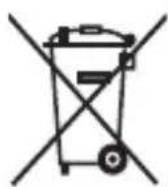
GARANTÍAS IMPLÍCITAS
text_image
QR code image containing encoded data, no visible human-readable textnatural_image
Simple line drawing of an open book with no text or symbols visible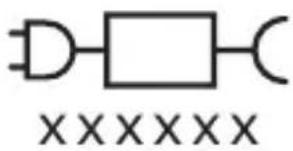
text_image
XXXXXXtext_image
QR code image containing encoded data, no visible human-readable textnatural_image
Illustration of a hand interacting with a smartphone displaying a grid interface (no text or symbols visible)www.philips.com/toothbrush-heads
text_image
Diagram showing a device with signal waves and a checkmark indicating a confirmation or adjustment.natural_image
Illustration of a toothbrush being inserted into a tooth, with an inset showing the same tooth (no text or symbols present)natural_image
Illustration of a dental tool interacting with teeth and jawbone, labeled 45° (no text or symbols on the diagram itself)text_image
Hand-drawn diagram showing a hand pressing a button on a bottle with a power symbol and label 'Power Supply'natural_image
Illustration of a dental tool interacting with teeth and jaw (no text or symbols)natural_image
Line drawing of a person using a tool to apply or write (no text or symbols present)natural_image
Illustration of dental tool applying tooth removal to upper teeth (no text or symbols)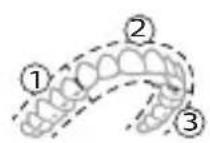
natural_image
Simple line drawing of a device with a circular component and a pointer, no text or symbols present.natural_image
Line drawing of a person applying a pencil to their mouth (no text or symbols)natural_image
Line drawing of a person applying a toothbrush to their lips (no text or symbols)text_image
Diagram showing two dental arch structures with numbered labels indicating different tooth positions or regions.natural_image
Simple diagram showing a circular object with a small dot connected to a vertical line, no text or symbols present.natural_image
Hand holding a battery with a power button icon (no text or symbols)text_image
Diagram showing a device with labeled parts and directional arrows indicating electrical or mechanical connections.natural_image
Simple 3D illustration of a mechanical component with a downward arrow indicating motion (no text or symbols)2 Placez le socle de chargee (couvercle transparent) sur la base de recharge.
natural_image
Simple line drawing of a mechanical component with an arrow indicating downward motion (no text or symbols)natural_image
Simple line drawing of a tube with star-shaped markings and a base, no text or symbols present.natural_image
Diagram showing a plug inserted into a container with an arrow indicating direction (no text or symbols)text_image
Diagram of a handheld electric shaver with labeled parts 1 and 2natural_image
Illustration of a cylindrical object with star-shaped markings and a pointed tip, no text or symbols presentnatural_image
Simple line drawing of a cylindrical object with a looped end, marked with a checkmark (no text or symbols)natural_image
Illustration of a hand holding a small object with a pipette inserted, showing fluid or material flow (no text or symbols)natural_image
Simple line drawing of a medical procedure showing a tube inserted into tissue with a magnified view (no text or symbols)natural_image
Diagram of a tool interacting with a curved surface, marked with an 'X' symbol (no text or labels present)text_image
RECYCLE RBRC 1.800.822.8837EXCLUSIONS DE GARANTIE
Philips and the Philips shield are trademarks of KPNV.
Sonicare and the Sonicare logo are trademarks of Philips Oral Healthcare, LLC and/or KPNV.
©2021 Koninklijke Philips N.V. (KPNV). Tous droits réservés.
Philips Oral Healthcare, LLC.
22100 Bothell Everett Highway
Bothell, WA 98021
3000.059.2712.1 (2/8/2021)