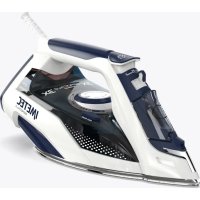
ZeroCalc Z3 3500 - Iron IMETEC - Free user manual and instructions
Find the device manual for free ZeroCalc Z3 3500 IMETEC in PDF.


| Product Type | Steam Iron |
| Brand | Imetec |
| Model | ZeroCalc Z3 3500 |
| Power Supply | Mains 220-240 V ~ 50/60 Hz |
| Rated Power | 2400 W |
| Water Tank Capacity | 300 ml |
| Soleplate Type | Non-stick soleplate (type not specified) |
| Anti-scale System | Permanent ZeroCalc resin filter |
| Auto Clean | Calc-Clean system (every 5 to 10 cycles) |
| Steam Functions | Continuous steam, super steam, vertical steam, spray |
| Eco Function | Yes (ECO position) |
| Temperature Setting | Dial with positions 1 to 3 dots and max |
| Temperature Indicator | Yes (indicator light) |
| Safety | Automatic shut-off not mentioned; unplug before filling |
| Recommended Water Type | Demineralized water for steam irons only |
| Maintenance | Clean soleplate with damp cloth; do not use abrasive products |
| Warranty | 2 years from delivery |
| Repairability | Authorized technical service center only |
| Country of Origin | Not specified (manufactured for Tenacta Group) |
Frequently Asked Questions - ZeroCalc Z3 3500 IMETEC
User questions about ZeroCalc Z3 3500 IMETEC
0 question about this device. Answer the ones you know or ask your own.
Ask a new question about this device
Download the instructions for your Iron in PDF format for free! Find your manual ZeroCalc Z3 3500 - IMETEC and take your electronic device back in hand. On this page are published all the documents necessary for the use of your device. ZeroCalc Z3 3500 by IMETEC.
USER MANUAL ZeroCalc Z3 3500 IMETEC
Instructions for use
WARNING: TYPE OF WATER TO BE USED Use only demineralised water for irons.

natural_image
Two horizontal bar segments with grayscale shades and a central crosshair symbol (no text or labels)Dear customer, thank you for choosing our product. We feel certain you will appreciate its quality and reliability as it was designed and manufactured with customer satisfaction in mind. These instructions for use are compliant with the European Standard EN 82079.

WARNING! Instructions and warnings for safe use.
Before using this appliance, carefully read the instructions for use and in particular the safety notes and warnings, which must be complied with. Keep this manual together with its illustrative guide for future consultation. Should you transfer the appliance to another user, make sure you hand over this documentation as well.
NOTE: should any part of this manual be difficult to understand or any doubt arise, contact the company at the address indicated on the last page before using the appliance.
①NOTE: persons with impaired vision may consult these instructions for use in digital format at the website www.tenactagroup.com
INDEX
Introduction page 11
Safety notes page 11
Key to symbols used page 14
Description of the appliance and accessories
Preparation
Use
page 14
page 14
page 15
End of use page 17
Maintenance page 17
Troubleshooting page 18
Disposal at the end of life page 19
Support and warranty page 19
Illustrative guide page I-II
Technical data page I
SAFETY NOTES
- After unpacking, make sure the appliance is intact, complete with all its parts as shown in the illustrative guide and with no sign of damage. If in any doubt, do not use the appliance and contact an authorised service centre.

WARNING! Remove any communication material such as labels, tags etc. from the appliance before use.

WARNING! Risk of suffocation.
Children shall not play with the packaging. Keep the plastic bag out of the reach of children.
EN
- This appliance must be used only for the purpose for which it was designed, namely as a vented steam iron for home use. Any other use is considered not compliant to the intended use and therefore dangerous.
- Before connecting the appliance to the mains supply, make sure that the voltage and frequency indicated on the technical data of the appliance correspond to those of the mains supply. The rating is on the appliance or on the power supply unit, if any (see illustrative guide).
- This appliance can be used by children aged from 8 years and above and persons with reduced physical, sensory or mental capabilities or lack of experience and knowledge if they have been given supervision or instruction concerning use of the appliance in a safe way and understand the hazards involved. Children shall not play with the appliance. Cleaning and user maintenance shall not be made by children without supervision.

WARNING! Keep the iron and its cord out of reach of children less than 8 years of age when it is energized or cooling down.
- DO NOT use the appliance with wet hands, damp feet or barefoot.
- DO NOT pull the supply cord or the appliance itself to remove the plug from the socket.
- DO NOT pull or lift the appliance by the supply cord. DO NOT expose the appliance to humidity, to the effects of weather (rain, sun, etc.) or to extreme temperatures.
- The appliance must not be left unattended while it is connected to the mains supply.
- Always disconnect the appliance from the mains supply before cleaning or performing maintenance and when the appliance is not in use.
EN
- If the appliance is faulty or malfunctions, switch it off and do not tamper with it. Contact an authorised technical service centre for any repairs.
- If the supply cord is damaged it must be replaced by an authorised technical service centre, so as to prevent all risks.
- The electrical safety of this appliance is only guaranteed when it is connected correctly to an effective earthing system as required by applicable electrical safety standards. This important safety requirement must be verified before connecting the appliance to the mains supply. If in doubt request a thorough check of the system by a qualified technician.
- DO NOT immerse this appliance into water or other liquids. For any cleaning and maintenance operation refer to the instructions in the relevant chapter.
- DO NOT leave this appliance in contact with or near materials and surfaces that are easily flammable or can be damaged by heat.
- Always place the appliance with the stand, if any, on a heat-resistant, stable, flat surface.
- When placing the iron on its stand, ensure that the surface on which the stand is placed is stable.
- DO NOT use chemical additives, scented substances or descaling agents.
- DO NOT add chemical additives or scented substances to the water.
- The plug must be removed from the socket-outlet before the water reservoir is filled with water.
• See the external packaging for the characteristics of the appliance. - Use the appliance only with the supplied accessories that are an essential part of the appliance.
- DO NOT use extension cords or adaptors.
KEY TO SYMBOLS USED
| ! | Caution/Warning/Danger | ∅ | Prohibition |
| ### | Warning! Hot surface Information | i | |
| ● | Position with 1 dot. Suitable for ironing synthetic fabrics such as: viscose, polyester | ●● | Position with 2 dots. Suitable for ironing fabrics such as silk and wool |
| ●●● | Position with 3 dots. Suitable for ironing fabrics such as cotton and linen | MAX | Maximum temperature. Suitable for ironing fabrics such as jeans |
| 0 | Steam closed position | ECO | Eco steam position |
| Max | Maximum steam position Steam boost | ||
| ### | Spray Max fill-up level | MAX | |
| CALC-CLEAN | Calc clean button | ||
EN

DESCRIPTION OF THE APPLIANCE AND ACCESSORIES
Refer to the illustrative guide on page I to check that your appliance is complete with all accessories.
- Plate temperature LED
- Power cable with plug
- Temperature adjustment knob
- Calc clean button
- Technical data
- Reservoir
-
Plate
-
Spray nozzle
- Water fill cover
- Steam selector
- Spray button
- Super-steam button
- Water cup
PREPARATION
Sort the laundry according to the international symbols shown on the label; if this is missing, sort according to the type of material.
Start to iron the garments that require a lower temperature so as to reduce idle time (the iron requires less time to warm up than to cool down) and eliminate the risk of burning the fabric.
USE
EN

WARNING! This appliance is not to be used if it has been dropped, if there are visible signs of damage or if it is leaking water.
Use only demineralised water for irons.

WARNING! DO NOT pour diluting agents, scented liquids or descaling agents into the reservoir as the use of these substances can damage the product.

WARNING! Do not use water from dryers, air-conditioners or tumble dryers, filtered water with water softeners, or rainwater.
The reservoir may contain some water as each product is tested before being put on the market.
Check that the power supply cable with plug (2) is plugged into the socket.
Move the steam selector (10) to the steam closed position [Fig. C].
Open the water fill cover (9).
Set the iron in a position that facilitates filling the water and prevents it from overflowing.
Slowly fill the water in the reservoir (6) using the water cup (13) [Fig. B].
Do not exceed the maximum fill level shown on the reservoir (6).
Close the water fill cover (9).
SELECTING THE TEMPERATURE
Set the iron upright.
Plug the power supply cable with plug (2) into the socket.
Set the temperature according to the type of fabric in line with the international symbols shown on the labels; using the adjustment knob (2) [Fig. D].
The plate temperature LED (1) indicates that the iron is warming up.
Wait for the plate temperature LED (1) to go off before starting to iron.
It is recommended that you place a cloth between the iron and the fabric when using the iron for the first time.
Before starting ironing, direct a jet of steam onto the cloth by lifting the iron slightly so that any residual condensation comes out.
Fabrics with the following symbols may not be ironed

ECO FUNCTION
The appliance is equipped with new technology that optimises steam production, thereby reducing energy consumption.
To activate the ECO function, move the steam selector (10) to the ECO steam position.
EN
IRONING WITHOUT STEAM (DRY)
To iron without steam, follow the instructions in the section "steam ironing", leaving the steam selector (10) in the steam closed position.
IRONING WITH STEAM
Move the steam selector (10) to a position between the closed steam position and the maximum steam position based on the amount of steam desired.
Continuous steam will only be dispensed when the iron is in a horizontal position.
The continuous steam can be stopped by placing the iron in a vertical position or by moving the steam selector (10) to the steam closed position.
NOTE: Steam can only be used at the highest temperatures, between the position with the 3 dots and the maximum temperature position, as indicated by the symbol on the temperature adjustment knob (3).
If the selected temperature is too low, water droplets may drip from the plate.
The soleplate temperature LED flashes intermittently while ironing, thereby indicating that the selected temperature is maintained.
SUPER-STEAM AND STEAM IN A VERTICAL POSITION
Press the super-steam button (12) to generate a strong shot of steam.
Wait a few seconds between each pressing action of the iron [Fig. E].
Press the super-steam button (12) intermittently to iron vertically (drapes, hanging garments, etc.).
NOTE: The super-steam function can only be used at high temperatures. Stop using it when the soleplate temperature LED goes on and start ironing again when it goes off.
SPRAY FUNCTION
Verify that there is water in the reservoir (6).
Press the spray button (11) slowly (for a dense spray) or quickly (for a mist) [Fig. F].
Dampen delicate fabric using the spray function before ironing or alternatively lay a damp cloth between the fabric and the iron. Do not use the spray function on silk or synthetics.
END OF USE
EMPTYING
Unplug the power supply cable with plug (2) from the socket.
Open the water fill cover (9).
Empty the reservoir (6) by turning the iron upside down and shaking it lightly.
Let the iron cool down completely.
Always set the iron upright.
NOTE: If the appliance is not to be used for several weeks, wait for the appliance to cool down completely before emptying the water reservoir completely according to the instructions in the relevant chapter.
When the appliance is switched on again, refill the reservoir as indicated in the relevant chapter.
MAINTENANCE
ZEROCALC ANTI-LIMESCALE SYSTEM
A special resin filter located inside the water reservoir decreases the water hardness and limits the formation of limescale in the plate. The resin filter is permanent and is not replaced.
CALC CLEAN SYSTEM
This function is used to clean the inside of the iron's plate (7) from limescale residues or other impurities.
It is recommended to implement this function every 5 - 10 times it is used.
Fill the reservoir (6) to the maximum fill level [Fig. B].
Move the steam selector (10) to the steam closed position [Fig. C].
Adjust the temperature knob (3) to maximum and wait for the plate temperature control LED (1) to turn off.
Unplug the power supply cable with plug (2) from the socket and put the iron in a horizontal position over a sink.
Press the calc-clean (4) button, and hold it until hot water, steam and any impurities or limescale come out of the plate (7).
Once cooled down, clean the plate (7) with a moist cloth.
CLEANING

WARNING! Make sure the plug is disconnected from the socket and the plate has cooled down completely before cleaning the iron.
Any starch deposits or residue on the surface of the plate can be removed with a damp cloth and non-abrasive liquid detergent.
Avoid scratching the plate with steel wool or metal objects.
The plastic parts can be cleaned with a damp cloth and then wiped with a dry cloth.

WARNING! Risk of fire. Wait for the appliance to cool completely before storing it.


TROUBLESHOOTING
This chapter describes the most common problems that can arise using the appliance. If the problems cannot be solved with the information below, please contact the Authorised Assistance Centre.
| Problem Possible cause Solution | ||
| The plate (7) remains cold or does not heat up. | There is no power supply. | Check if the power supply cable plug (2) is inserted correctly or try inserting it in another socket. |
| Check whether the temperature adjustment knob (3) is set to the minimum temperature (Fig. D). | ||
| The plate temperature LED (1) goes on and off. | Normal procedure. | The switching ON and OFF of the LED indicates the heating phase of the iron. The LED goes off once the set temperature is reached. |
| Only a little steam or none at all is dispensed. | The steam selector (10) is in the steam closed position. | Move the steam selector (10) to the desired position (Fig. C). |
| There is not enough water in the reservoir (6). | Fill the reservoir (6). | |
| The impurities that come out from the steam holes stain the garments. | Possible residues in the plate (7). | Perform self-cleaning (see the Calc-Clean System paragraph). |
| Chemical additives, scented liquids or descaling agents are being used | These substances damage the product: do not add additives to the water in the reservoir. | |
| Starch is being used. | Always spray the starch on the reverse side of the fabric. | |
| Water leaks from the plate. | Plate temperature (7) too low due by pressing the super-steam button (12) too frequently. | Allow slightly longer intervals between the jets of steam. |
| The temperature adjustment knob (3) is set to a temperature that is too low. | Turn the temperature adjustment knob (3) to a position between the 3 dots and the maximum temperature (Fig D). | |
EN

DISPOSAL AT THE END OF LIFE


The appliance packaging is made of recyclable materials. Dispose of the packaging in accordance with the environmental protection regulations.
Pursuant to Directive 2012/19/EU on waste electrical and electronic equipment (WEEE), the crossed bin symbol on the appliance or its packaging indicates that the appliance must be disposed of separately from other waste at the end of its useful life.
The user must therefore take the appliance to an appropriate recycling centre for electrical and electronic equipment. Alternatively, instead of handling the disposal, the user can hand over the appliance to the retailer when a new, equivalent one is purchased. The user can hand over
electronic products measuring less than 25 cm to retailers of electronic products having a sales area of at least 400 m ^2 free of charge and with no obligation to buy. Appropriate separate collection for the subsequent procedure for the decommissioned appliance for recycling, which includes treatment and environmentally friendly disposal helps prevent adverse effects on the environment and health and promotes reusing and/or recycling materials that the appliance consists of.
SUPPORT AND WARRANTY
The appliance is guaranteed for a period of two years from the date of delivery. This date is taken as the date on the receipt/invoice (as long as it is clearly legible), unless the purchaser can prove that delivery was made at a later date.
In the event of a product flaw already present at the time of delivery, the cost-free repair or replacement of the appliance is guaranteed unless one of the two solutions is out of proportion with the other. The purchaser is responsible for informing an Authorised Assistance Centre about the conformity flaw within two months of discovering it.
The warranty does not cover parts that may be faulty due to:
a. damage from transport or accidental drops,
b. incorrect installation or inadequate electrical system,
c. repairs or alterations performed by unauthorised personnel,
d. insufficient or improper maintenance and cleaning,
e. products and/or product parts subject to wear and/or consumables, including the reduced operating time of the batteries (if installed) due to usage or age,
f. non-observance of the operating instructions for the appliance, negligent or careless usage,
g. the water used is different from that described in the manual,
h. thinner, scented liquids or descaling agents are used,
i. plate damage caused by ironing unsuitable fabrics or with inadequate temperatures for the fabric.
The above list is merely an example; it is not complete, as this warranty in any case does not cover circumstances that cannot be traced back to manufacturing flaws.
In addition, this warranty is not considered valid in cases of improper appliance use or professional use. No responsibility can be taken for any harm or damage caused directly or indirectly to people, pets or property as a result of the failure to observe all the indications given in the “Instructions and warnings booklet” with regards the installation, use and maintenance of the appliance.
This does not apply to contract warranty actions in relation to the seller.

natural_image
Two horizontal bar designs with grayscale shades and a central crosshair symbol (no text or labels)Assistance
The appliance may only be repaired by an authorised service centre. If the faulty appliance is under warranty, it must be sent to the Assistance Centre along with a proof of purchase showing the date of purchase or delivery.

INTRODUCTION
natural_image
Two horizontal bar designs with grayscale shades and a central crosshair symbol (no text or labels)Asistencia
ASSISTÊNCIA E GARANTIA
POPIS PŘÍSTROJE A PŘÍSLUŠENSTVÍ
natural_image
Two horizontal bar designs with grayscale shades and a central crosshair symbol (no text or labels)Podpora
natural_image
Two horizontal bar designs with grayscale shades and a central crosshair symbol (no text or labels)Servis
natural_image
Two horizontal bar designs with grayscale shades and a central crosshair symbol (no text or labels)Tehnična pomoč

- INDEX
- SAFETY NOTES
- EN
- DESCRIPTION OF THE APPLIANCE AND ACCESSORIES
- PREPARATION
- USE
- SELECTING THE TEMPERATURE
- ECO FUNCTION
- IRONING WITHOUT STEAM (DRY)
- IRONING WITH STEAM
- SUPER-STEAM AND STEAM IN A VERTICAL POSITION
- SPRAY FUNCTION
- END OF USE
- EMPTYING
- MAINTENANCE
- ZEROCALC ANTI-LIMESCALE SYSTEM
- CALC CLEAN SYSTEM
- CLEANING
- WARNING! Make sure the plug is disconnected from the socket and the plate has cooled down completely before cleaning the iron.
- WARNING! Risk of fire. Wait for the appliance to cool completely before storing it.
- TROUBLESHOOTING
- DISPOSAL AT THE END OF LIFE
- SUPPORT AND WARRANTY
- Assistance
- INTRODUCTION
- Asistencia
- ASSISTÊNCIA E GARANTIA
- POPIS PŘÍSTROJE A PŘÍSLUŠENSTVÍ
- Podpora
- Servis
- Tehnična pomoč
Brand : IMETEC
Model : ZeroCalc Z3 3500
Category : Iron