Solamagic SMS22500BTNA - Heating Etherma - Free user manual and instructions
Find the device manual for free Solamagic SMS22500BTNA Etherma in PDF.


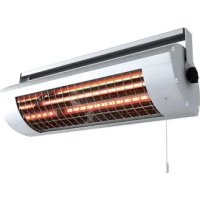
| Product type | Outdoor infrared heater |
| Brand | Etherma |
| Model | Solamagic SMS22500BTNA |
| Power (W) | 2500 W |
| Protection type | IP65 |
| Power supply | 230 V ~ 50 Hz, fuse 16 A (type C16A) |
| Dimensions (L x W x H) mm | 1050 x 160 x 100 mm (approx.) |
| Weight (kg) | 5 kg (approx.) |
| Heating type | Infrared halogen tube |
| Number of power levels | 3 (33%, 66%, 100%) |
| Control | Radio remote control (433.92 MHz) and keys on the unit |
| Remote control range | Approximately 20 m in open air |
| Timer | Automatic shutdown after 30, 60 or 90 min (programmable) |
| Memory function | Yes, recalls last setting |
| Minimum mounting height | 1.80 m above the ground |
| Mounting | Horizontal, wall or ceiling, with supplied brackets |
| Maintenance | Wipe with a soft, damp cloth without detergent |
| Average tube lifespan | 5000 hours (under 12-month warranty) |
| Warranty | 5 years unit, 12 months / 5000 h for tubes (subject to conditions) |
| Usage | Outdoor (IP65) – not suitable for indoor comfort |
Frequently Asked Questions - Solamagic SMS22500BTNA Etherma
User questions about Solamagic SMS22500BTNA Etherma
0 question about this device. Answer the ones you know or ask your own.
Ask a new question about this device
Download the instructions for your Heating in PDF format for free! Find your manual Solamagic SMS22500BTNA - Etherma and take your electronic device back in hand. On this page are published all the documents necessary for the use of your device. Solamagic SMS22500BTNA by Etherma.
USER MANUAL Solamagic SMS22500BTNA Etherma
natural_image
Exterior view of a cylindrical electronic device with visible internal grid structure and 'SOLA MAGIC' branding (no additional text or symbols)SOLAMAGIC
natural_image
Technical line drawing of a mechanical device with three circular insets showing different components (no text or symbols)natural_image
Isometric line drawing of a mechanical bracket with mounting holes (no text or symbols)Schritt 1: T-Halter montieren
natural_image
Diagram of a mechanical assembly with a tray, circular component, and paper (no text or symbols)Reinigungshinweise
natural_image
Black cylindrical device with grid pattern and 'SOLAMAGIC' label, no readable text or symbols beyond brandingSOLAMAGIC
natural_image
Technical line drawing of a mechanical device with three circular insets showing close-ups of components (no text or symbols)natural_image
Isometric line drawing of a 3D mechanical bracket with labeled points C and O (no text or symbols beyond labels)Stap 1: T-houder monteren
natural_image
Diagram of a mechanical assembly with a tray, circular component, and paper (no text or symbols)natural_image
Exterior view of a cylindrical device with grid pattern and 'SOLA MAGIC' label (no other text or symbols)Monterings- og brugsanvisning
S2 infrarød radiator 2500 W med varmetrin switch, IP65 (IR05007-WSI)
D2 infrarød radiator 2000 W med varmetrin switch, IP65 (DS05003-WSI)
05/2018
Indholdsfortegnelse
natural_image
Technical line drawing of a mechanical device with three circular insets showing different components (no text or symbols)Ved montering altid opad
Ved montering altid nedad
natural_image
Isometric line drawing of a 3D mechanical bracket with labeled points C and O (no text or symbols beyond labels)natural_image
Diagram of a mechanical assembly with a tray, circular component, and paper (no text or symbols)natural_image
Exterior view of a black cylindrical device labeled 'SOLAMAGIC' with internal grid structure (no additional text or symbols)natural_image
Technical line drawing of a mechanical device with three circular insets showing different components (no text or symbols)natural_image
Isometric line drawing of a 3D mechanical bracket with labeled points C and O (no text or symbols beyond labels)natural_image
Diagram of a mechanical device with a circular component and labeled parts, showing internal structure without any text or symbols.Rengjøring
natural_image
3D rendering of a cylindrical device with a grid pattern and 'SOLA MAGIC' label, no readable text or symbols beyond the label.natural_image
Technical line drawing of a mechanical device with three circular insets showing different components (no text or symbols)natural_image
Isometric line drawing of a mechanical bracket with mounting holes (no text or symbols)Driftsindikator: Vid D2 Lysdioder A, B, C
Fjärrkontrollen
natural_image
Diagram of a mechanical device with a circular component and labeled parts, showing internal structure without any text or symbols.Rengöringsinformation
natural_image
3D rendering of a cylindrical device with a grid pattern and 'SOLA MAGIC' label, no readable text or symbols beyond the label.natural_image
Technical line drawing of a mechanical device with three circular insets showing close-ups of components (no text or symbols)natural_image
Isometric line drawing of a mechanical bracket with mounting holes (no text or symbols)natural_image
Diagram of a mechanical assembly with a tray, central component, and paper (no text or symbols)Puhdistusohjeita
natural_image
Exterior view of a black cylindrical device with a grid pattern and 'SOLAMAGIC' label, no readable text beyond the label.Installation and operating manual
S2 Infrared radiator 2500 W with multi-point switch, IP65 (IR05007-WSI)
D2 Infrared Radiator 2000 W with multi-point switch, IP65 (DS05003-WSI)
05/2018
Contents
Safety and operating instructions 99
Scope of supply....100
Installation instructions....101
Initial operation....104
Wireless remote control 104
Operation 108
Changing the battery of the hand-held transmitter ..... 110
Cleaning instructions.... 110
Guarantee conditions.... 111
Additional instructions....112
Appendix
- Technical data
- Safety distances
- Radiation patterns
AX
AX
AX
Safety and operating instructions
Please observe the following instructions:
Carefully read through the instruction manual prior to installation and store the manual safely.
This heater is meant for outside use by adults. It is not meant to be used for indoor heating to create a pleasant temperature level.
Children must not play with the heater.
Children younger than 3 years old must be kept away from the heater unless they are continuously monitored.
Caution – Some parts of this product can become very hot and cause burns. Special care is required when children and vulnerable persons are present.
- Installation tasks must be properly carried out by a qualified person in accordance with VDE 0100 installation instructions (if applicable, also including Parts 559 and 701).
- When carrying out any work, always switch the system to a zero-volt state (disconnect mains plug; circuit-breaker off). Switch on the heater only after all the cables have been completely connected.
- The domestic installation for the power supply of the heater must be designed with a switch and secured with a fuse of at least 16A slow (type C16A).
- Do not install directly under sockets, junction boxes, switches or electrical cabling.
- Electrical sockets may only be located in the positions specified in Appendix 2.
- Do not mount the radiant heater close to curtains or combustible materials in accordance with VDE 0100, Part 559.
- The device meets the requirements for protection type IP 65, if all connectors (device plug, plugs for expansion components) are plugged in and it is approved for outdoor use.
- Never leave the heater unattended.
- The heater must always be switched off via the house installation switch when not in use.
- Do not cover the heater when it is switched on or still hot; there is a risk of fire.
- The wireless receiver is equipped with an overtemperature protection which will temporarily limit the heating function in the event of an overtemperature.
- To adjust the radiation direction, switch the heater off and allow to cool.
- Do not look directly at an operating IR halogen lamp for a long period and from a short distance.
-
IR halogen lamps are sensitive to direct skin contact (do not touch with bare fingers). Grease or other contamination can be removed with an alcohol-soaked cloth.
-
To maintain the service life of the IR halogen lamp, it must be protected against vibrations, impacts and contaminants such as acids, ammonia, cement dust, etc.
- The IR halogen lamp must be protected against mechanical loading. It must be replaced if changes (dark spots, deformation) become apparent or the rated life time is reached.
- Damaged equipment elements such as lead, rocker switch, sealing collar or heating tube must always be replaced. The unit must be immediately dismantled and stored dry.
- Repair work (replacement of a defective power lead, a defective heating tube or similar) must only be carried out by the customer service of the manufacturer or an authorised dealer.
- Cleaning and maintenance work must only be carried out by adults with sufficient expertise.
Scope of supply
IR heat radiator with mains lead
Mounting bracket including fastenings (supplied)
Manual
Installation instructions
- The infrared radiator may only be installed and operated horizontally!
- If radiator and socket are not installed on the same surface, it must be ensured that the field of radiation cannot be directed towards the socket. Failing this, it must be ensured that the socket cannot heat up to more than 70°C during heater operation.
- The safety distances given in Appendix 2 must be observed.
- The area in which the heat acts can be estimated from the radiation diagram (Appendix 3). The diagram shows the sizes of the irradiated areas at various distances from the radiant heater and in each case the maximum radiation intensity.
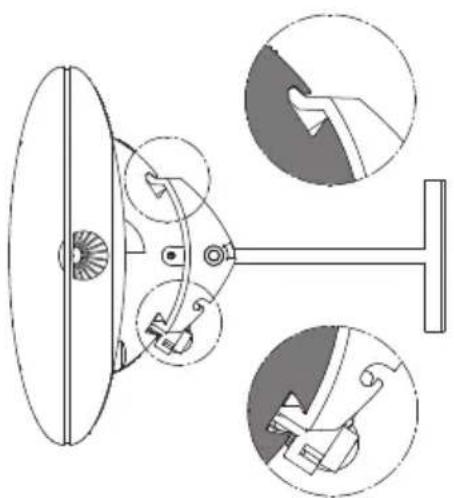
• Installation height: at least 1.80 m above the ground - The radiator must be installed with the hammer groove upwards.
- The hammer groove can be seen opposite to the connecting lead in view of the housing side.
natural_image
Technical diagram of a mechanical device with three circular insets showing close-ups of components (no text or labels)During mounting always up
During mounting always down
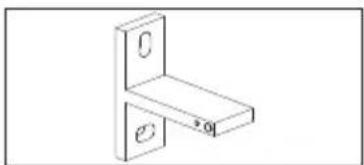
Step 1: Installing the T-bracket
natural_image
Isometric line drawing of a 3D mechanical bracket with labeled points C and O (no text or symbols beyond labels)• Install the radiant heater using 2 T brackets at a separation of 400 mm while observing the safety distances and safety instructions (see Appendix 2).
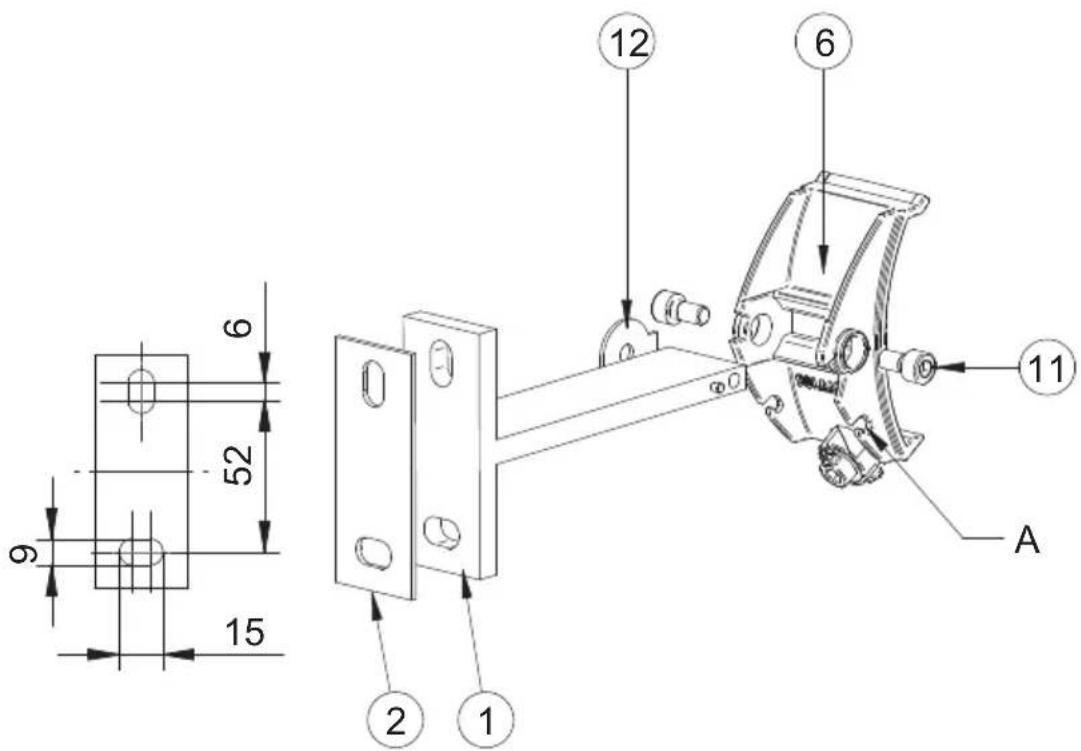
- Secure the T-bracket (1) with the silicone plate (2) below it on the fastening surface with 2 screws each according to the following figure. When wall-mounted the heater swivels to the horizontal, lower longitudinal hole side. When mounting on the ceiling/roof, the swivel range must be aligned for optimum heating effect towards the opposing longitudinal hole side (in contrast to the image below, swivel range 30^ ).
Step 2: Installing adapter claws on the T-brackets
- Fit adapter claws (6) at the two T-brackets mounted on the fastening surface, fit safety washer (12) between the T-bracket and adapter claw and screw in M6 socket cap screws (11) from outside into the T-bracket.
Step 3: Installing the heater on the T-brackets
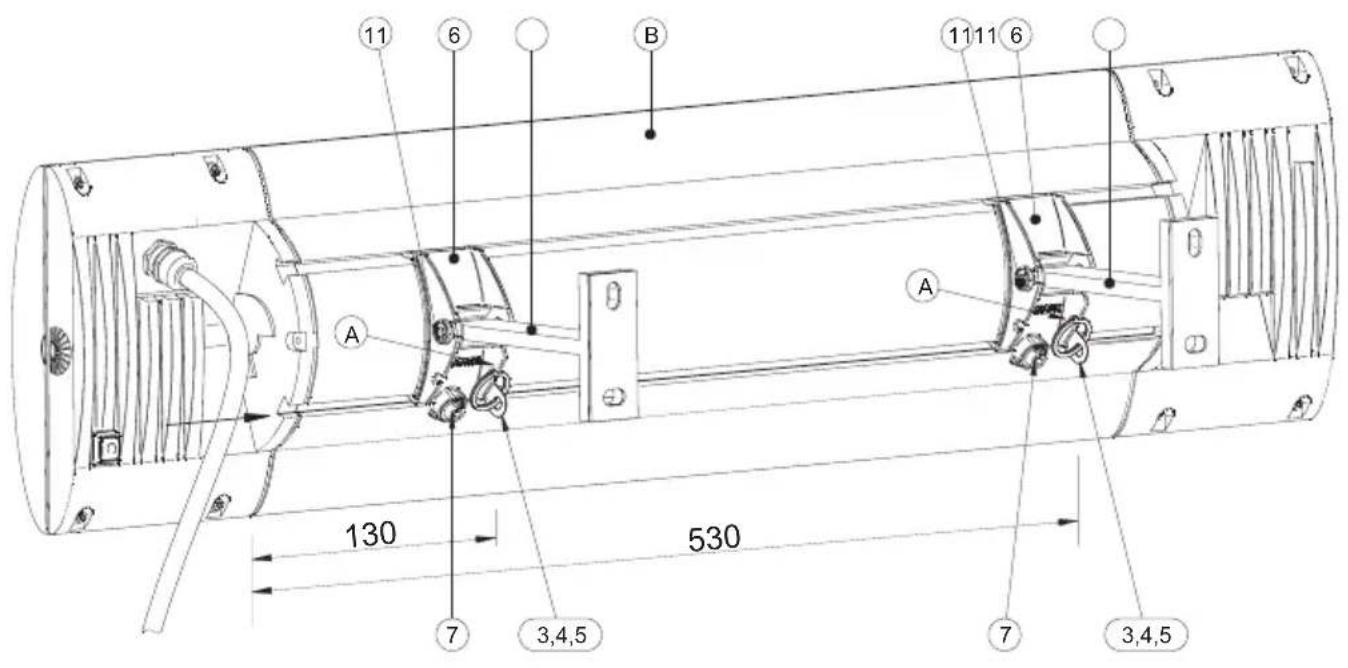
- Push the securing lugs (3) with the ring (4) from the left side into the dovetail groove for approx. 530 mm and 130 mm.
- Tighten the 3.5 × 6.5 screws (5).
- Mount the heater (B) in the adapter claws (6). The securing lugs must now be located directly alongside the adapter claws (6).
- Use a 5 mm Allen key to tighten the eccentric tensioner (7) in a clockwise direction; the radiant heater must be firmly connected to the adapter claws without any play. Attention: no screwing stop – do not over-tighten the eccentric tensioner!
- Hang each retaining ring (4) in the adapter claw (A).
- To set or adjust the direction of radiation, use a 5 mm Allen key to loosen the screws (11), shift the heater into the required direction and re-tighten the screws (11).
Initial operation
Warning: Completely remove the transport protection on the reflector.
Make the connection to the power supply (Schuko/mains plug).
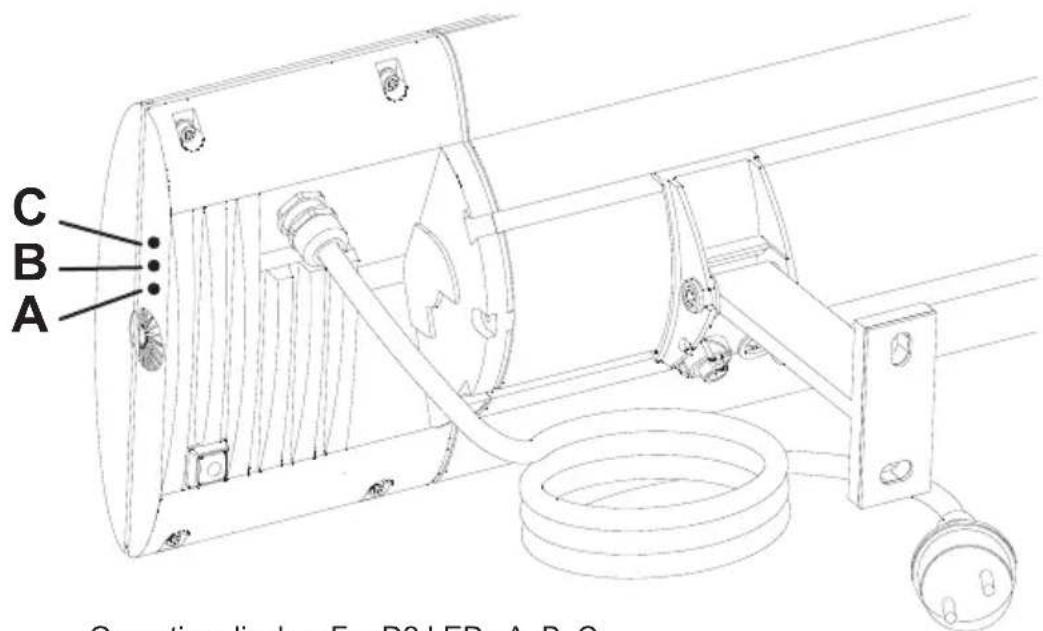
The tube has switched off, for device type D2 LED C flashes.
The wireless remote control must be programmed for operation, see the "Initial programming" section.
Operating display: For D2 LEDs A, B, C
Wireless remote control
For the device to be operated, you need the SOLAMAGIC FUS6 wireless remote control which can be purchased from your distributor.
Assign a key on the hand-held transmitter for heat regulation.
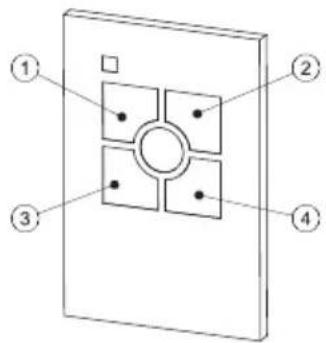
Key assignment: Keys 1-4: Wireless channel keys
Remote control: Transmission frequency: 433.92 MHz
Range: approx. 20 m with an unimpeded path through air
Programming the wireless remote control
Important:
- Only those heaters should be connected to the mains that are to undergo programming to a hand-held transmitter key. This allows the programming of several receivers (multi-power). Previously programmed devices can remain connected to the mains.
- Use of other components with a wireless-signal interface (e.g. wireless PC mouse and keyboard) may result in faulty operation of the wireless receiver. Switch off all other wireless components, particularly when programming.
- For device type D2, the LED operating display supports program progress:
LED A: Programming mode
LED B: Time switching
LED C: Wireless transmission blocked - The wireless receiver is briefly disabled after command entry using the hand-held transmitter.
Initial
programming: The heater to be programmed is connected to the mains (LED C flashes quickly). Brief pressing of the desired key 1 to 4 on the hand-held transmitter triggers wireless receiver programming, heating tube starts at low level (LED A flashes quickly). Repeated pressing of the same key confirms the programming, heating tube switches to top level (LED A flashes quickly). If desired, time-out switching can be programmed by double-clicking: If the programmed key is pressed briefly twice in succession, the heater will switch off in 30 minutes, the heating tube activates for 2 seconds (LED B flashes quickly). Double-clicking again increases the heating duration to 60 minutes, heating tube illuminates for 4 seconds (LED B flashes at medium speed). Double-clicking again increases the shut-down to 90 minutes, heating tube illuminates for 6 seconds (LED B flashes slowly). Double-clicking once more switches the time control off. The programming cycle for time-out switching begins again from the beginning. Programming is ended by long pressing of the programmed key of the hand-held transmitter. The heating tube confirms that programming is completed by operating for two seconds (all three LED's light up briefly).
Multiple
programming: It is possible to program radiant heaters on up to eight keys on one or more hand-held transmitters (multi-control).
Connect the relevant heaters to the mains. As described under „Initial programming“, the key to be programmed is briefly pressed, heating tube starts at low level (LED A flashes quickly). Repeatedly pressing ensures that the heating tube goes to full level (LED A flashes quickly).
Then the next key is activated by brief pressing, the heating tube returns to the low level (LED A flashes quickly) and programs the following confirmation, the heating tube goes to full level; LED A flashes quickly).
Then the next key is activated by brief pressing, the heating tube returns to the low level (LED A flashes quickly) and programs the following confirmation, the heating tube goes to full level; LED A flashes quickly). This process is repeated until all the desired buttons on all the desired hand-held transmitters are programmed.
The multiple programming is ended by long pressing of a key on one hand-held transmitter. The heating tube goes off and then on for 2 seconds (all three LEDs illuminate briefly).
Safety
switch-off: The radiant heater always remains switched off after a power outage.
Reprogramming
Selective
deletion: Previously programmed radio receivers can be deleted and
reprogrammed using the corresponding hand-held transmitter. To do this, press and hold buttons 1 and 2 of the hand-held transmitter simultaneously (longer than 3 seconds) until the red control lamp on the hand-held transmitter illuminates. Deletion is now enabled. Now release the buttons and directly thereafter briefly press that key with which the wireless receiver was operated up until now.
The control lamp on the hand-held transmitter flickers briefly when the deletion signal is sent. The heating tube switches to low level and then off (LED A flashes continuously). The wireless receivers enter the on-state and then switch off and on again.
These receivers can now be reprogrammed as described under „Programming“ above.
Complete
deletion:
Note:
This action deletes all receivers that are within range of the hand-held transmitter.
Programmed wireless receivers can also be deleted (reset) upon loss of a hand-held transmitter or if it becomes defective. The deletion process is only possible within 180 seconds of connection to the mains of the receiver in question. (If necessary, disconnect the receiver from the mains and then reconnect.) To delete, hold buttons 1 and 2 of the hand-held transmitter pressed down (longer than 3 seconds). When doing so, the red control lamp on the hand-held transmitter only illuminates once deletion is enabled. Now release the keys and directly thereafter briefly press both keys simultaneously for about 1 second.
The control lamp on the hand-held transmitter flickers briefly when the deletion signal is sent. The heating tube switches to low level and then off (LED A flashes continuously).
These receivers can now be reprogrammed as described under „Programming“ above.
Operation
via wireless remote control
Switching
on/off: Brief pressing of the programmed wireless channel button on the hand-held transmitter switches the connected radiant heater on or off (LED A: Operating display).
Short-term
heating: Double-clicking the programmed wireless channel key switches the radiant heater on for 15 minutes and then automatically switches it off again.
Heating level: Extended pressing of the programmed key on the hand-held transmitter switches the heat output up and down between three levels (33, 66 and 100%). The LEDs signal the selected heat levels.
Memory-
function: Upon switching back on, a short press of the key recalls the last heating level.
Timed
switch off: If a timed switch-off has been programmed, the radiant heater always switches off automatically after the specified time. The radiant heater signals as follows after the activating the set residual run time: Signal duration 2s (Quick flashing LED B) - 30 min. residual run time Signal duration 4s (Normal flashing LED B) - 60 min. residual run time Signal duration 6s (Slow flashing LED B) - 90 min. residual run time If necessary for radiant heater D2, LED B signals the remaining running time every minute by flashing intervals. Each flashing interval indicates 15 minutes remaining heating duration.
Synchronisation: If multiple radiant heaters are controlled using the same hand-held transmitter button, faults in the wireless transmission path can result in different states. For synchronisation, use the function „Heating level“ to initially set all radiant heaters in switched-on state. Then switch off all receivers by a briefly pressing the key. The „Heating level“ function can now be used to simultaneously set again all the actuated receivers.
Direct operation with device button
Warning: Risk of burns from hot housing parts.
The radiator can be directly operated via the device button on the device back as soon as the wireless remote control is programmed. The following functions are available:
Switching
on/off: Pressing the device button for a short time switches the connected radiant heater on or off (LED A: Operating display).
Heating level: Pressing the device button for an extended time switches the heat output up and down between three levels (33, 66 and 100% ). (The LEDs signal the selected heat levels).
Memory-
function: Upon switching back on, a short press of the key recalls the last heating level.
Changing the battery of the hand-held transmitter:
Warning: Do not touch the battery directly with the skin.
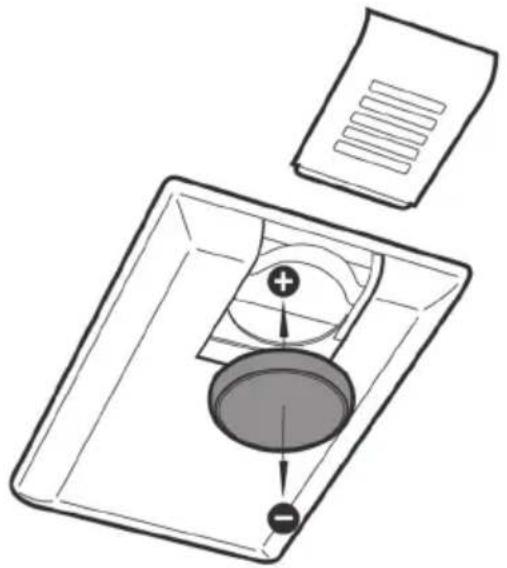
Open the housing cover. Push the battery out sideways from the clamped position and remove. Insert the new battery (plus to the top) and reassemble the unit in reverse order.
natural_image
Diagram of a mechanical assembly with a tray, circular component, and paper (no text or symbols)Cleaning instructions
- Disconnect the device from the mains.
- Allow the casing to cool.
- Wipe the casing clean with a moist, soft cloth. Do not use any detergent.
Never immerse the device in liquids nor spray-wash it. Possible discolouration of the protective grille due to heat effects results from normal physical processes and is not a defect.
Guarantee conditions for S2/D2 devices
We guarantee this heater in accordance with the following conditions:
- We will repair, free of charge, in accordance with the following provisions, damage or defects to the heater, which can be proven to be due to a factory defect, if they are reported to us immediately upon discovery on the heater and within 5 years of delivery to the end user. The duration of the guarantee for the heating tube is 12 months up to a maximum 5000 operating hours within this period. The guarantee does not cover minor deviations from the design properties that are irrelevant for the value and usability of the heater or damage caused by abnormal environmental conditions or unsuitable operating conditions. Likewise no guarantee can be given if the damage or defects on the heater arise from faulty installation or failure to observe the operating instructions.
- The guarantee is fulfilled in that defective heaters will be repaired, or replaced by flawless heaters, at our discretion, and free of charge. Heaters, for which a performance of guarantee is claimed with reference to this guarantee, must be handed over or sent to the manufacturer or an authorised service centre. The sender is liable for the transport risk associated with the sending. The shipping, transport, travel and labour costs of the end user are not refunded. Proof of purchase with the date of purchase and/or delivery date plus a detailed description of the fault must always be presented. Replaced heaters become our property.
- Any guarantee claim becomes void if repairs or adjustments are made by persons who are not authorised by us or if our heaters are provided with spare parts, supplementary parts or accessories that are not original parts, and have caused a defect. The same applies if the name plate or the device number has been removed or rendered illegible.
- Excluded from this guarantee are damages or defects from incorrect connection, improper handling, mechanical damage, particularly to the heating tube, and failure to observe the installation and operating instructions. We accept no liability for consequential damage.
- Guarantee performances do not extend the guarantee period nor do they initiate a new guarantee period. The guarantee period for any fitted spare parts ends with the guarantee period for the device as a whole. If a defect or deficiency cannot be eliminated or the rectification of defects is declined by us or unreasonably delayed, an equivalent replacement will be delivered, free of charge, upon request of the customer. In case of replacement, we reserve the right to enforce a reasonable usage charge for time of use up until the time of replacement.
- The guarantee only comes into force when the customer has registered their device with the manufacturer by means of the guarantee card.
These guarantee conditions apply from 01/01/2014 for heaters purchased in a country of the European Union, even if you use it in a foreign country. The guarantee conditions have no effects on the statutory guarantee claim.
Additional instructions
Subject to technical changes.
For more products and accessories
from SOLAMAGIC ^® , see:
www.SOLAMAGIC.com
Please note the following terminology in the appendix:
Appendix 1: Technical data
| 0 | Heater type | 5 | Dimensions Length x Width x Height (mm) |
| 1 | Power (W) | 6 | Weight (kg) |
| 2 | Power connection | 7 | Average service life (h) |
| 3 | Degree of protection | 8 | Distance (mm) |
| 4 | Protection rating | 9 | Approvals |
Appendix 2: Safety distances
| 0 | Heater type D Floor / heater distance | ||
| 1 | Wall mounting, horizontal A1 | Distance to the irradiated surface | |
| 2 | Minimum distances in mm A2 Distance to the socket | socket | |
| 3 | Heater power A3 Distance to the side wall | ||
| 4 | Ceiling mounting A4 Distance to overhead ceiling | ceiling | |
| α | Adjustment range A5 Distance to ceiling behind |
Appendix 3: Radiation diagrams
| 1 | Maximum capacity | 2 | Heated surface |
natural_image
Exterior view of a black cylindrical device with a grid-patterned panel and 'SOLA MAGIC' branding (no additional text or symbols visible)natural_image
Technical line drawing of a mechanical device with three circular insets showing close-ups of components (no text or symbols)natural_image
Isometric line drawing of a 3D mechanical bracket with labeled points C and O (no text or symbols beyond labels)natural_image
Diagram of a mechanical assembly with a tray, circular component, and paper (no text or symbols)natural_image
Exterior view of a black cylindrical device with grid pattern and 'SOLA MAGIC' label (no other text or symbols)natural_image
Technical line drawing of a mechanical device with three circular insets showing different components (no text or symbols)natural_image
Isometric line drawing of a 3D mechanical bracket with mounting holes (no text or symbols)natural_image
Diagram of a mechanical assembly with a tray, circular component, and paper (no text or symbols)natural_image
3D rendering of a cylindrical device with a grid pattern and 'SOLA MAGIC' label, no readable text or symbols beyond the label.natural_image
Technical line drawing of a mechanical device with three circular insets showing different components (no text or symbols)natural_image
Isometric line drawing of a 3D mechanical bracket with mounting holes (no text or symbols)natural_image
Diagram of a mechanical assembly with a tray, central component, and paper (no text or symbols)natural_image
Exterior view of a black cylindrical device with a grid pattern and 'SOLA MAGIC' label (no other text or symbols visible)natural_image
Technical line drawing of a mechanical device with three circular insets showing close-ups of components (no text or symbols)natural_image
Isometric line drawing of a 3D mechanical bracket with labeled points C and O (no text or symbols beyond labels)natural_image
Diagram of a mechanical assembly with a tray, central component, and paper (no text or symbols)natural_image
Exterior view of a black cylindrical device labeled 'SOLAMAGIC' with internal grid structure (no additional text or symbols)natural_image
Technical line drawing of a mechanical assembly with three circular insets showing different components (no text or symbols)natural_image
Isometric line drawing of a mechanical bracket with mounting holes (no text or symbols)Programovanie dial'kového ovládania rádia
Dôležité:
natural_image
Diagram of a mechanical device with a central component and two parts stacked, no visible text or symbolsPokyny k čisteniu
Technical data, safety distances, radiation patterns
Annexes
natural_image
Technical line drawing of a mechanical assembly with no visible text or symbols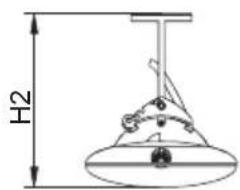
Zeichen:
Marking:
05/2018

Wandmontage, horizontal – Wall mounting, horizontal ①