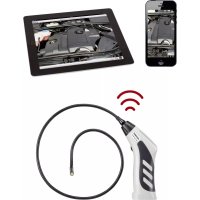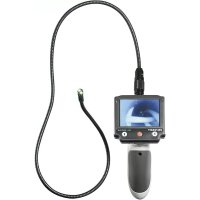
BS200XW - Endoscope VOLTCRAFT - Free user manual and instructions
Find the device manual for free BS200XW VOLTCRAFT in PDF.



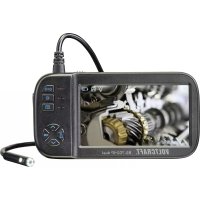
| Product Type | Digital Endoscope |
| Brand | Voltcraft |
| Model | BS200XW |
| Dimensions (L x H x D) | 90 x 205 x 131 mm |
| Weight | approx. 430 g |
| Power Supply | 4 AA 1.5 V batteries (not included) |
| Power Consumption | max. 400 mA |
| Display Type | TFT 8.9 cm (3.5") |
| Display Resolution | 320 x 240 pixels |
| Camera Resolution | 640 x 480 pixels |
| Video Format | PAL |
| Illumination | 4 LEDs, max. 1200 Lux at 20 mm |
| Field Angle | 54° |
| Depth of Field | 3 to 6 cm |
| Gooseneck Length | 88 cm ± 2 cm |
| Camera Diameter | 8 mm |
| Minimum Bending Radius | 45 mm |
| Operating Temperature | 0 to +45 °C |
| Storage Temperature | -10 to +50 °C |
| Included Accessories | 3 accessories (magnet, hook, mirror), transport case, monitor strap, video cable, monitor cable, instruction manual |
| Main Functions | LED brightness adjustment, image rotation, detachable display, TV connection |
| Maintenance and Cleaning | Clean with a non-linting antistatic cloth; rinse and dry the camera after use in a liquid |
| Safety | Camera head waterproof up to the "MAX Water Level" mark, base unit not waterproof; use only on de-energized installations |
| Spare Parts and Repairability | Compatible accessories available (cameras, extensions, accumulators, strap) |
| General Information | Instruction manual provided; updates available online |
Frequently Asked Questions - BS200XW VOLTCRAFT
User questions about BS200XW VOLTCRAFT
0 question about this device. Answer the ones you know or ask your own.
Ask a new question about this device
Download the instructions for your Endoscope in PDF format for free! Find your manual BS200XW - VOLTCRAFT and take your electronic device back in hand. On this page are published all the documents necessary for the use of your device. BS200XW by VOLTCRAFT.
USER MANUAL BS200XW VOLTCRAFT
- Introduction 15
- Intended Use 15
- Delivery content 16
- Latest product information 16
- Symbol explanation 16
- Safety instructions 17
a) General. 17
b) Persons / Product 18
c) (Rechargeable) batteries 18
- Operating elements 19
- Inserting / replacing batteries 20
- Connecting camera 20
- Basic functions 20
- Detachable display 21
- Monitor wristband 22
- Connecting to a TV 22
- Care and cleaning 22
- Disposal 23
a) Product 23
b) (Rechargeable) batteries. 23
- Technical data 24
- Matching accessories 25
1. Introduction
Dear customer,
Thank you for purchasing this product.
This product complies with the statutory national and European requirements.
To maintain this status and to ensure safe operation, you as the user must observe these operating instructions!

These operating instructions are part of this product. They contain important notes on commissioning and handling. Also consider this if you pass on the product to any third party. Therefore, retain these operating instructions for reference!
If there are any technical questions, please contact:
www.conrad.com/contact
2. Intended Use
The endoscope is a visual aid for optical troubleshooting and inspection at powered-down systems and facilities. The camera image is displayed on the integrated TFT monitor, and the lighting in the tip of the camera can be controlled. A PAL video output is available. The swan neck camera is water-tight and suitable for use in watery liquids (no acids or lye). The basic device must not be exposed to humidity or submersed. Power is supplied via four AA batteries (not included). Operation in explosive atmospheres or use with persons and animals is not permissible.
For safety and approval purposes, you must not rebuild and/or modify this product. If you use the product for purposes other than those described above, the product may be damaged. In addition, improper use can cause hazards such as short circuiting, fire, electric shock etc. Read the instructions carefully and keep them. Make this product available to third parties only together with its operating instructions. All company names and product names are trademarks of their respective owners. All rights reserved.

Observe all safety instructions and information within this operating manual.
3. Delivery content
Endoscope
- Carry box
Video cable
- Monitor cable
- 3 × attachments (magnet, hook, mirror)
Monitor wristband - Operating instructions
4. Latest product information
Download the latest product information at www.conrad.com/downloads or scan the QR code shown. Follow the instructions on the website.

5. Symbol explanation

An exclamation mark in a triangle indicates important instructions in this operating manual which absolutely have to be observed.

The symbol can be found when you are to be given tips and information on operation.
6. Safety instructions

Read the operating instructions carefully and especially observe the safety information. If you do not follow the safety instructions and information on proper handling in this manual, we assume no liability for any resulting personal injury or damage to property. Such cases will invalidate the warranty/ guarantee.
a) General
- The device is not a toy. Keep it out of the reach of children and pets.
- Do not leave packaging material lying around carelessly. This may become dangerous playing material for children.
- Protect the product from extreme temperatures, direct sunlight, strong jolts, high humidity, moisture, flammable gases, vapours and solvents.
- Do not place the product under any mechanical stress.
-
If it is no longer possible to operate the product safely, take it out of operation and protect it from any accidental use. Safe operation can no longer be guaranteed if the product:
-
is visibly damaged,
- is no longer working properly,
- has been stored for extended periods in poor ambient conditions or
-
has been subjected to any serious transport-related stresses.
-
Please handle the product carefully. Jolts, impacts or a fall even from a low height can damage the product.
- Also observe the safety and operating instructions of any other devices which are connected to the product.
- Consult an expert when in doubt about operation, safety or connection of the device.
- Maintenance, modifications and repairs are to be performed exclusively by an expert or at a qualified shop.
- If you have questions which remain unanswered by these operating instructions, contact our technical support service or other technical personnel.

b) Persons / Product
- The device is a precision tool. Do not drop it and do not subject it to any impacts.
- The basic device is not water-tight and therefore cannot be used underwater.
- The endoscope must only be used for inspection in powered-down systems. The camera head is made of metal and can lead to short-circuit.
- For reasons of safety, power down all system parts before any inspection.
- Always store the endoscope and its accessories in the case when not using them.
- Sensitive surfaces (with furniture polish, etc.) may cause chemical reactions with the casing.
- Avoid strong mechanic stress or vibration.
- Keep the device out of reach of children. It is not a toy.
- Do not leave packaging material unattended. This could become a dangerous toy in the hands of children.
- On industrial sites, the accident prevention regulations of the association of the industrial workers' society for electrical equipment and utilities must be followed.
- Never switch on the device immediately after it has been taken from a cold to a warm environment. Under adverse conditions, the resulting condensation could destroy the device. Allow the device to reach room temperature before switching it on.
- Observe also the additional safety instructions in each chapter of these operating instructions as well as in the operating instructions of the connected devices.
c) (Rechargeable) batteries
- Correct polarity must be observed while inserting the (rechargeable) batteries.
- (Rechargeable) batteries should be removed from the device if it is not used for a long period of time to avoid damage through leaking. Leaking or damaged (rechargeable) batteries might cause acid burns when in contact with skin, therefore use suitable protective gloves to handle corrupted (rechargeable) batteries.
- (Rechargeable) batteries must be kept out of reach of children. Do not leave (rechargeable) batteries lying around, as there is risk, that children or pets swallow them.
- All (rechargeable) batteries should be replaced at the same time. Mixing old and new (rechargeable) batteries in the device can lead to (rechargeable) battery leakage and device damage.
- (Rechargeable) batteries must not be dismantled, short-circuited or thrown into fire. Never recharge non-rechargeable batteries. There is a risk of explosion!
7. Operating elements
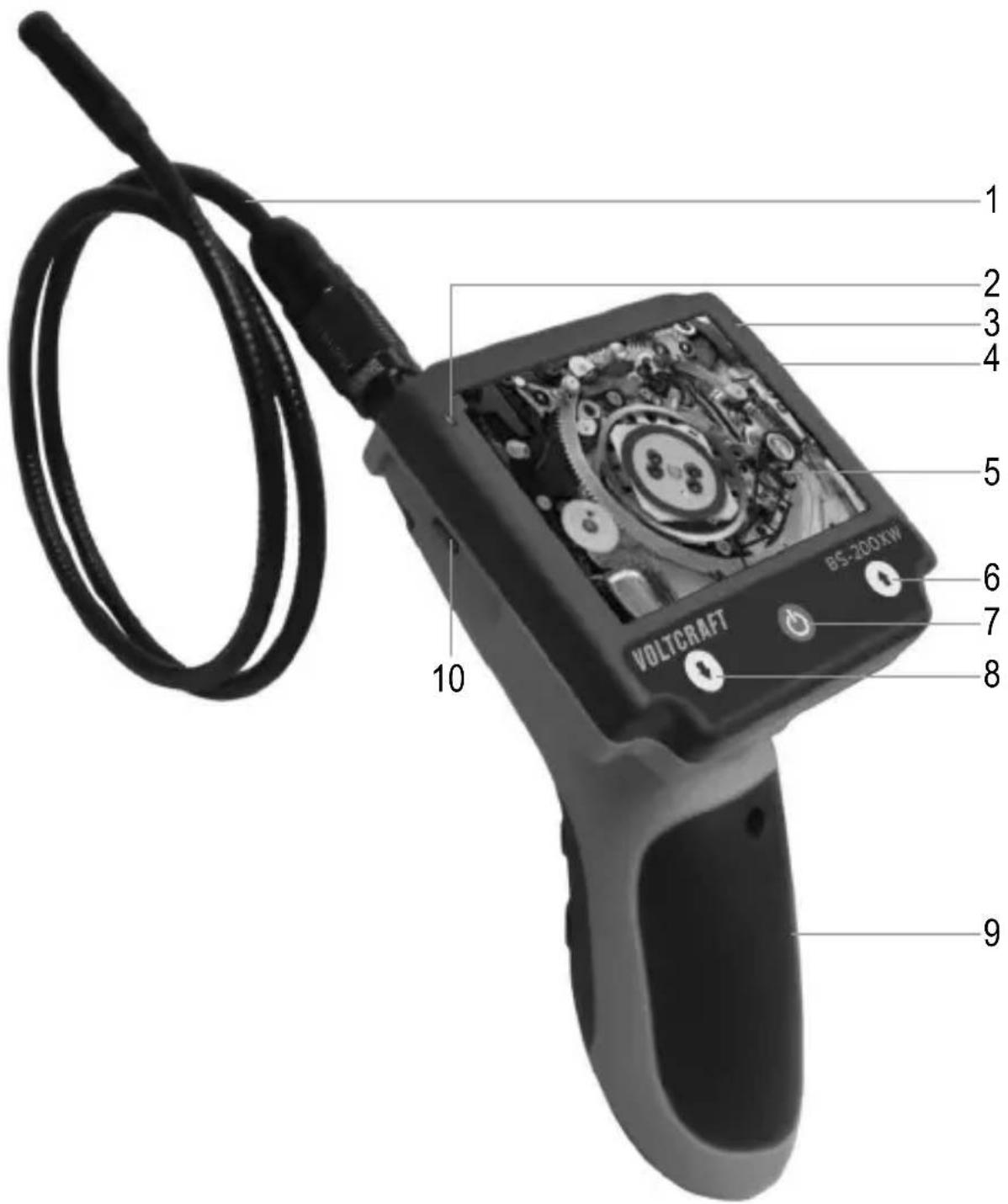
1 Goosenck
2 Battery LED
3 Power LED
4 Video output
5 Monitor
6 Button ↑
7 Button on/off
8 Button ↓
9 Battery compartment
10 microUSB port
8. Inserting / replacing batteries
- Loosen the screw using a Phillips screwdriver and take off the cover of the battery compartment.
- Remove the battery holder from the battery compartment.
- Insert four AA batteries into the battery holder, observing the polarity markings inside the battery holder bays.
- Put the battery holder back into the battery compartment, observing the polarity markings on the top of the battery holder and inside the battery compartment.
- Close the battery compartment again.

Replace the batteries when the battery LED is on.
9. Connecting camera
- Connect the plug of the gooseneck camera to the socket on the base unit. The protruding metal tongue on the camera's plug should be facing the recess on the front side of the socket.
- Slide the screw cap upwards, toward the camera and screw the screw cap counter-clockwise to fasten the camera.
- Follow these steps in reverse order when disconnecting the camera from the base unit.
10. Basic functions

Only immerse the camera head and camera neck in liquids that are voltage free! The camera neck is not to be submerged further than the marking "MAX Water Level".
The endoscope may only be used for inspection of dead systems. The camera head is made of metal and can lead to short circuits. For safety reasons, disconnect all system parts from the power supply before every inspection.
Avoid strong mechanical strains or vibrations. Make sure you never go below the minimum bending radius of 45mm .
- Press the on/off button to switch the device on. The power LED will turn on and the camera image will appear in the monitor.
-
Two LEDs are integrated in the camera head.
-
Press the button up to increase the brightness of the LEDs.
- Press the button to reduce the brightness of the LEDs or to turn the lighting off entirely.
Set the lighting so that the camera image displayed is neither overexposed nor underexposed.
3. Press the buttons and simultaneously to rotate the image by 180^ .
Attachments
1 If required, mount one of the three attachments (magnet, hook, mirror) into the small recess 1. below the camera head.
2 Before use, ensure that the mounting ring of the attachment is locked.
Ring bolt
There is a ring bolt fitted above the monitor. Attach this bolt to a carrying strap (not included), if required, to facilitate hands-free operation.
11. Detachable display
You can detach the display from the endoscope, if required. The camera picture will then be transmitted via the monitor cable to the display. For this, proceed as follows:
- Slide the display upwards, toward the gooseneck, and remove the display.
- Connect the micro USB plug of the monitor cable to the matching connection on the left side of the display unit.
- Connect the monitor cable's mini USB plug to the matching connection on the endoscope. This connection can be found where previously the display was attached.
- Now turn the endoscope on. The camera picture appears on the display.
12. Monitor wristband
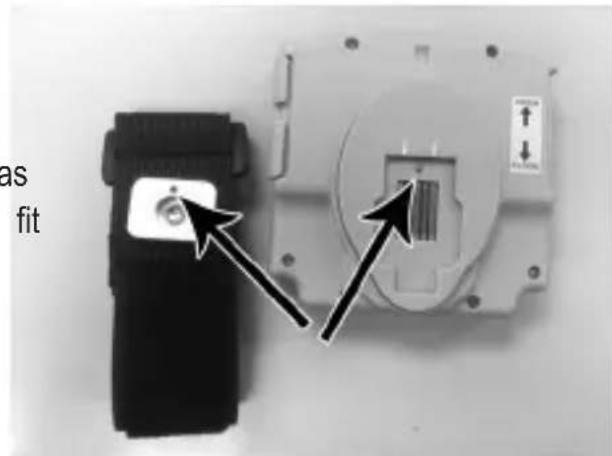
- Unwrap the wristband, position and fasten it on your arm.
- Mount the detachable display on the metal plate. Observe the correct orientation, as the metal point on the display should fit into the hole on the plate. Slide the display downwards to lock it onto the wristband.
13. Connecting to a TV
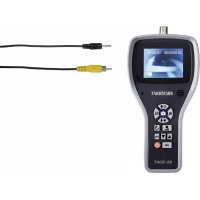
Connect the video cable jack with the matching socket on the endoscope and connect the cinch plug with the video input of the TV set. The endoscope monitor and the TV will display the image.
14. Care and cleaning
- The device requires no servicing on your part apart from occasional cleaning. Only use a soft anti-static and lint-free cloth for cleaning.
- Do not use abrasive or chemical cleaners.
- Flush the gooseneck camera thoroughly with clean water after each use in liquids and dry it off before returning it to the case.
- To clean the camera lens, use a small brush or cotton swab.
15. Disposal
a) Product
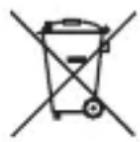
This symbol must appear on any electrical and electronic equipment placed on the EU market. This symbol indicates that this device should not be disposed of as unsorted municipal waste at the end of its service life.
Owners of WEEE (Waste from Electrical and Electronic Equipment) shall dispose of it separately from unsorted municipal waste. Spent batteries and accumulators, which are not enclosed by the WEEE, as well as lamps that can be removed from the WEEE in a non-destructive manner, must be removed by end users from the WEEE in a non-destructive manner before it is handed over to a collection point.
Distributors of electrical and electronic equipment are legally obliged to provide free take-back of waste. Conrad provides the following return options free of charge (more details on our website):
in our Conrad offices
- at the Conrad collection points
- at the collection points of public waste management authorities or the collection points set up by manufacturers or distributors within the meaning of the ElektroG
End users are responsible for deleting personal data from the WEEE to be disposed of.
It should be noted that different obligations about the return or recycling of WEEE may apply in countries outside of Germany.
b) (Rechargeable) batteries
Remove batteries/rechargeable batteries, if any, and dispose of them separately from the product. According to the Battery Directive, end users are legally obliged to return all spent batteries/rechargeable batteries; they must not be disposed of in the normal household waste.

Batteries/rechargeable batteries containing hazardous substances are labelled with this symbol to indicate that disposal in household waste is forbidden. The abbreviations for heavy metals in batteries are: Cd = Cadmium, Hg = Mercury, Pb = Lead (name on (rechargeable) batteries, e.g. below the trash icon on the left).
Used (rechargeable) batteries can be returned to collection points in your municipality, our stores or wherever (rechargeable) batteries are sold. You thus fulfil your statutory obligations and contribute to environmental protection.
Batteries/rechargeable batteries that are disposed of should be protected against short circuit and their exposed terminals should be covered completely with insulating tape before disposal. Even empty batteries/rechargeable batteries can contain residual energy that may cause them to swell, burst, catch fire or explode in the event of a short circuit.
16. Technical data
Operating voltage 4 x 1.5 V AA battery (not included)
Current consumption max. 400 mA
Display. 8.9 cm (3.5") TFT
Resolution. 320 x 240 pixels (monitor), 640 x 480 pixels (camera)
Video format .PAL
Camera lighting 4 LEDs (max. 1200 + / - 150 Lux at 20mm distance)
White balance.....automatic
Exposure automatic
Field of view. 540
Depth of field 3-6 cm
Operating temperature .0 to +45^
Operating humidity 15 - 85% RH
Storage temperature. -10 to +50^
Storage humidity. 15 - 85% RH
Gooseneck length. 88 cm ±2 cm
Camera 0.8 mm
Min. bend radius 45 mm
Dimensions (W× H× D) .90x205x131mm
Weight approx. 430 g
17. Matching accessories
Goosenck camera
| Item no.: 123 | 121 40921 | 1168801 | 1285871 | 1182109 | 4092 | 12 1209064 | ||
| Cameraø: | 5.5 mm | mm 5.5 mm | 6 mm | 8.0 mm | 8.0 mm | 9.8 mm | ||
| Length: 1 m | 1 m | 1 m 34, | 5 cm | 1 m 20 | m 20 m |
Gooseneck extension
| Item no.: | 123126 | 123130 |
| Length: | 1 m | 3 m |
Miscellaneous
| Rechargeable batteries | Carrying strap | Attachments (accessory set) for 8.0 mm camera | |
| Item no.: | 251020 | 123096 | 1496418 |
For more accessories, also see conrad.com
Table des matieres
Page
Chere cliente, cher client,
France (email): technique@conrad-france.fr
Copyright 2022 by Conrad Electronic SE.

This is a publication by Conrad Electronic SE, Klaus-Conrad-Str. 1, D-92240 Hirschau (www.conrad.com). All rights including translation reserved. Reproduction by any method, e.g. photocopy, microfilming, or the capture in electronic data processing systems require the prior written approval by the editor. Reprinting, also in part, is prohibited. This publication represents the technical status at the time of printing.
Copyright 2022 by Conrad Electronic SE.

Copyright 2022 by Conrad Electronic SE.