Kirin B1 Pro - Scooter Kugoo - Free user manual and instructions
Find the device manual for free Kirin B1 Pro Kugoo in PDF.



| Product type | Foldable electric scooter |
| Brand | Kugoo |
| Model | Kirin B1 Pro |
| Dimensions (folded) | 1040 x 205 x 720 mm |
| Dimensions (unfolded) | 1040 x 205 x 940 mm |
| Weight | 18 kg |
| Maximum load | 120 kg |
| Battery | Lithium, 10 Ah, 36 V |
| Charging time | 6 to 8 hours |
| Maximum speed | 25 km/h (limited to 20 km/h while riding) |
| Range (electric mode) | 40 ± 3 km |
| Range (assist mode) | 60 km |
| Motor | 250 W nominal |
| Brakes | Front and rear disc brakes |
| Wheel size | 12 inches |
| Frame material | Metal |
| Color | Black |
| Waterproof rating | IP54 |
| Operating temperature | -10 °C to 45 °C |
| Included accessories | Pedals, charger, keys, mudguard, manual |
| Main features | Quick folding, zero-speed start, cruise control, front/rear lighting, pedal assist |
| Maintenance | Check brakes and tire pressure (35-45 psi), do not oil brakes, store battery in a dry place |
| Safety | Helmet recommended, age 16-45 years, max weight 120 kg |
| Repairability | Spare parts available (pedals, brakes, battery, etc.); contact an authorized technician |
Frequently Asked Questions - Kirin B1 Pro Kugoo
User questions about Kirin B1 Pro Kugoo
0 question about this device. Answer the ones you know or ask your own.
Ask a new question about this device
Download the instructions for your Scooter in PDF format for free! Find your manual Kirin B1 Pro - Kugoo and take your electronic device back in hand. On this page are published all the documents necessary for the use of your device. Kirin B1 Pro by Kugoo.
USER MANUAL Kirin B1 Pro Kugoo
natural_image
Abstract orange geometric shape on dark background (no text or symbols)KUGOO

KIRIN B1PRO
KUGOO KIRIN SMART E-BIKE B1PRO English、Polish、Italian、Spanish、German、French、Dutch INSTRUCTION
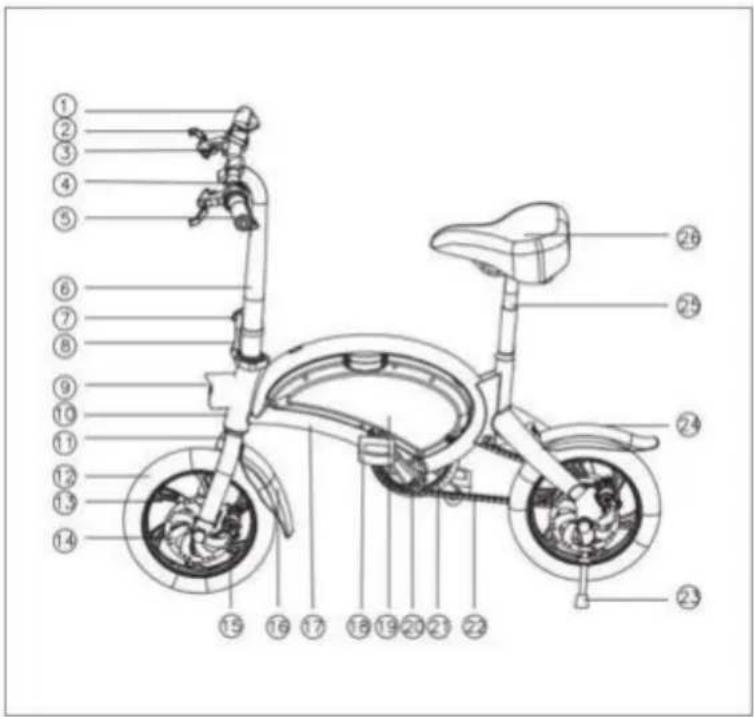
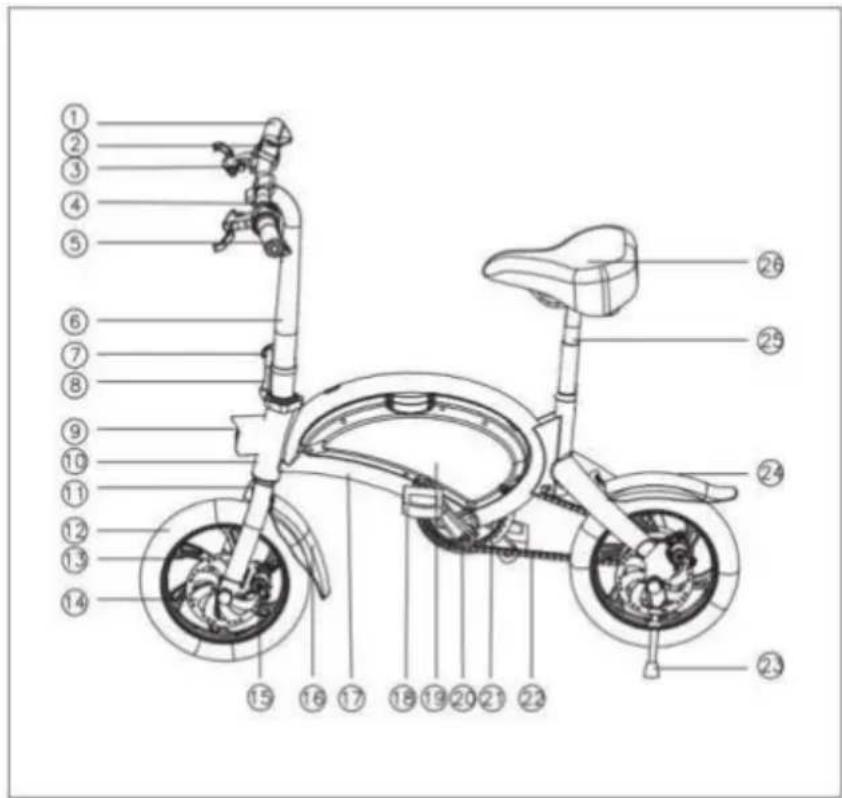
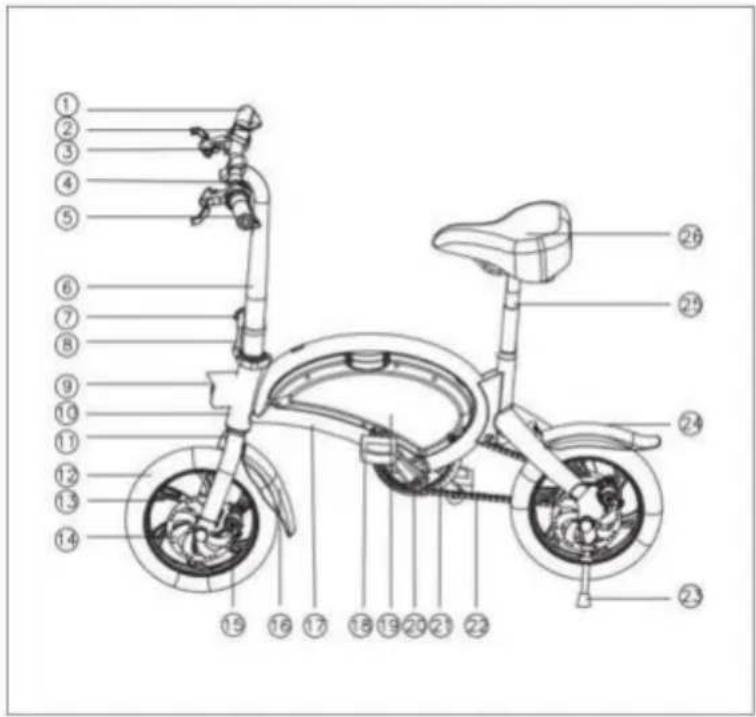
PRODUCT FUNCTION DIAGRAM
text_image
Technical diagram of a bicycle with numbered parts for identification and assembly reference.-
Gear shift
-
Dash board
-
Brake handle
4.Handle bar
5.Power button
6.Standpipe
7.Vertical folding clasp
- Safety buckle
9.Front light
10.Head tube
11.The front fork
12.Tyre
13.Wheel hub
- Brake disc
15.Disc brake
16.Front fender
17.Frame
18.Pedal
19.Battery box
20.Crank
21.Chain wheel
22.Chain
23.Kickstand
- Back fender
25.Seat tube
26.Seat
Note: Some details of your bike may be little different from the above picture due to our product upgrading, which will not affect the usage.
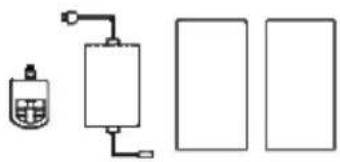
LIST OF ACCESSORIES
natural_image
Simple line drawing of a device with a container and two rectangular panels (no text or symbols)Pedal*2 Charger*1 Instruction*1
Warranty card*1
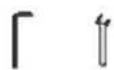
Inner hexagon spanner*1
15mm Single open wrench*1
Fender*1
Child seat^1(optional)
text_image
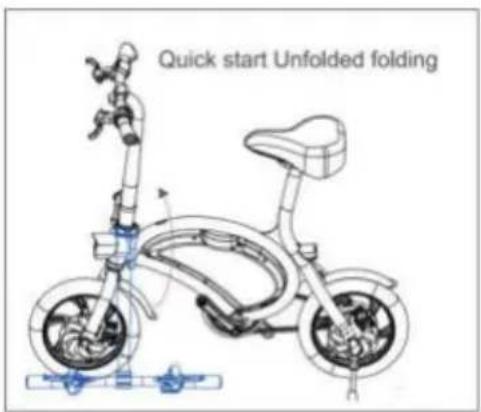
Quick start Unfolded folding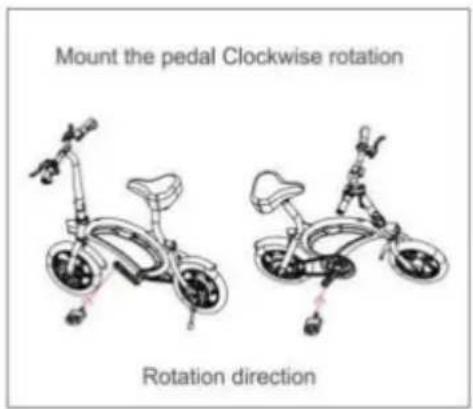
text_image
Mount the pedal Clockwise rotation Rotation directionFUNCTION
-
Installation: After unpacking, loosen the handle bar & quick release, adjust the horizontal handle to the right direction, lock the horizontal handle, and gently hold the brake lever several times, adjust the brake lines to the best condition.
-
On/off: Press the switch button on left handle bar to turn on the E-bike, the dash board will light up; Press the switch button again to turn off the E-bike.
-
Charging: Connect the charger to the power plug and then to the E-bike. When the charger indicator turns green from red, it shows full power.
-
Battery status: After booting, the dash board lights up and the electricity shows up, it has four grids, Corresponding to high power, medium power and low power respectively
-
Braking: Use disc brakes, you can not speed up before fully loosed.
-
Headlight: the headlight is in manual control mode, the control button under the meter, press it to turn on/off the light.
-
Rrear light: When braking, the rear light will blink slowly; In other conditions, the rear light will be synchronous with the front light.
-
Zero speed booting: When the E-bike on standby mode, you can accelerate with speeding bar.
-
Speed up: Please accelerate the Ebike slowly, do not twist the throttle bar too hard, in case of broken.
-
Cruise control: While riding, keep the handle stationary and ride at a constant speed for 8 seconds. If you release the handle, it can move at a constant speed. If you brake again or accelerate again, will cancel the cruise function.
-
Electric mode and Assisting mode: the default of the Ebike is assisting mode, only one gear. While it is assisting mode, also can use the electric mode.
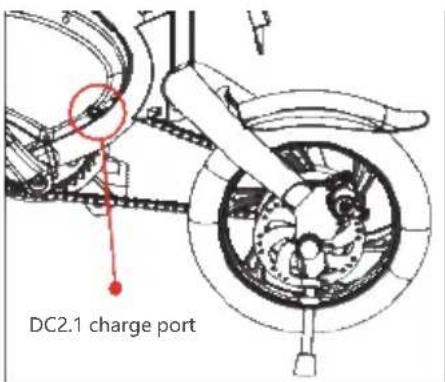
text_image
DC2.1 charge port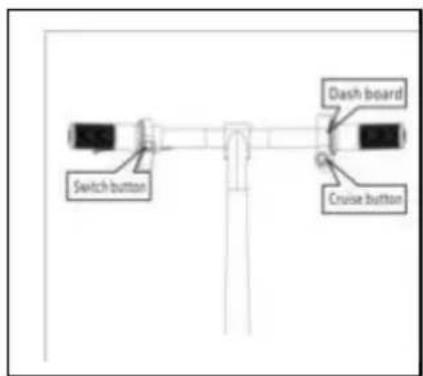
text_image
Switch button Dash board Cruise buttonPARAMETERS
| Size | Material Metal | |
| Folding size 1040*205*720mm | ||
| Released size 1040*205*940mm | ||
| Pedal height 80mm | ||
| Hub size 12inch | ||
| Package size 1050*220*650mm | ||
| Color Black | ||
| Performance | Weight 18kg | |
| Max load 120kg | ||
| Riding speed 20km/h | ||
| Max speed 25km/h | ||
| Mileage(pure electric) | 40±3km | |
| Assistant-Mileage 60km | ||
| Uphill 15 dcgrcc | ||
| Temperature -10~45°C | ||
| Waterproof IP54 | ||
| Standards | Battery 10Ah | |
| Rated power 250W | ||
| Rated voltage | 36V | |
| Charging voltage | DC42V | |
| Input voltage AC100~220V | ||
| BMS | Yes | |
| Charging time | 6-8H | |
| Features | App | Yes |
| Personal sticker | Optional | |
| Lights Yes/ Head light+ rear lgiht | ||
| Cruise | Yes | |
| Brake mode | Front and rear disc brakes | |
Remark: Many factors will affect the max speed, such as power, load, tyre pressure, road conditions, chain, lubrication degree etc. Mileage has been measured on basis of temperature 25°C, load of 60KG, speed of 15-20KM/H, smooth and hard road, and from full battery to dead battery. It also is subjected to other factors, such as driving habits, temperature, load, tyre pressure, road conditions etc."
CAUTION
Charge between 0 degree- 45 degree, rife between -20 degree to 60 degree, keep the battery dry. Don't put it in acid and alkalinity fluid. No rain, fire and heat. Don't put the battery positive an negative wrong. Don't damage disassemble the battery or use the wrong adapter. Don't charge it over 6 hours and don't charge it over 2A.
When not using for a long time, please put the battery in dry and cool place and charge it for 2 hours every 2 months. Follow the instruction or the user will be responsible for the consequence.
When charging, Please be careful of the battery type and voltage, place the battery in open air and don't put it under bright sun shine and closed space.
When charging, please place the battery first, then connect the electricity; after charging, cut the electricity then cut the battery plug. When the green light lights up, turn off the power, don't connect the battery when not charging.
When charging, if the indicating light goes wrong or some strange smell shows up or the charger is over hot, please stop charging immediately, them check and repair or replace the charger. When using or storing the charging. In case of something wrong were dropped into the charger, especially the water or other fluids, please don't take the charger when possible. Otherwise, be careful and put it in the cool box. No disassembling the charger yourself.
Please check the brake before riding.
Please brake the rear wheel first.
Be careful of the tightness of brake, use the hexagon wrench when it's loose.
Rainy and snowy days need longer braking distance.
Suitable age :16-45 years old.
Riding
Read the instruction first to know the product performance first.
Don't lend it to someone who is not familiar with it.
Wear a helmet when riding. Obey the traffic rules and don't ride it in the cars road. Don't riding it in the crowded road.
When go downhill or slippery road, the speed should be under 15km/h.
Inspect the Tyre before riding, Tyre pressure should be 35-45PSI.
Don't over impact the motor, keep the axle smooth.
Don't over load.(Max load is 120kg)
Please be careful of the adding distance when it under the rainy day and snow day.
Single-handed ride is prohibited.
Maintenance
The E-bike front and back wheel should be at the center of the frame.
Put the E-bike up after riding at cool and dry place.
Check the Motor and Brake often, don't inject the oil onto the brake.
Check the E-bike and screws and places that need fixing, fix it often.
Suggested torsion: Bar screws 60-80 kgf.cm, bar stand screws 175-200kgf.cm, wheel screws 320-450kgf.cm.
Check the Tyre is pierced and leaks air, please contact professional technician for repairing and replacing.
Responsibility announcement
All the product model, type and related information copy right and explain right are reserved.
This instruction is suitable for denoted models.
Any changing or replace part of the E-bike will not be informed again.
Read the instructions and follow the instructions or the user will be responsible for the damage.
SCHEMAT FUNKCJI PRODUKTU
text_image
Technical diagram of a bicycle with numbered parts for identification and assembly reference.1.zmiana biegów
2.wyświetlacz
3.uchwyt hamulca
4.uchwyt
5.włącznik
6.ramię widelca
natural_image
Pure electrical circuit lines without any symbolstext_image
Quick start Unfolded folding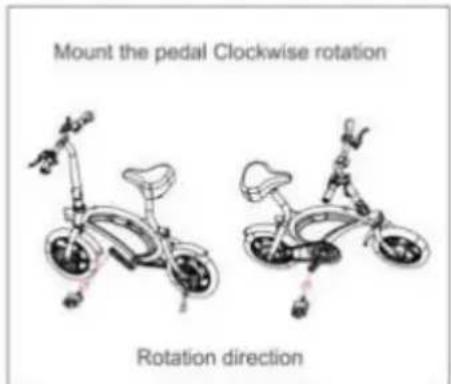
text_image
Mount the pedal Clockwise rotation Rotation directiontext_image
Switch button Dash board Cruise buttonPARAMETRY
text_image
Technical diagram of a bicycle with numbered parts for identification and assembly reference.1.Cambio di marcia
2.Cruscotto
natural_image
Simple line drawing of a gas collection system with a pump and three rectangular storage units (no text or symbols)text_image
Quick start Unfolded foldingtext_image
Mount the pedal Clockwise rotation Rotation directiontext_image
Switch button Dash board Cruise buttonPARAMETRI
text_image
Technical diagram of a bicycle with numbered parts for identification and assembly reference.1.Cambiodemarchas
- Tablerodeinstrumentos
3.Manijadefreno
4.Barra delamanija
5.Botóndeencendido
6.Tubo
- Cierredesplegable vertical
natural_image
Simple line drawing of a gas collection tank connected to three empty rectangular chambers (no text or symbols)text_image
Quick start Unfolded folding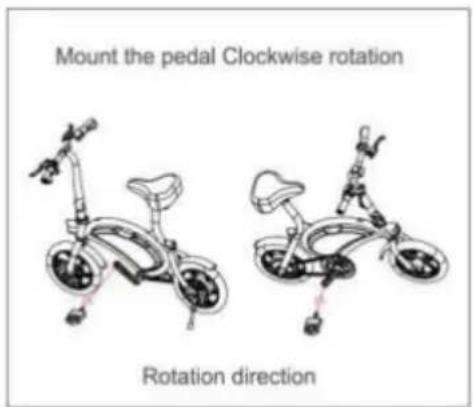
text_image
Mount the pedal Clockwise rotation Rotation directiontext_image
Switch button Dash board Cruise buttonPARÁMETROS
text_image
Technical diagram of a bicycle with numbered parts for identification and assembly reference.natural_image
Pure schematic diagram of a mechanical or electrical component with no text, numbers, or symbolstext_image
Quick start Unfolded folding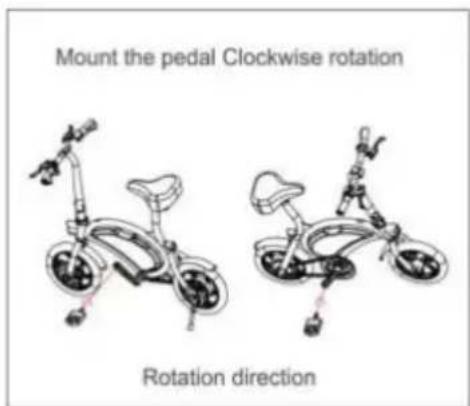
text_image
Mount the pedal Clockwise rotation Rotation directionFUNKTION
text_image
Switch button Dash board Cruise buttonPARAMETER
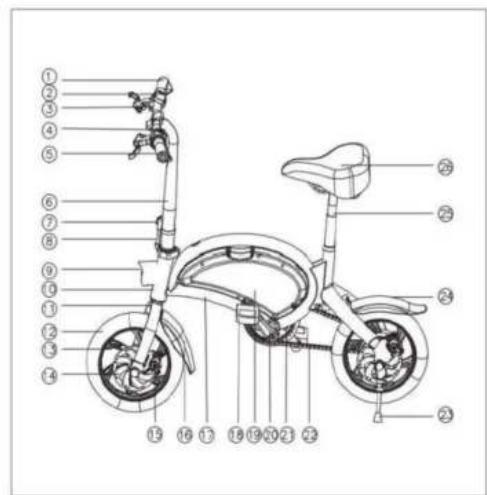
DIAGRAMME FONCTIONNEL DU PRODUIT
text_image
Labeled diagram of a bicycle with numbered parts for identificationnatural_image
Simple line drawings of various objects and containers (no text or symbols)text_image
DC2.1 Port de charge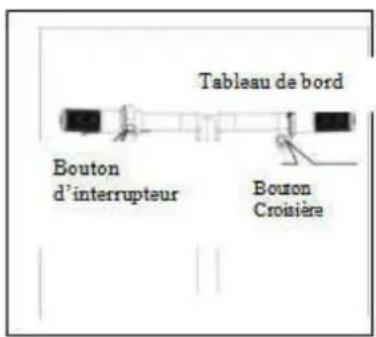
PRODUCT FUNCTIESCHEMA
text_image
Technical diagram of a bicycle with numbered parts for identification and assembly reference.text_image
Quick start Unfolded folding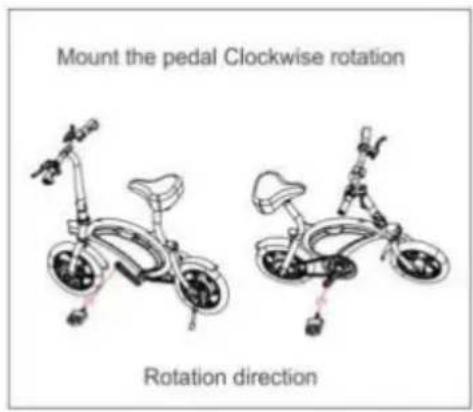
text_image
Mount the pedal Clockwise rotation Rotation directiontext_image
Switch button Dash board Cruise buttonPARAMETERS