14.1504 - Food thermometer TFA - Free user manual and instructions
Find the device manual for free 14.1504 TFA in PDF.

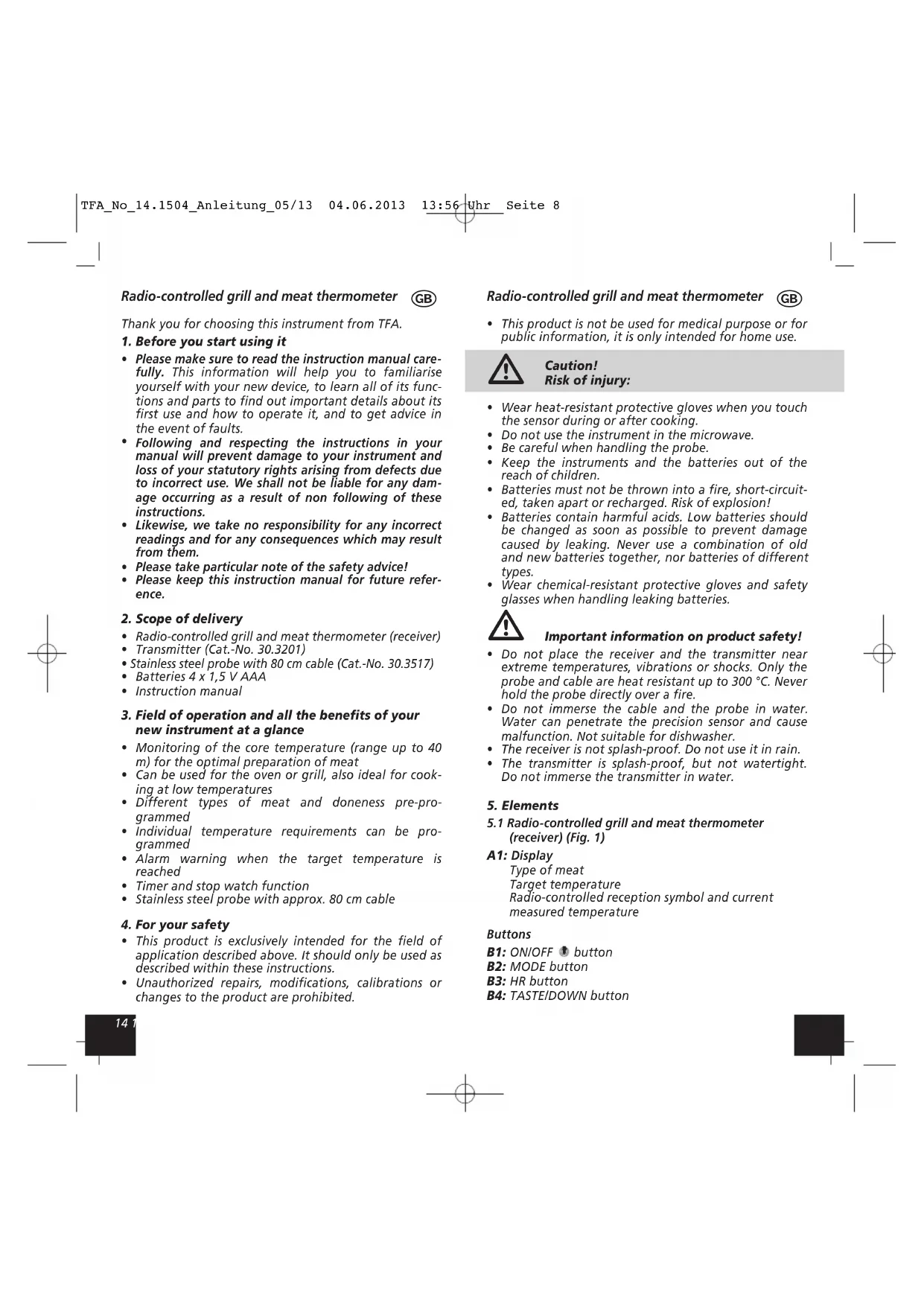


| Product type | Radio-controlled cooking and grilling thermometer probe |
| Brand | TFA |
| Model | 14.1504 |
| Category | Food thermometer |
| Receiver dimensions | 60 x 21 (28) x 105 mm |
| Receiver weight | 67 g |
| Transmitter dimensions | 63 x 23 x 85 mm |
| Transmitter weight | 60 g |
| Power supply | 4 AAA 1.5 V batteries (2 for receiver, 2 for transmitter) |
| Measuring range | 0 °C to +300 °C (32 °F to 572 °F) |
| Resolution | 1 °C / 1 °F |
| Maximum range | Approx. 40 m in open field |
| Probe cable length | Approx. 80 cm |
| Probe heat resistance | Up to 300 °C |
| Functions | Timer, stopwatch, alarm, pre-settings for meats |
| Safety | Heat-resistant probe, do not immerse, do not use in microwave |
| Maintenance | Cleaning with a soft damp cloth, no solvents |
| Spare parts available | Probe (ref. 30.3517), Transmitter (ref. 30.3201) |
| Compliance | EU standards (WEEE, R&TTE) |
| Warranty | Legal guarantee of conformity |
| Manufacturer | TFA Dostmann |
Frequently Asked Questions - 14.1504 TFA
User questions about 14.1504 TFA
0 question about this device. Answer the ones you know or ask your own.
Ask a new question about this device
Download the instructions for your Food thermometer in PDF format for free! Find your manual 14.1504 - TFA and take your electronic device back in hand. On this page are published all the documents necessary for the use of your device. 14.1504 by TFA.
USER MANUAL 14.1504 TFA
°C Temperaturen Temperatures Températures Temperatura Temperaturas
| Display BEEF PORK CHICK TURKY VEAL LAMB FISH HAM- | BURGER |
| Well done 75 77 80 80 75 75 60 75 | |
| Medium 70 71 70 70 | |
| Medium rare 60 | |
| Rare 55 |
Je nach Fleischsorte stehen unterschiedliche Garstufen zur Verfügung.
Different degrees of doneness are available depending on type of meat.
/ous disposez de différents niveaux de cuisson en fonction du type de viande.
Sono disponibili diversi livelli di cottura a seconda del tipo di carne.
Al naar gelang het soort vlees staan u verschillende gaarniveaus ter beschikking.
Según el tipo de carne, hay diferentes niveles de cocción disponibles.
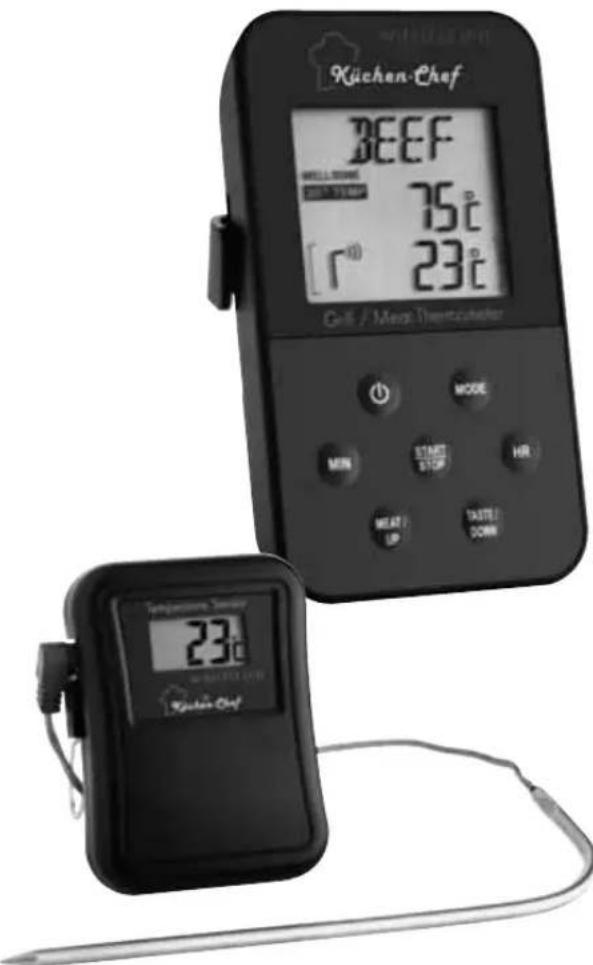
natural_image
Two kitchen thermometers displaying a digital display showing 'BEEF' and '33°C' with temperature readings (no readable text beyond branding)E
Kat. Nr. 14.1504

Fig. 1
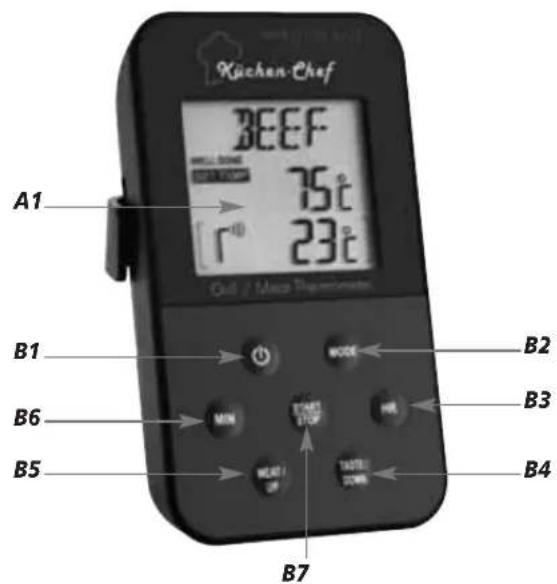
Fig. 2
Funk-Grill-Bratenthermometer

Radio-controlled grill and meat thermometer GB
Thank you for choosing this instrument from TFA.
1. Before you start using it
- Please make sure to read the instruction manual carefully. This information will help you to familiarise yourself with your new device, to learn all of its functions and parts to find out important details about its first use and how to operate it, and to get advice in the event of faults.
- Following and respecting the instructions in your manual will prevent damage to your instrument and loss of your statutory rights arising from defects due to incorrect use. We shall not be liable for any damage occurring as a result of non following of these instructions.
- Likewise, we take no responsibility for any incorrect readings and for any consequences which may result from them.
- Please take particular note of the safety advice!
- Please keep this instruction manual for future reference.
2. Scope of delivery
- Radio-controlled grill and meat thermometer (receiver)
- Transmitter (Cat.-No. 30.3201)
- Stainless steel probe with 80 cm cable (Cat.-No. 30.3517)
• Batteries 4 x 1,5 V AAA - Instruction manual
3. Field of operation and all the benefits of your new instrument at a glance
• Monitoring of the core temperature (range up to 40 m) for the optimal preparation of meat
- Can be used for the oven or grill, also ideal for cooking at low temperatures
- Different types of meat and doneness pre-programmed
- Individual temperature requirements can be programmed
- Alarm warning when the target temperature is reached
- Timer and stop watch function
- Stainless steel probe with approx. 80 cm cable
4. For your safety
- This product is exclusively intended for the field of application described above. It should only be used as described within these instructions.
- Unauthorized repairs, modifications, calibrations or changes to the product are prohibited.
Radio-controlled grill and meat thermometer

- This product is not be used for medical purpose or for public information, it is only intended for home use.

Caution! Risk of injury:
- Wear heat-resistant protective gloves when you touch the sensor during or after cooking.
- Do not use the instrument in the microwave.
- Be careful when handling the probe.
- Keep the instruments and the batteries out of the reach of children.
- Batteries must not be thrown into a fire, short-circuited, taken apart or recharged. Risk of explosion!
- Batteries contain harmful acids. Low batteries should be changed as soon as possible to prevent damage caused by leaking. Never use a combination of old and new batteries together, nor batteries of different types.
- Wear chemical-resistant protective gloves and safety glasses when handling leaking batteries.

Important information on product safety!
- Do not place the receiver and the transmitter near extreme temperatures, vibrations or shocks. Only the probe and cable are heat resistant up to 300 °C. Never hold the probe directly over a fire.
- Do not immerse the cable and the probe in water. Water can penetrate the precision sensor and cause malfunction. Not suitable for dishwasher.
- The receiver is not splash-proof. Do not use it in rain.
- The transmitter is splash-proof, but not watertight. Do not immerse the transmitter in water.
5. Elements
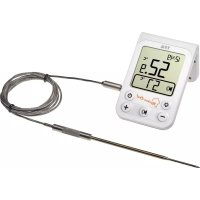
5.1 Radio-controlled grill and meat thermometer (receiver) (Fig. 1)
A1: Display
Type of meat
Target temperature
Radio-controlled reception symbol and current measured temperature
Buttons
B1: ON/OFF button
B2: MODE button
B3: HR button
B4: TASTE/DOWN button
Radio-controlled grill and meat thermometer GB
B5: MEAT/UP button
B6: MIN button
B7: START/STOP button
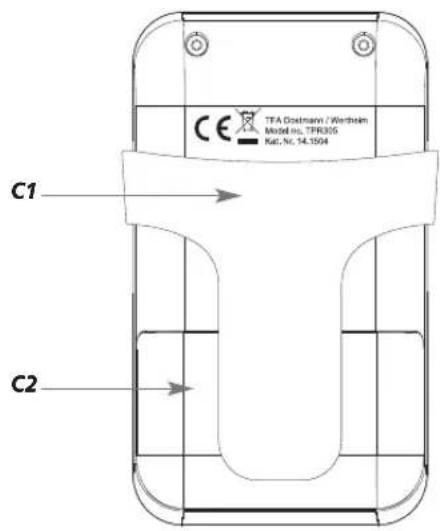
Housing
C1: Support
C2: Battery compartment
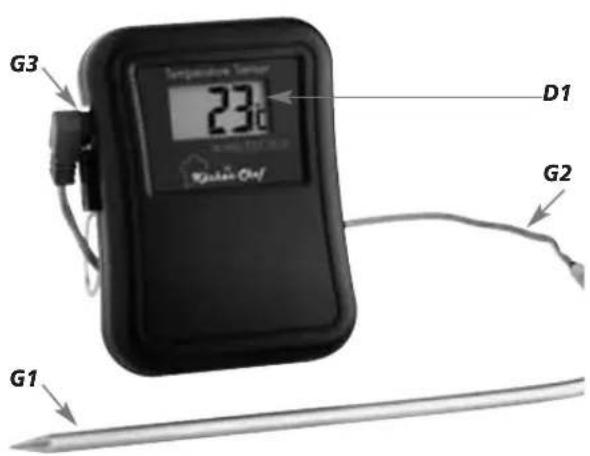
5.2 Transmitter (Fig. 2)
D1: Display Current measured temperature
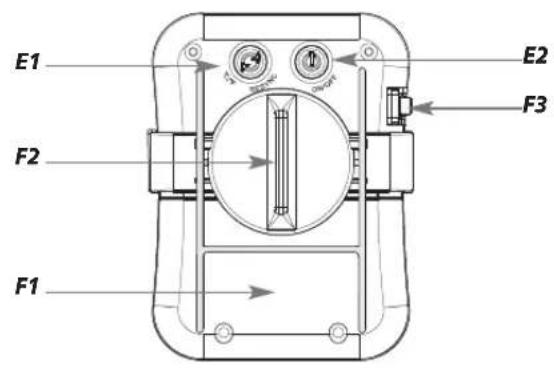
Buttons (back)
E1: °C/°F button
E2: ON/OFF button
Housing
F1: Battery compartment (screwed on)
F2: Bracket for metal support
F3: Opening for the connecting plug with rubber protection cap
Sensor
G1: Metal probe
G2: Cable
G3: Connecting plug
6. Getting started
- Remove the supports at the back of the receiver and the transmitter.
- Pull off the rubber protection cap carefully from the opening for the connecting plug on the left side of the transmitter. Plug the connector for the sensor cable into the socket.
- Open the battery compartment at the back of the transmitter with a suitable screwdriver and the battery compartment at the back of the receiver.
- Lay the instruments on a table. Avoid getting close to possible interference sources. (Electronic devices and radio installations)
- To guarantee a quicker and better transmission of the measured temperature, insert two batteries AAA 1,5 V in the compartment of the receiver and make sure that the polarities are correct. The device will alert you with a beep and all LCD segments will light up for a short moment.
• The device is now ready for use.
- The temperature display is flashing and the defaults appear on the display.
Radio-controlled grill and meat thermometer GB
- Afterwards insert two new batteries 1,5 V AAA in the compartment of the transmitter. Make sure the polarities are correct. All LCD segments will be displayed briefly.
- The latest measured temperature will appear on the display of the transmitter and the information will be transmitted automatically to the receiver.
- As soon as the transmission is successful the device will alert you with a beep, the radio signal symbol will blink and the latest measured temperature will appear on the display of the receiver.
- Every 5 seconds the transmitter will transmit the last measured temperature
- Close the battery compartment of the transmitter and the receiver again.
6.1 Manual transmitter search
- If the transmission fails or if the contact between the transmitter and the receiver gets lost (maximum range 40 m free field, within ferro-concrete rooms like basements and superstructures, the received signal is naturally weakened), a beep tone will be heard at regular intervals, the radio-controlled reception symbol disappears and --- °C appears on the display of the receiver.
- You can now start the search for the transmitter manually.
- Press and hold the MIN button on the receiver in the temperature setting mode.
- --- °C is flashing on the display of the receiver.
- Press and hold the ^ / ^ at the back of the transmitter.
- As soon as the transmission is successful a beep tone will be heard, the radio-controlled reception symbol is flashing and the last measured temperature appears on the display of the receiver.
6.2 Receiver
- Press and hold the HR button in the temperature setting mode to select between ^ C (Celsius) or ^ F (Fahrenheit) as the temperature unit.
- Press and hold the button.
• The instrument is turned off - Press and hold the button to turn on the instrument.
• The temperature display is flashing. - Wait until the flashing is finished (90 seconds) and the last measured temperature appears or start the search for the transmitter manually.
Radio-controlled grill and meat thermometer GB
6.3 Transmitter
- Press the °C/°F button at the backside to change between °C (Celsius) or °F (Fahrenheit) as temperature unit.
- Press and hold the button at the back of the transmitter.
• The instrument is turned off. - Press and hold the button to turn on the instrument.
- If the probe is still connected, the display will show the last measured temperature.
For your information:
- To guarantee a better and quicker transmission of the last measured temperature, turn on at first the receiver and then the transmitter.
6.4 Measuring of the core temperature
- Press and hold eventually the MODE button in temperature setting mode.
• WELL DONE (default) appears on the display. - Press the MEAT/UP button to choose the type of meat (see table).
- Press the TASTE/DOWN button to choose the done-ness (see table).
- Press and hold the MODE button in temperature setting mode to insert an individual temperature.
• WELL DONE (default) disappears. - Press the MEAT/UP or TASTE/DOWN button to adjust the core temperature. Press and hold the button for fast running.
- Push the probe at least 2.5 cm into the middle of the thickest part of the meat, for poultry between the torso and the thigh; it should touch neither bones nor cartilage and should not protrude from the meat. Put the meat into the oven and set the relevant oven temperature.
- If you only want to measure the oven temperature, place the probe in the oven.
6.5 Measuring procedure
- Simply run the cable to the outside. The cable adapts to the oven seal. Take care of sharp-edged frames and hinges.
Radio-controlled grill and meat thermometer GB
- Use the flexible support to fasten the transmitter in position near the oven (cable length approx. 80 cm) or remove the holder and the instrument can be placed onto flat surfaces.
• The receiver can now be used in a range of up to 40 m. - As soon as the core temperature is reached three beep tones will be heard every second.
- The temperature display and the warning symbol ⚠ are flashing on the display of the receiver.
- Press any button to stop the alarm sound.
- The temperature display and the warning symbol ⚠ continue flashing on the display of the receiver.
- The temperature display will continue flashing until the measured temperature is below the desired temperature.
• The warning symbol △ disappears.
6.6 Setting of the timer and the stop watch
Stop watch
- Press the MODE button to enter the timer-stop watch mode.
- The stop watch symbol (in the top left corner) and 0:00 appear.
- Press the START/STOP button to start the count up process.
- is flashing.
- With the START/STOP button you can stop and restart the counting.
- stays/is flashing.
- Press and hold the START/STOP button to clear the display.
- disappears.
Count Down Timer
- Press the HR button to adjust the hours.
- Press the MIN button to adjust the minutes.
- appears on the display.
- Press the START/STOP button.
- is flashing and the count up process starts.
- When setting more than one hour, only the hours / minutes are displayed, otherwise minutes / seconds.
- With the START/STOP button you can stop the counting (Stays) and start it again (is Nashing).
- When the timer count down is finished, the display will be flashing and two short beep tones will be heard every seconds (30 seconds).
- and will be flashing simultaneously and the seconds will be counted up.
- Press any button to stop the alarm sound.
Radio-controlled grill and meat thermometer GB
7. Table stand and attachment
Receiver:
- To use the bracket as a clamp (for example on a belt), insert the double-sided mounting aids into the upper slots of the receiver.
- To use the bracket as a stand, put the double-sided mounting aids into the lower, gently sloping slots. The installation is successful if you hear a click.
Transmitter:
- Place the bracket for the flexible metal support into the double-sided mounting aids on the transmitter. The installation is successful if you hear a click. Take the metal support and attach the two ends into the holes provided on the turntable of the bracket. With the turntable, you can now choose whether you want to use the metal support to stand or to be mounted. The turntable is properly adjusted when you hear a click.
8. Care and maintenance
- Clean the instruments and the probe with a soft damp cloth. Do not use solvents or scouring agents. Protect it from moisture.
- Should water or steam enter the socket, it could affect the contact with the probe. Dry the plug connector with a cloth before you connect it to your transmitter.
- Turn off the instruments after use.
- Remove the batteries if you do not use your instruments for a long period of time.
- Keep the instruments in a dry place.
8.1 Battery replacement
- Change the batteries of the transmitter (REMOTE) or the receiver (MAIN) when the battery symbol appears on the display of the receiver.
- Please note: When the batteries are changed, the contact between transmitter and receiver must be restored – so always insert new batteries into both units or start a manual transmitter search.
9. Troubleshootings
Problems Solutions
No display → Turn on the instruments
(at first the receiver and afterwards the transmitter)
Radio-controlled grill and meat thermometer

→ Ensure correct polarity of the batteries
→ Change the batteries
Incorrect display → Change the batteries
→ Check the contact of the plug to the socket, wipe dry if necessary
Display is flashing and → Reduce the distance
a beep tone is heard between transmitter and
no contact between receiver (max. 40 m)
transmitter and reveiver → Check if there is any source of interference
→ Manual transmitter search
→ Restart according to the manual
Temperature displayed → Check the position of the is too high probe in the meat
10. Waste disposal
This product has been manufactured using high-grade materials and components which can be recycled and reused.

Never dispose of empty batteries and rechargeable batteries in household waste. As a consumer, you are legally required to take them to your retail store or to an appropriate collection site depending on national or local regulations in order to protect the environment.
The symbols for the heavy metals contained are: Cd=cadmium, Hg=mercury, Pb=lead
This instrument is labelled in accordance with the EU Waste Electrical and Electronic Equipment Directive (WEEE).
Please do not dispose of this instrument in household waste. The user is obligated to take end-of-life devices to a designated collection point for the disposal of electrical and electronic equipment in order to ensure an environmentally-compatible disposal.
Radio-controlled grill and meat thermometer GB
11. Specifications
Receiver
| Measuring range Meat: 0 °C...+300°C(+32 °F... +572 °F)°CI°F-reversible |
Resolution: 1°C/1°F
| HHH/LLL: Temperature is outside measuring range |
| Count-up and max. 23 hours count-down timer: and 59 minutes |
| Power consumption: 2 x 1.5 V AAA Batteries (included) |
| Housing dimension: 60 x 21 (28) x 105 mm |
| Weight: 67 g (instrument only) |
Transmitter
| Cable: appr. 80 cm,heat resistant up to 300 °C |
| Range: max. 40 m (free field) |
| Power consumption: 2 x 1.5 V AAABatteries (included) |
| Housing dimension: 63 x 23 x 85 mm |
| Weight: 60 g (instrument only) |
No part of this manual may be reproduced without written consent of TFA Dostmann. The technical data are correct at the time of going to print and may change without prior notice.
DECLARATION OF CONFORMITY
Herewith we declare, that this wireless transmission device does comply with the essentials requirements of R&TTE Directive 1999/5IEC. A copy of the signed and dated Declaration of Conformity is available on request via info@tfa-dostmann.de. www.tfa-dostmann.de 06/13
| Alimentation: 2 x 1,5 V AAA Piles (incluses) |
| Alimentation: 2 x 1,5 V AAA Piles (incluses) |
EU- DECLARATION DE CONFORMITE
E1: Tasto°C/°F
E2: Tasto ON/OFF
Struttura esterna
- Funk-Grill-Bratenthermometer
- Radio-controlled grill and meat thermometer GB
- Before you start using it
- Scope of delivery
- Field of operation and all the benefits of your new instrument at a glance
- For your safety
- Radio-controlled grill and meat thermometer
- Caution! Risk of injury:
- Important information on product safety!
- Elements
- Radio-controlled grill and meat thermometer (receiver) (Fig. 1)
- A1: Display
- Buttons
- Getting started
- Manual transmitter search
- Receiver
- Transmitter
- For your information:
- Measuring of the core temperature
- Measuring procedure
- Setting of the timer and the stop watch
- Stop watch
- Count Down Timer
- Table stand and attachment
- Receiver:
- Transmitter:
- Care and maintenance
- Battery replacement
- Troubleshootings
- Problems Solutions
- Waste disposal
- Specifications
- DECLARATION OF CONFORMITY
- EU- DECLARATION DE CONFORMITE
- Struttura esterna
Brand : TFA
Model : 14.1504
Category : Food thermometer