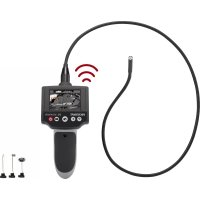
BS310XWIFI - Inspection camera VOLTCRAFT - Free user manual and instructions
Find the device manual for free BS310XWIFI VOLTCRAFT in PDF.



| Product type | Inspection camera (endoscope) |
| Brand | Voltcraft |
| Model | BS310XWIFI |
| Dimensions (L x H x D) | 116 x 13.2 x 3.6 cm |
| Weight | 279 g |
| Power supply | 4 AA 1.5 V batteries (not included) |
| Power consumption | 350 mA max. |
| Display | TFT 6.85 cm (2.7"), 960 x 240 pixels |
| Camera sensor | VGA CMOS 4.82 cm (1/9"), 640 x 480 pixels |
| Lighting | 4 LEDs, max. 1200 lux at 20 mm |
| Gooseneck length | 88 ±2 cm |
| Camera diameter | 8.0 ±0.1 mm |
| Wireless connection | WiFi 2.4 GHz, WPA2 PSK encryption |
| WiFi range | Up to 18 m (in open field) |
| Image/video formats | Photo: JPG, Video: MJPG |
| Main functions | Photo, video, digital zoom (1x, 1.5x, 2x), 180° image rotation, LED brightness adjustment, mobile app (iOS/Android) |
| Protection rating | IP67 (gooseneck and camera only) |
| Included accessories | 3 tips (magnet, hook, mirror), storage case, user manual |
| Maintenance and cleaning | Clean with a soft, lint-free cloth; rinse the camera and gooseneck with clean water after use in a liquid |
| Safety | Do not use on live electrical installations; do not look directly into the LEDs; avoid shocks and moisture on the housing |
| Repairability | Repairs only by a specialist; spare parts available (e.g. accessory set, strap) |
| Operating temperature | 0 to +45 °C, 15-85% RH (non-condensing) |
| Storage temperature | -10 to +50 °C, 15-85% RH |
Frequently Asked Questions - BS310XWIFI VOLTCRAFT
User questions about BS310XWIFI VOLTCRAFT
0 question about this device. Answer the ones you know or ask your own.
Ask a new question about this device
Download the instructions for your Inspection camera in PDF format for free! Find your manual BS310XWIFI - VOLTCRAFT and take your electronic device back in hand. On this page are published all the documents necessary for the use of your device. BS310XWIFI by VOLTCRAFT.
USER MANUAL BS310XWIFI VOLTCRAFT
BS-310XWIFI Endoscope
Item No. 1544027 Page 16 - 29
F Notice d'emploi
Endoscope BS-310XWIFI
N^ de commande 1544027 Page 30 - 43
Endoscoop BS-310XWIFI
Bestelnr. 1544027 Pagina 44 - 59
Seite
www.business.conrad.at
- Introduction 17
- Explanation of symbols 17
- Intended use 18
- Package contents 18
- Features and functions 18
- Safety information 19
a) General information 19
b) Persons and product 19
c) Batteries 20
d) Miscellaneous 20
- Product overview 21
- Operation 21
a) Inserting/changing the batteries 21
- Operating the endoscope 22
a) Attachments 22
b) Eyelet. 22
c) Basic functions of the endoscope 22
d) LCD display symbols 24
- Using the app 24
a) Installing the app 24
b) Establishing a Wi-Fi connection 24
c) App functions 25
d) Onscreen buttons 25
- Care and cleaning 26
12.Declaration of Conformity (DOC) 27 - Disposal 27
a) Product 27
b) Batteries 27
- Technical data 28
- Compatible accessories 29
1. Introduction
Dear customer,
Thank you for purchasing this product.
This product complies with the statutory national and European requirements.
To maintain this status and to ensure safe operation, you as the user must observe these operating instructions!

These operating instructions are part of this product. They contain important notes on commissioning and handling. Also consider this if you pass on the product to any third party. Therefore, retain these operating instructions for reference!
If there are any technical questions, please contact:
International: www.conrad.com/contact
United Kingdom: www.conrad-electronic.co.uk/contact
2. Explanation of symbols

The symbol with an exclamation mark in a triangle is used to highlight important information in these operating instructions. Always read this information carefully.

The arrow symbol indicates special information and advice on how to use the product.
3. Intended use
This endoscope is a visual aid for troubleshooting and inspecting facilities and appliances that do not carry a voltage. The camera image is displayed on a built-in TFT monitor. The brightness of the light on the top of the camera can be adjusted in stages. Photos and videos can be sent, displayed and saved on mobile devices via Wi-Fi. The gooseneck camera is waterproof and suitable for use in aqueous liquids (not acids or alkalis). The base unit must not be exposed to moisture or immersed in liquids. The product is powered by four AA batteries (not included). The endoscope must not be used in areas that are at risk of explosion or for inspecting people and animals.
For safety and approval purposes, you must not rebuild and/or modify this product. Using the product for purposes other than those described above may damage the product. In addition, improper use can cause hazards such as a short circuit or fire. Read the instructions carefully and store them in a safe place. Only make this product available to third parties together with its operating instructions.
All company and product names are trademarks of their respective owners. All rights reserved.
4. Package contents
Endoscope
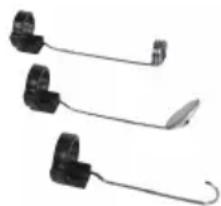
- 3x attachments (magnet, hook, mirror)
Storage case
- Operating instructions
Up-to-date operating instructions
To download the latest operating instructions, visit www.conrad.com/downloads or scan the QR code on this page. Follow the instructions on the website.

5. Features and functions
Endoscope with goose neck
- Ergonomic pistol grip for easy handling
- Wireless image transfer to mobile devices over encrypted Wi-Fi network (with app)
- Compatible with Android and Apple® mobile devices

Read the operating instructions and safety information carefully. If you do not follow the safety instructions and information on proper handling in this manual, we will assume no liability for any resulting personal injury or damage to property. Such cases will invalidate the warranty/guarantee.
a) General information
- This product is not a toy. Keep it out of the reach of children and pets.
- Do not leave packaging material lying around carelessly, as it may become dangerous playing material for children.
- Protect the product from extreme temperatures, direct sunlight, strong jolts, high humidity, moisture, flammable gases, vapours and solvents.
- Do not place the product under any mechanical stress.
-
If it is no longer possible to operate the product safely, stop using it and prevent unauthorized use. Safe operation can no longer be guaranteed if the product:
-
is visibly damaged,
- is no longer working properly,
- has been stored for extended periods in adverse ambient conditions or
-
has been subjected to any serious transport-related stress.
-
Always handle the product carefully. Jolts, impacts or a fall even from a low height may damage the product.
- Always observe the safety and operating instructions of any other devices which are connected to the product.
- Consult a technician if you are not sure how to use or connect the product.
- Maintenance, modifications and repairs must be done by a technician or a specialist repair centre.
- If you have questions which remain unanswered by these operating instructions, contact our technical support service or other technical personnel.
-
Warning, LED light:
-
Do not look directly at the LED light!
- Do not look into the beam directly or with optical instruments!
b) Persons and product
- This product is a precision instrument. Do not drop it or expose it to impacts.
- The base unit is not waterproof and therefore cannot be immersed under water.
- The endoscope must only be used to inspect facilities that are not connected to a power source. The camera head is made from metal and can lead to short circuits.
- For safety reasons, turn off all power sources before each inspection.
- When you are not using the endoscope, always place the endoscope and its accessories in the case.

- Sensitive surfaces (e.g. with furniture polish) may react chemically with the housing.
- Avoid heavy mechanical loads and vibrations.
- Do not use the product if condensation forms on the camera lens. Wait until the condensation has evaporated.
- Always comply with the accident prevention regulations for electrical equipment when using the product in industrial facilities.
- Never use the device immediately after it has been brought from a cold room into a warm one. The condensation generated may destroy the product in adverse conditions. Leave the device switched off and allow it to reach room temperature.
- Read the safety information in each section of these operating instructions and in the instruction manuals of any connected mobile devices.
c) Batteries
- Ensure that you insert the batteries in the correct polarity.
- To prevent battery leakage, remove the batteries when you do not plan to use the product for an extended period. Leaking or damaged batteries may cause acid burns if they come into contact with your skin. Always use suitable protective gloves when handling damaged batteries.
- Batteries must be kept out of the reach of children. Do not leave batteries lying around, as there is a risk that children or pets may swallow them.
- All batteries must be replaced at the same time. Mixing old and new rechargeable batteries can cause the batteries to leak and damage the product.
- Batteries must not be dismantled, short-circuited or thrown into fire. Never recharge non-rechargeable batteries, as this may cause an explosion.
d) Miscellaneous
- This product is not suitable for medical or commercial use.
7. Product overview
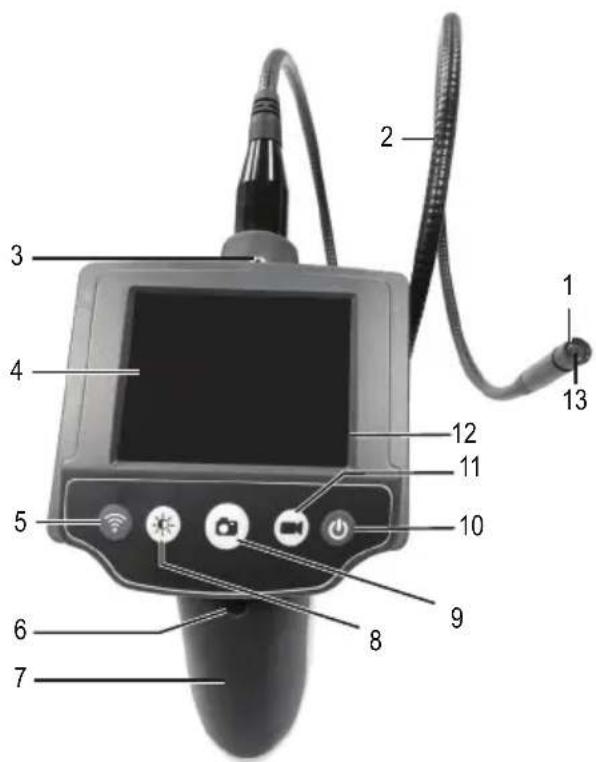
1 Camera LEDs
2 Goosenck
3 Eyelet
4 LCD display
5 Wi-Fi button
6 Battery compartment screw
7 Battery compartment cover
8 Brightness button
9 Camera button (photos)
10 On/off button
11 Video button (filming)
12 RESET button (hidden)
13 Camera
8. Operation
a) Inserting/changing the batteries
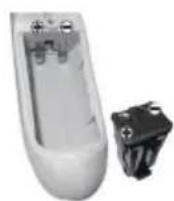
- Loosen the battery compartment screw (6) with a Phillips screwdriver, and then remove the battery compartment cover (7).
- Remove the battery holder from the battery compartment.
- Insert four AA batteries in the battery compartment. Pay attention to the polarity markings inside the battery holder.
- Place the battery holder back into the battery compartment. Pay attention to the polarity markings on the top of the battery holder and inside the battery compartment. The protruding tab on the battery holder should point upwards.
- Replace the battery compartment cover (7) and secure it in place with the screw using moderate force. Replace the batteries when the battery symbol on the LCD display (4) indicates a low battery level.
9. Operating the endoscope

Only hold the camera head and gooseneck in liquids that are not connected to a power source. The gooseneck must not be submerged beyond the "IP67 MAX Water Level" mark. The endoscope must only be used to inspect facilities that are not connected to a power source. The camera head is made from metal and can lead to short circuits. For safety reasons, turn off all power sources before each inspection. Avoid heavy mechanical loads and vibrations. The minimum bending radius of the gooseneck must not be less than 45mm .
a) Attachments
- If required, fix one of the three attachments (magnet, mirror or hook) to the narrow slot underneath the camera head.
- Check that the ring on the attachment is closed before use.
b) Eyelet
- An eyelet (3) is attached to the top of the monitor. You can attach a carrying strap (not included) to the eyelet to free up your hands when you are using the endoscope.
c) Basic functions of the endoscope
The following functions can be controlled using the keypad on the endoscope.
Viewing images
- Place the camera and gooseneck next to the object that you want to inspect and carefully move them to the desired position. Avoid inspecting moving parts or equipment that you may touch unintentionally. Turn off such equipment beforehand.

If it is not possible to switch off the equipment, using the endoscope to inspect such equipment may damage the endoscope or the equipment itself.
Switching the endoscope on/off
- Press the on/off button (10) to switch the endoscope on. After a short startup interval, the camera image will appear on the monitor.
- Press the on/off button (10) to switch the endoscope off. The monitor will switch off.

After you have finished using the endoscope, switch it off immediately to conserve battery power.
Interrupting/re-establishing a Wi-Fi connection.
- Press the Wi-Fi button (5) to interrupt an existing Wi-Fi connection between the endoscope and a mobile device.
- Press the Wi-Fi button (5) to re-establish the Wi-Fi connection between the endoscope and your mobile device.
- You may need to restart the real-time display in the app. See "d) Onscreen buttons" for details.
- For details on how to set up a Wi-Fi connection, see "10. Using the app b) Establishing a Wi-Fi connection".
Setting the brightness
- The camera head features four built-in LEDs. Press the brightness button (8) to adjust the brightness of the LEDs and turn the light on/off. The brightness is indicated in percent in the upper-right corner of the LCD display (4).
- Adjust the brightness so that the image displayed on the monitor is not over- or underexposed.
Photo and video functions
- Press the camera button (9) to take a photo.
- Press the video button (11) once to start recording a video.
- Press the video button (11) again to stop the recording.

The endoscope must be connected to the app via Wi-Fi in order to take photos and videos. If the endoscope is not connected to the app, these buttons (9 and 11) have no function. The video will be saved to an automatically-generated folder on your mobile device. See "10. Using the app" for details.
Restoring the endoscope to factory settings
Restore the factory settings if you want to rename your network or when you forget your password.
- To restore factory settings, press the RESET button (12) on the back of the endoscope. For best results, use a straightened paper clip. You will feel a slight click when you press the button. The endoscope will switch off automatically when factory settings have been restored. The Wi-Fi network password will be reset to the factory default.
d) LCD display symbols
| Symbol Meaning |
| Wi-Fi connection was successfully established. |
| Wi-Fi connection was not established, or there is no Wi-Fi connection. |
| Displays the current luminosity (0 % = off, 25 %, 50 % 100 %). |
| Displays the current zoom setting (factor 1.0x, 1.5x, 2.0x). |
10. Using the app
a) Installing the app
- Download the Voltcraft Wi-Fi ScopeCam app from the Google Play store (for Android® devices) or the Apple App Store (for Apple® mobile devices).
- Follow the onscreen prompts to install the app.
- Complete the installation process.
b) Establishing a Wi-Fi connection
- The endoscope creates a Wi-Fi network when it is switched on. After connecting to this network with your mobile device, you can operate and control the endoscope with the mobile app.
- Press the on/off button (10) to switch the endoscope on. After a short startup interval, the camera image will appear on the monitor.
- Enable Wi-Fi on your mobile device and follow the onscreen prompts.
- Select ToolSmart-iBorescope from the list of available Wi-Fi networks and touch to confirm.
- You will be prompted to enter the password. Enter "12345" and confirm your entry.
- The Wi-Fi connection will be established.

You can change the Wi-Fi password in the mobile app.
c) App functions
-
The app creates folders during the installation process. Photos and videos are automatically saved to these folders. The following folders are created automatically:
-
iVideoApp/cache
- iVideoApp/photo
-
iVideoApp/video
-
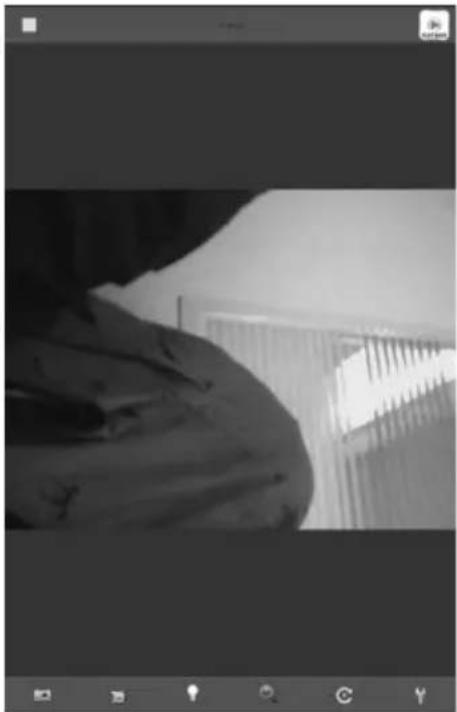
Launch the mobile app to configure the settings and access all of the endoscope functions. The user interface with the camera image will be displayed (see right-hand screenshot).
d) Onscreen buttons
Use the onscreen buttons in the menu bar at the top and bottom of the touchscreen to control the endoscope functions. You can also view photos and videos.
| Button | Function |
| • Touch this button to take a photo. The photo will be saved to an automatically generated folder on your mobile device. | |
| • Touch this button once to start a video recording. • Touch this button again to stop the video recording. • The video will be saved to an automatically generated folder on your mobile device. | |
| • Touch this button to turn the camera LEDs (1) on/off and adjust the brightness of the light. | |
| • Touch this button to adjust the camera zoom (1.0x, 1.5x, 2.0x). | |
| • Touch this button to rotate the displayed image by 180°. | |
| • Touch this button to change or reset the Wi-Fi password for your mobile device. • Enter the new network name, the old and new password, and then enter the new password again. Touch "OK" to confirm your entries. • If you do not wish to change the network name and password, touch "CANCEL" to exit the configuration process. • The endoscope will switch off and restart. The new network name and password are now effective and can be used to reconnect to the network. | |
| • Touch this button to go to the playback menu in the app. • From the playback menu, you can play video recordings or view images. Select a photo or video from the corresponding list. | |
| • Touch this button to turn off the live image from the camera. A still image will appear. | |
| • Touch this button to turn on the live image from the camera. The still image will disappear and the live image from the camera will be displayed. |
11. Care and cleaning

Never use aggressive detergents, rubbing alcohol or other chemical solutions, as these could damage the casing or stop the product from functioning properly.
- The endoscope does not require maintenance except for occasional cleaning. Use a soft, antistatic, lint-free cloth to clean the product.
- Carefully rinse the gooseneck camera with clean water after using it in liquids and dry it before storing it in the case.
- Use a small brush or a cotton bud to clean the camera lens.
12. Declaration of Conformity (DOC)
Conrad Electronic SE, Klaus-Conrad-Straße 1, D-92240 Hirschau, hereby declares that this product conforms to the 2014/53/EU directive.

Click on the following link to read the full text of the EU declaration of conformity: www.conrad.com/downloads
Select a language by clicking on the corresponding flag symbol, and then enter the product order number in the search box. The EU Declaration of Conformity is available for download in PDF format.
13. Disposal
a) Product
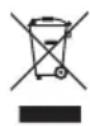
Electronic devices are recyclable waste and must not be placed in household waste. Always dispose of the product according to the relevant statutory regulations. Remove any inserted batteries and dispose of them separately from the product.
b) Batteries

You are required by law to return all used batteries (Battery Directive). Batteries must not be placed in household waste.
Batteries containing hazardous substances are labelled with this symbol to indicate that disposal in household waste is forbidden. The abbreviations for heavy metals in batteries are: Cd = Cadmium, Hg = Mercury, Pb = Lead (indicated on the battery, e.g. below the trash icon on the left).
Used batteries can be returned to local collection points, our stores or battery retailers.
You thus fulfil your statutory obligations and contribute to the protection of the environment.
14. Technical data
Operating voltage 4 x 1.5 V AA batteries (not included)
Current consumption. Max. 350 mA
Protection rating .IP67 (goosenck and camera only)
Camera sensor. 4.82 (1/9") VGA, CMOS
Display. 6.85 cm (2.7") TFT
Resolution. 960 x 240 pixels (display), 640 x 480 pixels (camera)
Video format .MJPG
Frame rate. 30 fps
Photo format.JPG
Camera light. 4 LEDs (max. 1200± 150 lx at a distance of 20~mm
White balanceAutomatic
Exposure Automatic
Field of view. 54°
Depth of field 3-6 cm
Battery life. 4 hours (with new batteries)
Gooseneck length. 88 ±2 cm
Camera 0.8 ±0.1 mm
Bending radius. Min. 45 mm
Supported Wi-Fi standards.IEEE802.11 b/g/n
Encryption protocol.. WPA2 PSK (with password)
Transmission power. 802.11b: 15± 2 dBm (normal), 802.11g: 10± 2 dBm (normal)
Wi-Fi range....Max. 18 m (with no obstructions)
Frequency. 2.4 GHz
Compatible with.. .iPad Series / iPhone 3GS, 4, 4S, 5, 5S, 5C with iOS4.1 or higher, Android mobile devices with Android OS 2.3.5 or higher
Operating conditions. 0 to +45^ 15 - 85% relative humidity (non-condensing)
Storage conditions. -10 to +50^ 15-85% relative humidity (non-condensing)
Dimensions (W× H× D) 116 (± 2cm)× 13.2× 3.6cm
Weight 279g
15. Compatible accessories
| Carrying strap Accessory set for 8 | 0 mm camera | |
| Item no.: 123096 1496418 |
Additional accessories are available from conrad.com.
Table des matieres
Page
Chere cliente, cher client,
France (email): technique@conrad-france.fr
Suisse: www.conrad.ch www.biz-conrad.ch
2. Explication des symboles

Standards WiFi supportés .IEEE802.11 b/g/n
d) On-screen-knuppen
Copyright 2017 by Conrad Electronic SE.
This is a publication by Conrad Electronic SE, Klaus-Conrad-Str. 1, D-92240 Hirschau (www.conrad.com).
All rights including translation reserved. Reproduction by any method, e.g. photocopy, microfilming, or the capture in electronic data processing systems require the prior written approval by the editor. Reprinting, also in part, is prohibited. This publication represent the technical status at the time of printing.
Copyright 2017 by Conrad Electronic SE.
Copyright 2017 by Conrad Electronic SE.
Copyright 2017 by Conrad Electronic SE.
