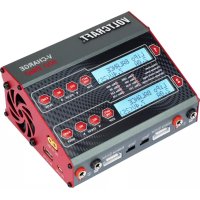
VCharge 100 Duo - Model making VOLTCRAFT - Free user manual and instructions
Find the device manual for free VCharge 100 Duo VOLTCRAFT in PDF.



User questions about VCharge 100 Duo VOLTCRAFT
0 question about this device. Answer the ones you know or ask your own.
Ask a new question about this device
Download the instructions for your Model making in PDF format for free! Find your manual VCharge 100 Duo - VOLTCRAFT and take your electronic device back in hand. On this page are published all the documents necessary for the use of your device. VCharge 100 Duo by VOLTCRAFT.
USER MANUAL VCharge 100 Duo VOLTCRAFT
www.business.conrad.at
NIMH CYCLE DCHG>CHG 1
[BATT MEMORY 1] C:2.2A D:0.4A
[BATT MEMORY 1] ENTER SET->
c) Akkudaten laden
[BATT MEMORY 1] C:2.2A D:1.0A
[BATT MEMORY 2] ENTER SET->
CONNECT ERROR CHECK MAIN PORT
CELL NUMBER INCOFFECT
Safety timer ON 20min
Capacity Out-off ON 500mAh
LiPo/Lilon/LiFe, 1-6 Zellen
- Introduction 62
- Explanation of Symbols 62
- Intended Use 63
- Scope of Delivery 64
- Safety Notes 64
a) General Information 64
b) Mains Cable/Mains Voltage. 65
c) Location for Installation 66
d)Operation 67
- Rechargeable Battery Notes 69
a) General Information 69
b) Additional Information on Lithium Batteries. 71
- Usable Rechargeable Battery Types 73
-
Operating Elements 74
-
Commissioning 76
a) Connection to a Voltage/Current Supply. 76
b) Connection of a Rechargeable Battery to the Charger 77
c) General Information on Operation of the Menus. 80
- Menu Structure 81
- Lithium Batteries (LiPo, Lilon, LiFe) 82
a) General Information 82
b) Charging Rechargeable Batteries without Balancer Connection ("CHARGE")......83
c) Charging Rechargeable Batteries with Balancer Connection ("BALANCE") 85
d) Fast Charge ("FAST CHG") 87
e) Storing Rechargeable Batteries ("STORAGE"). 87
f) Discharging Rechargeable Batteries ("DISCHARGE") 88
Page
- NiMH and NiCd Rechargeable Batteries 89
a) General Information 89
b) Charging Rechargeable Batteries ("CHARGE"). 89
c) Automatic Charge Mode ("Auto CHARGE"). 91
d) Recharge Rechargeable Battery Again ("RE-PEAK") 91
e) Discharging Rechargeable Batteries ("DISCHARGE") 93
f) Cycle Program ("CYCLE") 94
- Lead Batteries (Pb) 96
a) General Information 96
b) Charging Rechargeable Batteries ("CHARGE"). 96
c) Discharging Rechargeable Batteries ("DISCHARGE") 98
- Saving/Loading Rechargeable Battery Data 100
a) Selecting/Setting Rechargeable Battery Data. 100
b) Saving Rechargeable Battery Data. 105
c) Loading Rechargeable Battery Data 106
- Voltage Display for Lithium Rechargeable Batteries 107
- System Settings 108
- USB Output 111
- PC Software 112
- Warning Messages on the Display 113
- Information on the Charger 115
- Maintenance and Cleaning 116
- Disposal 116
a) General Information 116
b) Batteries and Rechargeable Batteries 116
- Technical Data 117
1. Introduction
Dear Customer,
Thank you for making the excellent decision to purchase a Voltcraft® product.
Volcraft®This name stands for above-average quality products in the areas of measuring, charging and grid technology, characterised by technical competence, extraordinary performance and permanent innovation.
Whether you are an ambitious hobby electronics or a professional user - a product of the Voltcraft® brand family will provide you with the best solution for even the most sophisticated of tasks. Special features: We offer the sophisticated technology and reliable quality of our Voltcraft® products at a near-unbeatable price/performance ratio. We lay the groundwork for long, good and successful cooperation.
Enjoy your new Voltcraft® product!
All company names and product names are trademarks of their respective owners. All rights reserved.
If there are any technical questions, contact:
International: www.conrad.com/contact
United Kingdom: www.conrad-electronic.co.uk/contact
2. Explanation of Symbols
The lightning symbol is used if there is a danger to your health, e.g. from electric shock.

The exclamation mark in a triangle indicates important notes in these operating instructions that must be observed strictly.
The "arrow" symbol indicates that special advice and notes on operation are provided.
3. Intended Use
The charger is used to charge and discharge rechargeable batteries of the type NiMH/NiCd (1 - 15 cells), LiPo/Lilon/LiFe (1 - 6 cells) and lead acid batteries (1 - 10 cells, 2V - 20V ).
There are 2 outputs that are independent of each other (charge/discharge channels), the operation of which takes place via a two-line lit LC display and four operating buttons each.
Output #1:
The charge current can be set between 0.1 A and 10.0 A (depending on the cell number/ rechargeable battery voltage). The maximum charging power is 100W
The discharge current can be set between 0.1 A and 6.0 A (depending on the cell number/ rechargeable battery voltage). The maximum discharging power is 10W
Output #2:
The charge current can be set between 0.1 A and 5.0 A (depending on the cell number/ rechargeable battery voltage). The maximum charging power is 50W
The discharge current can be set between 0.1 A and 2.0 A (depending on the cell number/ rechargeable battery voltage). The maximum discharging power is 5W
The combined total charging capacity for channels 1 + 2 is 100W
The charger also offers a connection for an external temperature sensor (not enclosed, can be ordered as an accessory) for rechargeable-battery monitoring at each output. For multiple-cell lithium rechargeable batteries, a balancer is integrated for each output (two matching external XH-adapters are enclosed for rechargeable batteries with 2 - 6 cells).
The charger has an integrated mains unit to permit operation on mains voltage (100 - 240 V/AC, 50 / 60Hz ). The charger may, however, also be alternatively operated on a stabilised direct voltage of 11 - 18 V/DC (e.g. via an external vehicle lead battery or a suitable mains adapter).
The safety notes and all other information in these operating instructions always have to be observed!
Read the operating instructions carefully and attentively, and keep them for later reference. Only pass the product on to any third parties together with the operating instructions.
Use other than that described above can lead to damage to the product and may involve additional risks such as, for example, short circuits, fire, electrical shock etc. The entire product must not be modified or converted, and the casing must not be opened!
This product complies with the statutory national and European requirements.
4. Scope of Delivery
Multifunctional charger
- Mains cable
- 2 x XH adapter
- 2 × charging cable (banana plug to T-plug)
- Software-CD
- Operating instructions

Current operating instructions
Download the current operating instructions via the link www.conrad.com/downloads or scan the QR code displayed. Observe the instructions on the website.
5. Safety Notes

e operating instructions attentively and particularly observe the safety notes. If the safety notes and the information in these operating instructions regarding proper handling are not observed, we assume no liability for any resulting injury/property damage. In such cases, the warranty/guarantee will also lapse.
a) General Information
- The unauthorized conversion and/or modification of the product is inadmissible for safety and approval reasons (CE). Never dismantle the product!
- Maintenance, adjustments and repair work may only be carried out by a specialist/a specialised workshop. The device contains no parts that require servicing or adjusting by you.
- The product is not a toy and must be kept out of the reach of children! The product must only be set up, used or stored in places that are not accessible to children. The same applies for rechargeable batteries. Pay particular attention when children are present! Children may change the settings or short-circuit the rechargeable battery/ batteries, which may lead to fire or explosion. Danger to life!
In schools, training centres, hobby and self-help workshops, the use of the product must be supervised by responsible trained personnel.
In commercial institutions, the accident prevention regulations of the Employer's Liability Insurance Association for Electrical Systems and Operating Materials are to be observed.
- Do not leave packaging material lying around carelessly. It might become a dangerous toy for children!
-
Handle the product with care; impacts, shock or fall even from low heights will damage it.
-
If you are not sure about the correct operation or if questions arise which are not covered by the operating instructions, please do not hesitate to contact us or another specialist.
b) Mains Cable/Mains Voltage
- Product setup corresponds to protection class I. Only a proper protective-contact mains socket must be used for connection of the charger via the mains cable.
- The mains socket to which the plug-in mains unit is connected must be easily accessible.
- Do not pull the mains plug from the mains socket by pulling the cable.
- If the mains cable or charger are damaged, do not touch it. Danger to life from electric shock!
First switch off the mains voltage for the mains socket to which the mains cable is connected (switch off the corresponding circuit breaker or take out the fuse, then switch off the fault interrupter protection switch (FI circuit breaker) so that the mains socket is separated from the mains voltage on all poles).
Only then unplug the mains unit from the mains socket.
If the charger is damaged, stop operating it. Take it to a specialised workshop or dispose of it in an environmentally friendly way.
If the mains cable is damaged, dispose of the damaged mains cable in an environmentally compatible way. Do not use it anymore. Replace it with a new mains cable of the same specifications.
c) Location for Installation The charger is intended for dry in
If the charger is operated via the mains cable, there is danger to life from electric shock in case of moisture/wetness on the charger/mains cable!
- Avoid direct sun irradiation, strong heat or cold. Keep the charger away from dust and dirt. The same applies to any rechargeable battery that may be connected.
- Choose a solid, flat, clean and sufficiently large surface for the charger. Never place the charger on a flammable surface (e.g. carpet, tablecloth). Always use a suitable, non-flammable, heatproof surface.
- Keep the charger away from flammable or easily inflammable materials (e.g. curtains).
- Never cover the ventilation slots; danger of overheating and fire. Never push any objects into the ventilation slots of the charger; There is a danger to life from electric shock!
- Never block the function of the fan. The fan will start up on its own as required.
- Do not place the charger on any valuable furniture surfaces without using a suitable protection. Otherwise, scratches, pressure points or discolourations are possible. The same applies to the rechargeable battery.
- Do not use the charger inside a vehicle.
- The charger must only be set up, used or stored in places that are not accessible to children. Children may change the settings or short-circuit the rechargeable battery/battery pack, which can lead to an explosion. Danger to life!
- Avoid installation in direct proximity of strong magnetic or electromagnetic fields, transmitter aerials or HF generators. This can affect the control electronics.
- Ensure that the cables are not crushed or damaged by sharp edges. Never place any objects on the cables.
- Do not place any containers filled with liquid, vases or plants, on or next to the charger/mains cable.
When these liquids get into the charger (or the plug connections of the mains cable), the charger will be destroyed and there is a most severe danger of potentially fatal electric shock or fire.
If the charger is operated via the mains cable, first switch off the mains voltage for the mains socket to which the mains cable is connected (switch off the corresponding circuit breaker or take out the fuse, then switch off the fault interrupter protection
switch (FI circuit breaker) so that the mains socket is separated from the mains voltage on all poles). Only then unplug the mains plug of the mains cable from the mains socket.
charger is operated via the DC input (11 - 18 V/DC), disconnect the charger from the voltage/power supply.
Then disconnect the connected rechargeable battery from the charger. Do not use the charger again - bring it to a specialist workshop.
d) Operation
- The charger may be operated either via the mains voltage (100 - 240 V/AC, 50/60 Hz) or via a stabilised direct voltage of 11 - 18 V/DC (e.g. via an external vehicle lead battery or a suitable mains adapter).
Use only one of the two connection types, but never both at once. This may damage the charger.
- Do not wear any metal or conductive materials, such as jewellery (necklaces, bracelets, rings, etc.) while you are working with the charger or batteries. A short-circuit at the rechargeable battery or charging cable poses a danger of burns and explosion.
- Never leave the product unattended while operating. Despite a considerable number of protective circuits, it is impossible to exclude the possibility of malfunctions or problems during the charging process.
-
Ensure that there is sufficient ventilation during operation. Never cover up the charger. Leave enough of a distance (at least 20~cm ) between charger and other objects. Overheating causes a danger of fire!
-
The charger must only be used to charge (or discharge) rechargeable batteries of types NiMH, NiCd, Lilon/LiPo/LiFe and lead batteries. Never charge any other rechargeable battery types or non-rechargeable batteries. There is great danger of fire or explosion!
- Always connect the charging cable to the charger first. Only then must the rechargeable battery be connected to the charging cable.
When disconnecting, proceed in reverse order - first disconnect the rechargeable battery from the charging cable, then the charging cable from the charger.
If the order is chosen incorrectly, there may be a short-circuit of the charger plugs; there is a danger of fire and explosion!
- Only operate the product in moderate climate, never in tropical climate. For more information on acceptable environmental conditions, see the chapter "Technical Data".
er operate the device immediately after it was taken from a cold room to a warm room. The resulting condensation may lead to malfunctions or damage!
Let the product reach room temperature before taking it into operation again. This may take several hours!
-
Avoid operation in direct proximity of strong magnetic or electromagnetic fields, transmitter aerials or HF generators. This can affect the control electronics.
-
If you have reason to believe that the device can no longer be operated safely, disconnect it immediately and make sure it is not operated unintentionally.
Disconnect the charger from the voltage/current supply. Do not use the product any more after this, but take it to a specialised workshop or dispose of it in an environmentally compatible manner.
It can be assumed that operation without danger is no longer possible if the device has any visible damage, the device no longer works, after extended storage under unsuitable conditions or after difficult transport conditions.
- Keep the entire product at a dry, cool, clean site that is not accessible to children.
6. Rechargeable Battery Notes
Although use of rechargeable batteries in everyday life is a matter of course today, there are many dangers and problems. In particular, with LiPo/Lilon/LiFe rechargeable batteries with their high energy content (in comparison with conventional NiCd or NiMH rechargeable batteries), various regulations must be observed in order to avoid the danger of explosion and fire.
For this reason, always ensure that you have read and understood the following information and safety information when handling rechargeable batteries.
If the manufacturer of the rechargeable battery has provided any other information, read it carefully and observe it!
General Information
-
Rechargeable batteries are no toys. Always keep batteries/rechargeable batteries out of the reach of children.
-
Do not leave batteries/rechargeable batteries lying around openly; there is a risk of them being swallowed by children or pets. If swallowed, consult a doctor immediately!
- Rechargeable batteries must not be short-circuited, taken apart or thrown into fire. There is a risk of fire and explosion!
-
Leaking or damaged batteries/rechargeable batteries can cause chemical burns to skin when touched without the use of adequate protective gloves.
-
Never recharge normal (non-rechargeable) batteries. There is a risk of fire and explosion!
Non-rechargeable batteries are meant to be used once only and must be disposed of properly when empty.
Only charge rechargeable batteries intended for this purpose. Use a suitable battery charger.
-
Rechargeable batteries must not get damp or wet.
-
Place the charger and battery on a non-flammable, heat-resistant surface (e.g. stone tiles). Maintain enough distance from flammable objects. Leave enough distance between the charger and the rechargeable battery - never place the rechargeable battery on the charger.
- As both the charger and the rechargeable battery heat up during the charge/discharge procedure, it is necessary to ensure sufficient ventilation. Never cover the charger or the rechargeable battery!

-
Never recharge a battery directly in the model. Always remove the rechargeable battery from the model for recharging.
-
Always observe correct polarity (plus/+ and minus/-) when connecting the rechargeable battery to your model or charger. Connecting the battery incorrectly will not only damage the model but also the rechargeable battery. There is a risk of fire and explosion!
This charger has a mechanism that protects against connecting the poles incorrectly. Nonetheless, it is possible that an incorrectly connected battery may lead to damage in certain situations.
- If the product is not to be used for an extended period of time (e.g. storage), disconnect any connected rechargeable battery from the charger and disconnect the charger from the voltage/current supply.
The charger has no mains switch. If you operate the charger via the mains cable, pull the mains plug from the socket when you no longer need the charger.
-
Do not charge/discharge any battery that is still hot (e.g. caused by high discharging current from the model). Allow the rechargeable battery to cool down to room temperature before attempting to charge or discharge it.
-
Never damage the exterior cover of a battery. There is a risk of fire and explosion!
- Never charge/discharge damaged, leaking or deformed batteries. This can result in a fire or explosion! Dispose of any unusable rechargeable batteries in an environmentally compatible fashion. Do not continue to use them.
- Remove the rechargeable battery from the charger when it is fully charged.
- Recharge the rechargeable batteries about every 3 months. Otherwise, so-called deep discharge may result, rendering the rechargeable batteries useless.
- Keep rechargeable batteries in a suitable location. Use a smoke detector in the room. The risk of fire (or the occurrence of toxic smoke) cannot be excluded. Special rechargeable batteries for the model construction area are subject to great stress (e.g. high charging and discharging currents, vibrations, etc.).
b) Additional Information on Lithium Batteries Modern batteries with lithium technology do not only have a cl
than NiMH or NiCd rechargeable battery packs but they also have a considerably lower weight. This makes this type of rechargeable battery very interesting for application in model construction; so-called LiPo batteries (lithium-polymer) are often used here.
Rechargeable lithium batteries require special care when charging/discharging, as well as during operation and handling.
For this reason, we would like to provide you with some information in the sections below about the dangers and how you can avoid them, thus helping such batteries to maintain their performance for an extended period of time to come.
Additionally observe chapter 6. a).
- The outer shell of many rechargeable lithium batteries is only made of a thick foil and therefore very sensitive.
Never destroy or damage the battery, never let the battery fall and do not pierce the battery with any objects! Avoid any mechanical strain on the battery; never pull the connection cables of the battery! There is a risk of fire and explosion!
These guidelines must also be observed when the battery is inserted into the model or when it is removed from the model.
- Ensure that the battery does not overheat during usage, recharging, discharging, transport or storage. Do not place the battery next to sources of heat (e.g. speed controller, motor), keep the battery away from direct sunlight. There is a risk of fire and explosion if the battery overheats!
The battery must never heat up to more than +60^ (observe any additional information from the manufacturer!).
- If the battery is damaged (e.g. after the crash of an aircraft or helicopter model) or the exterior cover is soaked/has expanded, do not use the battery. Do not charge it anymore. There is a risk of fire and explosion!
Handle the battery with care, use suitable protective gloves. Dispose of the rechargeable battery environmentally compatibly.
Never keep such rechargeable batteries in an apartment or a house/garage anymore. Damaged or bloated lithium rechargeable batteries may catch fire suddenly.

use a suitable charger to charge lithium batteries or use the correct charging procedure. Due to a risk of fire and explosion, conventional chargers for NiCd, NiMH and lead batteries must not be used!
Always choose the right charging procedure depending on rechargeable battery.
-
When charging a lithium battery with more than one cell, always use a so-called balancer (one is already integrated into the supplied charger).
-
Charge LiPo batteries with a max. charging current of 1C (if not indicated otherwise by the battery manufacturer!). This means that the charging current may not exceed the capacity value imprinted on the battery (e.g. battery capacity 1000mAh , max. charging current 1000mA = 1A ).
With LiFe and Lilon batteries, you must observe the instructions of the battery manufacturer.
- The discharging current must not exceed the value printed on the battery.
For example, if a value of "20C" is printed on a LiPo battery, the max. discharging current is 20 times the battery's capacity (e.g. battery capacity 1000mAh , max. discharging current 20C = 20 × 1000mA = 20A ).
Otherwise, the battery will overheat, causing deformation/bloating of the battery or explosion and fire!
The printed value (e.g. "20C") does not generally refer to the constant current, but to the maximum current that the battery is capable of producing in the short-term. The constant current therefore should not be higher than one half of the given value.
- Observe that the individual cells of a lithium rechargeable battery must not be deep-discharged. A deep discharge of a lithium rechargeable battery will lead to permanent damage/destruction of the rechargeable battery.
If the model does not provide protection against total discharge or possess a visual display indicating a low battery, remember to switch off the model in time.
7. Usable Rechargeable Battery Types
| Rechargeable battery type LiPo Lilon LiFe | NiCd NiMH | Pb | |||
| Rated voltage (V/cell) 3.7 3.6 3.3 | 1.2 1.2 2.0 | ||||
| Max. charging voltage (V/cell) 4 | 2 4.1 3.6 1.5 | 1.5 2.46 | |||
| Voltage for storage (V/cell) 3.8 3.7 | 3.3 - - - | ||||
| Charging current for quick charge | <= 1C <= 1 | C <= 4C 1C - 2 | C 1C - 2C | <= 0.4C | |
| Min. voltage after discharge (V/cell) | 3.0 - 3.3 2.9 | - 3.2 2.6 - 2 | 9 0.1 - 1.1 0 | 1 - 1.1 1.8 |
The voltages in the above table apply to a single cell.
The max. charging and discharging currents are indicated with the capacity value "C". A charging current of 1C corresponds to the capacity value imprinted on the battery (e.g. indicated battery capacity 1000mAh , max. charging current 1000mA = 1A ).

Also observe the correct voltage setting for multi-cell battery packs. For example, the individual cells in a two-cell battery pack may be switched in parallel or in series.
If the maximum permissible charging current for the rechargeable battery is exceeded or a wrong cell number/voltage setting is chosen, there is a danger of destroying the rechargeable battery. There also is a danger of fire and explosion from the rechargeable battery!
Further notes on the max. charging current and the cell number/voltage can be taken from the data sheets or the labels of the rechargeable batteries; these data take precedence over the information in the above table.
Important!
- Never charge battery packs made up of different cells (or cells from different manufacturers).
- Never charge non-rechargeable batteries.
- Never charge rechargeable batteries not listed in the above table.
- Never charge rechargeable batteries with integrated electronics.
- Never charge rechargeable batteries that are still connected to other devices (e.g. a speed controller).
- Never charge any damaged or bloated rechargeable batteries.
8. Operating Elements
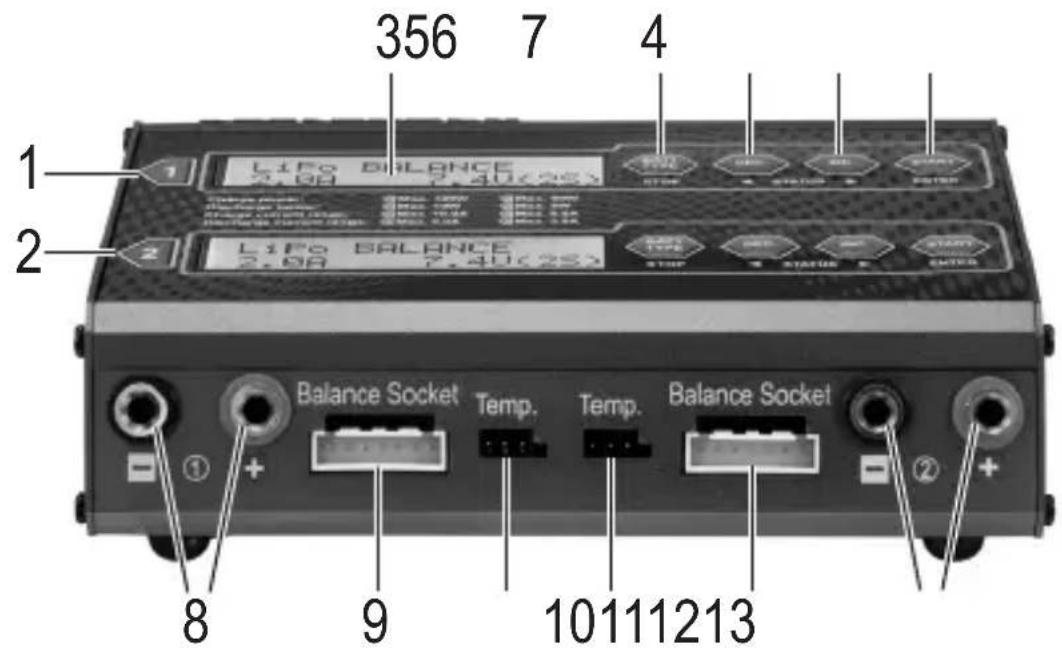
1 Output #1: LC display and operating buttons
2 Output #2: LC display and operating buttons
3 Illuminated, two-line LC display
4 Button "BATT. TYPE/STOP" for returning from a menu or stopping the charging process
5 "DEC" button for entering values (decreasing value), menu selection (backwards) and displaying various data while charging/discharging
6 "INC" button for entering values (increasing value), menu selection (forward) and displaying the voltage values of the individual cells when charging lithium batteries with a balancer connection
7 "START/ENTER" button for starting/continuing the charging process or confirming an adjustment/operating function
8 Output #1: Round sockets (4 mm) for rechargeable battery connection (red = plus/+, black = minus/-)
9 Output #1: Connection socket for enclosed external XH-adapter
10 Output #1: Socket for external temperature sensor (not enclosed, can be ordered separately)
11 Output #2: Socket for external temperature sensor (not enclosed, can be ordered separately)
12 Output #2: Connection socket for enclosed external XH-adapter
13 Output #2: Round sockets (4 mm) for rechargeable battery connection (red = plus/+, black = minus/-)
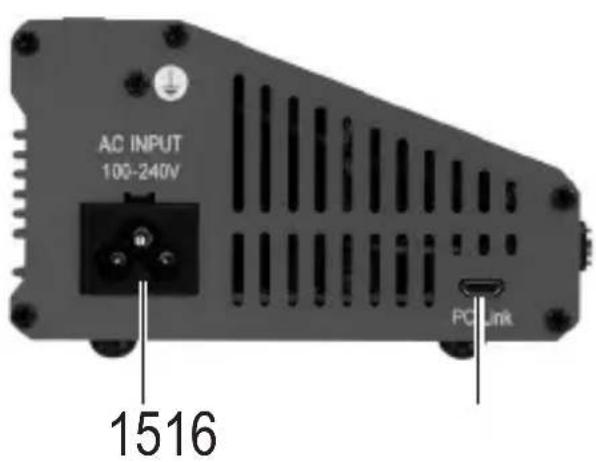
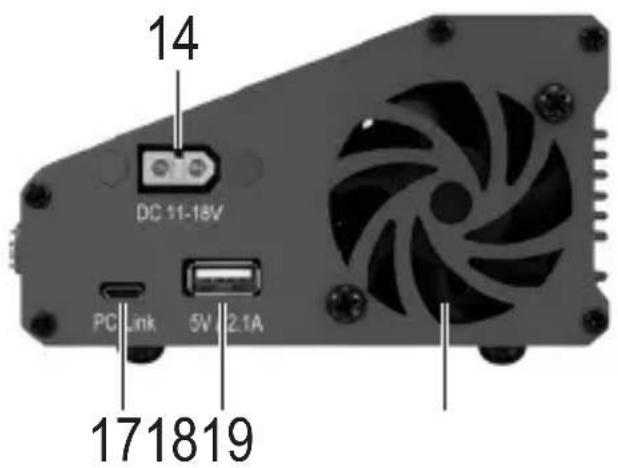
14 Direct voltage input (11 - 18 V/DC, stabilised), e.g. to connect to an external vehicle lead battery
15 Low-voltage device socket for connecting the charger to the mains voltage

Either operate the charger via the mains voltage connection (1) or the direct voltage input (9). Never use both inputs at the same time. This may damage the charger.
16 Output #1: Micro-USB socket for PC connection
17 Output #2: Micro-USB socket for PC connection
18 USB voltage/current output (5 V/DC, max. 2.1 A), e.g. to charge a mobile phone or tablet computer
19 Fan (starts up automatically on demand depending on the charge/discharge program)
9. Commissioning
a) Connection to a Voltage/Current Supply
Attention!
Always connect the charger to the voltage/current supply first; only then must a rechargeable battery be connected to the charger.
The charger offers two different options for operation.
Operation via the mains voltage (100 - 240 V/AC, 50/60 Hz)
- Operation via stabilised direct voltage (11 - 18 V/DC, e.g. via an external vehicle lead battery or a mains adapter)

Never use both operating modes at the same time. This may damage the charger. Loss of guarantee/warranty!
If the charger is to be operated via the direct voltage input, the power supply must be chosen accordingly strong, e.g. a suitable 12V car lead battery.
If the charger is not to be operated on a 12V car lead battery but via a fixed voltage mains adapter, this must be able to supply a correspondingly high current (we recommend a mains adapter with at least 14 A when fully using the maximum charging capacity).
Since the charger has its own mains adapter integrated, however, operation via a separate fixed voltage mains adapter makes no sense and should be avoided!
When using the direct current input, observe the correct polarity when connecting (plus/+ and minus/-).
The charger will switch on automatically after connecting to the voltage/current supply. The two displays of outputs #1 and #2 light up; the start message appears (see figure on the right) and the charger emits two brief signals.
The charger is now ready for operation.
VOLTCRAFT 103 DUO
b) Connection of a Rechargeable Battery to the Charger
Please observe the following points before connecting or charging/recharging the battery:
You have not done so already, please read chapters 5, 6 and 7 completely and ensure that you have understood the information there.
-
Do you know all of the information you need to know about your rechargeable battery? Unknown or unlabelled batteries, the necessary values of which you do not know, must not be connected/charged/discharged!
-
Always make sure that you do not swap the connections of outputs #1 and #2.
- Have you selected the correct charging/discharging program for the type of battery you are using? Incorrect settings will damage the charger and the battery; there is a danger of fire and explosion!
- Did you set the correct charging or discharging current?
-
Have you selected the correct voltage (e.g. for multiple-cell LiPo batteries)? A two-cell LiPo battery may be switched in parallel (3.7 V) or series (7.4 V).
-
Are all connector cables and plugs undamaged, do the plugs stay firmly in the sockets? Worn plugs and damaged cables should be replaced.
- Connect only one rechargeable battery or a single battery pack to the charger output, but never several at once.
- When connecting a rechargeable battery to the charger, always connect the charging cable to the charger first. Only then must the charging cable be connected to the rechargeable battery. When disconnecting, proceed in reverse order (first disconnect the rechargeable battery from the charging cable, then the charging cable from the charger).
Failure to do so presents the danger of a short circuit. This can result in a fire or explosion of the rechargeable batteries!
- If you wish to charge battery packs that you have manufactured yourself, the cells must be identical in their construction (same type, same capacity, same manufacturer).
The cells must also be charged to the same level (lithium batteries can be balanced out using the balancer. This is, however, not possible with other battery packs such as NiMH or NiCd).
- Before connecting a rechargeable battery/battery pack to the charger, disconnect it completely, e.g. from a flight or speed controller.
Important when charging/discharging a multiple-cell lithium rechargeable battery with balancer connection:
Multi-cell lithium batteries usually always have a balancer connection. This permits the charger to monitor the voltage of every single cell separately at all times.
The charger adjusts the voltage of all cells to each other if there are deviations. The balancer prevents that one or several cells are over-charged or other cells not sufficiently fully charged by this. The balancer therefore protects both from over-charging (which may cause fire or explosion) and from deep discharge of a single cell, and thus ensures best performance of the rechargeable battery in your model.
Procedure when connecting a rechargeable battery to the charger:
- Connect the charger to the voltage/current supply.
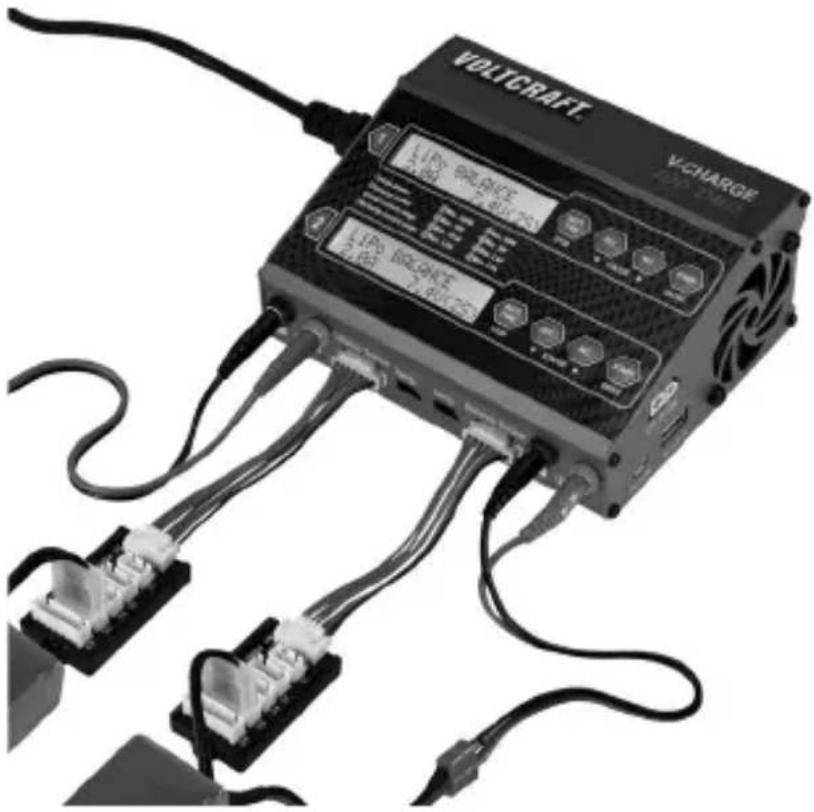
- First connect the charging cable to the two 4 mm round sockets of the charging output #1 (or #2). Ensure correct polarity (red cable = plus/+, black cable = minus/-).

The charging cable must not be connected to the rechargeable battery yet! There may be a short-circuit of the charger plugs; there is a danger of fire and explosion!
- If you want to connect a multiple-cell lithium rechargeable battery with balancer cable to the charger, plug the enclosed balancer board into the charger using the corresponding socket chargers (for output #1 or #2).
- Connect the charging cable to the rechargeable battery now. Ensure correct polarity (red cable = plus/+, black cable = minus/-).
- Connect the balancer plug of a multiple-cell lithium rechargeable battery to the corresponding connection of the XH adapter. Do not use any force for plugging in! Ensure correct polarity.
The minus connection of the balancer plug of the rechargeable battery should usually be marked (e.g. black cable); the minus pole is marked on the balancer board as well (print "-").
If the balancer plug of the rechargeable battery does not match the shape of the socket on the XH adapter (it is intended for XH plugs), you need to use a suitable connection cable. It is available in accessory trade.
Example for charging two lithium rechargeable batteries with balancer plug:
Proceed in the following steps when disconnecting a rechargeable battery:
- If a multiple-cell lithium rechargeable battery is connected to the balancer board with the balancer cable, disconnect the cable from the balancer board first.
- Disconnect the charging cable from the rechargeable battery.
- Last disconnect the charging cable from the charger.

Always proceed in this order!
chargeable battery must always be disconnected from the charging cable (and from the balancer connection for lithium rechargeable batteries) first. Only then must the charging cable be disconnected from the charger.
Any other order poses danger of short circuit by the two round plugs of the charging cable connected to the rechargeable battery, as well as danger of fire and explosion!
- If no rechargeable battery is connected to the charger anymore, you can disconnect the charger from the voltage/current supply.
c) General Information on Operation of the Menus
For an overview of the menu structure, see the next chapter.
The two outputs #1 and #2 of the charger are independent of each other.
Operation of the two outputs (charge/discharge channels) takes place via a lit LC display each and four buttons to its right.
- Exit each setting menu using the "BATT. TYPE/STOP" each; pushing this button several times will return you to the main menu.
- Select the desired submenu from the main menu using the "INC" or the "DEC" button and confirm your selection with the button "START/ENTER".
- Using the buttons "INC" and "DEC", the various configuration options are selected.
- To modify a value or setting, push the "START/ENTER" button; the display then flashes. Modify the value flashing in the display using the "INC" and "DEC" buttons. For quick adjustment of a value (e.g. the charging current), keep the respective button pushed for a longer time.
- Save the (modified) value with the "START/ENTER" button.
Various information is indicated on the display during a charge/discharge process by repeatedly pressing the button "DEC" (see chapter 20). If you do not push any button for a few seconds, the charger will return to the normal display.
If a lithium rechargeable battery with balancer plug is connected to the charger, you can switch to the display of the individual cell voltages during charging/discharging by pushing the button "INC". Briefly push the button "START/ENTER" for the charger to return to the normal display.
10. Menu Structure
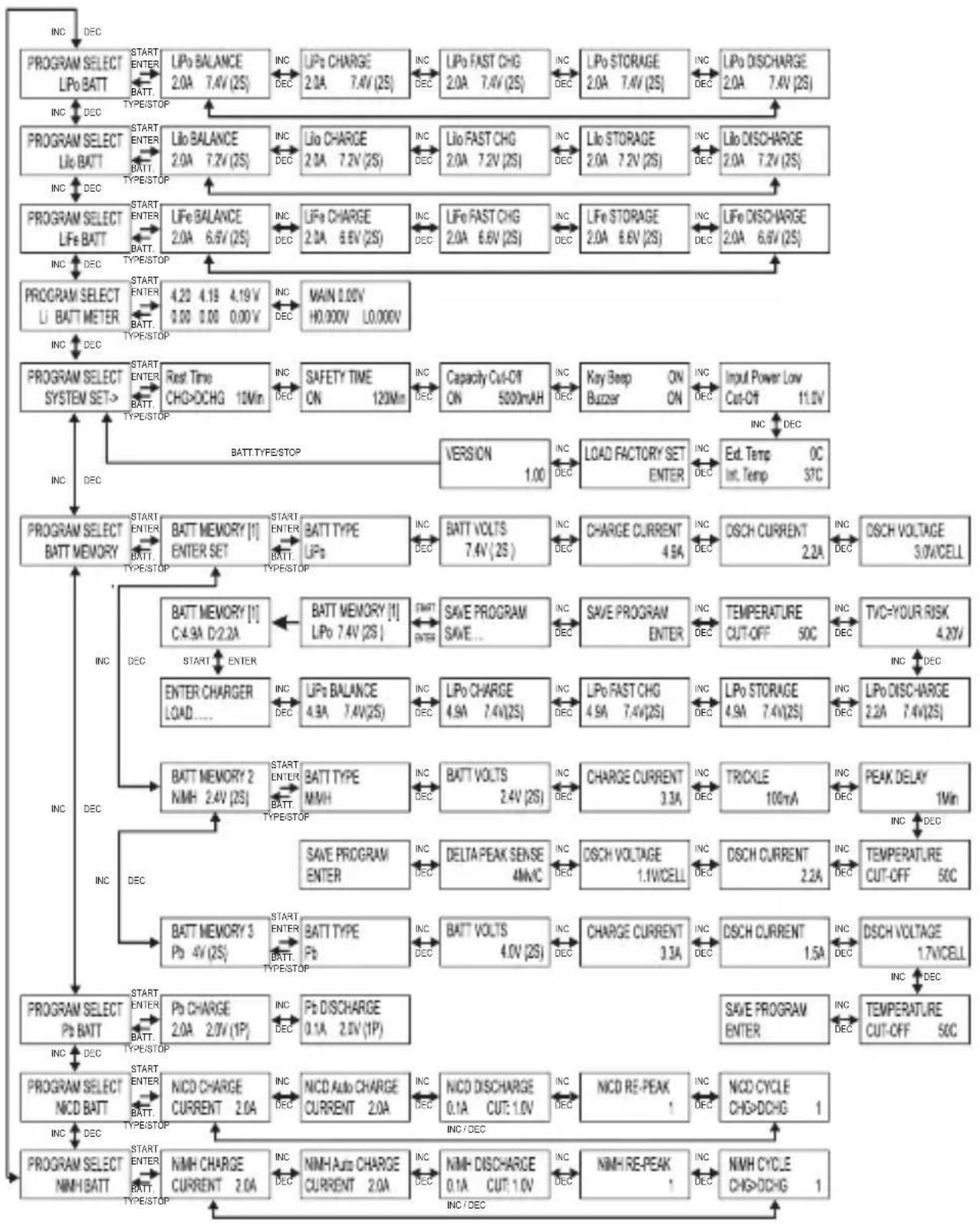
Newer versions of the charger may differ in menu structure or some displays.
11. Lithium Batteries (LiPo, Lilon, LiFe)
a) General Information
The rechargeable battery programmes for LiPo, Lilon and LiFe rechargeable batteries generally differ only in the voltages and the permitted charging current, see table in chapter 7.
When charging a lithium battery, there are two different phases. First, the rechargeable battery is charged with a consistent current. When the rechargeable battery reaches its maximum voltage (at a LiPo rechargeable battery, e.g., 4.2V ), charging continues at constant voltage (the charging current drops). When the charging current drops below a certain threshold, charging is ended and the rechargeable battery is fully charged.

If the rechargeable battery has a balancer connection (usually this is the case in almost every lithium battery with more than one cell), the balancer connection must be connected to the charger as well as the rechargeable battery's cable for charging/ discharging.
There are different types of balancer plug. Therefore, do not apply any force when the plug does not fit in the charger! The matching adapters for the balancer plugs are available as accessories.
There are also rare rechargeable batteries with more than one cell where the cell connections are separately routed out and that strictly speaking are not a "multiple-cell battery pack". Therefore, always observe the information of the rechargeable battery manufacturer on the build and rated voltage.
When using a balancer (integrated in the charger), all cells of a multi-cell battery pack have the same voltage after the charge process, which prevents the overcharging of individual cells (danger of fire and explosion) or a deep discharge of one of the cells (damage to the rechargeable battery).
The charging current to be set depends on the battery capacity and build (see chapter 7). Always observe the battery manufacturer's instructions.
The charger must be in the main menu.
Select the rechargeable battery type matching the rechargeable battery used with the button "INC" or "DEC" (LiPo, Lilon or LiFe), see figures on the right.
Confirm the selection by pressing the "START/ENTER" button.
PROGRAM SELECT LiPo BATT
PROGRAM SELECT LiIo BATT
PROGRAM SELECT LiFe BATT
Then use the button "INC" or "DEC" to select the different rechargeable battery programmes:
- "BALANCE": Charge lithium battery with balancer connection
- "CHARGE": Charge lithium battery without balancer connection
- "FAST CHG": Quick charge for lithium rechargeable battery
- "STORAGE": Charging/discharging batteries at a set voltage value (e.g. for storage)
- "DISCHARGE": Discharging the rechargeable battery
b) Charging Rechargeable Batteries without Balancer Connection ("CHARGE")

Of course, you can also charge multiple-cell lithium rechargeable batteries with a balancer connection with the rechargeable battery programme "CHARGE".
However, the individual cell voltages are not reconciled here, so that one or several cells may be overcharged. There is a risk of fire and explosion!
Therefore, always charge multiple-cell lithium rechargeable batteries with balancer connection with the rechargeable battery programme "BALANCE", but never with the rechargeable battery programme "CHARGE"!
- First, choose the rechargeable battery type with the button "INC" or "DEC" as described in chapter 11. a) (LiPo, Lilon or LiFe) and push the button "START/ENTER".
- Select the rechargeable battery programme "CHARGE" with the button "INC" or "DEC".
The previously selected rechargeable battery type is written in the upper left.
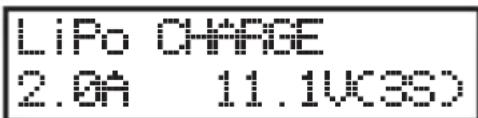
The value at the lower left indicates the currently set charging current ("2.0A"), the lower right shows the rechargeable battery nominal voltage ("11.1V") and the associated cell number ("3S" = 3cell rechargeable battery).
Use the button "INC" or "DEC" to select a different rechargeable battery programme; use the button "BATT. TYPE/STOP" to return to the main menu.
- If the values need to be changed, push the "START/ENTER" button.
The charging current at the lower left of the display flashes. Change the charging current using the button "INC" or "DEC". Keep the respective button pressed for quick adjustment.
The maximum possible charging current depends on the battery type and number of cells. The max. charging capacity for output #1 is 100 W; 50 W are available for output #2. The combined charging capacity (output #1 + #2) is max. 100 W.
- Confirm the charging current with the "START/ENTER" button.
The number of cells at the lower right of the display is flashing. Set the number of the cells with the buttons "INC" and "DEC". Keep the respective button pressed for quick adjustment. The associated rechargeable battery nominal voltage is automatically calculated and displayed to the left of the cell number.
Confirm the number of the cells by pressing the "START/ENTER" button.
- When no display is flashing anymore, start charging by keeping the "START/ENTER" button pushed (approx. 3 seconds).
- The charger now examines the connected rechargeable battery. In case of an error, a warning signal is output and the corresponding information is displayed. You can stop the warning signal by pressing the "BATT. TYPE/STOP" button. You then return to the previous configuration menu.
BATTERY CHECK HAIT...
If no error is found, e.g. the display shown on the right will appear.
The "R" value indicates the cell number that the charger has recognised (in the example a 3-cell rechargeable battery).
The "S" value indicates the cell number that you have set in the menu (in the example also a 3-cell rechargeable battery).
P:3SER S:3SER CANCEL(STOP)
P:3SER S:3SER CONFIRKENTERO

If these two numbers do not match, please check the settings on the charger and the battery itself. It may be that the rechargeable battery has been completely discharged, or a cell may be faulty. In this case, the battery should not be charged, as there is a risk of fire and explosion!
You can return to the previous configuration menu using the "BATT. TYPE/STOP" button.
- If the two cell numbers match, briefly push the "START/ENTER" button.
- Charging process starts. The display will show various information on the current charging progress.
Example:
LP3s 1.2n 12.32U CHG022:4800632
At the upper left, the rechargeable battery type and the cell number are displayed (e.g. "LP3s" = LiPo rechargeable battery with 3 cells); the charging current is shown in the upper middle and the current rechargeable battery voltage at the upper right.
The lower left shows the current rechargeable battery programme ("CHG" = "CHARGE"), in the middle the elapsed charging time and the charged capacity in mAh are displayed to the right of this.
Various information is indicated on the display during a charge/discharge process by repeatedly pressing the button "DEC" (see chapter 20). If you do not push any button for a few seconds, the charger will return to the normal display.
- After completion of charging, an audio signal is emitted (if it has not been turned off).
If you wish to cancel the charging process, push the "BATT. TYPE/STOP" button.
c) Charging Rechargeable Batteries with Balancer Connection ("BALANCE")
In contrast to the simple rechargeable battery programme "CHARGE" (see chapter 11. b), the rechargeable battery programme "BALANCE" motors the voltage of every single cell of a multiple-cell lithium rechargeable battery and corrects it accordingly if there are any deviations.
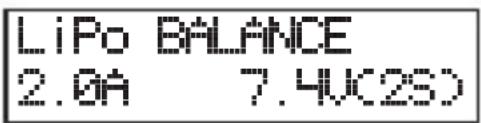
Besides the two normal rechargeable battery connections (plus/+ and minus/-), the balancer connector for the battery must also be connected to the charger.
Observe correct polarity when connecting the balancer plug of the rechargeable battery to the charger. Usually, the minus pole of the balancer connection is applied with a black cable or is specifically marked. This side of the balancer plug must point in the direction "-" of the charger's balancer socket and of course also be pushed onto this connection pin.
If you use self-customised rechargeable batteries, the balancer plug must be correctly assigned.
The black/marked cable is the minus pole of the first cell. The next connection pin is the plus pole of the first cell; the respective next connection pin is the plus pole of the second, third, fourth, fifth and sixth cell (depending on cell number).
The last connection pin of the balancer plug of the rechargeable battery therefore is the plus pole of the last cell. Therefore, the same voltage can be measured between the two outer pins of the balancer plug as at the two rechargeable battery connections directly.
The remaining procedure for charging is described in chapter 11. b).
If a lithium rechargeable battery with balancer plug is connected to the charger, you can switch to the display of the individual cell voltages by pushing the button "INC", see figure on the right.
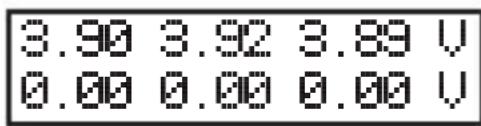
Briefly push the button "START/ENTER" for the charger to return to the normal display.
Important!
battery pack with exactly the same voltage for each cell provides the maximum performance and service life for a model airplane/vehicle.
Variations in the quality of the materials used and the internal structure of multiple-cell lithium battery packs mean that the cells may have different voltages once discharged.
Charging such a rechargeable lithium battery without balancer will quickly cause large differences of cell voltage. This not only shortens the operating life (as one cell may have a very low voltage), but also damages the rechargeable battery as a result of a total discharge.
When charging a rechargeable lithium battery with different cell voltages without a balancer, there is the risk of overcharging one cell.
Example:
A dual-cell LiPo battery pack charged without the use of a balancer appears to have a voltage of 8.4V and thus appears to be fully charged. The individual cells, however, have a voltage of 4.5V and 3.9V (one cell is dangerously overcharged, the other half discharged).
A cell overcharged in this way may leak, expand or, in a worst case scenario, catch fire or explode!
When this LiPo rechargeable battery is, e.g., used in a model airplane, the flight time will be very short because the voltage of the half-discharged cell will break down quickly and the rechargeable battery will stop supplying power.

If your lithium rechargeable battery has a balancer connection, it must always be connected to the charger via the enclosed XH adapter in addition to the two regular rechargeable battery connections (plus/+ and minus/); always use the charge program "BALANCE" then, rather than the charge program "CHARGE".
If the balancer plug of the rechargeable battery does not match the shape of the socket on the XH adapter (it is intended for XH plugs), you need to use a suitable connection cable. It is available in accessory trade.
d) Fast Charge ("FAST CHG")
When charging a lithium rechargeable battery, the charging current reduces continually due to the charging method used, the fuller the rechargeable battery becomes (when the rechargeable battery has reached its maximum charging current and the charger switches from continuous current to continuous voltage charging). This will, of course, also extend the charging time.
Quick charging reaches a higher charging current. However, this reduces the capacity, because the charge process is terminated earlier due to the safety cut-off in the charger.
This means, a LiPo battery, for example, cannot be fully charged using the fast charge function. Only approx. 90% of the capacity achievable with the normal charge process is available.
Therefore, fast charging is only wise if the battery has to be used again as quickly as possible.
The procedure when setting the charging current and voltage/cell number must be performed as for the rechargeable battery programme "CHARGE"; see chapter 11. b).
e) Storing Rechargeable Batteries ("STORAGE")
This rechargeable battery programme can be used if you want to store the rechargeable battery for an extended period. Depending on the rechargeable battery type set, the rechargeable battery is charged or discharged to a specific voltage.
Depending on the cell voltage, the battery is either charged or discharged. Of course, with a multi-cell battery pack, this is only wise if a balancer connection is available and connected to the charger.
At extended storage of a lithium rechargeable battery (e.g. when storing a flight battery over winter), the rechargeable battery should in any case be checked every 3 months and treated with the rechargeable battery programme "STORAGE" again to prevent harmful deep discharge.
The procedure when setting the charging current and voltage/cell number must be performed as for the rechargeable battery programme "CHARGE"; see chapter 11. b).
f) Discharging Rechargeable Batteries ("DISCHARGE")
Normally, it is not necessary to discharge lithium batteries (contrary to NiCd batteries) before charging. The battery can be charged immediately, independent of its current status. If you want to discharge a rechargeable lithium battery anyway, you can set the discharge current.
The maximum possible discharging current depends on the battery type and number of cells. The max. discharging capacity for output #1 is 10 W; 5 W are available for output #2. This limits the max. possible discharging current in rechargeable batteries with multiple cells.
Discharge a lithium rechargeable battery only to the minimum permitted discharge end voltage per cell (see table in chapter 7 or observe information of the rechargeable battery manufacturer). If the rechargeable battery is discharged any further, this deep discharge will permanently damage it and render it useless!
The procedure when setting the discharging current and voltage/cell number must be performed the same as when charging, see chapter 11. b), except that the rechargeable battery is not charged, but discharged after starting the rechargeable battery programme.
12. NiMH and NiCd Rechargeable Batteries
a) General Information
The rechargeable battery programmes for NiMH and NiCd rechargeable batteries generally differ only in the internally used charging procedures. The settings in the menus are the same.
The charger must be in the main menu.
Select the rechargeable battery type matching the rechargeable battery used here with the button "INC" or "DEC", see figures on the right.
Confirm the selection by pressing the "START/ENTER" button.
Then use the button "INC" or "DEC" to select the different rechargeable battery programmes:
- "CHARGE": Charge rechargeable battery
- "Auto CHARGE": Select the charge current according to the rechargeable battery
- "DISCHARGE": Discharging the rechargeable battery
- "RE-PEAK": Repeat the charge end recognition
- "CYCLE": Perform multiple discharge/charge cycles
PROGRAM SELECT NiMH BATT
PROGRAM SELECT NiCD BATT
NIMH CHARGE CURRENT 2.0a
You can return to the main menu using the "BATT. TYPE/STOP" button.
b) Charging Rechargeable Batteries ("CHARGE")
The charging current to be set depends on the rechargeable battery's capacity and is usually 1C (also see chapter 7). High-quality rechargeable batteries also can stand a charging current up to 2C. However, you should always observe the battery manufacturer's instructions.
The value "1C" means that the charging current is equivalent to the battery's capacity. A charging current of 3 A therefore is required for a 3000 mAh-NiMH battery at 1C.
A value of 0.5C means that the charging current corresponds to half the capacity value. At a NiMH rechargeable battery with a capacity of 3000mAh , 0.5C means that a charging current of 1.5 A must be set.
In general: The smaller the rechargeable battery (the individual cell), the lower the maximum charging current.
For example, conventional NiMH-mignon/AA-cells with a capacity of 2000 mAh permit a charging current of 1C (this corresponds to a charging current of 2 A). For quick charging of such cells (contained, e.g., in receiver batteries), never set more than 0.5C.
Charge a NiMH or NiCd battery as follows:
- Fist, choose the rechargeable battery type with the button "INC" or "DEC" as described in chapter 12. a) (NiMH or NiCd) and push the button "START/ENTER".
- Select the rechargeable battery programme "CHARGE" with the button "INC" or "DEC".
The value at the lower right represents the currently set charging current.
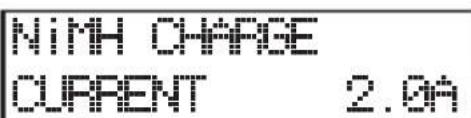
Use the button "INC" or "DEC" to select a different rechargeable battery programme; use the button "BATT. TYPE/STOP" to return to the main menu.
- If the value for the charging current must be changed, push the "START/ENTER" button. The charging current flashes. Change the charging current using the button "INC" or "DEC". Keep the respective button pressed for quick adjustment.
The maximum possible charging current depends on the battery type and number of cells. The max. charging capacity for output #1 is 100 W; 50 W are available for output #2. The combined charging capacity (output #1 + #2) is max. 100 W.
Confirm the set charging current with the "START/ENTER" button.
- When no display is flashing anymore, start charging by keeping the "START/ENTER" button pushed (approx. 3 seconds).
- The charger now examines the connected rechargeable battery. In case of an error, a warning signal is output and the corresponding information is displayed. You can stop the warning signal by pressing the "BATT. TYPE/STOP" button. You then return to the previous configuration menu.
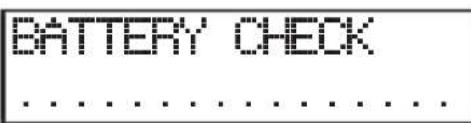
If no error is found, e.g. the display shown on the right will appear.
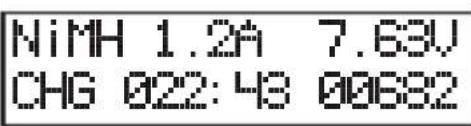
The rechargeable battery type is shown in the upper left ("NiMH" = NiMH rechargeable battery), the upper middle shows the charging current and the upper right the current rechargeable battery voltage.
The lower left shows the current rechargeable battery programme ("CHG" = "CHARGE"), in the middle the elapsed charging time and the charged capacity in mAh are displayed to the right of this.
- After completion of charging, an audio signal is emitted (if it has not been turned off).
If you wish to cancel the charging process, push the "BATT. TYPE/STOP" button.
c) Automatic Charge Mode ("Auto CHARGE")
In automatic charge mode, the charger checks the condition of the connected rechargeable battery (e.g. the inner resistance) and calculates the charging current from this. You need to set an upper limit for the charging current so that the rechargeable battery is not damaged by a too-high charging current.
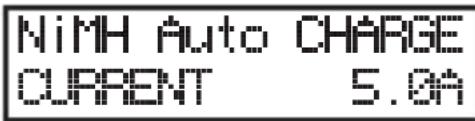
Depending on the rechargeable battery and its inner resistance, shorter charging times may be achieved in the rechargeable battery programme "Auto CHARGE" than in the rechargeable battery programme "CHARGE" (chapter 12. b).
Proceed as in the rechargeable battery programme "CHARGE" for setting and operation (chapter 12. b).
The only difference is that you do not set the actual charging current, but the limit for the maximum charging current that the charger must not exceed for reasons of safety.
d) Recharge Rechargeable Battery Again ("RE-PEAK")
The charger automatically ends charging of NiMH and NiCd rechargeable batteries when the rechargeable battery is fully charged. Recognition of when the rechargeable battery is fully charged is according to the delta-U procedure.
The rechargeable battery programme "RE-PEAK" performs this recognition again. This way, you can not only ensure that the rechargeable battery is truly fully charged, you can also check how well the rechargeable battery can take quick charging.
First, charge the rechargeable battery completely (see chapter 12. b) or chapter 12. c)). Then start the rechargeable battery programme "RE-PEAK".
Proceed as follows:
- Set the rechargeable battery type as described in chapter 12. a) (NiMH or NiCd) and select the rechargeable battery programme "RE-PEAK".
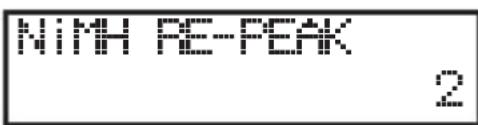
The value in the lower right means the number of the recognition processes.
Use the buttons "INC" and "DEC" to select a different rechargeable battery programme; use the button "BATT. TYPE/STOP" to return to the main menu.
- When the number of recognition processes for the delta-U charging procedure is to I changed, briefly push the button "START/ENTER". The number flashes.
- Use the buttons "INC" and "DEC" to set the number of recognition process.
- Briefly push the "START/ENTER" button to confirm the setting. The display stops flashing.
- Start the rechargeable battery programme "RE-PEAK" by pushing the button "START/ENTER" for 3 seconds.
If the settings are wrong, or if the charger detects a problem, a warning signal is emitted and the appropriate information is shown in the display. You can stop the warning signal by pressing the "BATT. TYPE/STOP" button. The charger then returns to the previous configuration menu.
The display shows, e.g., the following data while charging:
The rechargeable battery type is shown in the upper left ("NiMH" = NiMH rechargeable battery), the upper middle shows the charging current and the upper right the current rechargeable battery voltage.
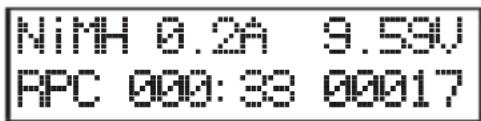
The lower left shows the current rechargeable battery programme ("RPC" = "RE-PEAK"), the middle the elapsed charging time and the charged capacity in mAh is displayed to the right of this.
- Once the charging process has been completed, an audio signal is emitted (if it was not turned off).
If you wish to cancel the charging process, push the "BATT. TYPE/STOP" button.
e) Discharging Rechargeable Batteries ("DISCHARGE")
This rechargeable battery program can be used to put partially charged NiMH-/NiCd rechargeable batteries into a defined starting condition or to perform a measurement of the rechargeable battery capacity.
Specifically NiCd rechargeable batteries should not be recharged from a partially discharged condition, since the capacity may reduce by this (memory effect).
The maximum possible discharging current depends on the battery type and number of cells. The max. discharging capacity for output #1 is 10 W; 5 W are available for output #2. This limits the max. possible discharging current in rechargeable batteries with multiple cells.
Discharge a NiMH or NiCd battery as follows:
- Set the rechargeable battery type as described in chapter 12. a) (NiMH or NiCd) and select the rechargeable battery programme "DISCHARGE".
NIMH DISCHARGE 0.1A OUT: 1.0U
The set rechargeable battery type (NiMH or NiCd) is shown in the upper left of the display, and the rechargeable battery programme next to it.
The value in the lower left indicates the currently set discharging current; the value on the lower right represents the deactivation voltage at the end of the discharge process.
Use the buttons "INC" and "DEC" to select a different rechargeable battery programme; use the button "BATT. TYPE/STOP" to return to the main menu.
- To change the value for the discharging current and the deactivation voltage, briefly push the "START/ENTER" button. The discharging current flashes.
- Set the discharging current with the buttons "INC" and "DEC". Keep the respective button pressed for quick adjustment.
- Briefly push the "START/ENTER" button; the deactivation voltage flashes.
- Set the deactivation voltage with the buttons "INC" and "DEC". Keep the respective button pressed for quick adjustment.
- Briefly push the "START/ENTER" button to confirm the setting.
Proceed as described above to change the discharging current or the discharging voltage again if desired.
- When no display is flashing anymore, keep the "START/ENTER" button pushed (approx. 3 seconds), to start discharging.
If the settings are wrong, or if the charger detects a problem, a warning signal is emitted and the appropriate information is shown in the display. You can stop the warning signal by pressing the "BATT. TYPE/STOP" button. The charger then returns to the previous configuration menu.
The display shows, e.g., the following data while discharging:
The rechargeable battery type is shown in the upper left of the display ("NiMH" = NiMH rechargeable battery), the upper middle shows the discharging current and the upper right the current rechargeable battery voltage.
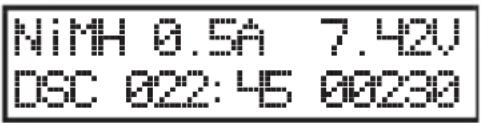
The lower left shows the current rechargeable battery programme ("DSC" = "DISCHARGE"), in the middle the elapsed charging time and the charged capacity in mAh are displayed to the right of this.
- Once the discharging process has been completed, an audio signal is emitted (if it was not turned off).
If you wish to cancel the discharging process, push the "BATT. TYPE/STOP" button.
f) Cycle Program ("CYCLE")
To test rechargeable batteries, form new rechargeable batteries or refresh older rechargeable batteries, you can perform up to 5 cycles in sequence automatically. The two possible combinations are "Charge/Discharge" ("CHG>DCHG") and "Discharge/Charge" ("DCHG>CHG").
The values that you have set in the charging programme ("CHARGE") or discharging programme ("DISCHARGE") are used as charging or discharging current.
Proceed as follows:
- Set the rechargeable battery type as described in chapter 12. a) (NiMH or NiCd) and select the rechargeable battery programme "CYCLE".
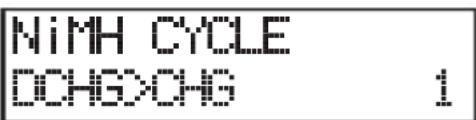
The set rechargeable battery type is shown in the upper left of the display, and the rechargeable battery programme next to it.
The display in the lower left represents the corresponding combination "Charging/discharging" ("CHG>DCHG") or "Discharging/charging" ("DCHG>CHG"), the lower right shows the number of currently set cycles.
Use the buttons "INC" and "DEC" to select a different rechargeable battery programme; use the button "BATT. TYPE/STOP" to return to the main menu.
- If any other cycle mode is to be selected or if you would like to set the number of cycles, briefly push the button "START/ENTER". The display "CHG>DCHG" or "DCHG>CHG" flashes.
- With the buttons "INC" or "DEC", select the desired order in cycle operation:
"CHG>DCHG" = Charge + then discharge
"DCHG>CHG" = Discharge + then charge
- Briefly push the button "START/ENTER"; the number of cycles flashes (how often the currently set sequence of charging/discharging or discharging/charging is performed).
- Set the cycle number with the buttons "INC" and "DEC" (1 - 5 cycles are possible).
- Briefly push the "START/ENTER" button to confirm the setting. The display stops flashing.
- To start cycle operation, keep the "START/ENTER" button pressed for longer (approx. 3 seconds).
If the settings are wrong, or if the charger detects a problem, an audio signal is emitted and the appropriate information is shown in the display. You can stop the warning signal by pressing the "BATT. TYPE/STOP" button. The charger then returns to the previous configuration menu.
The display shows, e.g., the following data while charging or discharging:
The rechargeable battery type is shown in the upper left ("NiMH" = NiMH rechargeable battery), the upper middle shows the charging or discharging current and the upper right the current rechargeable battery voltage.
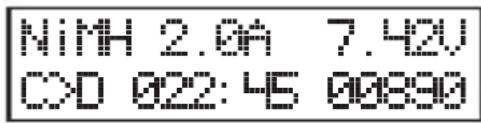
The lower left shows the selected cycle operation ("C>D" = Charge/discharge, "D>C" = Discharge/charge), the middle shows the elapsed charging or discharging duration and the right next to it the charged or discharged capacity in mAh.
- Once cycle operation has been completed, an audio signal is emitted (if it has not been turned off).
To interrupt cycle operation, push the button "BATT. TYPE/STOP".
13. Lead Batteries (Pb)
a) General Information
Lead batteries are completely different from lithium, NiMH or NiCd batteries. Despite their high capacity they can only provide low currents. The charging process is also different.
The charging current for modern lead batteries must not exceed 0.4C; 1/10C is perfect for lead batteries.

A higher charging current is not permitted; it would overload the rechargeable battery! This not only causes danger of explosion and fire, but also danger of injury from the contained acid.
Also always observe the information printed on the battery or the information provided by the battery manufacturer on the permitted charging current.
The charger must be in the main menu.
Select the rechargeable battery type "Pb BATT" with the "INC" or "DEC" button here, see figure on the right.
Confirm the selection by pressing the "START/ENTER" button.
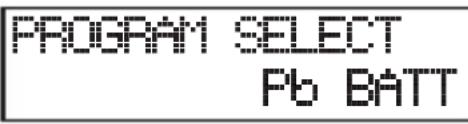
Then use the button "INC" or "DEC" to select the different rechargeable battery programmes:
- "CHARGE": Charge rechargeable battery
- "DISCHARGE": Discharging the rechargeable battery
b) Charging Rechargeable Batteries ("CHARGE")
The charging current to be set depends on the battery capacity and is usually 0.1C (also see chapter 7). High-quality lead batteries also can stand a charging current up to 0.4C. However, you should always observe the battery manufacturer's instructions.
The value "0.1C" means that the charging current is equivalent to one-tenth of the rechargeable battery's capacity. For a lead battery with a capacity of 5000mAh ( = 5Ah ) the charging current at 0.1C must be set to 0.5 A.
Proceed as follows to charge a lead battery:
-
Fist, choose the rechargeable battery type "Pb BATT" with the buttons "INC" and "DEC" as described in chapter 13. a) and push the button "START/ENTER".
-
Select the rechargeable battery programme "CHARGE" with the buttons "INC" or "DEC".
The set rechargeable battery type is shown in the upper left of the display, and the rechargeable battery programme next to it.
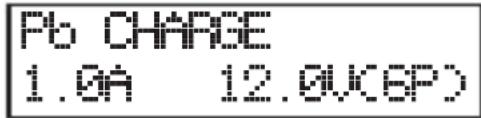
The value on the lower left shows the currently set charging current, the value at the lower right shows the voltage or number of cells of the lead battery (in this example, a 6-cell lead battery (6 × 2.0V = 12.0V) ).
Use the buttons "INC" and "DEC" to select a different rechargeable battery programme; use the button "BATT. TYPE/STOP" to return to the main menu.
- If the value for the charging current must be changed, push the "START/ENTER" button. The charging current flashes. Change the charging current using the buttons "INC" and "DEC". Keep the respective button pressed for quick adjustment.
The maximum possible charging current depends on the battery type and number of cells. The max. charging capacity for output #1 is 100 W; 50 W are available for output #2. The combined charging capacity (output #1 + #2) is max. 100 W.
- Confirm the set charging current with the "START/ENTER" button.
- The number of the cells in the lower right of the display flashes. Set the number of the cells with the buttons "INC" and "DEC". Keep the respective button pressed for quick adjustment.
- Confirm the number of the cells by pressing the "START/ENTER" button.
- When no display is flashing anymore, start charging by keeping the "START/ENTER" button pushed (approx. 3 seconds).
If the settings are wrong, or if the charger detects a problem, an audio signal is emitted and the appropriate information is shown on the display. You can stop the warning signal by pressing the "BATT. TYPE/STOP" button. The charger then returns to the previous configuration menu.
The display shows, e.g., the following data while charging:
The rechargeable battery type is shown in the upper left ("P" = lead battery), as well as the cell number; the upper middle shows the charging current and the upper right the current rechargeable battery voltage.
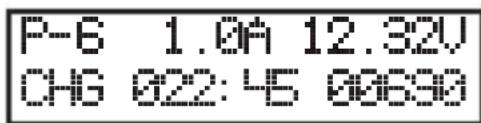
The lower left shows the current rechargeable battery programme ("CHG" = "CHARGE"), in the middle the elapsed charging time and the charged capacity in mAh are displayed to the right of this.
- Once the charging process has been completed, an audio signal is emitted (if it was not turned off).
If you wish to cancel the charging process, push the "BATT. TYPE/STOP" button.
c) Discharging Rechargeable Batteries ("DISCHARGE")
This rechargeable battery program can be used to put partially charged lead batteries into a defined starting condition or to perform a measurement of the rechargeable battery capacity.
The maximum possible discharging current depends on the battery type and number of cells. The max. discharging capacity for output #1 is 10 W; 5 W are available for output #2. This limits the max. possible discharging current in rechargeable batteries with multiple cells.
Proceed as follows to discharge a lead battery:
- Fist, choose the rechargeable battery type "Pb BATT" with the buttons "INC" and "DEC" as described in chapter 13. a) and briefly push the button "START/ENTER".
- Select the rechargeable battery programme "DISCHARGE" with the button "INC" or "DEC".
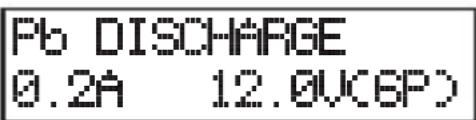
The set rechargeable battery type is shown in the upper left of the display, and the rechargeable battery programme next to it.
The value on the lower left shows the currently set discharging current, the value on the right shows the voltage or number of cells of the lead battery (in this example, a 6-cell lead battery (6 × 2.0V = 12.0V) ).
Use the button "INC" or "DEC" to select a different rechargeable battery programme; use the button "BATT. TYPE/STOP" to return to the main menu.
- If the value for the discharging current must be changed, briefly push the "START/ENTER" button. The discharging current flashes.
- Change the discharging current using the button "INC" or "DEC". Keep the respective button pressed for quick adjustment.
Briefly push the "START/ENTER" button to confirm the set discharging current.
- When no display is flashing anymore, keep the "START/ENTER" button pushed (approx. 3 seconds), to start discharging.
If the settings are wrong, or if the charger detects a problem, an audio signal is emitted and the appropriate information is shown on the display. You can stop the warning signal by pressing the "BATT. TYPE/STOP" button. The charger then returns to the previous configuration menu.
- The display shows, e.g., the following data while discharging:
The rechargeable battery type is shown in the upper left ("P" = lead battery), the upper middle shows the discharging current and the upper right the current rechargeable battery voltage.
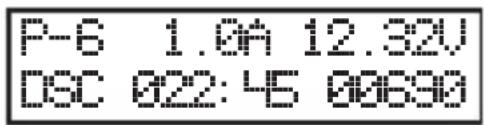
The lower left shows the current rechargeable battery programme ("DSC" = "DISCHARGE"), in the middle the elapsed charging time and the charged capacity in mAh are displayed to the right of this.
- Once the discharging process has been completed, an audio signal is emitted (if it was not turned off).
If you wish to cancel the discharging process, push the "BATT. TYPE/STOP" button.
14. Saving/Loading Rechargeable Battery Data
The charger has a total of 10 memories in which you can save rechargeable battery data/settings. They can be loaded again on demand.
a) Selecting/Setting Rechargeable Battery Data
- Select the function "BATT MEMORY" in the main menu of the charger with the button "INC" or "DEC".
- Confirm the selection by pressing the "START/ENTER" button. The memory number flashes.
- Select one of the 10 memories with the buttons "INC" or "DEC".
PROGRAM1 SELECT BATT MEMORY
[BATT MEMORY 1]
ENTER SET->
If there already are data in the memory, the display will alternate, e.g., between the rechargeable battery type and the cell number, as well as the charging and discharging current.
When the memory is empty, only "ENTER SET ->" is displayed.
- Confirm the selection of the memory number by pressing the "START/ENTER" button.
The rechargeable battery type is displayed first; figure on the right.
BATTTYPE LiPo see - The buttons "INC" and "DEC" select the desired setting function (e.g. battery type, cell number, charge current, etc.). A description of the respective setting functions shown is included on the following pages.
If a setting is to be changed, briefly push the button "START/ENTER". The respectively adjustable value flashes. - Change the flashing value with the buttons "INC" and "DEC". Keep the respective button pressed for quick adjustment.
- Complete the setting by briefly pushing the "START/ENTER" button. The respective adjustable value stops flashing. Then you can select another setting function, see above.
If you want to save all previous settings in the memory selected at first, call the setting function "SAVE PROGRAM" at the end with the buttons "INC" and "DEC" and briefly push the button "START/ENTER".
SAUE PROGRAM ENTER
If this is not done, all settings are lost!
- Then the display shows the indication with the flashing memory number again.
To discard previous settings and cancel setting mode, push the button "BATT. TYPE/ STOP" repeatedly until you are back in the main menu.
The following functions are available:
Depending on the set battery type (LiPo, Lilo, LiFe, NiMH, NiCd, Pb), different setting functions are available. For example, the setting function for the charge end voltage per cell is only available for lithium rechargeable batteries.
Therefore, always set the rechargeable battery type first and only then the other data, so that the charger can offer the setting functions matching the rechargeable battery type.
Rechargeable battery type
BATT TYPE LiPo
For this, select the rechargeable battery type "LiPo", "Lilo", "LiFe", "NiMH", "NiCd" or "Pb".
As described above, this selection must be made first, since the right setting functions matching the rechargeable battery type are only displayed then.
Battery Voltage
BATT VOLTS 7.4K250
Depending on the set rechargeable battery type, the rechargeable battery voltage can be set here.
However, it is not possible to set any voltage, but the steps depend on the rated voltage of an individual cell of the respective rechargeable battery type; see chapter 7.
For example, the rated voltage of a cell in LiPo rechargeable batteries is 3.7V ; the rechargeable battery voltage can thus only be set in steps of 3.7V (3.7 V, 7.4 V, 11.1 V, etc.).
Charging current
CHARGE CURRENT 2.2A
Set the desired charging current here. It must be selected according to the rechargeable battery used.
A charging current of 0.1 - 10.0 A can be set at output #1; a charging current of 0.1 - 6.0 A can be set at output #2.
The actual charging current during charging depends on the battery type and number of cells. The max. charging capacity for output #1 is 100 W; 50 W are available for output #2.
The combined charging capacity (output #1 + #2) is max. 100 W.
Discharging current
DSCH CURRENT 2.0A
Set the desired discharging current here. It must be selected according to the rechargeable battery used.
A discharging current of 0.1 - 5.0 A can be set at output #1; a discharging current of 0.1 - 2.0 A can be set at output #2.
The actual discharging current during discharging depends on the battery type and number of cells. The max. discharging capacity for output #1 is 10 W; 5 W are available for output #2.
Discharging end voltage per cell
DSCH VOLTAGE 3.0V/CELL
Here, the voltage per cell at which discharging ends can be set.

Attention!
set the voltage too low. For lithium rechargeable batteries, this may cause deep discharge and permanent damage to the rechargeable battery!
Observe the table in chapter 7 and any special information of the rechargeable battery manufacturer.
Charging end voltage per cell
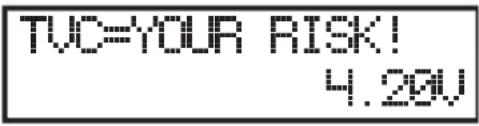
Here, the voltage per cell at which discharging ends in lithium rechargeable batteries can be set.

Attention!
set the voltage too high. This can result in a fire or explosion with lithium rechargeable batteries!
Observe the table in chapter 7 and any special information of the rechargeable battery manufacturer.
Deactivation at overtemperature
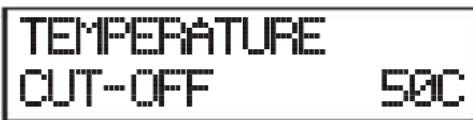
The charger can automatically cancel charging/discharging if the rechargeable battery exceeds the temperature set here.
To use this function, an external temperature sensor is required (not enclosed). It must be connected to the respective socket of the charger.
Maintenance charging current (for NiMH and NiCd only)
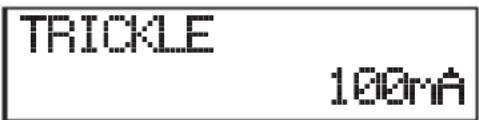
Set the maintenance charging current here. When a NiMH or NiCd rechargeable battery is fully charged, it will lose part of its capacity again by self-discharge.
The maintenance charging current (short charging impulses, no continuous charging current!) ensures that the rechargeable battery remains fully charged. Thus also prevents crystal formation in the rechargeable battery.
Delay time for delta-U recognition (for NiMH and NiCd only)
PEAK DELAY
1min
The charger ends charging of NiMH or NiCd rechargeable batteries according to the delta-U method. Set for how long the charger is to continue charging after this recognition here.
Voltage for delta-U recognition (for NiMH only)
DELTA PEAK SENSE
4.1U/C
Set the voltage here where the delta-U charging procedure recognises a fully charged rechargeable battery.
If the value is set too high, the charger may not recognise that the rechargeable battery is fully charged. The protection circuit for the charge duration or the maximum capacity usually trips here (if set correctly).
If the value is set too low, the charge will switch off too early and the rechargeable battery will not be fully charged.
Change the voltage in steps and check the charging process. Due to the many different rechargeable batteries, it is not possible to suggest a perfect value.
Save settings
SAVE PROGRAM
ENTER
For this purpose, see chapter 14. b).
b) Saving Rechargeable Battery Data
To save the set values, select the setting function "SAVE PROGRAM" and then briefly push the button "STENTER". Otherwise, all settings are lost.
The charger will show the corresponding display message when saving ("SAVE....") and emit a sound signal.
Then the charger alternatingly shows the most important information that you have stored in the memory.
In the example in the figure on the right, memory "1" holds a LiPo rechargeable battery with 2 cells, a charging current of 2.2A and a discharging current of 0.4A .
This shows you which rechargeable battery or data are stored in the memory at first glance.
When the memory is empty, the bottom line shows only "ENTER SET ->".
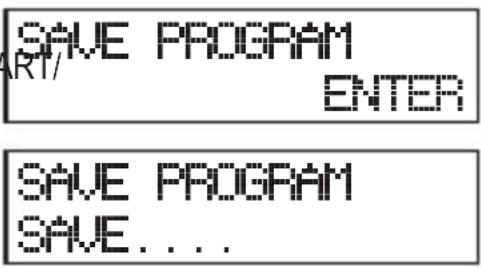
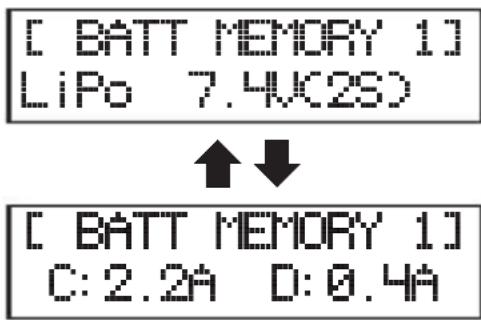
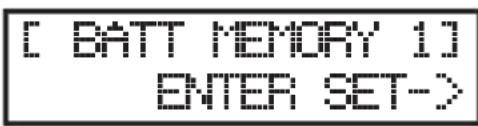
c) Loading Rechargeable Battery Data
- Select the function "BATT MEMORY" in the main menu of the charger with the button "INC" or "DEC".
- Confirm the selection by pressing the "START/ENTER" button. The memory number flashes.
- Select one of the 10 memories with the buttons "INC" or "DEC".
If there are data in the memory, the display will show in the bottom line alternately, e.g., the rechargeable battery type and the cell number, as well as the charging and discharging current.
When the memory is empty, the bottom line shows only "ENTER SET->".
- Load the battery data from the selected memory pushing the button "START/ENTER" for 3 seconds.
The display shows the message "ENTER CHARGE LOAD...."; the data are then loaded and the desired charging/discharging programme can then be started (push the button "START/ENTER" again for 3 seconds).
If you keep the button "START/ENTER" pushed for 3 seconds in an empty memory, the charger will start selection/setting mode, see chapter 14. a).
[BATT MEMORY 1] LiPo 7.4K(2S)
[BATT MEMORY 1] C:2.2D:1.0A
[BATT HISTORY 2]
ENTER SET->
ENTER CHARGE LOAD...
15. Voltage Display for Lithium Rechargeable Batteries
The charger can also display the current voltages of the cells of a lithium rechargeable battery.

For this, the rechargeable lithium battery must have a balancer connection that must be connected to the charger.
Proceed as follows:
- Select the function "LI BATT METER" in the main menu of the charger with the button "INC" or "DEC".
- Confirm the selection by pressing the "START/ENTER" button.
Then the voltage display appears.
-
Use the buttons "INC" or "DEC" to switch between:
-
individual voltages of cells 1 - 6
- overall voltage ("MAIN"), maximum cell voltage ("H") and minimum cell voltage ("L")
PROGRAM SELECT LI BATT METER
4.19 4.17 4.19 U
0.00 0.00 0.00 U
MAIN 12.55U H.191U L4.178U
The individual voltage displays depending on the cell number, of course. The example figure may be a 3-cell LiPo rechargeable battery (or a multiple-cell LiPo rechargeable battery with defective cells or defective balancer connections).
The display of the maximum cell voltage ("H") and the minimum cell voltage ("L") of all cells of the connected battery pack shows the difference of the voltage situation of the cells at a glance.
- You can return to the main menu as usual via the "BATT.TYPE/STOP" button.
16. System Settings
The system settings of the charger summarise various basic settings. They are pre-applied with the most common values in the delivery condition.
Depending on the rechargeable batteries you want to charge or discharge, however, certain changes to the values are sensible.
Proceed as follows:
- Select the function "SYSTEM SET->" in the main menu of the charger with the button "INC" or "DEC".
- Confirm the selection by pressing the "START/ENTER" button.
First, the break time between a charging/discharging process (e.g. in cycle operation) is displayed; see figure on the right.
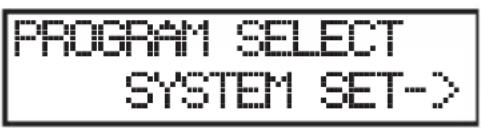
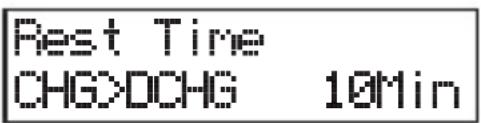
Use the buttons "INC" or "DEC" to select the desired setting functions.
If a setting is to be changed, briefly push the button "START/ENTER". The respectively adjustable value flashes.
Change the flashing value with the buttons "INC" and "DEC". Keep the respective button pressed for quick adjustment.
Complete the setting by briefly pushing the "START/ENTER" button. The respective adjustable value stops flashing. Then you can select another setting function, see above.
To return to the main menu, push the button "BATT.TYPE/STOP".
Observe the following information for description of the possible setting functions.
Pause duration between charging/discharging processes
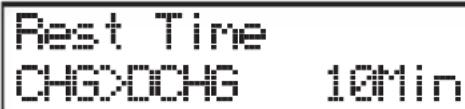
When charging a rechargeable battery, it heats up (depending on the charging current). In cycle operation, the charger may make a break between charging and discharging so that the rechargeable battery cools off before discharging starts.
Safety timer
SAFETY TINER ON 120min
If charging starts, the internal safety timer starts as well. If the charger cannot detect whether the battery is fully charged for whatever reason (e.g. with delta-U detection), the charge process is terminated automatically after a set time if the safety timer is on. This protects the battery from overloading.
The safety timer can be switched on ("ON") or off ("OFF"); the time for the safety timer can also be changed.
Do not set the time too short, since the rechargeable battery cannot be fully charged then because the safety timer will cancel charging.
Calculate the time for the safety timer as follows:
Examples:
Battery capacity Charging current Timer time
2000 mAh 2.0 A 2000 / 2.0 = 1000 / 11.9 = 84 minutes
3300 mAh 3.0 A 3300 / 3.0 = 1100 / 11.9 = 92 minutes
1000 mAh 1.2 A 1000 / 1.2 = 833 / 11.9 = 70 minutes
The factor 11.9 is used to permit charging 140% of the rechargeable battery capacity (the rechargeable battery is guaranteed to be fully charged then), before the safety timer trips.
Automatic deactivation at specific charging capacity
Capcity Out-Off ON 588
This safety function of the charger terminates charging automatically when a certain capacity has been "loaded" into the battery.
The safety function can be switched on ("ON") or off ("OFF") and the capacity can be set.
However, do not set a capacity which is too low; otherwise the rechargeable battery cannot be fully charged.
Switching the key confirmation/warning sounds on/off
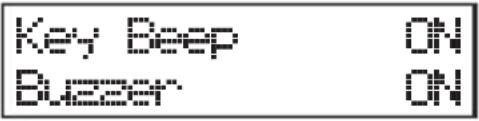
With the option "Key Beep", confirmation beep for each push of a button is switched on ("ON") or off ("OFF").
The function "Buzzer" switches the signal sound for various functions/warning messages on ("ON") or off ("OFF").
Monitoring of the input voltage
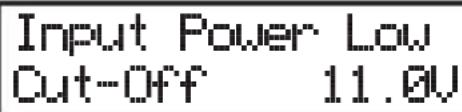
This function monitors the voltage at the charger input. This is sensible when a 12 V car lead battery is used for power supply.
If the voltage drops below the set value, charging is terminated to prevent deep discharge of the car lead battery.
Display of the rechargeable battery and charger temperatures
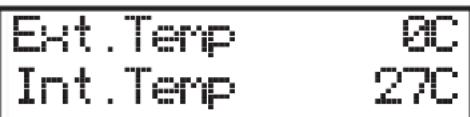
This function shows the external rechargeable battery temperature and the internal temperature of the charger.
The external temperature can only be displayed if an external temperature sensor is connected to the charger (not enclosed, but available as an accessory).
This temperature sensor is attached to the rechargeable battery.
Loading factory settings (reset)
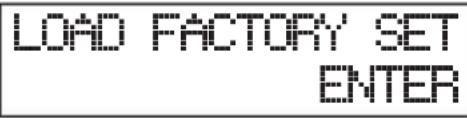
This recovers the factory settings (reset).
Keep the button "START/ENTER" pressed for 3 seconds. The lower display line shows "COMPLETED"; the charger restarts and then is in the main menu again.
Observe that all values set by you are then reset to factory settings; the 10 rechargeable battery memories (see chapter 14) are also deleted.
Display firmware version
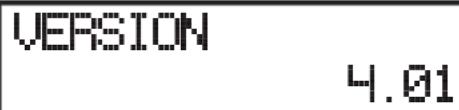
The current firmware of the charger is displayed at the lower right of the display.
17. USB Output
If the charger is connected to the voltage/current supply, a voltage of 5 V/DC as common for USB and a current of up to 2.1 A are available at the USB-output.
You can use this output, e.g. to charge a mobile phone or a tablet computer.
- First install the software (at least Windows XP or higher required) and the drivers of the enclosed CD before connecting the charger to a computer.
For operation of the software observed, e.g., the corresponding information on the CD or in the software's help function.
Important!
For design reasons, it is impossible to connect both USB interfaces (see chapter 8, item 16/17) to a single computer and control them by software at the same time (no switching option was present at the time these operating instructions were drawn up). In this case, two separate computers are required that must be connected to one USB interface of the charger each.
- Place the CD included in the delivery in the corresponding drive of your computer.
- Open the table of contents of the CD, e.g. with the file manager of Windows and start the installation programme.
- Follow all instructions of the software or Windows.
- Now connect the USB socket of the charger to a free USB interface of your computer via a suitable USB cable (not included).
Windows recognises the new hardware and completes the driver installation. Windows may then have to be restarted.
- Start the software. If any problems occur, try starting the software with Administrator rights.
- The charger can be controlled by software now.
If a new version of the software is available, you can find it on the website www.conrad.com, in the download area for the product.
19. Warning Messages on the Display
REVERSE POLARITY
CONNECTION BREAK
CONNECT ERROR CHECK MAIN PORT
BALANCE CONNECT ERROR
DC IN TOO LOH
DC IN TOO HIGH
CELL ERROR LOH VOLTAGE
CELL ERROR HIGH VOLTAGE
CELL ERROR VOLTAGE-INSALID
CELL NUMBER INCOFFECT
INT. TEMP. TOO HI
The polarity of the rechargeable battery connections has been switched.
The connection to the rechargeable battery has been disrupted, e.g. if the battery has been disconnected during the charging process.
The rechargeable battery was connected with reversed polarity.
The balancer connection of the rechargeable battery has been connected incorrectly or with reversed polarity.
The input voltage (at the direct voltage input) for the charger is too low (< 11V)
The input voltage (at the direct voltage input) for the charger is too high (>18V)
The voltage of a cell of a connected lithium rechargeable battery is too low.
The voltage of a cell of a connected lithium rechargeable battery is too high.
The voltage of a cell of a connected lithium rechargeable battery cannot be measured correctly.
The set cell number is wrong.
The inner temperature of the charger is too high.
EXT. TEMP. 100 HI
The temperature measured at the rechargeable battery via the external temperature sensor (not enclosed, can be ordered separately) is too high.
OVER CHARGE CAPACITY LIMIT
The set capacity limit (see chapter 16) has been exceeded.
OVER TIME LIMIT
The set time limit for charging (see chapter 16) has been exceeded.
BATTERY HAS FULL
The connected rechargeable battery is fully charged. If required, check the cell number settings.
20. Information on the Charger
Various information is indicated on the display during a charge/discharge process by repeatedly pressing the button "DEC". If you do not push any button for a few seconds, the charger will return to the normal display.
The information that can be displayed depends on the connected rechargeable battery type.
Voltage of the battery at the end of charging/discharging
End Voltoge 12.BU(3S)
Input voltage
IN Power Voltoge 14.83V
Display of the temperature at the external temperature sensor
Ext.Temp 80 Int.Temp 27C
If no external temperature sensor is connected (not enclosed, can be ordered separately), "Ext.Temp" will display "0C".
Duration for safety timer
Safety timer ON 280min
Battery capacity for safety cut-off
Capacity Cut-off ON 500mAh
21. Maintenance and Cleaning
The product does not require any maintenance. You should never take it apart.
The product should only be repaired by a specialist or specialist workshop or it may be damaged. Furthermore, the CE approval and the guarantee/warranty will expire.
Any rechargeable battery connected must be disconnected from the charger before cleaning. Then disconnect the charger from the voltage/current supply.
Clean the product only with a soft, clean, dry and fuzz-free cloth. Do not use cleaning agents as they may corrode the casing and wear off the labelling.
Dust can be removed using a clean, soft brush and a vacuum cleaner.
22. Disposal
a) General Information
The product does not belong in the household waste.
of the product according to the applicable statutory provisions at the end of its service life once it has become useless.
b) Batteries and Rechargeable Batteries
You as the end user are required by law (Battery Ordinance) to return all used batteries/re-chargeable batteries. Disposing of them in the household waste is prohibited!
Batteries/rechargeable batteries containing harmful substances are marked with the following symbols, which point out that they are not allowed to be disposed of in the domestic refuse. The descriptions for the respective heavy metals are: Cd=cadmium, Hg=mercury, Pb=lead (the names are indicated on the battery/rechargeable battery, e.g. below the dust bin icons shown to the left).
You may return used batteries/rechargeable batteries free of charge at the official collection points in your community, in our stores, or wherever batteries/rechargeable batteries are sold.
You thus fulfil your statutory obligations and contribute to the protection of the environment.
23. Technical Data
Operating voltage..Mains voltage input: 100 - 240 V/AC, 50/60Hz
Direct voltage input: 11 - 18 V/DC

Never use both inputs at the same time. This may damage the charger. Loss of guarantee/warranty!
Charging/discharging channels 2
Charging current....Output #1: 0.1 - 10.0 A
Output #2: 0.1 - 6.0 A
Charging output. Output #1: max. 100 W
Output #2: max. 50 W
The combined charging capacity for outputs #1 and #2 is max. 100 W (e.g. output #1 = 60 W and output #2 = 40 W).
Discharging current Output #1: 0.1 - 5.0 A
Output #2: 0.1 - 2.0 A
Discharging output....Output #1: max. 10 W
Output #2: max. 5 W
Suitable rechargeable batteries.....NiMH/NiCd, 1 - 15 cells
LiPo/Lilon/LiFe, 1 - 6 cells
Pb, 1 - 10 cells (rated voltage 2 - 20 V)
Discharging current for balancer ......LiPo/Lilon/LiFe: 300 mA per cell
Delta-U detection.. NiMH/NiCd: 3 - 15 mV/cell (adjustable)
Safety timer 1-720 minutes, can be switched off
Ambient conditions. Temperature 0^ to +40^ ; humidity 0% to 90% relative, non-condensing
Weight .Approx. 710 g
Dimensions.. Approx. 143× 115× 63mm (W× D× H)
Page
Cher client, chere clientele,
France (email): technique@conrad-france.fr
ARTBATT MEMORY 1] ENTER SET->
[BATT MEMORY 1] C:2.2D:1.0A
MAIN12.55UHH.191U L4.178U
2000 mAh 2,0 A 2000 / 2,0 = 1000 / 11,9 = 84 minutes
3300 mAh 3,0 A 3300 / 3,0 = 1100 / 11,9 = 92 minutes
1000 mAh 1,2 A 1000 / 1,2 = 833 / 11,9 = 70 minutes
CONNECT ERROR CHECK MAIN PORT
CELL NUMBER INCOFFECT
Safety timer ON 20min
Capacity Out-off ON 5880n
11. Lithium-accu's (LiPo, Lilon, LiFe)
a) Algemeen
[BATT MEMORY 1] C:2.2A D:0.4A
[BATT MEMORY 1] ENTER SET->
c) Accugegevens opladen
[BATT MEMORY 1] C:2.2D:1.0A
[BATT MEMORY 2] ENTER SET->
MAIN12.55U H.191U L4.178U
2000 mAh 2,0 A 2000 / 2,0 = 1000 / 11,9 = 84 minutes
3300 mAh 3,0 A 3300 / 3,0 = 1100 / 11,9 = 92 minutes
1000 mAh 1,2 A 1000 / 1,2 = 833 / 11,9 = 70 minutes
CONNECT ERROR CHECK MAIN PORT
CELL NUMBER INCOFFECT
Safety timer ON 280min
Capacity Out-off ON 500mAh
LiPo/Lilon/LiFe, 1 - 6 cellen
Pb, 1 - 10 cellen (nominale spanning 2 - 20V )
Copyright 2016 by Conrad Electronic SE.

This is a publication by Conrad Electronic SE, Klaus-Conrad-Str. 1, D-92240 Hirschau (www.conrad.com).
All rights including translation reserved. Reproduction by any method, e.g. photocopy, microfilming, or the capture in electronic data processing systems require the prior written approval by the editor. Reprinting, also in part, is prohibited. This publication represent the technical status at the time of printing.
© Copyright 2016 by Conrad Electronic SE.

Copyright 2016 by Conrad Electronic SE. V4-0516-02-m/VTP
