CLB600 - Measuring device VOLTCRAFT - Free user manual and instructions
Find the device manual for free CLB600 VOLTCRAFT in PDF.



| Product type | Chlorine meter (free and total) |
| Brand | Voltcraft |
| Model | CLB600 |
| Test method | DPD (paraphenylenediamine) |
| Measurement range | 0.00 to 5.00 ppm (mg/L) |
| Resolution | 0.01 ppm |
| Accuracy | ±0.03 + 1 digit (<2.00 ppm); ±3% FS + 1 digit (≥2.00 ppm) |
| Measurement time | <5 seconds |
| Sample volume | 10 ml |
| Memory | 150 results |
| Power supply | 4 AAA 1.5 V batteries |
| Display | Liquid crystal display (LCD) |
| Auto-off | 10 minutes inactivity |
| Dimensions (L x W x H) | 135 x 70 x 65 mm |
| Weight | 170 g (with batteries) |
| Operating conditions | 0 to +50°C, RH <85% (non-condensing) |
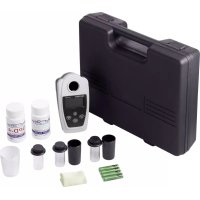
| Package contents | Device, 3 glass tubes, 2 caps, measuring container, 50 DPD-1 test strips, 50 DPD-4 test strips, carrying case, 4 AAA batteries, cleaning cloth, instruction manual |
| Main functions | Measurement of free chlorine (FCL) and total chlorine (TCL), zero calibration, save and recall results |
| Safety | Do not expose to moisture, do not use wet tubes, keep out of reach of children, use gloves for used batteries |
| Maintenance and cleaning | Clean with a dry cloth, rinse tubes with distilled water, do not use abrasive products |
| Spare parts and repairability | DPD-1 and DPD-4 test strips available as replacement (ref. BN1763043) |
| Light source | LED, wavelength 520 nm |
| Detector | Silicon photocell |
Frequently Asked Questions - CLB600 VOLTCRAFT
User questions about CLB600 VOLTCRAFT
0 question about this device. Answer the ones you know or ask your own.
Ask a new question about this device
Download the instructions for your Measuring device in PDF format for free! Find your manual CLB600 - VOLTCRAFT and take your electronic device back in hand. On this page are published all the documents necessary for the use of your device. CLB600 by VOLTCRAFT.
USER MANUAL CLB600 VOLTCRAFT
text_image
4 VOLTCAFT ELB-600 3 2 1 5 6 8 7 11 Batteriefach
2 Keypad
3 LCD-Anzeige
b) LCD-Anzeige
text_image
ABCDE - + FCL TCL ppm 8.88 STORE 888 RECALL FGHnatural_image
Close-up of a laboratory instrument with a black knob and digital display showing 'CLB-600' and 'PPM', no readable text or symbols beyond labels.- Introduction......17
- Explanation of Symbols....17
- Intended Use....18
- Delivery Content....18
- Features and Functions....18
- Safety Instructions....19
a) General Information....19
b) Batteries 20
c) Cell Chamber 20
d) DPD Method Performance 20
e) Sample Cells....20
f) Reagent Strips....21
- Overview ......22
a) Operating Elements....22
b) LCD Display 22
c) Keypad 23
- Replacing Batteries ....23
- Testing Procedure ......24
- Store and Recall Readings....25
- Care and Cleaning ....25
- Disposal....26
a) Product....26
b) Batteries 26
- Interferences ....27
- Technical Data....29
1. Introduction
Dear customer,
Thank you for purchasing this product.
This product complies with the statutory national and European requirements.
To maintain this status and to ensure safe operation, you as the user must observe these operating instructions!

These operating instructions are part of this product. They contain important notes on commissioning and handling. Also consider this if you pass on the product to any third party. Therefore, retain these operating instructions for reference!
If there are any technical questions, please contact:
International: www.conrad.com/contact
United Kingdom: www.conrad-electronic.co.uk/contact
2. Explanation of Symbols

The symbol with the exclamation mark in the triangle is used to indicate important information in these operating instructions. Always read this information carefully.
The arrow symbol indicates special information and advice on operation.
3. Intended Use
This device is a portable meter that uses the DPD method of testing for free or total chlorine content (depending on the reagent used). The internal memory can store up to 150 results for later analysis. Measurements can be taken in the 0.00 to 5.00 mg/L (ppm) range.
For safety and approval purposes, you must not rebuild and/or modify this product. If you use the product for purposes other than those described above, the product may be damaged. In addition, improper use can result in other hazards. Read the instructions carefully and store them in a safe place. Make this product available to third parties only together with its operating instructions.
All company names and product names are trademarks of their respective owners. All rights reserved.
4. Delivery Content
- Main unit
- 3 x glass sample cell
- 2 x sample cell covers
- Measuring cup
• DPD-1: FCL Reagent test strips (50 pcs)
• DPD-4: TCL Reagent test strips (50 pcs)
- Carrying case
- 4 x 1.5V AAA batteries
- Cleaning cloth
- Operating instructions
Up-to-Date Operating Instructions
Download the latest operating instructions at www.conrad.com/downloads or scan the QR code shown. Follow the instructions on the website.
5. Features and Functions
- Fast and accurate measurements
- Large LCD display
• Memory function stores and recalls up to 150 readings - Auto shut-off.

Read the operating instructions carefully and especially observe the safety information. If you do not follow the safety instructions and information on proper handling in this manual, we assume no liability for any resulting personal injury or damage to property. Such cases will invalidate the warranty/guarantee.
a) General Information
- The device is not a toy. Keep it out of the reach of children and pets.
- Do not leave packaging material lying around carelessly. This may become dangerous playing material for children.
- Protect the appliance from extreme temperatures, direct sunlight, strong jolts, high humidity, moisture, steam and solvents.
- Do not place the product under any mechanical stress.
- If it is no longer possible to operate the product safely, take it out of operation and protect it from any accidental use. Safe operation can no longer be guaranteed if the product:
- is visibly damaged,
- is no longer working properly,
- has been stored for extended periods in poor ambient conditions or
- has been subjected to any serious transport-related stresses.
- Please handle the product carefully. Jolts, impacts or a fall even from a low height can damage the product.
- Consult an expert when in doubt about the operation, safety or connection of the appliance.
- Maintenance, modifications and repairs must only be completed by a technician or an authorised repair centre.
- If you have questions which remain unanswered by these operating instructions, contact our technical support service or other technical personnel.
- For schools and educational institutions, the use of this product must be supervised by trained staff.

b) Batteries
- Correct polarity must be observed while inserting the battery.
- The batteries should be removed from the device if it is not used for a long period of time to avoid damage through leaking. Leaking or damaged batteries might cause acid burns when in contact with skin, therefore use suitable protective gloves to handle corrupted batteries.
- Batteries must be kept out of reach of children. Do not leave batteries lying around, as there is risk, that children or pets swallow them.
- All batteries should be replaced at the same time. Mixing old and new batteries in the device can lead to battery leakage and device damage.
- Batteries must not be dismantled, short-circuited or thrown into fire. Never recharge nonrechargeable batteries. There is a risk of explosion!
c) Cell Chamber
- The cell chamber (4) must be kept dry. Do not insert wet cells (7) for testing! Water can destroy the electronic components.
d) DPD Method Performance
- The accuracy of the measurements depend on factors relating to the overall method which include the meter, the glass cells, reagents and testing procedure.
e) Sample Cells
• These are made from glass and can get damaged if dropped. Handle with care.
- Discard cells (7) that are badly scratched, this can affect the accuracy of results. Use the included cell covers (5) and caps (6) for protection during transport and storage.

f) Reagent Strips
- Test reagents must be used within the best before date.
- Do not leave DPD-1 and DPD-4 reagent strips and samples unattended. They could be swallowed by children and pets.
- The reagent strip pads are not hazardous but may cause irritation.
- Avoid the following types of contact:
| Contact First Aid | |
| Eyes | Flush with copious amounts of water for at least 15 minutes. Contact a physician. |
| Skin Rinse with copious amounts of water. Contact a physician. | |
| Ingestion | Consume 1-2 glasses of water. Call a physician or poison control. |
7. Overview
a) Operating Elements
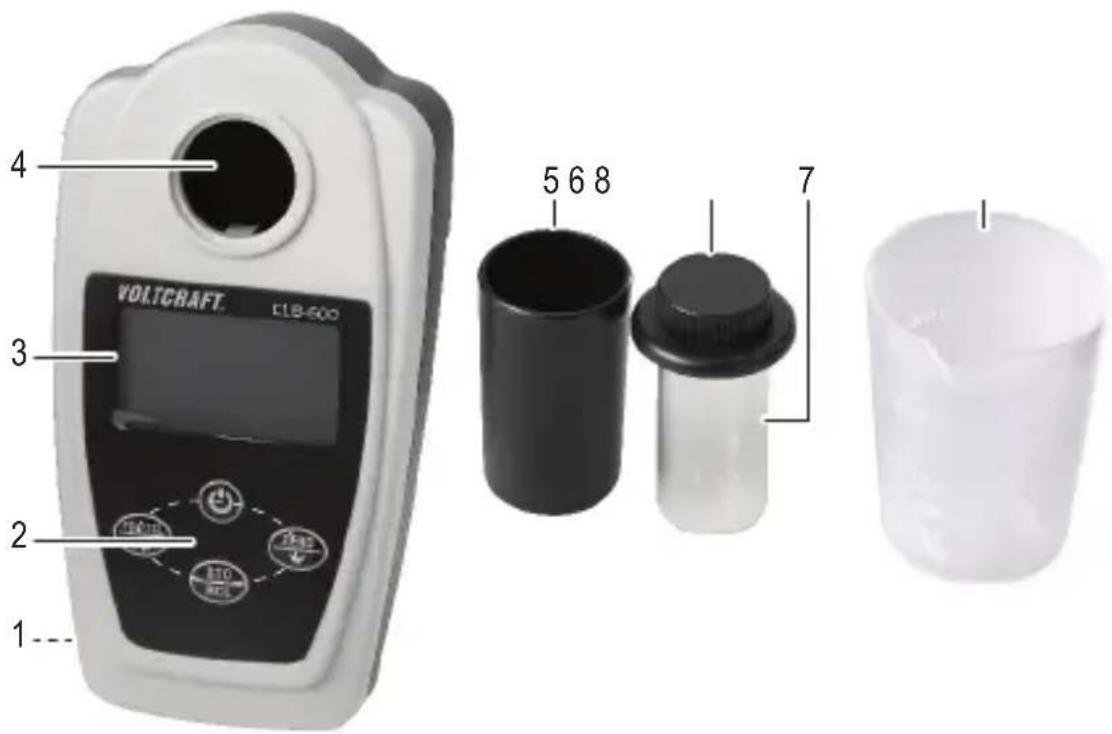
text_image
4 VOLTCAFT ELB-600 3 2 1 5 6 8 7 11 Battery compartment
2 Keypad
3 LCD display
b) LCD Display
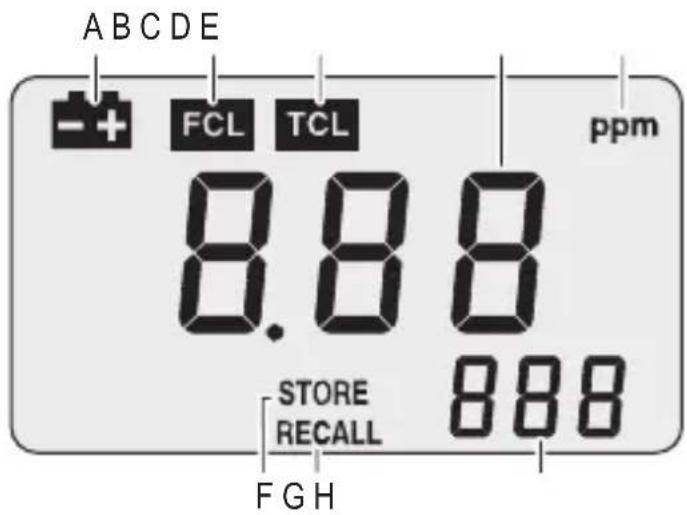
text_image
ABCDE - + FCL TCL ppm 8.88 STORE RECALL 888 FGH4 Cell chamber
5 Cell cover
6 Cell cap
7 Glass cell
8 Measurement cup
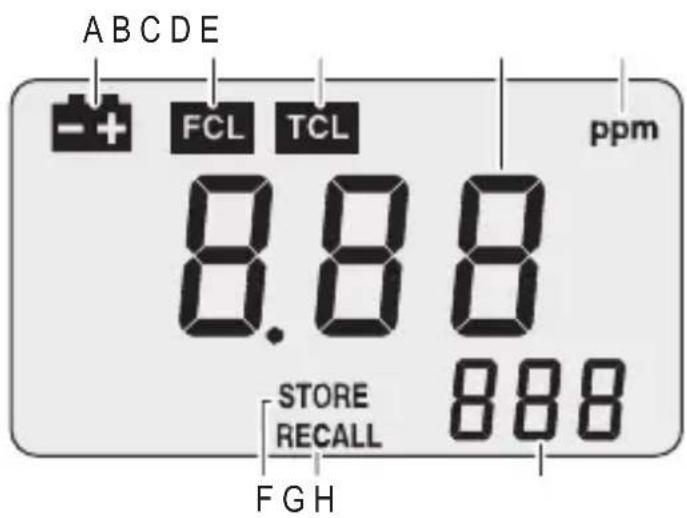
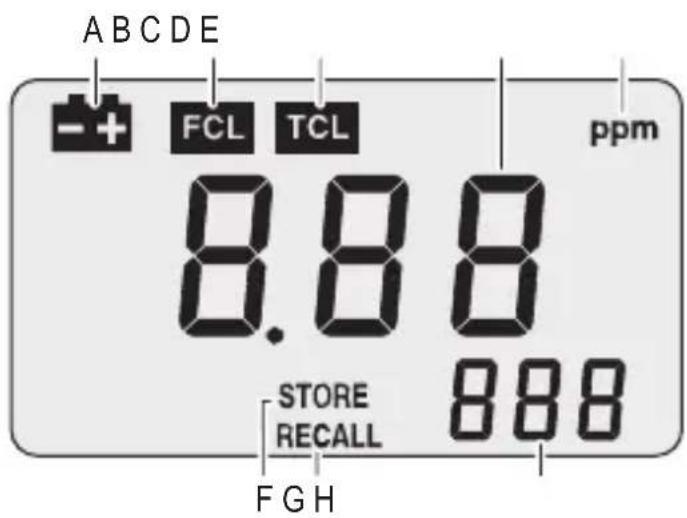
A Low battery indicator
B FCL: Free Chlorine Level
C TCL: Total Chlorine Level
D Readings
E ppm: Unit of measure
F STORE readings
G RECALL mode
H Stored reading
c) Keypad
| Button Description | |
 | Power on/off. |
 | Toggle between FCL (B) and TCL (C) mode. |
 | Zero calibration.In RECALL mode (G), browse records. |
 | Store the current reading.Press and hold for 3 seconds to enter RECALL mode (G). |
8. Replacing Batteries

Stored readings will not be lost when batteries are replaced or run out. Replace batteries if the low battery symbol shows.
- Remove the battery compartment (1) screws using a plus-head screwdriver
- Insert the batteries matching polarities as shown inside the compartment.
- Replace the compartment cover and fasten the screws.
To preserve battery life, meter will automatically shut down after 10 minutes of no activity. Press 📁 turn the meter back on.
9. Testing Procedure

Samples should be analyzed as soon as possible after collection. Exposure to sunlight, other strong light, or agitation will accelerate the reduction of chlorine.
- Use the measuring cup to fill the cell with 10 ml of sample liquid then screw the cap on.
→ Use a lint free soft cloth to dry the cell (7) and wipe any fingerprints off before inserting into the cell chamber (4).
- Press to turn the meter on.
- Press and hold FCLTEL for two seconds to select FCL (B) or TCL (C) mode.
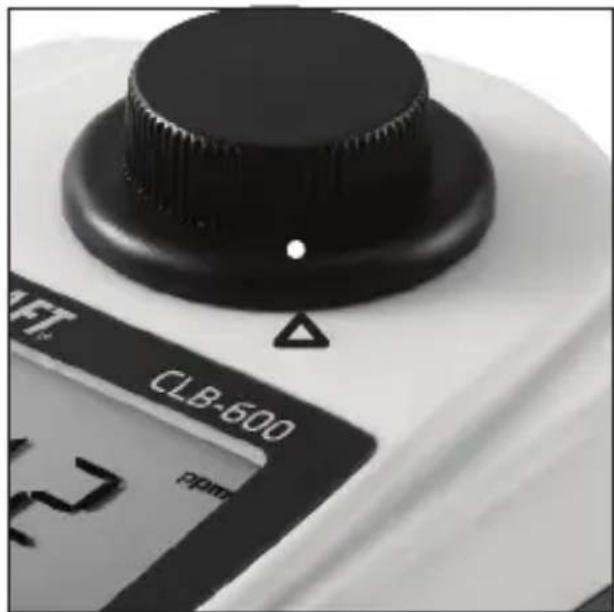
- Put the cell (7) into the chamber (4), and line the dot on the cap (6) with the triangle on the meter.
- Press and hold for two seconds to adjust to zero.
- After the reading (D) stops flashing and shows "0.00", remove the cell (7).
- Unscrew the cap (6) and insert one FCL (DPD-1) strip or one TCL (DPD-4) strip into the sample solution.
- Fan the strips in a gentle back and forth motion (approximately 2 strokes per second) for 20 seconds, then remove the strip.
natural_image
Close-up of a laboratory instrument with a black knob and digital display showing 'CLB-600' and 'PDM', no readable text or symbols beyond labels.- Screw the cap (6) back on and wipe the cell (7) dry, taking care not to leave any fingerprints on the glass.
→ Bubbles can lead to incorrect measurements. If needed gently swirl the cell (7) to remove any bubbles before testing. Do not agitate the sample.
- Insert the cell (7) into the chamber (4), lining the marks up as shown above.
- Press to get a reading.
→ Thoroughly rinse cells (7) and caps (6) with distilled water after testing. If reagent is left inside for too long they may stain the glass which will affect accuracy.
10. Store and Recall Readings
- After getting a reading, press to store the current reading. The STORE (F) icon and the ordinal of this record will appear on the display (H).
- Press and hold STO for 3 seconds to enter RECALL mode (G). In this mode, press or to browse records.
- Press and hold to exit this mode and return to measuring mode.
- In RECALL mode (G), press FL/ICL and ZERO together for 3 seconds to clear all stored readings.
11. Care and Cleaning

Be careful not to scratch the glass cells (7) as this can affect the accuracy of readings. Do not get the meter wet. Any liquid entering the cell chamber (4) can damage the electronics
- Do not use any aggressive cleaning agents, rubbing alcohol or other chemical solutions as they can cause damage to the meter housing and malfunctioning.
- The meter is generally maintenance free.
• Use distilled water to rinse the glass cells (7) and caps (6) before and after each use. - Clean the product with a dry, fibre-free cloth.
12. Disposal
a) Product
Electronic devices are recyclable waste and must not be disposed of in the household waste. At the end of its service life, dispose of the product in accordance with applicable regulatory guidelines.
Remove any inserted batteries and dispose of them separately from the product.
b) Batteries
You as the end user are required by law (Battery Ordinance) to return all used batteries. Disposing of them in the household waste is prohibited.
Contaminated batteries are labeled with this symbol to indicate that disposal in the domestic waste is forbidden. The designations for the heavy metals involved are: Cd = Cadmium, Hg = Mercury, Pb = Lead (name on batteries, e.g. below the trash icon on the left).
Used batteries can be returned to collection points in your municipality, our stores or wherever batteries are sold.
You thus fulfill your statutory obligations and contribute to the protection of the environment.
13. Interferences
| Interfering Substance | Interference Level |
| Acidity | More than 150 mg/L CaCO_3 . The full color may not develop or the color may fade instantly. Adjust to pH 6–7 with 1 N Sodium Hydroxide. Measure the amount to add on a separate sample aliquot, then add the same amount to the sample that is tested. Correct the test result for the dilution from the volume addition. |
| Alkalinity | More than 250 mg/L CaCO_3 . The full color may not develop or the color may fade instantly. Adjust to pH 6–7 with 1 N Sulfuric Acid. Measure the amount to add on a separate sample aliquot, then add the same amount to the sample that is tested. Correct the test result for the dilution from the volume addition. |
| Bromine, Br_2 | Positive interference at all levels |
| lodine, I_2 | Positive interference at all levels |
| Chlorine Dioxide, ClO_2 | Positive interference at all levels |
| Chloramines, organic May interfere. | |
| Hardness No effect at less than 1000 mg/L as CaCO_3 | |
| Manganese, Oxidized ( Mn^4+ , Mn^7+ ) or Chromium Oxidized ( Cr^6+ ), | Pre-treat the sample as follows:1 Adjust the sample pH to 6–7.2 Add 3 drops of Potassium lodide (30-g/L) to 10 mL of sample.3 Mix and wait 1 minute.4 Add 3 drops of Sodium Arsenite (5-g/L) and mix.5 Use the test procedure to measure the concentration of the treated sample.6 Subtract this result from the result without the treatment to obtain the correct chlorine concentration. |
| Monochloramine | Causes a gradual drift to higher readings. When read within 1 minute after reagent addition, 3 mg/L monochloramine causes less than a 0.1 mg/L increase in the reading. |
| Ozone Positive interference at all levels | |
| Peroxides May interfere. | |
| Highly buffered samples or extreme sample pH | Can prevent the correct pH adjustment (of the sample) by the reagents. Sample pretreatment may be necessary. Adjust to pH 6–7 with acid (Sulfuric Acid, 1 N) or base (Sodium Hydroxide, 1 N). Correct the test result for the dilution caused by the volume additions. |
| Turbidity May interfere. | |
14. Technical Data
Power 4 x 1.5 V AAA battery
Operating current....max. 119 mA
Low battery indication....4.2 V
Auto-off 10 minutes
Testing method ....DPD (diethyl paraphenylene diamine)
Units ......ppm
Light detector......Silicone cell
Light source......LED
LED wavelength ....520 nm
Range 0 to 5.00 ppm
Resolution....0.01 ppm
Accuracy.... ± 0.03 + 1 digit at <2.00 ppm
± 3% FS + 1 digit at >2.00 ppm
Response ....<5 seconds
Sample 10 ml
Data logging ......max 150 results
Operating/Storage conditions......0 to +50 °C, < 85 % RH (non-condensing)
Dimensions (L x W x H)....135 x 70 x 65 mm
Weight 170 g (with batteries)
Testing Strips
FCL reagent.....DPD-1 (50 pcs)
TCL reagent.....DPD-4 (50 pcs)
Visit the Conrad website and search BN1763043 for information about any optional accessories, spares, or replacement parts.
Page
France (email): technique@conrad-france.fr
text_image
4 VOLTCAFT ELB-600 3 2 1 5 6 8 7 11 Compartiment des piles
2 Clavier
3 Écran à CL
b) Écran à CL
text_image
ABCDE - + FCL TCL ppm 8.88 STORE 888 RECALL FGH4 Chambre du tube
5 Couvercle du tube
6 Capuchon du tube
7 Tube en verre
natural_image
Close-up of a laboratory instrument with a black knob and digital display showing 'CLB-600' and 'Pipm', no readable text or symbols beyond labels.text_image
4 VOLTCAFT ELB-600 3 2 1 5 6 8 7 11 Batterijvak
2 Toetsenblok
3 LCD-scherm
4 Celkamer
5 Celdeksel
6 Celdop
7 Glazen cel
8 Maatbeker
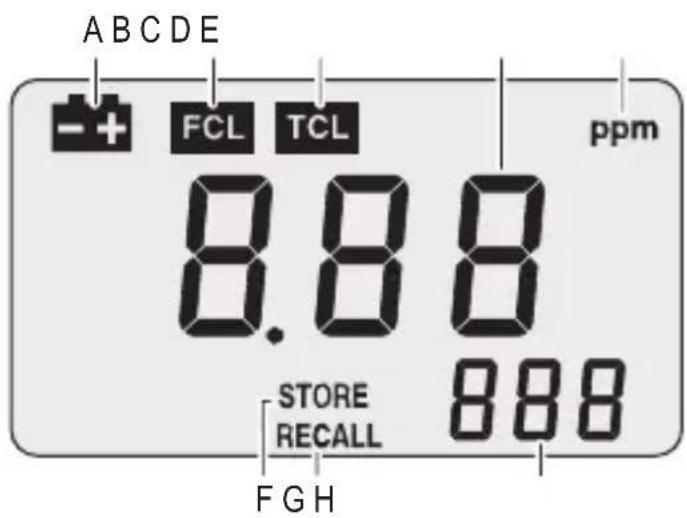
b) LCD-scherm
text_image
ABCDE - + FCL TCL ppm 8.88 STORE 888 RECALL FGHnatural_image
Close-up of a laboratory instrument with a black knob and digital display showing pressure reading (no readable text or symbols)Copyright 2019 by Conrad Electronic SE.
This is a publication by Conrad Electronic SE, Klaus-Conrad-Str. 1, D-92240 Hirschau (www.conrad.com).
All rights including translation reserved. Reproduction by any method, e.g. photocopy, microfilming, or the capture in electronic data processing systems require the prior written approval by the editor. Reprinting, also in part, is prohibited. This publication represent the technical status at the time of printing.
Copyright 2019 by Conrad Electronic SE.
Copyright 2019 by Conrad Electronic SE.
Copyright 2019 by Conrad Electronic SE.
