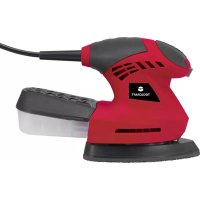
TMS 200 W - Sander Toolcraft - Free user manual and instructions
Find the device manual for free TMS 200 W Toolcraft in PDF.


| Product type | Detail sander |
| Brand | Toolcraft |
| Model | TMS 200 W |
| Rated voltage | 230-240 V AC |
| Frequency | 50 Hz |
| Rated power | 200 W |
| Sound pressure level (LpA) | 77.3 dB(A) (KpA=3 dB(A)) |
| Sound power level (LwA) | 88.3 dB(A) (KwA=3 dB(A)) |
| Vibration level (ah) | 11.009 m/s² (K=1.5 m/s²) |
| Protection class | II (double insulation) |
| Extraction system | Integrated with microfilter (dust box) |
| Abrasive type | Abrasive sheets (60#, 80#, 120# included) |
| Package contents | 1 sander, 3 abrasive papers, 1 dust box, 1 instruction manual |
| Compatible materials | Wood, metal, painted surfaces |
| Usage | Dry sanding of flat surfaces (doors, baseboards, windows) |
| Recommended safety equipment | Safety goggles, dust mask, hearing protection |
| Maintenance | Clean with a clean cloth (avoid solvents), integrated lubrication |
| Repairability | Have repaired by a qualified technician only |
| Weight | Approximately 1.2 kg (estimated) |
| Dimensions (L x W x H) | Approximately 28 x 12 x 15 cm (estimated) |
Frequently Asked Questions - TMS 200 W Toolcraft
User questions about TMS 200 W Toolcraft
0 question about this device. Answer the ones you know or ask your own.
Ask a new question about this device
Download the instructions for your Sander in PDF format for free! Find your manual TMS 200 W - Toolcraft and take your electronic device back in hand. On this page are published all the documents necessary for the use of your device. TMS 200 W by Toolcraft.
USER MANUAL TMS 200 W Toolcraft
GB Operating Instructions Detail Sander T-MS 200 W Item No. 1582582 Page 16 - 28
www.business.conrad.at
text_image
1 TOOLCRAFT 2 3 4 5Abb. A
www.conrad.com/downloads
- Introduction......17
- Explanation of symbols....18
- Intended use....19
- Delivery content....19
- Safety instructions ....20
a) Work area safety 20
b) Electrical safety 20
c) Personal safety....20
d) Power tool use and care....21
e) Service....21
f) Safety warning for sander....21
- Operating elements ......23
- Operation....24
a) Integrated dust extraction with microfilter 24
b) Empty the dust box....24
c) Replacing the sanding sheet 24
d) Switch on and switch off....24
e) Use 25
f) Once you have finished using the appliance....25
- Troubleshooting....25
- Care and cleaning....26
a) Cleaning 26
b) Lubrication....26
- Disposal 26
- Declaration of Conformity (DOC)......27
- Technical data....28
a) Note....28
b) Warning 28
1. Introduction
Dear customer,
Thank you for purchasing this product.
This product complies with the statutory national and European requirements.
To maintain this status and to ensure safe operation, you as the user must observe these operating instructions!

These operating instructions are part of this product. They contain important notes on commissioning and handling. Also consider this if you pass on the product to any third party. Therefore, retain these operating instructions for reference!
If there are any technical questions, please contact:
International: www.conrad.com/contact
United Kingdom: www.conrad-electronic.co.uk/contact
2. Explanation of symbols
In this manual and/or on the machine the following symbols are may used:

The symbol with the lightning in the triangle is used if there is a risk to your health, e.g. due to an electric shock.

The symbol with the exclamation mark in the triangle is used to indicate important information in these operating instructions. Always read this information carefully.

Read instructions carefully.

In accordance with essential applicable safety standards of European directives.

Class II machine – Double insulation – You don't need any earthed plug.

Faulty and/or discarded electrical or electronic apparatus have to be collected at the appropriate recycling locations.

Immediately unplug the plug from the mains electricity in the case that the cord gets damaged and during maintenance.

Wear eye protection.

Wear dust mask.

The arrow symbol indicates special information and advice on operation.
3. Intended use
Working hints for your sander
- Your sander is useful for working on wood, metal, painted surface. It will smooth surfaces prior to painting, even where fillers have been used.
- Your sander is best suited to large flat areas such as doors but can also be used on skirting boards, windows, etc, provided they are accessible.
- Different types of sanding paper will allow the sander to meet various needs. Different grades of sanding paper are available, the higher grade number, the finer the grit. For rough work start with a low grade of grit (i.e. 80 grade) and change to a higher, finer grade (i.e. 100 or 120) for finishing. If you use a fine grade for rough surfaces it will soon clog and need changing.
- At all times, let the sander do the work-do not force it or apply excessive pressure to the sanding paper or it could wrinkle or tear. Preferably, use a light circular motion.
- If the surface shows excessive making from the abrasive motion, you may be using a grit which is too coarse or applying too much pressure.
4. Delivery content
• Detail sander: 1pc
• Sanding paper: 3pc (60#, 80#, 120#)
- Dust box: 1pc
- Instruction manual: 1p
After unpacking, check the tool and accessories for damages and do not use the tool in case something is defective.
Up-to-date Operating Instructions
Download the latest operating instructions at www.conrad.com/downloads or scan the QR code shown. Follow the instructions on the website.

5. Safety instructions

WARNING Read all safety warnings and instructions. Failure to follow all the warnings and instructions may result in electric shock, fire and/or serious injury.
SAVE ALL THE WARNINGS AND INSTRUCTIONS FOR FUTURE REFERENCE.
The term “power tool” in the warnings refers to your mains operated (corded) power tool or battery operated (cordless) power tool.
a) Work area safety
- Keep work area clean and well lit. Cluttered and dark areas invite accidents.
- Do not operate power tools in explosive atmospheres, such as in the presence of flammable liquids, gases or dust. Power tools create sparks which may ignite the dust or fumes.
- Keep children and bystanders away while operating a power tool. Distractions can cause you to lose control.
b) Electrical safety
- Power tool plugs must match the outlet. Never modify the plug in any way. Do not use any adapter plugs with earthed (grounded) power tools. Unmodified plugs and matching outlets will reduce risk of electric shock.
- Avoid body contact with earthed or grounded surfaces such as pipes, radiators, ranges and refrigerators. There is an increased risk of electric shock if your body is earthed or grounded.
- Do not expose power tools to rain or wet conditions. Water entering a power tool will increase the risk of electric shock.
- Do not abuse the cord. Never use the cord for carrying, pulling or unplugging the power tool. Keep cord away from heat, oil, sharp edges or moving parts. Damaged or entangled cords increase the risk of electric shock.
- When operating a power tool outdoors, use an extension cord suitable for outdoor use. Use of a cord suitable for outdoor use reduces the risk of electric shock.
- If operating a power tool in a damp location is unavoidable, use a residual current device (RCD) protected supply. Use of an RCD reduces the risk of electric shock.
c) Personal safety
- Stay alert, watch what you are doing and use common sense when operating a power tool. Do not use a power tool while you are tired or under the influence of drugs, alcohol or medication. A moment of inattention while operating power tools may result in serious personal injury.
- Use personal protective equipment. Always wear eye protection. Protective equipment such as dust mask, non-skid safety shoes, hard hat, or hearing protection used for appropriate conditions will reduce personal injuries.
-
Prevent unintentional starting. Ensure the switch is in the off-position before connecting to power source and /or battery pack, picking up or carrying the tool. Carrying power tools with your finger on the switch or energising power tools that have the switch on invites accidents.
-
Remove any adjusting key or wrench before turning the power tool on. A wrench or a key left attached to a rotating part of the power tool may result in personal injury.
- Do not overreach. Keep proper footing and balance at all times. This enables better control of the power tool in unexpected situations.
- Dress properly. Do not wear loose clothing or jewellery. Keep your hair, clothing and gloves away from moving parts. Loose clothes, jewellery or long hair can be caught in moving parts.
- If devices are provided for the connection of dust extraction and collection facilities, ensure these are connected and properly used. Use of dust collection devices can reduce dust related hazards.
d) Power tool use and care
- Do not force the power tool. Use the correct power tool for your application. The correct power tool will do the job better and safer at the rate for which it was designed.
- Do not use the power tool if the switch does not turn it on and off. Any power tool that cannot be controlled with the switch is dangerous and must be repaired.
- Disconnect the plug from the power source and/or the battery pack from the power tool before marking any adjustments, changing accessories, or storing power tools. Such preventive safety measures reduce the risk of starting the power tool accidentally.
- Store idle power tools out of the reach of children and do not allow persons unfamiliar with the power tool or these instructions to operate the power tool. Power tools are dangerous in the hands of untrained users.
- Maintain power tools. Check for misalignment or binding of moving parts, breakage of parts and any other condition that may affect the power tool's operation. If damaged, have the power tool repaired before use. Many accidents are caused by poorly maintained power tools.
- Keep cutting tools sharp and clean. Properly maintained cutting tools with sharp cutting edges are less likely to bind and are easier to control.
- Use the power tool, accessories and tool bits etc. in accordance with these instructions, taking into account the working conditions and the work to be performed. Use of the power tool for operations different from intended could result in a hazardous situation.
e) Service
- Have your power tool serviced by a qualified repair person using only identical replacement parts. This will ensure that the safety of the power tool is maintained.
f) Safety warning for sander
- Harmful/toxic dusts will arise from sanding e.g. lead painted surfaces, woods and metals. Contact with or inhalation of these dusts can endanger the health of operator and bystanders. Always use eye glasses and dust mask.
-
Hearing protection should be worn when using the sander.
-
Hold power tools by insulated gripping surfaces when performing an operation where the cutting tool may contact hidden wiring or its own cord. Contact with a "live" wire will make exposed metal parts of the tool "live" and shock the operator.
- Always wear safety glasses or eye shields when using the sander. Everyday eyeglasses have only impact-resistant lenses; they are not safety glasses. Following this rule will reduce the risk of serious personal injury.
- Remove the plug from the socket before carrying out any adjustment, servicing or maintenance.
- Fully unwind cable drum extensions to avoid potential overheating.
- When an extension cable is required you must ensure it has the correct ampere rating for your power tool and is in a safe electrical condition.
- Ensure your mains supply voltage is same as indicated on the rating plate.
- Our tool is double insulated for additional protection against a possible electrical insulation failure within the tool.
- Always check walls, floors and ceilings to avoid hidden power cables and pipes.
• After long working periods external metal parts and accessories could be hot. - If possible, ensure the work-piece is firmly clamped to prevent movement.
- Your sander is a hand held tool, do not clamp your sander.
- Before sanding, check the area is free of nails, screws, etc.
- Never stop the sander by applying a force to the base plate.
- Only use paper in good condition. Do not use torn or worn paper.
- Do not sand material containing asbestos due to a health risk.
- Do not sand lead based paint due to the risk of lead poisoning.
- Do not eat or drink in the working area of the sander.
- Do not allow people to enter the working area without wearing a dust mask.
- Where possible, seal off the working area to contain the dust for later removal.
- Your tool is designed for dry sanding only, not wet sanding.
- Your tool is designed for general purpose light polishing of wood and metals.
- Do not sand magnesium material due to the risk of fire.
- WARNING: Some dust particles created by power sanding, contain chemicals known to cause cancer, birth defects or other reproductive harm. Some examples of these chemicals are:
- Lead from lead-based paints.
- Crystalline silica from bricks and cement and other masonry products.
- Arsenic and chromium from chemically treated lumber. Your risk from these exposures varies, depending upon how often you do this type of work. To reduce your exposure to these chemicals:
• Work in a well-ventilated area. - Work with approved safety equipment, such as those dust masks that are specially designed to filter microscopic particles.
6. Operating elements
text_image
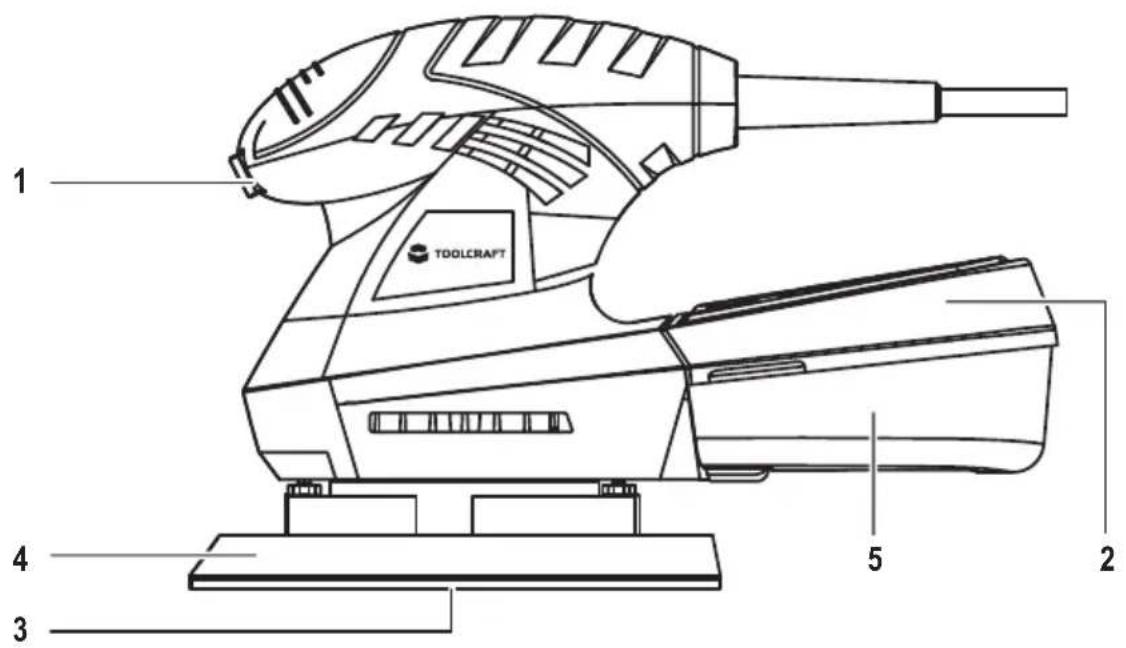
1 TOOLCRAFT 2 3 4 5Fig. A
1 On/Off Switch
2 Dust box with microfilter system
3 Sanding sheet
4 Sanding plate
5 Filter connector
7. Operation

Read the instruction book carefully. Make sure that all the products' packaging has been removed. Ensure that the voltage indicated on the rating label matches the main voltage before plugging in the appliance.
a) Integrated dust extraction with microfilter
• See figure A.
• Always use the appliance with the dust box (2) connected, inhaling dust is harmful to your health.
- Connect the dust box (2) to the filter connector (5)
b) Empty the dust box
• See figures C, D and E.
• To empty the dust box, pull off the dust box (2)
- Remove the filter lid (6) pulling it as it is shown in fig D.
- Remove the filter element (7) from the dust tank (8).
- Clean the filter element (7) and the dust tank (8) with a soft brush.
c) Replacing the sanding sheet
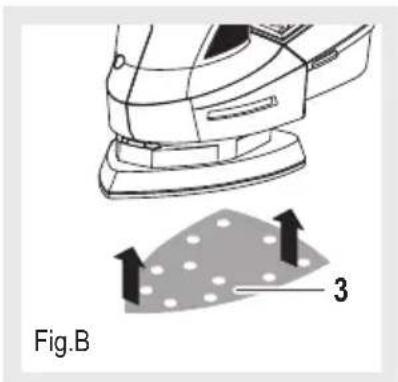
• See figure B.
- To remove the sanding sheet (3), grasp it at one of the tips and pull it off from the sanding plate (4).
- Pay attention that punched holes of the abrasive sheet (3) match with the holes of the sanding plate (4).
- Position the sanding sheet (3) flush alongside one edge of the sanding plate (4).
- Lay the sanding sheet onto the sanding plate and press firmly.
- To remove the sanding sheet (3), grasp it at one of the tips and pull it off from the sanding plate (4).
d) Switch on and switch off
• See figure A.
- To start the tool, press the on/off switch to "I" ON position (1).
- To stop the tool, press the switch to "O" OFF position (1).
natural_image
Diagram of a steam machine with a mesh component and directional arrows, labeled Fig.B (no text or symbols on the diagram itself)
text_image
2 Fig.C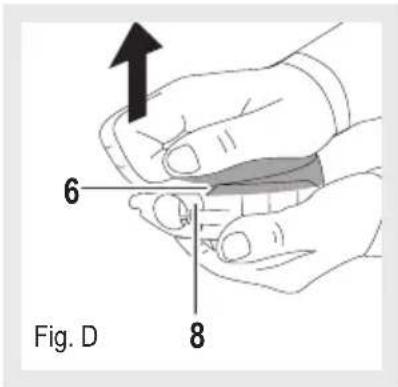
text_image
6 8 Fig. D
text_image
Fig. E 7 8e) Use
- Unroll the cable completely before plugging it in.
- Connect the appliance to the mains.
- Assemble the sanding Sheet
- Turn the appliance on, by using the on/off switch (1).
- Place the appliance against the surface you want to work.
- Slowly move the appliance over the workpiece.
- Do not apply excessive pressure against the workpiece.
- Apply uniform sanding pressure against the workpiece to increase performance and working life of the sander and the sanding sheet.
f) Once you have finished using the appliance
- Stop the appliance using the on/off switch (1).
- Unplug the appliance from the mains.
8. Troubleshooting
By purchasing this detail sander, you have acquired a product design to the state of the art and operationally reliable. Nevertheless, problems or errors may occur.
The following contains description for the removal of possible interference.
Always observe all safety information in these operating instructions.
- Clean the appliance.
- If your sander will not operate, check the power at the mains plug.
- If the sander does not abrade surface, check the sanding paper. If the sanding paper has been worn, replace the new paper and try again. The paper must be kept in a dry place, if it is allowed to become damp, the abrasive particles will lose their adhesion to the backing paper and will not abrade.
- If the sander does not move smoothly, the sanding paper may be loose, damaged or wrinkled. Replace and try again.
- If a fault cannot be rectified return the sander to a qualified person for repair.
9. Care and cleaning

Always disconnect the device before performing any adjustment or maintenance operation. If the supply cord is damaged, it must be replaced by the manufacturer or its service agent in order to avoid a hazard.
a) Cleaning

Avoid using solvents when cleaning plastic parts. Most plastic parts are susceptible to damage from various types of commercial solvents and may be damaged by their use.
- Use clean cloths to remove dirt, carbon dust, etc.
- Disconnect from the power supply immediately if the supply cord is damaged.
• Take care not to expose this tool to the rain.
b) Lubrication
All the bearings in this tool are lubricated with a sufficient amount of high grade lubricant for the life of the ur normal operating conditions, therefore no further lubrication is required.
10. Disposal

Electronic devices are recyclable waste and must not be disposed of in the household waste. At the end of its service life, dispose of the product in accordance with applicable regulatory guidelines.
Total thus fulfil your statutory obligations and contribute to the protection of the environment.
11. Declaration of Conformity (DOC)
Conrad Electronic SE, Klaus-Conrad-Str. 1, D-92240 Hirschau hereby declares that the product is in conformity with following directives, norms and/or regulations.
EMCD directive 2014/30/EU
EN 55014-1:2006+A1:2009+A2:2011
EN 55014-2:1997+A1:2001+A2:2008
EN 61000-3-2:2014
EN 61000-3-3:2013
MD directive 2006/42/EC
EN 60745-1:2009+A11:2010
EN 60745-2-4:2009+A11:2011
RoHS directive 2011/42/EC
CE marking on product

→ Click on the following link to read the full text of the EU declaration of conformity:
www.conrad.com/downloads
Select a language by clicking on a flag symbol and enter the product order number in the search box. You can then download the EU declaration of conformity in PDF format.
12. Technical data
Rated voltage 230-240 V/AC, 50 Hz
Rated power input 200 W
Speed, n0 12000 /min
Level of acoustic pressure LpA....77,3 dB(A); KpA=3 dB(A)
Level of acoustic power LwA....88,3 dB(A); KwA=3 dB(A)
Level of vibration (K=1.5 m/s2)....ah = 11,009m/s²
a) Note
- The declared vibration total value has been measured in accordance with a standard test method and may be used for comparing one tool with another.
- The declared vibration total value may also be used in a preliminary assessment of exposure.
b) Warning
- The vibration emission during actual use of the power tool can differ from the declared total value depending on the ways in which the tool is used.
- Avoid vibration risk.
→ Wear glove during operation.
→ Limit operating time and shorten trigger time.
Page
France (email) : technique@conrad-france.fr
text_image
1 TOOLCRAFT 2 3 4 5Fig. A
Directive Machines 2006/42/CE
EN 60745-1:2009+A11:2010
EN 60745-2-4:2009+A11:2011
Directive RoHS 2011/42/CE
www.conrad.com/downloads
Vitesse, n0....12000 /min
BEWAAR ALLE WAARSCHUWINGEN EN INSTRUCTIES VOOR LATERE RAADPLEGING.
text_image
1 TOOLCRAFT 4 3 5 2Afb. A
www.conrad.com/downloads
GB This is a publication by Conrad Electronic SE, Klaus-Conrad-Str. 1, D-92240 Hirschau (www.conrad.com).
All rights including translation reserved. Reproduction by any method, e.g. photocopy, microfilming, or the capture in electronic data processing systems require the prior written approval by the editor. Reprinting, also in part, is prohibited. This publication represent the technical status at the time of printing. Copyright 2017 by Conrad Electronic SE.