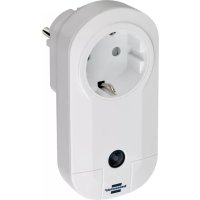
BrematicPRO FA EM868 01 - Smart Home BRENNENSTUHL - Free user manual and instructions
Find the device manual for free BrematicPRO FA EM868 01 BRENNENSTUHL in PDF.


User questions about BrematicPRO FA EM868 01 BRENNENSTUHL
0 question about this device. Answer the ones you know or ask your own.
Ask a new question about this device
Download the instructions for your Smart Home in PDF format for free! Find your manual BrematicPRO FA EM868 01 - BRENNENSTUHL and take your electronic device back in hand. On this page are published all the documents necessary for the use of your device. BrematicPRO FA EM868 01 by BRENNENSTUHL.
USER MANUAL BrematicPRO FA EM868 01 BRENNENSTUHL
natural_image
White electrical wall socket with a circular socket and a small button labeled 'brønnonstuhl°' (no additional text or symbols visible)Brematic®
PRO

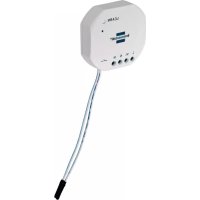
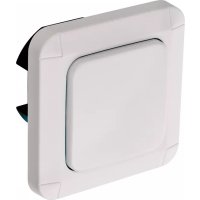
Wireless Switch Adapter with Energy Measurement
Instructions for use

EN Instruction....Page 9
natural_image
Pure electrical circuit lines without any symbolsnatural_image
Pure electrical circuit lines without any symbolswww.brematic.com/de/service.
Tel.: 0080048720743 (kostenlos)
Hersteller
EN Wireless Switch Adapter with Energy Measurement 868.3 MHz
List of pictograms used ....
Safety notes ....
Intended use ....
Information about Wireless Operation ....
Duty Cycle....
Scope of delivery ....
Technical data ....
Device overview ....
Function
Preparation....
Download app / PC software BrematicPRO......
Pairing the Wireless Switch Adapter with the BrematicPRO Wireless Remote Control ...... Page 12
Unpair
Pairing the Wireless Switch Adapter with the BrematicPRO Gateway Page
Factory reset
Cleaning the device ....
Troubleshooting......
Disposal
Service
Manufacturer ....
Declaration of Conformity ....
| List of pictograms used | |||
 | Please read the instructions for use! Caution! Fire hazard! | ||
 | Observe the warnings and safety notes! | Dispose of the packaging and device in an environmentally-friendly manner! | |
 | Caution! Risk of electric shock! | ||
Safety notes
The instructions for use are a part of this product. They contain important information about safety, use and disposal. Before using this device, please familiarise yourself with all instructions for use and safety notes. Only use the device as described and for the indicated purpose. Be sure to include all documentation when passing this device on to others.
WARNING! RISK OF FATAL INJURY AND ACCIDENT HAZARD FOR TODDLERS AND SMALL
CHILDREN! Never leave children unsupervised with the packaging materials. They pose suffocation hazard as children may swallow or inhale small parts or films. Children frequently underestimate the dangers. Always keep children away from the device. It is not a toy.
This product may be used by children aged 8 years and up, as well as by persons with physical, sensory or mental impairments or lacking experience and/or knowledge, so long as they are supervised or instructed in the safe use of the product and understand the associated risks. Do not allow children to play with the device. Cleaning and user maintenance must not be performed by children without supervision.
- Only operate this device in a dry, dust-free environment.
- Only operate this device indoors.
Do not expose the device to adverse conditions, such as moisture,
• continuous sunlight,
- heat radiation,
• cold,
- vibration.
CAUTION! RISK OF INJURY!
We assume no liability for property damage or personal injury due to improper use or failure to observe the safety notes! This will void the warranty/guarantee!
- Any use not specified in these instructions for use will damage the product. Do not modify the device. Otherwise safe operation is not guaranteed.
RISK OF ELECTRIC SHOCK!
Do not open the housing. This device has no parts which require maintenance. In the event of a malfunction, please contact Service.
- Work on the mains must be performed by an electrician whilst de-energised.
- This device is not suitable for disconnecting. The load is not electrically isolated from the mains.
- Do not use the device if it is visibly damaged.
Do not connect multiple wireless switch adapters in series.
- In the event of a malfunction, disconnect the device from the socket immediately.
FIRE HAZARD!
- Do not connect any terminal devices to the device which could cause a fire or other damage when switched on unattended (e.g. iron).
Do not switch the device uncontrolled or whilst unattended.
Do not use extension leads. - Ensure the socket is located near the connected device, easy to access and the device will not be covered during operation.
Do not overload the device.
Overloads may result in fire hazards or product damage. The maximum load is 3600 W.
Intended use
The wireless switch adapter is solely intended to switch consumers connected to the wireless switch adapter on and off in dry indoor locations and to determine measurement data such as voltage, power input and energy consumption.
Information about Wireless Operation
This device uses the 868.3 MHz proprietary wireless protocol. Wireless transmission is implemented using a non-exclusive channel, interference can therefore not be excluded.
The range in building may vary greatly from open areas. In addition to the transmission power and the reception characteristics of the receivers, ambient conditions, e.g. humidity in addition to the structural conditions on site, are important factors.
The range can partly be significantly reduce due to:
• wood, gypsum, concrete, reinforced concrete walls
• proximity to metal and conductive objects
- broadband interference, e.g. in residential areas (DECT phones, mobiles, wireless headphones, wireless speakers, wireless weather stations, baby monitors)
- proximity to electric motors, transformers, mains adapters, computers
Duty Cycle
Duty cycle refers to a transmission time limit regulated by law for devices transmitting in the 868 MHz range. It is intended to ensure smooth operation of devices operating in the 868 MHz range. The maximum transmission time of each device is 1% of an hour (corresponding to 36 seconds / hour). Once the 1% limit has been reached it cannot transmit until the time limit of the duty cycle has ended, so after one hour.
Scope of delivery
1 x Wireless Switch Adapter with Energy Measurement
1 x Quick start guide
1 x Instructions for use (digital, available for download)
Technical data
Product designation: FA EM 868 01 W3600 3726
Item no.: 1294510
Radio frequency: 868.3 MHz
Max. transmitting power: < 20 mW
Frequency: 868.1 - 868.5 MHz
Duty cycle: < 1 % per h
Supply voltage: 230 V/AC, 50 Hz
Max. switching capacity: 3600 W
Power input: < 1 W
Ambient temperature: 0 °C to 35 °C
Protection type: IP20
Open area range: approx. 100 m
Dimensions (W x H x D): 113.2 x 55 x 70.7 mm
Weight: 114 g
Device corresponds to: protection class I, pollution degree: 2, rated impulse voltage: 2500 V, operating mode: S1, PTI175, level: 3, unipolar switch-off
Non-replaceable installation fuse: thermal cutoff
Subject to technical changes without notice.
Device overview
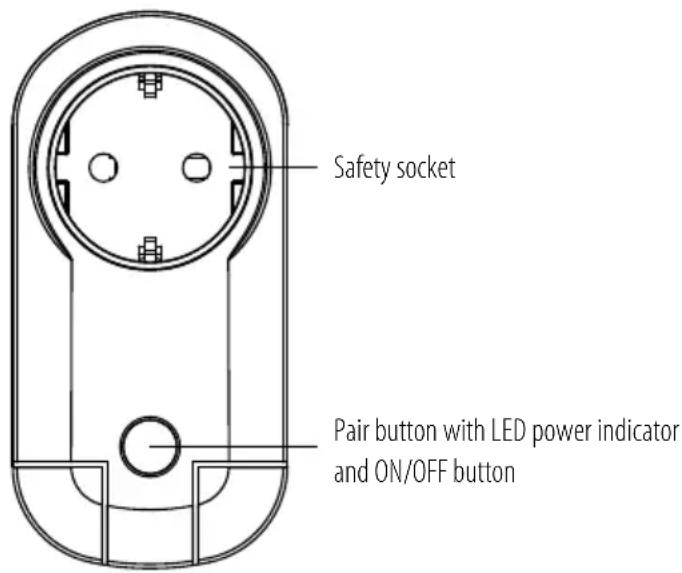
LED Status
Lights up green when On
Flashing red Pairing mode
Rapid flashing red Wireless switch adapter reset
Function
The wireless switch adapter is part of the Brennenstuhl Home Automation Systems, controlled via app or the BrematicPRO PC software. The wireless switch adapter can be connected and controlled directly with the BrematicPRO wireless remote control. It can be directly linked with the Brennenstuhl Home Automation Systems BrematicPRO via the BrematicPRO Gateway to use other software-based functions (e.g. timer control, theme control, astro function). In addition to switching connected consumers on and off, the device features a measuring function: Measurements such as voltage, power input and energy consumption are transmitted to the gateway and displayed in the BrematicPRO app / PC software.
The device stores the energy consumption of the connected device in Wh. The consumption can be deleted using "Reset" in the app.
Note:
For information on which components can be paired with the wireless switch adapter, please visit: www.brematic.com/gb/service. For additional information on components, please refer to the instructions for use of the respective BrematicPRO wireless component.
Preparation
Connect the wireless switch adapter to an easy to access socket. The mains voltage on site must correspond with the technical data of the wireless switch adapter (see "Technical data").
☐ Check the power input of the consumer you intend to connect to the wireless switch adapter prior to use. The maximum load is 3600 W.
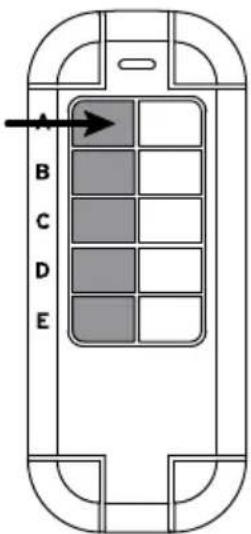
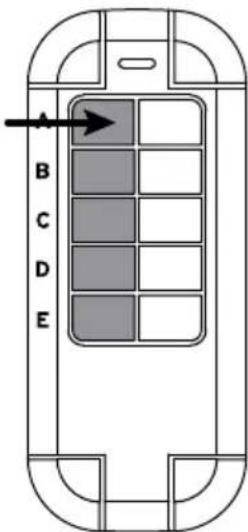
Whilst the LED is flashing, press a button on the left of the BrematicPRO wireless remote control you wish to program for the device. Once the devices have been paired the LED will light up green. This completes the pairing process.
Download app / PC software BrematicPRO
The Brennenstuhl Home Automation Systems BrematicPRO is controlled via the BrematicPRO app / PC software. The app can be downloaded for free from the App Store and Google Play. The PC software is available for download at www.brematic.com/gb/service. Please follow the on-screen instructions for download and installation.

Download on the App Store

GET IT ON Google Play
For more information about the app and how to use it, please visit www.brematic.com/gb/service.
Pairing the Wireless Switch Adapter with the BrematicPRO Wireless Remote Control
The wireless switch adapter can be paired directly with the BrematicPRO wireless remote control.
natural_image
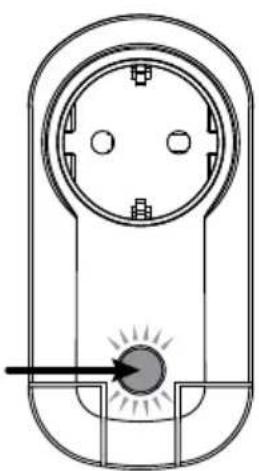
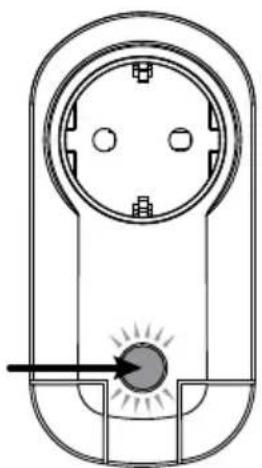
Pure electrical circuit lines without any symbols○ Press and hold the pair button for 3 seconds. The LED will flash red.
Unpair
natural_image
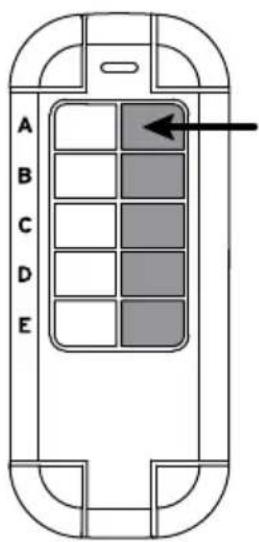
Pure electrical circuit lines without any symbols○ Press and hold the pair button for 3 seconds. The LED will flash red.
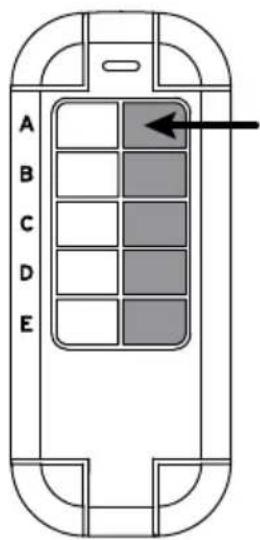
Whilst the LED is flashing, press the respective button on the right of the BrematicPRO wireless remote control you wish to unfair. This completes the unpairing process.
Pairing the Wireless Switch Adapter with the BrematicPRO Gateway
When linked with the Home Automation Systems BrematicPRO via the BrematicPRO Gateway, you can use the app / BrematicPRO PC software to use additional functions, e.g. timer control, theme control, astro function (dawn / dusk control).
The app or BrematicPRO PC software is installed and open.
The BrematicPRO Gateway is ready for use.
- Keep the device at least 50 cm from the gateway.
○ Open the "Settings" menu.
○ Select the room where you wish to use the device.
○Select"AddDevice".
○ Select the frequency "868 MHz".
Under "New Device", select "Switch / Socket" and click "Continue" to confirm your selection.
○ Follow the on-screen instructions.
○ Press and hold the Pair button on the device for 3 seconds.
Enter a device name for the wireless switch adapter, e.g. "Living Room Floor Lamp".
○ Select "Add" to assign the device to the room.
- First tap "Back" to leave the room, then "Done" to complete the pairing process.
The wireless switch adapter is now connected to the Home Automation Systems BrematicPRO.
Use "Test Device" to switch the device on and off to ensure the wireless switch adapter is working properly.
In this submenu you can also add the device to your favourites.
For more information about the app and how to use it, please visit: www.brematic.com/gb/service
Factory reset
The device can be restored to the factory settings at any time. A reset will be required if malfunctions occur.
○ Press the Pair button for at least 6 seconds.
The LED will flash rapidly and go out after approx. 3 seconds.
The device has been reset.
Cleaning the device
DANGER! RISK OF ELECTRIC SHOCK!
Disconnect the device from the mains before cleaning.
Do not allow liquids to enter the device. Liquids entering can result in a short circuit.
○ Clean the device with a dry, lint-free cloth. For tough dirt, you may also slightly dampen the cloth.
Do not clean with solvent-based cleaners. These could damage the product surface and markings.
Never immerse the device in water or other liquids. The device may otherwise be damaged.
○ Be sure the device is completely dry before using it again.
Troubleshooting
| Problem Possible cause Action | ||
| LED doesn't flash. The device is not properly connected to the socket. | Connect the device to the socket properly. Verify the wall socket is powered. | |
| Device not detected. | The device is outside the gateway range. | Reduce the distance to the gateway. |
Disposal

kaging is made from environmentally-friendly materials which can be disposed of through your local recycling facilities.
Contact your municipality for more details on how to dispose of your worn-out product.

To help protect the environment, please dispose of the product properly when it has reached the end of its useful life, not in the household waste. Please contact your municipality for information on collection facilities and their opening hours.
Service
For information about the product, please contact us at
www.brematic.com/gb/service.
Tel.: 0080048720743 (toll-free)
Manufacturer
Declaration of Conformity
Hugo Brennenstuhl GmbH & Co.KG, hereby declares the wireless system model FA EM 868 01 W3600 3726 to comply with directives 2014/53/EU and 2011/65/EU (RoHS II). The full text of the EU declaration of conformity is available at the following internet address: www.brematic.com/gb/service/konformitaetserklaerung/ke_1294510.pdf
This device complies with the legal, national and European requirements. All company names and product names are trademarks of the respective owners. All rights reserved.
natural_image
Technical line drawing of a mechanical component with circular and rectangular features (no text or symbols)natural_image
Pure electrical circuit lines without any symbolsnatural_image
Pure electrical circuit lines without any symbolsnatural_image
Pure electrical circuit lines without any symbolsHoud de „leer“-knop 3 seconden lang ingedrukt. De led knippert rood.
natural_image
Pure electrical circuit lines without any symbolsHoud de „leer“-knop 3 seconden lang ingedrukt. De led knippert rood.
www.brematic.com/nl/service.
Tel.: 0080048720743 (gratis)
Fabrikant
natural_image
Technical line drawing of a mechanical or electrical component with no visible text or symbolsnatural_image
Pure electrical circuit lines without any symbolsnatural_image
Pure electrical circuit lines without any symbols
- Brematic®
- PRO
- Hersteller
- EN Wireless Switch Adapter with Energy Measurement 868.3 MHz
- Safety notes
- WARNING! RISK OF FATAL INJURY AND ACCIDENT HAZARD FOR TODDLERS AND SMALL
- CAUTION! RISK OF INJURY!
- RISK OF ELECTRIC SHOCK!
- FIRE HAZARD!
- Intended use
- Information about Wireless Operation
- Duty Cycle
- Scope of delivery
- Technical data
- LED Status
- Function
- Note:
- Preparation
- Download app / PC software BrematicPRO
- Download on the App Store
- GET IT ON Google Play
- Pairing the Wireless Switch Adapter with the BrematicPRO Wireless Remote Control
- Unpair
- Pairing the Wireless Switch Adapter with the BrematicPRO Gateway
- Factory reset
- Cleaning the device
- DANGER! RISK OF ELECTRIC SHOCK!
- Disposal
- Service
- Manufacturer
- Declaration of Conformity
- Fabrikant
Brand : BRENNENSTUHL
Model : BrematicPRO FA EM868 01
Category : Smart Home