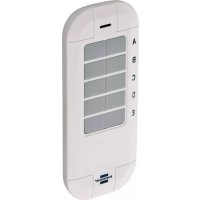
BrematicPRO FB868 01 5TA - Smart Home BRENNENSTUHL - Free user manual and instructions
Find the device manual for free BrematicPRO FB868 01 5TA BRENNENSTUHL in PDF.


| Product type | Wireless remote control |
| Brand | Brennenstuhl |
| Model | BrematicPRO FB868 01 5TA |
| Radio frequency | 868.3 MHz |
| Frequency band | 868.1 - 868.5 MHz |
| Maximum transmission power | < 20 mW |
| Duty Cycle | < 1% per hour |
| Supply voltage | 1 x 3 V CR2450 button cell battery |
| Battery type | CR2450 lithium button cell battery |
| Battery life | Approximately 2.5 years |
| Current consumption | 30 mA max. |
| Ambient temperature | 0 °C to 35 °C |
| Protection rating | IP20 |
| Dimensions (L x W x H) | 107.2 x 44.9 x 11.8 mm |
| Weight | 33.2 g |
| Number of keys | 10 (5 pairs) |
| Intended use | Control of BrematicPRO radio components in dry indoor environments |
| Package contents | 1 remote control, 1 CR2450 battery, 1 quick start guide, 1 digital instruction manual |
| Main functions | Turn on/off, open/close compatible radio components |
| Programming | Directly on the radio component or via the BrematicPRO Gateway |
| Control software | Mobile app (iOS/Android) or PC software |
| Cleaning and maintenance | Dry, lint-free cloth, do not use solvents |
| Manufacturer | Hugo Brennenstuhl GmbH & Co. KG, 4 rue de Bruxelles, F-67170 Bernolsheim |
| Customer service | www.brematic.com/fr/service, Tel. 0080048720743 |
| Compliance | CE, RoHS II (Directives 2014/53/EU and 2011/65/EU) |
Frequently Asked Questions - BrematicPRO FB868 01 5TA BRENNENSTUHL
User questions about BrematicPRO FB868 01 5TA BRENNENSTUHL
0 question about this device. Answer the ones you know or ask your own.
Ask a new question about this device
Download the instructions for your Smart Home in PDF format for free! Find your manual BrematicPRO FB868 01 5TA - BRENNENSTUHL and take your electronic device back in hand. On this page are published all the documents necessary for the use of your device. BrematicPRO FB868 01 5TA by BRENNENSTUHL.
USER MANUAL BrematicPRO FB868 01 5TA BRENNENSTUHL
Wireless remote control
Instructions for use

Draadloze afstandsbediening
Gebruiksaanwijzing
DE Bedienungsanleitung . 3
EN Instruction.. Page 9
FR Mode d'emploi.. 15
NL Gebruiksaanwijzing.. 23
IT Manuale diistruzioni.. 29
EN Wireless remote control 868.3 MHz
List of pictograms used
Safety instructions
Special safety instructions for handling batteries.. 10
Intended use
Information about Wireless Operation
Duty Cycle.. 11
Included in delivery
Technical data
Device overview
Function
Preparation Page 12
Inserting / replacing the battery.. 12
Download app / PC software BrematicPRO.
Direct pairing of the wireless remote control
Removing a direct connection.. Page 12
Pairing the wireless remote control with the BrematicPRO Gateway
Defining button assignment (for direct pairing)
Cleaning the Device 13
Action
Disposal
Service
Manufacturer
Declaration of conformity
List of pictograms used

Please read the instructions for use! Caution! Danger of exp


Dispose of the packaging and device in an environmentally friendly manner!
Safety instructions
The instructions for use are a part of this product. They contain important information about safety, use and disposal. Before using this device, please familiarise yourself with all instructions for use and safety instructions. Only use the device as described and for the indicated purpose. Be sure to include all documentation when passing this device on to others.
WARNING! DANGER TO LIFE AND RISK OF ACCIDENTS FOR INFANTS AND CHILDREN! Never leave children alone and unsupervised with the packaging material. It poses a risk of suffocation as children may swallow or inhale small parts or plastic film. Children frequently underestimate the dangers. Always keep children away from the product. It is not a toy.
This device may be used by children aged 8 years and up, as well as by persons with reduced physical, sensory or mental capacities, or lacking experience and / or knowledge, so long as they are supervised or instructed in the safe use of the device and understand the associated risks. Do not allow children to play with the device. Cleaning and user maintenance must not be performed by children without supervision.
Only operate this device in a dry, dust-free environment.
Only operate this device indoors.
Do not expose the device to adverse conditions, such as moisture,
- continuous sunlight,
heat radiation,
cold,
vibrations.
CAUTION! RISK OF INJURY!
- Do not open the housing. This device has no parts which require maintenance.
Do not use the device if it is visibly damaged.
We assume no liability for property damage or personal injury due to improper use or failure to observe the safety instructions! This will void the warranty/guarantee!
Any use not specified in these instructions will damage the product. Do not modify the device. Otherwise safe operation is not guaranteed.
Special safety instructions for handling batteries
WARNING! DANGER TO LIFE!
Batteries are not intended for children. Seek immediate medical attention if swallowed!
CAUTION! DANGER OF EXPLOSION! Never

recharge disposable batteries, do not short-circuit and / or open batteries!
Never throw batteries into fire or water!
Do not exert mechanical loads on batteries!
Risk of battery leakage
In the event of a battery leak, immediately remove it from the device to prevent damage!
Avoid contact with the eyes, skin and mucous membranes! In the event of contact with battery acid, flush the affected areas with clean water and seek immediate medical attention!
- Only use the same type of batteries! Do not mix used and new batteries!
- Avoid extreme conditions and temperatures which may affect batteries, e.g. radiators / direct sunlight.
- Remove the batteries from the device if they have not been used for a long period!
Risk of device damage
Only use the specified battery type!
Please note the correct polarity when inserting the battery!
If necessary, clean the battery and device contacts before inserting the battery!
Remove drained batteries from the device immediately!
A WARNING! CHEMICAL BURNS!
Keep batteries away from children.
The remote control contains a lithium button cell battery. If a new or drained button cell is swallowed or enters the body it can lead to severe internal chemical burns and can cause death within two hours of ingestion. Always ensure that the battery compartment is securely shut. If the battery compartment does not close correctly, stop using the device, remove the battery and keep it away from children.
If you believe that a button cell has been swallowed or has entered someone's body, seek immediate medical attention.
The batteries must be disposed of correctly, even if they have been kept away from children.
Even used batteries can cause injuries.
Intended use
The purpose of the wireless remote control is solely the control of BrematicPRO wireless components in dry indoor spaces.
Information about Wireless Operation
This product uses the 868.3 MHz proprietary wireless protocol. Wireless transmission is implemented using a non-exclusive channel, interference can therefore not be excluded.
The range in building may vary greatly from open areas. In addition to the transmission power and the reception characteristics of the receivers, ambient conditions, e.g. humidity in addition to the structural conditions on site, are important factors.
The range can be significantly reduced in part due to:
- wood, gypsum, concrete, reinforced concrete walls
- proximity to metal and conductive objects
- broadband interference, e.g. in residential areas (DECT phones, mobiles, wireless headphones, wireless speakers, wireless weather stations, baby monitors)
- proximity to electric motors, transformers, mains adapters, computers
Duty Cycle
Duty cycle refers to a transmission time limit regulated by law for devices transmitting in the 868 MHz range. It is intended to ensure smooth operation of devices operating in the 868 MHz range. The maximum transmission time of each device is 1% of an hour (corresponding to 36 seconds/hour). Once the 1% limit has been reached it cannot transmit until the time limit of the duty cycle has ended, so after one hour.
Included in delivery
1 x Wireless remote control
1x3V button cell battery CR2450
1 x Quick start guide
1 x Instructions for use (digital, available for download)
Technical data
Product designation: FB 868 01 5TA 3726
Item no.: 1294550
Radio frequency: 868.3 MHz
Frequency: 868.1 - 868.5 MH
Max. transmitting power: < 20mW
Duty cycle: < 1% per h
Supply voltage: 1 × 3V button cell CR2450
Battery life span: approx. 2.5 years
Power consumption: 30mA max.
Ambient temperature: 0^ to 35^
Protection type: IP20
Open area range: approx. 100m
Dimensions (W× H× D) .. 107.2× 44.9× 11.8mm
Weight: 33.2g
Subject to technical changes without notice.
Device overview
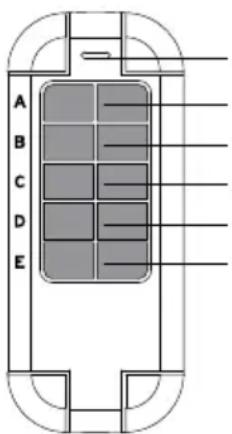
Front
Device LED
Button pair A
Button pair B
Button pair C
Button pair D
Button pair E
Battery
compartment
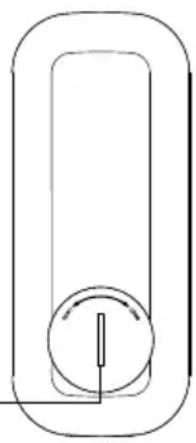
Back
Function
The wireless remote control is part of the Brennenstuhl Home Automation System BrematicPRO, controlled via app or the BrematicPRO PC software.
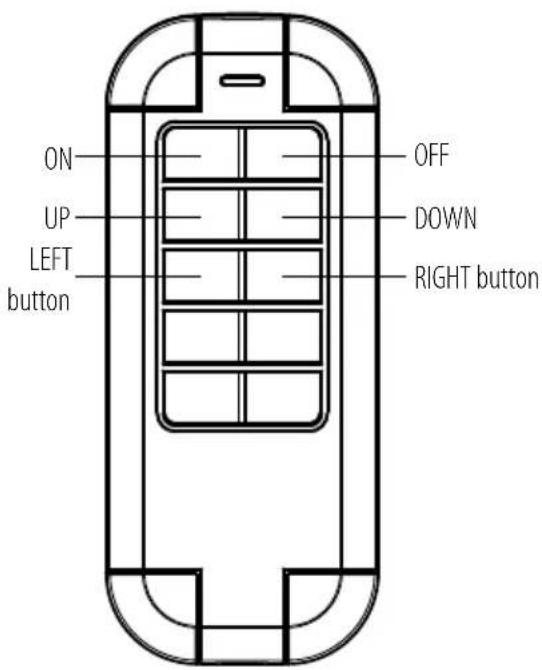
The 10 buttons on the wireless remote control are defined by default as button pairs. They serve to switch a component on or off, or to open and close shutters, for example. In so doing, the right button - depending on the linked component - may for example have an "off / down" function, and the left button an "on / up" function. For information on which components can be controlled by the wireless remote control, please visit www.brematic.com/gb/service. For additional information on components, please refer to the instructions for use of the respective BrematicPRO wireless component.
When linked with the Home Automation System BrematicPRO via the BrematicPRO Gateway, you can also use the app/BrematicPRO PC Software to assign each button with an individual function.
Preparation Inserting/replacing the battery
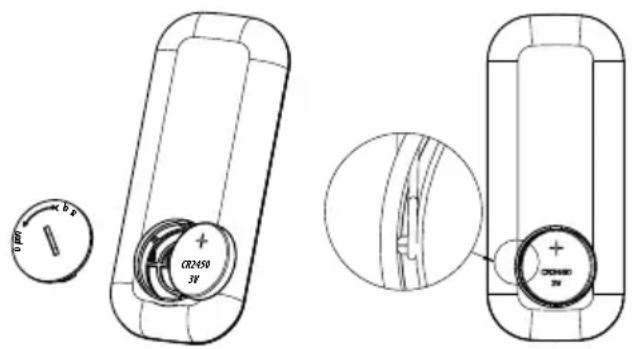
Note: Please ensure that the battery contact on the side fits closely on the side of the battery and is not pressed down by it. The wireless remote control operates using a 3 V battery (CR2450).
- Rotate the battery cover into the OPEN position using a coin, for example, to open the battery compartment.
Remove the drained battery if required.
Insert the battery into the battery compartment at a slight angle and with correct polarity (+ pole pointing upwards). - Close the battery cover and secure it by rotating it into the CLOSE position.
The wireless remote control is ready to use and in pairing mode.
Note: For pairing with BrematicPRO Gateway: The remote control is in pairing mode. Do not press any button on the remote control until it is paired with the Gateway.
Download app / PC software BrematicPRO
The Brennenstuhl Home Automation Systems BrematicPRO is controlled via the BrematicPRO app / PC software. The app can be downloaded for free from the App Store and Google Play. The PC software is available for download at www.brematic.com/gb/service.
Please follow the on-screen instructions for download and installation.
For more information about the app and how to use it, please visit www.brematic.com/gb/service.

Download on the App Store

GET IT ON Google Play
Direct pairing of the wireless remote control
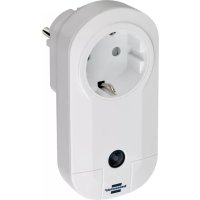
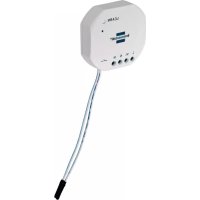
The wireless remote control can be paired directly with the BrematicPRO wireless switch adapter and flush-mounted actuators. The respective paired button pairs are for switching a component on or off. In so doing, the right button - depending on the linked component - may for example have an "off" function, and the left button an "on" function.
Note: Software-based functions (such as timing) are not available when pairing directly.
The wireless remote control and wireless component are in pairing mode (see instructions for use of the component).
Press the left button A on the wireless remote control. The component will be assigned to button pair A on the wireless remote control. The device LED will flash briefly to confirm.
To pair further components, proceed in the same way and assign the next button pairs. The device LED of the wireless remote control will flash thrice if there has been a transmission error or if the component to be linked is not ready for use. Repeat the pairing process as described above.
Removing a direct connection
The wireless component is in pairing mode (see the component's instructions for use).
Press the right button A on the wireless remote control. The component is removed from the button pair A of the wireless remote control. For further components, proceed in the same way and delete the next button pairs.
Pairing the wireless remote control with the BrematicPRO Gateway
When linked with the Home Automation System BrematicPRO via the BrematicPRO Gateway, you can also use the app / BrematicPRO PC Software to use software-based functions and assign each button with an individual function, such as
- switching the component on or off
- opening / closing shutters
The app or BrematicPRO PC software is installed and open.
The BrematicPRO Gateway is ready for use.
Keep the device at least 50~cm from the Gateway.
Open the "Settings" menu.
Select the room where you wish to use the device.
Select "Add Device".
Select the frequency "868 MHz".
Under "New Device", select "Switch / Socket" and click "Continue" to confirm your selection.
Follow the on-screen instructions.
- Insert the battery in the battery compartment as described in the section "Inserting / replacing the battery".
The wireless remote control is in pairing mode when the battery is inserted.
Press any button on the remote control.
Enter a device name for the wireless remote control e.g. "Living room remote control".
Note: If the pairing process has failed, remove the battery for
20 seconds. Reinsert the battery and restart the process in the app.
Select "Add" to assign the device to the room.
- First tap "Back" to leave the room, then "Done" to complete the pairing process.
Note: The wireless remote control is fully paired (all button pairs) once one button has been paired. It is not necessary to pair every button individually.
Note: The remote control does not have a tile in the app. The wireless remote control can be linked to other devices via tasks and acts as a trigger for a task.
Defining button assignment (for direct pairing)
Cleaning the Device
Clean the device with a dry, lint-free cloth. For tough dirt, you may also slightly dampen the cloth.
Do not clean with solvent-based cleaners. These could damage the device surface and markings.
- Never immerse the device in water or other liquids. The device may otherwise be damaged.
Action
| Problem Possible | cause Action | |
| The remote control is not working. | The battery is drained. | Insert a new battery. |
| The remote control is outside the range of the Gateway / the wireless component. | Reduce the distance to the Gateway / wireless component. | |
| The device LED flashes thrice / command is not confirmed | The receiver cannot be reached. | Reduce the distance to the Gateway / wireless component. |
| The receiver is defective. | Replace the defective receiver. Please contact your specialist dealer. | |
| The device LED flashes every second. | The battery is already drained when you try to insert it. | Insert a new battery. |
Disposal

kaging is made from environmentally-friendly materials which can be disposed of through your local recycling facilities.
Contact your local refuse disposal authority for more details of how to dispose of your worn-out product.

To help protect the environment, please dispose of the product properly when it has reached the end of its useful life, not in the household waste. Please contact your municipality for information on collection facilities and their opening hours.
Faulty or drained batteries must be recycled in accordance with Directive 2006/66/EC and its amendments. Return batteries and / or the device to the provided recycling facilities.

Improper disposal of batteries can harm the environment!
Never dispose of batteries in your household bin. They may contain toxic heavy metals and are subject to hazardous waste regulations. The chemical symbols of the heavy metals are: Cd = cadmium, Hg = mercury, Pb = lead. Therefore dispose of drained batteries through your local collection facilities.
Service
For questions related to the product, please contact us at
www.brematic.com/gb/service.
Tel.: 0080048720743 (toll-free)
Manufacturer
Declaration of conformity
Hugo Brennenstuhl GmbH & Co.KG, hereby declares the wireless system model FB 868 01 STA to comply with directives 2014/53/EU and 2011/65/EU (RoHS II). The full text of the EU declaration of conformity is available at the following internet address: www. bremtic.com/gb/service/konformitaetserklaerung/ke_1294550.pdf
This product complies with the legal, national and European requirements. All company names and product names are trademarks of the respective owners.
All rights reserved.
WAARSCHUWING! LEVENSGEVAAR!
Download in de App Store

Note:毕业后, the radio station will be replaced by a new radio station. Note: after 1995, the radio station will be replaced by a new radio station.

- EN Wireless remote control 868.3 MHz
- List of pictograms used
- Safety instructions
- CAUTION! RISK OF INJURY!
- Special safety instructions for handling batteries
- WARNING! DANGER TO LIFE!
- Risk of battery leakage
- Risk of device damage
- A WARNING! CHEMICAL BURNS!
- Intended use
- Information about Wireless Operation
- Duty Cycle
- Included in delivery
- Technical data
- Device overview
- Function
- Preparation Inserting/replacing the battery
- Download app / PC software BrematicPRO
- Download on the App Store
- GET IT ON Google Play
- Direct pairing of the wireless remote control
- Removing a direct connection
- Pairing the wireless remote control with the BrematicPRO Gateway
- Defining button assignment (for direct pairing)
- Cleaning the Device
- Action
- Disposal
- Improper disposal of batteries can harm the environment!
- Service
- Manufacturer
- Declaration of conformity
- WAARSCHUWING! LEVENSGEVAAR!
- Download in de App Store
Brand : BRENNENSTUHL
Model : BrematicPRO FB868 01 5TA
Category : Smart Home