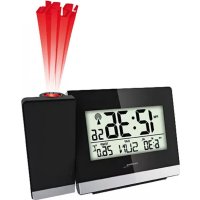
WT 496 - Alarm clock radio TECHNOLINE - Free user manual and instructions
Find the device manual for free WT 496 TECHNOLINE in PDF.



| Product type | Alarm clock radio with LCD display |
| Brand | TECHNOLINE |
| Model | WT 496 |
| Power supply | 4 AAA batteries (non-rechargeable) |
| Time reception | Radio-controlled (DCF signal), automatic and manual |
| Number of alarms | 5 programmable alarms |
| Alarm repeat ranges | Daily (1-7), workdays (1-5), weekend (6-7), single day (1-1) |
| Alarm tone | High (HI) or low (LO) |
| Alarm duration | 2 minutes |
| Snooze function | Adjustable from 5 to 60 minutes |
| Display | 12/24 hour format, calendar (day/month or month/day), time zone |
| Backlight | Approximately 5 seconds when pressing the Zz·☀️ button |
| Programmable night light | Yes, with adjustable turn-on time and duration (5h or 7h) |
| Low battery indicator | Icon on the LCD screen |
| Care and cleaning | Wipe with a soft, dry cloth. Do not use abrasive cleaners. |
| Safety | Use only new alkaline batteries. Do not expose to moisture, extreme temperatures, or shocks. Keep out of reach of children. |
| Spare parts and repairability | Not provided. In case of malfunction, remove and reinsert the batteries. |
| General information | Complies with directives 2014/53/EU and ROHS 2011/65/EC. Declaration of conformity available at www.technoline.de/doc/4029665004969 |
Frequently Asked Questions - WT 496 TECHNOLINE
User questions about WT 496 TECHNOLINE
0 question about this device. Answer the ones you know or ask your own.
Ask a new question about this device
Download the instructions for your Alarm clock radio in PDF format for free! Find your manual WT 496 - TECHNOLINE and take your electronic device back in hand. On this page are published all the documents necessary for the use of your device. WT 496 by TECHNOLINE.
USER MANUAL WT 496 TECHNOLINE
text_image
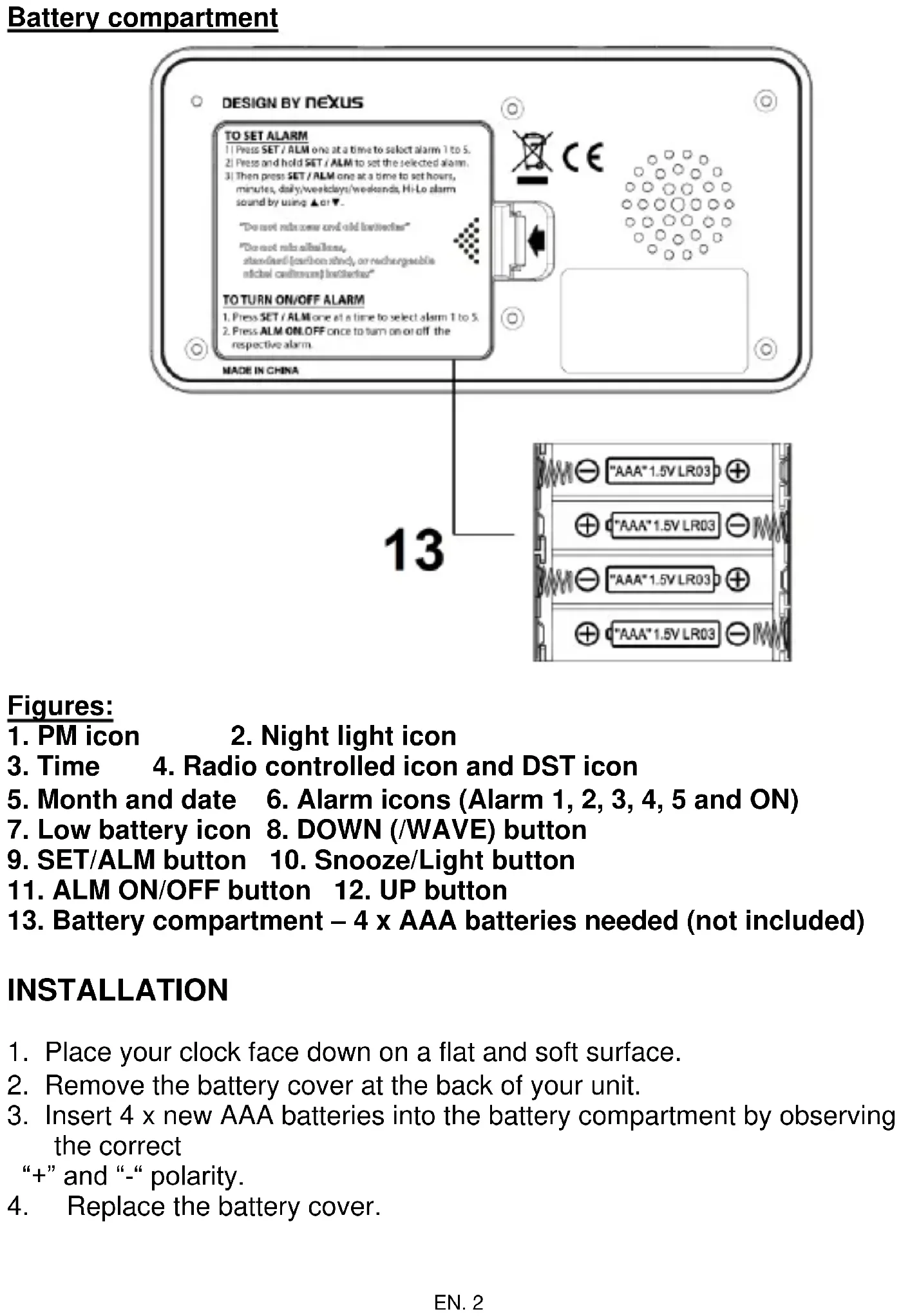
DESIGN BY NEXUS TO SET ALARM 1) Press SET / ALM one at a time to select alarm 1 to 5. 2) Press and hold SET / ALM to set the selected alarm. 3) Then press SET / ALM one at a time to set hours, minutes, daily/weekdays/weekends, Hi-Lo alarm sound by using ▲ or ▼. "Do not run new and old batteries" "Do not run sites lines, standard (carbon mind), or rechargeable digital motors are better" TO TURN ON/OFF ALARM 1. Press SET / ALM one at a time to select alarm 1 to 5. 2. Press ALM ON/OFF once to turn on or off the respective alarm. MADE IN CHINA 13 "AAA"1.5V LR03 "AAA"1.5V LR03 "AAA"1.5V LR03 "AAA"1.5V LR03text_image
DESIGN BY NEXUS TO SET ALARM 1) Press SET / ALM one at a time to select alarm 1 to 5. 2) Press and hold SET / ALM to set the selected alarm. 3) Then press SET / ALM one at a time to set hours, minutes, daily/weekdays/weekends, Hi-Lo alarm sound by using ▲ or ▼. "Do not mix once and old batteries" "Do not mix all Bahamas, standard (carbon steel), or rechargeable nickel cadmium batteryes" TO TURN ON/OFF ALARM 1. Press SET / ALM one at a time to select alarm 1 to 5. 2. Press ALM ON/OFF once to turn on or off the respective alarm. MADE IN CHINA 13 "AAA" 1.5V LR03 "AAA" 1.5V LR03 "AAA" 1.5V LR03 "AAA" 1.5V LR03Figures:
- PM icon 2. Night light icon
- Time 4. Radio controlled icon and DST icon
- Month and date 6. Alarm icons (Alarm 1, 2, 3, 4, 5 and ON)
- Low battery icon 8. DOWN (/WAVE) button
- SET/ALM button 10. Snooze/Light button
- ALM ON/OFF button 12. UP button
- Battery compartment - 4 x AAA batteries needed (not included)
INSTALLATION
- Place your clock face down on a flat and soft surface.
- Remove the battery cover at the back of your unit.
-
Insert 4 x new AAA batteries into the battery compartment by observing the correct
“+” and “-” polarity. -
Replace the battery cover.
RADIO CONTROLLED TIME SIGNAL RECEPTION
After your clock is powered up, it starts to receive radio controlled time signal. The 📤icon flashes.
Receiving Signal ( icon flashing)
Successful Reception (icon becomes static)
Failed Reception ( icon disappear)
Automatic reception and Manual Reception
Your clock starts automatic reception everyday at 1:00, 2:00, and 3:00. If it fails to receive the radio controlled time time signal at 3:00, it will start reception at 4:00. If it fails again, it will start reception at 5:00. If it fails again, it will start automatic reception at 1:00 again in the next day.
Manual reception: press and hold ▼, your clock will start manual reception with a short beep tone. Press and hold ▼ to stop radio controlled time reception with a short beep tone.
During reception, all buttons do not function temporarily except the Zz • 🌿 button.
TO SET TIME ZONE, HOUR, MINUTE, 12/24 HR, CALENDAR, SNOOZE
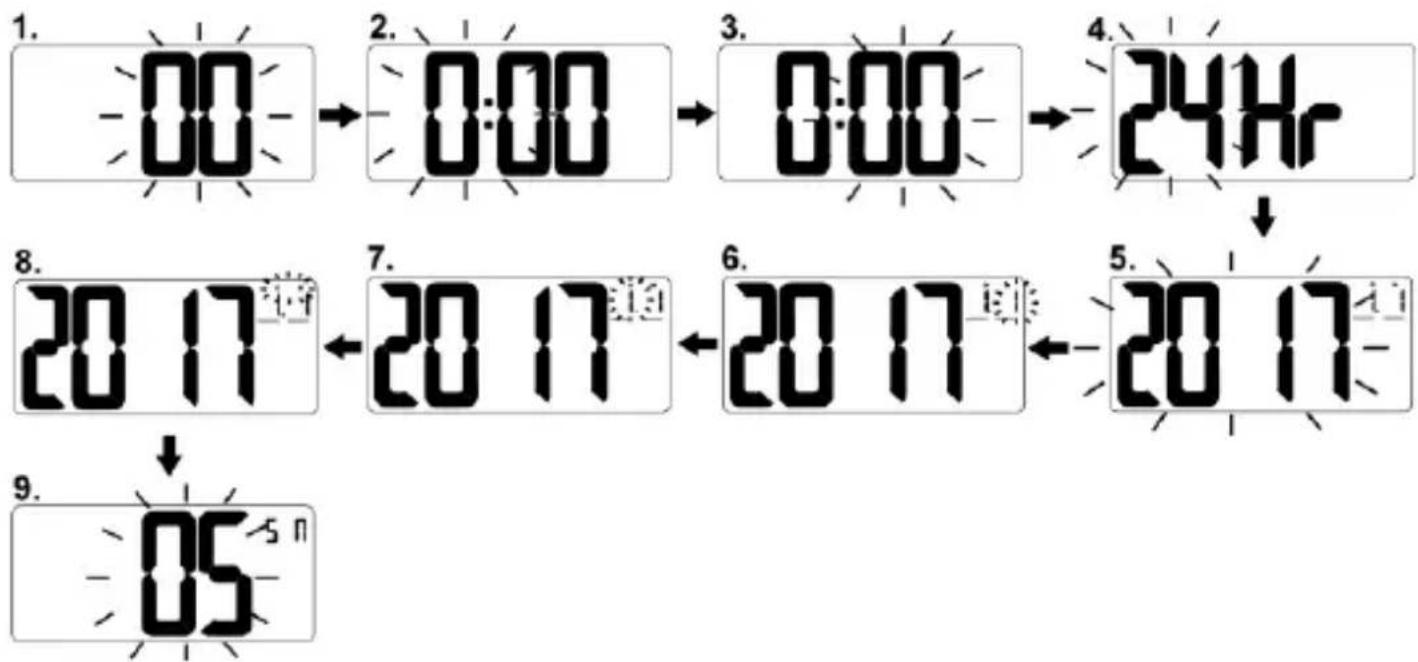
- Press and hold SET/ ALM, "00" flash. Press ▲ / ▼ button to select time zone in hours.
from “-12” to “+12” hours. Default time zone is “00” (Germany) :-
$$ 0 0 = \text { Germany (GMT } + 1 \text { hour) } $$
$$ - 0 1 = \mathrm{U.K.} (\mathrm{GMT} + 0 \text { hour }) $$
$$ 0 1 = \text { Finland (GMT +2 hours) } $$
- Press SET/ ALM once again, hour digits flash. Press ▲ / ▼ button to set hour. Press and hold ▲ or ▽ to accelerate setting in fast speed.
- Press SET/ ALM once again, minute digits flash. Press ▲ / ▼ button to set minute. Press and hold ▲ or ▼ to accelerate setting in fast speed.
- Press SET/ ALM once again, "24 Hr" flash, press ▲ / ▼ to select "12 Hr" or "24 Hr" time format. For 12Hr time format, "PM" will appear on the left of time digits to indicate the afternoon time. There is no AM
icon to indicate before-noon time.
- Press SET/ ALM once again, “2017” flashes. Press ▲/▼ to set the year.
- Press SET/ ALM once again, month digits flash. Press ▲/ ▼ button to set month.
- Press SET/ ALM once again, date digits flash. Press ▲ / ▼ button to set date.
- Press SET/ ALM once again, D/M flash. Press ▲ / ▼ button to select D/M or M/D.
- Press SET/ ALM once again, the LCD display shows "S N" and "05" flashes, press
▲ / ▼ to set snooze duration from 5 to 60 minutes.
- Press SET/ ALM once to return to time display, or it will return to time display in around
10 seconds if no further press of any other buttons.
flowchart
graph TD
    A["1. 00"] --> B["2. 0:00"]
    B --> C["3. 0:00"]
    C --> D["4. 24Hr"]
    D --> E["5. 20 17"]
    E --> F["6. 20 17"]
    F --> G["7. 20 17"]
    G --> H["8. 20 17"]
    H --> I["9. 05"]
TO SET ALARM 1 to 5
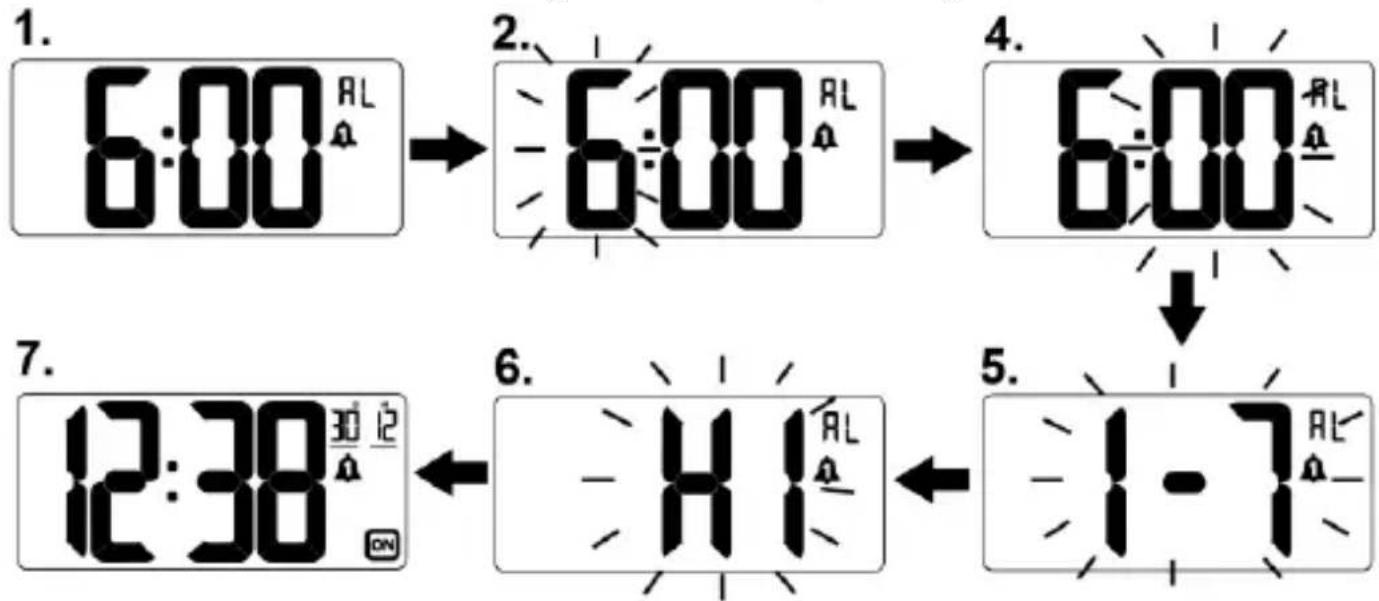
- At normal time display, press SET/ ALM one at a time to view and
select individual alarm, the corresponding alarm icon from appears.

- Then press and hold SET/ ALM, the hour digits flash. Press 6:00 and appear.
- Once the alarm is selected, then press and hold SET/ ALM until the hour digit flash. Then press ▲ or ▼ to set the alarm in hours. Press and hold ▲ or ▼ to accelerate setting in fast speed.
- Press SET/ ALM once again, the minute digits flash. Then press ▲ or ▼ to set the alarm in minutes. Press and hold ▲ or ▼ to accelerate setting at high speed.
- Press SET/ ALM once again, “1-7” flash, press ▲ or ▼ to select “1-5” or “6-7” or “1-1”.
1-7 = Monday to Sunday only (Daily)
1-5 = Monday to Friday only (Weekdays)
6-7 = Saturday and Sunday only (Weekends)
1-1 = one time one day alarm only (special day alarm)
- Press SET/ ALM once again, "HI" flash, press ▲ or ▼ to select "HI" or "LO" alarm sound.
HI = Hi / loud alarm sound
LO = Low / soft alarm sound
- Press SET/ ALM once again or if no key pressed for approx. 10 seconds to exit the setting of the corresponding alarm.
flowchart
graph TD
    A["6:00 AL"] --> B["6:00 AL"]
    B --> C["6:00 AL"]
    C --> D["12:38 AL"]
    D --> E["41 AL"]
    E --> F["1-7 AL"]
EN. 5
TO SET AND USE SPECIAL DAY ALARM (ONE TIME ALARM)
- At normal time display, press SET/ ALM one at a time to select an alarm to sound on a special day, the corresponding alarm icon from
1 to 5 appears.
- Then press and hold SET/ ALM to set the respective alarm by following step 2) to 5) of TO SET ALARM 1 TO 5 as above.
- When "1-7" appears and flashes, press ▲ or ▼ to select "1-1".
- Then press SET/ ALM once again, "2017" flashes. Press ▲ or ▼ to set the year.
- Press SET/ ALM once again, month digits flash. Press ▲ or ▼ button to set month.
- Press SET/ ALM once again, date digits flash. Press ▲ or ▼ button to set date.
- Press SET/ ALM once again, "HI" flash, press ▲ or ▼ to select "HI" or "LO".
HI = Hi / loud alarm sound
LO = Low / soft alarm sound
- Press SET/ ALM once again or if no key pressed for approx. 10 seconds to exit the Alarm setting.
When time reaches the set special day's alarm time, your clock will sound and the display will show the set special day (year, month and date) and flash. Press ALM / ON-OFF once to turn off the alarm and the clock reverts to normal time display. This alarm only works one time.
TO TURN ON OR OFF ALARM 1 TO 5
-
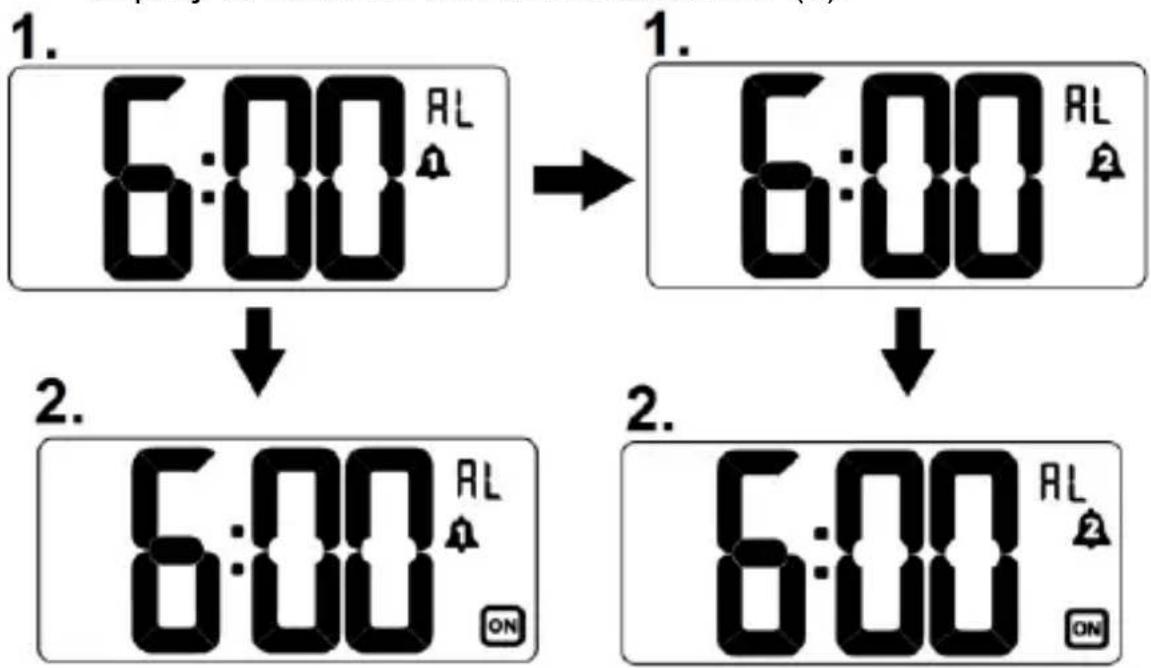
At normal time display, press SET/ ALM one at a time to view and select individual alarm, the corresponding alarm icon from 1 to 5 appears.
-
Then press ALM/ON.OFF once to turn on the corresponding alarm,

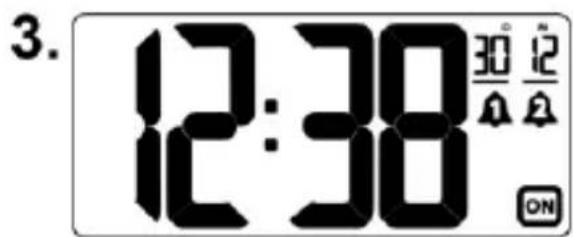
icon appears, press AL/ON.OFF once again to turn off the alarm, icon disappears.

- Your clock will return to normal time display in 5 seconds if no press of any button. The corresponding alarm icon will appear on the time display to indicate the activated alarm (s).
flowchart
graph TD
    A["1. 6:00 AL"] --> B["2. 6:00 AL"]
    B --> C["1. 6:00 AL"]
    C --> D["2. 6:00 AL"]
text_image
3. 12:38 30° 12 ONTO USE THE SNOOZE ALARM
When time reaches the respective set alarm time(s), your clock will sound and the corresponding alarm icon 📁 to 🕒 icon will flash. Press Zz • ⚙ once to stop the alarm temporarily, the corresponding alarm icon keeps flashing. The alarm will sound again according to the setting of your snooze duration.
TO STOP AND RESET THE ALARM TO COME ON THE NEXT DAY
When the respective alarm is sounding, the related alarm icon flashes. Press any button except the Z button once to stop the alarm and
reset it to come on the following day. After that the alarm icon remains static on the display.
TO USE THE BACKLIGHT
At normal time display, press Zz • once, the light will last for around 5 seconds and then go off.
WARNING: constant use of the backlight will significantly reduce the life expectancy of the batteries.
Your clock has a programmable night-light display for you to view time in the dark.
- At normal time display, press and hold Zz • 🌿, the 🔺 appears and “OFF” flash on the LCD display, press ▲ or ▼ button to select “ON” or “OFF”.
- Press Zz • once again, "0:00" flash, press ▲ or ▼ button to set the Night-Light starting hours.
- Press Zz • once again, “6 Hr” flash, press ▲ or ▼ button to select “5 Hr” or “7 Hr” as the Night-Light duration.
- Press once again or if no button press in around 10 seconds, your clock will return to normal time display.
LOW BATTERY ALERT
When the battery level becomes low, an low battery icon 📋 will appear on the lower middle of the LCD. Replace old batteries with new alkaline batteries.
TROUBLE SHOOTING
If your clock displays irrelevant time or does not function properly, which may be caused by electro-static discharge or other interference, slide open the battery cover, take out the batteries and reinstall them by observing the correct +/- polarity. Your unit will be reset to default settings and you need to set it again.
Hereby, Technotrade declares that this product WT496 is in compliance with the essential requirements and other relevant provisions of Directive 2014/53/EU and ROHS 2011/65/EC. The original EU declaration of conformity may be found at: www.technoline.de/doc/4029665004969
SPECIFICATIONS
Alarm duration 2 minutes
Snooze duration 5 to 60 minutes
Default settings:
Time 0:00
Alarm 1 to 5 6:00, 1-7 (Daily alarm)
Alarm sound Hi
Night-light Off
Snooze duration 05 (5 minutes)
Environmental reception effects
The clock obtains the accurate time with wireless technology. Same as all wireless devices, the reception is maybe affected by the following circumstances:
- long transmitting distance
• nearby mountains and valleys - near freeway, railway, airports, high voltage cable etc.
- near construction site
- among tall buildings
• inside concrete buildings - near electrical appliances (computers, TV's, etc) and metallic structures
• inside moving vehicles
Place the clock at a location with optimal signal, i.e. close to a window and away from metal surfaces or electrical appliances.
Precautions
- This main unit is intended to be used only indoors.
- Do not subject the unit to excessive force or shock.
- Do not expose the unit to extreme temperatures, direct sunlight, dust or humidity.
- Do not immerse in water.
- Avoid contact with any corrosive materials.
- Do not dispose this unit in a fire as it may explode.
- Do not open the inner back case or tamper with any components of this unit.
Batteries safety warnings
- Use only alkaline batteries, not rechargeable batteries.
• Install batteries correctly by matching the polarities (+/-).
• Always replace a complete set of batteries.
- Never mix used and new batteries.
- Remove exhausted batteries immediately.
- Remove batteries when not in use.
- Do not recharge and do not dispose of batteries in fire as the batteries may explode.
- Ensure batteries are stored away from metal objects as contact may cause a short circuit.
- Avoid exposing batteries to extreme temperature or humidity or direct sunlight.
- Keep all batteries out of reach from children. They are a choking hazard.
Use the product only for its intended purpose!
Consideration of duty according to the battery law

Old batteries do not belong to domestic waste because they could cause damages of health and environment. You can return used batteries free of charge to your dealer and collection points. As end-user you are committed by law to bring back needed batteries to distributors and other collecting points!
Consideration of duty according to the law of electrical devices
This symbol means that you must dispose of electrical devices separated from

the General household waste when it reaches the end of its useful life. Take your unit to your local waste collection point or recycling centre. This applies to all countries of the European Union, and to other European countries with a separate waste collection system.
WT 496 - MODE D'EMPLOI
RADIORÉVEIL RADIOPILOTÉ AVEC LCD ET 5 ALARMES
text_image
DESIGN BY NEXUS TO SET ALARM 1) Press SET / ALM one at a time to select alarm 1 to 5. 2) Press and hold SET / ALM to set the selected alarm. 3) Then press SET / ALM one at a time to set hours, minutes, daily/weekdays/weekends, Hi-Lo alarm sound by using ▲ or ▼. "Do not mix case and old batteries" "Do not mix all/bias, standard (carbon steel), or rechargeable nickel castorsand batteries" TO TURN ON/OFF ALARM 1. Press SET / ALM one at a time to select alarm 1 to 5. 2. Press ALM ON/OFF once to turn on or off the respective alarm. MADE IN CHINA 13Figures :
- Icône PM
- Heure
- Mois et date
- Icône piles faibles
- Touche SET/ALM (RÉGLAGE/ALARME)
- Touche ALM ON/OFF (ACTIVATION/DÉSACTIVATION D'ALARME)
- Compartiment à piles - 4 piles AAA requises (non fournies)
INSTALLATION
text_image
9 10 11 8 SET ALM Zz • ALM OOPF 12text_image
DESIGN BY NEXUS TO SET ALARM 1) Press SET / ALM one at a time to select alarm 1 to 5. 2) Press and hold SET / ALM to set the selected alarm. 3) Then press SET / ALM one at a time to set hours, minutes, daily/weekdays/weekends, Hi-Lo alarm sound by using ▲ or ▼. "Do not make new and old lathester" "Do not make all/less, standard (carbon steel), or rechargeable nickel cautionous lathester" TO TURN ON/OFF ALARM 1. Press SET / ALM one at a time to select alarm 1 to 5. 2. Press ALM ON.OFF once to turn on or off the respective alarm. MADE IN CHINA 13 "AAA" 1.5V LR03 "AAA" 1.5V LR03 "AAA" 1.5V LR03 "AAA" 1.5V LR03Figuras:
text_image
DESIGN BY NEXUS TO SET ALARM 1) Press SET / ALM one at a time to select alarm 1 to 5. 2) Press and hold SET / ALM to set the selected alarm. 3) Then press SET / ALM one at a time to set hours, minutes, daily/weekdays/weekends, Hi-Lo alarm sound by using ▲ or ▼. "Do not relax case and aid lathester" "Do not relax all times, standard (carbon steel), or rechargeable nickel cadherand lathester" TO TURN ON/OFF ALARM 1. Press SET / ALM one at a time to select alarm 1 to 5. 2. Press ALM ON/OFF once to turn on or off the respective alarm. MADE IN CHINA 13 "AAA" 1.5V LR03 "AAA" 1.5V LR03 "AAA" 1.5V LR03 "AAA" 1.5V LR03Figuren:
WAARSCHUWING LEGE BATTERIJ
text_image
DESIGN BY NEXUS TO SET ALARM 1) Press SET / ALM one at a time to select alarm 1 to 5. 2) Press and hold SET / ALM to set the selected alarm. 3) Then press SET / ALM one at a time to set hours, minutes, daily/weekdays/weekends, Hi-Lo alarm sound by using ▲ or ▼. "Do not mix once and old batteries" "Do not mix all times, standard (carbon steel), or rechargeable nickel capacitors) batteries" TO TURN ON/OFF ALARM 1. Press SET / ALM one at a time to select alarm 1 to 5. 2. Press ALM ON/OFF once to turn on or off the respective alarm. MADE IN CHINA 13 "AAA" 1.5V LR03 "AAA" 1.5V LR03 "AAA" 1.5V LR03 "AAA" 1.5V LR03Figure:
6-7 = Solo sabato e domenica (weekend)