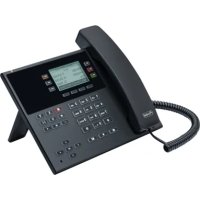
COMfortel D110 - Phone Auerswald - Free user manual and instructions
Find the device manual for free COMfortel D110 Auerswald in PDF.


| Product type | VoIP telephone |
| Brand | Auerswald |
| Model | COMfortel D110 |
| Dimensions (W × H × D) | 238 × 125-160 × 145-195 mm |
| Weight | 697 g |
| Power supply | PoE IEEE 802.3af (Class 1), 1.5 to 3.8 W |
| Display | Backlit graphic, black/white, 240 × 128 pixels |
| Keypad | 12 fixed keys, navigation key, 6 programmable keys (3 levels), 4 context-sensitive keys |
| VoIP codecs | G.711, G.722 (wideband), G.726, G.729, iLBC |
| Network connectivity | 1 Ethernet port 10/100 Base-Tx |
| USB port | 1 USB port for key expansion module (COMfortel D-XT20) |
| Headset | Separate interface for dynamic headset, DHSG compatible |
| Speaker | Wideband, dynamic earpiece |
| Operating temperature | 0 to 40 °C |
| Storage temperature | -30 to 70 °C |
| Housing | Plastic, black |
| Manufacturer warranty | 24 months |
| Maintenance | Clean with a dry cloth |
| Safety | Do not open the device, use only original accessories |
| Repairability | Repair by manufacturer only |
| Hearing aid compatibility | Hearing aid compatible earpiece |
Frequently Asked Questions - COMfortel D110 Auerswald
User questions about COMfortel D110 Auerswald
0 question about this device. Answer the ones you know or ask your own.
Ask a new question about this device
Download the instructions for your Phone in PDF format for free! Find your manual COMfortel D110 - Auerswald and take your electronic device back in hand. On this page are published all the documents necessary for the use of your device. COMfortel D110 by Auerswald.
USER MANUAL COMfortel D110 Auerswald
COMfortel ^® D-110 COMfortel ^® D-210
Standard-VoIP-Telefon Standard VoIP Telephone
Betriebsanleitung Deutsch Instructions English Manual de instrucciones Español Οδηγίες λειτουργίας Ελληνικά Notice d'utilisation Français Istruzioni per l'uso Italiano Gebruikshandleiding Nederlands Instrukcja obsługi Polski
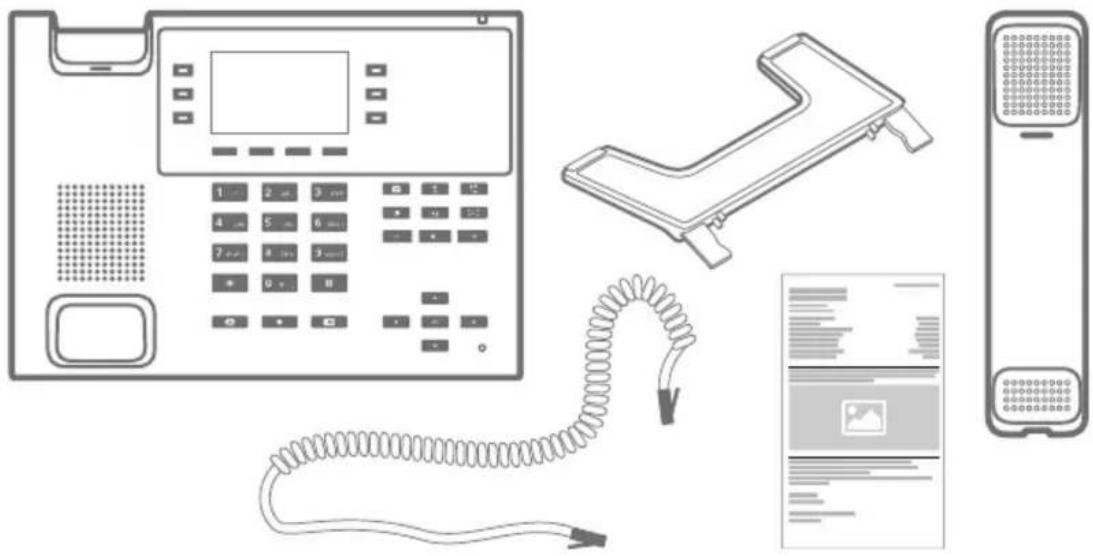
Lieferumfang (de) / Scope of Delivery (en) / Volumen de suministro (es) / Εξοπλισμός παράδοσης (el) / Contenu de la livraison (fr) / Dotazione (it) / Leveringsomvang (nl) / Zakres dostawy (pl)
Kontaktdaten (de) / Contact Data (en) / Datos de contacto (es) / Στοιχεία επικοινωνίας (el) / Coordonnées (fr) / Dati di contatto (it) / Contactgegevens (nl) / Dane połączeń (pl)
Hersteller/Manufacturer: Auerswald GmbH & Co. KG, Hordorfer Str. 36, 38162 Cremlingen, Germany
D A CH L
www.auerswald.de
B E F GR I NL PL UK
www.fontevo.com
Anleitungen (de) / Manuals (en) / Instrucciones (es) / Οδηγίες χρήσης (el) / Notices (fr) / Guide (it) / Handleidingen (nl) / Instrukcje (pl)
| Die Anleitung „Erweiterte Informationen“ finden Sie in der Weboberfläche und auf unserer Internetseite. Die Kurzanleitung finden Sie auf unserer Internetseite. Nach einem Firmware-Update benötigen Sie ggf. aktualisierte Anleitungen. Diese finden Sie auf unserer Internetseite. (de) | de |
| You will find the "Advanced Information" manuals in the web interface and on our website. You will find the Quick Guide on our website. After a firmware update you usually require a new version of the instructions. You will find this on our website. | en |
| Encontrará las instrucciones del apartado "Advanced Information" en la interfaz web y en nuestra página web. En nuestra página web encontrará la Guía rápida. Después de efectuar una actualización del firmware es posible que necesite descargar una copia actualizada de las instrucciones. La encontrará en nuestra página web. | es |
| Мпореіте va ́ßeіте тіс о́днігіес "Advanced Information" στο περιβάλλον εργασίας web кαι στην ιστοσελίδα μας. Ои συνοπτικές о́днігіес хрήσης υπάρχουν στο διαδίκτυο. Метá την ενημέρωση του υλικολογισμικού θα χρειαστεῖτε ενδ. ενημερωμένες о́днігіес хрήσης. Мпореіте va тіс ́ßeіте στο διαδίκτυο. | el |
| La notice « Advanced Information » est disponible dans l’interface Internet ainsi que sur notre site Internet. Vous trouverez la notice abrégée sur notre site Internet. Après une mise à jour de la version du logiciel, vous aurez besoin de notices actualisées. Elles sont disponibles sur notre site Internet. | fr |
| La guida “Advanced Information” è consultabile nell’interfaccia web e sul nostro sito web. La guida rapida è disponibile sul nostro sito web. Dopo un aggiornamento del firmware possono servire guide aggiornate. Queste sono disponibili sul nostro sito web. | it |
| De handleiding “Advanced Information” vindt u op de webinterface en op onze website. Een korte handleiding vindt u op onze internetpagina. Na een firmware-update heeft u evt. geactualiseerde handleidingen nodig. Deze vindt u op onze internetpagina. | nl |
| Instrukcję „Advanced Information” można znaleźć w interfejsie sieciowym i na naszej stronie internetowej. Skrócona instrukcja znajduje się na naszej stronie internetowej. Po zaktualizowaniu oprogramowania wewnętrznego mogą być ewentualnie potrzebne zaktualizowane instrukcje. Można je znaleźć na naszej stronie internetowej. | pl |
Copyright
© Auerswald GmbH & Co. KG, 38162 Cremlingen, Germany, 2020
Licenses
Please read the Auerswald license before using your Auerswald Product or downloading the software update accompanying this license.
The software included in this product contains parts of copyrighted software that is subject to the GPL, the LGPL or other licenses.
The licenses can be found in the web interface under Dashboard > Status information > Legal > Auerswald license and Open source licenses or on our website.
Trademarks
Android is a trademark of Google, Inc. All other trademarks mentioned are the property of the corresponding manufacturer.
Deutsch
VoIP telephone for connection to Ethernet network. The telephone is not cordless, and is intended for use in enclosed, dry spaces.

Safety Information
To ensure that you are able to use the device safely and without faults, comply with the notes below. Improper use may, for example, cause functional restrictions, destruction of the device or, in a worst case scenario, personal injury. You will find any necessary additional warning notices about using the device in the relevant sections.
Read the instructions for the device and keep them for future reference.
Connecting Safely
Connect the device as described in these Instructions. Take note of the technical data on the type plate and in these Instructions. Only connect the device's connection cables to wall sockets that are designed for that purpose, and that have been properly installed. Arrange for a qualified electrician to install all the cables inside the building. Only use screened network cables. UTP network cables are not suitable.
Only use original accessories and original replacement parts. Non-approved headsets, external loudspeakers, or receivers, may cause hearing damage or interfere with the voice connection. Take note of the technical information about connecting a headset.
Location Characteristics
Only operate the telephone in enclosed, dry spaces.
Never cover the device.
Limitations on Use
Never use a damaged device.
Do not touch the device during an electrical storm.
Never use the device in life-support systems or nuclear facilities. The device can only be used for these purposes with prior written permission/clarification from the manufacturer in each individual case.
Necessary Knowledge for Configuration
Incomplete or incorrect configuration can create a personal hazard e.g. because emergency calls cannot be made.
The product is configured using the telephone or an integrated web server whose pages are accessed using a web browser. The associated help is provided in English, German or French.
If you are not familiar with these languages, and the technical terms that are used, seek support from someone who has the necessary technical and language skills.
Repair
Do not open the device. Only the manufacturer is permitted to open the device and repair it.
Cleaning

Caution: Liquids penetrating the casing can damage or destroy the device.
- Only clean the device with a dry cloth.
Technical Data
| COMfortel® D-110 COMfortel | ® D-210 | |
| Operating voltage Supply via the Ethernet port using PoE in compliance with IEEE 802.3af. (If there is no PoE supply on the network, use a COMfortel® PoE-100 or COMfortel® PoE-1000, available as an accessory.) | ||
| PoE class Class 1 (identified on the type plate) | Class 2 (identified on the type plate) | |
| Power consumption | Min. 1.5 W, max. 3.8 W Min. | 1.2 W, max. 6.5 W |
| System connection | 10/100Base Tx Ethernet 10/100/1000 Tx Ethernet | |
| 2nd Ethernet port | 10/100Base Tx Ethernet 10/100/1000 Tx Ethernet | |
| VoIP codecs G.711 | A-law, μ-Law, G.722 (Wideband), G.726, G.729, iLBC | |
| USB connection 1x for connecting a | COMfortel® D-XT20, COMfortel® D-XT20i key extension module | |
| Displays 12 polychromatic LEDs, illuminated graphic display, black/white, 240 x 128 pixels, backlight | ||
| User elements Keypad, 12 fixed function keys, directional pad. | ||
| 6 freely programmable function keys on the left and right, beside the display (3 levels), labelled, status display LED. | ||
| 4 context-sensitive soft keys under the display. | ||
| Receiver Wideband audio, electret microphone, receiver with dynamic loudspeaker, hearing aid-compatible | ||
| Headset Separate interface for dynamic headsets, also with DHSG support | ||
| Telephone hook | Magnetic switch contact | |
| Casing | Plastic material, black | |
| Dimensions(W × H × D) | 238 mm × 125/160 mm × 145/195 mm | |
| Weight | 697 g | |
| Temperature | Operation: 0 ° to 40 °C, storage: - 30 ° to + 70 °C, non-condensing | |
Technical Data for Headset Connections
Microphone current consumption Max. 0.5 mA
| Microphone sensitivity - 43 dB | |
| Loudspeaker impedance 100 Ohms | |
| Loudspeaker sensitivity at 1 kHz 19.5 +/- | 3 dBPa/V |
| Sound level threshold 24 dBPa |
Environmental Notices
If you want to dispose of the device, please ensure its professional disposal. Do not put it in the normal household waste.

Dispose of the packaging material properly and in interest of the environmental protection.

Consult your responsible authority for information about the professional and environment-friendly disposal of your device. If you want that we handle the disposal for you, you can send the device at your costs to
Declaration of Conformity
This device complies with the basic health, safety and environmental requirements in all relevant EU directives. You will find the Declaration of Conformity on our website.
Conditions of Guarantee
- Auerswald GmbH & Co. KG, Vor den Grashöfen 1, 38162 Cremlingen, Germany, grants 24 months Manufacturer's Warranty from the date of purchase, as the manufacturer of this product.
- For you, as a consumer, this means: We guarantee that our devices are error-free when supplied. If a manufacturing error is identified within 24 months of the delivery date we will repair or replace the device free of charge without you, as the consumer, having to provide the usual legally required proof that this fault was present when you received the device. We either use new parts or parts in mint condition for the repair or replacement delivery. Any parts removed from the device become our property and can be destroyed by us.
- In addition to this warranty, you have the unlimited legal right to claim against the supplier on the basis of the terms of the warranty for defects on the basis of the purchase contract. However, in contrast to our Manufacturer's Warranty, the legal warranty for defects only applies to the device's state when sold (handover).
- You can only claim against this warranty if you return the faulty device to Auerswald GmbH & Co. KG or our local general importer or distributor, outside Germany, at your own cost, with a valid proof of purchase (invoice or till receipt). When you return it to us, please provide a detailed description of the fault that has occurred, and also tell us your telephone number, in case we need to contact you. To prevent shipping damage, provide suitable transport packaging (e.g. original packaging with a secondary shipping box).
- The Manufacturer's Warranty excludes damage caused by mishandling, operating errors, misuse, external influences, lightning strikes/power surges, modifications to the product and extensions. Also excluded are wearing parts (e.g. batteries, fuses, rechargeable batteries and memory cards) and damage caused by wearing parts (e.g. if batteries go flat). Shipping damage, consequential damage, and costs arising from down times and travel times are also excluded.
- The warranty is cancelled if repairs are carried out by unauthorised agents.
Initial Commissioning

Note: These Instructions describe how to perform initial commissioning without provisioning.
- Mount the device base. See Figure A 1.
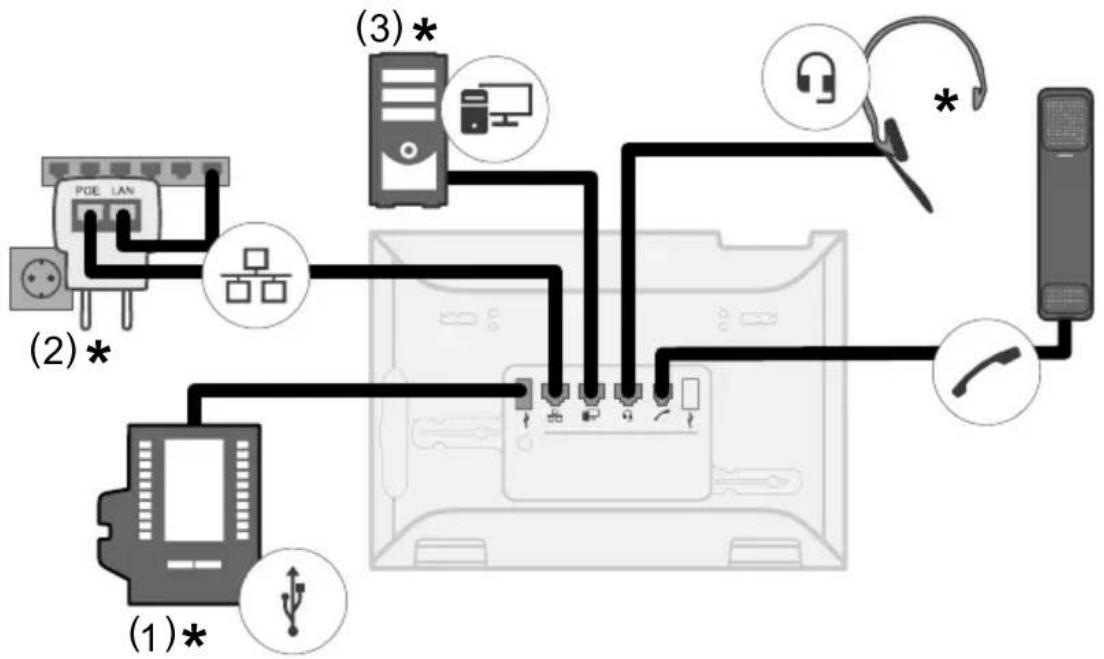
- Connect the device. See Figure A 2.
The device starts operating.
The company logo is displayed for 1 minute.
The system displays a message that it is searching for provisioning files.
The telephone's IP address is shown on the display at the same time.
- Write down the IP address.
- Press the Cancel soft key.
You access the First setup menu.

Note: Then make these settings:
- Use the ▲▼ direction keys to navigate in lists.
- Use the keypad to enter numbers and characters.
- Press OK to confirm your selection or entry.
Configuring language and location
- Press the Country soft key.
- Open Phone language.
- Configure the language for the telephone (here: English).
The menu language changes.
- Select Location.
- Set the telephone's location.
- Select Language web interface.
- Configure the language for the web interface.
- Press Back .
You return to the First setup menu.
-
The following alternatives are available for further configuration:
-
Press the OK soft key to configure additional settings on the telephone. See Configuring identity on the telephone.
- Press the WebUI soft key to enable Access > Web administration (https). You can now conveniently configure additional settings in the web interface. See Opening the web interface.
The First setup menu closes.
Configuring identity on the telephone
- Open Menu > Settings > Identities.
You access a list of unconfigured identities.
- Open an unconfigured identity.
- Then enter the data that is listed, depending on the operating mode.

Note: Hold down the digit keys to enter numbers.
| PBX VoIP provider | ||
| SIPUsername | The internal number configured for the telephoneExample: 557 | The username configured for the accountExample: telephonenumber@Provider.co.uk |
| Password The associated password The associated password | ||
| SIPRegistrar | the PBX's IP addressExample: 192.168.196.37 | the VoIP provider's URLExample: Providername.co.uk |
- In the entry field under Displayname, enter the name that is to be displayed on the device's display.
- Select activate Identity (cross mark).
This completes initial setup. All other settings are optional.
Opening the web interface
- Enter the telephone's IP address in the browser's address line.
- Enter the username and password. They are both admin in the factory settings.
- Click on Login.

Caution: Passwords that are unchanged from the factory settings are a security risk. During login, the device forces the user to enter a secure password.

Note: You will find more information, among other things about how to configure an identity, in the Online help.
Español
* Gerätefuß umsteckbar (2 verschiedene Neigungswinkel) de
* Device base can be set to 2 different tilt angles en
* Soporte desmontable del dispositivo (2 ángulos de inclinación diferentes) es
* Βάση συσκευής ρυθμιζόμενη (2 διαφορετικές γωνίες κλίσης) el
* Pied d'appareil amovible (2 angles d'inclinaison différents) fr
* Piedino del dispositivo modificabile (2 diversi angoli di inclinazione) it
* Standaard op 2 manieren te monteren (2 verschillende hellingshoeken) nl
* Podstawka z możliwością przełożenia (2 różne kąty pochylenia) pl
A 2: Anschluss (de) / Connection (en) / Conexión (es) / Σύνδεση (el) / Raccordement (fr) / Collegamento (it) / Aansluiting (nl) / Przyłącze (pl)
flowchart
graph TD
    A["PCGE LAN"] -->| (2) * | B["Device"]
    A -->| (1) * | C["Computer"]
    B --> D["Central Computer"]
    C --> D
    D --> E["Headphones"]
    D --> F["Bay Line"]
    D --> G["Switch"]
    D --> H["Wireless Cable"]
    D --> I["Wireless Cable"]
    D --> J["Wireless Cable"]
    D --> K["Wireless Cable"]
    D --> L["Wireless Cable"]
    D --> M["Wireless Cable"]
    D --> N["Wireless Cable"]
    D --> O["Wireless Cable"]
    D --> P["Wireless Cable"]
    D --> Q["Wireless Cable"]
    D --> R["Wireless Cable"]
    D --> S["Wireless Cable"]
    D --> T["Wireless Cable"]
    D --> U["Wireless Cable"]
    D --> V["Wireless Cable"]
    D --> W["Wireless Cable"]
    D --> X["Wireless Cable"]
    D --> Y["Wireless Cable"]
    D --> Z["Wireless Cable"]
| (1) Anschluss COMfortel® D-XT20, COMfortel ® D-XT20i (nur COMfortel® D-210)(2) COMfortel® PoE-100 (10/100 MBit/s) oder COMfortel® PoE-1000 (10/100/1000 MBit/s) bei fehlender PoE-Versorgung(3) Direkter PC-Anschluss über Netzwerkkabel* Nicht im Lieferumfang | de |
| (1) COMfortel® D-XT20, COMfortel® D-XT20i connection (only COMfortel® D-210)(2) COMfortel® PoE-100 (10/100 Mbit/s) or COMfortel® PoE-1000 (10/100/1000 Mbit/s) if there is no PoE supply(3) Direct PC connection via network cable* Not included in the scope of delivery | en |
| (1) Conexión COMfortel® D-XT20, COMfortel® D-XT20i (solo COMfortel® D-210)(2) COMfortel® PoE-100 (10/100 MBit/s) o COMfortel® PoE-1000 (10/100/1000 MBit/s) en ausencia de alimentación PoE(3) Conexión PC directa mediante cable de red* No incluido | es |
| (1) Σύνδεση COMfortel® D-XT20, COMfortel® D-XT20i (μόνο COMfortel® D-210)(2) COMfortel® PoE-100 (10/100 MBit/s) ή COMfortel® PoE-1000 (10/100/1000 MBit/s) σε περίπτωση απουσίας τροφοδοσίας PoE(3) Απευθείας σύνδεση υπολογιστή μέσω καλωδίου δικτύου* Δεν περιλαμβάνεται στα παραδοτέα | el |
| (1) Raccordement COMfortel® D-XT20, COMfortel® D-XT20i (COMfortel® D-210 uniquement)(2) COMfortel® PoE-100 (10/100 MBit/s) ou COMfortel® PoE-1000 (10/100/1000 MBit/s) en l’absence d’alimentation PoE(3) Connexion PC directe par câble réseau* Non compris à la livraison | fr |
| (1) Collegamento COMfortel® D-XT20, COMfortel® D-XT20i (solo COMfortel® D-210)(2) COMfortel® PoE-100 (10/100 MBit/s) o COMfortel® PoE-1000 (10/100/1000 MBit/s) in assenza di alimentazione PoE(3) Collegamento del PC direttamente tramite cavo di rete* Non in dotazione | it |
| (1) Aansluiting COMfortel® D-XT20, COMfortel® D-XT20i (alleen COMfortel® D-210)(2) COMfortel® PoE-100 (10/100 Mbit/s) of COMfortel® PoE-1000 (10/100/1000 Mbit/s) bij het ontbreken van een PoE-voeding(3) Directe PC-aansluiting via netwerkkabel* Niet bij de levering inbegrepen | nl |
| (1) Gniazdo COMfortel® D-XT20, COMfortel® D-XT20i (tylko COMfortel® D-210)(2) COMfortel® PoE-100 (10/100 Mb/s) albo COMfortel® PoE-1000 (10/100/1000 Mb/s) przy braku zasilania PoE(3) Bezpośrednie przyłącze komputera przez kabel sieciowy* Nie znajduje się w zakresie dostawy | pl |
A 3: Headsetbuchse (de) / Headset Socket (en) / Conexión auriculares (es) / Υποδοχή σετ ακουστικών (el) / Connecteur micro-casque (fr) / Presa per cuffia auricolare (it) / Aansluiting headset (nl) / Gniazdo zestawu słuchawkowego (pl)
1 DHSG BUS_IN
2 DHSG GND
| 3 - | Mikrofon (de) / Microphone (en) / Micrófono (es) / Mικρόφωνο (el) / Microphone (fr) / Microfono (it) / Microfoon (nl) / Mikrofon (pl) |
| 4 - | Lautsprecher (de) / Loudspeaker (en) / Altavoz (es) / Hχείο (el) / Haut-parleur (fr) / Altoparlante (it) / Luidspreker (nl) / Głośnik (pl) |
| 5 + | Lautsprecher (de) / Loudspeaker (en) / Altavoz (es) / Hχείο (el) / Haut-parleur (fr) / Altoparlante (it) / Luidspreker (nl) / Głośnik (pl) |
| 6 + | Mikrofon (de) / Microphone (en) / Micrófono (es) / Mικρόφωνο (el) / Microphone (fr) / Microfono (it) / Microfoon (nl) / Mikrofon (pl) |
| 7 DHSG | + 3,3 V |
| 8 DHSG | BUS_OUT |