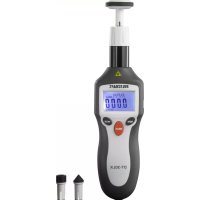
VOLTCRAFT DT30LK - Odometer

DT30LK - Odometer VOLTCRAFT - Free user manual and instructions

Find the device manual for free DT30LK VOLTCRAFT in PDF.

📄 64 pages English EN 💬 AI Question
Notice VOLTCRAFT DT30LK - page 19
View the manual : Français FR Deutsch DE English EN Nederlands NL

Download the instructions for your Odometer in PDF format for free! Find your manual DT30LK - VOLTCRAFT and take your electronic device back in hand. On this page are published all the documents necessary for the use of your device. DT30LK by VOLTCRAFT.

USER MANUAL DT30LK VOLTCRAFT

Dear customer, Thank you for purchasing this product. This product complies with the statutory national and European requirements. To maintain this status and to ensure safe operation, you as the user must observe these operat- ing instructions! These operating instructions are part of this product. They contain important notes on commissioning and handling. Also consider this if you pass on the product to any third party. Therefore, retain these operating instructions for reference! If there are any technical questions, please contact: www.conrad.com/contact

2. Explanation of symbols

The symbol with the exclamation mark in the triangle is used to indicate important information in these operating instructions. Always read this information carefully. The arrow symbol indicates special information and advice on operation.

The product is designed to measure and display rotation speed and belt speed. Measurements are either non-contact via the built-in laser or per direct contact using the included adapters. The measured values are shown on the 5-digit LC display. The product features a memory with space for 40 measured values which allows the user to retrieve the maximum, minimum and average values from a stored measuring procedure. Power supply is via a 9 V block battery. It is intended for indoor use only. Do not use it outdoors. Contact with moisture, e.g. in bath- rooms, must be avoided under all circumstances. For safety and approval purposes, you must not rebuild and/or modify this product. Using the product other than for its intended purpose as described above can damage the product or pose ariskofinjury.Readtheinstructionscarefullyandstoretheminasafeplace.Makethisproduct available to third parties only together with its operating instructions. All company names and product names are trademarks of their respective owners. All rights reserved.

  • Extension attachment
  • Operating instructions 1Up-to-date operating instructions Download the latest operating instructions at www.conrad.com/downloads orscantheQRcodeshown.Followtheinstructionsonthewebsite.

205. Features and functions

  • 2-in-1: contact or non-contact measurement
  • MeasuringrotationspeedinRPM,Hz,m/min,in/min,ft/minandyd/min
  • Measuring the distance in meters (m), inches (in), foot (ft), yard (yd)
  • Display total number of revolutions (Event Counter)
  • Distance measurement

Read the operating instructions carefully and especially observe the safety information. If you do not follow the safety instructions and information on proper handling in this manual, we assume no liability for any resulting per- sonal injury or damage to property. Such cases will invalidate the warranty/ guarantee. a) General information

  • The device is not a toy. Keep it out of the reach of children and pets.
  • Do not leave packaging material lying around carelessly. This may become dan- gerous playing material for children.
  • Protect the device from extreme temperatures, direct sunlight, strong jolts, high humidity,moisture,ammablegases,steamandsolvents.
  • Do not place the product under any mechanical stress.
  • If it is no longer possible to operate the product safely, take it out of operation and protect it from any accidental use. Safe operation can no longer be guaranteed if the product: - is visibly damaged, - is no longer working properly, - has been stored for extended periods in poor ambient conditions or - has been subjected to any serious transport-related stresses. 21• Please handle the product carefully. Jolts, impacts or a fall even from a low height can damage the product.
  • Never turn the product on immediately after it has been brought from a cold room into a warm one. The condensation generated could destroy the product. Leave the device turned off until it has reached room temperature.
  • Consult an expert when in doubt about the operation, safety or connection of the device.
  • Maintenance,modicationsandrepairsmustonlybecompletedbyatechnician or an authorised repair centre.
  • If you have questions which remain unanswered by these operating instructions, contact our technical support service or other technical personnel. b) Connected devices
  • Also observe the safety and operating instructions of any other devices which are connected to the product. c) (Rechargeable) batteries
  • Correct polarity must be observed while inserting the (rechargeable) battery.
  • The (rechargeable) batteries should be removed from the device if it is not used for a long period of time to avoid damage through leaking. Leaking or damaged (rechargeable) batteries might cause acid burns when in contact with skin, there- fore use suitable protective gloves to handle corrupted (rechargeable) batteries.
  • (Rechargeable)batteriesmustbekeptoutofreachofchildren.Donotleave (rechargeable) batteries lying around, as there is risk, that children or pets swal- low them.
  • All (rechargeable) batteries should be replaced at the same time. Mixing old and new (rechargeable) batteries in the device can lead to (rechargeable) battery leakage and device damage.
  • (Rechargeable)batteriesmustnotbedismantled,short-circuitedorthrowninto re.Neverrechargenon-rechargeablebatteries.Thereisariskofexplosion! 22d) Laser
  • When operating the laser equipment, always make sure that the laser beam is directedsothatnooneisintheprojectionareaandthatunintentionallyreected beams(e.g.,fromreectiveobjects)cannotbedirectedintoareaswherepeople are present.
  • Laserradiationcanbedangerous,ifthelaserbeamoritsreectionentersun- protected eyes. Therefore, before using the laser equipment, familiarise yourself with the statutory regulations and instructions for operating such a laser device.
  • Never look into the laser beam and never point it at people or animals. Laser radiation can seriously damage your eyes.
  • If laser radiation enters your eyes, close your eyes immediately and move your head away from the beam.
  • If your eyes have been irritated by laser radiation, do not continue to carry out tasks with safety implications, such as working with machines, working from great heights or close to high voltage. Also, do not operate any vehicles until the irrita- tion has completely subsided.
  • Donotpointthelaserbeamatmirrorsorotherreectivesurfaces.Theuncon- trolled,reectedbeammaystrikepeopleoranimals.
  • Never open the device. Setting or maintenance tasks must only be executed by a trained specialist familiar with potential hazards. Improperly executed adjust- ments might result in dangerous laser radiation.
  • The product is equipped with a class 2 laser. Laser signs in different languages are included in the package. If the sign on the laser is not written in the language ofyourcountry,pleaseafxtheappropriatesignontothelaser.
  • Caution: if operation settings or procedures other than those described in these instructions are used, it could lead to exposure to dangerous radiation.

1 Battery compartment lid 2 MEM button 3 LC display 4 Laser beam exit aperture / thread 5 MODE button 6 MEAS button 7 Friction wheel 8 Inside cone 9 Outer cone 10 Adapter holder 11 Extension attachment

1. Use a Phillips screwdriver to loosen the screw from the battery compartment lid (1) and

2. Connect a 9 V block battery to the corresponding connection inside the battery compart-

ment. Only one orientation is possible. Do not use force.

3. Store the battery and the cable inside the battery compartment.

4. Close the battery compartment. Make sure that the cable is not pinched.

ReplacethebatterywhenBAT appears on the display. Removethebatteryfromtheproductifitisnotusedforalongperiodoftime. b) Attaching the case handle On the sides of the case lock, there are two holes for attaching the case handle. There are two inward-pointing pegs on the case handle. Proceed as follows to attach the handle:

1. Insert one peg into one of the holes.

2. Carefully stretch the handle and then insert the second peg into the other hole.

3. To remove the handle, proceed in reverse order.

9. Preparations for measurement

a) Non-contact measurement Measurementsareconductedusingreection.Theincludedself-adhesivereectivestripscan befastenedtorotatingobjects.Thereectivestripsthenreectthelaserbeam(4)emittedbythe device.Aphotodiodeinsidethedeviceregistersandanalyzesthereectedlaserbeam.Make the following preparations:

  • Cutoffasquarepieceofthereectivestrip(approx.12x12mm).
  • Fasten this piece to the test object. Make sure that the surface is dry and free from dust and grease. Beforeattachingthereectivestrip,rotatingcomponentsmustcometoacomplete stop and prevent them from being switched back on. 25• Makesurethereisasufcientlight-darkcontrast.Itmaybenecessarytopaintthesurfaceof thetestobjectmattblackaroundthereectivestrip.Thenon-reectiveareamustbelarger thanthereectivestrip.
  • You must screw the included extension attachment (11) into the thread (4). Conducting non-contact measurements without the extension attachment can result in unstable meas- urements. b) Contact measurement

1. Screw the included extension attachment (11) into the thread (4) on the device.

2. Screw the adapter holder (10) into the extension attachment thread.

3. Select one of the three contact adapters:

- Outer cone (9), suitable for concave shaft ends - Inside cone (8), suitable for conical shaft ends - Friction wheel (7), suitable for measuring belt speed (e.g. fan belts, conveyor belts, belt saws, etc.)

4. There are two short and two long slots on the bottom of each of the three contact adapters.

Place the contact adapter you wish to use on the adapter holder’s axis so that the axis lock- ingpintsintooneoftheshortslots.

10. Conducting measurements

1. Press the MEASbutton(6)brieytoturnonthedevice.

2. RepeatedlypresstheMEM button (2) to select one of the 10 memory cells (DATA 0 to DATA 9).

The memory cell icon appears on the bottom right of the display (3). Moreinformationonstoringmeasuredvaluesiscontainedunder“Storing/Retrieving measured values”.

3. You can choose between two sequences for units of measurement. Press and hold the

MODE button (5) for approx. 3 seconds to toggle between the sequences.

4. Then repeatedly press the MODE button until the display shows the desired unit of meas-

M Total distance in meter (contact via friction wheel)

In Total distance in inches (contact via friction wheel)

FT Total distance in feet (contact via friction wheel)

Yd Total distance in yards (contact via friction wheel) a) Non-contact measurement

1. Follow the steps above to select the desired unit of measurement.

274. Ifreectionissuccessful,theicon appears on the top right of the display (3). The meas-

ured value is shown in the middle of the display. If the display shows “OL”, the measurement range was exceeded. The display shows the multiplier X10 for measured values >10,000. Multiply the dis- played value by 10 to obtain the correct measured value.

5. ReleasetheMEASbutton(6)whenyouhavenishedmeasuring.“HOLD”appearsonthe

top right of the display and the measured value is frozen on the display. The device will turn off automatically after approx. 15 seconds. Slowly rotating components may result in inaccurate measurements. In this case, at- tachseveralequallyspacedreectivestripstothetestobject.Thendividethemeasur- ingresultbythenumberofreectivestripstoobtainthecorrectmeasuredvalue. b) Contact measurement Exercise extreme caution when conducting contact measurements as rotating ma- chine components pose a risk of serious injury should they come into contact with any body parts.

1. Follow the steps above to select the desired unit of measurement.

2. Press and hold the MEAS button (6).

3. Press the contact adapter (7, 8 or 9) at a right angle against the test object.

4. The measured value is shown in the middle of the display (3). If the display shows “OL”, the

measurement range was exceeded. The display shows the multiplier X10 for measured values >10,000. Multiply the dis- played value by 10 to obtain the correct measured value.

5. ReleasetheMEASbuttonwhenyouhavenishedmeasuring.“HOLD”appearsonthetop

right of the display and the measured value is frozen on the display. The device will turn off automatically after approx. 15 seconds. c) Storing/Retrieving measured values You can store up to ten data sets (DATA 0 to DATA 9). A data set consists of four measured values:

  • minimum value (MIN) and
  • average value (AVG). 28Proceed as follows to store and retrieve measured values:

1. Whenyouhavenishedmeasuring,presstheMEM button (2) while holding down the MEAS

button (6). The values from the current measuring procedure are stored. The display jumps to the next data set.

2. ReleasetheMEAS button and conduct further measurements as needed.

3. To retrieve stored values, repeatedly press the MEM button until the desired data set ap-

pears on the bottom right of the display (3). The last registered value from the stored meas- uring process is shown in the middle of the display.

4. Press the MEMbuttonbrieytotogglebetweenthemaximumvalue,minimumvalueand

average value. This applies only to values stored in Sequence 1. Stored values remain in the memory even if you replace the battery. You can overwrite old values by selecting any memory cell, conducting measurements and storing the values following the above steps. There are no maximum/minimum/average values for the functions from Sequence 2 (REV,M,In,FTandYd).

11. Care and cleaning

Do not use any aggressive cleaning agents, rubbing alcohol or other chemical solu- tions as they can cause damage to the housing and malfunctioning. Do not immerse the product in water.

  • The device is maintenance-free apart from occasional cleaning.
  • 2-in-1: contact- of contactloze meting
Manual assistant
Powered by ChatGPT
Waiting for your message
Product information

Brand : VOLTCRAFT

Model : DT30LK

Category : Odometer