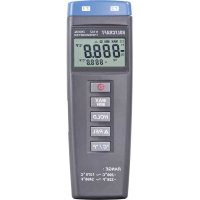
K102 - Thermometer VOLTCRAFT - Free user manual and instructions
Find the device manual for free K102 VOLTCRAFT in PDF.



| Product type | Digital pocket thermometer |
| Brand | Voltcraft |
| Model | K102 |
| Measuring range | -200°C to +1370°C / -328°F to +2498°F |
| Resolution | 0.1°C from -200°C to +200°C, 1°C from +200°C to +1370°C |
| Number of input channels | 2 (for type K thermocouples) |
| Measurement functions | Data Hold, Min/Max, Relative, Auto power off |
| Temperature unit | °C / °F switchable |
| Accuracy | ±(0.3% of reading + 1°C) for -200°C to +200°C |
| Max. input voltage | 60 V DC or 24 V AC |
| Power supply | 9 V block battery |
| Dimensions (L x W x H) | 164 x 54 x 34 mm |
| Weight | Approx. 180 g (with battery) |
| Operating conditions | 0°C to +50°C, 0-80% RH |
| Storage conditions | -10°C to +60°C, 0-80% RH |
| Measurement rate | 0.6 measurements per second |
| Display | LCD with function indicators |
| Maintenance | Clean with a dry cloth, do not use liquids |
| Safety | Do not exceed max. input voltages, do not open the housing |
| Spare parts available | Type K temperature sensors (optional) |
| General information | User manual included, manufacturer's warranty |
Frequently Asked Questions - K102 VOLTCRAFT
User questions about K102 VOLTCRAFT
0 question about this device. Answer the ones you know or ask your own.
Ask a new question about this device
Download the instructions for your Thermometer in PDF format for free! Find your manual K102 - VOLTCRAFT and take your electronic device back in hand. On this page are published all the documents necessary for the use of your device. K102 by VOLTCRAFT.
USER MANUAL K102 VOLTCRAFT
© Copyright 2008 by Voltcraft®
GB Impressum /legal notice in our operating instructions
These operating instructions are a publication by Voltcraft®, Lindenweg 15, D-92242 Hirschau/Germany, Phone +49 180/586 582 7 (www.voltcraft.de).
All rights including translation reserved. Reproduction by any method, e.g. photocopy, microfilming, or the capture in electronic data processing systems require the prior written approval by the editor. Reprinting, also in part, is prohibited.
These operating instructions represent the technical status at the time of printing. Changes in technology and equipment reserved.
© Copyright 2008 by Voltcraft®
© Copyright 2008 by Voltcraft®
© Copyright 2008 by Voltcraft®
01_1108_02/HK
These Operating Instructions accompany this product. They contain important information on setting up and using your Voltage Detector. You should refer to these instructions, even if you are buying this product for someone else.
Please retain these Operating Instructions for future use!
Thank you for purchasing a Voltcraft® product. You have made a very good decision.
The Voltcraft® name represents products of superior quality, characterized by technical competence, outstanding efficiency, and constant innovation in the fields of measurement, charging, and power technology. From the ambitious hobby electronics engineer to the professional user, you always have the optimal solution at hand with a product from the The Voltcraft® brand family, even for the most critical tasks. And something exceptional: we offer you the tried and tested technology and reliable quality of our The Voltcraft® products with a nearly unbeatable cost-to-value ratio. This is why we are absolutely certain that with our The Voltcraft® device series, we create the basis for a good, lasting, and successful working relationship.
We now wish you a lot of fun with your new The Voltcraft® product!
Intended use
This product is intended to be used in the following manner:
- Measuring temperatures by optional K-type temperature sensors in a temperature range from -200^ to +1370^ or -328^ to +2498^ .
- Max. voltage at the inputs is 60V DC or 24V AC
- Use only a 9V block battery for voltage supply
- Use only in dry areas

Applications other than those described above will result in damage to the product that can be dangerous, e.g. a short circuit, fire or an electric shock. The product should not be modified or rebuilt in any way and the housing should not be opened!
The safety information must be followed at all times!
Safety information

Damage caused through non-observance of these operating instructions is not covered by the guarantee. We accept no responsibility for any consequential damages that result!
An exclamation mark within a triangle indicates important information in the operating instructions. Before operating the product please read the instructions.
For safety and licensing reasons (CE) unauthorised rebuilding or modification of the hand thermometer is not permitted.
Never exceed the maximum input limits.
In commercial facilities, the electrical equipment safety regulations from the German Federation of Institutions (HVBG) are to be observed.
Keep away from children.
In case of queries that cannot be answered in these operating instructions, please contact a specialist or our customer support service.
Product description
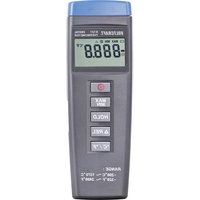
The hand thermometer K101 and K102 are robust and precise devices for the measurement of temperature by optional K-type thermocouples. All commercial K-type thermocouples can be connected to the devices via a standard blade terminal. A selection of various thermocouples (temperature sensors) can be found in our catalogue. The K101 comes with one input port for the thermocouple and the K102 with two input ports. The maximum temperature range for these devices is -200^ to +1370^ or -328^ to +2498^ , depending upon the respective temperature sensor.
Equipment supplied
Digital hand thermometer · 9V block battery · Operating instructions
Description of individual parts
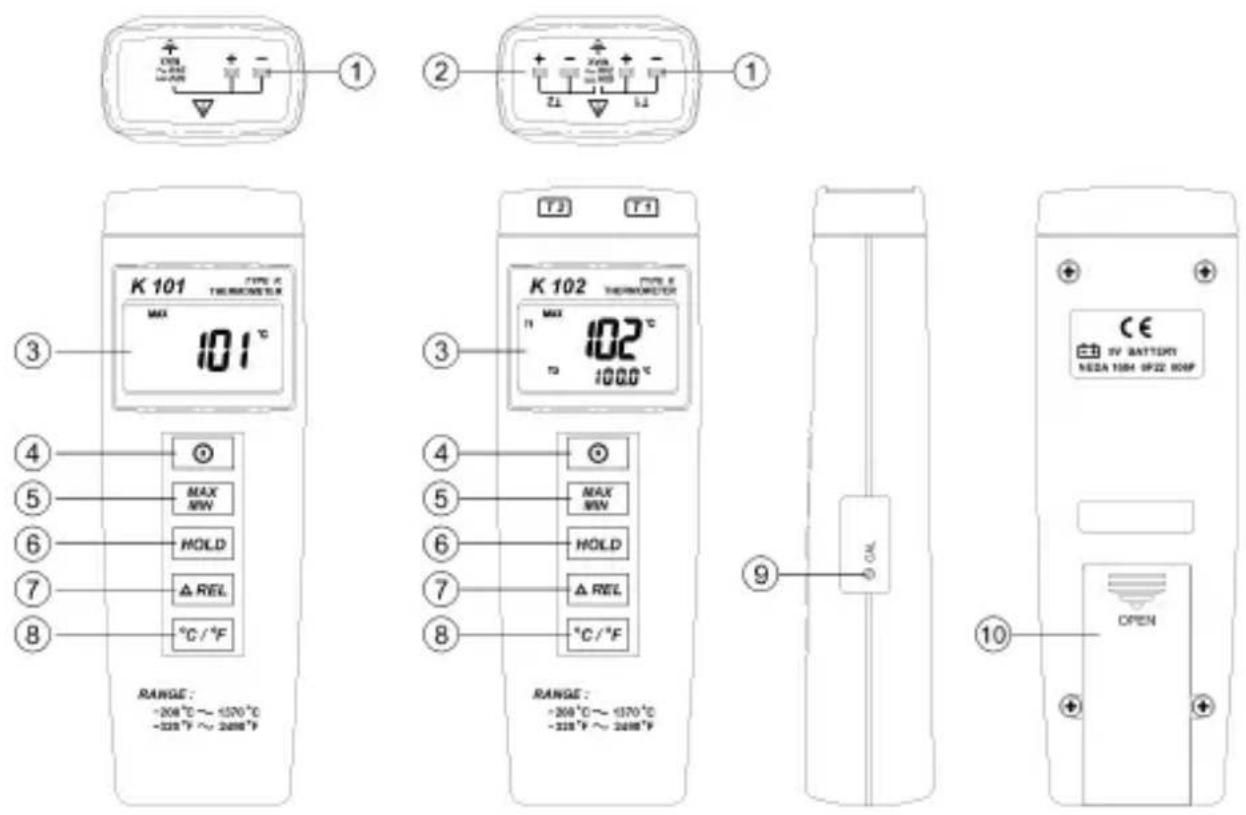
text_image
1 2 3 4 5 6 7 8 K 101 TENOMETER MAX 101°C 102°C 1000°C K 102 TENOMETER MAX 101°C 102°C 1000°C RANGE: -200°C ~ -1370°C -333°F ~ 2698°F RANGE: -200°C ~ -1370°C -333°F ~ 2698°F 10 CE IV BATTERY NEZA 1504 0F22 80MP OPEN- T1 K-type input 6. Hold button
- T1 K-type input (only K102) 7. Relative button
- LCD display 8. °C/°F switch
- On/Off button 9. Offset calibration screw
- Min/Max button 10. Battery compartment
LCD display
text_image
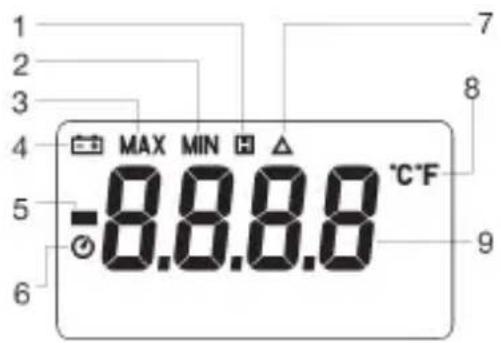
-8.8.8.8 °C·F MAX MIN H 7 8 9- Data Hold display 6. Automatic shut off display
- Minimum value display 7. Relative display
- Maximum value display 8. °C/°F – display
- Battery empty display 9. Temperature display channel1
- Minus temperature display 10. Temperature display channel 2
(only K102)
Operation Inserting/changing the battery
The hand thermometer requires a 9V block battery to operate. When the battery is empty the display "Low Batt" " (4) will appear in the LCD display. The battery will need to be replaced as a correct display cannot be made when the battery is low.
The procedure for changing the battery is as follows:
- Disconnect the device from the temperature sensor/s and turn it off.
- Open the battery compartment (10) by pushing the battery compartment cover towards the bottom.
- Remove the empty battery and replace it with a new battery.
- Replace the battery compartment cover.

Do not leave the battery lying around, there is a danger that a child might swallow it. Batteries that have expired or been damaged can cause skin burns. Do not throw batteries into the fire!
Environmental notice
As the end user you are legally obliged (battery regulations) to return all used batteries (including button cell and lead batteries); disposal in household refuse is forbidden.
Used batteries can be returned free of charge to our branches or head office in Hirschau or, as always, to your local authority waste management centre (recycling centre) who are obligated to accept the batteries.
Make a contribution to protecting the environment!
Switching on/off
Press the On/Off button (4) to switch the hand thermometer on or off.
Connecting the temperature sensors
Connect a commercial K-type temperature sensor to the input T1 (1) and T2 (2) (only for K102). If the temperature sensor is defective or not properly connected, "----" will appear in the LCD display.
Take note that the maximum input voltage at the input, 60V DC or 24V AC, must not be exceeded!
Selecting the temperature unit °C/°F
When the hand thermometer is switched on the temperature is shown in degrees Celsius. To change the temperature to degrees Fahrenheit press the °C/°F button (8). To display the temperature back in degrees Celsius press the °C/°F button (8) once again.
Data-Hold function
The hand thermometer is equipped with a Data-Hold function. This allows the current temperature reading in the display to be "frozen". To freeze the temperature reading press the hold button (6). When activated the Data-Hold function will be indicated in the LCD display with the "hold" symbol "H(1). The hand thermometer continues to
read the current temperature in the background. To deactivate the Data-Hold function, press the hold button (6) once again – the hold symbol "H(1) will be extinguished. In the LCD display the current temperature will now be displayed.
Note: When the Data-Hold function is activated, the Relative and MIN/MAX functions as well as the °C/°F switch are no longer accessible.
Relative function
The hand thermometer is equipped with a Relative function. By pressing the Rel-button (7) the hand thermometer will register the temperature at the pressing of the Rel-button (7). The difference between the temperature readings will be indicated in the LCD display. To deactivate the relative function, press the Rel-button (7) once again.
Max/Min function
The hand thermometer is equipped with a Max/Min function. This function records the lowest (Min) and the highest (Max) temperatures during the measurement. As a result processes can be easily monitored. By pressing the Max/Min button (5) you will reach the Max/Min function. Through repeated pressing of the Max/Min button (5) you can scroll though the various temperatures (Min/Max/Current).
When "MAX" (3) is displayed, the highest temperature recorded will be shown, when "MIN" (2) is displayed, the lowest. When "MAX MIN" blinks simultaneously in the LCD display, the current temperature will be shown – the maximum and minimum temperature values will however continue to be updated and recorded.
To leave the Min/Max function press and hold the Max/Min button for approximately two seconds.
Deactivating the automatic shut off
In order to save the batteries the device is equipped with an automatic power off function (automatic shut off). If the device is not operated for more than 30 minutes it will automatically shut off. The automatic shut off is activated when the hand thermometer is switched on. When activated, the automatic shut off is signalled in the LCD display with the automatic power off symbol " "
To deactivate this function switch the hand thermometer off. Press and hold the Hold button (6) while switching the hand thermometer back on. The automatic shut off is now deactivated and the automatic power off symbol " " will be extinguished.
Calibration
The hand thermometer is calibrated in the factory. For precise measurements the hand thermometer can be set to the respective temperature sensor. Hold the temperature sensor in a container of icy water (0°C). Check the hand thermometer's display after approximately one minute. If it does not read 0°C it can be correctly set by turning the offset calibration screw (9). For more precise measurements the hand thermometer can be set with an optional thermocalibrator.
Maintenance and cleaning
Clean the casing occasionally with a dry cloth. Never use liquids nor cleaning agents. Maintenance or repairs must be carried out by qualified personnel.
Remove batteries from the device when it is not to be used for an extended period.
Disposal
Dispose of a defective device according to the current legal regulations.
Technical details
Temperature measurement range: -200°C to +1370°C
$$ : - 3 2 8 ^ {\circ} \mathrm{F} \text {to} + 2 4 9 8 ^ {\circ} \mathrm{F} $$
Scale: -200^ to +200^ = 0,1^
$$ : + 2 0 0 ^ {\circ} \mathrm{C} \text {to} + 1 3 7 0 ^ {\circ} \mathrm{C} = 1 ^ {\circ} \mathrm{C} $$
$$ : - 3 2 8 ^ {\circ} \mathrm{F} \text {to} + 2 0 0 ^ {\circ} \mathrm{F} = 0, 1 ^ {\circ} \mathrm{F} $$
$$ : + 2 0 0 ^ {\circ} \mathrm{F} \text { to } + 2 4 9 8 ^ {\circ} \mathrm{F} = 1 ^ {\circ} \mathrm{F} $$
Maximum input voltage : 60V DC to 24V AC
Environmental conditions
operation : 0^ C to +50^ C ( 32^ F to 122^ F);
0–80 % RH
storage : -10°C to +60°C (14°F to
140°F); 0–80 % RH
Measurement rate : 0,6 measurements per sec-
ond
Inputs : 1 (K101); 2 (K102) for K-type
thermocouples
Supply voltage : 9V block battery
Dimensions : (H x B x T) 164 x 54 x 34 mm
Weight : ca. 180g (incl. batteries)
Accuracy (at 23^ C +/- 5^ C)
| Measurement range Accuracy | |
| -200°C to +200°C ± (0.3% of the display, +1°C) | |
| +200°C to +400°C ± (0.5% of the display, +1°C) | |
| +400°C to +1370°C ± (0.3% of the display, +1°C) | |
| -328°F to -200°F ± (0.5% of the display, +2°F) | |
| -200°F to +200°F ± (0.3% of the display, +2°F) | |
| +200°F to +400°F ± (0.5% of the display, +2°F) | |
| +400°F to +2498°F ± (0.3% of the display, +2°F) |
Temperature coefficient
With environmental temperatures from 0^ C to +18^ C and +28^ C to +50^ C the following tolerance must be added for every degree Celsius under +18^ C and over +28^ C
0.01% of the display, +0.03°C or + 0.06°F
Note! The figures above refer only to the hand thermometer and do not include the measurement tolerances for the temperature sensors that are attached.

Introduction
Cher client,
text_image
ON ~+40 =10A ①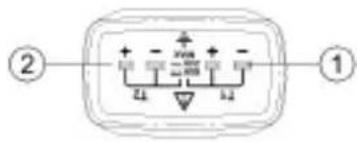
text_image
② ①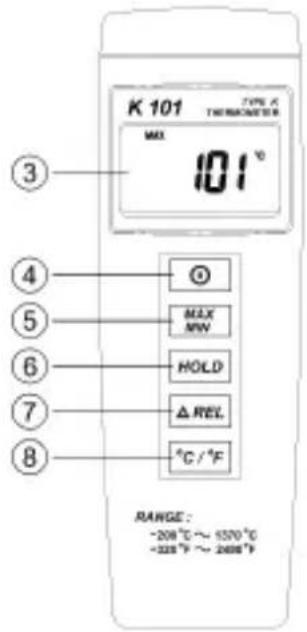
text_image
K 101 TYPE: A THERMINDER MAX 101 ° ③ ④ ⑤ ⑥ ⑦ ⑧ MAX MW HOLD Δ REL. °C / °F RANGE: -208°C ~ 6370°C -328°F ~ 2698°F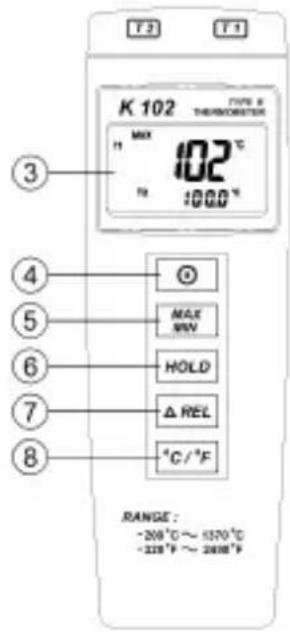
text_image
T.2 T.1 K 102 TYPE & THYCORRATER MAX 102 °C T0 :1000 °C ③ ④ ⑤ ⑥ ⑦ ⑧ MAX MIN HOLD △REL °C / °F RANGE : -200 °C ~ -1570 °C -228 °F ~ 2618 °F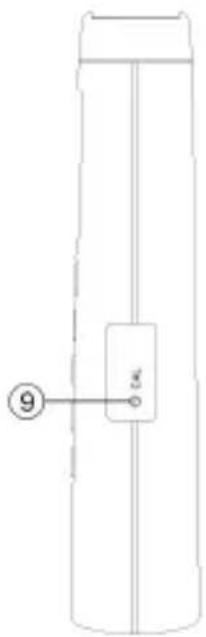
natural_image
Simple line drawing of a cylindrical object with a labeled component (no text or symbols)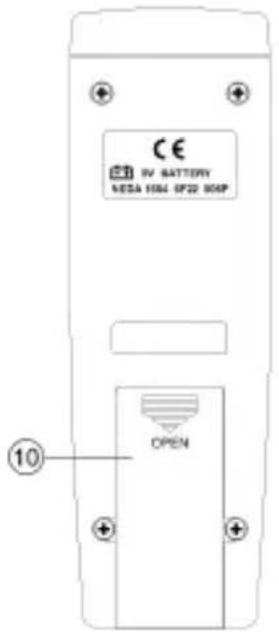
text_image
CE IV BATTERY MESA 1064 OP22 806P OPEN ⑩- T1 K-type ingang 6. Hold-toets
- T1 K-type ingang