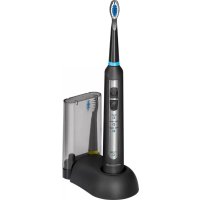
PCEZS 3056 - Toothbrush ProfiCare - Free user manual and instructions
Find the device manual for free PCEZS 3056 ProfiCare in PDF.



| Product type | Electric toothbrush |
| Brand | ProfiCare |
| Model | PCEZS 3056 |
| Charging station power supply | 100‑240 V~, 50/60 Hz, 1.4 W |
| Charging station protection | IPX7 (splash resistant) |
| Safety class station | II |
| Toothbrush - Battery | Li-ion 260 mAh, 3.7 V DC |
| Toothbrush - Protection | IPX7 |
| Toothbrush - Safety class | III |
| Net weight | 0.80 kg |
| Contents | 1 charging station with case, 1 toothbrush, 2 brush heads |
| Speed levels | 3: clean (high), sensitive (normal), massage |
| Timer | Automatic shut-off after 2 minutes, reminders every 30 seconds |
| First charge | Approximately 10 hours |
| Maximum charging time | 48 hours (avoid overcharging) |
| Charge indicator | Red light during charging, turns off when fully charged |
| Cleaning the housing | Wipe with a damp cloth |
| Cleaning brush heads | Under running water after each use |
| Station maintenance | Wipe compartments with damp cloth, let dry |
| Recommended age | From 3 years old with supervision |
| Medical instructions | Consult a doctor in case of gum problems or implants |
| Spare parts | Replacement brush heads available |
| Use | Domestic, indoor |
Frequently Asked Questions - PCEZS 3056 ProfiCare
User questions about PCEZS 3056 ProfiCare
0 question about this device. Answer the ones you know or ask your own.
Ask a new question about this device
Download the instructions for your Toothbrush in PDF format for free! Find your manual PCEZS 3056 - ProfiCare and take your electronic device back in hand. On this page are published all the documents necessary for the use of your device. PCEZS 3056 by ProfiCare.
USER MANUAL PCEZS 3056 ProfiCare
Batteries au lithium-ion rechargeables (Li-ion)
Operating Instructions
Thank you for choosing our product. We hope you enjoy using this appliance.
Symbols used in these operating instructions
Important tips for your safety are identified by a special mark. You must observe these tips to avoid accidents and damage to the appliance:

WARNING:
Warns of dangers to your health and indicates possible risks of injury.

ATTENTION:
Indicates possible hazards to the appliance or other items.

NOTE:
Highlights tips and information for you.
Safety Tips
Before using this appliance for the first time, please read the instructions for use very carefully and keep these safe along with the warranty certificate, receipt and if possible the box and inner packaging. If you give the appliance to a third party, you should also provide them with the operating instructions.
- The charging station is designed for indoor use.
- The charging station and power cable must be checked regularly for signs of damage. If damage is discovered, stop using the charging station.
- Do not repair the charging station yourself, instead, contact an authorised professional. The power cord of this appliance cannot be replaced. When the cable is damaged the appliance should be scrapped.
- Only use original accessories.
- Toothbrushes may be used by children and persons with reduced physical, sensory or mental abilities and/or a lack of knowledge and experience, if they are supervised or where they have been instructed on the safe use of the appliance and understand the dangers which may result.
English

WARNING:
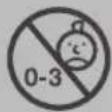
This appliance is not suitable for children under 3 years due to small parts, which could be broken off and swallowed.
- Cleaning and user maintenance must not be performed by children, unless they are supervised.
- Keep the appliance out of reach of children. Do not allow children to play with the appliance.
- For the safety of your children, do not place any of the packaging items (plastic bag, box, polystyrene etc.) within their reach.

WARNING:
Do not let young children play with the film. There is a danger of suffocation!
Medical Information
- If you have medical problems, please consult your doctor before using the appliance.
- If you have had any dental work on your gums within the last 2 months, ask your dentist before using the product.
- If excessive bleeding occurs after use of this product, which still persists even after a week, you should consult your doctor. This bleeding could be a sign of other health problems.
- If you wear a pacemaker or have other implants, you should consult your doctor before using the appliance.
- The toothbrush has been tested and complies with current safety standards for electromagnetic devices.
Scope of Delivery
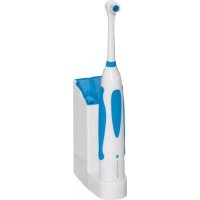
1 charging station with brush compartment
1 toothbrush with integrated rechargeable battery
2 brush heads
Instructions for Use
i NOTE:
Make sure there is a plug socket nearby.
Electrical Connection
-
Before you insert the plug into the power outlet, check that the voltage you wish to use conforms with that of the appliance. You can find information about this on the rating plate.
-
Connect the appliance to a properly installed earthed socket.
Charging the Rechargeable Battery
Before you can use the toothbrush for the first time, the battery inside the appliance needs to be charged.
-
To ensure that the appliance is off, press down once on the 'Switch'.
-
Place the toothbrush on the charging station.
-
Put the plug into the power outlet.
i NOTE:
- The red illuminated indicator light (charge) shows that contact has been made with the charging station.
- The indicator light goes off when the charging cycle is complete.
- The charging time for the first charge is approximately 10 hours.

ATTENTION:
Only use the supplied charging station and power cord for charging the appliance. Otherwise there is a risk of malfunction or fire.
i NOTE:
- After use put the toothbrush back on the charging station. This way it is always ready to use, even if you use it several times a day.

ATTENTION:
- The maximum charging time is 48 hours. Overcharging will affect the battery life.
- In case of prolonged absence or non-use of the toothbrush remove the charging station power plug from the plug socket.
English
Use
- Place the brush head on the appliance and turn it to the left, so that the markings on the back of the brush head and toothbrush align. The brush head is pointing in the direction of the ⏻ switch. If necessary, remove the protective film.
- Moisten the brush head and apply a little tooth-paste.
- Rinse your mouth with water.
- Move the brush up close to the teeth before turning on the toothbrush using the ⏻ switch. This avoids any splashing.
- Place the brush close to the gum line. Brush the outer and inner surfaces as well as the chewing surfaces of the teeth. Slowly move the brush head from tooth to tooth, applying only light pressure. Proceed in this way to clean all four quarters of your mouth for about 30 seconds each. The appliance signals when these intervals are over by a short break. After a total time of 2 minutes, the dentist-recommended brushing time, the toothbrush turns off automatically. During the cleaning process you can use the ⏻ switch to stop the toothbrush at any time.
- Use the ⏻ switch to turn the appliance off.
Speed Settings
The unit has 3 speed settings (clean/sensitive/massage). When you first turn it on, the clean speed setting is activated by default. Thereafter, the last used setting is always activated when you switch on the appliance.
Select the desired mode by pressing the select button situated below the ⏻ switch. The illuminated display indicates the currently selected mode.
With the right brush heads the toothbrush offers three speed settings for various oral hygiene purposes:
- high speed (clean)
Ideal for restoring the enamel's natural fluoride and for a healthier, whiter smile. - normal speed (sensitive)
Recommended for everyday use. - massage mode (massage)
Recommended for receding gums, braces, those receiving gum treatment or with sensitive teeth.
i NOTE:
- During initial applications gums may bleed slightly.
- If symptoms persist for longer than 2 weeks, you should consult a dentist.
English
Cleaning

ATTENTION:
Never use harsh or abrasive detergents.
- Turn the appliance off before cleaning it.
- The appliance housing can be wiped down with a slightly damp cloth.
- Turn the brush attachment to the right and clean it under running water after every use.

NOTE:
The components cannot be cleaned in the dishwasher.
Charging Station

WARNING:
Pull the plug out of the socket each time before you clean the device.

NOTE:
The charging station is splash proof.
- Regularly wipe the brush holder and lid first with a damp cloth and then with a dry one.
- Wipe the charging station's exterior first with a damp cloth and then with a dry one.
- Allow the brush holder and lid to dry completely before closing the lid again.
- Only put the plug back into the power outlet when the charging station is completely dry.
Removing and replacing the decorative trim for cleaning
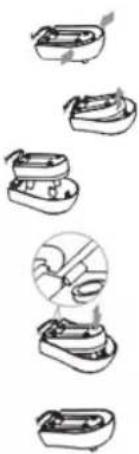
- Hold the bottom of the charging station with one hand, with the other hand push the panel together as indicated by the arrows and pull it off the bottom. You can now clean the decorative trim.
- To re-assemble the appliance place the bulge on the underside of the panel carefully onto the opening in the charging station as shown. Then press the panel into place.
Technical data
Model: PC-EZS 3056
Net weight: 0.80 kg
Charging Station
Power supply: 100–240 V\~; 50/60 Hz
Power consumption: 1.4 W
Protective system: IPX7
Protection class:....II
Toothbrush
Rechargeable battery:....260 mAh Li-Ion, DC 3.7 V
Protective system: IPX7
Protection class:....III
The right to make technical and design modifications in the course of continuous product development remains reserved.
Rechargeable Lithium-Ion Batteries (Li-Ion)
The appliance is equipped with rechargeable Li-ion batteries. This results in numerous advantages compared to other batteries and accumulators:
• A high cell voltage (more volts)
- No memory effect
- A low self-discharge
Safe Handling of Rechargeable Lithium-Ion Batteries
In general, Li-ion batteries are considered safe. Nevertheless, hazards may result from mechanical damage, electrical faults and thermal effects.
Mechanical damage may result in the leakage of gaseous or liquid substances that can be highly irritating, flammable or even toxic.
An electrical fault, such as a short circuit, may lead to overheating and cause a fire.
Even the heating of the outer shell of a Li-ion battery, e. g. due to sunlight or a heating element, may lead to fire or an explosion.
However, Li-ion batteries are safe when handled properly. Only if used or stored improperly they may become dangerous. Therefore:
- Avoid temperatures above 40°C and below 0°C .
- Do not drop the appliance or the rechargeable battery.
- In case the Li-Ion battery has been dropped and is now damaged, stop using it.
- When storing or disposing of the appliance, mask the terminals to prevent short circuits.
- Dispose of old accumulators properly in collecting containers at the trader or at municipal collection points.
Extending the Life of the Rechargeable Li-Ion Battery
For Li-ion batteries, even more than with other accumulators, their life can be extended by treating them properly. The following simple rules for charging and storing help you keeping the capacity of the battery:
- Temperature: The ideal temperature for these batteries ranges from 10 - 25 °C. Temperatures above may lead to premature aging.
- Charging and discharging: During charging cycles, both full charge and deep discharge should be avoided.
When the charging process of the battery is completed, you should disconnect the charger immediately. A charge up to 90 % is considered best.
Conversely, it is also preserving the battery more when it is not discharged to 0%. If the possibility arises, you should already recharge the battery when it is reaching a charge state of 30%. - Storage: Always store batteries in a dry place and at moderate temperatures between 10°C and 20°C .
Also consider the effect of self-discharge! When the accumulator is already empty, this effect may lead to a deep
discharge resulting in damaging the battery. If you intend to store the battery for an extended period of time, you can counteract this effect. We then recommend charging the battery to approx. 40 % before storage. You should check the state of charge after not more than a month.
Disposal
Accumulator/Battery Disposal
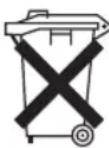
The unit contains a rechargeable battery. Used batteries / accumulators (rechargeable batteries) do not belong in household waste.
The battery must be removed before the product is recycled. Contact qualified personnel.
Information, where batteries / accumulators are to be disposed of can be obtained from your local or municipal authorities.
Meaning of the "Dustbin" Symbol
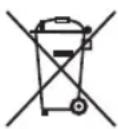
Protect our environment: do not dispose of electrical equipment in the domestic waste.
Please return any electrical equipment that you will no longer use to the collection points provided for their disposal.
This helps avoid the potential effects of incorrect disposal on the environment and human health.
This will contribute to the recycling and other forms of re-utilisation of electrical and electronic equipment.
Information concerning where the equipment can be disposed of can be obtained from your local authority.
Instrukcja obsługi


- BATTERIES AU LITHIUM-ION RECHARGEABLES (LI-ION)
- OPERATING INSTRUCTIONS
- SYMBOLS USED IN THESE OPERATING INSTRUCTIONS
- WARNING
- ATTENTION
- NOTE
- SAFETY TIPS
- ENGLISH
- MEDICAL INFORMATION
- SCOPE OF DELIVERY
- INSTRUCTIONS FOR USE
- I NOTE
- ELECTRICAL CONNECTION
- CHARGING THE RECHARGEABLE BATTERY
- USE
- SPEED SETTINGS
- CLEANING
- CHARGING STATION
- REMOVING AND REPLACING THE DECORATIVE TRIM FOR CLEANING
- TECHNICAL DATA
- TOOTHBRUSH
- RECHARGEABLE LITHIUM-ION BATTERIES (LI-ION)
- SAFE HANDLING OF RECHARGEABLE LITHIUM-ION BATTERIES
- EXTENDING THE LIFE OF THE RECHARGEABLE LI-ION BATTERY
- DISPOSAL
- ACCUMULATOR/BATTERY DISPOSAL
- MEANING OF THE "DUSTBIN" SYMBOL
- INSTRUKCJA OBSŁUGI
Brand : ProfiCare
Model : PCEZS 3056
Category : Toothbrush