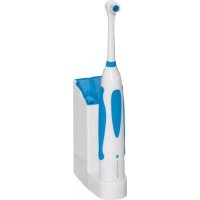
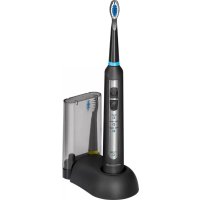
PCEZ 3055 - Toothbrush ProfiCare - Free user manual and instructions
Find the device manual for free PCEZ 3055 ProfiCare in PDF.



| Product type | Electric toothbrush |
| Brand | ProfiCare |
| Model | PCEZ 3055 |
| Net weight (brush + base) | 0,30 kg |
| Base power supply | 220-240 V~, 50 Hz |
| Power consumption (base) | 1,5 W |
| Battery | Ni-MH, type AA, 800 mAh, 1,2 V |
| Water resistance (brush and base) | IPX7 |
| Protection rating (base) | Class II |
| Protection rating (brush) | Class III |
| Included brush heads | 4 |
| Wall mounting | Wall bracket with wall plugs and screws |
| Initial charging time | Approximately 14 hours |
| Maximum charging time | 48 hours |
| Recommended use | Indoor, bathroom |
| Cleaning | Damp cloth, brush head washable under running water |
| Safety | Not suitable for children under 3 years old |
| Box contents | 1 base, 1 toothbrush, 4 heads, 1 wall bracket, 2 wall plugs, 2 screws |
Frequently Asked Questions - PCEZ 3055 ProfiCare
User questions about PCEZ 3055 ProfiCare
0 question about this device. Answer the ones you know or ask your own.
Ask a new question about this device
Download the instructions for your Toothbrush in PDF format for free! Find your manual PCEZ 3055 - ProfiCare and take your electronic device back in hand. On this page are published all the documents necessary for the use of your device. PCEZ 3055 by ProfiCare.
USER MANUAL PCEZ 3055 ProfiCare
Thank you for choosing our product. We hope you will enjoy using the appliance.
Symbols in these Instructions for Use
Important information for your safety is specially marked. It is essential to comply with these instructions in order to avoid accidents and prevent damage to the machine:
WARNING:
This warns you of dangers to your health and indicates possible injury risks.
△ CAUTION:
This refers to possible hazards to the machine or other objects.
i NOTE:
This highlights tips and information.
Safety instructions
Read the operating instructions carefully before putting the appliance into operation and keep the instructions including the warranty, the receipt and, if possible, the box with the internal packing. If you give this device to other people, please also pass on the operating instructions.
- The docking station is intended for indoor use.
- Regularly check the docking station and mains cable for damage. In case of damage, stop using the docking station.
- Do not repair the docking station yourself. Have it repaired by an authorized expert. The mains cable of the appliance cannot be replaced. In case the mains cable is damaged, the appliance must be scrapped.
- Do only use original parts.
- Toothbrushes can be used by children and by persons with reduced physical, sensory or mental capabilities or lack of experience and knowledge if they have been given supervision or instruction concerning use of the appliance in a safe way and if they understand the hazards involved.
WARNING:

This device is not suited for children under the age of 3 as small parts could be broken off and swallowed.
22 English
- Cleaning and user maintenance must not be carried out by children, unless they are supervised.
- Store the device out of the reach of children. Children may not play with the device.
- In order to ensure your children's safety, please keep all packaging (plastic bags, boxes, polystyrene etc.) out of their reach.

WARNING!
Caution! Do not allow small children to play with the foil as there is a danger of suffocation!
Scope of delivery
1 docking station
1 toothbrush with built-in battery
4 brush heads
Installation material:
1 wall bracket
2 dowels
2 screws
Operating instructions
Wall mounting
It is recommended to wall-mount the docking station for safe operation.
First attach the wall bracket to the wall, and then slide the docking station onto the wall bracket.

NOTE:
A wall socket must be in near proximity.

CAUTION:
Make sure there is no wiring or water pipes at the location where the wall bracket is to be mounted.
- Measure the distance between the two holes in the wall bracket. Then drill two holes with the same distance into the wall.
- Plug the dowels into the wall.
- Secure the bracket with the screws.
- Slide the charger from above onto the wall bracket until it locks into place.
Mains connection
-
Before connecting the mains plug to the wall socket, make sure the mains voltage to be used matches the voltage requirements of the appliance as indicated on the rating plate of the docking station.
-
Connect the appliance to a properly installed isolated ground receptacle.
Charging the battery
Charge the built-in battery prior to first use of the toothbrush.
- Press the "O" button once to make sure the device is switched off.
- Put the toothbrush onto the charger.
- Connect the mains plug to the wall socket.

IOTE:
- The indicator lamp lights up indicating the connection with the docking station.
- The indicator lamp does not provide any information on the charging status of the battery.
- Charging the appliance for the first time will take approx. 14 hours.
- Put the toothbrush onto the docking station after use. That way it will be ready for use even when used several times a day.

CAUTION:
- The maximum charging time is 48 hours. Overcharging will affect the battery's lifetime.
- During longer periods of absence or non-use, disconnect the mains plug of the docking station from the wall socket.
Usage
- Stick the brush attachment onto the device. The brush head will show in the direction of the I/O switch. If necessary, remove the protective foil.
- Moisten the brush head and apply some toothpaste.
- Rinse your mouth with water.
-
Guide the brush to your teeth before turning on the device with the | switch. You will thus prevent splatters.
-
Place the brush against the edge of the gums. Brush the outsides, the insides and the occlusal surface of your teeth. Slowly guide the brush head from tooth to tooth. Only exert little pressure. Dentists recommend a brushing period of a total of 2 minutes.
- Shut off the device with the O switch.
i NOTE:
- During the first few uses it can result in a slight bleeding of the gums.
- If these symptoms should last for longer than 2 weeks, you should contact a dentist.
Cleaning
CAUTION:
Do not use sharp or abrasive cleaning agents.
- Switch off the appliance before cleaning.
- You may wipe the housing of the device with a slightly damp cloth.
- Pull off the brush attachment. Clean it under running water after each use.
Docking station
WARNING:
Disconnect the mains plug before cleaning.
i NOTE:
The docking station is splashproof.
- You will need a sharp tool in order to loosen the docking station from the wall mount.
There is a strap located at the center of the wall bracket's lower end. Use a sharp tool to press this strap towards the wall while simultaneously pulling the docking station upwards. - Regularly wipe the brush compartments with a damp cloth and dry afterwards with a dry cloth.
- Clean the exterior of the docking station with a damp cloth and dry afterwards with a dry cloth.
- Let the brush compartments and lid dry completely before closing the lid again.
- Wait until the docking station has dried completely before connecting the mains plug again to the wall socket.
Handling Batteries

Insert correctly!

Do not charge!

Do not disassemble!

Danger of explosion! Do not expose batteries to intense heat, such as sunlight, fire or similar.

Do not short circuit!
Technical Specifications
Model: PC-EZ 3055 Net weight: 0.30 kg
Docking station
Power supply: 220-240 V\~; 50 Hz Power consumption: 1.5 W Water resistance: IPX7 Protection class: II
Toothbrush
Battery: Ni-MH; type AA; 800 mAh; 1.2 V = Water resistance: IPX7 Protection class: III
The right to make technical and design modifications in the course of continuous product development remains reserved.
This device complies with all current CE directives, such as electromagnetic compatibility and low voltage directive and is manufactured according to the latest safety regulations.
Disposal
Battery
The toothbrush contains a nickel-metal hydride battery. Remove the battery before disposing of the appliance. Contact our customer service if required.
△ CAUTION:
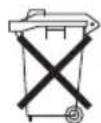
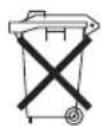
- Do not dispose of batteries in normal household waste!
-
As the end user you are obliged to return waste batteries/accumulators.
-
In order to remove the battery, use a sharp tool to open the lid at the bottom of the toothbrush.
- Then pull the battery from the housing. If necessary, use pliers as pulling aid.
- Return the battery at a collection facility for the recycling of waste batteries or hazardous waste. Contact your local authorities for more information.
Environmental protection
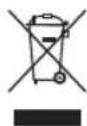
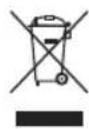
- Do not dispose of the device with household waste at the end of its service life. Bring it to an official collection point for recycling. By doing so, you help protect the environment.
CTC Clatronic Sp. z o.o
Ul. Brzeska 1
45-960 Opole
Usuwanie
Bateria


- SYMBOLS IN THESE INSTRUCTIONS FOR USE
- WARNING
- △ CAUTION
- I NOTE
- SAFETY INSTRUCTIONS
- 22 ENGLISH
- SCOPE OF DELIVERY
- OPERATING INSTRUCTIONS
- WALL MOUNTING
- NOTE
- CAUTION
- MAINS CONNECTION
- CHARGING THE BATTERY
- IOTE
- USAGE
- CLEANING
- DOCKING STATION
- HANDLING BATTERIES
- TECHNICAL SPECIFICATIONS
- TOOTHBRUSH
- DISPOSAL
- BATTERY
- ENVIRONMENTAL PROTECTION
- USUWANIE
- BATERIA
Brand : ProfiCare
Model : PCEZ 3055
Category : Toothbrush