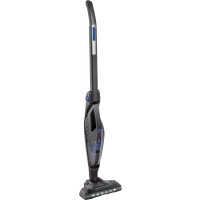
PCBS 3035 - Vacuum Cleaner ProfiCare - Free user manual and instructions
Find the device manual for free PCBS 3035 ProfiCare in PDF.


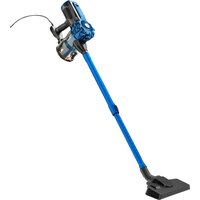
| Product type | Cordless stick vacuum cleaner |
| Brand | ProfiCare |
| Model | PCBS 3035 (PC-BS 3035 A) |
| Net weight | 2.8 kg |
| Battery type | Rechargeable lithium-ion |
| Power supply | Mains adapter (100-240 V) via charging station |
| Maximum runtime | 20 minutes |
| Charging time | 4.5 hours |
| Suction power | 2 levels (50% and 100%) |
| Dust capacity | Not specified |
| Included accessories | Floor nozzle with turbo brush, crevice tool, brush tool, charging station, mains adapter |
| Features | Motorized turbo brush, LED lighting, foldable handle, 3-LED charge indicator |
| Recommended use | Small amounts of dry dirt on hard floors and carpets (limited power) |
| Safety | Do not vacuum liquids, hot ashes or sharp objects; use with filter; do not expose battery to over 40°C |
| Maintenance | Clean filters and brush regularly; filter elements (1 and 2) rinseable with water |
| Repairability | Integrated battery; contact after-sales service for replacement |
Frequently Asked Questions - PCBS 3035 ProfiCare
User questions about PCBS 3035 ProfiCare
0 question about this device. Answer the ones you know or ask your own.
Ask a new question about this device
Download the instructions for your Vacuum Cleaner in PDF format for free! Find your manual PCBS 3035 - ProfiCare and take your electronic device back in hand. On this page are published all the documents necessary for the use of your device. PCBS 3035 by ProfiCare.
USER MANUAL PCBS 3035 ProfiCare
Batteries au lithium-ion rechargeables (Li-ion) 19
Poignee repliable 21
Batteries au lithium-ion rechargeables (Li-ion)
Entree:CA100-240V,50/60Hz,0,35AMAX
Sortie: CC 18V, 500mA
Polarite :
Batterie: 4 × 3,7V, 2200mAh Ion-Li
Thank you for choosing our product. We hope you will enjoy using the appliance.
Symbols in this Instruction Manual
Important information for your safety is specially marked. It is essential to comply with these instructions in order to avoid accidents and prevent damage to the appliance:

WARNING:
This warns you of dangers to your health and indicates possible injury risks.

CAUTION:
This refers to possible hazards to the appliance or other objects.

NOTE:
This highlights tips and information.
Contents
Overview of the Components. 3
Assembly 4
General Notes 36
Special Safety Instructions for this Appliance 36
Rechargeable Lithium-Ion Batteries (Li-Ion) 37
Safe Handling of Rechargeable Lithium-Ion Batteries...37
Extending the Life of the Rechargeable Li-Ion Battery..37
Unpacking the Appliance 38
Overview of the Components/ Scope of Delivery. 38
Notes for Use 38
Gap Nozzle and Brush Nozzle 38
Folding Handle 38
On/Off Switch (5 and 12) 38
Assembly and Battery Charging. 38
Assembly of the Appliance. 38
Charging the Battery 39
Using the Appliance 39
Emptying the Collection Container 39
Cleaning 39
Components 1 and 2. 40
Floor Nozzle 40
Storage 40
Troubleshooting 40
Technical Data. 40
Disposal 40
Accumulator/Battery Disposal. 40
Meaning of the "Dustbin" Symbol 40
General Notes
Read the operating instructions carefully before putting the appliance into operation and keep the instructions including the warranty, the receipt and, if possible, the box with the internal packing. If you give this appliance to other people, please also pass on the operating instructions.
- The appliance is designed exclusively for private use and for the envisaged purpose. This appliance is not fit for commercial use.
- The power adapter is only suitable for use in dry rooms.
- Check if the output current, voltage and the polarity of the power adapter match the information on the connected appliance!
- Do not touch the connected power adapter with wet hands!
- If necessary, disconnect the appliance from the power adapter.
- Ensure that the cable of the power adapter does not become kinked, jammed, driven over or come into contact with heat sources.
- Do not use a damaged power adapter.
- Do not repair the appliance yourself, but visit an authorized specialist.
- The appliance and the mains lead have to be checked regularly for signs of damage. If damage is found the appliance must not be used.
- Use only original spare parts.
- In order to ensure your children's safety, please keep all packaging (plastic bags, boxes, polystyrene etc.) out of their reach.

WARNING:
Do not allow small children to play with the foil. There is a danger of suffocation!
Special Safety Instructions for this Appliance
- This appliance can be used by children aged from 8 years and above and persons with reduced physical, sensory or mental capabilities or lack of experience and knowledge if they have been given supervision or instruction concerning use of the appliance in a safe way and understand the hazards involved.
Children shall not play with the appliance.
- Cleaning and user maintenance shall not be made by children without supervision.
- The appliance is intended for use with safety extra-low voltage. Connect only to a power supply according to the specifications on the rating label.
- If the connection cable of this appliance has been damaged, it must be replaced with a special connection cable available from the manufacturer or its customer service.
- Do not use any power adapter other than the one supplied.
- Do not suck in combustible substances or liquids!
- Do not suck up hot ashes or pointed or sharp objects!
- Never vacuum without the filter installed.
Rechargeable Lithium-Ion Batteries (Li-Ion)
The appliance is equipped with rechargeable Li-ion batteries. This results in numerous advantages compared to other batteries and accumulators:
A high cell voltage (more volts)
No memory effect
A low self-discharge
Safe Handling of Rechargeable Lithium-Ion Batteries
In general, Li-ion batteries are considered safe. Nevertheless, hazards may result from mechanical damage, electrical faults and thermal effects.
Mechanical damage may result in the leakage of gaseous or liquid substances that can be highly irritating, flammable or even toxic.
An electrical fault, such as a short circuit, may lead to overheating and cause a fire.
Even the heating of the outer shell of a Li-ion battery, e.g. due to sunlight or a heating element, may lead to fire or an explosion.
However, Li-ion batteries are safe when handled properly. Only if used or stored improperly they may become dangerous. Therefore:
- Avoid temperatures above 40^ and below 0^ .
- Do not drop the appliance or the rechargeable battery.
-
In case the Li-lon battery has been dropped and is now damaged, stop using it.
-
When storing or disposing of the appliance, mask the terminals to prevent short circuits.
- Dispose of old accumulators properly in collecting containers at the trader or at municipal collection points.
Extending the Life of the Rechargeable Li-Ion Battery
For Li-ion batteries, even more than with other accumulators, their life can be extended by treating them properly. The following simple rules for charging and storing help you keeping the capacity of the battery:
- Temperature: The ideal temperature for these batteries ranges from 10 - 25^ . Temperatures above may lead to premature aging.
- Charging and discharging: During charging cycles, both full charge and deep discharge should be avoided. When the charging process of the battery is completed, you should disconnect the charger immediately. A charge up to 90% is considered best.
Conversely, it is also preserving the battery more when it is not discharged to 0% . If the possibility arises, you should already recharge the battery when it is reaching a charge state of 30% .
Storage: Always store batteries in a dry place and at moderate temperatures between 10^ and 20^ . Also consider the effect of self-discharge! When the accumulator is already empty, this effect may lead to a deep discharge resulting in damaging the battery. If you intend to store the battery for an extended period of time, you can counteract this effect. We then recommend charging the battery to approx. 40% before storage. You
should check the state of charge after not more than a month.
Unpacking the Appliance
- Remove the appliance from its packaging.
- Check the delivery scope for completeness.
- Check the appliance for any transport damage, in order to prevent hazards.

NOTE:
In case of any transport damage, contact your dealer immediately. Do not use a damaged appliance!
- Remove the transport locks on the two on / off switches.
Overview of the Components / Scope of Delivery
Page 3
Figure I
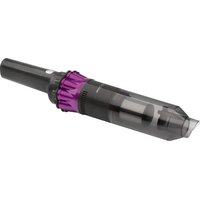
1 Dirt collection container
2 2-part filter insert
3 Indicator lights
4 Dust container release button
5 button (on / off switch on the basic unit)
6 Handle on the basic unit
7 Motor housing with air outlet
8 Suction opening
Figure II
9 button (floor nozzle with lighting)
10 button (50% suction power)
11 button (100% suction power)
12Button(on/off switch for device with floor nozzle)
13 Sliding release for folding handle
14 Folding handle with appliance holder
15 Locking / unlocking for floor nozzle
16 Floor nozzle with turbo brush
17 Basic unit (refer to fig. 1)
18 Unlock button for the basic unit
Page 4
19 Charging station
20 Base
21 Socket for power adapter
22 Contact pins
23 Charging contacts
Not Shown
1×Poweradapter
1× Gap nozzle
1×Brush nozzle
Notes for Use
- The appliance is especially suitable for quickly vacuuming small amounts of dry dirt or dust.
- The appliance is operated via charged battery. The battery is charged with the supplied charging station. Before that, you must assemble the appliance and must hang it into the charging station.
- Direct power supply via power adapter is not possible.
- This cordless vacuum cleaner is no adequate replacement for a conventional floor vacuum cleaner. Especially on shag-pile carpet, the cleaning performance is not sufficient owing to its design.
- Contaminated filters reduce the suction power of the vacuum cleaner. Therefore, we recommend regular cleaning of the existing dirt filters.
- Ideally, clean the filters whenever they were subject to a prolonged use.
- Please regularly check and clean the electric floor nozzle.
- If necessary, clean heavily soiled floors multiple times and / or use a conventional 230V floor vacuum cleaner.
Gap Nozzle and Brush Nozzle
- The nozzles are attached to the suction opening of the basic unit.
- You may store the nozzles at the back of the charging station.
Folding Handle
For back-friendly cleaning, the folding handle can be tilted twice. This facilitates the vacuuming in hard to reach places (e.g. under tables).

CAUTION:
- Do not tilt the folding handle beyond the respective resistance. The appliance may be damaged otherwise!
-
If you tilt the folding handle more than 90^ , the basic unit will fall out of the appliance holder!
-
Pull the slider (13) upwards for a short time and tilt the folding handle forward until resistance.
- When pressing the slider again, you will be able to tilt the folding handle a little more.
On/OffSwitch(5and12)
The appliance comes with two on / off switches. Press the or button to switch the appliance on or off.
Assembly and Battery Charging
Assembly of the Appliance
Refer to the illustrations on page 4.
A Place the supporting foot on a flat, stable surface. Plug the charging station into the supporting foot. It must engages.
B Connect the power adapter to the socket on the charging station.
C Connect the appliance holder with the floor nozzle. It must engages. Take note of the contact pins on the floor nozzle.
D Fix the basic unit in the appliance holder. First place the suction opening of the basic unit into the opening of the appliance holder. Then push the handle of the basic unit into the appliance holder. It must audibly engage.
E When you want to charge the battery, hang the completely assembled appliance into the charging station. Make sure of stability and correct assembly. The contacts of the appliance holder must touch the contacts on the charging station. The 4 contacts must be clean and dry. Otherwise the battery will not be charged.
F For space-saving storage, you can fold the handle of the appliance holder. To do this, push the slider (13) upwards and at the same time fold in the handle.
Charging the Battery
- Turn off the appliance.
- Connect the power adapter to a certified wall socket. Charge the appliance for 4.5 hours before first-time use.
NOTE:
- The indicator lights show the state of charge of the rechargeable battery.
-
Charging is completed when all 3 indicator lights are lit.
It is normal for the appliance to heat up during charging. -
Stop all other charging process after a maximum of 4.5 hours or once the indicator lights stay permanently on.
CAUTION:
Always remove the mains plug from the power outlet after charging is complete.
Using the Appliance
- You can use the appliance as a floor vacuum cleaner or as a handheld and upright vacuum cleaner (basic unit).
- To separate the basic unit from the appliance holder, press the button (18) and at the same time use the handle to pull out the appliance.
- Turn the appliance on or off with the on / off switch (5) or (12).
- During operation, you will be able to recognise the state of charge of the rechargeable battery via the indicator lights.
- Use the and buttons to adjust the suction power.
- Press the button to turn on the turbo brush on the floor nozzle. The rotation is indicated via the lighting.
NOTE:
The lighting can only be switched on or off while the appliance is in operation.
Emptying the Collection Container
- Turn off the appliance.
- Keep the appliance horizontal when opening the collection container.
- Press the button (4) to unlock the collection container.
- Remove the two-piece filter insert.
- Turn and remove the coarse filter by slightly turning it counterclockwise.
- Empty the components.
- Reinstall the components into the collection container in reverse order.
- Attaching the collection container to the housing: First position the collection container at the bottom of the housing. Then lock it at the button (4) on the top.
Cleaning
WARNING:
Under no circumstances should you immerse the motor housing in water in order to clean it. Otherwise this might result in an electric shock or fire.
CAUTION:
- Do not use a wire brush or any abrasive items.
- Do not use any acidic or abrasive detergents.
-
The single components are not dishwasher-safe.
-
Wipe the casing with a damp cloth.
- You can wipe the power adapter unit with a dry cloth.
Components 1 and 2
- These components can be rinsed off under running water. If need be, clean the components in warm soapy water using a soft brush.
- Allow the components to dry before you reassemble the appliance.
Floor Nozzle
- Press the unlock button (15) to pull the floor nozzle off the appliance holder.
- Turn the floor nozzle around, so that you see the lower side. Remove the cover by pressing the latch down.
- Pull out the brush roller.
- Remove threads and hair wound to the brush. Use scissors, if required.
- Assembly:
5.1 Place the brush roller, with the triangular recess first, onto the right side. Make sure that the triangular recess on the brush roller is positioned correctly.
5.2 Return the bearing of the brush roller into the housing of the floor nozzle.
- Place the cover back on. The latch must audibly engage.
Storage
- Clean the appliance as described and allow it to dry.
- You may use the mounted charging station for storage.
We recommend that you keep the appliance in the original packaging if it will not be used for long periods. - Always store the appliance out of the reach of children in a dry, well ventilated place.
Troubleshooting
| Problem Possible Cause Remedy | ||
| The appliance does not function. | The rechargeable battery is empty. | Charge the battery. |
| Weak suction power. | The rechargeable battery is nearly discharged. | Charge the battery. |
| The filters are dirty. | Clean the filters as described under “Cleaning”. △ CAUTION: Restart operation only with dry filters. | |
| Noise during operation. | A foreign body has been sucked into the floor nozzle. | Remove the foreign body. If required, separate the floor nozzle from the appliance holder. |
Technical Data
Model: PC-BS 3035 A
Net weight: approx. 2.8kg
Power adapter
Protection class: II
Input:AC 100 - 240 V, 50 / 60 Hz, 0.35 A MAX
Output: DC 18V, 500mA
Polarity:
Battery: 4 × 3.7V, 2200mAh Li-Ion
Operating time: 20 minutes maximum
Charging time: 4.5 hours
The right to make technical and design modifications in the course of continuous product development remains reserved.
This appliance has been tested according to all relevant current CE guidelines, such as electromagnetic compatibility and low voltage directives, and has been constructed in accordance with the latest regulations.
Disposal
Accumulator/Battery Disposal

The appliance contains a rechargeable battery. Used batteries / accumulators (rechargeable batteries) do not belong in household waste.
The battery must be removed before the product is recycled. Contact qualified personnel.
Information, where batteries / accumulators are to be disposed of can be obtained from your local or municipal authorities.
Meaning of the "Dustbin" Symbol
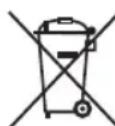
- Protect our environment: do not dispose of electrical equipment in the domestic waste.
Please return any electrical equipment that you will no longer use to the collection points provided for their disposal.
This helps avoid the potential effects of incorrect disposal on the environment and human health.
This will contribute to the recycling and other forms of re-utilisation of electrical and electronic equipment.
Information concerning where the equipment can be disposed of can be obtained from your local authority.
Instrukcja obslugi
Akkumulator: 4×3,7V, 2200mAh Li-ion
Uzemid6: maximum 20 perc
Jaet COBtI INHOpMaIIO.
CoapedkaHne
O63op deraen npnbopa. 3
C6opka 4
06ue 3ameuHn52
Cneuaalbhbte yka3aHnno 6e3onacnoctn
ДяЗТOrO npn6opa 53
MOHHO-JNTHeBBie
aKMyIaTOpHbIe 6aTapei (Li-Ion).53
Be30nacHoe 6oepHne C NOHHO-JNTNEBIMn
aKKMyIyTOpHbIMN 6aTapeIMN .53
IpoJIeHHe cPoKa cIyXbI IOHHO-JIITNeBOI aKKMyJrTOpHO bTapei 54
PacnaKOBka yctpoiCTBa. 54
063op deTanei npnbopa / KomnKeT nocTaBkn 54
PpmeuHnno nncnoB3OBAHn.. 55
Hacakn y3knx MeT n Hacakna-ueTka 55
CknaIbIbIauoJypa 55
IpeeknioateIb《BkIOueHO/BbIKIOeHO》(5u12)...55
C6opka n 3apraKa aKKymyIaTopa. 55
C6opka npibopa. 55
3apn aKmyTOpOB 55
3Kcnnyataua 56
Ouictka KOHTeHepa dIy Mycopa .56
Ynctka. 56
KOMnoHeHb1n2 56
Hacada nona 56
Xpanenie 56
Ponck yucpaHene HncnpaBHOtei 57
TexHHueckne daHbIe 57
Ytunnaa.. 57
Yttnn3aun6atapei/akkymnyatopnbix 6atapeek.....57
3HaueHne CmBbOla «KOp3nHa» 57
06uine 3ameyauHna
Ipeed Haayanom 3KcNpyataunn np6opba BHNMaTeIbHO npouTaNte npuIraeMyo IHCTpykTuIO no 3KcNpyataunn COxpaHNTe ee B HadeXHom MeCTe, BMeCTe C rapaHTnHBIM TaHOOM, KaccOBbIM YekOM N, NO BO3MOxHOCtN, KAPTOHHO KOp6KOc C yNaKoBOvHbIM MaTePnAnOM. Ecn daTe KoMy-Ni6o IOnNoB3ObaTbc np6obpOM, ObraaTeNbHO daIte B pInDaay DaHHy IOhCTpykTuIO n 3KcNpyataunn.
-Пользуйтесь пибором только чаТьим орраЗм и по ha3haЧeHHIO. Пибор He пpeДha3HaЧeн ДЯ КOMМерчecKOrO ИСПЛьЗВанИ.
- CeteB0n aadTep npiroeH dIg IcnoIb3OBAHnTOJIbKO B CYNX NOMEUHIX.
- Поверпс Te coIacobauHOCb BbIXoHOro ToKa, HanprJxHnI N noIpaHocTu CTeBorO aanTepa C INHOpMaUcnei Ha noknIOuHaemom npin6ope!
He npikacaiTecb K ceTeBOMy aanTepy BnaKhbIMnypKaM!
Korda Heo6xOaMa YnCTka,OTKnHouHTe np6op ot cTeBOrO aanTepa.
- Ybειntεcb,чтKaçebIb cTeBOrO aДaŋTepa He n3oRhyT, He npejkaT, He hataHyT n He KacaetcN UCTOuHnKOB Tennna.
- He npimHeHnTe NOBpeKdEHHbI cTeeBOaJaTep.
He nItaiTeCb camocToTeJIbHo pemOHInpoBaTb np6op o6paTneTecb K yONHOMOeHHOMy Ha 3TO cneuaJIncTy.
- Pn6op n Ka6eBcTeBOrO nHTaHnH Heo6xOIMOp peryIpaHo 06cneIOBaTb Ha HAIuHne cIeDob NOpeKdEHH. Pn O6hApUKeHH NOBpeXdEHnN POJIb3OBAtbcn Pn6bpom 3aIpeuaetc.
IcnoJb3yTeToJIbKOOpnHaJIbHbe3aHaCTN.
- IV3 coo6paXeHn 6e3oNaChOcTn DnA nTei He octaBnIyte IexKaTb ynaKOBky (PiactNKOBbIe MeWK, KapTOH, neHONlact n T.d.) 6e3 npncMOTpa.

PNEyPENPEKDEHNE:
He no3B0JnTe DeTm nIpaTb c noINaTIneHOBO nnEko. Onachoctb ydysb!
CneuNbHbIe yka3aHnNo 6e3oNaChOCTn IJy 3TOrO npnbopa
- ΘТИМ пибором могут пользоватбя DeTи CTapшe 8 Лети Лиca C оранчehнblIMN ФиЗЧЕСКИМN, OсЯЗTeЛьнblIMN И ПСИХИЧЕCKИМ NСОСБHOCТЯМ NПИ He ИмeЮшe ONbITA ИПИ 3HaHIN, ECSI N OHI HAXODЯТСЯ ПОД НaДЗОРOM ИПИ ПОИНСТPyКТИРОВAHы B OTHOWSEHIM БeЗOTаСHOrO ПОЛьзованя пиборOM IN 3HaIOT O CBY3aHHbIX C ATIM ONaCHOCTAx.
He no3BOJnTe DeTm nIgpaTb C np6Opom.
-ЧИстka и ухов за прибором не дожны проворпся DeТьми 6e3 надзopa. - Uстpoист bo npedha3naheho dny pa6otbI OT 6e30nacHOro Hn3-Koro HanpajkeHn. PodknoyaTe K nCTOuHnky nITaHnycorlaChOn HnΦopMaun Ha nHΦopMaunOHn Ta6Jnue.
- Ecπi coeɪnHntjBhI kābI yCTpOJcTba nOBpeKdēH, ero Heo6xOДmO 3aMeHtBJ Ha CneuJIbHbI COeɪnHntjBhI Ka6JIb, NOCTaBJIeMbI N3rTOBHTeJIeM I clyX60J KJIneHTcKoI NOdEprKkN.
He nCnoIb3yIte npYrIe cTeBbIe aIaNTepbl, KpOme aIaNTepa I3 KOMnJIeKTA NOCTaBKn.
He BCacbIbaiTe ropOChne BeUeCTBa n XnDkoCTn!
He BCacbBaIte ropnyn pepeI nnOCTpOKoHeHbIe nnIOCTpbIe ppeMTebl!
HnB Koem cnyae He 3KcnpyaTpyte nbinecoc 6e3 qnbtpa.
HONHO-JNTHeBbIe aKKymyIaTOpHbIe 6aTapeu (Li-Ion)
YcTpoiCTBO o60pyoBaHO IOHHO-NTHeBBIMn AKKyMnyIaTOPbIMn 6bTapeAIMn. OHI o6IaJaOT MHOKeCTBOMIpeMysIeCTB CpaBHeHmC dpyrIMN TINAMn 6bTaapeNn AKKyMnyIaTOPOB:
BbICOKoe HaprrxKeHne 3nEMeHTOB (60JIbe BOnblT)
OTcYCTBnEeΦΦeKtA nAMrTn
- Hnzkni camopazd
БezonacHoe obpaueHne c noHHO-JNTHeBbIMn aKkMyIaTOpHBIMn 6aTapeMn
B cIeHOM IOHHO-JNTNtEeBIE 6aTapeu CHTaHOTc 6e3oNaHbIMn. Tem He MeHee, MexAHueckme NOpeXdEHn, NOBpeKdEHn B 3JIeKTpUeCKO ueN IN TELIOBBe 3ΦΦeKtBu MOyr CTaTb NCTOUYHKOM ONaCHOCTN.
MexAHueckoe NOBpeKdHeH MeoKe TnpBecTn K yTeUke ra3006pa3HbIX INI INKDKHX BeUeCTB, KOtOpBe MOrT Bbl
3BaTb CnIbHoe pa3dpaxKeHne, MoryT 6bITb rOpOcHIMN NIN DaKe TOKCNHbIMN.
I P I M E U A H N A:
B cnyuae kaknx-ni6o nobpejdeHn npn TpaHcnoptnpoBke o6paTntecb K BaWemy npOaBcy HMeDneHNO. He nIb3yTeCb nobpejdeHHbIM yCTpOCTBOM!
- CHIMMTE TpaHcnpTbI Kpenex Ha DByx NepeKnOyateJIAX «BKNIOUeHO / BblKlIOUeHO»
O63op DeTaIe npIbopa / KomJIeKToNocTaBKn
Ctp. 3
Pnc. I
1 KOnTeHep dIg c6opa mycopa
2 Φιλβτργούμη 3πεΜΕΝΤις 3 2 αυχατη
3 INHnKaToPbIe IaMnOuKIn
4 KhoIka OTkpbIbAHnKoTeHepa IJIpyIIN
5 KhoNka (pepeKIOuATEIb《BKIIOUeHO/BbIKIOUeHO》 Ha 6a3OBom 6nOke)
6 Puyka 6a3oBOro 6JIOka
7 KoxyMXOTOPa C BbInyCKOM Bo3Dyxa
8 OTBepCTne BCacbBaHn
Pnc. II
9 Khonka nanaKa dna nona c noDCBtKoJ
10 KhoNka-(50%OTMOUHOCTHBcAcbBaHn)
11 Khonka + (100 % OT MOUHOCTN BCACBAHA)
12 KhoNka GnepeKIOUaTeIb BkIOUeHO/BblKIOUeHO> Dna yctpoiCTBa C hacaIkoI dna nola)
13 CdbnI pIocbo6oxJeHHN cKnaIbBaIOeHc pyKn
14 CknaIbIbAIOUaIc pyuKa c depKaTeIeM npHaIneKHOCTeI
15Блokировka/pa36лokировkaнаддяпona
16 Conno dna nona c typo-ueTko
17 Ba3OBbIb 6NOK (CM.pnc.I)
18 Khonka pa36IIOKIpOBkN 6a3OBOro 6Ioka
Ctp. 4
19 CtaHnna 3apAdkn
20 OchOBaHne
21 P03eTkaДЯ cTeBOro nepexOdHnka
22 CoeHInTeNbHbIe KOHTaKtbl
23 KoHTaKTbI 3apJdKn
He noka3aHo
1×AanTepnTaHn
1×Hacaikdny3KnxMeCt
1×Hacaika-üeTka
PpmeHnno nCNoB3OBAHn
- UcTpoIcTBO npeKpacHO IIOxOoIT dIg 6bICTpo y6OpKn He3HaHTeJIbHbIX ObEMOB cyXo Ipr3N ININ PbIIN.
- Pn6op pa6oTaet ot 3apya akymyTopa. AkymyIaTOp 3apXaeTc8 ot 3apdHoi cTahmN 3 KomnKeTaNocTabKn. Ipeed 3tHM Heo6xOJMo CO6paTb yctpoiCTBO NIOBecNTb eRo Ha 3apdHyIO cTahmIO.
-Пяраимо Кпдкнчсни Клжтческг сетиnomeц- ня HeBO3MOXHO.
3TOT6ecnpoBOHbI PbIEcOC He RaBnETCaNoHOUeHHO 3aMeHO TpaDINuOHbIM BaKyyMHbIM PbIEcOCaM.OcoBeHHo Ha DInHHOBOPCBbIX KOBpax erO MoUHOCTN BCacbIBAHNA 6ydt HeIOCTaTOH O3-3a OCObeHHOCTeKOHCTpykUIN.
3aONHeHbIe pNtBpbl CHNKAIOT MOLHOCb BCaCbIbAHnIpbIeCocA. I03TomyMbI peKOMeHdyem peryIpaHOCTHTnbJIeBBle pNtBpbl.
Bnneane nctnte pfntpbl nocne IIO6oro dIITeHORO nCNOb3OBAHN. - PtoxanyuCTa, peryIpyHO npOBepaTe n uNCTnTe HaCakky dna nona.
- Pn HeoXoDMOCtN, YcCTNe CINbHOrO 3aPra3HeHHbIe NIObl HECKoJIbKO pa3 N/INu INCNOJIb3yTe O6bUHbI NbJIncoc C 3JekTPOrNTaHmEOM t cTeN 230 B~.
HacaKaIy3KnxMeCtN HacaKa-KeTka
HacaKn npucoeHHIOCTK OTBepCTNU BCacbIBAHNA 6a3OBOro 6noka.
- Moxho xpaHnTB hacaKn Ha 3aDne CTOpHe cTaHcN 3apAkn.
CknaIbIbAIOuaJc pyuKa
IINCTKn 6e3 HArpy3Kn Ha CInHy npImHeHa CKnaDbBaIOUaCRA BBOE pyka. 3To nO3BONrEt NCTNTb B TpyHDoCTNXIMbIX MecTx (HAnpIMep, NOI CTOnAMN).

BHIMAHNE:
He crn6aIte cKlaIbIbIaIooI cyuKy nocIe ee otBETHO peakun. HNaue moXHo nobpeDITb np6Op
Ecn corHyb cknaDbIbIaIOUc pyky Ha 6oJe yem 90^ , 6a3OBb I bNOK BbIaNed n3 depkaTeI npn6opa!
- KpaTkoBpeMeHHo TAHHTe NOn3yHOK (13) BBepx n crIbaiTe cKnaIbIbAIOUyOcR pyuKy Do yNopa (OTBeTHa peakun).
- EcHn HaxKaTb NOJ3yHOK CHOBA, MoKHO eue HeMHORO cOrHyTb CknaDbIbAIOUyIOc pyKy.
IpekeKIOUaTeB 念 BKIOUeHO/BbIKIOUeHO》(5n12) Pnp6op mMeet Dba nepeKIOUaTeT BKOIOUeHO/BbIKIOUeHO.HaxMnte KHOJky Onnn BKOIOUeHn Nn BBKIOUeHn np6opa.
C6opka n 3apnka aKkymyIaTopa
C6opka npnbopa
CM. pnc. Ha ctp. 4.
A IocTaBbTe onOpHyIO HOxKy Ha poBHyIO yCToHmByIO NO-BepXHoCtB. IOnKJIIOChIte 3apAnHyIO cTahnIO K OnOpHOHoxke. OH donKeH 3aueKHyTCr.
B IopKnHouHTe 3JneKtpoNTaHHe K po3eTKe Ha 3apAHOI CTaHnN.
C PoiKJIIOUHTe DEpKaTeJIb npi6opa c HacakOJ dIra nOla. OH DoJIKeH 3aФИКСИРОВaTcBc. O6paTIte BHHMaHHe Ha COeDINHTeJIbHbIe KOHTaKTbI HAcakNdIra NOJa.
D 3aKpEnIte 6a30BbI 6Iok B dEpxKaTeIe np6opa.CaHuaN BCTaBbTe OTBepCTne BCacbIBaHnIg 6a3OBoro 6Ioka B OTBepCTne DEpxKaTeIg np6opa.3aTeM BDburaiTe pyKy 6a3OBOrO 6Ioka B dEpxKaTeIb np6opa.DoJHKHO 6bITb CbIiHo 3aCenIIeHne.
E Korda notpe6yetyra3apdntb akkymylantop, nobecbte noHIOCTbIO c6paHHbI np6bOp Ha 3apdHyIO CTAHUHO. Y6eINTecb B HApExKHOCTN IN KOPpeKTHOCTN C6OpKn. KoHTaKTbI DePkaTeI np6bOp dONKhbl KacaTbcr KOHTAKTOB 3apdHOn CTAHUIMn. Bce 4 KOHTaTKa DOJKNHbI 6bITb NcHbIMN n CyXIMN. IHaue aKKymyIaTOp He 6yJeT 3apxKaTbcR.
F yTO6bl 3KOHOMITb MecTo XpaHeHnA, MoXHO CIOXHTb pyKy depkataI np6Opa. IINr 3TOrO HaxMnte NOn3yHOK (13) BBePx n ODNHOpeMeHHo corHnTe pyKy.
3apd akkymlyaTopoB
- BbIKIOHTe yCTPOIcTBO.
2.ПОДКЛЮЧИТЕСЕТБОДаДАNTЕРКСЕТИЗПИСИВАнHOДэЛКТРИСЕСКОуроЗКУЗ.TЗAPЯЖАTEyCTPOICTBO4,5чACOBпepEDпервьIMиСПОЛБ3ОВAHINEM.

ПОНМЕЧАНО:
-
INДИКАТОРНБЕ ЛAMПОЧКIN NOKA3БIBAHT COCTOHRHe 3apяДКINпepe3apЯжаemонakkуМЛТOPHOn 6batapen.
3apka 3aBepseHa, KOrda roprT Bce 3 HnDkA-TopHbIe IamnoQKn.
HarpeB yctpoiCTBa npn 3apAke AblareTcHOpMaJIbHbIM. -
OctaHOBIne IIO6bIe npOcecca 3apAKn CnYCTMaKcNmym4,5 Yaca Nn Pn HnpepbIBHom BKNIOueHIN INdIKaTOpHbIX NaMNoueK.

BHIMAHHE:
IIO 3aBepseHn 3apAKn 6o8aTeJbHo n3BneKeTte WTEncelb n3 pO3eTKN.
3Kcnnyataun
Moxho nCnoJb3oBaTb npn6op B KaueCTBe nbIeococa IJIa NJI B BIne NepeHOCHO TbeNecoca IBy BePTKAbHoO uNcTKn (6a30BbI 6Jok).
- 4TO6bI N3BNEy6a3OBbI 6bOK n3 DepeXaTeY np6oPa, HaxMMTE KHOJky (18) n ODHOBpeMeHHO BbITaUHTe np6oB 3a pyKy.
BkIIOUeHHe nIIN BbIKIOUeHHe npIbopa IpOu3BOIDITcpeKIOUaTeIeM (5) nI (12).
BoBpempa6oTbI NO INHnKaTopHbIMJaMNoUkAM MOxHO y3HaTb COCTOHRHe 3aprAnKe nepe3apRJaEMoA kkyMnyTOpHo 6aTapen.
- IVcnoJIb3yIte KHOPIKNI - IaIpeRyIINpOBKN MOUHOCTN BCACbIBAHN.
Haxmnte KhONky BkIOUeHnry Tpy6o-ueTKN B HacaKe INa. BpaueHne OTMeuaetcnoCBeTkoJ.

ПРИМЕЧАНО:
IIOCBETKMOXHO BKJIOaTb NIN BbIKIOaTb TOJIbKO BO BpempaobToPiN6opa.
OuHcTka KOHTeHepa DnA Mycopa
- BbIKHouHTe yCTPOIcTBO.
- YdepKnBaIte yctpoIcTBO roPn3OHTaJIbHO npN OTKpbIbAHnn KOHTeHepa dny c6opa.
- HaxMMTe KhoNky (4) Дя OТcoeДиЕнгЯ KOHTeHepa OT nbJIeCoca.
- CHIMMTE DBe DeTaJIIN ΦnIbTpyUoSei BCTaBKn.
- NOBEPHNTe H3BNEKNTe QnIbTp rpyoO uNCTKN 3a CHT He60JbWOrO NOBOPota npoTNB YacBOB CTpeKN.
- Ydannite codepkmmoe.
- 3aHOBO yCTaHOBInTe KOMNoHEHTbI B KOHTeHep B O6paT HOM IopRdKe.
- YctaHOBka KOHTeHepa B KOpnyc npu6opa:
Chauana yctahOBtKe KOHTeHep B HnKHeu qactn Kopnyca. 3aTeM 3aФнкCpyuTe erO KNkOu (4) CBepxy.
UncTka

PPEyPExEHNHe:
Hn B Koem cnyae He Okyhaite Kopnyc DBrTaTeJЯ dIЯ MbITbY B Body. 3TO MOxET 6bITb PruHOn 3JeKtpueckoro ydapa nIII noXapa.

BHIMAHNE:
He nCnoB3yIte npoBOIOHbIe 1ETKn INn dpYrne capanaHOJIpe npedMeTbI.
He nCnoJIb3yIte CnJIbHbIe NIIu capanaIOUne YIcCTA-
OTdIbHbIe KOMNoHEtbl He IpeHa3HaueHbI nocydomoeyHoMaHHbI.
Kopnyc moxho npotnpaTb cnerka BnaJHo TpIkoi.
- MoKHO BbITnPaTb 6Iok 3JIeKtPonITaHn CyXo TkaHbI.
KOMTOHEHTb1 1 n 2
3TN DeTANBbMOKTe NOMbITb NOI pTOOHTHOBOIO. Pn Heo6xOIMOCNT IpOMOTe KOMNOHEHTb I TENTIO MBJbHO BDOc NCNOJIb3OBAHHeM MRTKO UETKN.
- PpocuyuTe Detani, npexJe cHOBa co6npaTb np6op.
Hacaika nna nnona
- Haxmte KhoNy pa36nokpObKn (15) nIy n3BneHnHa cadaK dny noJa n3 depkaTeJ np6opa.
-
NobeprHnTe HacaydnonaTak, YTo6bI yBnDeTb ee HNKHIOCTOPHY.CHMnTe Kpbilky ,HaXaB 3aueJky Bn3.
-
BbITaHHTe pOJIINKOBYU uETky.
4.YdaInTe UeTko HnTKN BOIOcbl.NcnoJIb3yIte HOKHNcbl, pHne Heo6xOIMOCTN. - C60pka:
5.1 Chaana BCTabBePoNik UeIKNB TpeyrolbHyo BblEMky Ha npaBoi CTOpOHe. PpOBepbTe, YTo6bl 6blIO npaBnBHO paCNOJoxEHO TpeyrolbHoe yrIy6bnHeHa poNkoBoi UeTke.
5.2 BepHnTe nOuHHNk PoJHKOBoI uETKn B KOpnyc HacaKn dJa noJa.
- NocTaBbTe KpbIuKy o6paTHo. DOnJKeH 6bITb cJIbI-WeH 3ByK 3aUeIIeHnra 3aUeJIKN.
XpaHeHne
-ПоиnteустpoICTBOKONICAHO BYPOKOIOCTBe,ИдTe EMY NOHOCbTO BbICOXHyTb.
- YctahOBHeHHyO CTaHcIIO 3apJIK MoKHO NcTIOb3oBaTb DnI XpaHeHn np60pa.
- PekomeHnyetc xpaHnTb yctpoiCTBO B erO opuHnaJIb-HoYnakOBKe,ecnOHO He nCNoIb3yeTcRdNITeJIbHoeBpeM.
Bcerda xpaHnte yctpoNCTBO B cyXOM, XopoO BoHTnIpyemom MeCTe, HeoCTyINHom IJNeITei.
Ponck uycpaHene HencnpaBHOte
a a a a a a a a a a a a a a a a a a a a
j0 j5g jlll l 102g g ydlld oolc! aLs d e u
a#gSlyg aLysyLlUdI pluolol
jaoalzil jSc gill jSloydaaldealcbcloglslgclgall
aabababwUxjoo
Lggy 200 a1g
jglal pluul
- jgljll
a 85 aasosg - 2021 a1glo 2021 2021oloo 2021 2021 2021 2021 2021
aai 4j
(18)jIbJolaloo
jzbs 10 jg561 zg64
jglal jwol jbi pdl wdi
aill 3jll gaii i 10g 10g 10g 10g 10g 10g 10g 10g 10g 10g 10g 10g 10g 10g 10g 10g 10g
:blb 2011 aygl .s .8
(4) jll gog eolauu, pai. Cui bai jaoi aiglo 0j
-
.(12) (5)
jg jgsa aal Jx 1Jx 0a Jy
S OBC = S BOC + S_ CDF


.
12 × 5 · 2^3 × 2^3 × 2^3 = 64
.00
ab = 10
jbs jgsll Jzsscls lslg 1 g sall J
#
:
a 11 11 11 11 11 11 11 11 11 11 11 11 11
.
6
3 = 4
#
a5jglgabgl gallde jgalabi
jusill aui jouill aai pluieul s
aIgblalaiolauoalueieydylae jglggo
Aegell 10g 100 k Jlabll Uglua jauu lal jauu
10 > 3 , 2 < 3 , 3 < 4 , 4 < 5 , 5 < 6 , 6 < 7 , 7 < 8 ,
a bii p gll iic. glll 161 ccc cllg5b0i a bii jSc
.100 100
jlll lssj 1s jlll6
Cduj11aogd
Joloo ju 15) Jj
j4
11234567890
Jauiloljy jbjl jdo
jolololalajglw
j13i,aa aiaaai.0la jall 1e 1a 1g 1g 111
.
:
5.1
aaiy 1
a0j11 aog C 11 11 11 11 5.2
3
山
Lgog.1yJlal Jabla al! 5g jglbI (yglbl J:J) IJgogll
:
a 1 a gaa aao jai bll lalal jai alol l lssy
laogali o jgai iue calu jgalj
aLl aol glbawd,90 no jai jai bll allol allo
gablll jalil jagab1 jajg aai 13) gjubw1 .aoglably jj lpoJ
jaiabla! ae! jolq gss s jy jubi de baaall u2.2
(12g5)Jy/
:5g1p0g 1yjblb jai jia jialldll
( y - 1) y = k( x)
oJUd juui pu
1111 1
jaiil 8aoy ayai jg yuuy
g j 1000
a 1000000000000000000000000000000000000000000
a aal alalalalalalalalalalalalalal
Jolw g j Jueuui d 1g Sj gSj
aJrJrJrJrJrJrJrJrJrJrJrJr
a1gai 3g2g
g aaii i 1
.1000000000000000000000000000
1000 100000000000000000000000000000000000000000
:adeg. wioia gai de lai jzjg lgaluaui uic yj 0jzjg
a0g240j yj jll 1
jaiil 50y jaii i jiy
gulalw jgsaig aagb gaaal bgaaw J
jglll gil a jrlll lalbdl k ai jalll gl jglll jjoi iie
.
ie gai gaoi igb jg wio goi de agdai yj jao jai
a. a. 1000
jooall oolcy aylll jyjogaiy aayjy jao all!
Jolalilie (s) 1y1 y1 y0g j0g 11111111111
oall alll aill aall aal gall dusu wau
- Batteries au lithium-ion rechargeables (Li-ion)
- Symbols in this Instruction Manual
- WARNING:
- CAUTION:
- NOTE:
- Contents
- General Notes
- Special Safety Instructions for this Appliance
- Rechargeable Lithium-Ion Batteries (Li-Ion)
- Safe Handling of Rechargeable Lithium-Ion Batteries
- Extending the Life of the Rechargeable Li-Ion Battery
- Unpacking the Appliance
- Overview of the Components / Scope of Delivery
- Page 3
- Figure I
- Figure II
- Page 4
- Not Shown
- Notes for Use
- Gap Nozzle and Brush Nozzle
- Folding Handle
- On/OffSwitch(5and12)
- Assembly and Battery Charging
- Assembly of the Appliance
- Charging the Battery
- Using the Appliance
- Emptying the Collection Container
- Cleaning
- Components 1 and 2
- Floor Nozzle
- Storage
- Technical Data
- Power adapter
- Disposal
- Accumulator/Battery Disposal
- Meaning of the "Dustbin" Symbol
- Instrukcja obslugi
- CoapedkaHne
- 06uine 3ameyauHna
- PNEyPENPEKDEHNE:
- CneuNbHbIe yka3aHnNo 6e3oNaChOCTn IJy 3TOrO npnbopa
- HONHO-JNTHeBbIe aKKymyIaTOpHbIe 6aTapeu (Li-Ion)
- БezonacHoe obpaueHne c noHHO-JNTHeBbIMn aKkMyIaTOpHBIMn 6aTapeMn
- I P I M E U A H N A:
- O63op DeTaIe npIbopa / KomJIeKToNocTaBKn
- Ctp. 3
- Pnc. I
- Pnc. II
- Ctp. 4
- He noka3aHo
- PpmeHnno nCNoB3OBAHn
- HacaKaIy3KnxMeCtN HacaKa-KeTka
- CknaIbIbAIOuaJc pyuKa
- BHIMAHNE:
- C6opka n 3apnka aKkymyIaTopa
- C6opka npnbopa
- 3apd akkymlyaTopoB
- ПОНМЕЧАНО:
- BHIMAHHE:
- 3Kcnnyataun
- ПРИМЕЧАНО:
- OuHcTka KOHTeHepa DnA Mycopa
- UncTka
- PPEyPExEHNHe:
- KOMTOHEHTb1 1 n 2
- Hacaika nna nnona
- XpaHeHne
- Ponck uycpaHene HencnpaBHOte
- Lggy 200 a1g
- jglal pluul
- #
- :
- > 3 , 2 < 3 , 3 < 4 , 4 < 5 , 5 < 6 , 6 < 7 , 7 < 8 ,
- 山
Brand : ProfiCare
Model : PCBS 3035
Category : Vacuum Cleaner