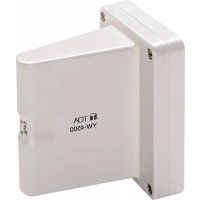
YW4500 - TV Antenna TOA - Free user manual and instructions
Find the device manual for free YW4500 TOA in PDF.


| Product type | UHF dipole indoor TV antenna |
| Brand | TOA |
| Model | YW-4500 |
| Power supply | 7 to 12 V DC (provided by tuner) |
| Power consumption | < 15 mA |
| Receiving frequency | 550 to 937.5 MHz (UHF) |
| Antenna gain | > 8 dB (at 0 dB attenuation) |
| Adjustable attenuator | 0 / -10 / -20 dB (selectable) |
| Output impedance | 75 Ω |
| Compatible coaxial cable type | RG-6/U or RG-11/U |
| Maximum cable length | 35 m (RG-6/U), 50 m (RG-11/U) |
| Operating temperature | -10°C to +50°C |
| Operating humidity | 30% to 85% RH |
| Weight | 270 g |
| Color | Off white |
| Included accessories | 2 wood screws, 2 machine screws, 1 rubber cable bushing |
| Installation | Indoor wall-mounted, at least 30 cm from ceiling and 2.4 m from floor |
| Indicator light | Yes, lights up when powered |
| Built-in RF amplifier | Yes, compensates for cable loss |
| Safety | Professional installation recommended; avoid exposure to rain and humidity |
| Maintenance | Clean with a soft, dry cloth; do not use chemicals |
Frequently Asked Questions - YW4500 TOA
User questions about YW4500 TOA
0 question about this device. Answer the ones you know or ask your own.
Ask a new question about this device
Download the instructions for your TV Antenna in PDF format for free! Find your manual YW4500 - TOA and take your electronic device back in hand. On this page are published all the documents necessary for the use of your device. YW4500 by TOA.
USER MANUAL YW4500 TOA
WALL-MOUNTED WIRELESS ANTENNA
YW-4500
Please follow the instructions in this manual to obtain the optimum results from this unit. We also recommend that you keep this manual handy for future reference.
1. SAFETY PRECAUTIONS
- Be sure to read the instructions in this section carefully before use.
- Make sure to observe the instructions in this manual as the conventions of safety symbols and messages regarded as very important precautions are included.
• We also recommend you keep this instruction manual handy for future reference.
Safety Symbol and Message Conventions
Safety symbols and messages described below are used in this manual to prevent bodily injury and property damage which could result from mishandling. Before operating your product, read this manual first and understand the safety symbols and messages so you are thoroughly aware of the potential safety hazards.

WARNING
Indicates a potentially hazardous situation which, if mishandled, could result in death or serious personal injury.
- Be sure to securely mount the unit on the wall or ceiling that is robust enough to stand the antenna weight. Failure to do so may drop the antenna, causing personal injury and/or property damage.
- Do not expose the unit to rain or an environment where it may be splashed by water or other liquids, as doing so may result in fire or electric shock.
- To prevent lightning strikes, install the unit at least five meters away from a lightning rod, and yet within the protective range (angle of 45^ ) of the lightning conductor. Lightning strikes may cause a fire, electric shock or personal injury.
- Since the unit is designed for in-door use, do not install it outdoors. If installed outdoors, the aging of parts causes the unit to fall off, resulting in personal injury. Also, when it gets wet with rain, there is a danger of electric shock.
- Use nuts and bolts that are appropriate for the ceiling's or wall's structure and composition. Failure to do so may cause the unit to fall, resulting in material damage and possible personal injury.
- Do not touch a plug or antenna during thunder and lightning, as this may result in electric shock.

CAUTION
Indicates a potentially hazardous situation which, if mishandled, could result in moderate or minor personal injury, and/or property damage.
- Leave the installation of an antenna to your TOA dealer because the installation requires expert knowledge. The falling of an antenna may cause personal injury.
- Do not place heavy objects on the unit as this may cause it to fall or break which may result in personal injury and/or property damage. In addition, the object itself may fall off and cause injury and/or damage.
Traceability Information for Europe
Manufacturer:
TOA Corporation
7-2-1, Minatojima-Nakamachi, Chuo-ku, Kobe, Hyogo, Japan
Authorized representative:
TOA Electronics Europe GmbH
Suederstrasse 282, 20537 Hamburg, Germany
2. GENERAL DESCRIPTION
The TOA YW-4500 is an indoor dipole antenna designed to be used in a UHF band wireless system. A power lamp is provided on the unit's bottom side to indicate the power supply status (it lights when power is supplied.).
Power for the YW-4500 is supplied on a coaxial cable from the antenna connector of the WT-5800, WT-5805, WT-4820, or WD-4800.
Cable loss can be compensated for by a built-in RF signal booster.
3. INSTALLATION PRECAUTIONS
- Avoid installing the unit in humid or dusty locations, in locations exposed to the direct sunlight, near the heaters, or in locations generating sooty smoke or steam.
- When installing the YW-4500 in a room of a tall building, be sure to position it more than 1 m apart from a window to minimize interference caused by external noises of radio waves.
- When using a wireless microphone, keep it 3 m or more away from the YW-4500.
Doing otherwise may cause unused other channels to operate or radio interference to occur. - When using two or more antennas, they should be spaced out 6 to 18m apart from each other.
- Take special care when treating coaxial cable end and when connecting the cable to the antenna and BNC connector. Incomplete cable treatment and connection deteriorate receiving sensitivity, and increase interference caused by external noises.
- Use the coaxial cable of 75 impedance.
4. NOMENCLATURE
[Front]
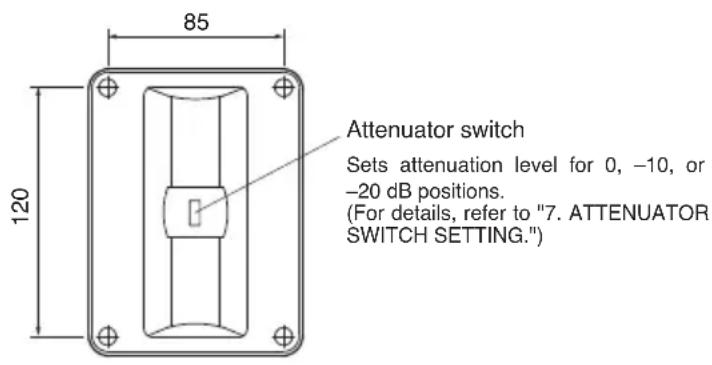
text_image
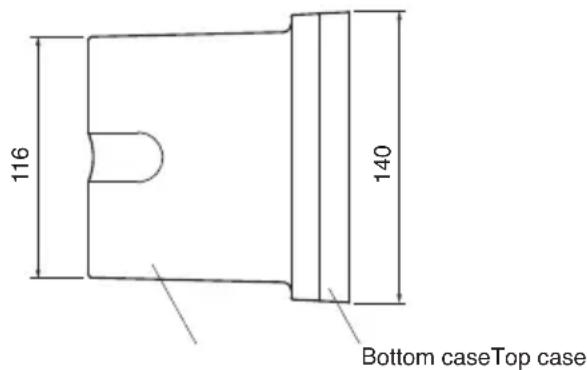
85 120 Attenuator switch Sets attenuation level for 0, -10, or -20 dB positions. (For details, refer to "7. ATTENUATOR SWITCH SETTING.")[Top]
Unit: mm
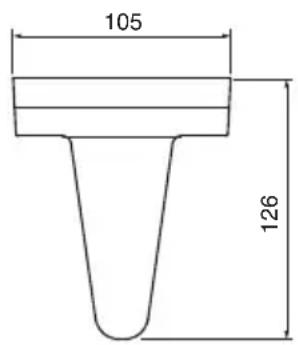
text_image
105 126[Side] [Bottom]
text_image
116 140 Bottom caseTop case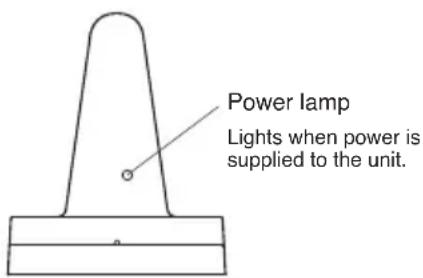
text_image
Power lamp Lights when power is supplied to the unit.5. INSTALLATION
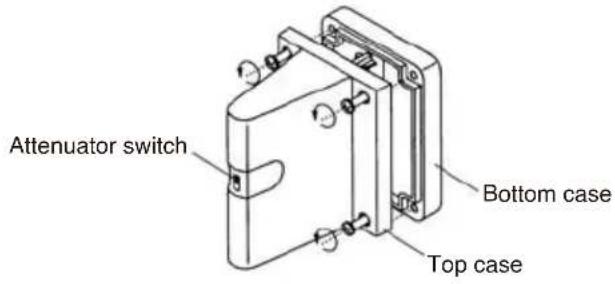
Step 1. Remove 4 screws on the top case.
text_image
Attenuator switch Bottom case Top caseStep 2. Detach the top case from the bottom case.
- If the coaxial cable is wired over the wall from the ceiling or floor
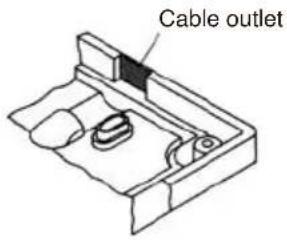
- Cut the cable outlet of the frame using a pair of cutting pliers, etc.
text_image
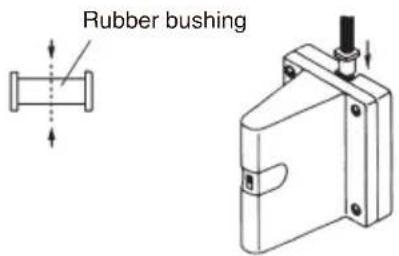
Cable outlet- Cut the supplied rubber bushing into halves. One half is suited for the RG-6U cable (smaller internal diameter) and other half for the RG-11/U cable (larger internal diameter). Run the cable through the bushing. (Insert the bushing into the cable entry hole after cable installation completion.)
text_image
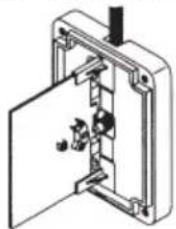
Rubber bushing- Run the coaxial cable through the cable outlet.

natural_image
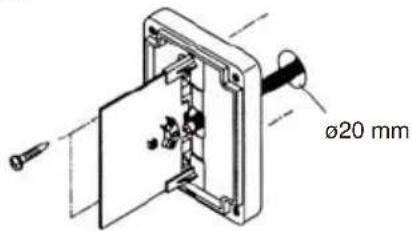
Isometric technical diagram of a mechanical assembly with no visible text or symbols- If the coaxial cable is to be drawn directly from the wall surface
-
Drill a ø20 mm hole.
-
Run the coaxial cable through the hole and the bottom case as well, and draw it out as shown below.
text_image
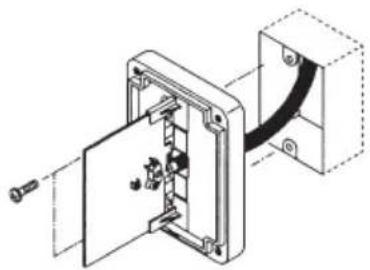
Ø20 mm- If the coaxial cable is installed using a recessed electrical box (Mounting pitch: 83.5 mm) Draw out the coaxial cable through the electrical box and the bottom case.
Note: Be sure to use a pipe thick enough to allow the wired coaxial cable to be easily inserted.
natural_image
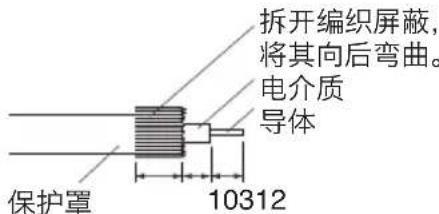
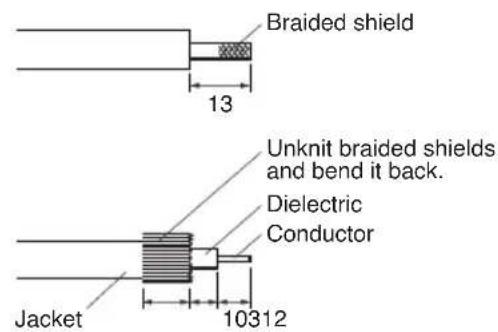
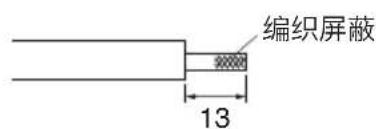
Technical line drawing of a mechanical assembly with no visible text or symbolsStep 3. Strip coaxial cable end.
- RG-6/U
Unit: mm
text_image
Braided shield 13 Unknit braided shields and bend it back. Dielectric Conductor Jacket 10312- RG-11/U
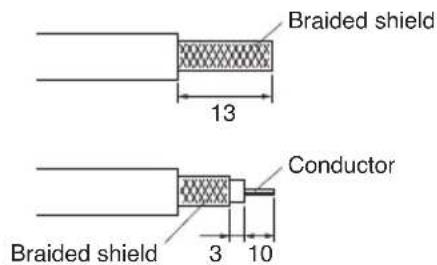
text_image
Braided shield 13 Conductor Braided shield 3 10Step 4. Fix the coaxial cable to the circuit board of antenna.
- Remove 3 cable clamp screws.
- Connect the coaxial cable to the circuit board.
- Fix the cable with the removed screws.
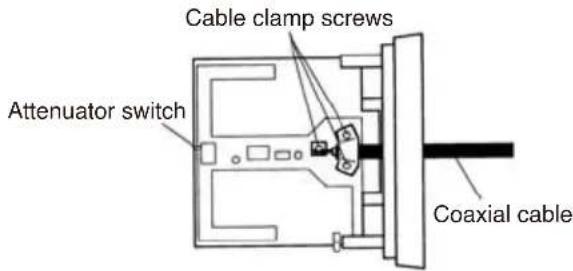
text_image
Cable clamp screws Attenuator switch Coaxial cableStep 5. Mount the antenna bottom case on the wall. Use the supplies wood screws (4 x 25) to fix it to the wall surface, or supplies machine screws (3.5 x 20) to fix to the electrical box.
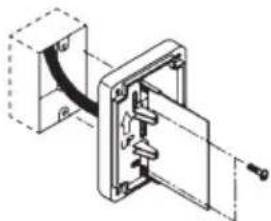
natural_image
Technical line drawing of a mechanical assembly with no visible text or symbolsNotes
- When installing the YW-4500, be sure the antenna is more than 30 cm away from the ceiling. It is recommended that the unit be installed at the height of 2.4 m or more from the floor.
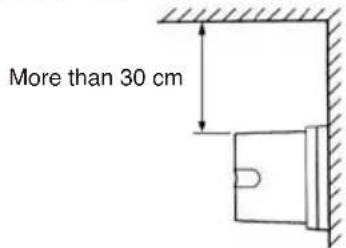
text_image
More than 30 cm- Set the antenna vertical to the ceiling floor. The receiving sensitivity of the antenna, when installed horizontally, is about 6 dB lower than that when installed vertically. The receiving sensitivity greatly depends on the installation condition.
Step 6. Replace the top case and retighten the 4 top case screws removed.
In this case, pay attention to the following points.
- The top case should be positioned with its lamp hole (located on the bottom side) facing downward.
- The knob of attenuator switch on the built-in circuit board should fit in that of top case.
6. SPECIFICATION OF THE COAXIAL CABLE
| Cable Type | External Diameter Max. Length | |
| RG-6/U | 8.4 mm | 35 m |
| RG-11/U | 10.3 mm 50 m | |
7. ATTENUATOR SWITCH SETTING
The attenuator switch is provided to minimize external noises or interference caused when two or more microphones having the same channel or adjacent channels are used in close proximity to each other.
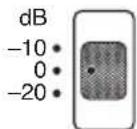
The attenuation level can be selected from 0 (factory-preset), -10, and -20 dB positions.
The more the attenuation level increases (antenna sensitivity becomes less), the narrower the usable area of wireless microphone is.
In the condition that no interference is present, set the attenuator switch of the antenna for 0 dB position.
8. SPECIFICATIONS
| Power Source 7 to 12 V DC (supplied from tuner) | |
| Current Consumption Under 15 mA | |
| Receiving Frequency 550 to 937,5 MHz, UHF | |
| Antenna Gain More than 8 dB (0 dB position) | |
| Attenuator 0 / -10 / -20 dB (selectable) | |
| Output Impedance 75 Ω | |
| Recommended Cable Type RG-6/U or RG-11/U | |
| Operating Temperature Range -10 to 50°C | |
| Operating Humidity 30 % to 85 %RH | |
| Weight | 270 g |
| Color | Off-white |
- Accessories
Wood screw 2
Machine screw (for electrical box) ... 2
Rubber bushing 1
Note: The design and specifications are subject to change without notice for improvement.
UHF Dipolantenne zur Wandmontage
YW-4500
natural_image
Technical line drawing of a mechanical assembly with no visible text or symbolsnatural_image
Technical line drawing of a mechanical assembly with no visible text or symbolsnatural_image
Technical line drawing of a mechanical assembly with no visible text or symbolsHinweise
natural_image
Technical line drawing of a mechanical assembly with no visible text or symbolsnatural_image
Technical diagram of a mechanical assembly with internal components and mounting holes (no text or labels)text_image
Cable clamp screws Attenuator switch Coaxial cablenatural_image
Mechanical assembly diagram showing a clamping mechanism with no visible text or symbolsNota
natural_image
Technical line drawing of a mechanical assembly with no visible text or symbolsnatural_image
Technical line drawing of a mechanical assembly with no visible text or symbolsnatural_image
Technical line drawing of a mechanical assembly with no visible text or symbolsNotas
natural_image
Technical line drawing of a mechanical clamp or bracket component (no text or symbols)- 将同轴电缆穿过电缆出口。
natural_image
Technical line drawing of a mechanical assembly with no visible text or symbols- 如果同轴电缆直接从墙面拉出,
natural_image
Technical line drawing of a mechanical assembly with no visible text or symbols第 3 步 剥去同轴电缆末端。
- RG-6/U
text_image
编织屏蔽 13单位: mm